Page 19 of 28
17
OVERVIEW
FEATURES/OPERATIONS
SAFETY AND EMERGENCY FEATURES
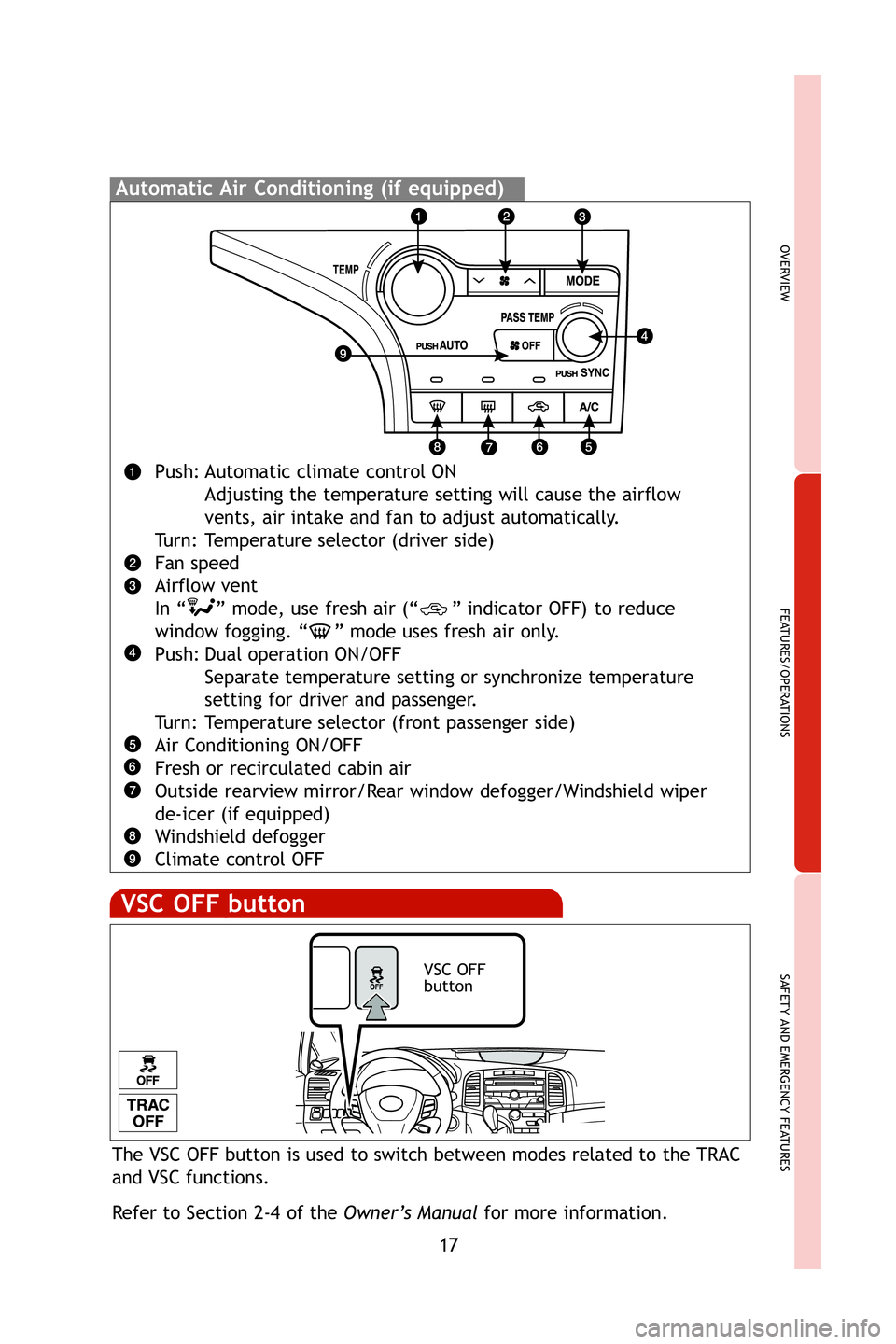
Automatic Air Conditioning (if equipped)
Push: Automatic climate control ONAdjusting the temperature setting will cause the airflow
vents, air intake and fan to adjust automatically.
Turn: Temperature selector (driver side)
Fan speed
Airflow vent
In “ ” mode, use fresh air (“ ” indicator OFF) to reduce window fogging. “ ” mode uses fresh air only.
Push: Dual operation ON/OFF Separate temperature setting or synchronize temperature
setting for driver and passenger.
Turn: Temperature selector (front passenger side)
Air Conditioning ON/OFF
Fresh or recirculated cabin air
Outside rearview mirror/Rear window defogger/Windshield wiper
de-icer (if equipped)
Windshield defogger
Climate control OFF
The VSC OFF button is used to switch between modes related to the TRAC
and VSC functions.
Refer to Section 2-4 of the Owner’s Manualfor more information.
VSC OFF
button
VSC OFF button
413077M1.qxd 10/21/08 4:45 PM Page 17
Page 24 of 28
 22
FEATURES/OPERATIONS
Multi-information display (clock)
Push “INFO” or “INFO-CLOCK” to change information in the fol\
lowing:
(1) Average fuel economy (AVERAGE ECON)
(2) Current fuel economy")
22
FEATURES/OPERATIONS
Multi-information display (clock)
Push “INFO” or “INFO-CLOCK” to change information in the fol\
lowing:
(1) Average fuel economy (AVERAGE ECON)
(2) Current fuel economy (CURRENT ECON)
(3) Distance to empty (RANGE)
(4) Average speed (AVERAGE SPEED)
(5) Trip timer (TFT type only)
TFT type*
LCD type
Setting the clock
TFT type*(1) Press the “SETUP” button for the “Custom Settings” screen.
(2) Select “Clock” on the Display Settings screen, and press the\
“SELECT RESET”
button. (3) Press the “INFO” button to adjust the hours and the “SETUP” b\
utton
to adjust the minutes. (4) Press the “SELECT RESET” button to set the clock.
LCD type (1) Press and hold the “INFO-CLOCK” button until part of the display
begins to flash. (2) Press and hold the “RESET-H” button to adjust the hours and
the “US/M-M” button to adjust the minutes. (3) Press the “INFO-CLOCK” button to
complete the setting.
* On vehicles equipped with back-up camera
413077M1.qxd 10/22/08 4:55 PM Page 22
Page 25 of 28
23
OVERVIEW
FEATURES/OPERATIONS
SAFETY AND EMERGENCY FEATURES
Bluetooth®technology allows dialing or receipt of calls without taking
hands from the steering wheel or using a cable to connect the telephone
and the system.
Refer to the Navigation System Owner’s Manual or the Owners Manual .
Telephone controls (Bluetooth®)
(if equipped)
MicrophoneAudio unit
Steering wheel telephone switches
Start call
End call
Voice command buttonVo l u m e
Customizable features
If your vehicle has a TFT type* multi-information display, you will be able
to customize certain electronic features. Press the “SETUP” button while
stopped to access the “Custom Settings” screen.
Please see the Owner’s Manual for details.
* On vehicles equipped with back-up camera
413077M1.qxd 10/21/08 4:45 PM Page 23