Page 300 of 672
300 3-2. Using the audio system
CAUTION
■For vehicles sold in U.S.A. and Canada
●Part 15 of the FCC Rules
FCC Warning:
Any unauthorized changes or modifications to this equipment will void the
user’s authority to operate this device.
● Laser products
• Do not take this unit apart or attempt to make any changes yourself.
This is an intricate unit that uses a laser pickup to retrieve information
from the surface of compact discs. The laser is carefully shielded so
that its rays remain inside the cabinet. Therefore, never try to disas-
semble the player or alter any of its parts since you may be exposed to
laser rays and dangerous voltages.
• This product utilizes a laser. Use of controls or adjustments or performance of procedures other
than those specified herein may result in hazardous radiation expo-
sure.
NOTICE
■ To prevent battery discharge
Do not leave the audio system on longer than necessary with the engine is
off.
■ To avoid damaging the audio system
Take care not to spill drinks or other fluids over the audio system.
Page 324 of 672
324 3-2. Using the audio system
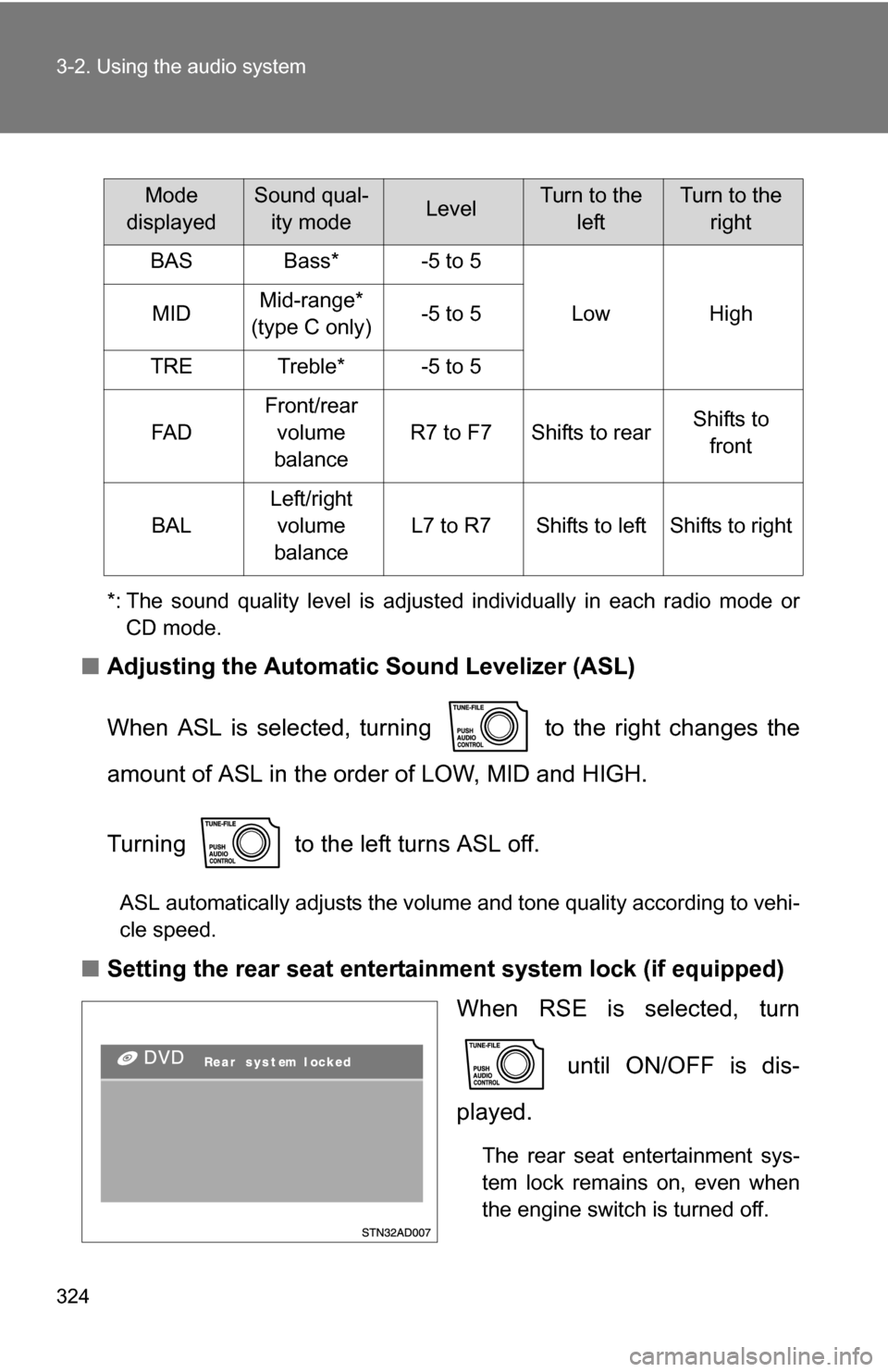
*: The sound quality level is adjusted individually in each radio mode orCD mode.
■ Adjusting the Automatic Sound Levelizer (ASL)
When ASL is selected, turning to the right changes the
amount of ASL in the order of LOW, MID and HIGH.
Turning to the left turns ASL off.
ASL automatically adjusts the volume and tone quality according to vehi-
cle speed.
■Setting the rear seat entertainment system lock (if equipped)
When RSE is selected, turn
until ON/OFF is dis-
played.
The rear seat entertainment sys-
tem lock remains on, even when
the engine switch is turned off.
Mode
displayedSound qual- ity modeLevelTurn to the leftTurn to the right
BASBass*-5 to 5
LowHighMIDMid-range*
(type C only)-5 to 5
TRETreble*-5 to 5
FA D
Front/rear volume
balance
R7 to F7Shifts to rearShifts to front
BAL
Left/right volume
balance
L7 to R7Shifts to leftShifts to right
Page 332 of 672
332 3-3. Using the rear audio/video system
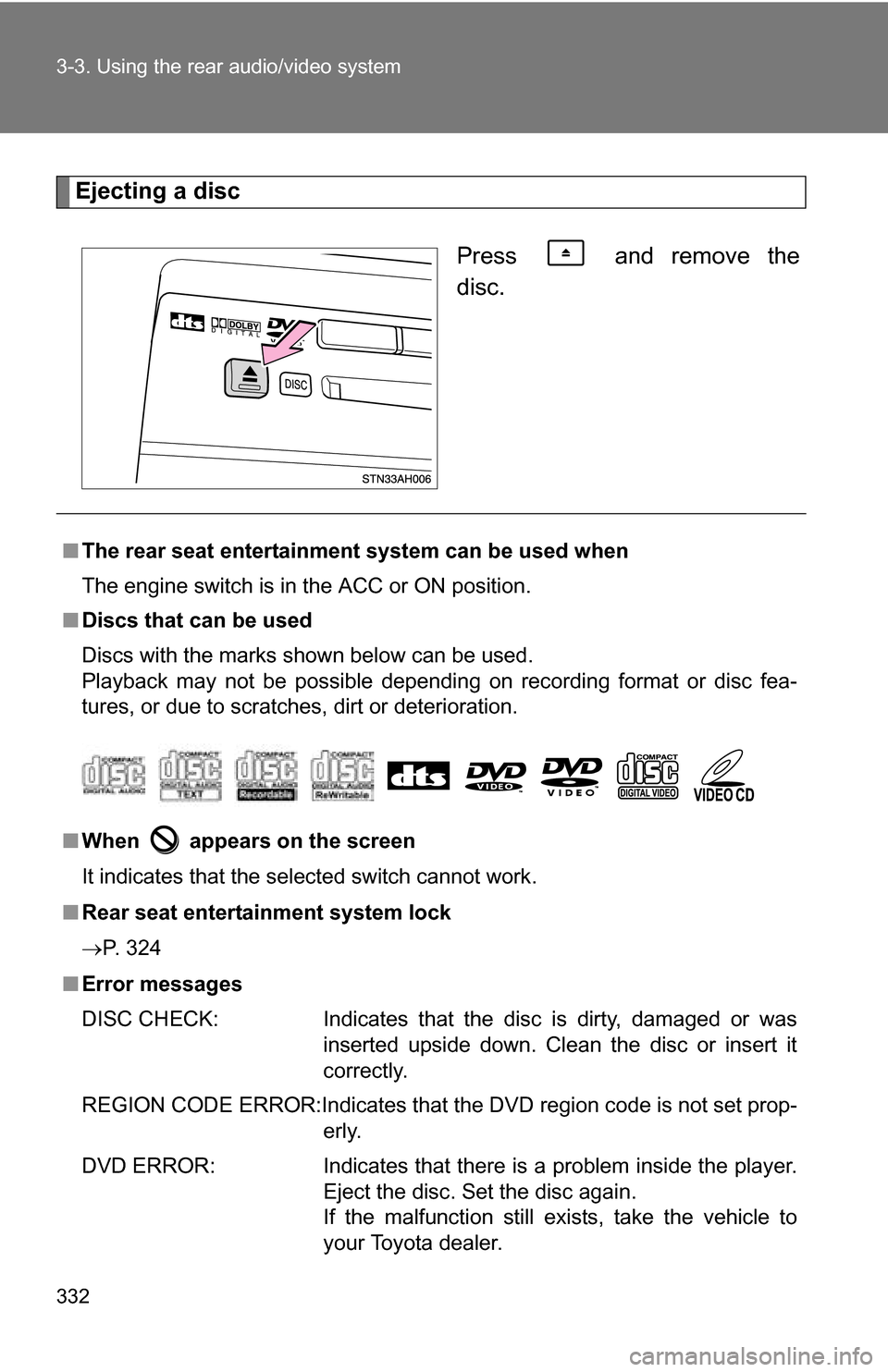
Ejecting a discPress and remove the
disc.
■The rear seat entertainmen t system can be used when
The engine switch is in the ACC or ON position.
■ Discs that can be used
Discs with the marks shown below can be used.
Playback may not be possible depending on recording format or disc fea-
tures, or due to scratches, dirt or deterioration.
■ When appears on the screen
It indicates that the selected switch cannot work.
■ Rear seat entertainment system lock
P. 324
■ Error messages
DISC CHECK: Indicates that the disc is dirty, damaged or was
inserted upside down. Clean the disc or insert it
correctly.
REGION CODE ERROR:Indicates that the DVD region code is not set prop- erly.
DVD ERROR: Indicates that there is a problem inside the player. Eject the disc. Set the disc again.
If the malfunction still exists, take the vehicle to
your Toyota dealer.
Page 393 of 672
393
3
Interior and exterior features
3-5. Using the interior lights
Interior lights list
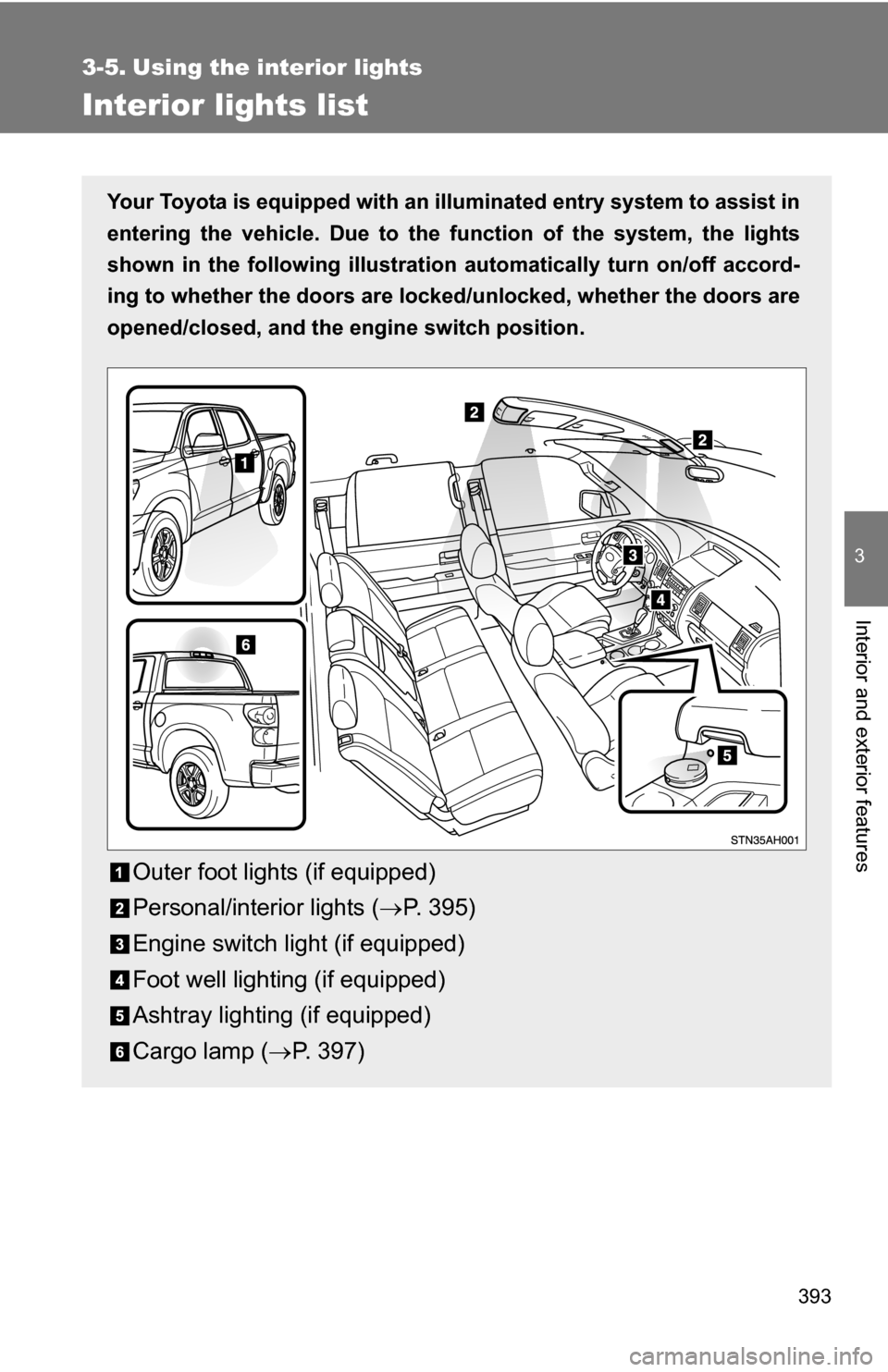
Your Toyota is equipped with an illuminated entry system to assist in
entering the vehicle. Due to the function of the system, the lights
shown in the following illustration automatically turn on/off accord-
ing to whether the doo rs are locked/unlocked, whether the doors are
opened/closed, and the en gine switch position.
Outer foot lights (if equipped)
Personal/interior lights (P. 395)
Engine switch light (if equipped)
Foot well lighting (if equipped)
Ashtray lighting (if equipped)
Cargo lamp ( P. 397)
Page 426 of 672
426
3-7. Other interior features
Clock
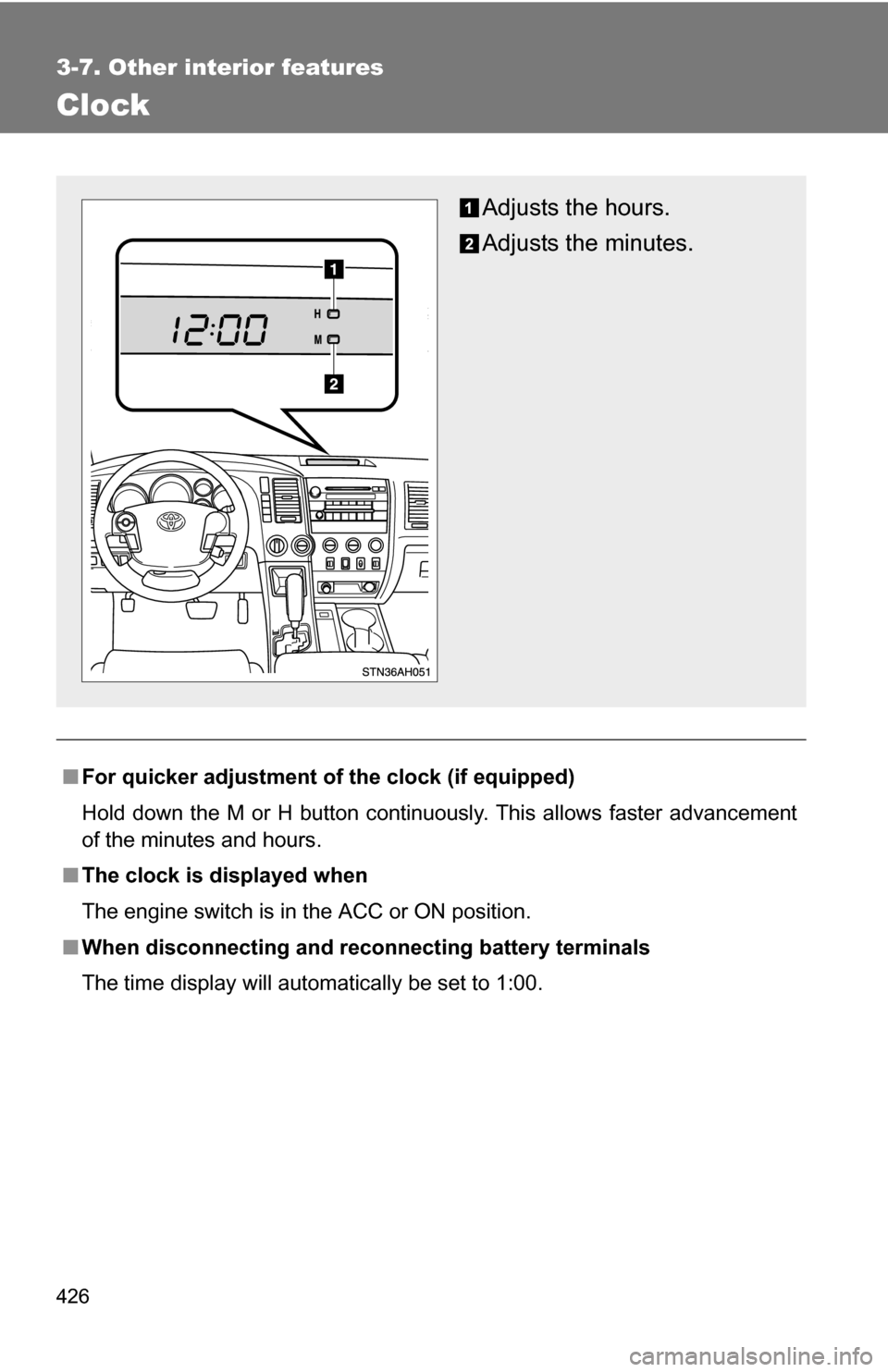
■For quicker adjustment of the clock (if equipped)
Hold down the M or H button continuously. This allows faster advancement
of the minutes and hours.
■ The clock is displayed when
The engine switch is in the ACC or ON position.
■ When disconnecting and reco nnecting battery terminals
The time display will automatically be set to 1:00.
Adjusts the hours.
Adjusts the minutes.
Page 428 of 672
428 3-7. Other interior features
■When – –°C or – –°F is displayed
The system may be malfunctioning. Take your vehicle to your Toyota dealer.
■ The outside air temperature is displayed when
The engine switch is in the ON position.
■ When disconnecting and reco nnecting battery terminals
The display will automatically be set to the initial mode.
■ Display
In the following situations, the correct outside temperature may not be dis-
played, or the display may take longer than normal to change.
●When stopped, or driving at low speeds (less than 12 mph [20 km/h])
● When the outside temperature has changed suddenly (at the entrance/
exit of a garage, tunnel, etc.)
Page 431 of 672
431
3-7. Other interior features
3
Interior and exterior features
Cigarette lighter
■The cigarette lighter can be used when
The engine switch is in the ACC or ON position.
CAUTION
■To avoid burns or fires
●Do not touch the metal parts of the cigarette lighter.
● Do not hold the cigarette lighter down. It could overheat and cause a fire.
● Do not insert anything other than the cigarette lighter into the outlet.\
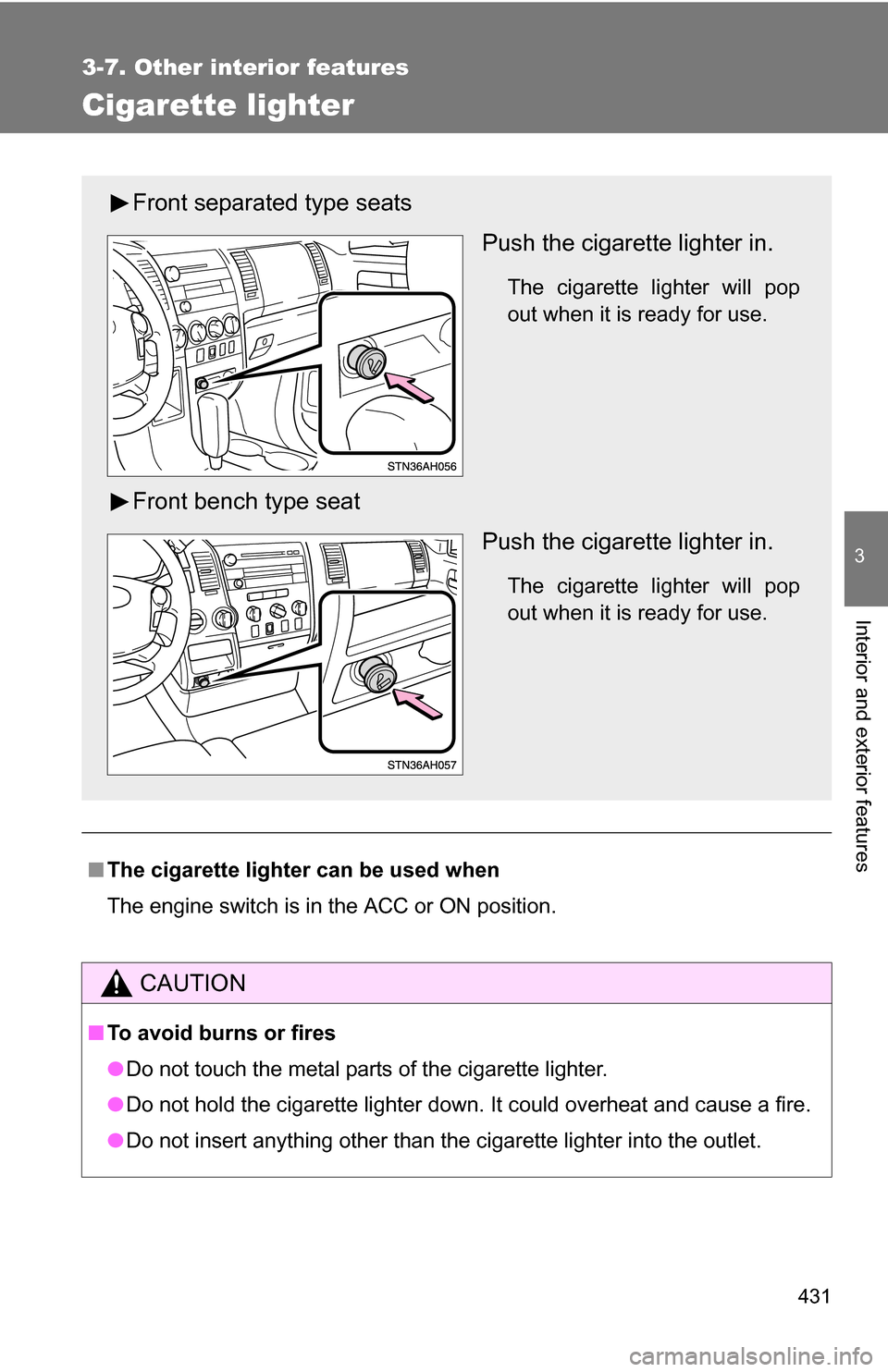
Front separated type seats
Push the cigarette lighter in.
The cigarette lighter will pop
out when it is ready for use.
Front bench type seatPush the cigarette lighter in.
The cigarette lighter will pop
out when it is ready for use.
Page 436 of 672
436 3-7. Other interior features
■The power outlet can be used when
The engine switch is in the ACC or ON position.
■ Depending on operating time and current consumption
The power outlets may not be used due to the electrical component protec-
tion function. Please start engine and use the power outlets again after turn
off the engine switch in this case.
NOTICE
■To avoid damaging the power outlet
Close the power outlet lid when the power outlet is not in use.
Foreign objects or liquids that enter the power outlet may cause a short cir-
cuit.
■ To prevent the fuse from being blown
Do not use an accessory that uses more than 12 V/10 A.
■ To prevent the battery from being discharged
Do not use the power outlet longer than necessary when the engine is
stopped.