Page 2 of 592

TABLE OF CONTENTSIndex
2
1-1. Key information .................. 26Keys ..................................... 26
1-2. Opening, closing and
locking the doors ............. 27
Wireless remote control ....... 27
Front doors ........................... 33
Sliding doors ........................ 37
Back door ............................. 47
1-3. Adjustable components
(seats, mirrors,
steering wheel) ................. 56
Front seats ........................... 56
Second seats ....................... 59
Third seats ........................... 61
Seating configurations.......... 63
Driving position memory....... 80
Head restraints ..................... 82
Seat belts ............................. 84
Steering wheel ..................... 93
Anti-glare inside rear view mirror .................................. 94
Outside rear view mirrors ..... 96
1-4. Opening a nd closing the
window s ............................ 99
Power windows .................... 99
Quarter windows ................ 101
Moon roof ........................... 103
1-5. Refueling ........................... 106 Opening the fuel tank cap ................................... 106 1-6. Theft deterrent system ..... 110
Engine immobilizer system .............................. 110
Alarm .................................. 112
Theft prevention labels (for U.S.A.) ....................... 114
1-7. Safety information ............ 115 Correct driving posture ....... 115
SRS airbags ....................... 117
Front passenger occupant classification system ......... 129
Child restraint systems ....... 135
Installing child restraints ..... 139
2-1. Driving procedures........... 158 Driving the vehicle .............. 158
Engine (ignition) switch....... 167
Automatic transmission ...... 170
Turn signal lever ................. 172
Parking brake ..................... 173
2-2. Instrument cl uster and
information display ........ 174
Gauges and meters ............ 174
Indicators and warning lights ................................. 177
Trip information display ...... 181
2-3. Operating the li ghts and
wipers .............................. 185
Headlight switch ................. 185
Fog light switch ................... 190
1Before driving
2When driving
Page 3 of 592

1
2
3
4
5
6
7
3
Windshield wipers and washer .............................. 191
Rear window wiper and washer .............................. 193
2-4. Using other driving systems ........................... 194
Cruise control ...................... 194
Dynamic laser cruise control ............................... 197
Intuitive parking assist......... 209
Driving assist systems ........ 215
2-5. Driving information ........... 219 Cargo and luggage ............. 219
Vehicle load limits ............... 225
Winter driving tips ............... 226
Trailer towing ...................... 229
Dinghy towing ..................... 237
3-1. Using the air conditioning system and defogger...... 240
Front manual air conditioning system .......... 240
Front automatic air conditioning system .......... 246
Rear manual air conditioning system .......... 253
Rear automatic air conditioning system .......... 256
Rear window and outside rear view mirror defoggers,
and windshield wiper
de-icer ............................... 260 3-2. Using the audio system ... 262
Audio system types ............ 262
Using the radio ................... 265
Using the CD player ........... 271
Playing back MP3 and WMA discs ....................... 279
Optimal use of the audio system .............................. 287
Using the AUX adapter....... 291
Using the steering wheel audio switches.................. 292
3-3. Using the rear audio system ............................. 296
Rear seat entertainment system features ................ 296
Using the DVD player (DVD video)...................... 303
Using the DVD player (video CD) ........................ 312
Using the DVD player (audio CD/CD text) ........... 315
Using the DVD player (MP3 discs) ...................... 316
Using the video mode......... 318
Changing the initial setting............................... 320
3-4. Using the hands-free phone system
(for cellular phone)......... 327
Hands-free phone system (for cellular phone)
features ............................ 327
Using the hands-free phone system
(for cellular phone) ........... 331
Making a phone call ........... 339
Setting a cellular phone ...... 345
3Interior features
Page 6 of 592
6
Headlights (high beam) P. 186
Pictorial indexExterior
Fog lights P. 190
Hood P. 434
Windshield wipers P. 191
Outside rear view mirrors P. 96
Side marker lights P. 185
Headlights (low beam) P. 185
Moon roof P. 103
Parking and turn
signal lights
P. 185
Page 157 of 592
When driving2
157
2-1. Driving procedures ........ 158Driving the vehicle............ 158
Engine (ignition) switch .... 167
Automatic transmission .... 170
Turn signal lever .............. 172
Parking brake ................... 173
2-2. Instrument cluster and information display...... 174
Gauges and meters ......... 174
Indicators and warning lights .............................. 177
Trip information display .... 181 2-3. Operating the lights and
wipers ........................... 185
Headlight switch ............... 185
Fog light switch ................ 190
Windshield wipers and washer ........................... 191
Rear window wiper and washer ........................... 193
2-4. Using other driving systems ........................ 194
Cruise control ................... 194
Dynamic laser cruise control ............................ 197
Intuitive parking assist...... 209
Driving assist systems ..... 215
2-5. Driving information ........ 219 Cargo and luggage .......... 219
Vehicle load limits ............ 225
Winter driving tips ............ 226
Trailer towing ................... 229
Dinghy towing .................. 237
Page 185 of 592
185
2
When driving
2-3. Operating the lights and wipers
Headlight switch
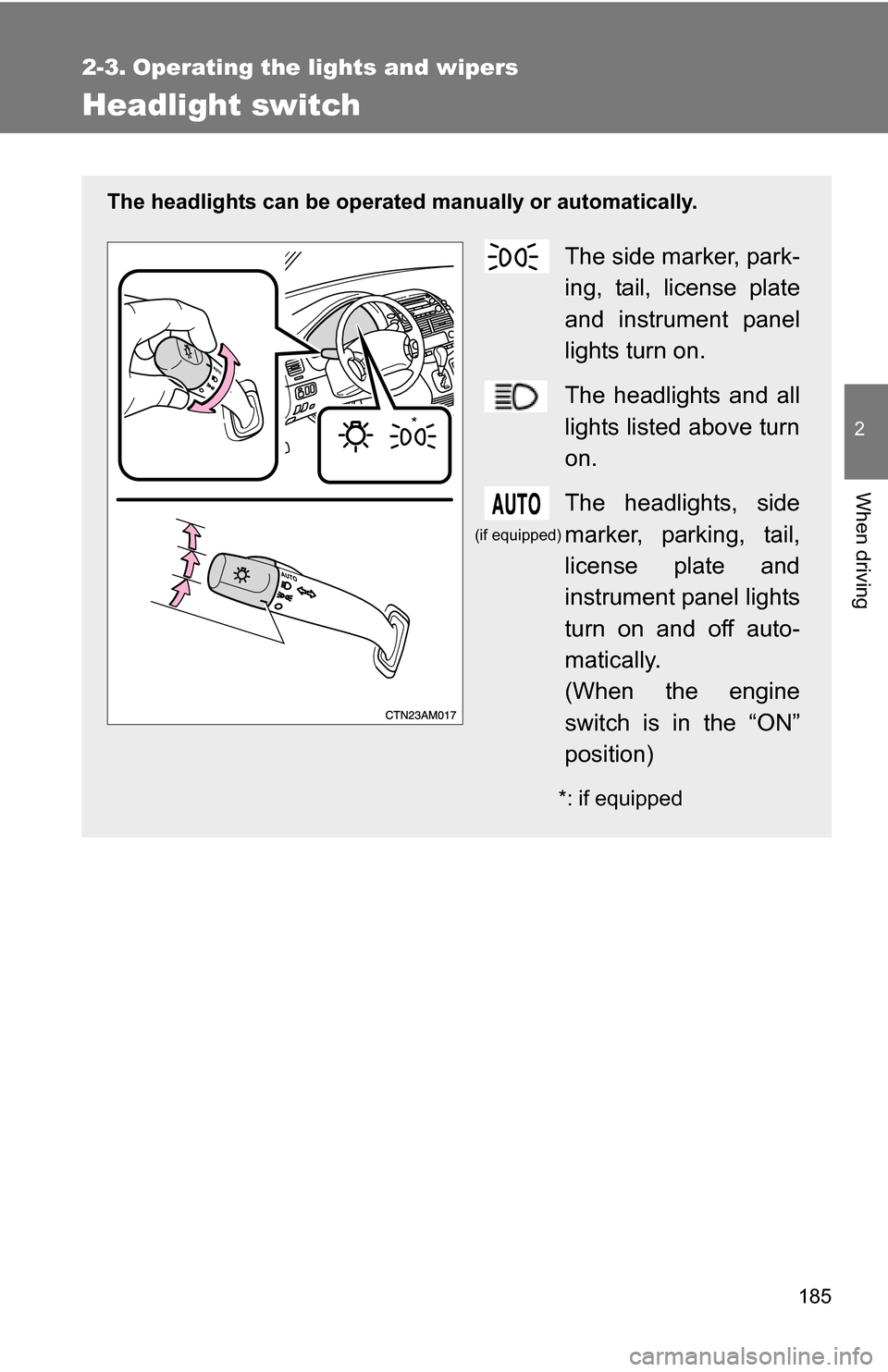
The headlights can be operated manually or automatically.
The side marker, park-
ing, tail, license plate
and instrument panel
lights turn on.
The headlights and all
lights listed above turn
on.
The headlights, side
marker, parking, tail,
license plate and
instrument panel lights
turn on and off auto-
matically.
(When the engine
switch is in the “ON”
position)
*: if equipped
*
(if equipped)
Page 186 of 592
186 2-3. Operating the lights and wipers
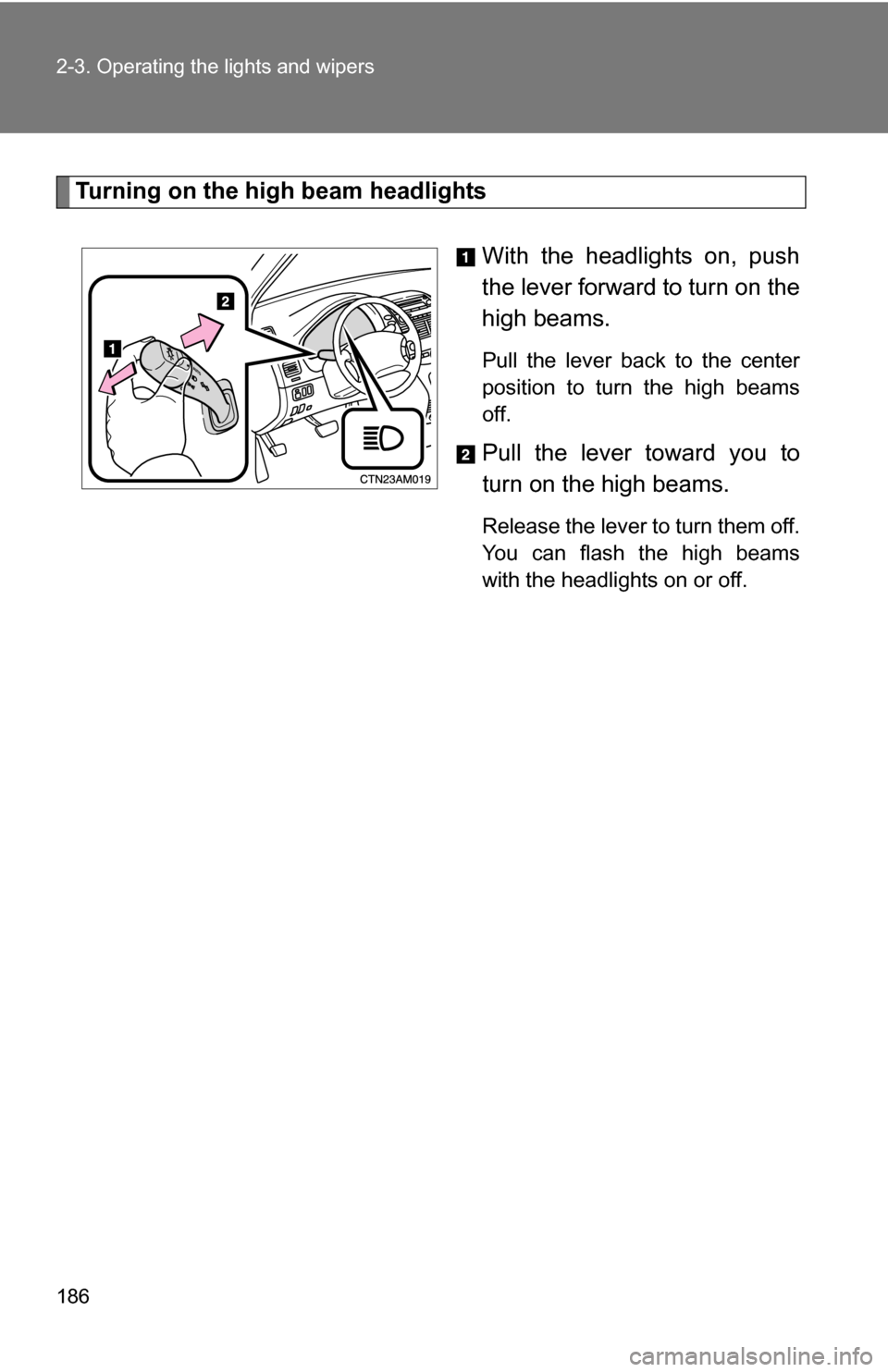
Turning on the high beam headlightsWith the headlights on, push
the lever forward to turn on the
high beams.
Pull the lever back to the center
position to turn the high beams
off.
Pull the lever toward you to
turn on the high beams.
Release the lever to turn them off.
You can flash the high beams
with the headlights on or off.
Page 187 of 592
187
2-3. Operating the lights and wipers
2
When driving
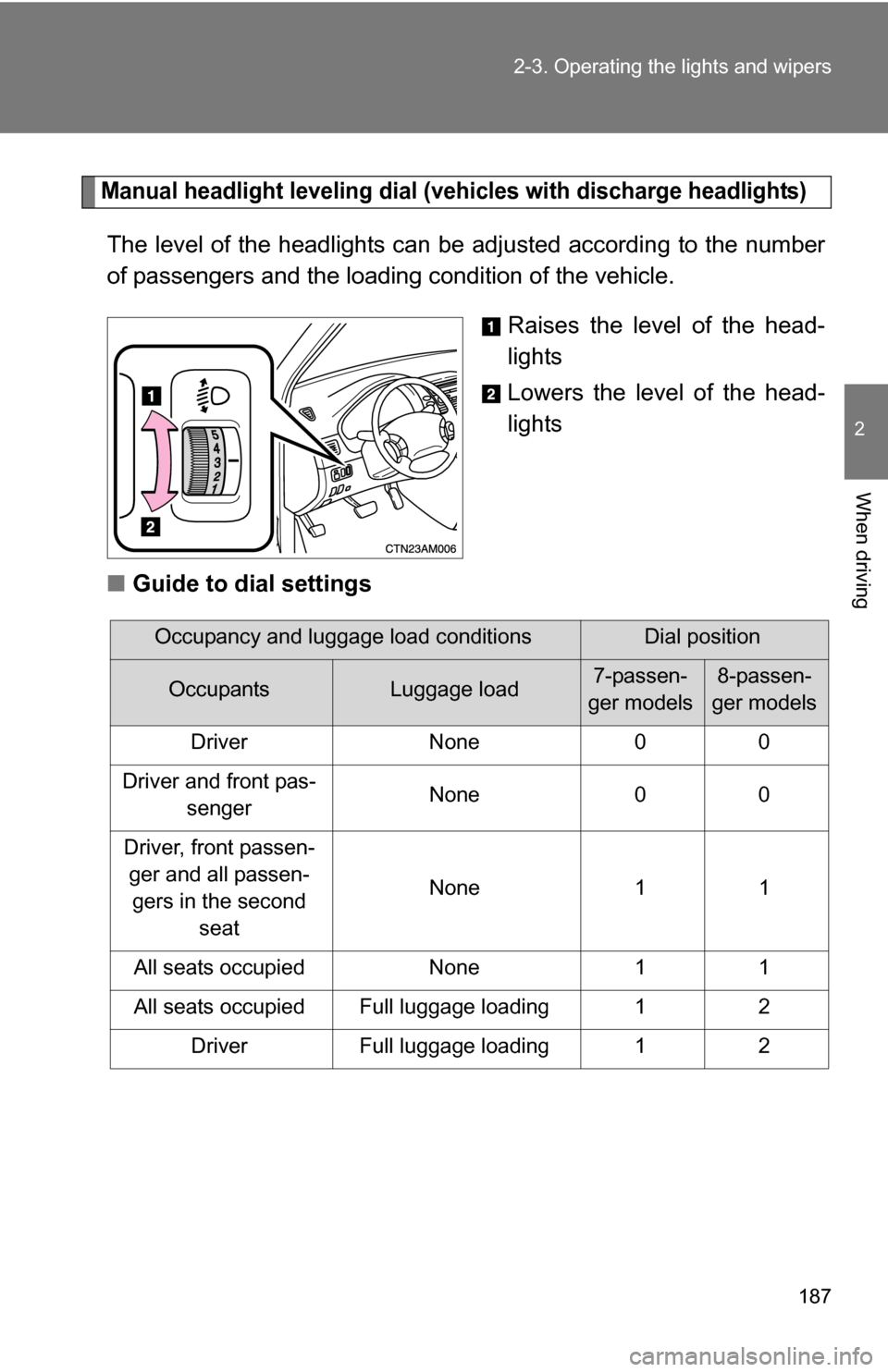
Manual headlight leveling dial (vehicles with discharge headlights)
The level of the headlights can be adjusted according to the number
of passengers and the loading
condition of the vehicle.
Raises the level of the head-
lights
Lowers the level of the head-
lights
■ Guide to dial settings
Occupancy and luggage load conditionsDial position
OccupantsLuggage load7-passen-
ger models8-passen-
ger models
Driver None 0 0
Driver and front pas- senger None 0 0
Driver, front passen- ger and all passen-gers in the second seat None 1 1
All seats occupied None 1 1
All seats occupied Full luggage loading 1 2 Driver Full luggage loading 1 2
Page 188 of 592
188 2-3. Operating the lights and wipers
■Daytime running light system (if equipped)
To make your vehicle more visible to other drivers, the headlights turn on
automatically (at a reduced intensity) whenever the engine is started and the
parking brake is released. Daytime running lights are not designed for use at
night.
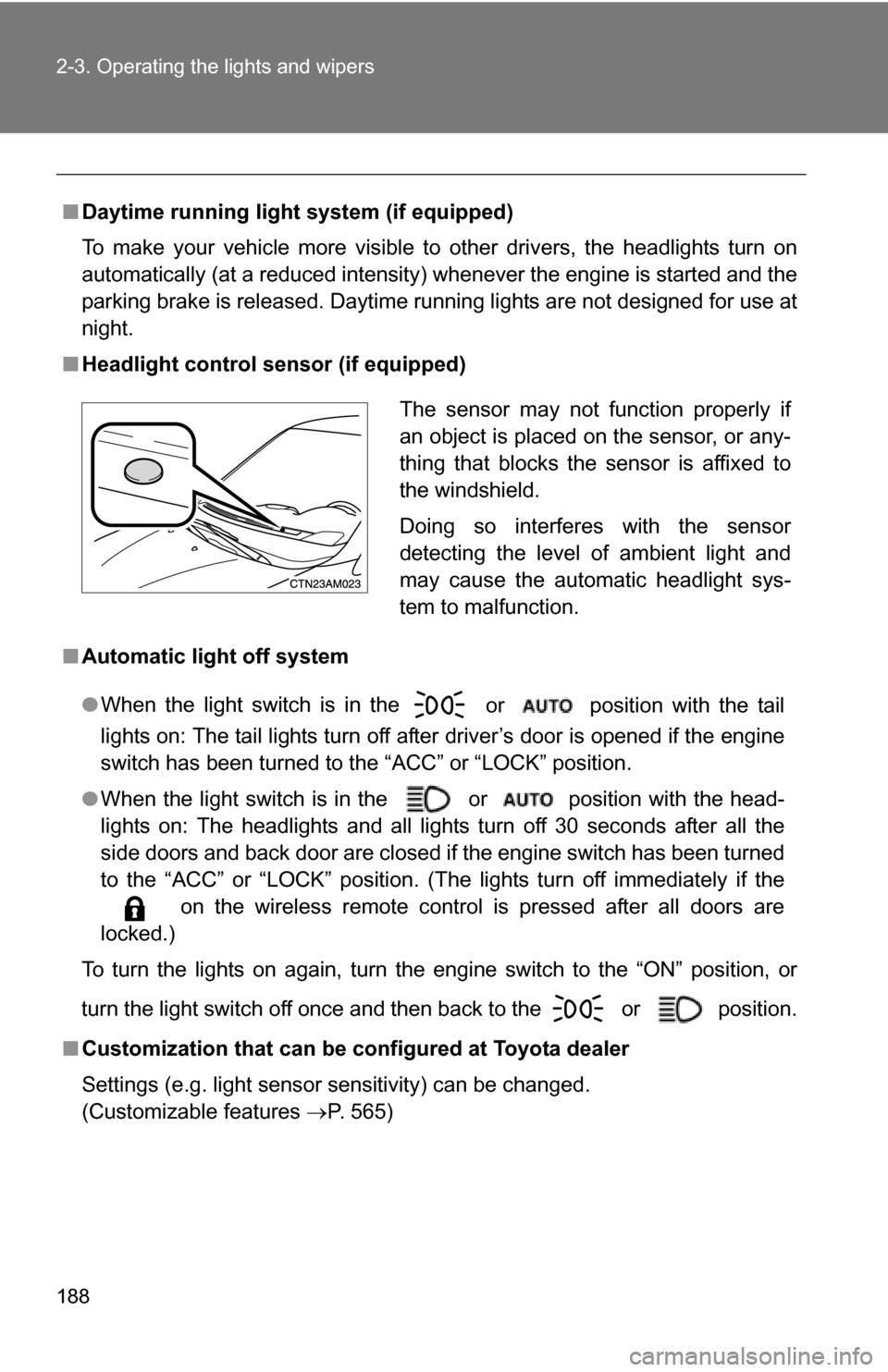
■ Headlight control sensor (if equipped)
■ Automatic light off system
●When the light switch is in the
or position with the tail
lights on: The tail lights turn off after driver’s door is opened if the engine
switch has been turned to the “ACC” or “LOCK” position.
● When the light switch is in the or position with the head-
lights on: The headlights and all lights turn off 30 seconds after all the
side doors and back door are closed if the engine switch has been turned
to the “ACC” or “LOCK” position. (The lights turn off immediately if the
on the wireless remote control is pressed after all doors are
locked.)
To turn the lights on again, turn the engine switch to the “ON” position, or
turn the light switch off once and then back to the
or position.
■ Customization that can be co nfigured at Toyota dealer
Settings (e.g. light sensor sensitivity) can be changed.
(Customizable features P. 565)
The sensor may not function properly if
an object is placed on the sensor, or any-
thing that blocks the sensor is affixed to
the windshield.
Doing so interferes with the sensor
detecting the level of ambient light and
may cause the automatic headlight sys-
tem to malfunction.