Page 1 of 612
TABLE OF CONTENTS
1
1Before drivingAdjusting and operating features such as door locks,
mirrors, and steering column.
2When drivingDriving, stopping, and safe-driving information.
3Interior
featuresAir conditioning and audio systems, as well as other in-
terior features for a comfortable driving experience.
4Maintenance
and careCleaning and protecting your vehicle, performing do-it-
yourself maintenance, and maintenance information.
5When trouble
arisesWhat to do if the vehicle needs to be towed, gets a flat
tire, or is involved in an accident.
6Vehicle
specificationsDetailed vehicle information.
7For ownersReporting safety defects for U.S. owners and seat belt
instructions for Canadian owners.
IndexAlphabetical listing of information contained in this
manual.
Page 3 of 612

1
2
3
4
5
6
7
3
2-3. Operating the lights and wipers .............................. 180
Headlight switch .................. 180
Fog light switch ................... 183
Windshield wipers and washer .............................. 184
Rear window wiper and washer .............................. 186
Headlight cleaner switch ..... 187
2-4. Using other driving systems ........................... 188
Cruise control ...................... 188
Dynamic laser cruise control ............................... 191
Intuitive parking assist......... 202
Electronically modulated air suspension................... 208
AVS (Adaptive Variable Suspension System) ......... 213
Four-wheel drive system ..... 214
AUTO LSD system.............. 219
Driving assist systems ........ 221
2-5. Driving information ........... 227 Off-road precautions ........... 227
Cargo and luggage ............. 232
Vehicle load limits ............... 236
Winter driving tips ............... 237
Trailer towing ...................... 241
Dinghy towing ..................... 257 3-1. Using the air conditioning
system and defogger ..... 260
Front air conditioning system .............................. 260
Rear air conditioning system .............................. 268
Rear window and outside rear view mirror
defoggers ......................... 272
Windshield wiper de-icer .... 273
Using the steering wheel climate remote control
switches ........................... 274
3-2. Using the audio system ... 276 Audio system (without navigation system) ........... 276
Using the radio ................... 279
Using the CD player ........... 285
Playing back MP3 and WMA discs ....................... 292
Optimal use of the audio system .............................. 301
Using the AUX adapter....... 303
Using the steering wheel audio switches.................. 305
3-3. Using the rear audio/ video system .................. 307
Rear seat entertainment system .............................. 307
Using the DVD player (DVD video)...................... 314
Using the DVD player (video CD) ........................ 323
3Interior features
Page 5 of 612

1
2
3
4
5
6
7
5
4-2. Maintenance ...................... 439Maintenance requirements ..................... 439
General maintenance.......... 441
Emission inspection and maintenance (I/M)
programs........................... 444
4-3. Do-it-yourself maintenance .................... 445
Do-it-yourself service precautions ....................... 445
Hood ................................... 449
Engine compartment ........... 450
Tires .................................... 466
Tire inflation pressure ......... 473
Wheels ................................ 477
Air conditioning filter............ 479
Wireless remote control battery ............................... 482
Checking and replacing fuses ................................. 484
Light bulbs........................... 495
5-1. Essential information ....... 508 Emergency flashers ............ 508
If your vehicle needs to be towed ................................ 509
If you think something is wrong ................................ 514
Fuel pump shut off system .............................. 515
Event data recorder ............ 516 5-2. Steps to take in an
emergency ...................... 518
If a warning light turns on or a warning buzzer
sounds... .......................... 518
If a warning message is displayed (vehicles with
multi-information
display) ............................. 527
If you have a flat tire ........... 532
If the engine will not start.... 542
If the shift lever cannot be shifted from P ................... 544
If you lose your keys........... 545
If the vehicle battery is discharged........................ 546
If your vehicle overheats .... 550
If the vehicle becomes stuck ................................. 553
6-1. Specifications ................... 556 Maintenance data (fuel, oil level, etc.) ........... 556
Fuel information.................. 569
Tire information .................. 573
6-2. Customization................... 584 Customizable features........ 584
Items to initialize ................. 588
5When trouble arises
6Vehicle specifications
Page 15 of 612
15
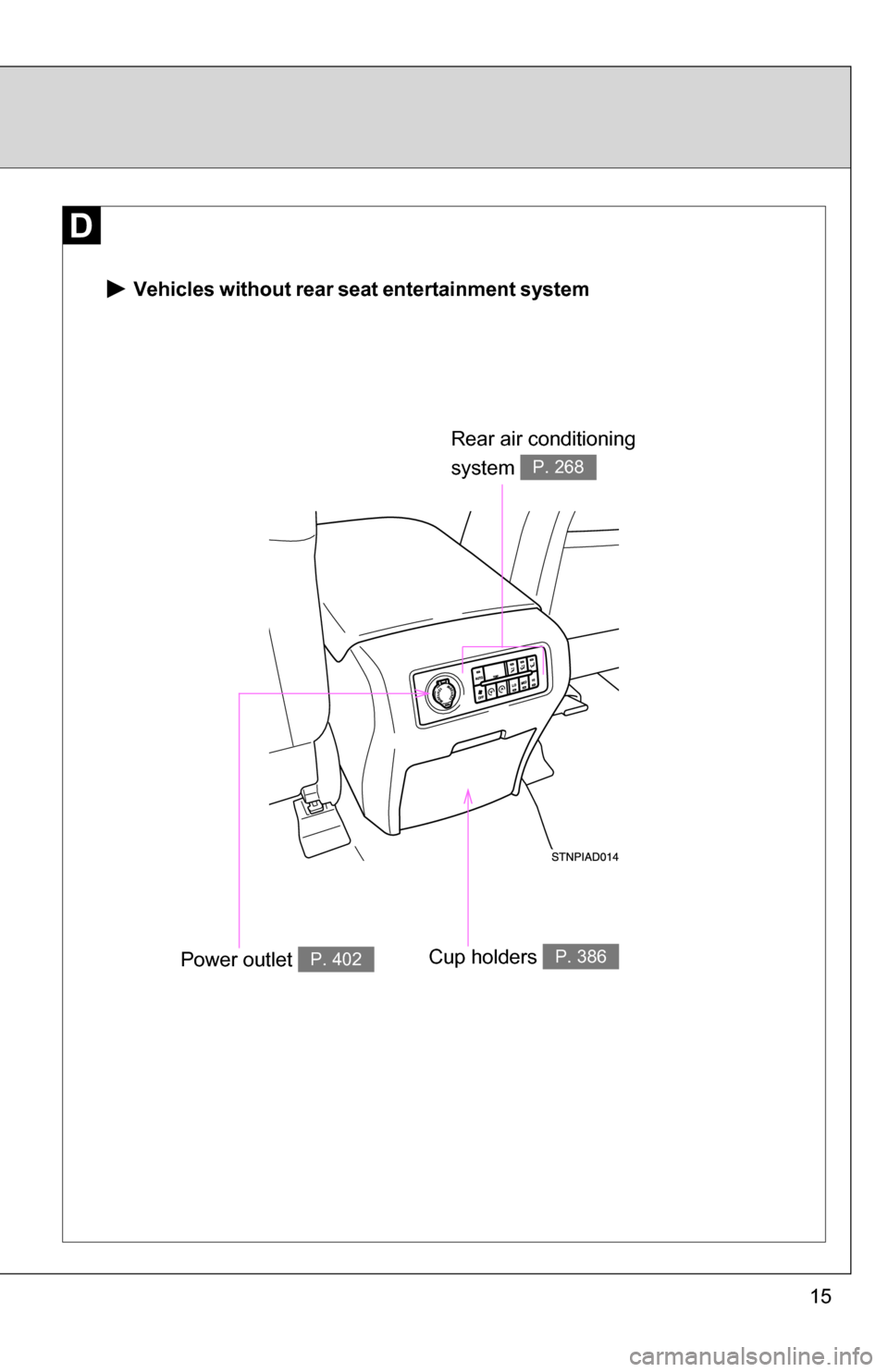
Vehicles without rear seat entertainment system
Rear air conditioning
system
P. 268
Power outlet P. 402Cup holders P. 386
Page 16 of 612
16
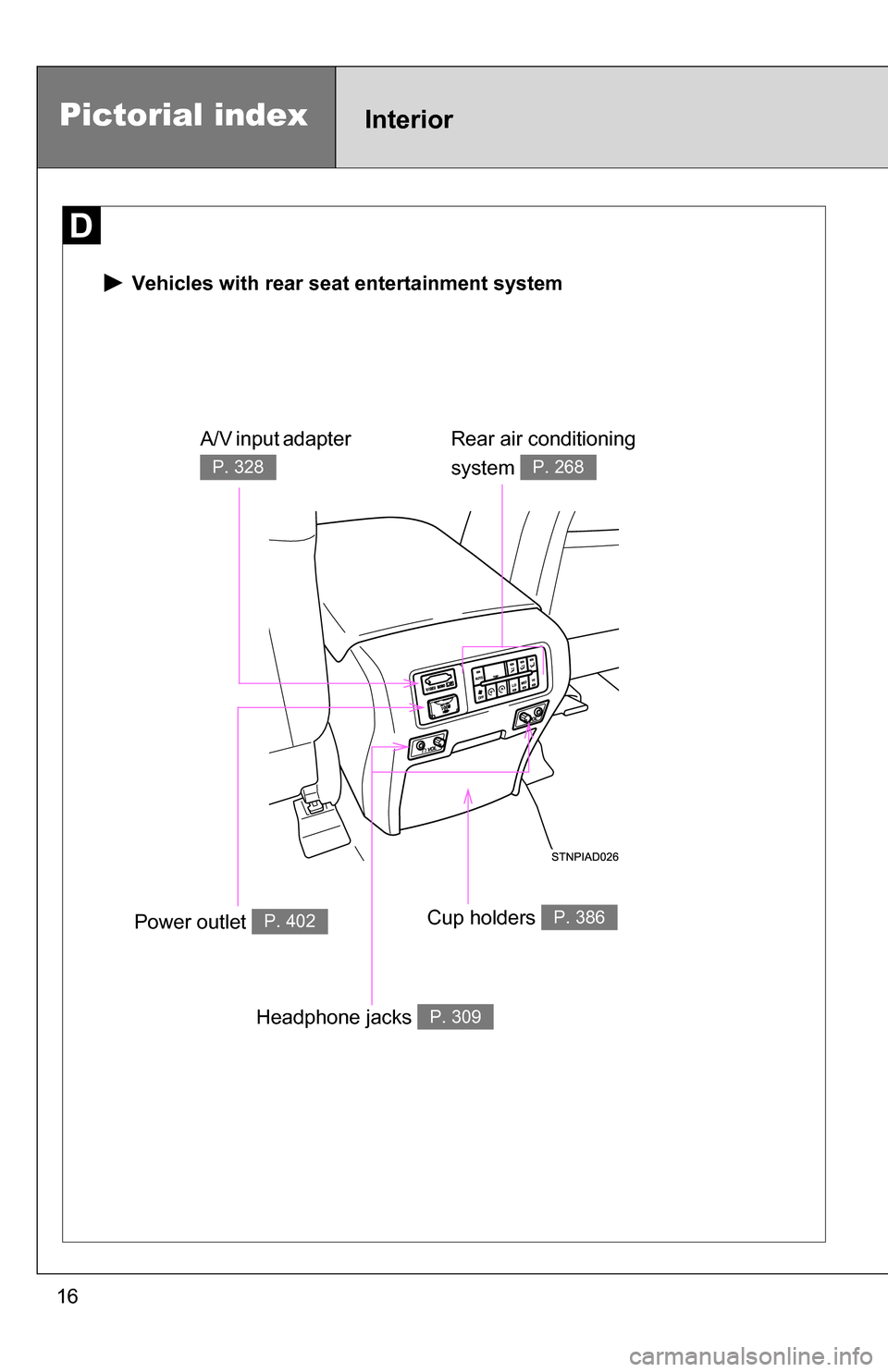
Pictorial indexInterior
Vehicles with rear seat entertainment system
Rear air conditioning
system
P. 268
Power outlet P. 402Cup holders P. 386
A/V input adapter
P. 328
Headphone jacks P. 309
Page 19 of 612
19
*: Refer to “Navigation System Owner’s Manual”
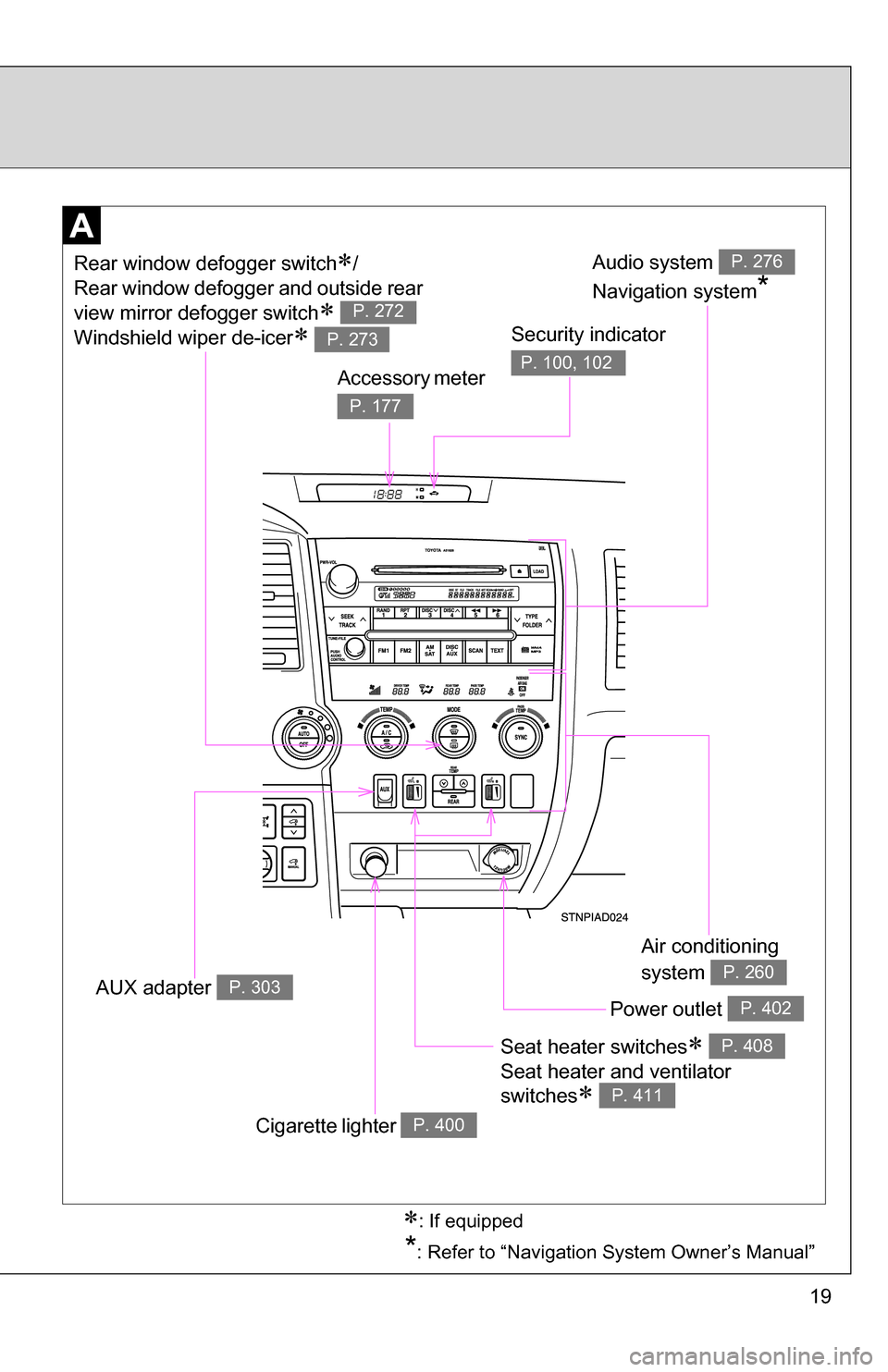
Seat heater switches
Seat heater and ventilator
switches
P. 408
P. 411
Air conditioning
system
P. 260
Power outlet P. 402
Audio system
Navigation system
*
P. 276Rear window defogger switch/
Rear window defogger and outside rear
view mirror defogger switch
Windshield wiper de-icer
P. 272
P. 273Security indicator
P. 100, 102Accessory meter
P. 177
Cigarette lighter P. 400
AUX adapter P. 303
: If equipped
Page 258 of 612

258
3-1. Using the air conditioning system and defogger... 260
Front air conditioning system ........................... 260
Rear air conditioning system ........................... 268
Rear window and outside rear view mirror
defoggers ....................... 272
Windshield wiper de-icer ............................ 273
Using the steering wheel climate remote control
switches ......................... 274
3-2. Using the audio system .......................... 276
Audio system (without navigation system) ......... 276
Using the radio ................. 279
Using the CD player ......... 285
Playing back MP3 and WMA discs ..................... 292
Optimal use of the audio system ........................... 301
Using the AUX adapter .... 303
Using the steering wheel audio switches ............... 305 3-3. Using the rear audio/
video system ................ 307
Rear seat entertainment system ........................... 307
Using the DVD player (DVD video) ................... 314
Using the DVD player (video CD)...................... 323
Using the DVD player (audio CD/CD text) ........ 325
Using the DVD player (MP3 discs) .................... 326
Using the video mode ...... 328
Changing the Setup Menu settings ................ 330
3-4. Using the hands-free phone system
(for cellular phone) ...... 338
Hands-free phone system (for cellular phone) ......... 338
Using the hands-free phone system ................ 342
Making a phone call ......... 351
Setting a cellular phone ... 356
Security and system setup .............................. 361
Using the phone book ...... 364
Interior features3
Page 260 of 612
260
3-1. Using the air conditioning system and defogger
Front air conditioning system
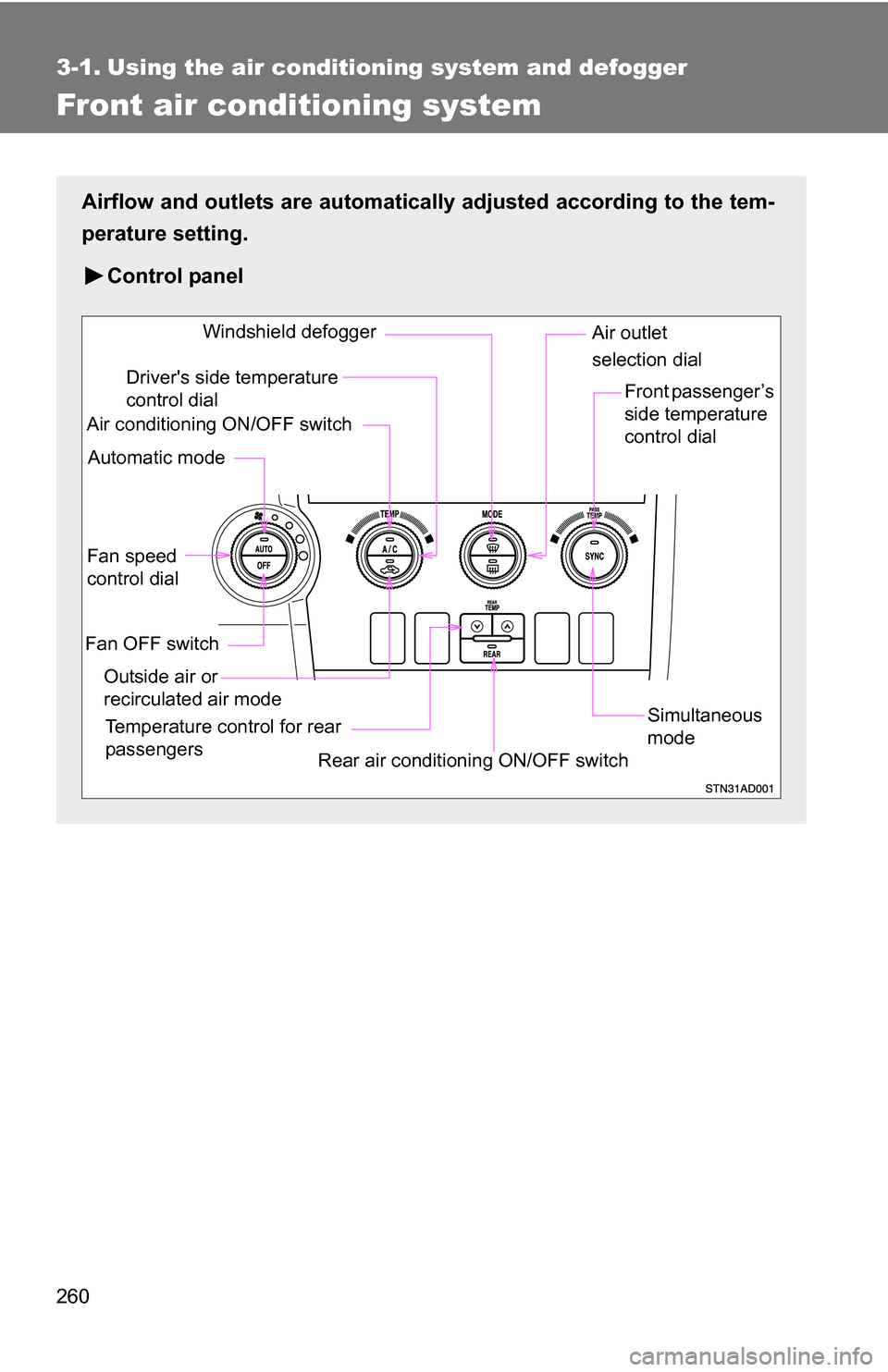
Airflow and outlets are automatically adjusted according to the tem-
perature setting.
Control panel
Fan speed
control dial
Outside air or
recirculated air mode Front passenger’s
side temperature
control dial
Air conditioning ON/OFF switch
Simultaneous
mode
Rear air conditioning ON/OFF switch
Temperature control for rear
passengers Air outlet
selection dial
Driver's side temperature
control dial
Automatic mode Windshield defogger
Fan OFF switch