Page 286 of 508
286 3-4. Using the hands-free system (for cellular phone)
PRIUS_U_(OM47614U)■
Inputting a key
When using phone services such as an answering service or a
bank, you can store phone numbers and code numbers in the
phone book.
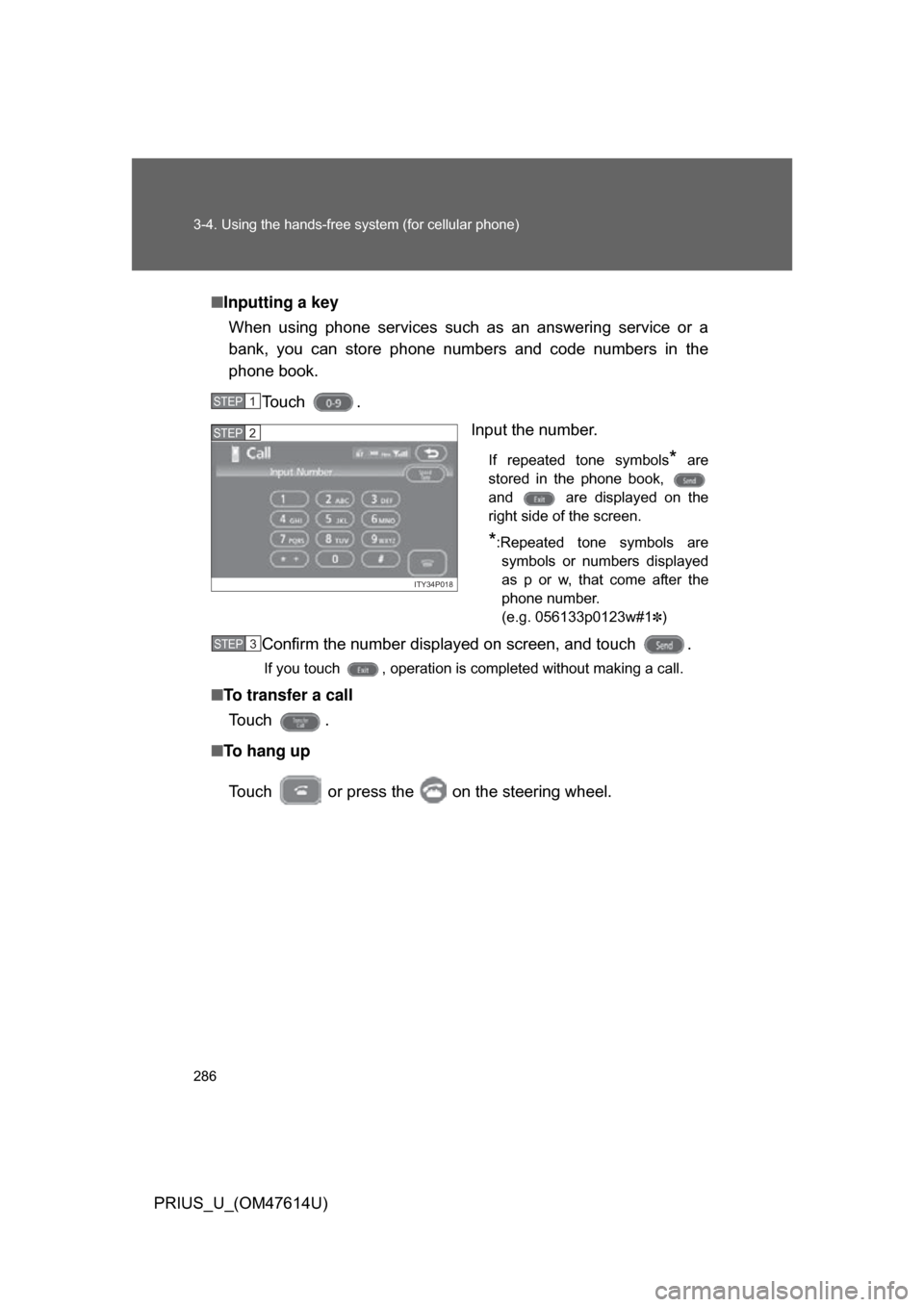
Touch . Input the number.
If repeated tone symbols* are
stored in the phone book,
and are displayed on the
right side of the screen.
*:Repeated tone symbols are symbols or numbers displayed
as p or w, that come after the
phone number.
(e.g. 056133p0123w#1
✽)
Confirm the number displayed on screen, and touch .
If you touch , operation is completed without making a call.
■ To transfer a call
To u c h .
■ To hang up
Touch or press the on the steering wheel.
STEP1
ITY34P018
STEP2
STEP3
Page 287 of 508
287
3-4. Using the hands-free
system (for cellular phone)
3
Interior features
PRIUS_U_(OM47614U)
■Transferring calls
● It is not possible to transfer from hands-free to the mobile phone while
driving.
● If you transfer from the mobile phone to hands-free, the hands-free
screen will be displayed, and you can operate the system using the
screen.
● Transfer method and operation may vary according to the mobile phone
used.
● For operation of the mobile phone in use, see the phone’s manual.
■ To send a tone by speed tone
Touch then touch . Choose the desired number from the
speed tone list displayed.
■ While driving
Key input is unavailable.
Page 313 of 508
313
3-4. Using the hands-free
system (for cellular phone)
3
Interior features
PRIUS_U_(OM47614U)■
To change the Bluetooth
® settings
You can change the device name and passkey.
Press .
Touch on the “Information” screen.
Touch on the “Telephone” screen.
Touch on the “Settings” screen.
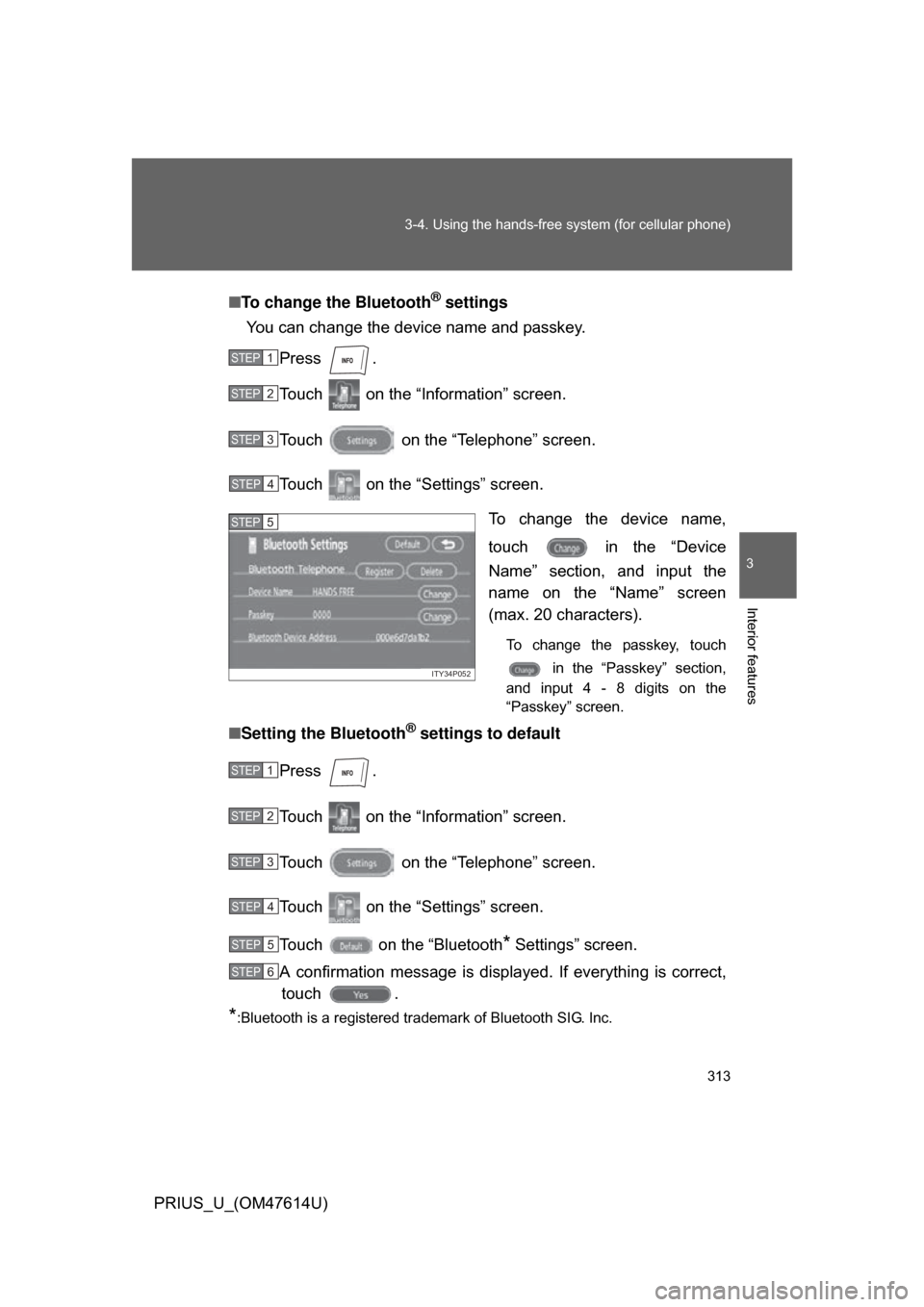
To change the device name,
touch in the “Device
Name” section, and input the
name on the “Name” screen
(max. 20 characters).
To change the passkey, touch in the “Passkey” section,
and input 4 - 8 digits on the
“Passkey” screen.
■ Setting the Bluetooth® settings to default
Press .
Touch on the “Information” screen.
Touch on the “Telephone” screen.
Touch on the “Settings” screen.
Touch on the “Bluetooth
* Settings” screen.
A confirmation message is displa yed. If everything is correct,
touch .
*:Bluetooth is a registered trademark of Bluetooth SIG. Inc.
STEP1
STEP2
STEP3
STEP4
ITY34P052
STEP5
STEP1
STEP2
STEP3
STEP4
STEP5
STEP6
Page 315 of 508
315
3
Interior features
PRIUS_U_(OM47614U)
3-5. Using the interior lights
Interior lights list
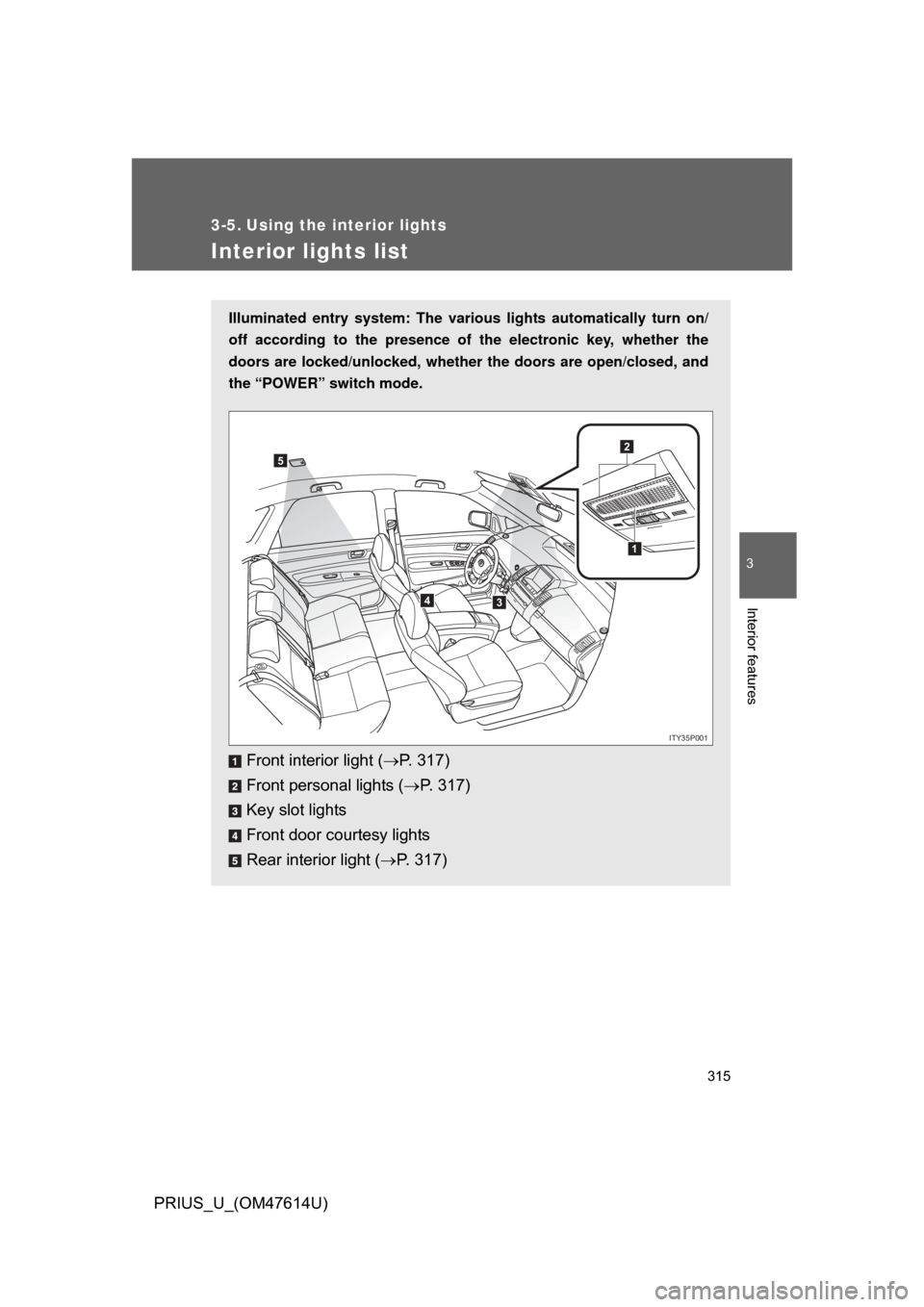
Illuminated entry system: The various lights automatically turn on/
off according to the presence of the electronic key, whether the
doors are locked/unlocked , whether the doors are open/closed, and
the “POWER” switch mode.
Front interior light ( P. 317)
Front personal lights ( P. 317)
Key slot lights
Front door courtesy lights
Rear interior light ( P. 317)
1
2
34
5
ITY35P001
Page 341 of 508
Maintenance and care4
341
PRIUS_U_(OM47614U)
4-1. Maintenance and careCleaning and protecting the vehicle’s exterior ............ 342
Cleaning and protecting the vehicle’s interior ............. 344
4-2. Maintenance Maintenance requirements .................. 347
General maintenance....... 349
Emission inspection and maintenance (I/M)
programs ........................ 352
4-3. Do-it-yourself maintenance Do-it-yourself service precautions .................... 353
Hood ................................ 357
Positioning a floor jack ..... 358
Engine compartment ........ 360
Tires ................................. 375
Tire inflation pressure ...... 384
Wheels ............................. 388
Air conditioning filter......... 390
Electronic key battery....... 392
Checking and replacing fuses .............................. 394
Light bulbs........................ 403
Page 392 of 508
392
4-3. Do-it-yourself maintenance
PRIUS_U_(OM47614U)
Electronic key batter y
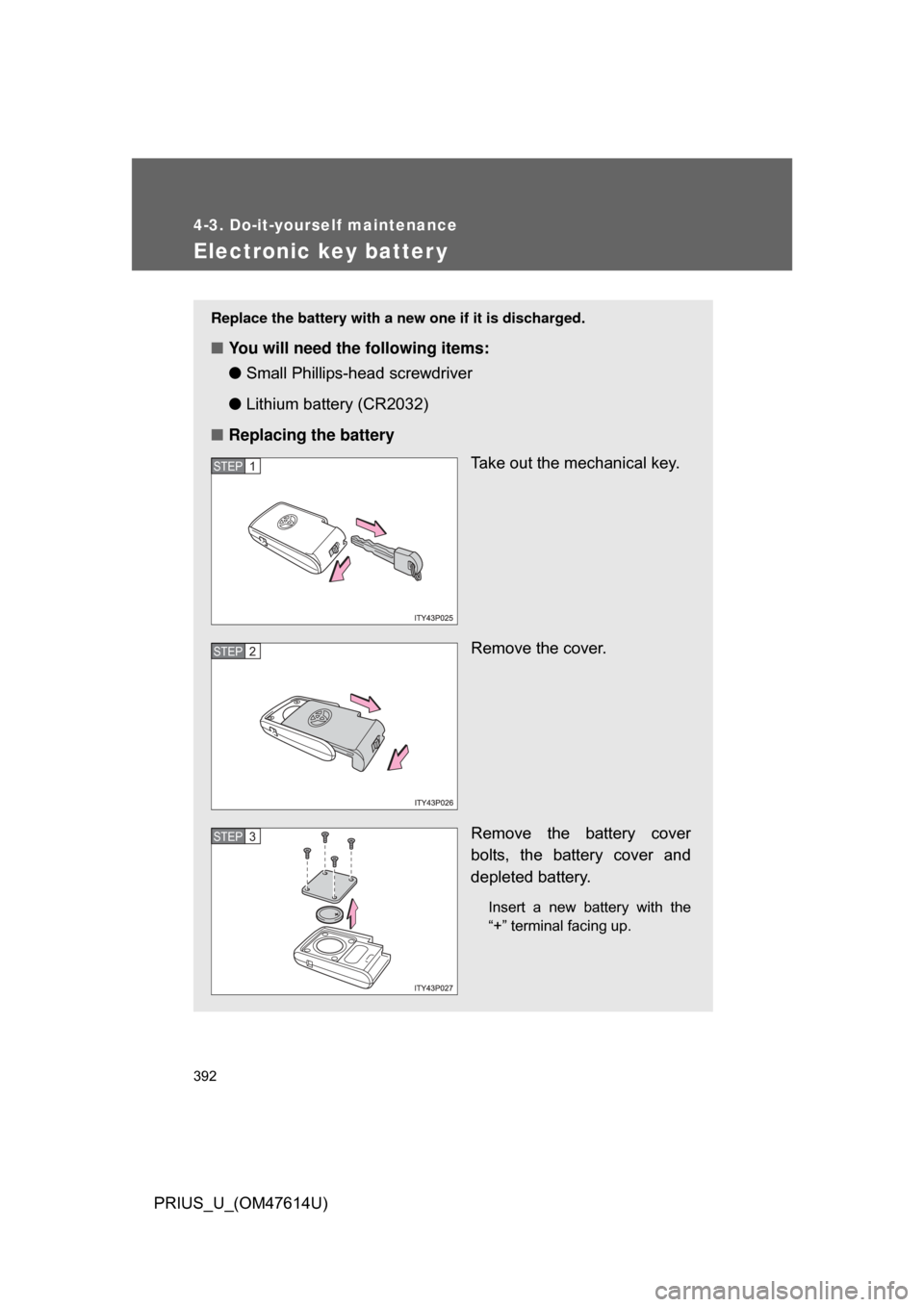
Replace the battery with a new one if it is discharged.
■You will need the following items:
●Small Phillips-hea d screwdriver
● Lithium battery (CR2032)
■ Replacing the battery
Take out the mechanical key.
Remove the cover.
Remove the battery cover
bolts, the battery cover and
depleted battery.
Insert a new battery with the
“+” terminal facing up.
STEP1
STEP2
STEP3
Page 393 of 508
393
4-3. Do-it-yourself maintenance
4
Maintenance and care
PRIUS_U_(OM47614U)
■
If the electronic key battery is discharged
The following symptoms may occur.
● The smart key system and wireless remote control will not function prop-
erly.
● The operational range is reduced.
■ Use a CR2032 lithium battery
● Batteries can be purchased at your Toyota dealer, jewelers, or camera
stores.
● Replace only with the same or equivalent type recommended by a Toy-
ota dealer.
● Dispose of used batteries according to the local laws.
CAUTION
■Removed battery and other parts
Keep away from children.
These parts are small and if swallowed by a child they can cause choking.
NOTICE
■For normal operation after replacing the battery
Observe the following precautions to prevent accidents.
● Always work with dry hands.
Moisture may cause the battery to rust.
● Do not touch or move any other components inside the electronic key.
● Do not bend the battery terminals.
Page 397 of 508
397
4-3. Do-it-yourself maintenance
4
Maintenance and care
PRIUS_U_(OM47614U)
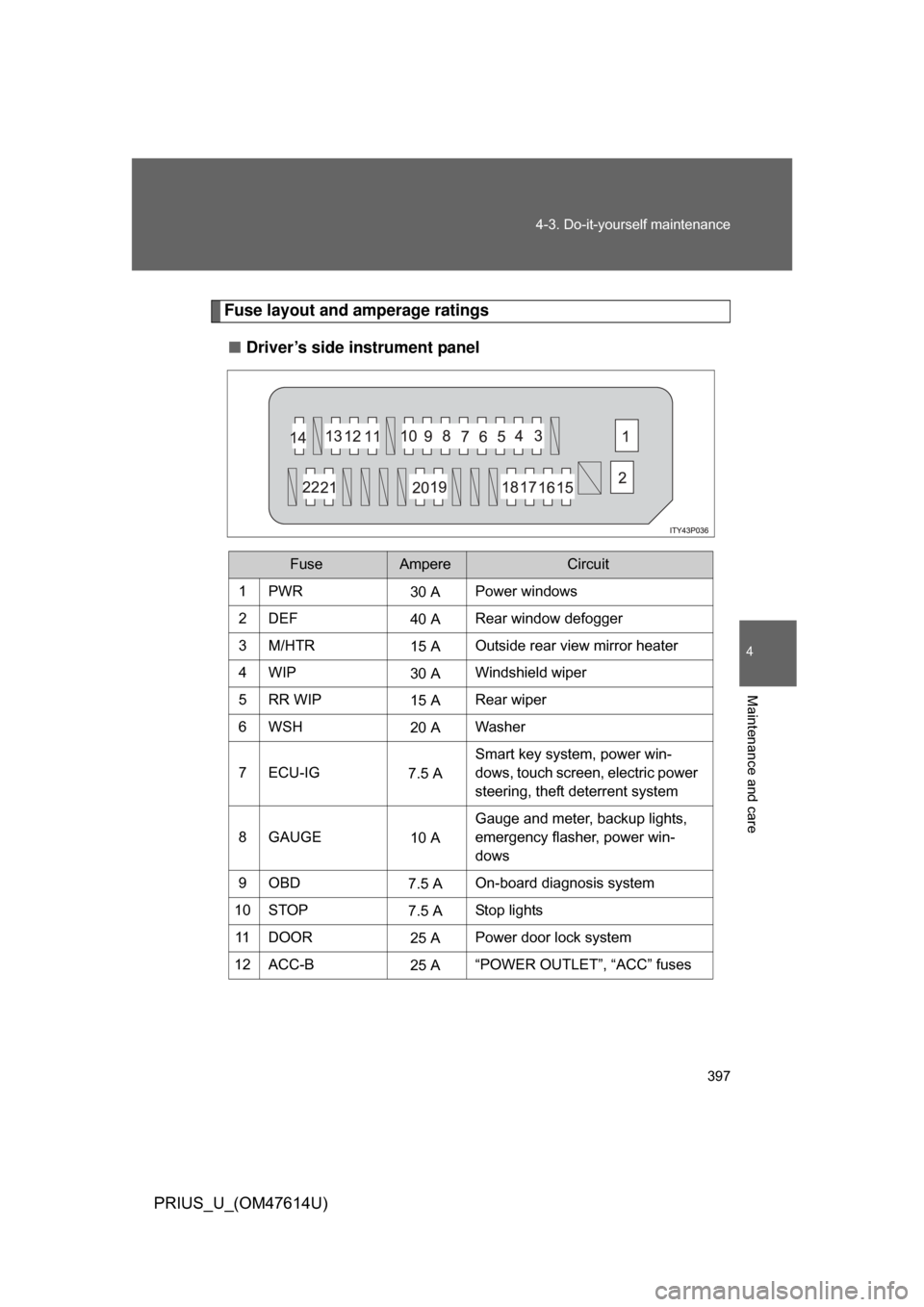
Fuse layout and amperage ratings
■ Driver’s side instrument panel
FuseAmpereCircuit
1PWR30 APower windows
2DEF 40 ARear window defogger
3M/HTR 15 AOutside rear view mirror heater
4WIP 30 AWindshield wiper
5RR WIP 15 ARear wiper
6WSH 20 AWasher
7 ECU-IG 7.5 ASmart key system, power win-
dows, touch screen, electric power
steering, theft deterrent system
8GAUGE 10 AGauge and meter, backup lights,
emergency flasher, power win-
dows
9OBD 7.5 AOn-board diagnosis system
10 STOP 7.5 AStop lights
11 D O O R 25 APower door lock system
12 ACC-B 25 A“POWER OUTLET”, “ACC” fuses