Page 254 of 508

254 3-3. Using the audio system
PRIUS_U_(OM47614U)
■CD player protection feature
To protect the internal components, playback is automatically stopped when
a problem is detected while the CD player is being used.
■ If CDs are left inside the CD player or in the ejected position for
extended periods
CDs may be damaged and may not play properly.
■ Lens cleaners
Do not use lens cleaners. Doing so may damage the CD player.
■ MP3 and WMA files
MP3 (MPEG Audio LAYER 3) is a standard audio compression format.
Files can be compressed to approximately 1/10 of their original size by using
MP3 compression.
WMA (Windows Media
TMAudio) is a Microsoft audio compression format.
This format compresses audio data to a size smaller than that of the MP3
format.
There is a limit to the MP3 and WMA file standards and to the media/formats
recorded by them that can be used.
● MP3 file compatibility
• Compatible standards
MP3 (MPEG1 LAYER3, MPEG2 LSF LAYER3)
• Compatible sampling frequencies MPEG1 LAYER3: 32, 44.1, 48 (kHz)
MPEG2 LSF LAYER3: 16, 22.05, 24 (kHz)
• Compatible bit rates MPEG1 LAYER3: 64, 80, 96, 112, 128, 160, 192, 224, 256, 320 (kbps)
• MPEG2 LSF LAYER3: 64, 80, 96, 112, 128, 144, 160 (kbps)
*: Compatible with VBR
• Compatible channel modes: stereo, joint stereo, dual channel and monaural
Page 266 of 508
266
3-3. Using the audio system
PRIUS_U_(OM47614U)
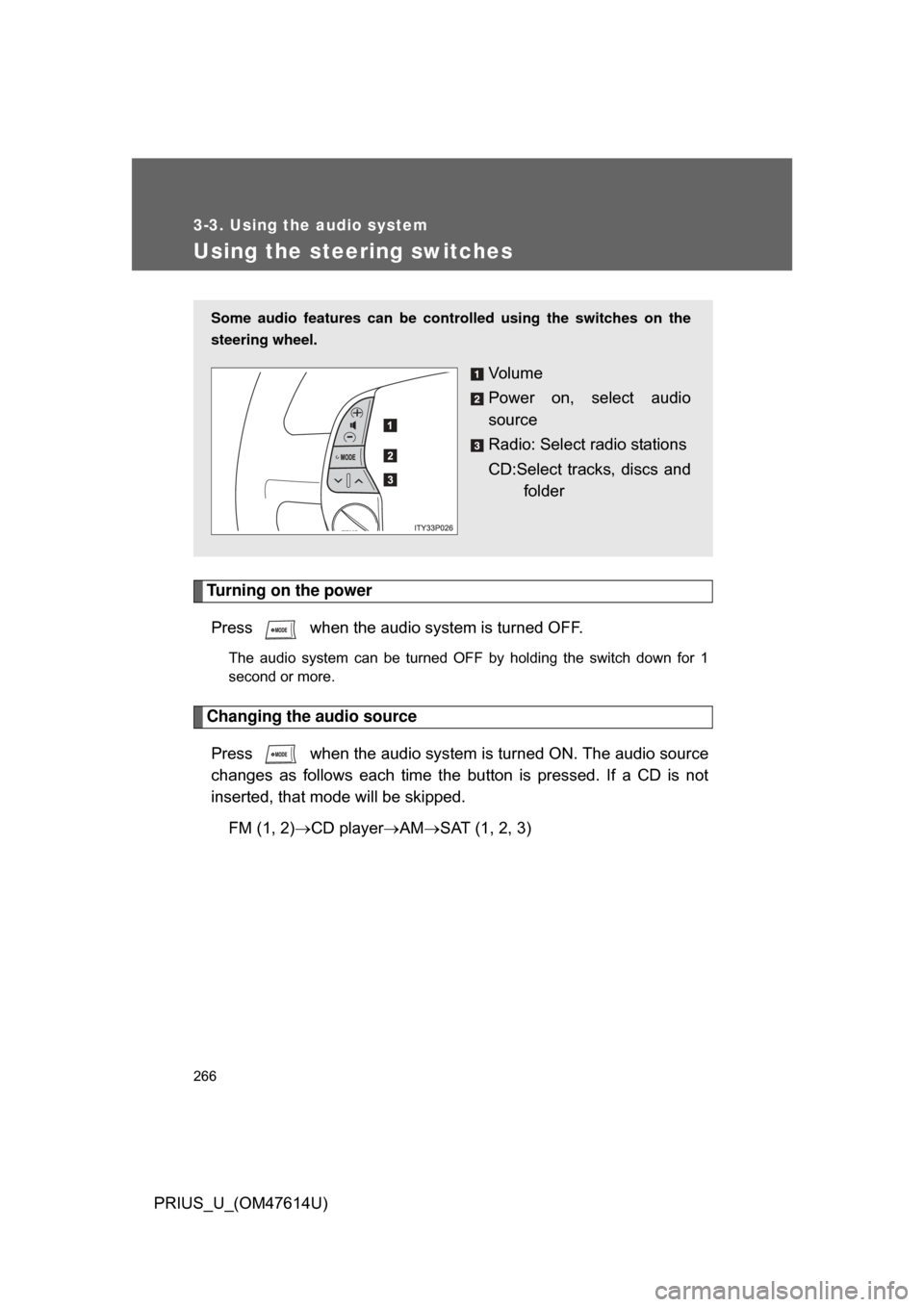
Using the steering switches
Turning on the powerPress when the audio system is turned OFF.
The audio system can be turned OFF by holding the switch down for 1
second or more.
Changing the audio sourcePress when the audio system is turned ON. The audio source
changes as follows each time the bu tton is pressed. If a CD is not
inserted, that mode will be skipped.
FM (1, 2) CD player AM SAT (1, 2, 3)
Some audio features can be controlled using the switches on the
steering wheel.
Vo l u m e
Power on, select audio
source
Radio: Select radio stations
CD:Select tracks, discs and
folder
Page 276 of 508
276 3-4. Using the hands-free system (for cellular phone)
PRIUS_U_(OM47614U)
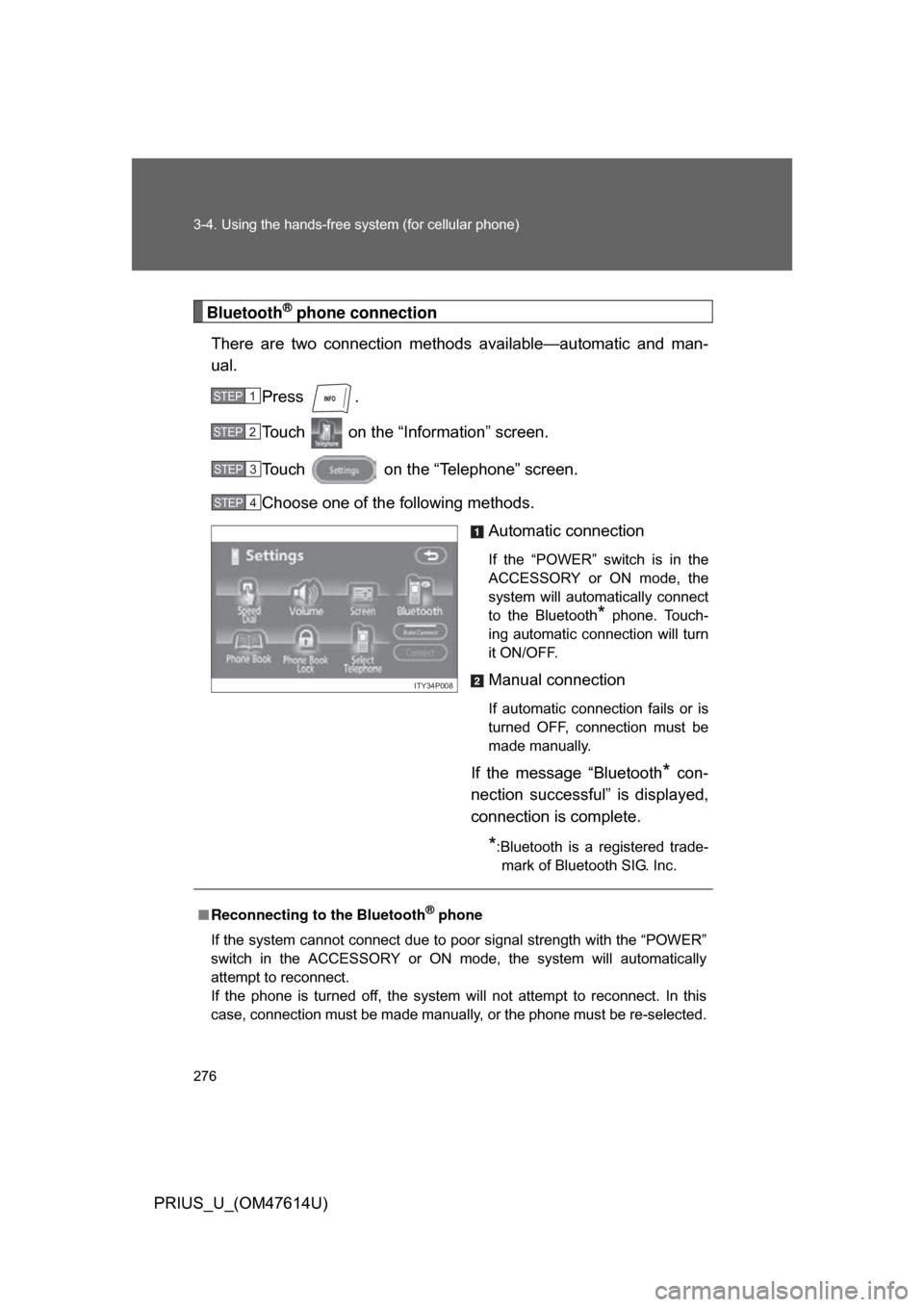
Bluetooth® phone connection
There are two connection method s available—automatic and man-
ual.
Press .
Touch on the “Inf ormation” screen.
Touch on the “Telephone” screen.
Choose one of the following methods. Automatic connection
If the “POWER” switch is in the
ACCESSORY or ON mode, the
system will automatically connect
to the Bluetooth
* phone. Touch-
ing automatic connection will turn
it ON/OFF.
Manual connection
If automatic connection fails or is
turned OFF, connection must be
made manually.
If the message “Bluetooth* con-
nection successful” is displayed,
connection is complete.
*:Bluetooth is a registered trade- mark of Bluetooth SIG. Inc.
STEP1
STEP2
STEP3
STEP4
ITY34P008
■ Reconnecting to the Bluetooth® phone
If the system cannot connect due to poor signal strength with the “POWER”
switch in the ACCESSORY or ON mode, the system will automatically
attempt to reconnect.
If the phone is turned off, the system will not attempt to reconnect. In this
case, connection must be made manually, or the phone must be re-selected.
Page 355 of 508
355
4-3. Do-it-yourself maintenance
4
Maintenance and care
PRIUS_U_(OM47614U)
CAUTION
The engine compartment contains many mechanisms and fluids that may
move suddenly, become hot, or become electrically energized. To avoid death
or serious injury observe the following precautions.
■
When working on the engine compartment:
● Keep hands, clothing, and tools away from the moving fan and engine
drive belt.
● Be careful not to touch the engine, inverter, radiator, exhaust manifold, etc.
right after driving as they may be hot. Oil and other fluids may also be hot.
● Do not leave anything that may burn easily, such as paper or rags, in the
engine compartment.
● Do not smoke, cause sparks or expose an open flame to fuel or the 12 volt
battery. Fuel and 12 volt battery fumes are flammable.
● Be extremely cautious when working on the 12 volt battery. It contains poi-
sonous and corrosive sulfuric acid.
● Never touch, disassemble, remove or replace the high voltage parts,
cables and their connectors. It can cause severe burns or electric shock
that may result in death or serious injury.
● When the hybrid system is operating with the “READY” light on, the engine
may suddenly start in some cases. When you inspect the engine compart-
ment, be sure to turn off the hybrid system.
■ When working near the electric cooling fan or radiator grille
Be sure the “POWER” switch is OFF.
With the “POWER” switch in ON mode, the electric cooling fan may automat-
ically start to run if the air conditioning is on and/or the coolant temperature
is high. ( P. 369)
■ Safety glasses
Wear safety glasses to prevent flying or falling material, fluid spray, etc. from
getting in the eyes.
Page 365 of 508
365
4-3. Do-it-yourself maintenance
4
Maintenance and care
PRIUS_U_(OM47614U)
■
Engine oil consumption
● The amount of engine oil consumed depends on the oil viscosity, the
quality of the oil and the way the vehicle is driven.
● More oil is consumed under driving conditions such as high speeds, fre-
quent acceleration and deceleration.
● A new engine consumes more oil.
● When judging the amount of oil consumption, keep in mind that the oil
may have become diluted, making it difficult to judge the true level accu-
rately.
● Oil consumption: Max. 1.1 qt./600 miles, 0.9 lmp. qt./600 miles (1.0 L per
1000 km). If the vehicle consumes more than this amount, contact your
Toyota dealer.
■ Resetting the engine oil maintenance data (U.S.A. only)
Perform the following steps:
Turn the “POWER” switch to OFF mode with the odometer shown.
Turn the “POWER” switch to ON mode with the trip meter reset but-
ton (P. 146) held down.
Keep pressing the button for longer than 5 seconds after the
“POWER” switch is in ON mode.
When the odometer indicates “000000” and the light goes off, the system
reset is completed.
STEP1
STEP2
STEP3
Page 372 of 508

372 4-3. Do-it-yourself maintenance
PRIUS_U_(OM47614U)
■Before recharging
When recharging, the 12 volt battery produces hydrogen gas which is flam-
mable and explosive. Therefore, before recharging:
● If recharging with the 12 volt battery installed on the vehicle, be sure to
disconnect the ground cable.
● Make sure the power switch on the charger is off when connecting and
disconnecting the charger cables to the 12 volt battery.
■ After recharging/reconnecting the 12 volt battery
In some cases, the hybrid system may not start. Follow one or both of the
following procedures:
● After opening and closing the driver’s door, wait 10 seconds then attempt
to start the engine. (If the system does not start first time, repeat the pro-
cedure.)
● With the shift lever in “P” and the “POWER” switch in the OFF mode,
open and close any door, then attempt to start the hybrid system.
If the system will not start even after multiple attempts at both methods, con-
tact your Toyota dealer.
Page 382 of 508
382 4-3. Do-it-yourself maintenance
PRIUS_U_(OM47614U)
CAUTION
■Tire pressure warning system operation
The tire pressure warning system may not provide warning immediately
if a tire bursts or if sudden air leakage occurs.
■When inspecting or replacing tires
Observe the following precautions to prevent accidents. Failure to do so
may cause damage to parts of the drive train, as well as dangerous han-
dling characteristics, which may le ad to fatal or injury accidents.
●Do not mix tires of different makes, models, tread patterns or tread-
wear.
●Do not use tire sizes other than those recommended by Toyota.
●Do not mix radial, bias-belted, or bias-ply tires.
●Do not mix summer, all season and winter tires.
●Do not use tires that have been used on another vehicle.
●Do not use tires if you do not know how they were used previously.
■When initializing the tire pressure warning system
Do not push the tire pressure warnin g reset switch without first adjusting
the tire inflation pressure to the spec ified level. Otherwise, the tire pres-
sure warning light may not come on ev en if the tire inflation pressure is
low, or it may come on when the tire inflation pressure is actually normal.
Page 432 of 508
432 5-2. Steps to take in an emergency
PRIUS_U_(OM47614U)
The tire pressure warning system may be disabled in the following condi-
tions:
(When the condition becomes normal, the system will work properly.)
●If electronic devices or facilities using similar radio wave frequencies
are nearby.
●If a radio set at similar frequencies is in use in the vehicle.
●If a window tint that affects the radio wave signals is installed.
●If there is a lot of snow or ice on the vehicle, in particular around the
wheels or wheel housings.
●If non-genuine Toyota wheels are used (Even if you use Toyota
wheels, the tire pressu re warning system may not work properly with
some types of tires.).
●If tire chains are used.
■If the tire pressure warning light comes on after blinking for 1
minute frequently
If the tire pressure warning light comes on after blinking for 1 minute fre-
quently when the “POWER” switch is turned to ON mode, have it
checked by your Toyota dealer.