Page 126 of 508

126 2-1. Driving procedures
PRIUS_U_(OM47614U)
CAUTION
■When driving the vehicle
● Do not under any circumstances shift the shift lever to “R”, “N” or push the
“P” position switch while the vehicle is moving.
Doing so can cause significant damage to the transmission and may result
in a loss of vehicle control.
● Do not shift the shift lever to “N” while the vehicle is moving.
Doing so may cause the engine brake not to operate properly and lead to
an accident.
● Do not turn the hybrid system off while driving.
The power steering and brake actuator will not operate properly if the
hybrid system is not operating.
● Use engine braking (“B”) to maintain a safe speed when driving down a
steep hill.
Using the brakes continuously may cause the brakes to overheat and lose
effectiveness. ( P. 138)
● When stopped on an inclined surface, use the brake pedal and parking
brake to prevent the vehicle from rolling backward or forward and causing
an accident.
● Do not adjust the position of the steering wheel, the seat, or the inside or
outside rear view mirrors while driving.
Doing so may result in a loss of vehicle control that can cause accidents
that may result in death or serious injury.
● Always check that all passengers’ arms, heads or other parts of their bod-
ies are not outside the vehicle, as this may result in death or serious injury.
● Do not drive in excess of the speed limit. Even if the legal speed limit per-
mits it, do not drive over 85 mph (140 km/h) unless your vehicle has high
speed capability tires. Driving over 85 mph (140 km/h) may result in tire
failure, loss of control and possible injury. Be sure to consult a tire dealer
to determine whether the tires on your vehicle are high-speed capability
tires or not before driving at such speeds.
Page 150 of 508
150 2-2. Instrument cluster
PRIUS_U_(OM47614U)
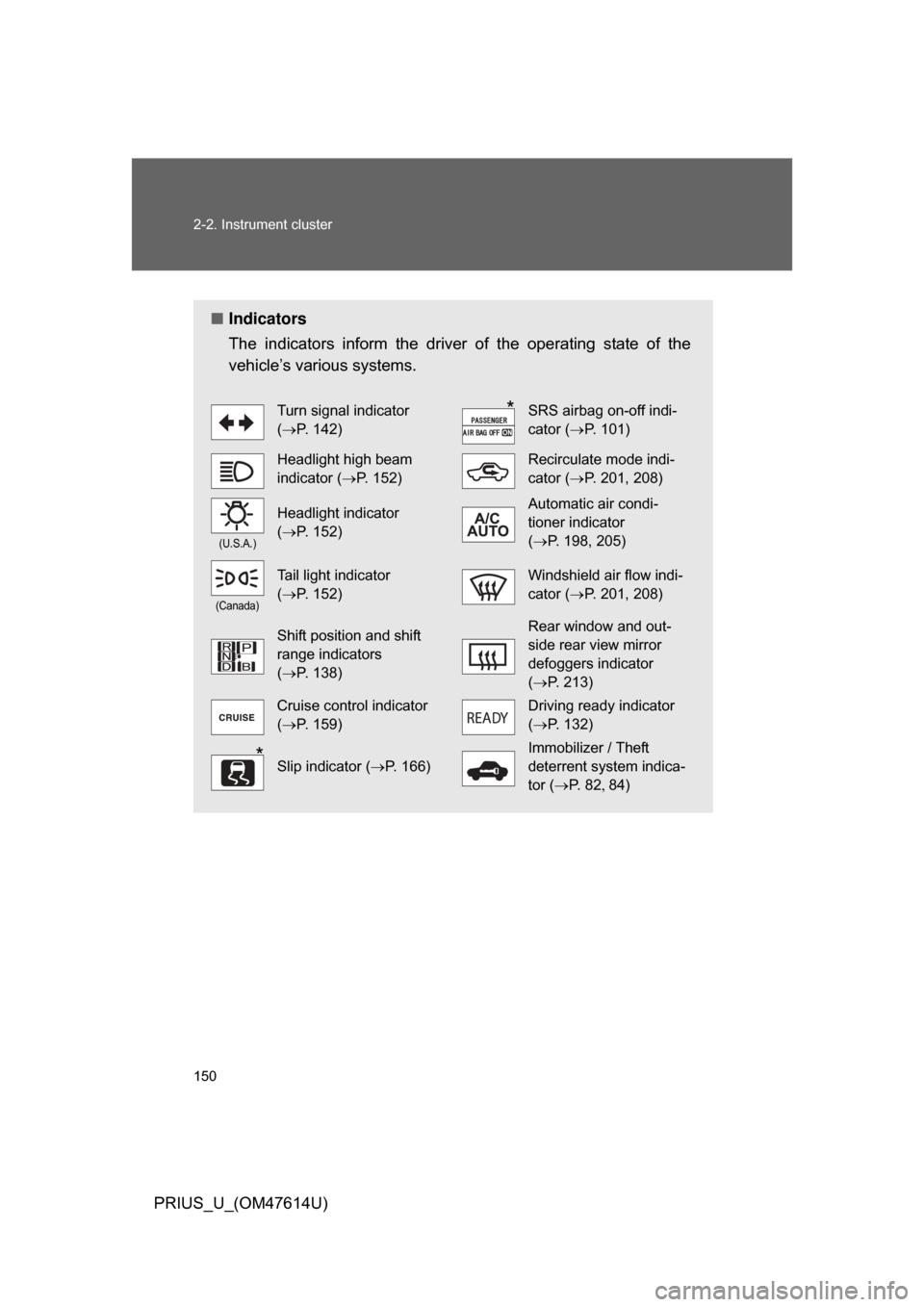
■Indicators
The indicators inform the driver of the operating state of the
vehicle’s various systems.
Turn signal indicator
(P. 142)SRS airbag on-off indi-
cator ( P. 101)
Headlight high beam
indicator ( P. 152)Recirculate mode indi-
cator (P. 201, 208)
(U.S.A.)
Headlight indicator
(P. 152)Automatic air condi-
tioner indicator
(P. 198, 205)
(Canada)
Tail light indicator
(P. 152)Windshield air flow indi-
cator ( P. 201, 208)
Shift position and shift
range indicators
(P. 138)Rear window and out-
side rear view mirror
defoggers indicator
(P. 213)
Cruise control indicator
(P. 159)Driving ready indicator
(P. 132)
Slip indicator ( P. 166)
Immobilizer / Theft
deterrent system indica-
tor (P. 8 2 84)
*
*
Page 163 of 508
163
2-4. Using other driving systems
2
When driving
PRIUS_U_(OM47614U)
Rear view monitor system
: If equipped
■Displayed area
Corner of bumper
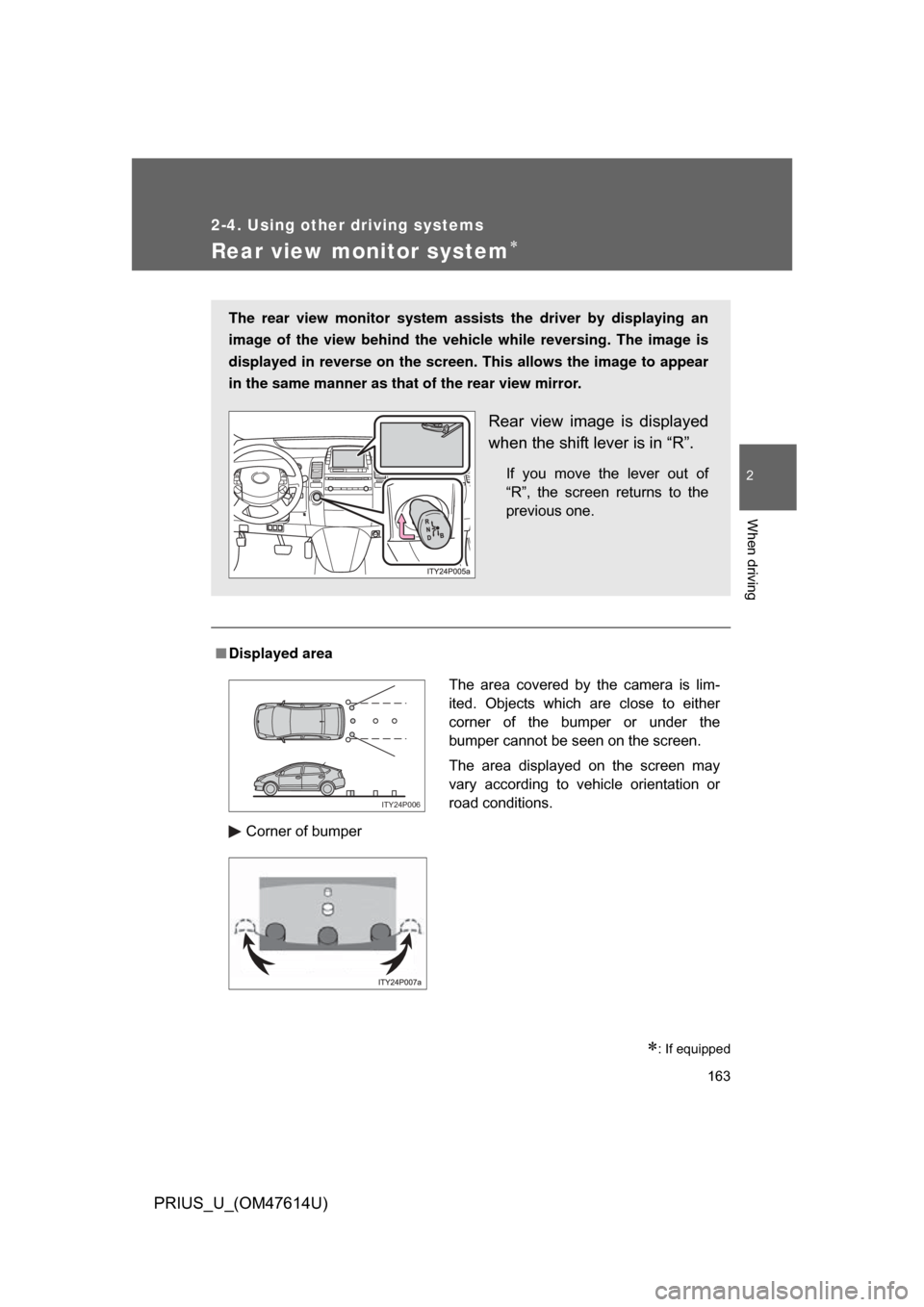
The rear view monitor system assists the driver by displaying an
image of the view behind the vehicle while reversing. The image is
displayed in reverse on the screen . This allows the image to appear
in the same manner as that of the rear view mirror.
Rear view image is displayed
when the shift lever is in “R”.
If you move the lever out of
“R”, the screen returns to the
previous one.
The area covered by the camera is lim-
ited. Objects which are close to either
corner of the bumper or under the
bumper cannot be seen on the screen.
The area displayed on the screen may
vary according to vehicle orientation or
road conditions.
ITY24P006
Page 165 of 508
165
2-4. Using other
driving systems
2
When driving
PRIUS_U_(OM47614U)
CAUTION
■When using the rear view moni tor system, observe these precautions
to avoid an accident that could r esult in death or serious injuries.
● Never depend solely on the monitor system when reversing.
● Always check visually and with the mirrors to confirm your intended path is
clear.
● Depicted distances between objects and flat surfaces differ from actual
distances.
● Do not use the system if the back door is open.
■ Conditions which may affect the rear view monitor system
● If the back of the vehicle is hit, the camera’s position and mounting angle
may change. Contact your Toyota dealer.
● Rapid temperature changes, such as when hot water is poured on the
vehicle in cold weather, may cause the system to function abnormally.
● If the camera lens is dirty, it cannot transmit a clear image. Rinse with
water and wipe with a soft cloth. If extremely dirty, wash with a mild
cleanser and rinse.
● The displayed image may be darker and moving images may be slightly
distorted when the system is cold.
Page 180 of 508
180
PRIUS_U_(OM47614U)
3-1. Using the touch screenTouch screen ................... 182
Setting the touch screen (Vehicles with AUX
adapter) ......................... 187
Setting the touch screen (Vehicles without AUX
adapter) ......................... 192
3-2. Using the air conditioning system and defogger
Automatic air conditioning system (Vehicles with
AUX adapter) ................. 197
Automatic air conditioning system (Vehicles without
AUX adapter) ................. 204
Using the steering wheel climate remote control
switches ......................... 211
Rear window and outside rear view mirror
defoggers ....................... 213
Page 211 of 508
211
3-2. Using the air conditioning system and defogger
3
Interior features
PRIUS_U_(OM47614U)
Using the steering wheel climate remote control switches
Using the automatic mode
Press .
The air conditioning system will operate, and air outlets and
fan speed will be set automatically.
“AUTO” will be displayed on the multi-information display. (if
equipped)
Press “” on to increase the temperature and “” to
decrease the temperature
.
Adjusting the temperature setting
Press
“” on to increase the temperature and “” to decrease
the temperature.
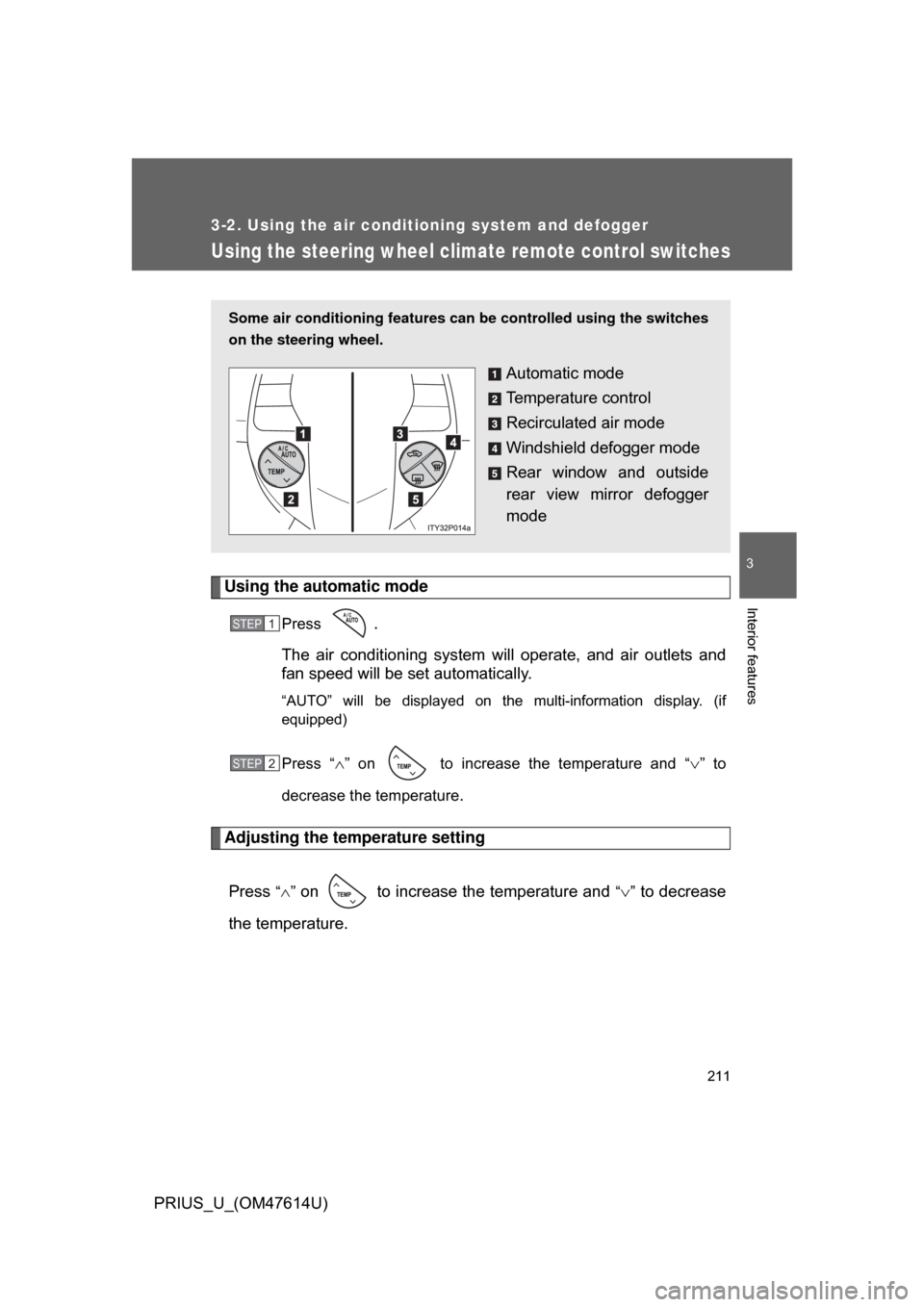
Some air conditioning features can be controlled using the switches
on the steering wheel.
Automatic mode
Temperature control
Recirculated air mode
Windshield defogger mode
Rear window and outside
rear view mirror defogger
mode
STEP1
STEP2
Page 212 of 508
212 3-2. Using the air conditioning system and defogger
PRIUS_U_(OM47614U)
Changing the recirculated air mode
Press . ( P. 2 0 1 208)
Using the windshield defogger mode
Press . ( P. 201, 208)
Using the rear window and outside rear view mirror defogger
mode
Press . ( 213)
CAUTION
■To reduce the risk of an accident
Exercise care when operating the audio switches on the steering wheel.
Page 213 of 508
213
3-2. Using the air conditioning system and defogger
3
Interior features
PRIUS_U_(OM47614U)
Rear window and outside rear view mirror defoggers
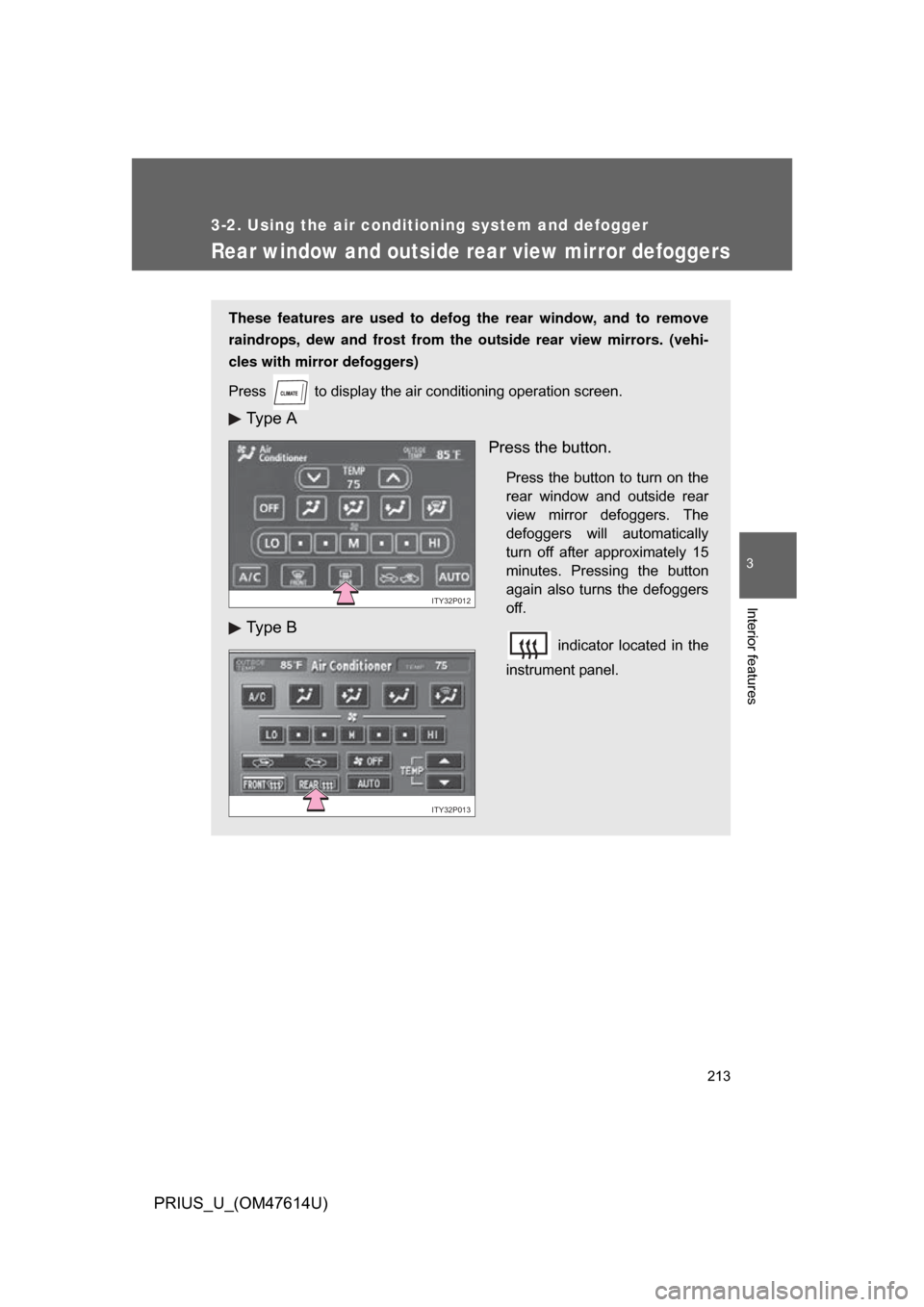
These features are used to defog the rear window, and to remove
raindrops, dew and frost from the outside rear view mirrors. (vehi-
cles with mirror defoggers)
Press
to display the air conditioning operation screen.
Ty p e A
Ty p e B Press the button.
Press the button to turn on the
rear window and outside rear
view mirror defoggers. The
defoggers will automatically
turn off after approximately 15
minutes. Pressing the button
again also turns the defoggers
off.
indicator located in the
instrument panel.
ITY32P012
ITY32P013