Page 227 of 508
227
3-3. Using the audio system
3
Interior features
PRIUS_U_(OM47614U)
■
When the 12 volt battery is disconnected
All preset stations are erased.
■ Reception sensitivity
● Maintaining perfect radio reception at all times is difficult due to the con-
tinually changing position of the antenna, differences in signal strength
and surrounding objects, such as trains, transmitters, etc.
● The radio antenna is mounted on the roof. To maintain clear radio recep-
tion, do not attach metallic window tinting or other metallic objects to the
antenna wire mounted inside the rear window.
■ XM
® satellite radio
An XM
® Satellite Radio is a tuner designed exclusively to receive broadcasts
provided under a separate subscription.
Availability is limited to the 48 contiguous states and 10 Canadian provinces.
● XM
® subscriptions
For detailed information about XM® Satellite Radio or to subscribe:
U.S.A. –
Visit on the web at www.xmradio.com
or call 1-800-967-2346.
Canada –
Visit on the web at www.xmradio.ca
or call 1-877-438-9677.
● Radio ID
You will need the radio ID when activating XM
® service or reporting a
problem. Select “CH000” using the dial, and the receiver’s 8-char-
acter ID number will appear.
● Satellite tuner
The tuner supports only Audio Services (Music and Talk) and the accom-
panying Text Information of XM
® satellite radio.
*: Terms and services provided by XM® Radio are subject to change without
notice.
TUNE FILE
Page 228 of 508
228 3-3. Using the audio system
PRIUS_U_(OM47614U)
■If the satellite radio does not operate normally
If a problem occurs with the XM
® tuner, a message will appear on the
screen. Refer to the table below to identify the problem, and take the sug-
gested corrective action.
ANTENNA
The XM® antenna is not connected. Check
whether the XM® antenna cable is attached
securely.
There is a short-circuit in the antenna or the sur-
rounding antenna cable. See a Toyota certified
dealer.
UPDATING You have not subscribed to XM
® satellite radio.
The radio is being updated with the latest encryp-
tion code. Contact XM
® satellite radio for subscrip-
tion information. When a contract is canceled, you
can choose “CH000” and all free-to-air channels.
The premium channel you selected is not autho-
rized. Wait for about 2 seconds until the radio
returns to the previous channel or “CH001”. If it
does not change automatically, select another
channel. If you want to listen to the premium chan-
nel, contact XM
® satellite radio.
NO SIGNAL The XM
® signal is too weak at the current location.
Wait until your vehicle reaches a location with a
stronger signal.
LOADING The unit is acquiring audio or program information.
Wait until the unit has received the information.
OFF AIRThe channel you selected is not broadcasting any
programming. Select another channel.
-----There is no song/program title or artist name/fea-
ture associated with the channel at that time. No
action needed.
Page 233 of 508
233
3-3. Using the audio system
3
Interior features
PRIUS_U_(OM47614U)
The type of program changes each time the button is pressed.
●
ROCK
● EASYLIS (Easy listening)
● CLS/JAZZ (Classical music and Jazz)
● R & B (Rhythm and Blues)
● INFORM (Information)
● RELIGION
● MISC (Miscellaneous)
● ALARM (Emergency messages)
If the system receives no RDS stations, “NO PTY” appears on the screen.
When a program is set, “TYPE SEEK” appears.
Touch on the screen or press or on .
The radio seeks or scans the station by the relevant program type.
If no radio station of that type is found, “NOTHING” appears on the
screen.
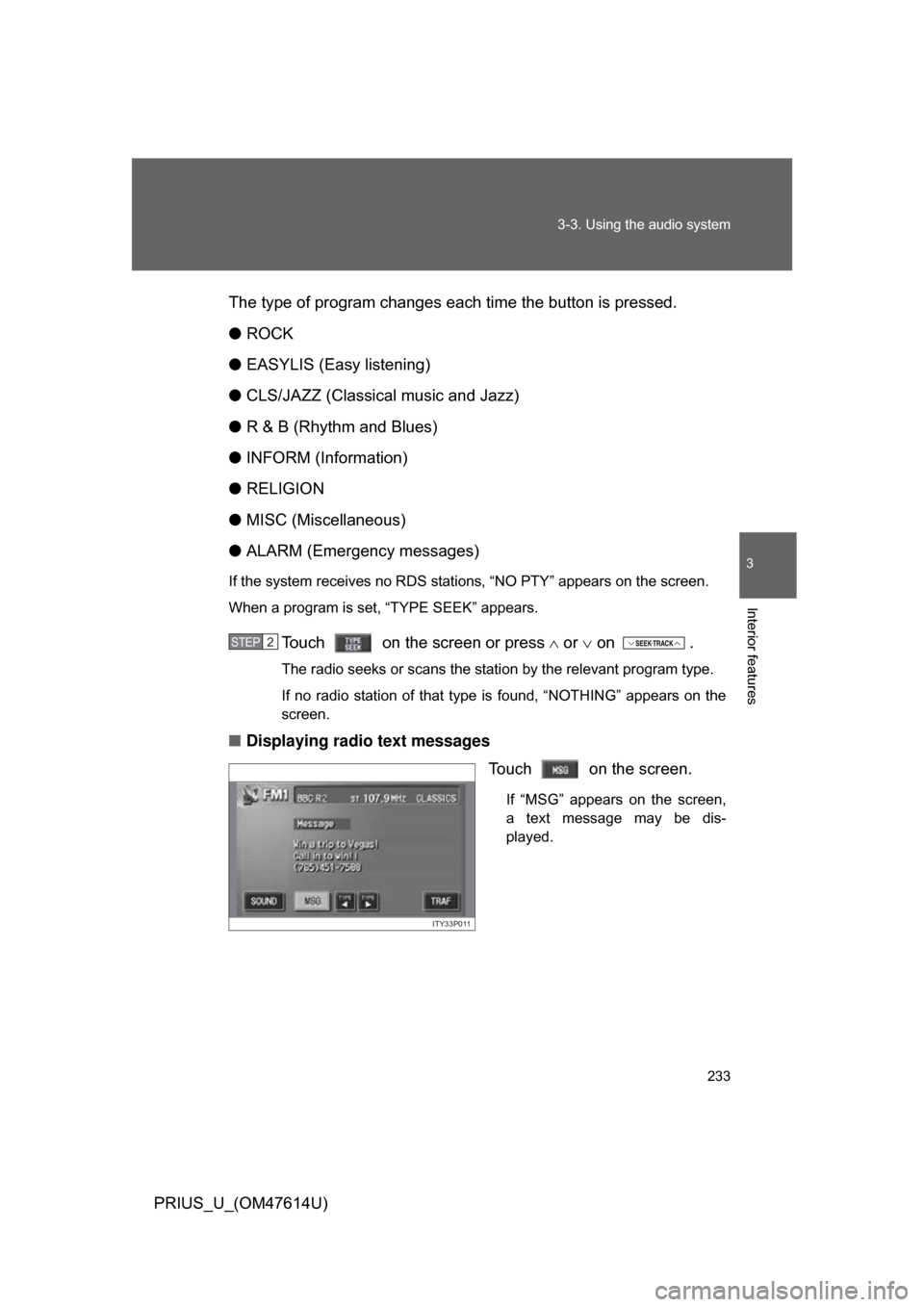
■ Displaying radio text messages
Touch on the screen.
If “MSG” appears on the screen,
a text message may be dis-
played.
STEP2
ITY33P011
Page 252 of 508
252 3-3. Using the audio system
PRIUS_U_(OM47614U)
Selecting and scanning files■ Selecting one file at a time
Turn the dial or press or on to select the
desired file.
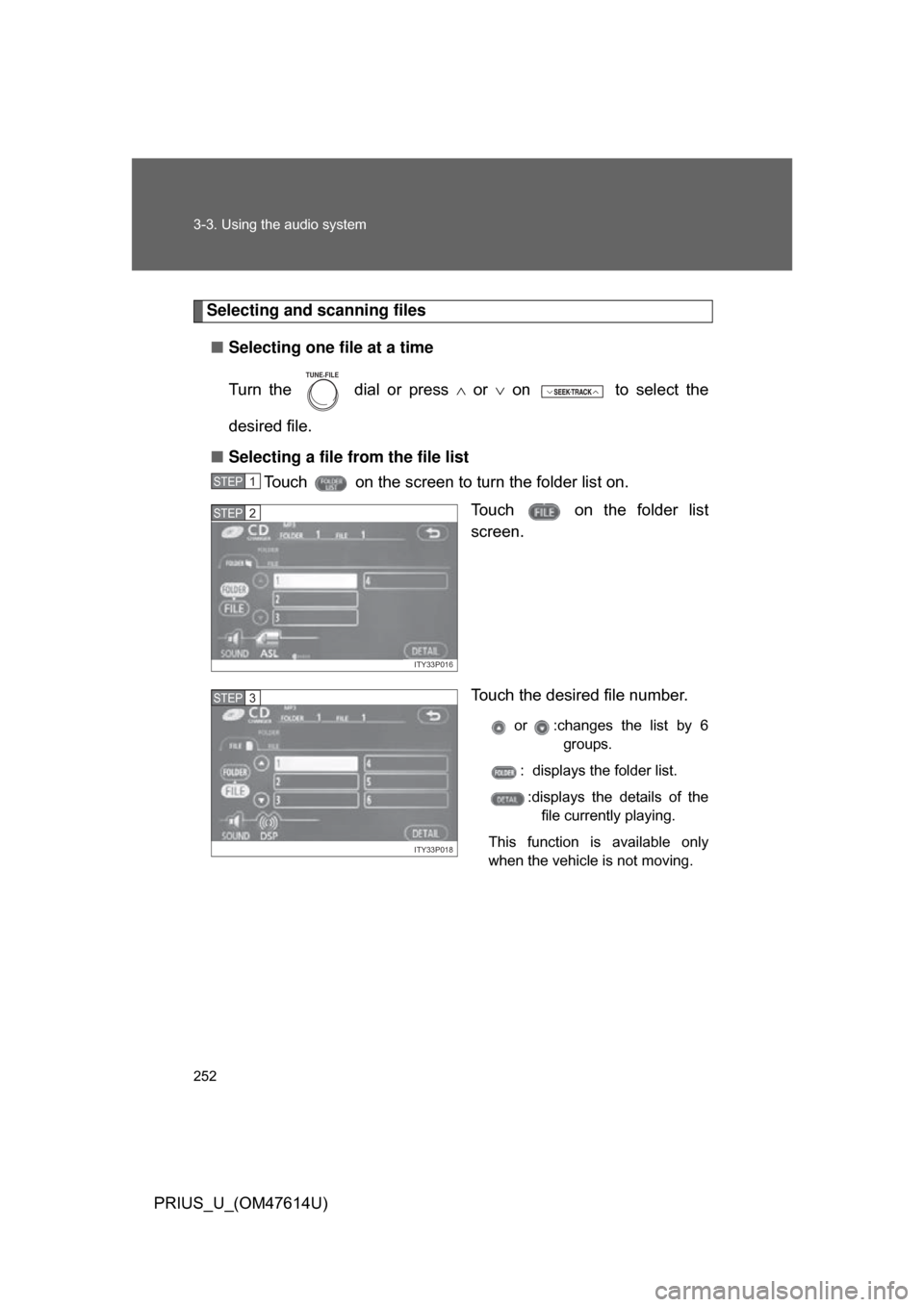
■ Selecting a file from the file list
Touch on the screen to turn the folder list on.
Touch on the folder list
screen.
Touch the desired file number.
or :changes the list by 6groups.
: displays the folder list.
:displays the details of the file currently playing.
This function is available only
when the vehicle is not moving.
TUNE FILE
STEP1
ITY33P016
STEP2
ITY33P018
STEP3
Page 266 of 508
266
3-3. Using the audio system
PRIUS_U_(OM47614U)
Using the steering switches
Turning on the powerPress when the audio system is turned OFF.
The audio system can be turned OFF by holding the switch down for 1
second or more.
Changing the audio sourcePress when the audio system is turned ON. The audio source
changes as follows each time the bu tton is pressed. If a CD is not
inserted, that mode will be skipped.
FM (1, 2) CD player AM SAT (1, 2, 3)
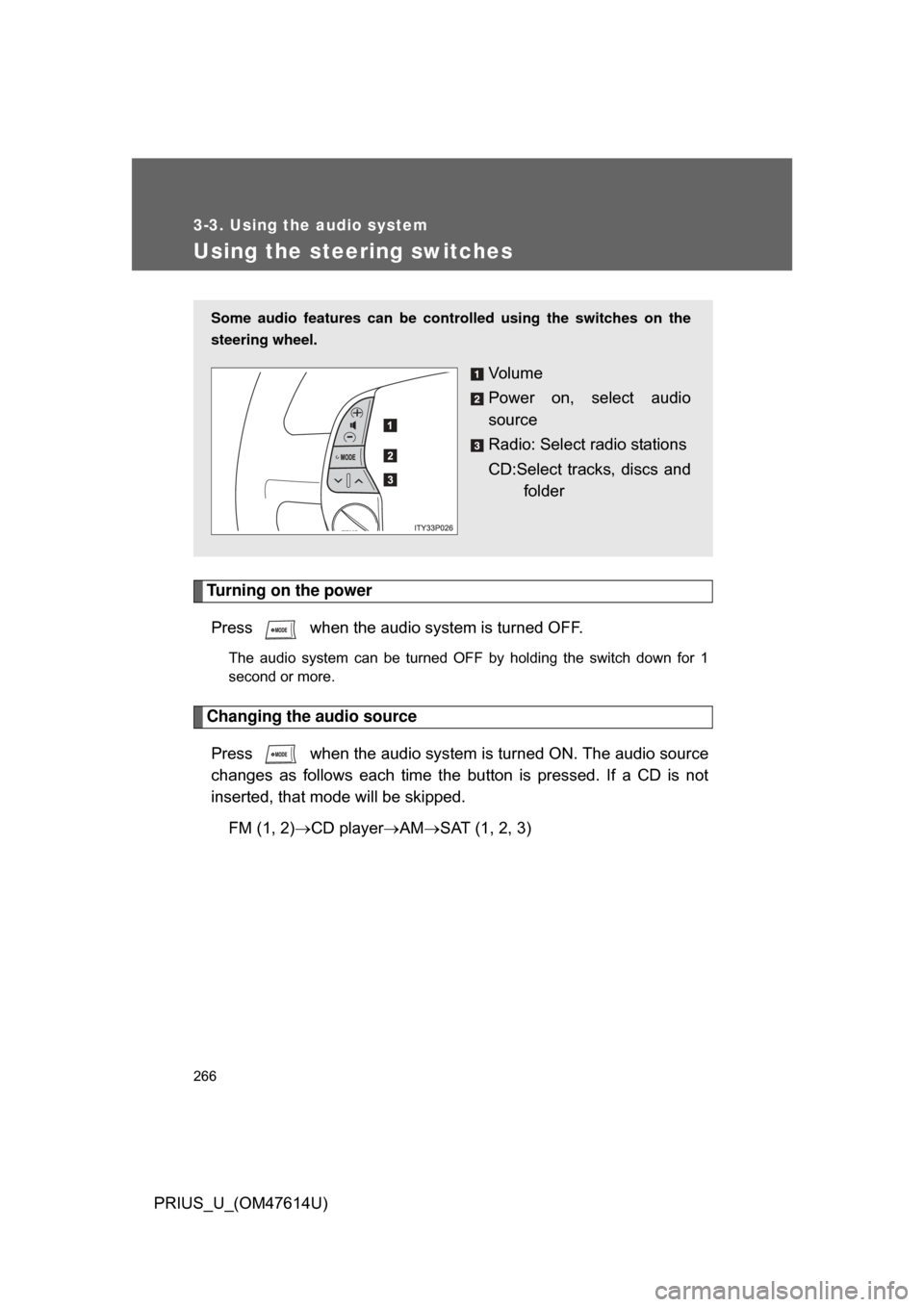
Some audio features can be controlled using the switches on the
steering wheel.
Vo l u m e
Power on, select audio
source
Radio: Select radio stations
CD:Select tracks, discs and
folder
Page 295 of 508
295
3-4. Using the hands-free
system (for cellular phone)
3
Interior features
PRIUS_U_(OM47614U)
Changing the screen settings
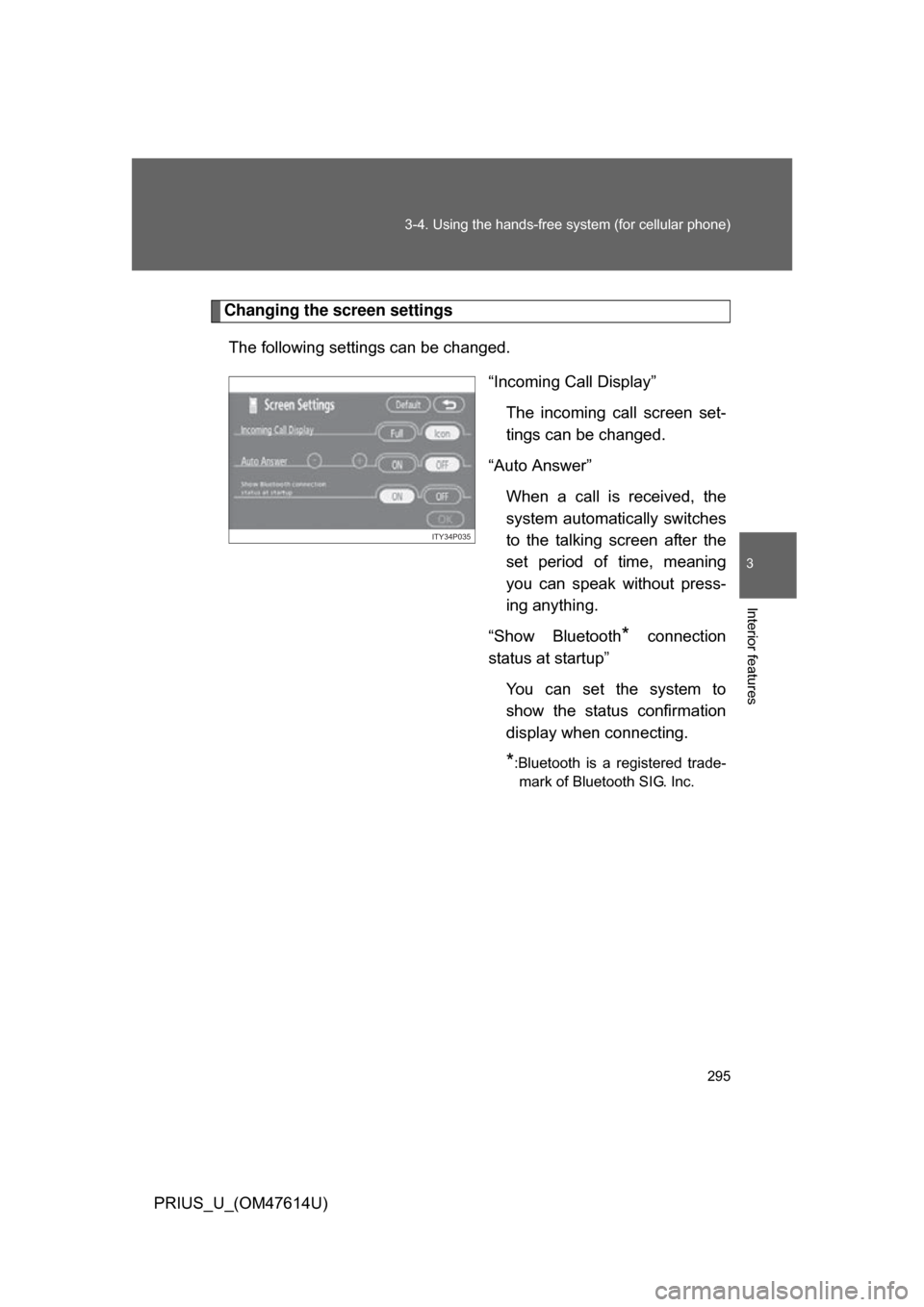
The following settings can be changed. “Incoming Call Display”The incoming call screen set-
tings can be changed.
“Auto Answer” When a call is received, the
system automatically switches
to the talking screen after the
set period of time, meaning
you can speak without press-
ing anything.
“Show Bluetooth
* connection
status at startup”
You can set the system to
show the status confirmation
display when connecting.
*:Bluetooth is a registered trade-mark of Bluetooth SIG. Inc.
ITY34P035
Page 316 of 508
316 3-5. Using the interior lights
PRIUS_U_(OM47614U)
■To prevent 12 volt battery discharge
If the interior lights and personal lights ON when the door is not fully closed
or the interior light switch in “DOOR” position, the lights will go off automati-
cally after 20 minutes.
■ Customization that can be co nfigured at Toyota dealer
Setting (e.g. The time elapsed before lights turn off) can be changed.
(
Customizable features P. 486)
Page 442 of 508
442 5-2. Steps to take in an emergency
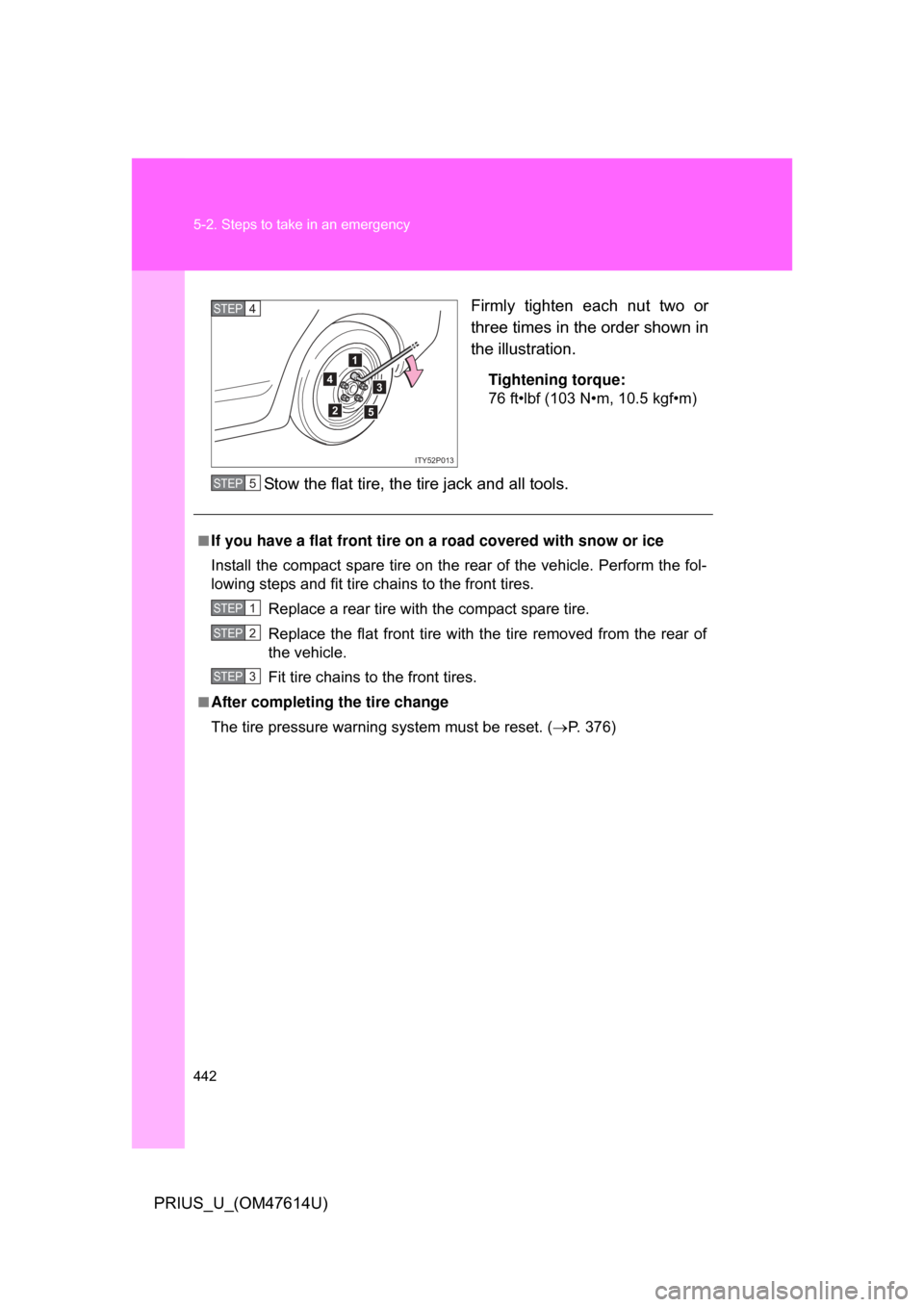
PRIUS_U_(OM47614U)Firmly tighten each nut two or
three times in the order shown in
the illustration.
Tightening torque:
76 ft•lbf (103 N•m, 10.5 kgf•m)
Stow the flat tire, the tire jack and all tools.
4
1
2
3
5
ITY52P013
STEP4
■If you have a flat front tire on a road covered with snow or ice
Install the compact spare tire on the rear of the vehicle. Perform the fol-
lowing steps and fit tire chains to the front tires.
Replace a rear tire with the compact spare tire.
Replace the flat front tire with the tire removed from the rear of
the vehicle.
Fit tire chains to the front tires.
■After completing the tire change
The tire pressure warnin g system must be reset. ( P. 376)
STEP5
STEP1
STEP2
STEP3