Page 402 of 608
402 3-7. Other interior features
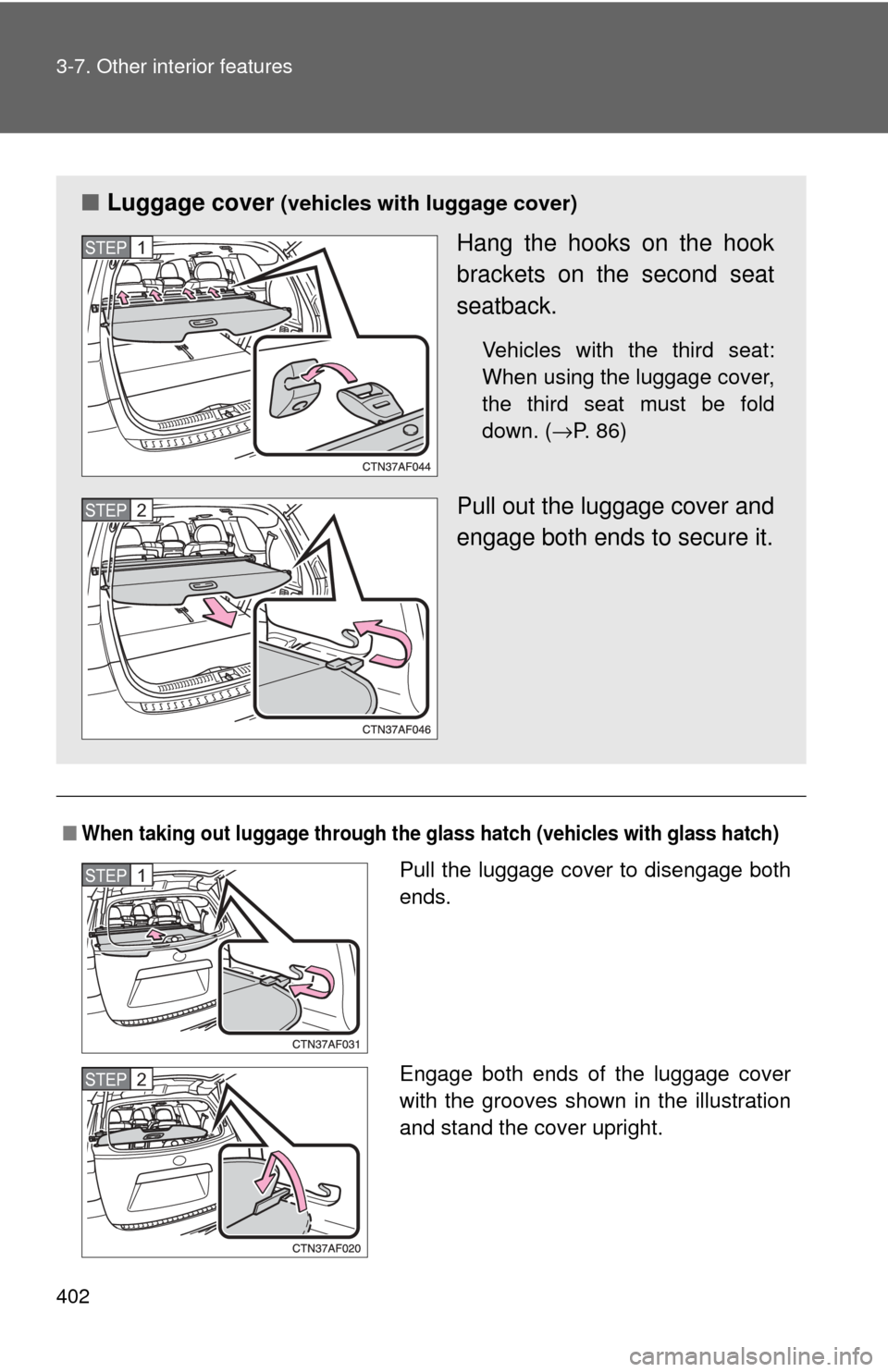
■When taking out luggage through the glass hatch (vehicles with glass hatch)
■Luggage cover (vehicles with luggage cover)
Hang the hooks on the hook
brackets on the second seat
seatback.
Vehicles with the third seat:
When using the luggage cover,
the third seat must be fold
down. ( →P. 86)
Pull out the luggage cover and
engage both ends to secure it.
STEP1
STEP2
Pull the luggage cover to disengage both
ends.
Engage both ends of the luggage cover
with the grooves shown in the illustration
and stand the cover upright.STEP1
STEP2
Page 403 of 608
403
3-7. Other interior features
3
Interior features
■
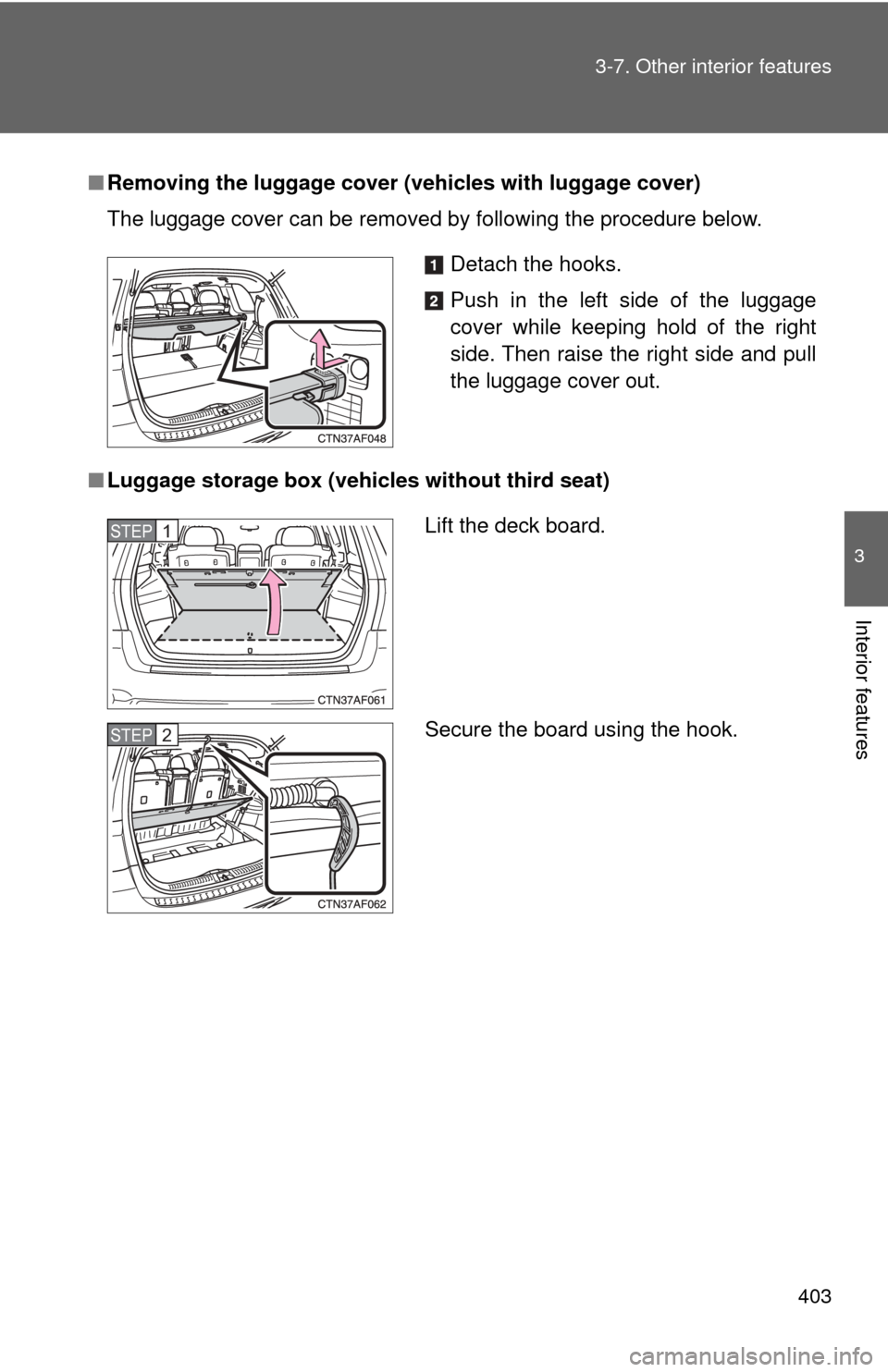
Removing the luggage cover ( vehicles with luggage cover)
The luggage cover can be removed by following the procedure below.
■ Luggage storage box (vehicles without third seat)
Detach the hooks.
Push in the left side of the luggage
cover while keeping hold of the right
side. Then raise the right side and pull
the luggage cover out.
Lift the deck board.
Secure the board using the hook.STEP1
STEP2
Page 406 of 608
406
3-7. Other interior features
Garage door opener∗
The garage door opener (HomeLink Universal Transceiver) is manufac-
tured under license from HomeLink.
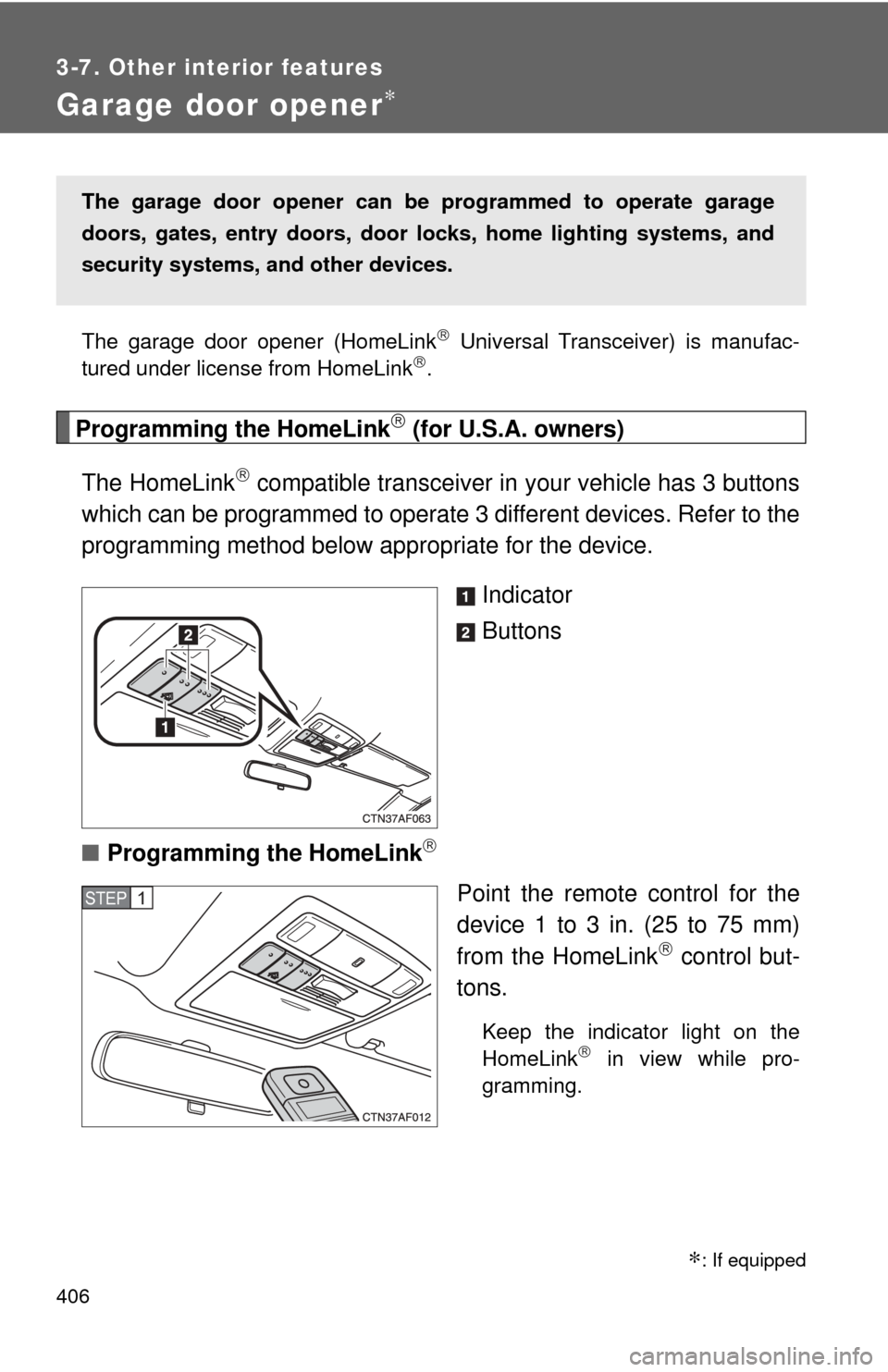
Programming the HomeLink (for U.S.A. owners)
The HomeLink
compatible transceiver in your vehicle has 3 buttons
which can be programmed to operate 3 different devices. Refer to the
programming method below appropriate for the device.
Indicator
Buttons
■ Programming the HomeLink
Point the remote control for the
device 1 to 3 in. (25 to 75 mm)
from the HomeLink
control but-
tons.
Keep the indicator light on the
HomeLink in view while pro-
gramming.
The garage door opener can be programmed to operate garage
doors, gates, entry doors, door locks, hom e lighting systems, and
security systems, and other devices.
STEP1
∗: If equipped
Page 409 of 608
409
3-7. Other interior features
3
Interior features
Test the operation of the HomeLink by pressing the newly
programmed button. Check to see if the gate/device operates
correctly.
Repeat the steps above to program another device for each of
the remaining HomeLink
buttons.
■ Programming other devices
To program other devices such as home security systems, home
door locks or lighting, contact your authorized Toyota dealer for
assistance.
■ Reprogramming a button
The individual HomeLink
buttons cannot be erased but can be
reprogrammed. To reprogram a button, follow the programming
instructions.
Operating the HomeLink
Press the appropriate HomeLink button. The HomeLink indicator
light on the HomeLink transceiver should turn on.
The HomeLink continues to send a signal for up to 20 seconds as long
as the button is pressed.
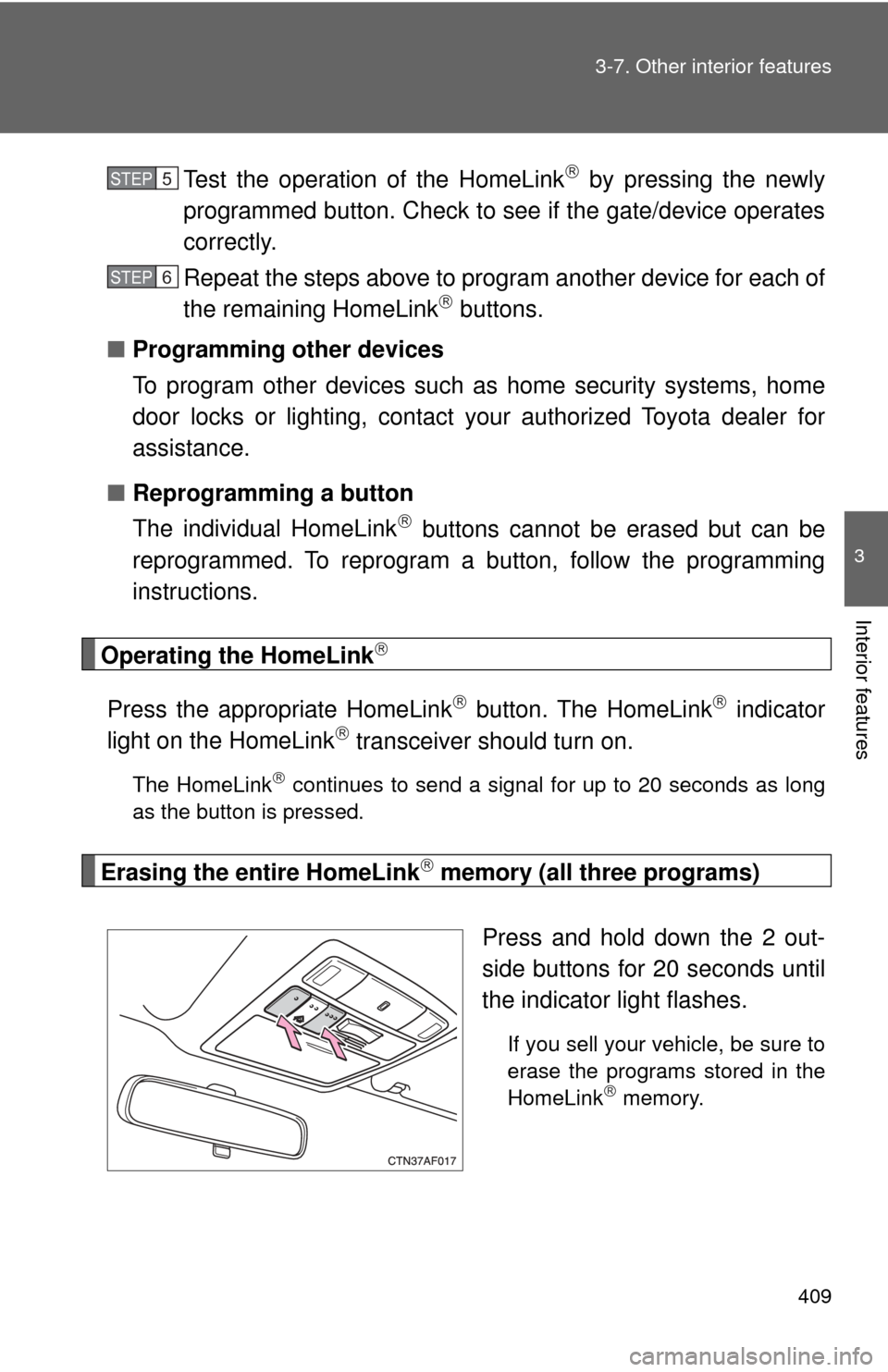
Erasing the entire HomeLink memory (all three programs)
Press and hold down the 2 out-
side buttons for 20 seconds until
the indicator light flashes.
If you sell your vehicle, be sure to
erase the programs stored in the
HomeLink
memory.
STEP5
STEP6
Page 413 of 608
413
3-7. Other interior features
3
Interior features
■
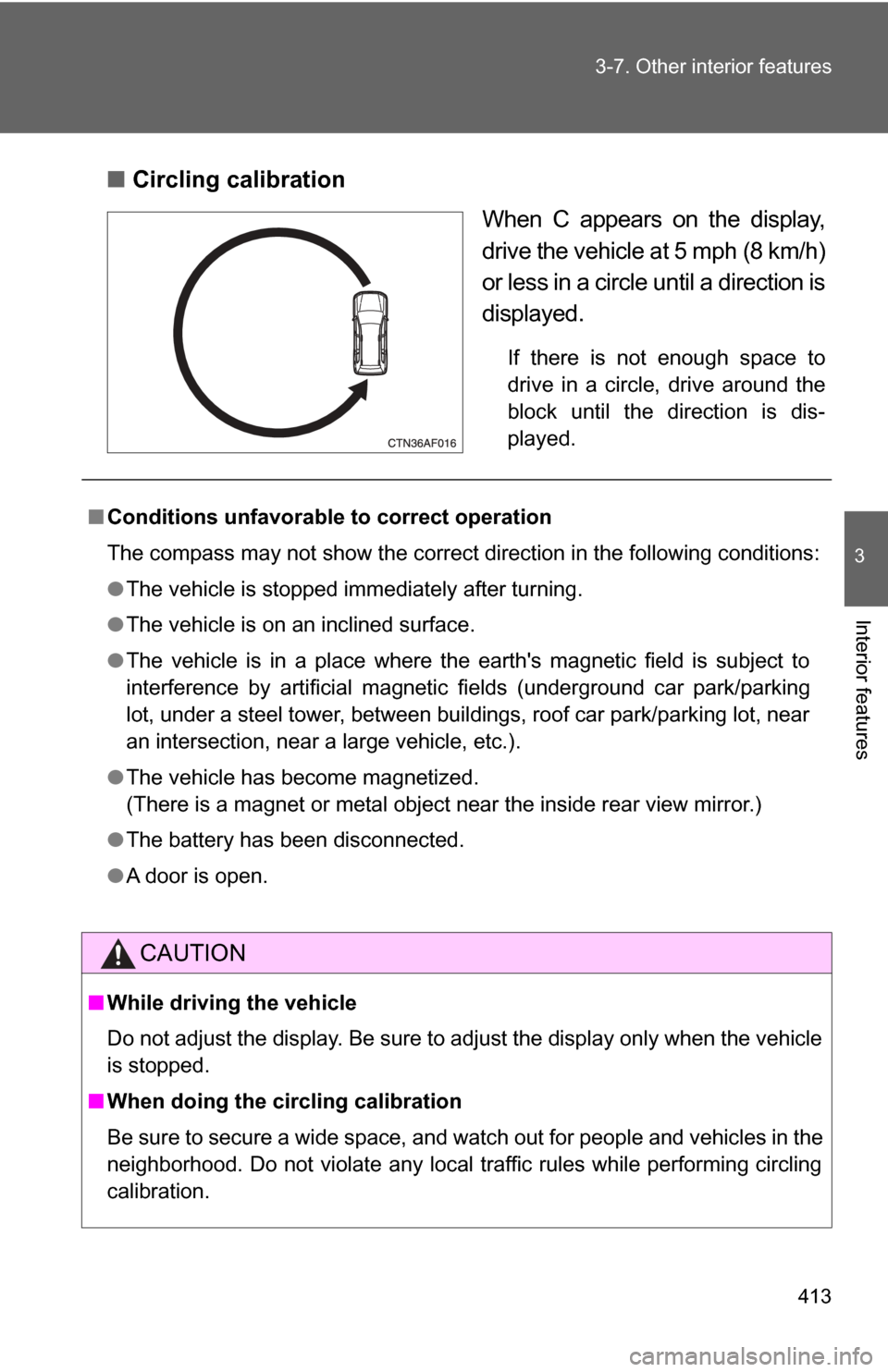
Circling calibration
When C appears on the display,
drive the vehicle at 5 mph (8 km/h)
or less in a circle until a direction is
displayed.
If there is not enough space to
drive in a circle, drive around the
block until the direction is dis-
played.
■Conditions unfavorable to correct operation
The compass may not show the correct direction in the following conditions:
●The vehicle is stopped immediately after turning.
● The vehicle is on an inclined surface.
● The vehicle is in a place where the earth's magnetic field is subject to
interference by artificial magnetic fields (underground car park/parking
lot, under a steel tower, between buildings, roof car park/parking lot, near
an intersection, near a large vehicle, etc.).
● The vehicle has become magnetized.
(There is a magnet or metal object near the inside rear view mirror.)
● The battery has been disconnected.
● A door is open.
CAUTION
■While driving the vehicle
Do not adjust the display. Be sure to adjust the display only when the vehicle
is stopped.
■ When doing the circling calibration
Be sure to secure a wide space, and watch out for people and vehicles in the
neighborhood. Do not violate any local traffic rules while performing circling
calibration.
Page 425 of 608
425
4-2. Maintenance
4
Maintenance and care
Vehicle interior
ItemsCheck points
Accelerator pedal • Moves smoothly (without uneven
pedal effort or catching)?
Automatic transmission “Park”
mechanism • Can the vehicle be held securely
on an incline with the shift lever in
P?
Brake pedal • Moves smoothly?
• Does it have appropriate clear-
ance and correct amount of free
play?
Brakes • Not pull to one side when
applied?
• Loss of brake effectiveness?
• Spongy feeling brake pedal?
• Pedal almost touches floor?
Head restraints • Move smoothly and lock
securely?
Indicators/buzzers • Function properly?
Lights • Do all the lights come on?
• Headlights aimed correctly?
Parking brake • Moves smoothly?
• Can hold the vehicle securely on
an incline?
Seat belts • Does the seat belt system oper-
ate smoothly?
• Are the belts undamaged?
Seats • Do the seat controls operate
properly?
Steering wheel • Moves smoothly?
• Has correct free play?
• No strange noises?
Page 433 of 608
433
4-3. Do-it-yourself maintenance
4
Maintenance and care
CAUTION
■
Pre-driving check
Check that the hood is fully closed and locked.
If the hood is not locked properly, it may open while the vehicle is in motion
and cause an accident, which may result in death or serious injury.
■ After installing the support rod into the slot
Make sure the rod supports the hood securely from falling down on to your
head or body.
NOTICE
■When closing the hood
Be sure to return the support rod to its clip before closing the hood. Closing
the hood with the support rod up could cause the hood to bend.
Page 436 of 608

436 4-3. Do-it-yourself maintenance
CAUTION
■When raising your vehicle
Make sure to observe the following to reduce the possibility of death or seri-
ous injury.
●Do not use the jack that was supplied with your vehicle.
● Do not put any part of your body or get underneath the vehicle supported
only by the floor jack.
Always use automotive jack stands on a solid, level surface.
● Do not start the engine while the vehicle is supported by the floor jack.
● Stop the vehicle on level firm ground, firmly set the parking brake and shift
the shift lever in P.
● Make sure to set the floor jack properly at the jack point.
Raising the vehicle with an improperly positioned floor jack will damage
the vehicle and may cause the vehicle to fall off the floor jack.
● Do not raise the vehicle while someone is in the vehicle.
● When raising the vehicle, do not place any objects on top of or underneath
the floor jack.
NOTICE
■Front jack point cover
●After installing the front jack point cover, make sure it is securely in its orig-
inal position.
● Before jacking up your vehicles, remove the front jack point cover. Other-
wise, the cover may be damaged.
●Lift up the vehicle using a floor jack
such as the one shown in the illustra-
tion.