Page 66 of 608
66
1-2. Opening, closing and locking the doors
Side doors
The vehicle can be locked and unlocked using the entry function,
wireless remote control, key or door lock switch.
■Entry function (vehicles with smart key system)
→P. 3 3
■ Wireless remote control
→P. 5 4
■ Key
Vehicles without smart key system
Locks all doors
Unlocks all doors
Turning the key unlocks the
driver's door. Turning the key
again unlocks the other doors.
Vehicles with smart key system
The doors can also be locked and unlocked with the mechanical
key. ( →P. 539)
Page 68 of 608

68 1-2. Opening, closing and locking the doors
Rear door child-protector lockThe door cannot be opened from
inside the vehicle when the lock
is set.
These locks can be set to prevent
children from opening the rear
doors. Push down on each rear
door switch to lock both rear
doors.
Automatic door locking and unlocking systemsThe following functions can be set or cancelled:
■ Setting and canceling the functions
To switch between setting and canceling, follow the procedure
below:
Vehicles without smart key system:
Close all the doors and switch the engine switch to the “ON”
position. (Perform step 2 within 10 seconds.)
Vehicles with smart key system:
Close all the doors and switch the “ENGINE START STOP”
switch to IGNITION ON mode. (Perform step 2 within 10 sec-
onds.)
FunctionOperation
Shift position linked
door locking functionShifting the shift lever out of P locks all
doors.
Shift position linked
door unlocking functionShifting the shift lever to P unlocks all doors.
STEP1
Page 69 of 608

69
1-2. Opening, closing and locking the doors
1
Before driving
Shift the shift lever to P or N, and
press and hold the driver's door
lock switch ( or ) for approx-
imately 5 seconds and then
release it.
The shift lever and switch posi-
tions corresponding to the
desired function to be set or can-
celed are shown in the following
table.
When the setting or canceling operation is complete, all doors are
locked and then unlocked.
STEP2
FunctionShift lever positionSwitch position
Shift position linked door lock-
ing function
PShift position linked door
unlocking function
■
When locking the doors using the key
Vehicles without smart key system
The door cannot be locked if the key is in the engine switch.
Vehicles with smart key system
The door cannot be locked if the “ENGINE START STOP” switch is in
ACCESSORY or IGNITION ON mode, or the electronic key is left inside
the vehicle.
Depending on the position of the electronic key, the key may not be
detected correctly and the door may be locked.
■ Customization that can be configured at Toyota dealer
Settings (e.g. door unlocking function) can be changed.
(Customizable features →P. 582)
Page 71 of 608
71
1
1-2. Opening, closing and locking the doors
Before driving
Back door
The back door can be locked/unlocked and opened by the following
procedures.
■Locking and unlocking the back door
Door lock switch
→P. 6 7
Entry function (vehicles with smart key system)
→ P. 3 4
Wireless remote control
→ P. 5 4
Key
→ P. 6 6
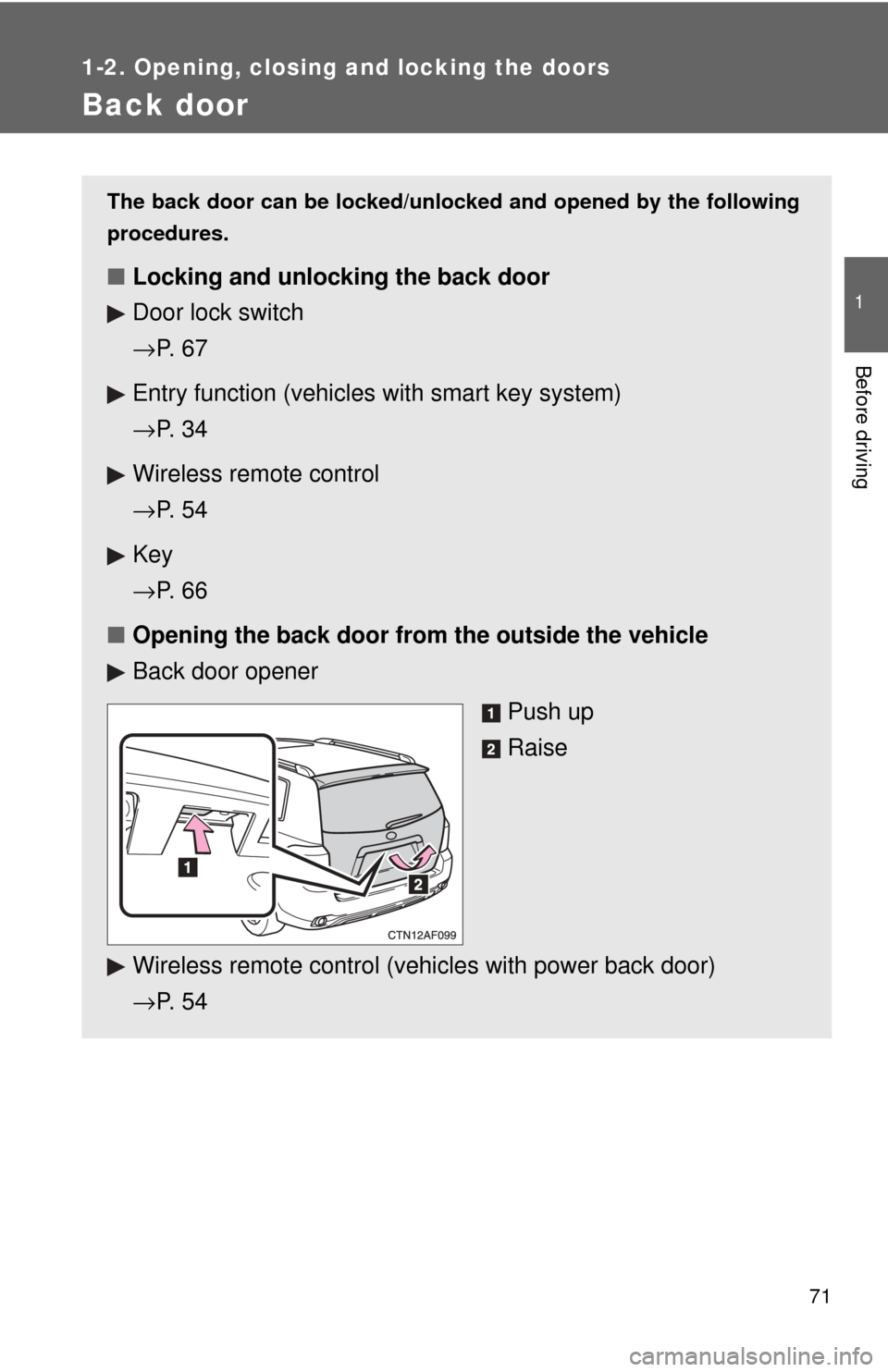
■ Opening the back door from the outside the vehicle
Back door opener
Push up
Raise
Wireless remote control (vehicles with power back door)
→ P. 5 4
Page 77 of 608
77
1
1-2. Opening, closing and locking the doors
Before driving
Glass hatch∗
■Opening and closing the glass hatch
●Make sure that the rear wiper is switched off.
● Do not rotate the rear wiper arm while the glass hatch is opening. (If the
rear wiper arm is rotated, close the glass hatch as it is then switch on the
wiper. The rear wiper arm will return to the correct position automatically
after wiping.)
● Make sure that the back door is closed before closing the glass hatch.
The glass hatch can be opened using the glass hatch opener or wire-
less remote control.
■ Wireless remote control (veh icles without smart key sys-
tem)
→ P. 5 4
■ Entry function (vehicles with smart key system)
→P. 3 4
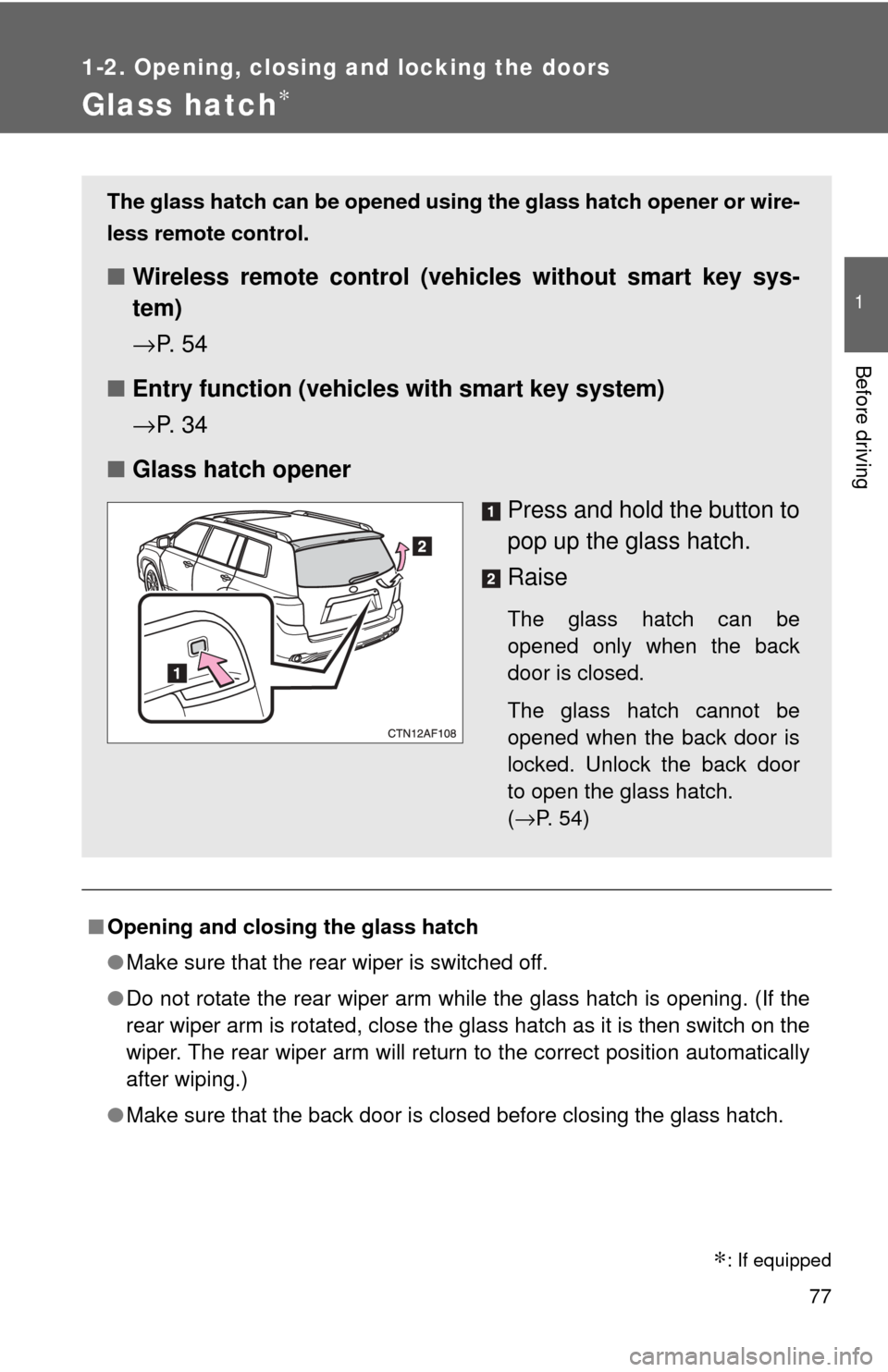
■ Glass hatch opener
Press and hold the button to
pop up the glass hatch.
Raise
The glass hatch can be
opened only when the back
door is closed.
The glass hatch cannot be
opened when the back door is
locked. Unlock the back door
to open the glass hatch.
(→P. 54)
∗: If equipped
Page 101 of 608
101
1
1-3. Adjustable components (seats, mirrors, steering wheel)
Before driving
Anti-glare inside rear view mirror
Glare from the headlights of vehicles behind can be reduced by
using the following functions.
Manual anti-glare inside rear view mirror
Normal position
Anti-glare position
Auto anti-glare inside rear view mirror
In automatic mode, sensors are used to detect the headlights of
vehicles behind and automatical ly reduces the reflected light.
Turns automatic mode on/off
The indicator comes on when
automatic mode is turned on.
Vehicles without smart key
system:
The mirror will revert to auto-
matic mode each time the
engine switch is turned to the
“ON” position.
Vehicles with smart key sys-
tem:
The mirror will revert to auto-
matic mode each time the
“ENGINE START STOP”
switch is turned to IGNITION
ON mode.
Page 104 of 608
104 1-3. Adjustable components (seats, mirrors, steering wheel)
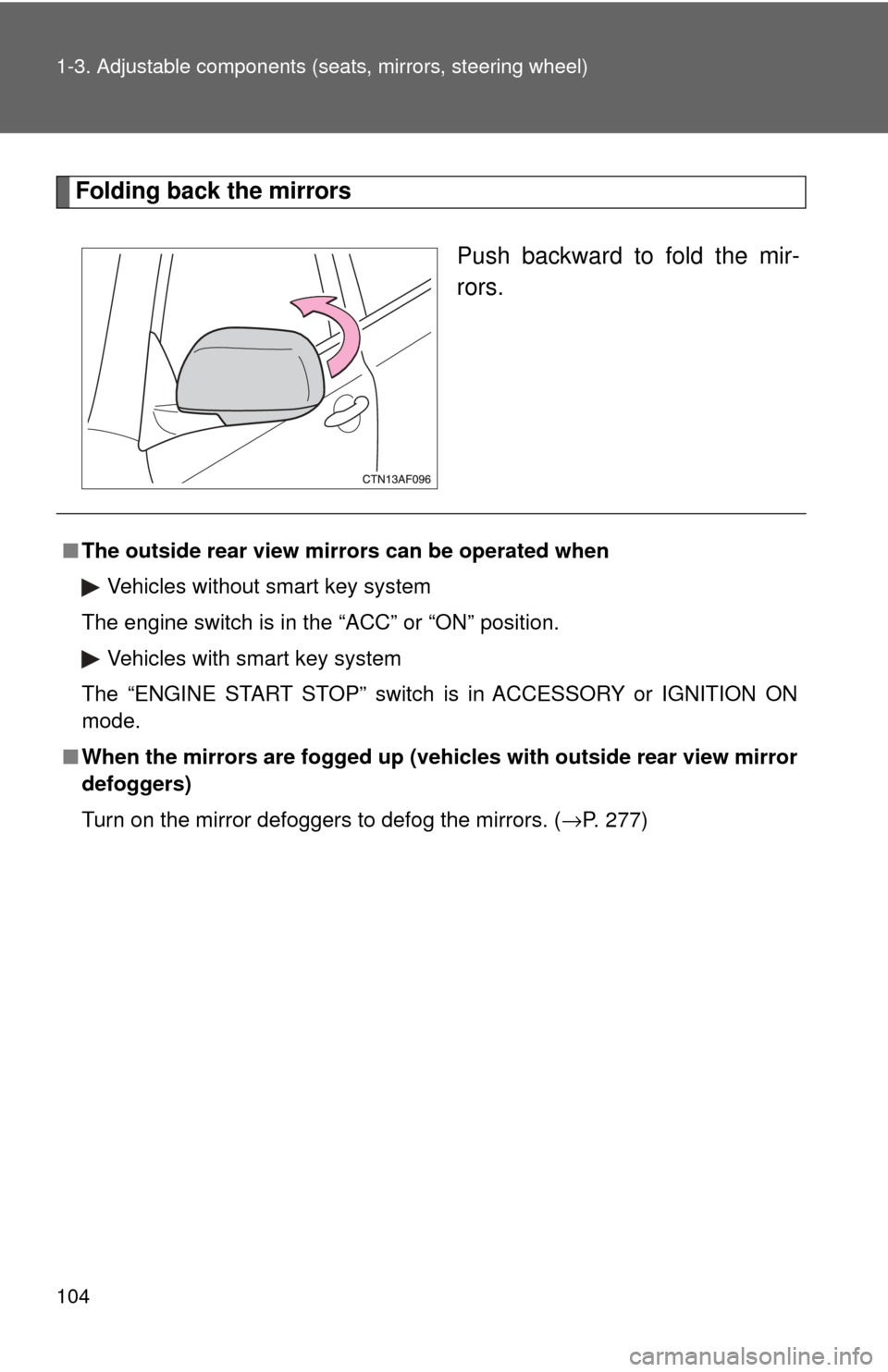
Folding back the mirrors
Push backward to fold the mir-
rors.
■The outside rear view mi rrors can be operated when
Vehicles without smart key system
The engine switch is in the “ACC” or “ON” position. Vehicles with smart key system
The “ENGINE START STOP” switch is in ACCESSORY or IGNITION ON
mode.
■ When the mirrors are fogged up (veh icles with outside rear view mirror
defoggers)
Turn on the mirror defoggers to defog the mirrors. ( →P. 277)
Page 107 of 608

107
1-4. Opening and closing the windows and moon roof
1
Before driving
■
The power windows can be operated when
Vehicles without smart key system
The engine switch is in the “ON” position.
Vehicles with smart key system
The “ENGINE START STOP” switch is in IGNITION ON mode.
■ Operating the power windows after turning the engine off (driver’s win-
dow only)
Vehicles without smart key system
The power windows can be operated for approximately 45 seconds after the
engine switch is turned to the “ACC” or “LOCK” position. They cannot, how-
ever, be operated once either front door is opened.
Vehicles with smart key system
The power windows can be operated for approximately 45 seconds after the
“ENGINE START STOP” switch is turned to ACCESSORY mode or turned
OFF. They cannot, however, be operated once either front door is opened.
■ Jam protection function (driver’s window only)
If an object becomes caught between the window and the window frame,
window travel is stopped and the window is opened slightly.
CAUTION
■Closing the windows
Observe the following precautions.
Failing to do so may result in death or serious injury.
●Check to make sure that all passengers do not have any part of their body
in a position where it could be caught when a window is being operated.
● Do not allow children to operate the power windows.
Closing a power window on someone can cause serious injury, and in
some instances, even death.
■ Jam protection function (driver’s window only)
●Never try jamming any part of your body to activate the jam protection
function intentionally.
● The jam protection function may not work if something gets caught just
before the window fully closes.