Page 142 of 444
142
2-2. Instrument cluster
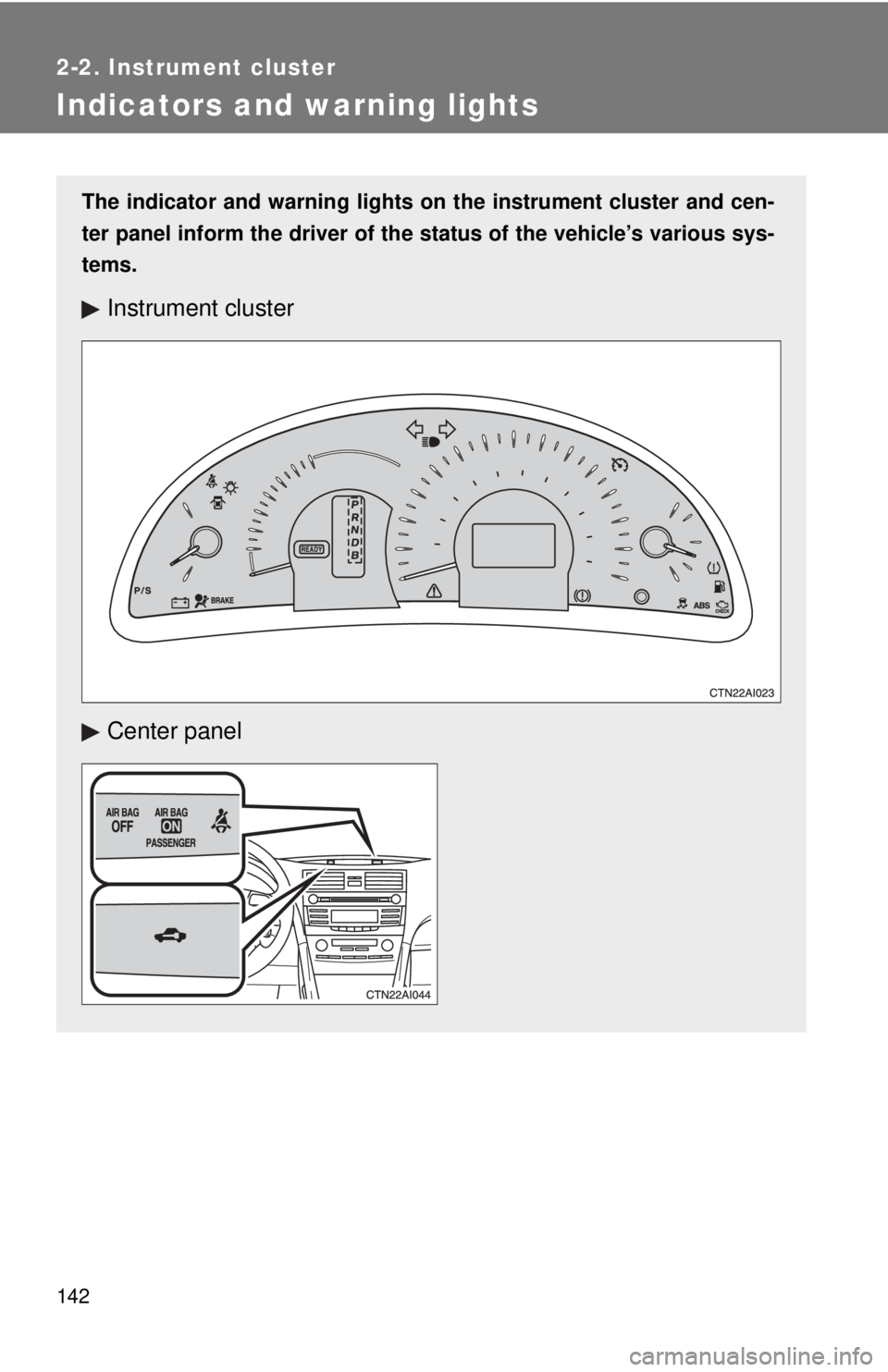
Indicators and warning lights
The indicator and warning lights on the instrument cluster and cen-
ter panel inform the driver of the status of the vehicle’s various sys-
tems.
Instrument cluster
Center panel
Page 144 of 444
144 2-2. Instrument cluster
CAUTION
■If a safety system warning light does not come on
Should a safety system light such as the ABS or the SRS warning light not
come on when you start the hybrid system, this could mean that these sys-
tems are not available to help protect you in an accident, which could result
in death or serious injury. Have the vehicle inspected by your Toyota dealer
immediately if this occurs.
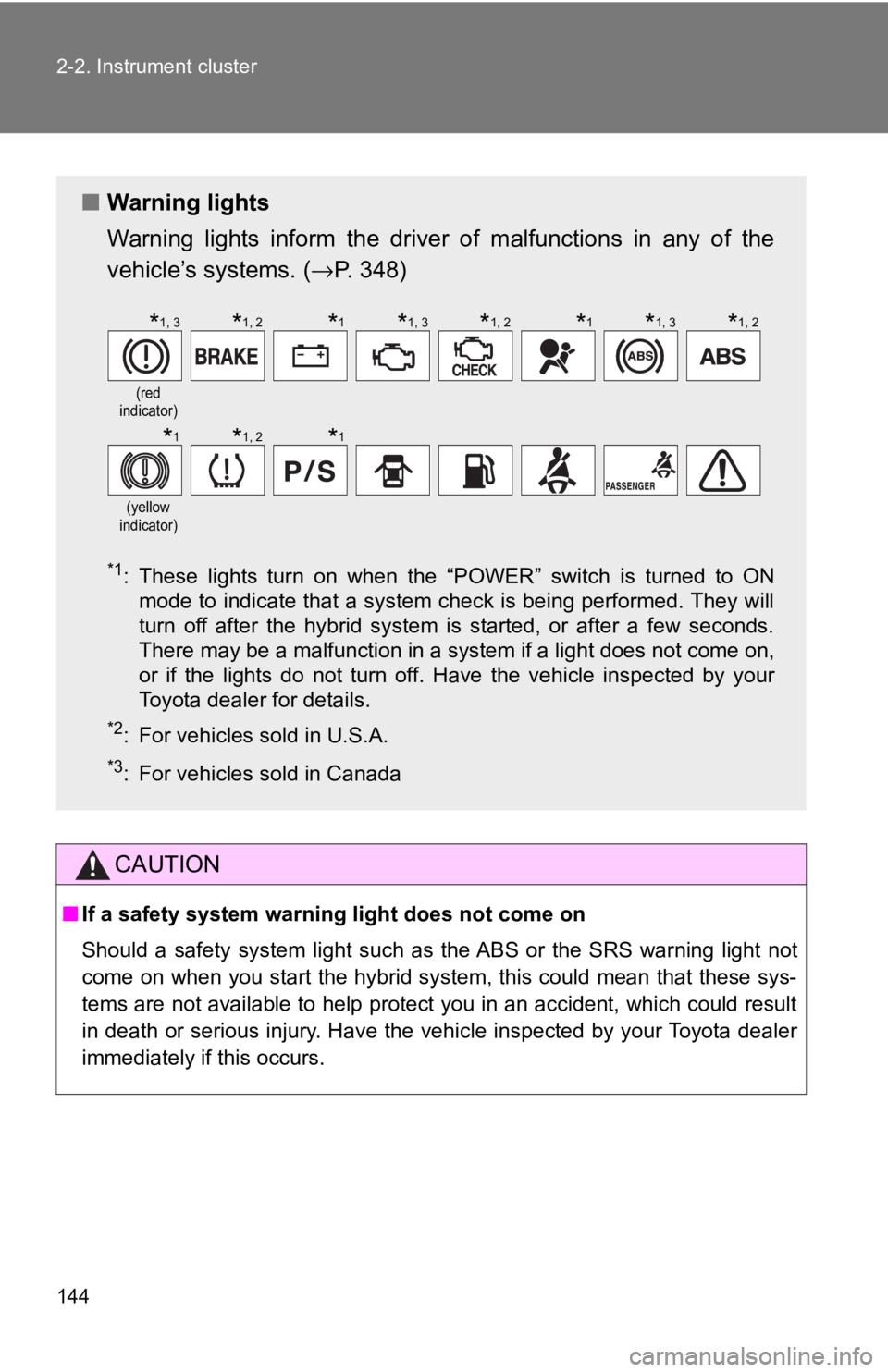
■ Warning lights
Warning lights inform the driver of malfunctions in any of the
vehicle’s systems. ( →P. 348)
*1: These lights turn on when the “POWER” switch is turned to ON
mode to indicate that a system check is being performed. They will
turn off after the hybrid system is started, or after a few seconds.
There may be a malfunction in a system if a light does not come on,
or if the lights do not turn off. Have the vehicle inspected by your
Toyota dealer for details.
*2: For vehicles sold in U.S.A.
*3: For vehicles sold in Canada
(red
indicator)
(yellow
indicator)
*1, 3*1, 2*1*1, 3*1, 2*1*1, 3*1, 2
*1*1, 2*1
Page 145 of 444
145
2-2. Instrument cluster
2
When driving
Multi-information display
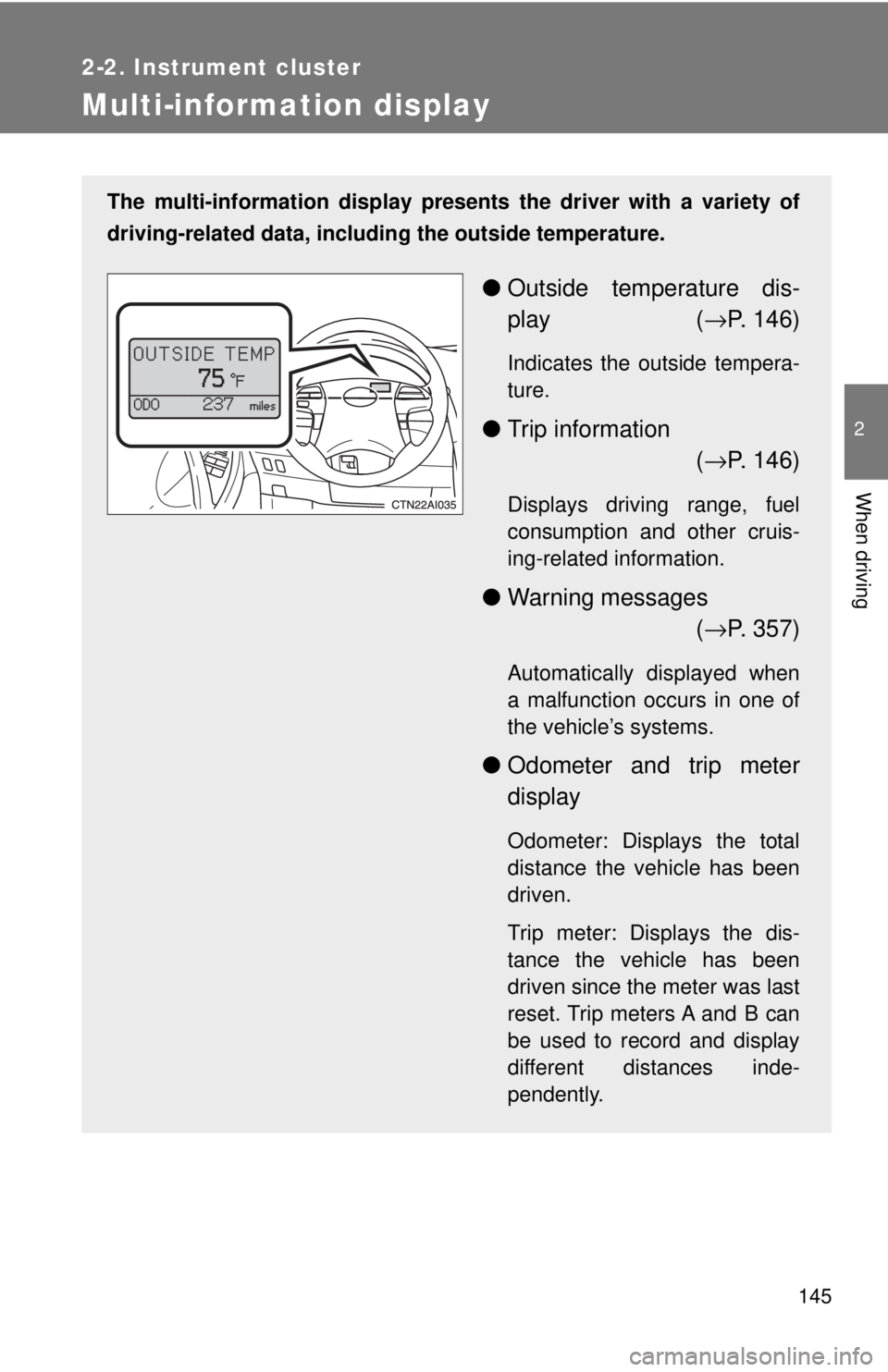
The multi-information display presents the driver with a variety of
driving-related data, including the outside temperature.
● Outside temperature dis-
play ( →P. 146)
Indicates the outside tempera-
ture.
● Trip information
(→ P. 146)
Displays driving range, fuel
consumption and other cruis-
ing-related information.
● Warning messages
(→ P. 357)
Automatically displayed when
a malfunction occurs in one of
the vehicle’s systems.
● Odometer and trip meter
display
Odometer: Displays the total
distance the vehicle has been
driven.
Trip meter: Displays the dis-
tance the vehicle has been
driven since the meter was last
reset. Trip meters A and B can
be used to record and display
different distances inde-
pendently.
Page 161 of 444
161
2-4. Using other
driving systems
2
When driving
CAUTION
■When VSC is activated
The slip indicator light flashes and a warning buzzer sounds. Always drive
carefully. Reckless driving may cause an accident. Exercise particular care
when the indicator light flashes and a buzzer sounds.
■ Replacing tires
Make sure that all tires are of the same size, brand, tread pattern and total
load capacity. In addition, make sure that the tires are inflated to the recom-
mended tire pressure level.
The ABS and VSC system will not function correctly if different tires are fitted
on the vehicle.
Contact your Toyota dealer for further information when replacing tires or
wheels.
■ Handling of tires and suspension
Using tires with any kind of problem or modifying the suspension will affect
the driving assist systems, and may cause the system to malfunction.
Page 169 of 444
169
2-5. Driving information
2
When driving
NOTICE
■
Repairing or replacing snow tires
Request repairs of and obtain replacement snow tires from Toyota dealers or
legitimate tire retailers.
This is because the removal and attachment of snow tires affects the opera-
tion of the tire pressure warning valves and transmitters.
■ Fitting tire chains
The tire pressure warning valves and transmitters may not function correctly
when tire chains are fitted.
Page 184 of 444
184 3-2. Using the audio system
■Using cellular phones
Interference may be heard through the audio system's speakers if a cellular
phone is being used inside or close to the vehicle while the audio system is
operating.
CAUTION
■For vehicles sold in U.S.A. and Canada
●Part 15 of the FCC Rules
FCC Warning:
Any unauthorized changes or modifications to this equipment will void the
user’s authority to operate this device.
● Laser products
• Do not take this unit apart or attempt to make any changes yourself.
This is an intricate unit that uses a laser pickup to retrieve information
from the surface of compact discs. The laser is carefully shielded so
that its rays remain inside the cabinet. Therefore, never try to disas-
semble the player or alter any of its parts since you may be exposed to
laser rays and dangerous voltages.
• This product utilizes a laser. Use of controls or adjustments or performance of procedures other
than those specified herein may result in hazardous radiation expo-
sure.
TitlePage
Using the radioP. 186
Using the CD playerP. 192
Playing MP3 and WMA discsP. 199
Optimal use of the audio systemP. 207
Using the AUX adapterP. 210
Using the steering wheel audio switchesP. 211
Page 215 of 444

215
3-3. Using the hand
s-free phone system (for cellular phone)
3
Interior features
FCC WARNING:
Any changes or modifications in construction of this device which are not
expressly approved by the party responsible for compliance could void the
user’s authority to operate the equipment.
CAUTION:
Radio Frequency Radiation Exposure
This equipment complies with FCC radiation exposure limits set forth for
uncontrolled equipment and meets the FCC radio frequency (RF) Exposure
Guidelines in Supplement C to OET65. This equipment has very low levels
of RF energy that it deemed to comply without maximum permissive expo-
sure evaluation (MPE). But it is desirable that it should be installed and oper-
ated with at least 20 cm and more between the radiator and person’s body
(excluding extremities: hands, wrists, feet and legs).
Co-location:
This transmitter must not be co-located or operated in conjunction with any
other antenna or transmitter.
CAUTION
■Caution while driving
Do not use a cellular phone, or connect the Bluetooth
® phone.
NOTICE
■To prevent damage to a cellular phone
Do not leave a cellular phone in the vehicle. The temperature inside may
become high resulting in damage to the phone.
Page 268 of 444
268 3-6. Other interior features
■Before programming
●Install a new battery in the transmitter.
● The battery side of the transmitter must be pointed away from Home-
Link
.
■ Certification for the garage door opener
This device complies with Part 15 of the FCC Rules and with RSS-210 of the
IC Rules.
Operation is subject to the following two conditions: (1) This device may not
cause harmful interference, and (2) this device must accept any interference
received, including interference that may cause undesired operation.
WARNING: This transmitter has been tested and complies with FCC and IC
rules. Changes or modifications not expressly approved by the party respon-
sible for compliance could void the user's authority to operate the device.
CAUTION
■When programming a garage door or other remote control device
The garage door may operate, so ensure people and objects are out of dan-
ger to prevent potential harm.
■ Conforming to federal safety standards
Do not use the HomeLink
compatible transceiver with any garage door
opener or device that lacks safety stop and reverse features as required by
federal safety standards.
This includes any garage door that cannot detect an obstruction object. A
door or device without these features increases the risk of death or serious
injury.