2009 SKODA YETI warning
[x] Cancel search: warningPage 56 of 271

Lights and Visibility
55
Using the system
Safety
Driving Tips
General Maintenance
Breakdown assistance
Technical Data
Rain lights If you switch on the windscreen wipe in th
e operation rain sensor* for longer than 10
seconds or in the operation permanent wipe (position 2 or 3)
⇒page 63 switching on
for longer than 15 seconds, the side lights
and low beam are switched on automati-
cally. The light switches off if the windscreen wipe is in operation rain sensor* for more than 4 minutes or is not switched
on in the operation permanent wipe.
WARNING
The automatic light control only operat
es as a support. Th
e driver is not
released from his responsibility to inspect the light and if necessary to switch on the light depending on the light conditions. The light sensor cannot detect for example rain or snow. For these conditions we recommend to switch on the low beam
!
Note
•
Do not affix any stickers in front of the light sensor, so that you do not impair its
function or put it out of operation.•
The same principles as for using the automa
tic light control also
apply to the light
which is switched on manually
⇒page 53.
Cornering lights*The cornering lights are used to illuminate
the curves by means of the cone of light
swiveling together with the front headlight with Xenon lights*. This function is active when the speed of the car increases to more than 10km/h. The swiveling function of the headlights ca
n be switched off / on via the menu point
Assistant
in the main menu of the Information display*
⇒page 24.
WARNING
If the cornering ligh
ts are defective, the headlights are automatically lowered to
the emergency position, which prevents a
possible dazzling of oncoming traffic.
Thus the illuminated length of the road is shortened. Drive carefully and have the car inspected immediatel
y by a specialist garage.
Coming Home FunctionThe function makes it possible to switch on the lights in the darkness for a short time after leaving the vehicle.Switching on Coming Home Function– The light switch is in the position automatic driving lamp control
and the low
beam illuminates.
– Switch off the ignition. – After opening the driver's door, the function Coming Home is switched on.– Close all the doors and the boot lid and lo
ck the vehicle. After a short time, switch
all lights off.
Depending on equipment fitted the function Coming Home switches on the following lights:•
Parking lights,
•
Low beam,
•
Entry lighting in the exterior mirrors,
•
Licence plate light.
Coming Home Function The lights go out 10 seconds after cl
osing all the doors and the boot lid.
If a door or the boot lid re
mains open, the lights go out
60 seconds after switching off
the ignition. The function Coming Home is controlled with the light sensor in the mount of the inte- rior rear mirror. If the light intensity is higher than the set value of the light sensor, the Coming Home Function is not switched on after switching off the ignition.
Note
•
If the Coming Home Function is switched
on constantly, the battery will be heavily
discharged particularly in short-haul traffic.•
The switching on of the described lights
should only be undertaken in accordance
with the legal requirements.
sgg.6.book Page 55 Thursday, September 24, 2009 2:32 PM
Page 58 of 271

Lights and Visibility
57
Using the system
Safety
Driving Tips
General Maintenance
Breakdown assistance
Technical Data
Switching on the fog lights– First of all turn the light switch into position
or ⇒page 56, fig. 46
.
– Pull the light switch into position . The rear fog light warning light
⇒page 29 lights up in the instrument cluster when
the fog light is switched off.Fog lights with the function “Corner”* The fog lights with the function “Corner” improve the illumination of areas close to the vehicle when turning, parking etc.The fog lights with the function “Corner” ar
e regulated according to the steering angle
or after switching on the turn signal light
8) in the following circumstances:
•
the vehicle is stationary and the engine
is running or it moves with a speed of
maximum 40 km/h;•
the daylight driving lights are not switched on;
•
the low beam is switched on or th
e light switch is
in the position
and the
intensity of the ambient light causes the low beam to be switched on;•
the fog lights are not switched on;
•
no reverse gear is engaged.Note
If you engage the reverse gear during the
active function “Corne
r”, both fog lights
illuminate.Rear fog light
Switching on the rear fog light– First of all turn the light switch into position
or ⇒page 56, fig. 46
.
– Pull the switch into position .
The rear fog light warning light
⇒page 29 lights up in the instrument cluster when
the fog light is switched off. Only the rear fog light of the trailer lights
up automatically when you are towing a trailer
using a factory-fitted towing device
which is fitted with the rear fog light.
The rear fog light is located in the rear light array on the driver's side.
Caution
The rear fog light should only be switched on
if visibility is partic
ularly poor (conform
with any varying legal provisions) to avoi
d dazzling vehicles behind your vehicle.
Instrument lighting*
You can adjust the brightness of the instrument lighting.Instrument lighting– Switch on the light. – Turn the control dial
⇒fig. 47
to the desired intensity of the instrument lighting.
For the information display*
⇒page 24 the intensity of the lighting is automatically
set. It is only possible to adjust the instrume
nt lighting with the co
ntrol dial if the light
intensity drops below the set value of the light sensor.
8)If both switch on versions are conflicting, for ex
ample if the steering wheel is turned to the left
and the right turn signal light is switched on, the turn signal light has the higher priority.
A1
A2
Fig. 47 Dash panel:
Instrument lighting
sgg.6.book Page 57 Thursday, September 24, 2009 2:32 PM
Page 59 of 271

Lights and Visibility
58Headlamp range adjustment
Once the low beam is switched on
you can then adapt the range of the
headlights to the lo
ad of the vehicle.
– Turn the control dial
⇒fig. 48
until you have adjusted the low beam so that
oncoming traffic is not dazzled.
Settings The positions correspond
approximately to the
following vehicle loads:
Front seats occupied, luggage compartment empty. All seats occupied, luggage compartment empty. All seats occupied, luggage compartment laden.Driver seat occupied, lu
ggage compartment laden.
Caution
Set the headlight beam adjustment in such
a way as to avoid dazzling oncoming traffic.
Note
Headlights fitted with Xenon bulbs* adapt
automatically to the load and driving state
of the vehicle (e.g. accelerating, braking) wh
en the ignition is switched on and when
driving. Vehicles which are equipped with
Xenon bulbs* do not have a manual head-
light range adjustment control.
Switch for hazard warning lights
– Press switch
⇒fig. 49
to switch the hazard warning light system on or off.
All the turn signal lights on the vehicle flas
h at the same time when the hazard warning
light system is switched on. The indicator light for the turn signals and the indicator light in the switch also flash at the same time. You can also switch on the hazard warning light system if the ignition is switched off. The hazard warning light system is switched
on automatically if an airbag is deployed
in the event of an accident. Please comply with any legal requirements when using the hazard warning light system.
Note
Switch on the hazard warning light system if, for example:•
you encounter traffic congestion,
•
your vehicle breaks down or an emergency situation occurs.
Fig. 48 Dash panel: Lights and Visibility
A-A1A2A3
Fig. 49 Dash panel: Switch for hazard warning lights
sgg.6.book Page 58 Thursday, September 24, 2009 2:32 PM
Page 60 of 271
Lights and Visibility
59
Using the system
Safety
Driving Tips
General Maintenance
Breakdown assistance
Technical Data
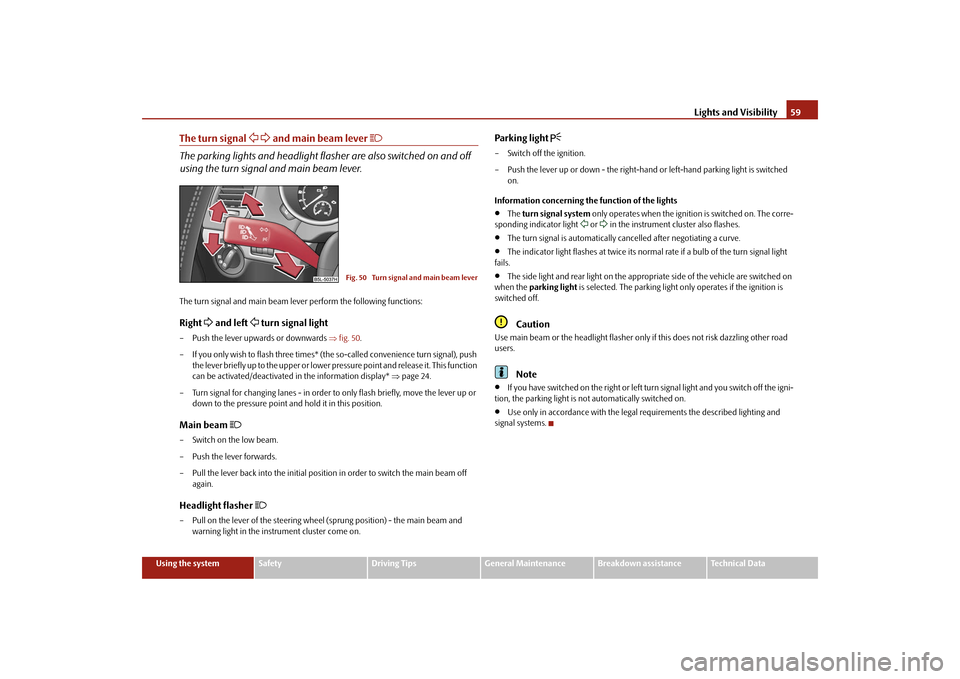
The turn signal
and main beam lever
The parking lights and headlight flas
her are also switched on and off
using the turn signal and main beam lever.The turn signal and main beam le
ver perform the following functions:
Right
and left
turn signal light
– Push the lever upwards or downwards
⇒fig. 50
.
– If you only wish to flash three times* (the
so-called convenience turn signal), push
the lever briefly up to the upper or lower pr
essure point and release it. This function
can be activated/deactivated in the information display*
⇒page 24.
– Turn signal for changing lanes - in order to
only flash briefly, move the lever up or
down to the pressure point and hold it in this position.
Main beam
– Switch on the low beam. – Push the lever forwards.– Pull the lever back into the initial positi
on in order to switch the main beam off
again.
Headlight flasher
– Pull on the lever of the steering whee
l (sprung position) -
the main beam and
warning light in the instrument cluster come on.
Parking light
– Switch off the ignition. – Push the lever up or down - the right-hand
or left-hand parking light is switched
on.
Information concerning the function of the lights•
The
turn signal system
only operates when the ignition is switched on. The corre-
sponding indicator light
or in the instrument cluster also flashes.
•
The turn signal is automatically cancelled after negotiating a curve.
•
The indicator light flashes at twice its normal
rate if a bulb of the turn signal light
fails.•
The side light and rear light on the appropriate side of the vehicle are switched on
when the
parking light
is selected. The parking light only operates if the ignition is
switched off.
Caution
Use main beam or the headlight flasher only
if this does not risk dazzling other road
users.
Note
•
If you have switched on the right or left turn signal light and you switch off the igni-
tion, the parking light is not automatically switched on.•
Use only in accordance with the legal
requirements the described lighting and
signal systems.
Fig. 50 Turn signal and main beam lever
sgg.6.book Page 59 Thursday, September 24, 2009 2:32 PM
Page 62 of 271

Lights and Visibility
61
Using the system
Safety
Driving Tips
General Maintenance
Breakdown assistance
Technical Data
Rear reading lightsSwitching the interior light on– Press the cover glass in the area of the symbol
⇒fig. 53
.
Switching the interior light off– Press the cover glass in the area of the symbol
O ⇒fig. 53
.
Door contact setting– Position the cover glass into middle position
.
Front door warning light*The warning light is located in the door trim panel below
⇒fig. 54
.
The warning light goes on every time the do
or is opened. The light goes out about 10
minutes after opening the door in order to
avoid discharging the battery of the vehicle.
There is a reflector installed on some vehicles instead of the warning light.Luggage compartment lightThe lighting comes on automatically when the boot lid is opened. The luggage compartment lighting will switch off again au
tomatically if the boot lid remains open
for more than about 30 minutes.Entry lighting*The lighting is positioned on the bottom edge of the exterior mirror. The light beam is directed towards
the entry area of the front door.
The light comes on after the doors have been
locked or on opening the boot lid. The
light goes out after switching on the ignition
or up to 30 seconds
after closing all the
doors, the bonnet and the boot lid. If a door, the bonnet or the boot lid remains open, the light goes out within 2 minutes if the ignition is switched off.
WARNING
If the entry light comes on, do not touch its cover - risk of burns!
Fig. 53 Detail of the headliner: Rear reading lightsFig. 54 Front door: Warning light
sgg.6.book Page 61 Thursday, September 24, 2009 2:32 PM
Page 63 of 271

Lights and Visibility
62VisibilityRear window heater– You can switch the rear window heater
on or off by pressing the switch
⇒ fig. 55
- the indicator light in the switch comes on or goes out.
The rear window heater only operates when the engine is running. The rear wind
ow heater
switches
off automatically after 10 minutes.
For the sake of the environment
As soon as the window is de-iced or free from
mist, the heating should be switched off.
The reduced current consumption will have a favourable effect on fuel economy ⇒ page 177, “Saving electricity”.Note
•
The position and the shape of the swit
ch can differ depending on equipment
installed in the vehicle.•
If the on-board voltage drops, the rear window heater is switched off automatically,
in order to provide sufficient electrical energy for the engine control.
Sun visorsFig. 56 Sun visor: Swivelling out / double sun visor: Folding outYou can pull the sun visor for the driver or front passenger out of the fixture and swivel it toward the door in the direction of the arrow
⇒fig. 56
.
The vanity mirrors* in the sun visors are provided with covers. Push the cover in direc- tion of arrow . On vehicles which are equipped with double
sun visor*, you can also unfold the auxil-
iary visor in direction of arrow after swivelling the sun visor
⇒fig. 56
.
WARNING
The sun visors must not be swivelled to the side windows into the deployment area of the head airbags if any objects, su
ch as ball-point pens
etc. are attached
to them. This might result in injuries to the occupants if the head airbag is deployed.
Fig. 55 Switch for rear window heater
A1
A2
A3
sgg.6.book Page 62 Thursday, September 24, 2009 2:32 PM
Page 65 of 271

Lights and Visibility
64The windscreen wipers and the wash system only operate if the ignition is switched on and the bonnet is closed
9).
If the intermittent wipe is switched on, the intervals are also controlled depending on speed. The rain sensor* automatically regulates
the break between the individual wiper
strokes depending on the intensity of the rain. The rear window will be wiped again if the front window wipers are on when reverse gear is selected. The windscreen washer nozzles are heated* when the ignition is switched on.Top up with wash liquid
⇒page 214.
Winter position If the windscreen wipers are in rest positi
on, they cannot be folded out from the wind-
screen. For this reason we recommend adjusting the windscreen wipers in winter so that they can be folded out from the windscreen easily. You can set this rest position as follows:•
Switch on the windscreen wipers.
•
Switch off the ignition. The windscreen wipers remain in the position in which they
were when switching off the ignition. You can also use the service position
⇒page 65 as a winter position.
WARNING
•
Properly maintained wind
screen wiper blades are essential for clear visi-
bility and safe driving
⇒page 65.
•
Do not use the windscreen washer sy
stem at low temperatures, without
heating the windscreen beforehand.
Otherwise the window cleaner could
freeze on the windscreen and re
strict the view to the front.
•
The rain sensor only operates as a support. The driver is not released from
the responsibility to set the function of the windscreen wipers manually depending on the visibility conditions.
Caution
In frosty weather, please firs
t of all check whether the windscreen wiper blades are not
frozen to the windscreen before switching them on. Switching on windscreen wipers when the blades are frozen to the windscreen may result in damage both to the blades and the motor of the windscreen wipers!
Note
•
If the slower or the faster wiper setting is switched on
⇒page 63, fig. 57
and
the vehicle speed decreases to below 4 km/h, the lower wiper step is switched on automatically. At a speed increase of more
than 8 km/h the previous wiper setting is
established again.•
If there is an obstacle on the windscre
en, the wiper will try to push away the
obstacle. If the obstacle continues to block
the wiper, the wiper stops after 5 cycles, in
order to avoid a damage to the wiper. Re
move the obstacle and and switch on the
wiper again.Automatic rear window wiper*If the windshield wiper lever is in the posi
tion or , the rear window wiper carries
out a wiping process every 30 seconds or
10 seconds at a speed above 5 km/h.
When the rain sensor* is active (the lever
is in the position ) the function is only
active if the front window wipers continue
to operate (no break between each wiping
process). Activation/deactivation The function of the automatic rear window wiper is activated/deactivated in the infor- mation display* in the menu:„
Setup„
Lights & Vision (Lights & Vision)„
Rear wiper
Note
The function of the automatic rear window
wiper is only valid for vehicles which are
equipped with the information display*. The function is activated in the factory.
9)On vehicles which do not have
a contact switch for the bonnet, the windshield wiper and wash
system operates also when
the bonnet is opened.
A2
A3
A2
A3
A1
sgg.6.book Page 64 Thursday, September 24, 2009 2:32 PM
Page 67 of 271

Lights and Visibility
66Wiper blades in proper
condition are essential to obtain
good visibility
. Wiper blades
should not be allowed to become dirtied by
dust, insect remains and preserving wax.
Juddering or smearing of the
wiper blades could then be
due to wax residues left on
the windscreen by vehicle washing in automa
tic vehicle wash systems. It is therefore
important to
degrease
the lips of the wi
per blades after every pass through an
auto-
matic vehicle wash system
.
WARNING
•
If the windscreen wipers are handled carelessly, there is a risk of damage to
the windscreen.•
You should clean the wiper blades regu
larly with a windscreen cleaner in
order to avoid any smears. Clean a wiper blad
e with a sponge or cloth if it is very
dirty, for example from insect residues.•
Replace the wiper blades once or twice a year for safety reasons. The wiper
blades are available from specialist garages.Replacing the wiper blade on the rear window wiperTaking off the wiper blade– Fold windscreen wiper arm
away from the windscreen.
– Press the locking button, in order to unl
ock the wiper blade and pull off in the
direction of arrow
⇒fig. 59
.
Attaching a wiper blade– Push the wiper blade until it locks up to the stop. – Check whether the wiper blade is correctly attached. – Fold the windscreen wiper ar
m back onto the windscreen.
The same remarks apply here as for
⇒page 65.
Rear-view mirrorManual dimming interior rear-view mirrorBasic setting– Pull the lever on the bottom edge of the mirror forward.Dimming mirror– Pull the lever on the bottom edge of the mirror back.Automatic dimming interior rear-view mirror*Switching on the automatic dimming– Press the button - the warning light lights up
⇒fig. 60
.
Fig. 59 Wiper blade for rear window
Fig. 60 Automatic dimming interior rear-view mirror
AB
AA
sgg.6.book Page 66 Thursday, September 24, 2009 2:32 PM