2009 SKODA YETI ignition
[x] Cancel search: ignitionPage 38 of 271

Instruments and Indicator/Warning Lights
37
Using the system
Safety
Driving Tips
General Maintenance
Breakdown assistance
Technical Data
Boot lid
The warning light
comes on when the ignition is switched on if the luggage
compartment door is open. If th
e boot lid opens while driving
, the warning light
lights up and an audible signal sounds. An audible signal sounds as an additional warning signal.The warning light comes on even when the ig
nition is switched off. The warning light
lights up for a maximum of 5 minutes. On vehicles with information display* this wa
rning light is replaced
by a vehicle symbol
⇒ page 25.Open door
The warning light
comes on, if one or several doors are opened. If one of the doors
opens while driving, the warning light lights
up and an audible signal sounds.
The warning light comes on even when the ig
nition is switched off. The warning light
lights up for a maximum of 5 minutes. On vehicles with information display* this wa
rning light is replaced
by a vehicle symbol
⇒ page 25.Windshield washer fluid level*
The warning light
comes on when the ignition is switched on if there is insufficient
fluid in the windshield washer system. Top up with liquid
⇒page 214.
The following text will be displayed in the information display*:
Add wash fluid!
Brake system
The warning light
flashes or comes on if the brake fluid level is too low, if there is a
fault in the ABS or if the handbrake is applied. If the warning light
flashes and an audible signal sounds three times (handbrake is
not applied),
stop
and check the brake fluid level
⇒
.
The following text will be displayed in the information display*:
Brake fluid Owner's manual
If there is a fault in the ABS which also infl
uences the function of the brake system (e.g.
distribution of brake pressure), the ABS warning light
comes on and at the same
time the brake system warn
ing light starts flashing
. Be aware that not only the ABS
but also another part of th brake system is defective
⇒
.
An audible signal sounds three times as an additional warning signal.One should get used to high pedal forces, long braking distances and long free play of the brake pedal when driving to the next specialist garage. For further information on the brake system
⇒page 166, “Brakes”.
Handbrake applied The warning light
also comes on if the handbrake is applied. An audible warning is
also given if you drive the vehicle for at least 3 seconds at a speed of more than 6 km/h. The following text will be displayed in the information display*:
Release parking brake!
WARNING
•
Pay attention to the following instruct
ions before checking the brake fluid
level and opening the bonnet
⇒page 204, “Working in the engine compart-
ment”.•
If the brake system warning light
does not go out a few seconds after
switching on the ignition or comes on when driving, stop immediately and check the brake fluid in the reservoir
⇒page 209. If the fluid level has dropped
below the MIN marking, do not drive any further - risk of accident! Obtain professional assistance.Alternator
The warning light
comes on after the ignition has been switched on. It should go
out after the engine has started.
sgg.6.book Page 37 Thursday, September 24, 2009 2:32 PM
Page 39 of 271

Instruments and Indicator/Warning Lights
38If the warning light does not go out after
the engine has started, or comes on when
driving, drive to the nearest specialist garage. The vehicle battery will be discharged in this case so switch off all non-
essential electrical components.
Caution
If the warning light
comes on when driving and in addition the warning light
(cooling system fault) also comes on in di
splay, you must then stop the car immedi-
ately and switch the engine off - risk of engine damage! Fuel reserve
The warning light
comes on, if the fuel level is still below 10.5 litres.
An audible signal sounds as an additional warning signal.The following text will be displayed in the information display*:
Please refuel! Range...kmNote
The Text in the information display* goes out only after refuelling and driving a short distance.Downhill Drive Support*
The warning light
comes on for a few seconds when
the ignition is switched on.
The warning light comes on when the speed of the car is less than 30 km/h and after pressing the Offroad button
⇒page 170.
The warning light flashes when the Downhill Drive Support actively intervenes.If your vehicle exceeds the speed of 30 km
/h, the Downhill Drive Support is deacti-
vated. The warning light goes out. If the sp
eed is subsequently reduced below 30 km/h,
the Downhill Drive Support is acti
vated. The warning light comes on.
The Downhill Drive Support is activated again when the engine is switched off and the car is restarted within 30 seconds. The Downhill Drive Support is deactivated after switching off the ignition.
In the event of a fault, the warning light does
not come on when the speed of the car is
less than 30 km/h and after pressing the Offroad button. Further information about the Offroad system
⇒page 170, “Off-road*”.
Temperature control of the automatic gearbox DSG*
The warning light
lights up if the temperature of the clutches of the automatic
gearbox DSG is too high. An audible signal sounds as an additional warning signal.The following text will be displayed in the information display*:
Gearbox overheated: Stop! Owner's man.!Caution
In the event that the clutches of the automatic gearbox DSG overheat, the warning light and a warning appear in the information di
splay*. In such a case bring the vehicle
to a stop and switch off the engine. You must wait until the warning light
and the
warning go out - risk of gearbox damage! Yo
u can continue the trip as soon as the
warning light and the warning go out.
sgg.6.book Page 38 Thursday, September 24, 2009 2:32 PM
Page 40 of 271

Unlocking and locking
39
Using the system
Safety
Driving Tips
General Maintenance
Breakdown assistance
Technical Data
Unlocking and lockingKeyFig. 30 Set of keys without remote control / set of keys with remote control keyTwo keys are provided with the vehicle. Depending on the equipment, your vehicle can be equipped with keys without radio remote control or with radio remote control keys* ⇒ fig. 30
.WARNING
•
Always withdraw the key whenever you le
ave the vehicle - even if it is only
for a short time. This is particularly important if children are left in the vehicle. The children might otherwise start the en
gine or operate electrical equipment
(e.g. power windows) - risk of injury!•
Do not withdraw the ignition key from the ignition lock until the vehicle has
come to a stop. The steerin
g lock might otherwise enga
ge unintentionally - risk
of accident!
Caution
•
Each key contains electronic components; therefore protect them against moisture
and severe shocks.•
Keep the groove of the keys absolutely clean as impurities (textile fibres, dust etc.)
have a negative effect on the proper operation of the locking cylinder and the ignition lock.
Note
Please approach a specialist garage if you lose a key since he can obtain a new one for you.Changing the battery of the radio remote controlFig. 31 Remote control key - remove cover / remove batteryEach remote control key contains a batt
ery which is housed under the cover
⇒ fig. 31
. If the battery is discharged, the red in
dicator light does not light up after
pressing a button on the remote control
⇒fig. 30
. Change the battery as follows:
– Fold open the key. – Carefully press off the cover at the points of the arrows .– Remove the discharged battery from the key by pressing the battery downwards at
the point of the arrow
⇒fig. 31
.
– Insert the new battery. Ensure that the “+”
symbol on the battery is facing upwards.
The correct polarity is shown on the battery cover.
– Position the battery cover on the key and press on it until it is heard to lock in place.
For the sake of the environment
Dispose of an old battery in accord
ance with environmental regulations.
AB
AAA1
A2
sgg.6.book Page 39 Thursday, September 24, 2009 2:32 PM
Page 41 of 271

Unlocking and locking
40
Note
•
Pay attention to the correct pola
rity when changing the battery.
•
The replacement battery must have the same specification as the original battery.
•
If it is still not be possible to unlock or
lock the vehicle with the remote control even
after replacing the battery this means that the system has to be synchronised ⇒ page 46.Electronic immobiliserThe electronic immobiliser prevents
the vehicle being operated by an
unauthorised person.An electronic chip is integrated in the head of the key. The immobiliser is deactivated with the aid of this chip when the key is in
serted in the ignition lock. The electronic
immobiliser is automatically activated when
you withdraw the ignition key from the
lock.
Note
It is only possible to start the engine of
your car with a Genuine Škoda key with the
matching code.Child safety lockThe child safety lock prevents the re
ar door from being opened from the
inside.
The rear doors are equipped with a child safe
ty lock. You can switch the child safety
lock on and off using the vehicle key.Switching child safety lock on– Use the vehicle key to turn the slit in the rear door to the left in the direction of the
arrow
⇒fig. 32
.
Switching child safety lock off– Use the vehicle key to turn the slit to the right against the direction of the arrow. So long as the child safety lock
is switched on it is not po
ssible to open the door from
the inside with the door opening lever. In this case the door can be opened only from the outside.Central locking systemDescriptionUnlocking or locking causes
all the doors and the fuel filler flap* to be unlocked or
locked at the same time by the central locking
system (as long as it is not set differently
in the menu
Setup (settings)
- Convenience
information display*). The boot lid is
unlocked when opening. It can be opened by pressing the hand grip above the licence plate
⇒page 44.
Operation of the central locking system is possible:•
from the outside using the vehicle key
⇒page 42,
•
using the button for the central locking system
⇒page 43,
•
by using the remote control
⇒page 45.
Indicator light in the driver's door on vehicles without anti-theft alarm system After the car is locked, the indica
tor light flashes after 2 seconds.
After the car is locked with the deactivate
d safe securing system, the indicator light
flashes only after 30 seconds.
Fig. 32 Child safety locks on the rear doors
sgg.6.book Page 40 Thursday, September 24, 2009 2:32 PM
Page 42 of 271

Unlocking and locking
41
Using the system
Safety
Driving Tips
General Maintenance
Breakdown assistance
Technical Data
Indicator light in the driv
er's door on vehicles with anti-theft alarm system
After locking the vehicle the indicator light fl
ashes for 2 seconds fast, then more slowly.
If the vehicle is locked and the safe securing system
⇒page 41 is not operating, the
indicator light in the driver door flashes for
about 2 seconds fast, goes out and starts to
flash slowly after about 30 seconds. If the indicator light first of all flashes fast for about 2 seconds, afterwards lights up for about 30 seconds and then flashes slowly, there is a fault in the system of the central locking or the interior monitor*
⇒page 47. Visit a specialist garage to obtain assist-
ance. Convenience operation of windows One can open and close the electrically powered windows when unlocking and locking the vehicle
⇒page 49.
Opening a single door* This function makes it possible to only unlock the driver's door. The other doors and the fuel filler flap* remain locked and ar
e only unlocked after repetitive unlocking.
If you wish, you can have a sp
ecialist garage activate the function of the single door
opening mode or you can activate it yourself
in the menu of the information display*
⇒ page 24. Automatic locking* All the doors and the boot lid are locked au
tomatically once the car reaches a speed of
about 15 km/h. If the ignition key is withdrawn, the car is
then automatically unlocked again. In addi-
tion, it is possible for the driver to unlock
the car by pressing the central locking button
⇒page 40 or by pulling the door opening lever.
If you wish, you can have a sp
ecialist garage activate the function of the single door
opening mode or you can activate it yourself
in the menu of the information display*
⇒ page 24.
WARNING
Locking the doors prevents
involuntary opening in an exceptional situation (an
accident). Locked doors prevent unwanted
entry into the vehicle from outside,
for example at road crossings. Locked do
ors do, however, make it more difficult
for rescuers to get into the vehicle
in an emergency - danger to life!
Note
•
In the event of an accident in which the airbags are deployed, the locked doors are
automatically unlocked in order to enable
rescuers to gain access to the vehicle.
•
Only the front doors can be unlocked and locked using the key if the central locking
system fails. You can lock or unlock ma
nually the other doors and the boot lid.
− Emergency locking of the door
⇒page 43.
− Emergency unlocking of the boot lid
⇒page 44.
Safe securingThe central locking system is equipped with a
safe securing
6) system. Locking the
vehicle from the outside causes
the door locks to be automatically blocked. It is not
possible to open the doors with the door ha
ndle either from the inside or from the
outside. This acts as
an effective deterrent for attemp
ts to break into your vehicle.
You can deactivate the safe securing sy
stem by locking twice within 2°seconds.
If the safe securing system is not operating, the warning light in the driver door flashes for about 2 seconds fast, goes out and starts to flash slowly again after about 30°seconds. The safe securing system is again activate
d the next time the vehicle is unlocked and
locked again. If the vehicle is locked and the safe securi
ng system is deactiva
ted, you can open the
vehicle from the inside by pulling on the door opening lever. The door is unlocked and opened at the same time.6)Only valid for some countries.WARNING (continued)
sgg.6.book Page 41 Thursday, September 24, 2009 2:32 PM
Page 43 of 271

Unlocking and locking
42
WARNING
If the vehicle is locked from the outside and the safe securing system is acti- vated, there must not be any person and animals in the vehicle as it is then not possible to open either a door or a window from the inside. The locked doors make it more difficult for rescuers to
get into the vehicl
e in an emergency,
hazard!
Note
The anti-theft alarm system* is also activated with the deactivated safe securing system when locking the vehicle. The interior monitor* is however not activated.Unlocking the vehicle using the key– Turn the key in the locking cylinder of the
driver's door in the direction of travel
(unlock position)
⇒fig. 33
.
– Pull on the door handle and open the door.•
All the doors (only the driver's door on ve
hicles with anti-theft alarm system) and
the fuel filler flap* are unlocked.•
The boot lid is then unlocked.
•
The switched on interior lights
come on over the door contact.
•
The safe securing system is deactivated.
•
The windows open provided the key
is held
* in the unlock position. On vehicles
fitted with anti-theft alarm system the window operation is only possible 45 seconds after deactivation of the warning system.•
The indicator light in the driver's door stops flashing if the vehicle is not fitted with
an anti-theft alarm system*
⇒page 46.
Note
If the vehicle is equipped with an anti-the
ft alarm system*, you must unlock the vehicle
by inserting the key into the driver door you then have to insert the key into the ignition lock and switch the ignition on within
15 seconds after opening the door. The
alarm
will be triggered
if you do
not switch on
the ignition within 15 seconds.
Locking the vehicle with the key– Turn the key in the locking cylinder of the driver's door in the opposite direction of
travel (lock position)
⇒fig. 33
.
•
The doors, the boot lid and the fuel filler flap* are locked.
•
The switched on interior lights will
switch off over the door contact.
•
The windows and the electric sliding/tilting roof* close provided the key is
held
in
the lock position.•
The safe securing system is activated immediately.
•
The indicator light in the dr
iver door begins flashing.
Note
The opened driver door cannot be locked. It
must be locked separately after closing
it.
Fig. 33 Turning the key for unlocking and locking the vehicle
AA
AB
sgg.6.book Page 42 Thursday, September 24, 2009 2:32 PM
Page 44 of 271

Unlocking and locking
43
Using the system
Safety
Driving Tips
General Maintenance
Breakdown assistance
Technical Data
Button for the central locking systemIf the vehicle was not locked from outside,
you can also unlock and lock it with the
rocker switch on the centre consol
e without the ignition switched on.
Locking all doors and the boot lid– Press button
⇒page 43, fig. 34
. The symbol
in the button comes on.
Unlocking all doors and the boot lid– Press button
⇒page 43, fig. 34
. The symbol
goes out in the button.
The following applies if
you have locked your vehicle using the button :
•
It is not possible to open the doors or the boot lid from the outside (safety feature,
e.g. when stopping at traffic lights etc.).•
You can unlock the doors individually from the inside and open them by pulling the
door opening lever.•
As long as one door is opened
7), the doors cannot be locked in order to avoid inad-
vertently locking the key in the vehicle.•
In the event of an accident in which the airbags are deployed, the locked doors are
automatically unlocked from the inside in orde
r to enable rescuers to gain access to
the vehicle. By pressing and holding the button or ,
you can conveniently close or open the
windows
⇒page 49.
WARNING
The central locking system al
so operates if the ignition is switched off. All the
doors and the boot lid are locked. Children should never be left unattended in the vehicle since it is difficult to prov
ide assistance from the outside when the
doors are locked. Locked doors make it difficult for rescuers to get into the vehicle in an emergency - hazard!
Note
The door opening lever and the buttons for
the central locking system do not operate
if the safe securing system is activated.Emergency locking of the doorsAll the other doors without locking cylinder
have an emergency locking which is only
visible once the door is opened. The emergenc
y locking must be used in particular if
the vehicle battery fails.Locking– Remove the panel
⇒fig. 35
.
– Insert the key into the slot and turn it
into the horizontal position in the direc-
tion of the arrow (mirror-inverted on the right doors).
– Re-insert the panel.
7)Is not valid for the boot lid.
Fig. 34 Centre console: Buttons for central locking
A1A2
A1
A1
A2
Fig. 35 Rear door: Emergency locking of the door
AA
AB
sgg.6.book Page 43 Thursday, September 24, 2009 2:32 PM
Page 46 of 271
Unlocking and locking
45
Using the system
Safety
Driving Tips
General Maintenance
Breakdown assistance
Technical Data
Remote control*DescriptionYou can use the remote control:•
to unlock and lock the car,
•
unlocking boot lid,
•
electrically open and close the windows.
The transmitter with the battery is incorporated in the handle of the remote control key. The receiver is located in the interior of the car. The operating range of the remote control is approx. 10 m. But this range of
the remote control can be reduced if the
batteries are weak. The remote control key has a fold-open key
bit which can be used
for unlocking and
locking the car manually and also for starting the engine. If a lost key is replaced or if the receiver unit has been repaired or a new unit installed, it is then necessary for a specialist garage to adapt the system. Only after this is it possible to again use the remote control.
Note
•
The remote control is automatically deactivated when the ignition is switched on.
•
The operation of the remote control may temporarily be affected by interference
from transmitters close to th
e car and which operate in the same frequency range (e.g.
mobile phone, TV transmitter).•
The battery must be replaced, ideally by a specialist garage, if the central locking or
anti-theft alarm system does react to the remote control at less than 3 metres away.•
If the driver door is opened, the vehi
cle cannot be locked using the remote
control.
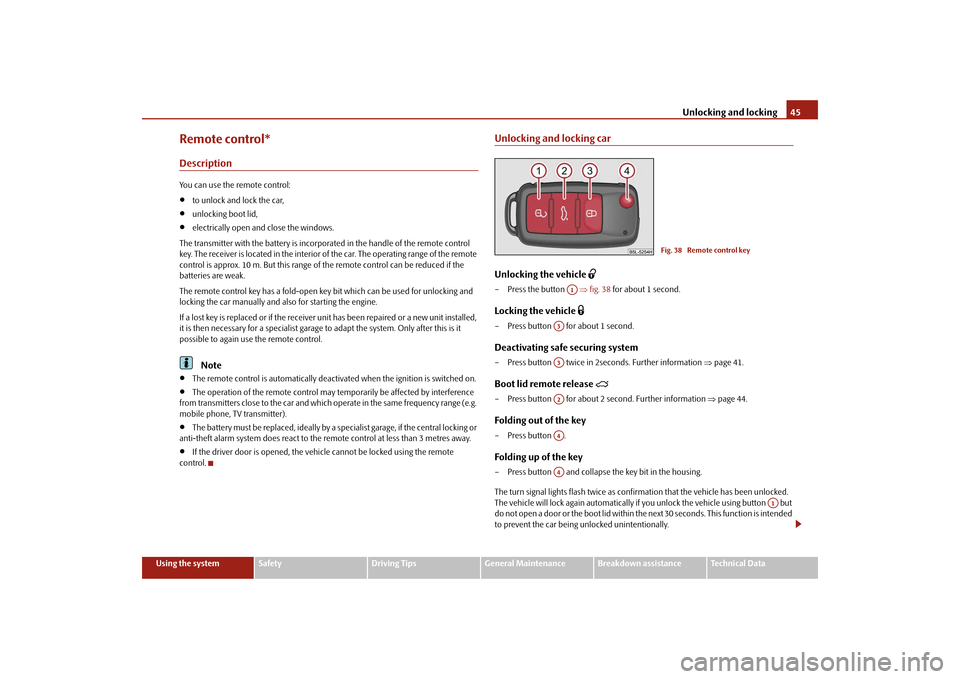
Unlocking and locking carUnlocking the vehicle
– Press the button
⇒fig. 38
for about 1 second.
Locking the vehicle
– Press button for about 1 second.Deactivating safe securing system– Press button twice in 2seconds. Further information
⇒page 41.
Boot lid remote release
– Press button for about 2 second. Further information
⇒page 44.
Folding out of the key– Press button .Folding up of the key– Press button and collapse the key bit in the housing. The turn signal lights flash twice as confir
mation that the vehicl
e has been unlocked.
The vehicle will lock again automatically if
you unlock the vehicle using button but
do not open a door or the boot lid within th
e next 30 seconds. This
function is intended
to prevent the car being unlocked unintentionally.
Fig. 38 Remote control key
A1
A3A3A2A4A4
A1
sgg.6.book Page 45 Thursday, September 24, 2009 2:32 PM