2009 SKODA SUPERB lights
[x] Cancel search: lightsPage 127 of 294

Starting-off and Driving
126
Switch on display of the park assist in the information display* – Press the button
⇒
fig. 141
.
– Drive past the parking row up to maximum 30 km/h and with a
distance of 0.5 m to 1.5 m
⇒
page 125, fig. 142
.
Operate the turn signal for the driver's side
if you wish to park on this side of the
road. In the information display* the search area for the parking place is indicated on the driver's side. If the button is pressed above a speed of 30 km/h, the display appears in the display of the instrument cluster as soon as you drive slower than 30 km/h.
Note
•
If the park assist is switched on, a yello
w warning light lights up in the button.
•
The search for suitable parking places is automatic after switching on the igni-
tion at speeds of more than 30 km/h. Searching for a parking place is performed at the same time on the driver and front passenger side.•
If the sensors find a suitable parking place, they store its parameters until
another suitable parking place has been found or until a distance of 10 m had been driven after finding the parking place. This is
why it is possible to switch on the park
assist after driving past the parking space,
on the information display* appears the
information if this parking space is suitable for parking.
Parking with the help of the pa
rk assist and concluding the
parking procedureThe time limit for the parking procedure with the help of the park assist lasts 180 seconds. – If the park assist has recognized a suitable parking place, the parking
place is shown in the information display*
⇒
fig. 143
.
– Drive on further until the display
⇒
fig. 144
appears.
– Bring the vehicle to a stop for at least 1 second. – Engage the reverse gear or set the selector lever* in the position
R.
Fig. 143 Information display: Parking place recog-nized with the information to drive onFig. 144 Information display: Parking place recog-nized with the information to engage the reverse gear
s2dk.1.book Page 126 Wednesday, April 8, 2009 12:23 PM
Page 133 of 294
Automatic gearbox DSG*
132
•
If you are stopping at a hill (downhill section), never try to hold the car
stationary with the gear engaged by me
ans of the “accelerator”, this means
by letting the clutch slip. This can lead
to overheating of the
clutch. If there is
a risk of overheating of the clutch due
to overload, the clut
ch is opened auto-
matically and the vehicle rolls backward - risk of accident!•
If you must stop at a slope, depress
and hold the brake pedal, so that you
can prevent the vehicle from rolling back.
Caution
•
The double clutch on the automatic gear
box DSG is equipped with an overload
protection. If you make use of the uphill func
tion on a vehicle which is stationary or
driving slowly uphill, it will result in an
increase of thermal stress of the clutches.
•
An overheating of the clutches can be de
tected by the flashing of the selector
level indicator and the “jerk” of the clut
ches, finally the clutches are opened. The
power transmission from the engine to the front wheels is interrupted and as a result of this the vehicle can no longer be
driven. If the clutch opens automatically,
depress the brake pedal, wait a few se
conds and only then continue driving.
Selector lever positions
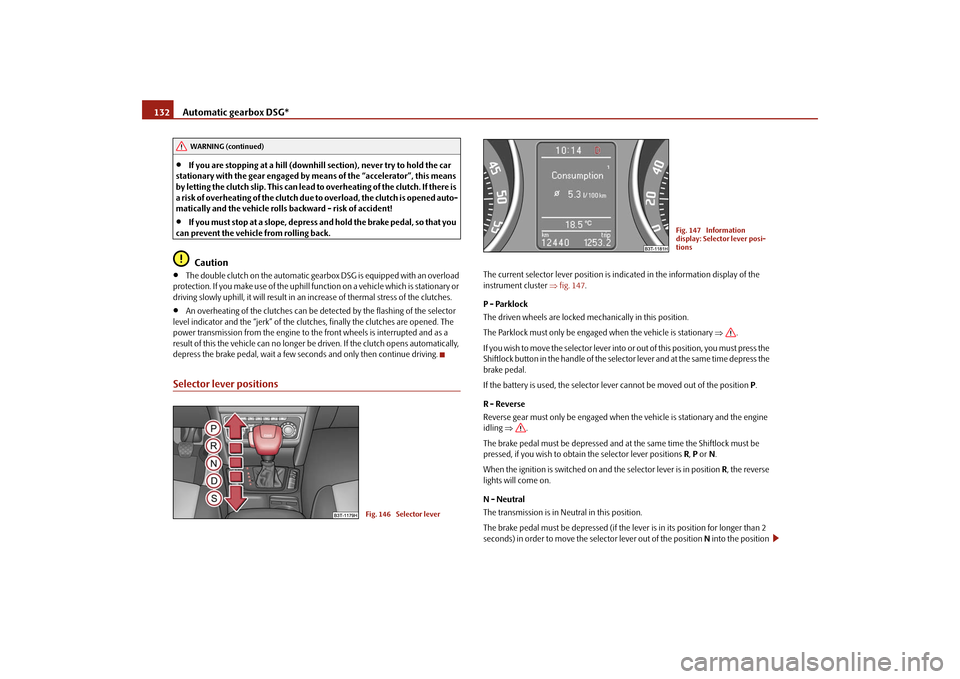
The current selector lever position is indicated in the information display of the instrument cluster
⇒fig. 147
.
P - Parklock The driven wheels are locked mechanically in this position. The Parklock must only be engage
d when the vehicle is stationary
⇒
.
I f y o u w i s h t o m o v e t h e s e l e c t o r l e v e r i n to
or out of this position, you must press the
Shiftlock button in the handle of the selector lever and at the same time depress the brake pedal. If the battery is used, the selector leve
r cannot be moved out of the position
P.
R - Reverse Reverse gear must only be engaged when
the vehicle is stationary and the engine
idling
⇒
.
The brake pedal must be depressed and at the same time the Shiftlock must be pressed, if you wish to obtain the selector lever positions
R, P or N.
When the ignition is switched on and the selector lever is in position
R, the reverse
lights will come on. N - Neutral The transmission is in Neutral in this position. The brake pedal must be depressed (if the lever is in its position for longer than 2 seconds) in order to move the selector lever out of the position
N into the position
WARNING (continued)
Fig. 146 Selector lever
Fig. 147 Information display: Selector lever posi-tions
s2dk.1.book Page 132 Wednesday, April 8, 2009 12:23 PM
Page 134 of 294

Automatic gearbox DSG*
133
Using the system
Safety
Driving Tips
General Maintenance
Breakdown assistance
Technical Data
D , with the ignition switched on, on a vehicle travelling at less than 5 km/hour or on a stationary vehicle. The brake pedal must be depressed (if the le
ver is in its position for longer than 2
seconds) in order to move the selector lever out of the position
N into the position
R , with the ignition switched on, on a vehicl
e travelling at less than 5 km/hour or on
a stationary vehicle. D - Drive, position for driving forward When the selector lever is in this position, the forward gears are shifted up and down automatically in line with engine
load, vehicle speed and the dynamic shift
programme. You must depress the brake pedal if
you wish to move into position
D from
N when
the vehicle is travelling at less than 5 km/hour or is stationary
⇒
.
In certain circumstances (e.g. when driving
in mountainous regions or when towing
a trailer) it may be beneficial to select
the manual shift programme for a short time
in order to adapt the gearbox ratios
manually to the driving situations.
S - Position for sporty style of driving Shifting up later into a higher gear makes it possible to fully exploit the power potential of the engine. The gearbox also then shifts down at higher engine speeds as in the position
D.
The Shiftlock on the selector lever grip must be pressed when moving the selector lever out of the position
D into the position
S.
WARNING
•
Never move the selector lever into position R or P when driving - risk of
an accident!•
When the engine is running and the vehicle is stationary, it is necessary
to hold the car with the brake pedal in all the positions of the selector lever (except P and N) since the power transmission is never completely inter- rupted, also not when the engine
is idling - the vehicle "creeps".
•
You must on no account unintentionally operate the throttle (e.g. by
hand from the engine compartment) if
a drive position is engaged when the
car is stationary. The vehicle would ot
herwise immediately start off - also
when the handbrake is firmly applied - risk of an accident!•
You must move the selector lever into position P and firmly apply the
handbrake first before you or any othe
r person opens the
bonnet and starts
working on the engine when it is runn
ing - risk of accident! Pay particular
attention to the warning instructions.Selector lever lockAutomatic selector lever lock
With the ignition on, the selector lever is locked when it is in the positions
P and
N.
You must first of all depress the brake pedal in order to move the selector lever out of this position. The warning light
⇒page 33 lights up in the instrument cluster
as a reminder for the driver when the selector lever is in position
P and
N.
A time delay element ensures that the sele
ctor lever is not blocked when rapidly
switching over the position
N (e.g. from
R to D). This does, for example, allow one
to seesaw out a stuck vehicle. The selector
lever lock will click into place if the lever
is in the
N position for more than 2 seconds
without the brake pedal being pressed.
The selector lever lock is only active if th
e vehicle is stationary
or moving at speed
of less than 5 km/hour. The lock is switched off automatically into position
N when
the car is travelling at a higher speed. Shiftlock button The Shiftlock button in the handle of select
or lever prevents certain selector lever
positions being engaged inadvertently. The
selector lever lock is cancelled when
you press the Shiftlock button. Keylock - Ignition key withdrawal lock You can only withdraw the ignition key after switching off the ignition if the selector lever is in position
P. If the ignition key is withdrawn, the selector lever is blocked in
position
P.
WARNING (continued)
s2dk.1.book Page 133 Wednesday, April 8, 2009 12:23 PM
Page 139 of 294

Communication
138
CommunicationMultifunction steering wheel*Operate radio und navigation on the multifunction steering wheelThe driver can set the basic functions of
the radio and navigation by simply oper-
ating the buttons located on the steering
wheel so that he can concentrate on the
traffic situation without being distracted as little as possible by operating the radio and navigation
⇒fig. 152
.
This applies only if your vehicle has been installed with radio and navigation at the factory. You can of course operate the ra
dio and navigation at the appliance. You
will find a description in the operating instructions of your radio system. When the headlights are switched on, the
steering wheel pushbuttons are then also
illuminated. The buttons apply for the respective operating mode of the current radio or naviga- tion. By pressing the buttons, you can
carry out the following functions:
Fig. 152 Multifunction steering wheel: control buttons
s2dk.1.book Page 138 Wednesday, April 8, 2009 12:23 PM
Page 146 of 294

Communication
145
Using the system
Safety
Driving Tips
General Maintenance
Breakdown assistance
Technical Data
Operation of the telephone on the multifunction steering wheel*
The driver can set the basic functions of the telephone by simply operating the buttons located on the steering wheel so th
at he can concentrate on the traffic situ-
ation without being distracted as little
as possible by operating the telephone
⇒ fig. 156
.
This applies only if your
vehicle has been eq
uiped with the telephone preinstalla-
tion at the factory. If the side lights are switched on, the bu
ttons on the multifunction steering wheel
are illuminated. Overview of the different functions in contrast to the multifunction steering wheel without mobile phone operation
⇒page 138.
Fig. 156 Multifunction steering wheel: Control buttons for the telephone
Button
Action
Operation
press briefly
Activation and deactivation of the voice control°
(Button PTT - Push to talk)
turn upwards
Increase volume
turn downwards
Decrease volume
press briefly
Accept call, terminate call, entry in the main me
nu of the telephone, list of selected numbers
press button for a long
time
Reject call, entry in the main menu of the telephone, list of selected numbers
press briefly
Reach one level higher in the menu (according to the current position in the menu)
press button for a long
time
Return in the main menu of the information display
press briefly
Confirm menu selection
press button for a long
period of time
Confirming the selected menu point, the following initial letters in the telephone book
turn upwards
The last chosen menu selection, name
turn downwards
The next menu selection, name
A1A1A1A2A2A3A3A4A4A4A4
s2dk.1.book Page 145 Wednesday, April 8, 2009 12:23 PM
Page 154 of 294

Communication
153
Using the system
Safety
Driving Tips
General Maintenance
Breakdown assistance
Technical Data
Note
In the memory of the control unit, up to
three users can be stored, whereby the
handsfree-system can only communicate ac
tively with one user. In the case of
mutual connection with a fourth mobi
le phone, you must erase one user.
•
If the telephone book of the mobile ph
one contains more than 1 000 entries,
the system announces a
failure while loading the telephone book
.
•
When connecting to the control unit, follow the instructions on your mobile
phone.•
Note that the range of the Bluetooth
® connection to the handsfree-system is
optimized in the vehicle interior. The range is dependent on local factors, e.g. obstacles between the devices and interferences with other devices.
Operation of the telephone on the multifunction steering wheel*The driver can set the basic functions of
the telephone by simply operating the
buttons located on the steering
wheel so that he can concentrate on the traffic situ-
ation without being distracted as little
as possible by operating the telephone
⇒ fig. 157
.
This applies only if your vehicle has b
een equiped with the telephone preinstalla-
tion at the factory. If the side lights are switched on, the
buttons on the multifunction steering wheel
are illuminated. Overview of the different functions in cont
rast to the multifunction steering wheel
without mobile phone operation
⇒page 138.
Fig. 157 Multifunction steering wheel: Control buttons for the telephone
s2dk.1.book Page 153 Wednesday, April 8, 2009 12:23 PM
Page 162 of 294

Communication
161
Using the system
Safety
Driving Tips
General Maintenance
Breakdown assistance
Technical Data
Ejecting a CD – Touch the button , in order to eject a CD. For assigned memory
spaces, now the LEDs light up in the buttons .
– Touch the corresponding button . The CD is ejected. Ejecting all CDs – Hold the button pressed for more than 2 seconds, in order to eject
the CDs. All CDs in the CD-cha
nger are ejected consecutively.
Note
•
Always guide the CD into the CD-cas
e with the printed side pointing
upwards.•
Never push the CD with force into the
CD-case as the insertion is performed
automatically.•
After loading a CD into the CD-changer
, you must wait until the LED of the
corresponding button lights up. Then th
e CD-case is free to load the next
CD.•
If you have selected a position, on which a CD is already located, this CD will be
ejected. Take out the ejected CD and load the desired CD.
AA
AD
AD
AA
AB
AD
AB
s2dk.1.book Page 161 Wednesday, April 8, 2009 12:23 PM
Page 184 of 294

Airbag system
183
Using the system
Safety
Driving Tips
General Maintenance
Breakdown assistance
Technical Data
On vehicles equipped with the switch for deactivation of the airbags, you can deac- tivate the front and side passenger airbag by means of this switch
⇒page 183.
Deactivation of airbags is envisaged only
for particular inst
ances, such as if:
•
you must
in exceptional cases
use a child seat on the front passenger seat
where the child has its back to the directio
n of travel of the ve
hicle (in some coun-
tries this must be in the direction of travel due to other legal regulations applying) ⇒ page 185, “Important safety information regarding the use of child safety seats”,•
you are not able to maintain the distance
of at least 25 cm between middle of
steering wheel and chest, despite the driver seat being correctly adjusted,•
special attachments are required in the area of the steering wheel because of a
physical disability,•
you have installed other seats (e.g. orthopaedic seats without side airbags).
Monitoring the airbag system The functionality of the airbag system is also monitored electronically, when one airbag has been switched off If the airbag was switched of
f using diagnostic equipment:
•
The warning light for the airbag system
lights up for 4 seconds after switching
on the ignition and then flashes for 12 seconds afterwards in 2 second intervals. Front passenger airbags switched off
using the switch for front passenger
airbags* in storage compartmen
t on the front passenger side:
•
the airbag indicator light in the inst
rument cluster comes on for about 4
seconds each time the ig
nition is switched on,
•
switching off airbags is indicated in the middle of the dash panel by the lighting
up of the indicator light
in the display
⇒fig. 178
.
Note
Your authorised Škoda Service Partner will
be able to advise
you whether national
legislation in your country allows airbags
in your vehicle to
be deactivated, and
which ones.
Switch for the front passenger airbag*The front passenger airbag is deactivated with the switch. Deactivating an airbag – Switch off the ignition. – Turn the slot of the airbag switch using the key in the position (
OFF
)
⇒
fig. 178
.
– Check whether the airbag indicator light
in display
in the middle of the dash panel
lights up when the ignition is
turned on
⇒
fig. 179
.
Fig. 178 Storage compart- ment: Switch for the front passenger airbagFig. 179 Indicator light for the front passenger airbag
A2
s2dk.1.book Page 183 Wednesday, April 8, 2009 12:23 PM