2009 SKODA SUPERB warning lights
[x] Cancel search: warning lightsPage 127 of 294

Starting-off and Driving
126
Switch on display of the park assist in the information display* – Press the button
⇒
fig. 141
.
– Drive past the parking row up to maximum 30 km/h and with a
distance of 0.5 m to 1.5 m
⇒
page 125, fig. 142
.
Operate the turn signal for the driver's side
if you wish to park on this side of the
road. In the information display* the search area for the parking place is indicated on the driver's side. If the button is pressed above a speed of 30 km/h, the display appears in the display of the instrument cluster as soon as you drive slower than 30 km/h.
Note
•
If the park assist is switched on, a yello
w warning light lights up in the button.
•
The search for suitable parking places is automatic after switching on the igni-
tion at speeds of more than 30 km/h. Searching for a parking place is performed at the same time on the driver and front passenger side.•
If the sensors find a suitable parking place, they store its parameters until
another suitable parking place has been found or until a distance of 10 m had been driven after finding the parking place. This is
why it is possible to switch on the park
assist after driving past the parking space,
on the information display* appears the
information if this parking space is suitable for parking.
Parking with the help of the pa
rk assist and concluding the
parking procedureThe time limit for the parking procedure with the help of the park assist lasts 180 seconds. – If the park assist has recognized a suitable parking place, the parking
place is shown in the information display*
⇒
fig. 143
.
– Drive on further until the display
⇒
fig. 144
appears.
– Bring the vehicle to a stop for at least 1 second. – Engage the reverse gear or set the selector lever* in the position
R.
Fig. 143 Information display: Parking place recog-nized with the information to drive onFig. 144 Information display: Parking place recog-nized with the information to engage the reverse gear
s2dk.1.book Page 126 Wednesday, April 8, 2009 12:23 PM
Page 133 of 294
Automatic gearbox DSG*
132
•
If you are stopping at a hill (downhill section), never try to hold the car
stationary with the gear engaged by me
ans of the “accelerator”, this means
by letting the clutch slip. This can lead
to overheating of the
clutch. If there is
a risk of overheating of the clutch due
to overload, the clut
ch is opened auto-
matically and the vehicle rolls backward - risk of accident!•
If you must stop at a slope, depress
and hold the brake pedal, so that you
can prevent the vehicle from rolling back.
Caution
•
The double clutch on the automatic gear
box DSG is equipped with an overload
protection. If you make use of the uphill func
tion on a vehicle which is stationary or
driving slowly uphill, it will result in an
increase of thermal stress of the clutches.
•
An overheating of the clutches can be de
tected by the flashing of the selector
level indicator and the “jerk” of the clut
ches, finally the clutches are opened. The
power transmission from the engine to the front wheels is interrupted and as a result of this the vehicle can no longer be
driven. If the clutch opens automatically,
depress the brake pedal, wait a few se
conds and only then continue driving.
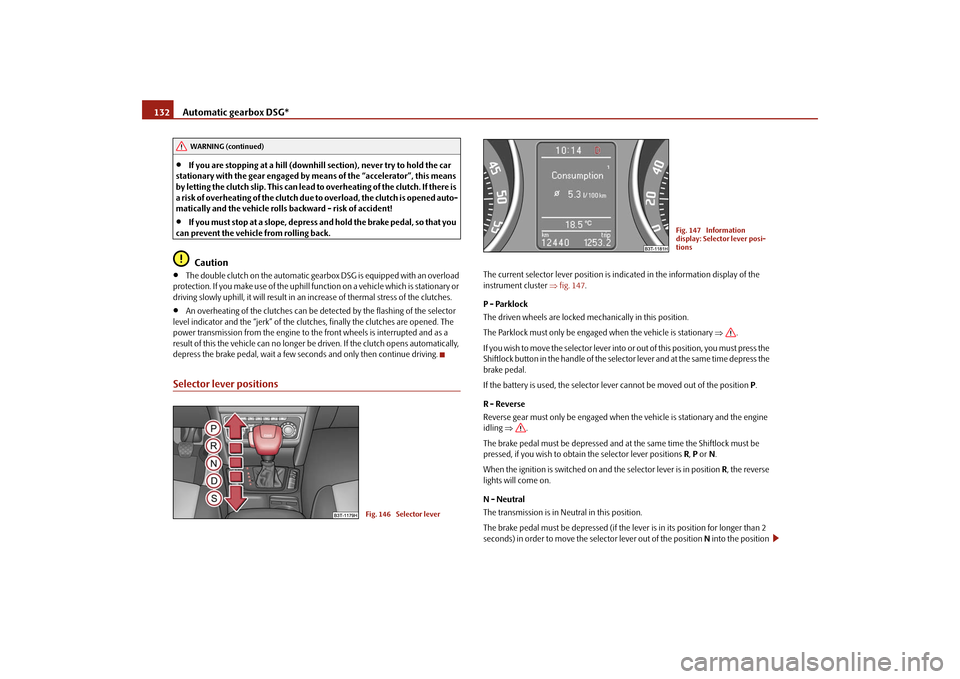
Selector lever positions
The current selector lever position is indicated in the information display of the instrument cluster
⇒fig. 147
.
P - Parklock The driven wheels are locked mechanically in this position. The Parklock must only be engage
d when the vehicle is stationary
⇒
.
I f y o u w i s h t o m o v e t h e s e l e c t o r l e v e r i n to
or out of this position, you must press the
Shiftlock button in the handle of the selector lever and at the same time depress the brake pedal. If the battery is used, the selector leve
r cannot be moved out of the position
P.
R - Reverse Reverse gear must only be engaged when
the vehicle is stationary and the engine
idling
⇒
.
The brake pedal must be depressed and at the same time the Shiftlock must be pressed, if you wish to obtain the selector lever positions
R, P or N.
When the ignition is switched on and the selector lever is in position
R, the reverse
lights will come on. N - Neutral The transmission is in Neutral in this position. The brake pedal must be depressed (if the lever is in its position for longer than 2 seconds) in order to move the selector lever out of the position
N into the position
WARNING (continued)
Fig. 146 Selector lever
Fig. 147 Information display: Selector lever posi-tions
s2dk.1.book Page 132 Wednesday, April 8, 2009 12:23 PM
Page 134 of 294

Automatic gearbox DSG*
133
Using the system
Safety
Driving Tips
General Maintenance
Breakdown assistance
Technical Data
D , with the ignition switched on, on a vehicle travelling at less than 5 km/hour or on a stationary vehicle. The brake pedal must be depressed (if the le
ver is in its position for longer than 2
seconds) in order to move the selector lever out of the position
N into the position
R , with the ignition switched on, on a vehicl
e travelling at less than 5 km/hour or on
a stationary vehicle. D - Drive, position for driving forward When the selector lever is in this position, the forward gears are shifted up and down automatically in line with engine
load, vehicle speed and the dynamic shift
programme. You must depress the brake pedal if
you wish to move into position
D from
N when
the vehicle is travelling at less than 5 km/hour or is stationary
⇒
.
In certain circumstances (e.g. when driving
in mountainous regions or when towing
a trailer) it may be beneficial to select
the manual shift programme for a short time
in order to adapt the gearbox ratios
manually to the driving situations.
S - Position for sporty style of driving Shifting up later into a higher gear makes it possible to fully exploit the power potential of the engine. The gearbox also then shifts down at higher engine speeds as in the position
D.
The Shiftlock on the selector lever grip must be pressed when moving the selector lever out of the position
D into the position
S.
WARNING
•
Never move the selector lever into position R or P when driving - risk of
an accident!•
When the engine is running and the vehicle is stationary, it is necessary
to hold the car with the brake pedal in all the positions of the selector lever (except P and N) since the power transmission is never completely inter- rupted, also not when the engine
is idling - the vehicle "creeps".
•
You must on no account unintentionally operate the throttle (e.g. by
hand from the engine compartment) if
a drive position is engaged when the
car is stationary. The vehicle would ot
herwise immediately start off - also
when the handbrake is firmly applied - risk of an accident!•
You must move the selector lever into position P and firmly apply the
handbrake first before you or any othe
r person opens the
bonnet and starts
working on the engine when it is runn
ing - risk of accident! Pay particular
attention to the warning instructions.Selector lever lockAutomatic selector lever lock
With the ignition on, the selector lever is locked when it is in the positions
P and
N.
You must first of all depress the brake pedal in order to move the selector lever out of this position. The warning light
⇒page 33 lights up in the instrument cluster
as a reminder for the driver when the selector lever is in position
P and
N.
A time delay element ensures that the sele
ctor lever is not blocked when rapidly
switching over the position
N (e.g. from
R to D). This does, for example, allow one
to seesaw out a stuck vehicle. The selector
lever lock will click into place if the lever
is in the
N position for more than 2 seconds
without the brake pedal being pressed.
The selector lever lock is only active if th
e vehicle is stationary
or moving at speed
of less than 5 km/hour. The lock is switched off automatically into position
N when
the car is travelling at a higher speed. Shiftlock button The Shiftlock button in the handle of select
or lever prevents certain selector lever
positions being engaged inadvertently. The
selector lever lock is cancelled when
you press the Shiftlock button. Keylock - Ignition key withdrawal lock You can only withdraw the ignition key after switching off the ignition if the selector lever is in position
P. If the ignition key is withdrawn, the selector lever is blocked in
position
P.
WARNING (continued)
s2dk.1.book Page 133 Wednesday, April 8, 2009 12:23 PM
Page 184 of 294

Airbag system
183
Using the system
Safety
Driving Tips
General Maintenance
Breakdown assistance
Technical Data
On vehicles equipped with the switch for deactivation of the airbags, you can deac- tivate the front and side passenger airbag by means of this switch
⇒page 183.
Deactivation of airbags is envisaged only
for particular inst
ances, such as if:
•
you must
in exceptional cases
use a child seat on the front passenger seat
where the child has its back to the directio
n of travel of the ve
hicle (in some coun-
tries this must be in the direction of travel due to other legal regulations applying) ⇒ page 185, “Important safety information regarding the use of child safety seats”,•
you are not able to maintain the distance
of at least 25 cm between middle of
steering wheel and chest, despite the driver seat being correctly adjusted,•
special attachments are required in the area of the steering wheel because of a
physical disability,•
you have installed other seats (e.g. orthopaedic seats without side airbags).
Monitoring the airbag system The functionality of the airbag system is also monitored electronically, when one airbag has been switched off If the airbag was switched of
f using diagnostic equipment:
•
The warning light for the airbag system
lights up for 4 seconds after switching
on the ignition and then flashes for 12 seconds afterwards in 2 second intervals. Front passenger airbags switched off
using the switch for front passenger
airbags* in storage compartmen
t on the front passenger side:
•
the airbag indicator light in the inst
rument cluster comes on for about 4
seconds each time the ig
nition is switched on,
•
switching off airbags is indicated in the middle of the dash panel by the lighting
up of the indicator light
in the display
⇒fig. 178
.
Note
Your authorised Škoda Service Partner will
be able to advise
you whether national
legislation in your country allows airbags
in your vehicle to
be deactivated, and
which ones.
Switch for the front passenger airbag*The front passenger airbag is deactivated with the switch. Deactivating an airbag – Switch off the ignition. – Turn the slot of the airbag switch using the key in the position (
OFF
)
⇒
fig. 178
.
– Check whether the airbag indicator light
in display
in the middle of the dash panel
lights up when the ignition is
turned on
⇒
fig. 179
.
Fig. 178 Storage compart- ment: Switch for the front passenger airbagFig. 179 Indicator light for the front passenger airbag
A2
s2dk.1.book Page 183 Wednesday, April 8, 2009 12:23 PM
Page 194 of 294

Intelligent Technology
193
Using the system
Safety
Driving Tips
General Maintenance
Breakdown assistance
Technical Data
Driving TipsIntelligent TechnologyElectronic stability programme (ESP)*GeneralGeneral The ESP aids you maintain control of your vehicle in situations in borderline driving situations such as when negotiating a curve too fast. The risk of skidding is reduced and your car thus offers greater driving stability depending on the conditions of the road surface. This occurs at all speeds. The following systems are integrated into the electronic stability programme:•
Electronic Differential Lock (EDL),
•
Traction control system (TCS),
•
Active driver-steering recommendation (DSR),
•
Antilock brake system (ABS),
•
Brake Assist,
•
Uphill-Start off-Assist.
Operating principle The ESP switches on automatically when the engine is started and then conducts a self-test. The ESP control unit processes data from the individual systems. It also processes additional measurement data which are supplied by highly sensitive sensors: the rotational velocity of the vehi
cle about its vertical axis, the lateral accel-
eration of the vehicle, the brakin
g pressure and the steering angle.
The direction which the driver wishes to ta
ke is determined based on the steering
angle and the speed of the vehicle and is constantly compared with the actual behaviour of the vehicle. If differences exis
t, such as the car beginning to skid, the
ESP will automatically brake the appropriate wheel. The car is stabilised again by the forces which take effect when the wheel is braked. Intervention into the brake system takes place primarily on the outer front wheel of a vehicle which tends to oversteer (tendency for the rear of the vehicle to break away) while occurs this is on the inner re
ar wheel of a vehicle which tends to under-
steer (tendency to shift out of the curve). This braking control cycle is accompanied by noises. The ESP operates in combination with the ABS
⇒page 197. If there is a fault in the
ABS system, the ESP also does not operate. The ESP warning light lights up in the instru
ment cluster when there is a fault on the
ESP
⇒page 39.
Switching off You can switch the ESP off and on again
as you wish, by pressing the button
⇒ fig. 190
. The ESP warning light lights up in th
e instrument cluster when the ESP is
switched off
⇒page 39.
The ESP should normally always be switched
on. It may be good practice in certain
exceptional cases, such as when you wish
to have wheel slip, to switch off the
system. Examples:
Fig. 190 ESP switch
s2dk.1.book Page 193 Wednesday, April 8, 2009 12:23 PM
Page 196 of 294

Intelligent Technology
195
Using the system
Safety
Driving Tips
General Maintenance
Breakdown assistance
Technical Data
Traction control system (TCS) The traction control system prevents
the driven wheels from spinning
when accelerating.General The TCS makes it much easier, and sometimes at all possible, to start off, accelerate and climb a steep hill when the conditio
ns of the road surface are unfavourable.
Operating principle The TCS switches on automatically when th
e engine is started and then conducts a
self-test. The system monitors the speeds of the driven wheels with the aid of the ABS sensors. If the wheels are spinning, the force transmitted to the road surface is automatically adapted by redu
cing the engine speed. Th
is occurs at all speeds.
The TCS operates in combination with the ABS
⇒page 197. The TCS will not func-
tion if a fault exists in the ABS system. The TCS warning light lights up in the instrument cluster when there is a fault on the TCS
⇒page 38.
Switching off You can switch the TCS off and on again
as you wish by pressing the button
⇒ fig. 191
. The TCS warning light lights up in the instrument cluster when the TCS is
switched off
⇒page 38.
The TCS should normally always be switched on. It may be good practice in certain exceptional cases, such as when you wish
to have wheel slip, to switch off the
system. Examples:•
when driving with snow chains
•
when driving in deep snow or on a loose surface
•
when it is necessary to rock a car free when it has become stuck.
then you should switch on the TCS again.
WARNING
You should always adjust your style of driving to the conditions of the road surface and the traffic situation. The increased safety offered must not tempt you to take greater risks than otherwise - risk of an accident!
Note
•
All four wheels must be fitted with the same tyres in order to achieve problem-
free operation of the TCS. Differing rolling circumferences of the tyres can lead to an undesirable reduction in the engine output.•
Changes to vehicle (e.g. on engine, on the brakes, on chassis or other assign-
ment of tyres and wheels) can in
fluence the function of the TCS
⇒page 241,
“Accessories, changes and replacement of parts”.Active driver-steering recommendation (DSR)*Vehicles with ESP are equi
pped with active driver-steering recommendation (DSR).
This function indicates to the driver in critical situations a steering recommendation in order to stabilise the vehicle. The active driver-steering recommendation is acti- vated, for example, on the right and left
vehicle side when
braking sharply on
different road surfaces.
Fig. 191 TCS switch
s2dk.1.book Page 195 Wednesday, April 8, 2009 12:23 PM
Page 199 of 294
Intelligent Technology
198
Brake Assist*During a severe brake application (e.g. if a hazard exists), the Brake Assist increases the braking force and thus makes it possible to rapidly produce the pressure required in the brake system. The majority of drivers do
apply the brakes in good time in dangerous situations,
but do not depress the brake pedal with su
fficient pressure. Consequently, it is not
possible for the car to achieve its maxi
mum deceleration and the car covers a
greater distance than necessary. The Brake Assist is activated by the very quick operation of the brake pedal. In such cases, a much greater braking pressure ex
ists than during a normal brake applica-
tion. This makes it possible, even with a relatively low resistance of the brake pedal, to produce an adequate pressure in the brake system in the shortest possible time, which is required for maximum deceleration of the car. You must apply the brake pedal firmly and hold it in
this position in order to achieve the shortest possible
braking distance. The Brake Assist is able to help you achieve a shorter braking distance in emergency situations by rapidly producing the pressure
required in the brake system. It fully
exploits the attributes of the ABS. After you release the brake pedal, the function of the Brake Assist is automatically switched off and the brakes operate in the normal way. The Brake Assist is part of the ESP system. If a fault occurs in the ESP, the Brake Assist function is also not available.
Further information on the ESP
⇒page 193.
WARNING
•
The Brake Assist is also not able to overcome the physical limits of your
car in terms of the braking distance required.•
Adapt your speed to the conditions of the road surface and to the traffic
situation.•
The increased safety offered by the Brake Assist must not tempt you to
take a greater safety risk than otherwise.
Uphill-Start
off-Assist*
The uphill-start off-assist makes it much easier to start off on steep hills. The system assists a start off by holding the brake pr
essure produced by the brake pedal actu-
ation for approx. 2 seconds after releasing the brake pedal. The driver can therefore move his foot from the brake pedal to th
e accelerator pedal and start off on the
slope, without having to actuate the hand
brake. The brake pressure drops gradually
the more you operate the accelerator pedal. If the vehicle does not start off within 2 seconds, it starts to roll back. The uphill-start off-assist is active in the ev
ent of a 5% slope, if the vehicle door is
closed. It is alwa
ys active on slopes when in forward or reverse start off. When
driving downhill, it is inactive.Electromechanical power steeringThe power steering enables you to steer
the vehicle with le
ss physical force.
With the electromechanical power steering, the steering assist is automatically adapted to the speed and to the steering angle. It is still possible to fully steer the vehicle if the power steering fails or if the engine is not running (vehicle being towed in). The
only difference is that greater physical
effort is required. If there is a fault in the power steering, the warning light
or lights up in the
instrument cluster
⇒page 36.
WARNING
Contact your specialist
garage if the power steering is defective.
s2dk.1.book Page 198 Wednesday, April 8, 2009 12:23 PM
Page 200 of 294

Intelligent Technology
199
Using the system
Safety
Driving Tips
General Maintenance
Breakdown assistance
Technical Data
Tyre inflation pressu
re-control system*
The tyre inflation pressure-control system compares with the aid of the ABS sensors the speed and also the rolling circumference
of the individual wheels. If the rolling
circumference of a wheel is changed, the warning light°
lights up in the instru-
ment cluster
⇒page 39. The rolling circumference of the tyre can change if:
•
the tyre inflation pressure is too low,
•
the structure of the tyre is damaged,
•
the vehicle is loaded on one side,
•
the wheels of an axle are loaded heavily (e.g. when towing a trailer or when
driving uphill or downhill),•
snow chains are mounted,
•
the temporary spare wheel is mounted,
•
one wheel per axle was changed.
Basic setting of tyre inflation pressure-control system After changing the tyre inflation pressures or after changing one or several wheels, a basic setting of the system must be carried out as follows.•
Inflate all tyres to the specified inflation pressure
⇒page 235.
•
Switch on the ignition.
•
Press button
⇒fig. 192
for more than 2 seconds. While pressing the
button, the warning light
lights up. At the same time the memory of the system
is erased and the new calibration is star
ted, which is confirmed with an audible
signal and then the warning light
goes out.
•
If the warning light
does not go out after the basic setting, there is a fault in
the system. Have the vehicle inspected by your nearest specialist garage. Warning light
lights up
If the tyre inflation pressure of at least on
e wheel is insufficiently inflated in compar-
ison to the stored basic value, the warning light
⇒
lights up.
Warning light
flashes
If the warning light flashes, there is a system fault. Have the vehicle inspected by your nearest specialist garage.
WARNING
•
When the warning light
lights up, immediately reduce the speed and
avoid sudden steering and brake mano
euvres. Please stop the vehicle
without delay at the nearest possible stop and inspect the tyres and their inflation pressures.•
The driver is responsible for the correc
t tyre inflation pressures. For this
reason, the tyre inflation pressures must be checked regularly.•
Under certain circumstances (e.g. sporty style of driving, wintry or
unpaved roads) the warning light
can be delayed or does not light up at
all.•
The tyre inflation pressure-control system does not take away the
responsability from the driver for the correct tyre inflation pressure.
Note
The tyre inflation pressure-control system:•
does not replace the regular tyre inflatio
n pressure control, because the system
cannot detect an even pressure loss,•
cannot warn in case of very rapid tyre inflation pressure loss, e.g. in case of
sudden tyre damage. In this
case carefully bring the vehi
cle to a standstill without
sudden steering movements and without sharp braking.
Fig. 192 Button for setting the tyre inflation pressure control value
s2dk.1.book Page 199 Wednesday, April 8, 2009 12:23 PM