2009 SKODA ROOMSTER lock
[x] Cancel search: lockPage 100 of 263
Starting-off and Driving99
Using the system
Safety
Driving Tips
General Maintenance
Breakdown assistance
Praktik
Technical Data
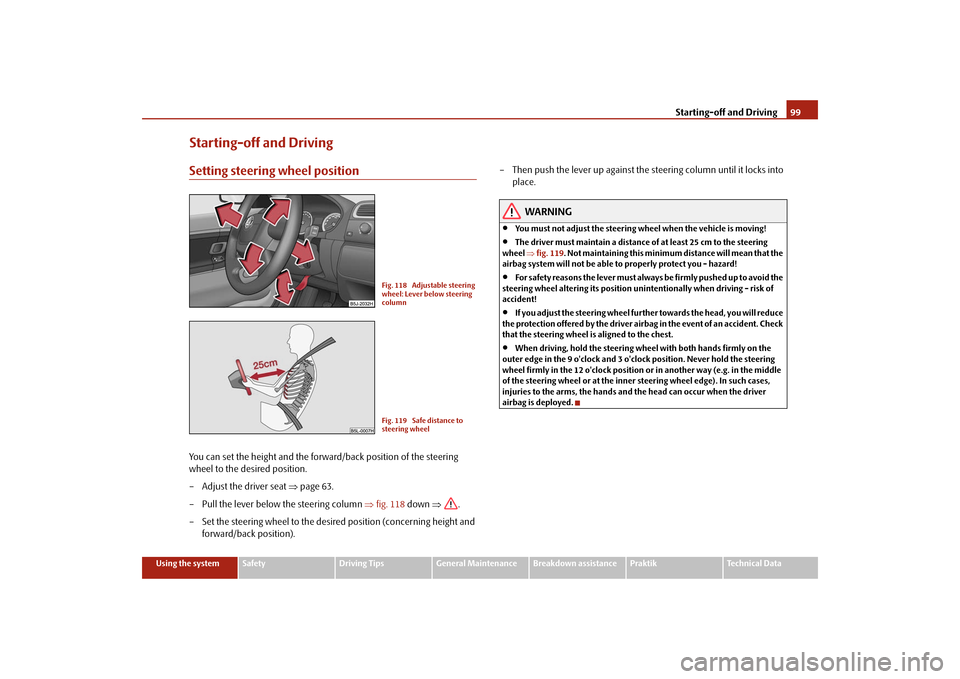
Starting-off and DrivingSetting steering wheel positionYou can set the height and the forward/back position of the steering
wheel to the desired position.
– Adjust the driver seat ⇒page 63.
– Pull the lever below the steering column ⇒fig. 118 down ⇒.
– Set the steering wheel to the desired position (concerning height and
forward/back position).– Then push the lever up against the steering column until it locks into
place.
WARNING
•
You must not adjust the steering wheel when the vehicle is moving!
•
The driver must maintain a distance of at least 25 cm to the steering
wheel ⇒fig. 119. Not maintaining this minimum distance will mean that the
airbag system will not be able to properly protect you - hazard!
•
For s a fe t y re a s ons the le v e r m ust a lwa y s b e fi rm l y pus he d up t o a vo id the
steering wheel altering its position unintentionally when driving - risk of
accident!
•
If you adjust the steering wheel further towards the head, you will reduce
the protection offered by the driver airbag in the event of an accident. Check
that the steering wheel is aligned to the chest.
•
When driving, hold the steering wheel with both hands firmly on the
outer edge in the 9 o'clock and 3 o'clock position. Never hold the steering
wheel firmly in the 12 o'clock position or in another way (e.g. in the middle
of the steering wheel or at the inner steering wheel edge). In such cases,
injuries to the arms, the hands and the head can occur when the driver
airbag is deployed.
Fig. 118 Adjustable steering
wheel: Lever below steering
columnFig. 119 Safe distance to
steering wheel
s29g.4.book Page 99 Wednesday, June 17, 2009 9:54 AM
Page 101 of 263

Starting-off and Driving 100Ignition lockPetrol engines
- ignition switched off, engine off
- ignition switched on
- start engine
Diesel engines
- interruption of fuel supply, ignition switched off, engine off, the steering can
be locked.
- heating glow plugs on, ignition switched on•
You should not switch on any major electrical components during the heating
period otherwise the vehicle battery will be drained unnecessarily.
- start engine
Applies to all models:
Position
To lock the steering, with the ignition key withdrawn, turn the steering wheel until
the steering locking pin is heard to engage. You should always lock the steering as
a general rule if you leave your vehicle. This acts as a deterrent against possible theft
of your vehicle ⇒.
Position Move the steering wheel back and forward a little if the ignition key cannot, or
cannot easily be turned into this position, in order to release the steering lock.
Position
The engine is started in this position. At the same time switched on low beam or
main beam or other electrical components with major power consumption are
briefly switched off. The ignition key moves back into position when one
releases the key.
The ignition key must be turned back into position each time before starting the
engine again. The starter repeat lock in the ignition lock prevents the starter being
engaged when the engine is running and thus getting damaged.
WARNING
•
When driving, the ignition key must always be in the position (igni-
tion switched on) without the engine running. This position is indicated by
the warning lights coming on. If this is not the case, it could result in unex-
pected locking of the steering wheel - risk of accident!
•
Do not withdraw the ignition key from the lock until the vehicle has come
to a stop. The steering lock can engage immediately - risk of accident!
•
Always withdraw the ignition key if you are going to leave the vehicle,
even for a short time. This is particularly important if children are left in the
vehicle. The children might otherwise start the engine or operate electrical
equipment (e.g. power windows) - risk of injury!
Starting the engineGeneral
You can only start the engine only using an original ignition key.•
Place the gearshift lever into neutral and put on the handbrake firmly before
starting the engine.
•
The clutch pedal should be fully depressed when starting the engine - the
starter then only has to crank the engine.
Fig. 120 Ignition lock posi-
tions
A1A2A3A1A2A3
A1A2
A3
A2
A1
A2
s29g.4.book Page 100 Wednesday, June 17, 2009 9:54 AM
Page 104 of 263

Starting-off and Driving103
Using the system
Safety
Driving Tips
General Maintenance
Breakdown assistance
Praktik
Technical Data
HandbrakeApplying the handbrake
– Pull the handbrake lever up fully.
Releasing the handbrake
– Pull the handbrake lever up slightly and at the same time press in the
locking button ⇒fig. 122.
– Hold the button pressed and push the handbrake lever down fully
⇒.The handbrake warning light
lights up when the handbrake is applied, provided
the ignition is on.
A warning signal sounds and the following text appears in the display* if you have
inadvertently driven off with the handbrake applied:
HANDBRAKE ON
The handbrake warning is activated if you drive at a speed of more than 6 km/h for
more than 3 seconds.
WARNING
•
Please note that the handbrake must be fully released. A handbrake
which is only partially released can result in the rear brakes overheating
which will have a negative effect on the operation of the brake system - risk
of accident! In addition this can result in premature wear of the rear brake
pads.
•
Never leave children unattended in the vehicle. The children might, for
example, release the handbrake or take the vehicle out of gear. The vehicle
might then move off - risk of accident!Caution
After the car has come to a stop, always first of all apply the handbrake firmly before
then additionally engaging a gear (manual gearbox) or moving the selector lever
into position P (automatic gearbox).Parking aid*The parking aid provides a warning of obstacles behind the vehicle.The audible parking aid determines the distance between the rear bumper and an
obstacle located behind the vehicle with the aid of ultrasound sensors. The sensors
are integrated in the rear bumper.
Fig. 122 Centre console:
Handbrake
Fig. 123 Parking aid: Range
of sensors
s29g.4.book Page 103 Wednesday, June 17, 2009 9:54 AM
Page 108 of 263

Automatic gearbox107
Using the system
Safety
Driving Tips
General Maintenance
Breakdown assistance
Praktik
Technical Data
Automatic gearbox6-speed automatic gearbox*IntroductionYour car is equipped with an electronically controlled 6-speed automatic gearbox.
Shifting up and also down through the gears is performed automatically.
At the same time this is a conventional automatic gearbox. The maximum speed is
reached in the 5th gear. The 6th gear serves as an economic driving programme,
which is intended to reduce the fuel consumption.Information for driving with an automatic gearbox
Shifting up and down through the gears is performed automatically.You can also, however, switch the gearbox over into the Tiptronic mode.
This mode makes it possible for you to also shift gears manually
⇒page 110.
Starting-off and Driving
– Depress the brake pedal and hold it depressed.
– Press the Shiftlock button (button in handle of the selector lever),
move the selector lever into the desired position, e.g. D ⇒page 108,
and then release the Shiftlock button.
– Wait a moment until the gearbox has shifted (a slight engagement
nudge can be felt).
– Release the brake pedal and depress the accelerator ⇒.Stopping for a short time
– The selector lever position N does not have to be selected when stop-
ping just for a short time, such as at a cross roads. It is sufficient to hold
the vehicle stationary using the foot brake. The engine can, however,
be allowed just to idle.
Parking
– Depress the brake pedal and hold it depressed.
– Apply the handbrake firmly.
– Press and Shiftlock button in the selector lever, move the selector
lever to P and then release the Shiftlock button.
The engine can only be started when the selector lever is in position P or N
⇒page 100.
It is sufficient to engage selector lever position P when parking on a flat surface.
When parking on a slope you should first apply the handbrake firmly and then
move the selector lever into position P. This is to ensure that there is no excessive
pressure acting on the lock mechanism and that it is easier to subsequently move
the selector lever out of position P.
If the selector lever position N is selected by accident while driving it is first neces-
sary to release pressure on the accelerator pedal and wait for idling speed of the
engine to be reached before engaging a drive position in the selector lever.
WARNING
•
Do not depress the accelerator when changing the position of the
selector lever if the car is stationary and the engine is running - risk of acci-
dent!
•
Never move the selector lever into position R or P when driving - risk of
an accident!
s29g.4.book Page 107 Wednesday, June 17, 2009 9:54 AM
Page 109 of 263
Automatic gearbox 108•
When the engine is running and the vehicle is stationary, it is necessary
to hold the car with the brake pedal in all the positions of the selector lever
(except P and N) since the power transmission is never completely inter-
rupted, also not when the engine is idling - the vehicle creeps.
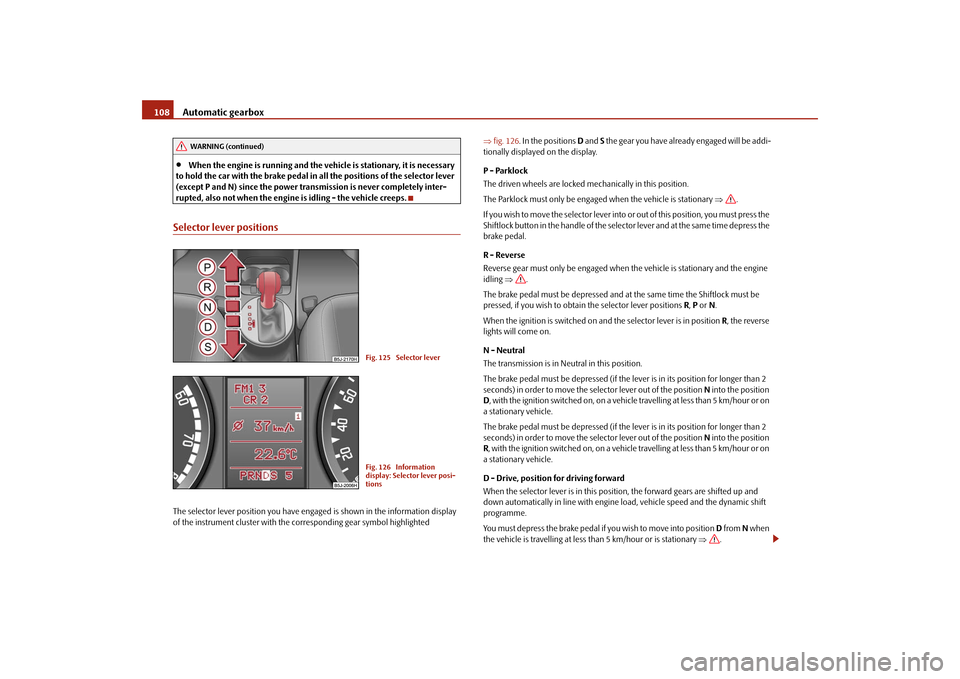
Selector lever positionsThe selector lever position you have engaged is shown in the information display
of the instrument cluster with the corresponding gear symbol highlighted ⇒fig. 126. In the positions D and S the gear you have already engaged will be addi-
tionally displayed on the display.
P - Parklock
The driven wheels are locked mechanically in this position.
The Parklock must only be engaged when the vehicle is stationary ⇒.
I f y o u w i s h t o m o v e t h e s e l e c t o r l e v e r i n to or out of this position, you must press the
Shiftlock button in the handle of the selector lever and at the same time depress the
brake pedal.
R - Reverse
Reverse gear must only be engaged when the vehicle is stationary and the engine
idling ⇒.
The brake pedal must be depressed and at the same time the Shiftlock must be
pressed, if you wish to obtain the selector lever positions R, P or N.
When the ignition is switched on and the selector lever is in position R, the reverse
lights will come on.
N - Neutral
The transmission is in Neutral in this position.
The brake pedal must be depressed (if the lever is in its position for longer than 2
seconds) in order to move the selector lever out of the position N into the position
D, with the ignition switched on, on a vehicle travelling at less than 5 km/hour or on
a stationary vehicle.
The brake pedal must be depressed (if the lever is in its position for longer than 2
seconds) in order to move the selector lever out of the position N into the position
R, with the ignition switched on, on a vehicle travelling at less than 5 km/hour or on
a stationary vehicle.
D - Drive, position for driving forward
When the selector lever is in this position, the forward gears are shifted up and
down automatically in line with engine load, vehicle speed and the dynamic shift
programme.
You must depress the brake pedal if you wish to move into position D from N when
the vehicle is travelling at less than 5 km/hour or is stationary ⇒.
WARNING (continued)
Fig. 125 Selector leverFig. 126 Information
display: Selector lever posi-
tions
s29g.4.book Page 108 Wednesday, June 17, 2009 9:54 AM
Page 110 of 263
Automatic gearbox109
Using the system
Safety
Driving Tips
General Maintenance
Breakdown assistance
Praktik
Technical Data In certain circumstances (e.g. when driving in mountainous regions or when towing
a trailer) it may be beneficial to select the manual shift programme ⇒page 110 for
a short time in order to adapt the gearbox ratios manually to the driving situations.
S - Position for sporty style of driving
Shifting up later into a higher gear makes it possible to fully exploit the power
potential of the engine. The gearbox also then shifts down at higher engine speeds
as in the position D.
The gearbox does not shift into the 6th gear in the position S, because the
maximum speed is achieved with the 5th gear.
The Shiftlock on the selector lever grip must be pressed when moving the selector
lever out of the position D into the position S.
WARNING
•
Never move the selector lever into position R or P when driving - risk of
an accident!
•
When the engine is running and the vehicle is stationary, it is necessary
to hold the car with the brake pedal in all the positions of the selector lever
(except P and N) since the power transmission is never completely inter-
rupted, also not when the engine is idling - the vehicle creeps.
•
You must on no account unintentionally operate the throttle (e.g. by
hand from the engine compartment) if a drive position is engaged when the
car is stationary. The vehicle would otherwise immediately start off - also
when the handbrake is firmly applied - risk of an accident!
•
You must move the selector lever into position P and firmly apply the
handbrake first before you or any other person opens the bonnet and starts
working on the engine when it is running - risk of accident! It is also essential
to observe all warnings ⇒page 185, “Working in the engine
compartment”.
Selector lever lockAutomatic selector lever lock
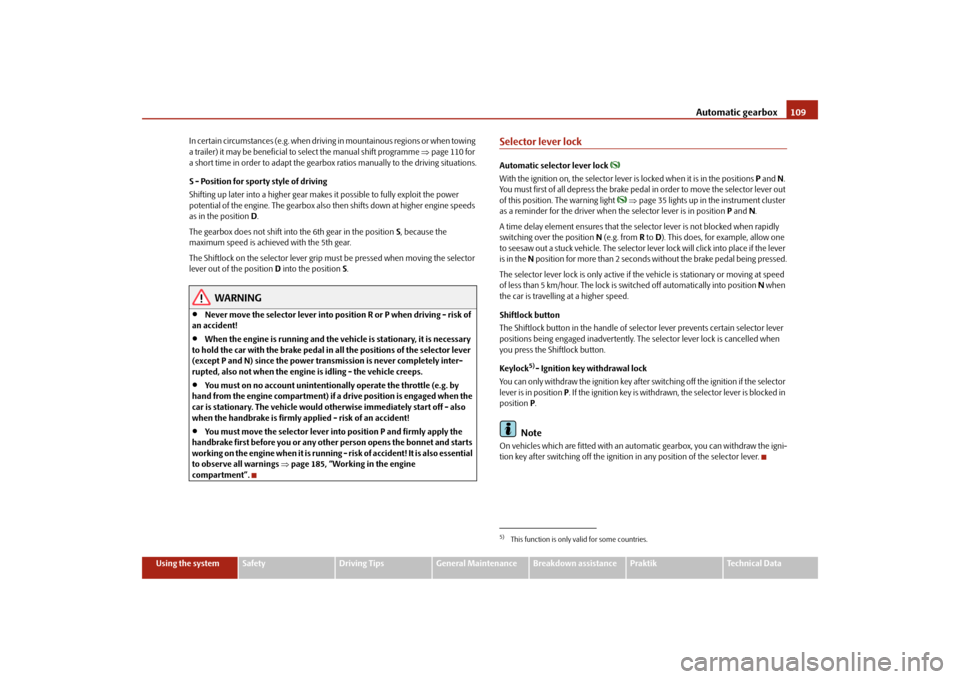
With the ignition on, the selector lever is locked when it is in the positions P and N.
You must first of all depress the brake pedal in order to move the selector lever out
of this position. The warning light
⇒page 35 lights up in the instrument cluster
as a reminder for the driver when the selector lever is in position P and N.
A time delay element ensures that the selector lever is not blocked when rapidly
switching over the position N (e.g. from R to D). This does, for example, allow one
to seesaw out a stuck vehicle. The selector lever lock will click into place if the lever
is in the N position for more than 2 seconds without the brake pedal being pressed.
The selector lever lock is only active if the vehicle is stationary or moving at speed
of less than 5 km/hour. The lock is switched off automatically into position N when
the car is travelling at a higher speed.
Shiftlock button
The Shiftlock button in the handle of selector lever prevents certain selector lever
positions being engaged inadvertently. The selector lever lock is cancelled when
you press the Shiftlock button.
Keylock
5)- Ignition key withdrawal lock
You can only withdraw the ignition key after switching off the ignition if the selector
lever is in position P. If the ignition key is withdrawn, the selector lever is blocked in
position P.
Note
On vehicles which are fitted with an automatic gearbox, you can withdraw the igni-
tion key after switching off the ignition in any position of the selector lever.5)This function is only valid for some countries.
s29g.4.book Page 109 Wednesday, June 17, 2009 9:54 AM
Page 116 of 263

Communication115
Using the system
Safety
Driving Tips
General Maintenance
Breakdown assistance
Praktik
Technical Data
•
During the dialogue avoid additional noise in the vehicle, e.g. simultaneously
talking occupants.
•
Do not speak, if the system makes an announcement.
•
The microphone for voice control is directed to the driver and front passenger.
Therefore the driver and the front passenger can operate the equipment.
WARNING
Pay attention primarily to the traffic situation! As the driver you are fully
responsible for road safety. Use the telephone system only to such an extent,
so that you are in full control of your vehicle at any time.
Caution
Taking the mobile phone out of the adapter during the call can lead to interruption
of the connection. When taking out the mobile phone, the connection to the
factory-fitted antenna is interrupted, this reduces the quality of the transmitting
and receiving signal. The charging of the mobile phone battery is also interrupted.
Note
•
Please also refer to the additional instructions ⇒page 122, “Mobile phones
and two-way radio system”.
•
Should you have any questions, please contact a specialist garage.
•
The voice control of the telephone is only possible for adapters with PTT button.
Suitable adapters are available at a specialist garage.
Inserting the mobile phone with the adapter*Only one telephone mount* is factory-fitted. An adapter for the phone
can be purchased from the Škoda original accessories.
Inserting the mobile phone with the adapter
– First of all push the adapter in the direction of arrow ⇒fig. 133 up
to the stop into the mount. Press the adapter slightly downwards, until
it locks securely into position.
– Insert the mobile phone into the adapter (as specified in manufac-
turer's instructions).
Removing the mobile phone with the adapter
– Press simultaneouly the side locks of the mount and remove the
mobile phone and adapter ⇒fig. 133.This enables you to make full use of the advantages of a normal carphone (“hands-
free system” using a microphone integrated in the vehicle, optimal transmission of
signals using an external aerial etc.). The battery of the mobile phone is also
constantly charged.
Fig. 133 Universal prepara-
tion for the phone
AA
AA
s29g.4.book Page 115 Wednesday, June 17, 2009 9:54 AM
Page 119 of 263
Communication 118The digits zero to nine are permitted. The system detects no continuous digit
combinations such as twenty-three, but only individually spoken digits (two, three).
After each order of digits (separation through brief voice pause) the detected digits
are repeated.
Notes for entering the PIN code•
When entering a PIN code with more than 8 digits, the system indicates “The
PIN is too long”.
•
When entering an incorrect PIN code, the system indicates “The PIN is incor-
rect”.
•
If the incorrect PIN code has been entered three times consecutively, the card
is blocked. With the aid of the personal unblocking code PUK (Personal Unblock
Key), the SIM card can be unblocked. The unblocking code can only be entered
via the phone keypad and not through the voice control.
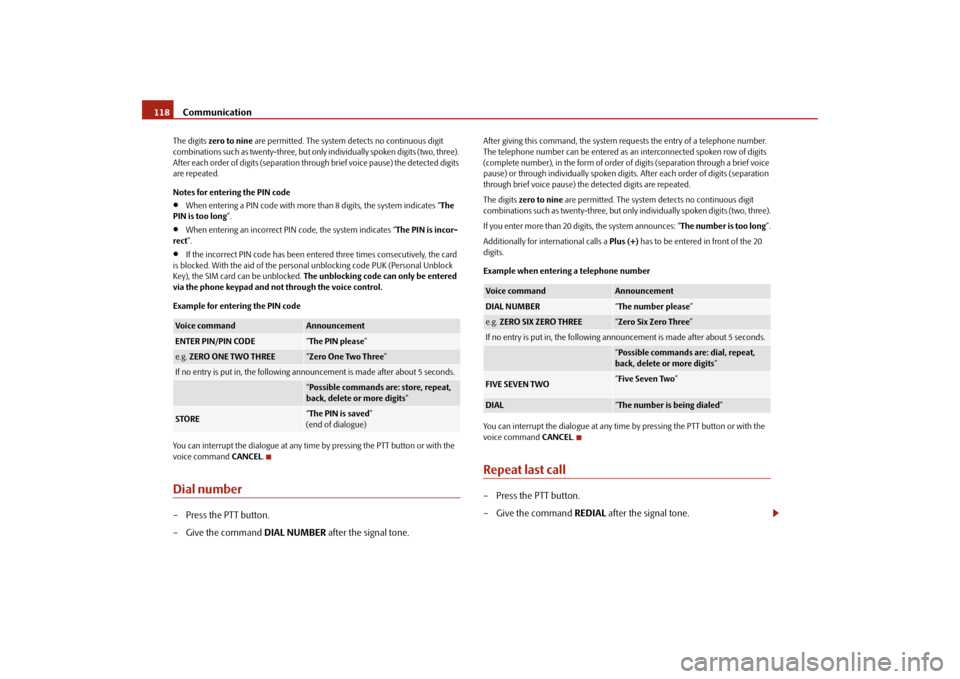
Example for entering the PIN code
You can interrupt the dialogue at any time by pressing the PTT button or with the
voice command CANCEL.
Dial number– Press the PTT button.
– Give the command DIAL NUMBER after the signal tone.
After giving this command, the system requests the entry of a telephone number.
The telephone number can be entered as an interconnected spoken row of digits
(complete number), in the form of order of digits (separation through a brief voice
pause) or through individually spoken digits. After each order of digits (separation
through brief voice pause) the detected digits are repeated.
The digits zero to nine are permitted. The system detects no continuous digit
combinations such as twenty-three, but only individually spoken digits (two, three).
If you enter more than 20 digits, the system announces: “The number is too long”.
Additionally for international calls a Plus (+) has to be entered in front of the 20
digits.
Example when entering a telephone number
You can interrupt the dialogue at any time by pressing the PTT button or with the
voice command CANCEL.Repeat last call– Press the PTT button.
– Give the command REDIAL after the signal tone.
Voice command
Announcement
ENTER PIN/PIN CODE
“The PIN please”
e.g. ZERO ONE TWO THREE
“Zero One Two Three”
If no entry is put in, the following announcement is made after about 5 seconds.
“Possible commands are: store, repeat,
back, delete or more digits”
STORE
“The PIN is saved”
(end of dialogue)
Voice command
Announcement
DIAL NUMBER
“The number please”
e.g. ZERO SIX ZERO THREE
“Zero Six Zero Three”
If no entry is put in, the following announcement is made after about 5 seconds.
“Possible commands are: dial, repeat,
back, delete or more digits”
FIVE SEVEN TWO
“Five Seven Two”
DIAL
“The number is being dialed”
s29g.4.book Page 118 Wednesday, June 17, 2009 9:54 AM