2009 Seat Ibiza SC lock
[x] Cancel search: lockPage 66 of 257
Cockpit
64If the warning lamp lights up again after driving on for a short distance, stop
the vehicle and switch the engine off . Contact an Authorised Service Centre
or a qualified workshop.
Coolant level too low
If the warning light comes on, stop the vehicle, switch off the engine and wait
for it to cool down First check the coolant level. If the level of the coolant is
below the “MIN” mark, top up with coolant liquid ⇒.
WARNING
•If your vehicle is immobilised for any technical reasons, move it to a
safe distance from traffic. Tur n the e ngin e off, turn t he hazard l ights on and
place the warning triangle.•Never open the bonnet if you can see or hear steam or coolant escaping
from the engine compartment. Risk of scalding. Wait until you can no
longer see or hear escaping steam or coolant.•The engine compartment is a danger ous area! Before carrying out any
work in the engine compartment, switch off the engine and allow it to cool
down. Always note the corresponding warnings ⇒page 176.
Alternator
This warning lamp signals a fault in the alternator.
The warning lamp
lights up when the ignition is switched on. It should go
out when the engine has started running.
If the warning lamp lights up while driving, the alternator is no longer
charging the battery. You should immediately drive to the nearest qualified
workshop. You should avoid using electrical equipment that is not absolutely necessary
because this will drain the battery.
If the indicator flashes the voltage is insufficient for normal vehicle
operation.
Turn signals
The warning lamp flashes when the indicators are in opera-
tion.Depending on which indicator is operating, either the left
or right
indi-
cator lamp flashes. Both warning lamps will flash at the same time when the
hazard warning lights are switched on.
If any of both indicators fails, the warning lamp will start flashing twice faster
than normal.
Further information on the indicators ⇒page 91.
Electronic immobiliser* “Safe”
This warning lamp flashes if an unauthorised key is used.Inside the key there is a chip that deactivates the electronic immobiliser auto-
matically when the key is inserted into the ignition. The immobiliser will be
activated again automatically as soon as you pull the key out of the ignition
lock.
The instrument panel displays shows the following message
6): SAFE . The
vehicle cannot be started in this case.
6)Depending on the version of the model.
IbizaSC_EN.book Seite 64 Mittwoch, 16. September 2009 12:11 12
Page 72 of 257
Unlocking and locking
70Unlocking and lockingCentral l ockingDescription
The central locking system enables you to lock and unlock all
doors by just pushing on the key button.Central locking can be activated by using any of the following options:•the key , by inserting it into the driver's door cylinder and rotating it in the
opening direction. Depending on the vehicle version, either all doors will be
unlocked or only the driver's door will be unlocked. All doors will be locked on
locking the vehicle using the key.•the interior central locking button ⇒ page 73.•the radio frequency remote control , using the buttons on the key
⇒ page 75.
Various functions are available to improve the vehicle safety:
- “Safe”* Locking system
- Selective unlocking system*
- Self-locking system to prevent involuntary unlocking
- Automatic speed-dependent locking and unlocking system*
- Emergency unlocking systemWARNING
•Locking from the outside carelessly or without good visibility may lead
to bruising, particularly in the case of children.•When locking a vehicle, never leave children unaccompanied inside, as
from the outside it will be difficult to provide assistance if required.
•Keeping the doors locked prevents an intruder from entering, for
example when stopped at a traffic light.Note
For anti-theft security, only the driver's door is fitted with a lock cylinder.Safety system “Safe*”
This is an anti-theft device which consists of a double lock for
the door locks and a deactivation function for the boot in
order to prevent a forced entry (according to country).Activation
The “safe” system is activated when the vehicle is locked using the key or the
remote control.
To activate it with the key, rotate once it is inserted in the door lock cylinder
in the locking direction.
To activate the system using the remote control, press the lock button once
on the remote.
Once this system is activated, opening doors from the outside and the inside
is not possible. The tailgate can not be opened. The central locking button
does not work.
WARNING (continued)
IbizaSC_EN.book Seite 70 Mittwoch, 16. September 2009 12:11 12
Page 73 of 257
Unlocking and locking71
Safety First
Controls and equipment
Practical tips
Technical Data
Deactivation
Rotate the key inserted in the lock cylinder twice towards the locking direc-
tion.
To activate the system using the remote control, press the lock button on the
remote twice in less than five seconds.
On deactivating the “Safe” system, the alarm volumetric sensor is also deac-
tivated.
With the “Safe” switched off, doors can be opened from the interior but not
from the exterior.
See “Selective unlocking system*”
“Safe” status
On the driver's door, there is a visible light indicator which shows the “Safe”
system status.
We will know that “Safe” system is activated by the flashing light indicator.
The indicator will flash on all vehicles, fitted and nor fitted with an alarm, until
they unlock.
Remember:
Safe activated with or without an alarm:
Continuous flashing of warning
light.
Safe deactivated without an alarm: The indicator remains off.
Safe deactivated with an alarm: The indicator remains off.
WARNING
No one should remain inside the vehicle if the “Safe” mechanism is acti-
vated because opening the doors will not be possible in case of emergency
neither from the inside nor the outside. Danger of death. Passengers could
become trapped inside in case of emergency.
Selective unlocking system*
This system allows the unlocking of either just the driver's
door or all the vehicle.Driver's door unlock button
Unlock once. Use either the key or the remote control.
Once the key is inserted in the lock cylinder, rotate once in the unlock direc-
tion. The driver's door will remain without “Safe” and unlocked. See Anti-theft
Alarm chapter for vehicles fitted with an alarm ⇒page 77.
Using the remote control, press the unlock button on the remote once. The
“Safe” system for all the vehicle is deactivated, only the driver's door is
unlocked and both the alarm and the light indicator are also turned off.
Unlocking all doors and the boot
The unlock button on the remote must be pressed twice so that all doors
and the boot can be opened.
Press twice within 5 seconds to deactivate the “Safe” system for all vehicle,
to unlock all doors and to use the boot. The indicator and the alarm (only vehi-
cles fitted with one) are turned off.
Unlocking the boot
See ⇒page 79.
Activating the selective unlocking system*
With the door open, insert a key into the start cylinder and start the ignition.
Insert the other key into the driver's door lock and turn in the direction of
opening for at least 3 seconds. The indicators will flash twice.
Deactivating the selective unlocking system*
With the door open, insert a key into the start cylinder and start the ignition.
Insert the other key into the driver's door lock and turn in the direction of
locking for at least 3 seconds. The indicators will flash once.
IbizaSC_EN.book Seite 71 Mittwoch, 16. September 2009 12:11 12
Page 74 of 257
Unlocking and locking
72Involuntary unlocking
It is an anti-theft system and prevents the unintentional
unlocking of the vehicle.If the vehicle is unlocked and none of the doors (including the tailgate) are
opened within 30 seconds, the vehicle will be re-locked automatically.Automatic speed dependent locking and unlocking system*
This is a safety system which prevent the access to the vehicle
from the outside when it is running (for example, when
stopped at a traffic light).Locking
The doors lock automatically after exceeding 15 km/h. The tailgate locks
automatically after exceeding 6 km/h.
If the vehicle is stopped and any of the doors opened, when the vehicle starts
again and above the mentioned speed, all doors will lock again.
Unlocking
On removing the ignition key, the vehicle returns to its status prior to self-
locking.
Each door can be unlocked and opened independently from the inside (for
example, when a passenger gets out of it). To do so, simply operate the lever
inside the door.
Activating the system*
With the ignition on, press the locking key on the central locking system for 3
to 10 seconds. Deactivating the system*
With the ignition on, press the unlocking key on the central locking system
within 3 to 10 seconds.
In both cases, if the operation has been carried out correctly, the locking lamp
will flash ⇒
page 73, fig. 41 .
WARNING
The door handles must not be operated when the vehicle is moving: the
door would open.
Note
If the airbags are triggered during an accident, the vehicle is unlocked, except
for the boot. It is possible to lock the vehicle from inside with the central
locking, after turning the ignition off and back on again.
IbizaSC_EN.book Seite 72 Mittwoch, 16. September 2009 12:11 12
Page 75 of 257
Unlocking and locking73
Safety First
Controls and equipment
Practical tips
Technical Data
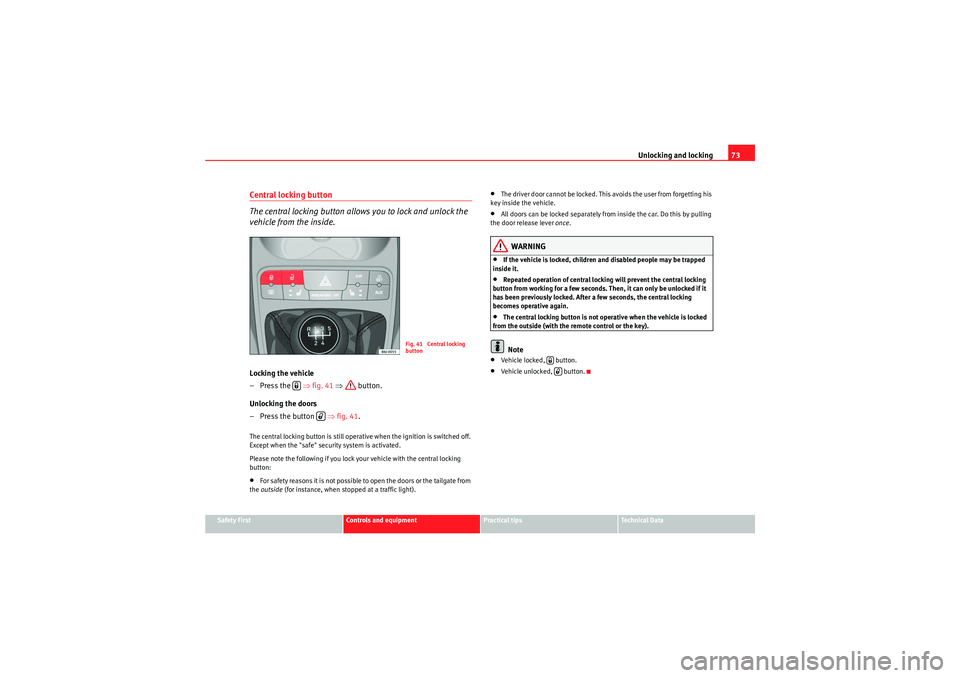
Central locking button
The central locking button allows you to lock and unlock the
vehicle from the inside.Locking the vehicle
–Press the ⇒fig. 41 ⇒ button.
Unlocking the doors
– Press the button ⇒fig. 41 .The central locking button is still operative when the ignition is switched off.
Except when the "safe" security system is activated.
Please note the following if you lock your vehicle with the central locking
button:•For safety reasons it is not possible to open the doors or the tailgate from
the outside (for instance, when stopped at a traffic light).
•The driver door cannot be locked. This avoids the user from forgetting his
key inside the vehicle.•All doors can be locked separately from inside the car. Do this by pulling
the door release lever once.WARNING
•If the vehicle is locked, children and disabled people may be trapped
inside it.•Repeated operation of central locking will prevent the central locking
button from working for a few seconds. Then, it can only be unlocked if it
has been previously locked. After a few seconds, the central locking
becomes operative again.•The central locking button is not operative when the vehicle is locked
from the outside (with the remote control or the key).Note
•Vehicle locked, button.•Vehicle unlocked, button.
Fig. 41 Central locking
button
IbizaSC_EN.book Seite 73 Mittwoch, 16. September 2009 12:11 12
Page 76 of 257
Unlocking and locking
74KeysSet of keys
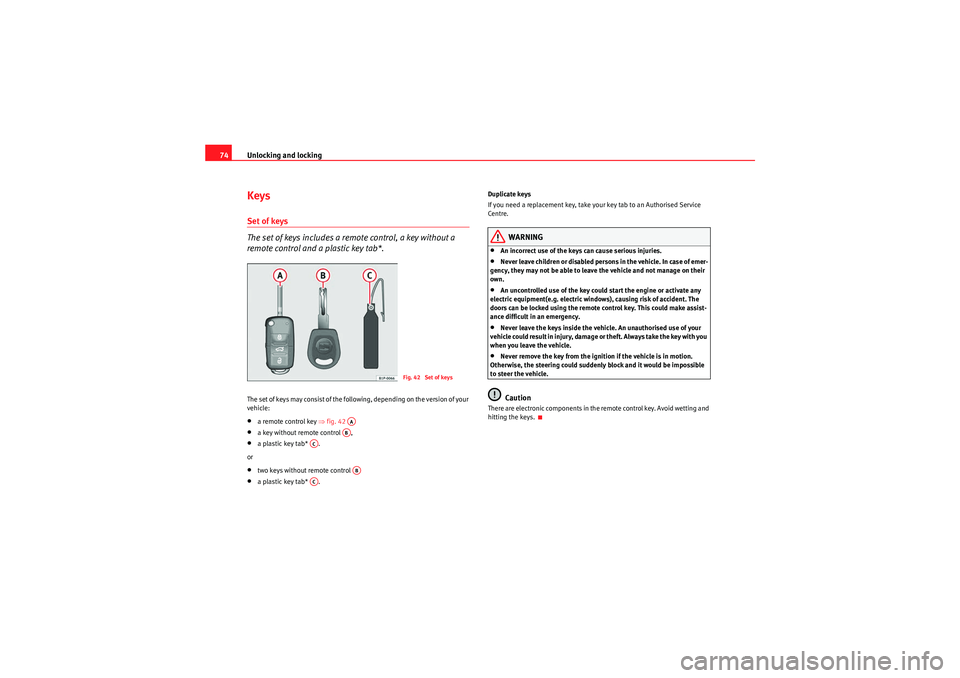
The set of keys includes a remote control, a key without a
remote control and a plastic key tab*.The set of keys may consist of the following, depending on the version of your
vehicle:•a remote control key ⇒ fig. 42 •a key without remote control ,•a plastic key tab* .
or•two keys without remote control •a plastic key tab* . Duplicate keys
If you need a replacement key, take your key tab to an Authorised Service
Centre.
WARNING
•An incorrect use of the keys can cause serious injuries.•Never leave children or disabled persons in the vehicle. In case of emer-
gency, they may not be able to leave the vehicle and not manage on their
own.•An uncontrolled use of the key could start the engine or activate any
electric equipment(e.g. electric wind ows), causing risk of accident. The
doors can be locked using the remote control key. This could make assist-
ance difficult in an emergency.•Never leave the keys inside the vehicle. An unauthorised use of your
vehicle could result in injury, damage or theft. Always take the key with you
when you leave the vehicle.•Never remove the key from the ignition if the vehicle is in motion.
Otherwise, the steering could suddenly block and it would be impossible
to steer the vehicle.Caution
There are electronic components in the remote control key. Avoid wetting and
hitting the keys.
Fig. 42 Set of keys
AAAB
AC
AB
AC
IbizaSC_EN.book Seite 74 Mittwoch, 16. September 2009 12:11 12
Page 77 of 257

Unlocking and locking75
Safety First
Controls and equipment
Practical tips
Technical Data
Radio frequency remote control*Locking and unlocking the vehicle
The remote control key is used to lock and unlock the vehicle
from a distance.
Using the button ⇒fig. 43 (arrow) on the control, the key shaft is released.
Unlocking the vehicle ⇒fig. 43 .
Locking the vehicle ⇒fig. 43 .
Unlocking the tailgate. Press button ⇒fig. 43 until all the indicators
on the vehicle flash briefly. When the unlocking button is pressed,
you have 2 minutes to open the door. After this period, the door is locked
once more.
Also, the battery indicator on the key ⇒fig. 44 , will flash.
The remote control transmitter and the batteries are integrated in the key. The
receiver is inside the vehicle. The maximum range of the remote control
depends on various factors. This range is reduced when the batteries start to
lose power.
WARNING
•An improper use of the key can cause serious injuries.
Fig. 43 Assignment of
buttons on the remote
control key
Fig. 44 Range of the
remote control:
A1
A2
A3
A3
IbizaSC_EN.book Seite 75 Mittwoch, 16. September 2009 12:11 12
Page 78 of 257
Unlocking and locking
76•Never leave children or disabled persons in the vehicle. In case of emer-
gency, they may not be able to leave the vehicle and not manage on their
own.•Never leave the keys inside the vehicle. Otherwise, this could result in
serious injuries, accidents or even the theft of your vehicle. Always take the
key with you when you leave the vehicle.•An uncontrolled use of the key could start the engine or activate any
electric equipment(e.g. electric wind ows), causing risk of accident. The
vehicle can be locked when using the remote control key. This could
complicate the aid in case of emergency.Note
•The remote control key functions only when you are within range
⇒ page 75, fig. 44.•If the vehicle cannot be unlocked or locked by using the radio-frequency
remote control, the remote control key will have to be re-synchronised. In this
case, please refer to your Technical Service.Changing the batteryIf the battery indicator does not flash when the buttons are pushed, the
battery must be replaced.
Caution
The use of inappropriate batteries may damage the radio frequency remote
control. For this reason, always replace the dead battery with another of the
same size and power.
For the sake of the environment
The flat batteries must be thrown away in accordance with regulations
governing the protection of the environment.Synchronising the remote control key
If it is not possible to unlock or lock the door with the remote
control, it should be re-synchronised.While the vehicle is open:
– Press button ⇒page 75, fig. 43 on the remote control.
– Then close the vehicle using the key bit within one minute.
While the vehicle is closed:
–Press button ⇒page 75, fig. 43 on the remote control.
– Then close the vehicle using the key bit within one minute.It is possible that the vehicle could no longer be opened and closed with the
remote control if the button is repeatedly pressed outside of the effective
range of the radio frequency remote control. The remote control key will have
to be resynchronised.
Spare remote control keys are available in your Authorised Service Centres,
where they must be matched to the locking system.
Up to five remote control keys can be used.
WARNING (continued)
A2
A1
IbizaSC_EN.book Seite 76 Mittwoch, 16. September 2009 12:11 12