2009 Seat Ibiza SC engine
[x] Cancel search: enginePage 78 of 257
Unlocking and locking
76•Never leave children or disabled persons in the vehicle. In case of emer-
gency, they may not be able to leave the vehicle and not manage on their
own.•Never leave the keys inside the vehicle. Otherwise, this could result in
serious injuries, accidents or even the theft of your vehicle. Always take the
key with you when you leave the vehicle.•An uncontrolled use of the key could start the engine or activate any
electric equipment(e.g. electric wind ows), causing risk of accident. The
vehicle can be locked when using the remote control key. This could
complicate the aid in case of emergency.Note
•The remote control key functions only when you are within range
⇒ page 75, fig. 44.•If the vehicle cannot be unlocked or locked by using the radio-frequency
remote control, the remote control key will have to be re-synchronised. In this
case, please refer to your Technical Service.Changing the batteryIf the battery indicator does not flash when the buttons are pushed, the
battery must be replaced.
Caution
The use of inappropriate batteries may damage the radio frequency remote
control. For this reason, always replace the dead battery with another of the
same size and power.
For the sake of the environment
The flat batteries must be thrown away in accordance with regulations
governing the protection of the environment.Synchronising the remote control key
If it is not possible to unlock or lock the door with the remote
control, it should be re-synchronised.While the vehicle is open:
– Press button ⇒page 75, fig. 43 on the remote control.
– Then close the vehicle using the key bit within one minute.
While the vehicle is closed:
–Press button ⇒page 75, fig. 43 on the remote control.
– Then close the vehicle using the key bit within one minute.It is possible that the vehicle could no longer be opened and closed with the
remote control if the button is repeatedly pressed outside of the effective
range of the radio frequency remote control. The remote control key will have
to be resynchronised.
Spare remote control keys are available in your Authorised Service Centres,
where they must be matched to the locking system.
Up to five remote control keys can be used.
WARNING (continued)
A2
A1
IbizaSC_EN.book Seite 76 Mittwoch, 16. September 2009 12:11 12
Page 83 of 257

Unlocking and locking81
Safety First
Controls and equipment
Practical tips
Technical Data
WindowsOpening or closing the windows electrically*
All electric windows can be operated using the controls on the
driver door.Opening and closing the windows
– Press the button to open a window.
– Pull button to close a window ⇒ .Always close the windows fully if you park the vehicle or leave it unattended
⇒.
You can use the electric windows for approx. 10 minutes after switching off
the ignition if neither the driver door nor the front passenger door has been
opened and the key has not been removed from the ignition. Buttons on the driver's door
Button for window in front left door
Button for window in front right door
WARNING
•Incorrect use of the electric windows can result in injury.•Never close the tailgate without observing and ensuring it is clear, to do
otherwise could cause serious injury to you and third parties. Make sure
that no one is in the path of a window.•Always take the vehicle key with you when you leave the vehicle.•Never leave children or disabled persons in the vehicle, particularly if
they have access to the keys. The misuse of the keys, for example, by chil-
dren, may result in serious injury and accident.•The engine may accidentally be started and be out of control.•If the ignition is switched on, the electric equipment could be activated
with risk of injury, for example, in the electric windows.•The doors can be locked using the remote control key. This could make
assistance difficult in an emergency.•Always take the key with you when you leave the vehicle.•The electric windows are only deactivated on switching the ignition off
and opening any of the doors.Note
If the window is not able to close because it is stiff or because of an obstruc-
tion, the window will automatically open again ⇒ page 82. If this happens,
check why the window could not be closed before attempting to close it
again.
Fig. 48 Detail of driver
door: controls for the front
windows.
A1A2
IbizaSC_EN.book Seite 81 Mittwoch, 16. September 2009 12:11 12
Page 86 of 257
Unlocking and locking
84
Opening the panoramic/tilting sunroof
– Press and hold down button . The roof starts opening until the button is released.
Automatic closing of the panoramic/tilting sunroof
– Press button once only; the roof starts closing automatically until it is completely closed.
Automatic opening of the panoramic/ tilting sunroof
– Press button once only. The roof starts opening automatically until it is completely open.
Restoring one-touch opening and closing
– Close the roof manually until it is completely closed. Release the button
– Press the closing button again, keeping it pressed down, until a complete opening and closing cycle has taken place.Always close the panoramic/ tilting roof fully if you park the vehicle or leave
it unattended ⇒ .
The tilting roof can be operated for up to about ten minutes after the ignition
has been switched off, provided the driver door and the front passenger door
are not opened.
Sunroof blind
The sunroof blind is opened and closed manually (independently of the
sliding/ tilting roof).
WARNING
•Incorrect use of the tilting roof can result in injury.
•Never close the tilting sunroof without observing and ensuring it is
clear to do, otherwise it may cause serious injury to you and others. Make
sure that no one is in the path of the tilting roof.•Always take the vehicle key with you when you leave the vehicle.•Never leave children or disabled persons in the vehicle, particularly if
they have access to the keys. Unsupervised use of a key could mean that
the engine is started or that electrical equipment is used (e.g. electric
tilting sunroof) with a risk of accident. The doors can be locked using the
remote control key. This could make assistance difficult in an emergency.•The tilting sunroof continues to function until one of the front doors is
opened and the key removed from the ignition.•Ensure that no object and/or limb is between the glass and the roof
when the one-touch opening/closing function is reset.
Convenience closing*Using the door lock
– Hold the key in the door lock of the driver's door in the locking position until the tilting sunroof is closed.
– Release the key to interrupt this function.
Using the remote control
– Push the lock button on the remote control for about 3 seconds. The tilting roof closes.
– Press the unlock button to interrupt the function.
AA
ABAA
WARNING (continued)
IbizaSC_EN.book Seite 84 Mittwoch, 16. September 2009 12:11 12
Page 91 of 257

Lights and visibility89
Safety First
Controls and equipment
Practical tips
Technical Data
– Push the headlight lever to the main beam position
.
– Dipped headlights come on when the door is opened.
Yo u h a v e 2 m i ns . f r o m w h e n t h e ke y i s ta ke n o u t o f t h e i g n i t i o n s wi tch t o w h e n
the lights flash; after this, the Coming home function will not activate. To acti-
vate it again, repeat the operation.
When the system is activated, dipped headlights remain on for 30 seconds.
after closing the door. If the door is open for more than 3 mins., the system
will not remain active after the 3 mins., which means that the dipped lights
will not light up.
Note
•If the vehicle is often used during the night for short trips and the Coming
home function is used, the battery will considerably discharge. To avoid this,
make longer journeys whenever possible.•Observe all relevant statutory requirements when using the lighting
systems described here.
Rear window heating
The rear window heating only works when the engine is running. When it is
switched on, a lamp lights up on the switch.
After approx. 8 minutes, the heating device of the rear window switches off
automatically.
For the sake of the environment
The rear window heater should be disconnected as soon as the glass is
demisted. By saving electrical power you can also save fuel.
Note
To avoid possible damage to the battery, an automatic temporary disconnec-
tion of this function is possible, coming back on when normal operating
conditions are re-established.
Fig. 54 Centre console:
heated rear window
switch
IbizaSC_EN.book Seite 89 Mittwoch, 16. September 2009 12:11 12
Page 92 of 257
Lights and visibility
90Hazard warning lights
The hazard warning lights are used to draw the attention of
other road users to your vehicle in emergencies.
If your vehicle breaks down:
1. Park your vehicle at a safe distance from moving traffic.
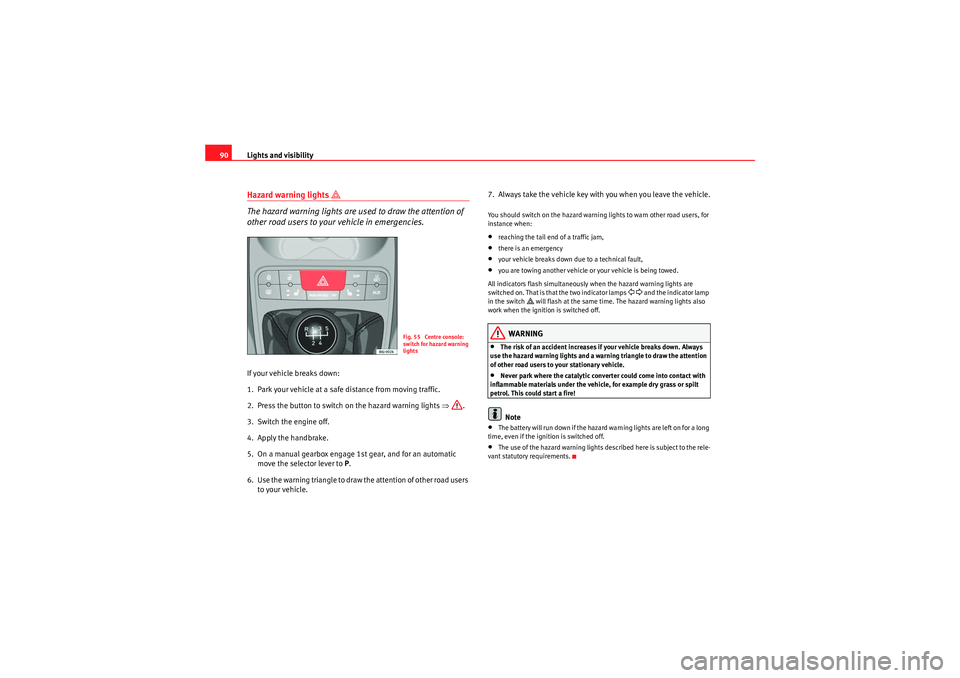
2. Press the button to switch on the hazard warning lights ⇒.
3. Switch the engine off.
4. Apply the handbrake.
5. On a manual gearbox engage 1st gear, and for an automatic move the selector lever to P.
6. Use the warning triangle to draw the attention of other road users to your vehicle. 7. Always take the vehicle key with you when you leave the vehicle.
You should switch on the hazard warning lights to warn other road users, for
instance when:•reaching the tail end of a traffic jam,•there is an emergency•your vehicle breaks down due to a technical fault,•you are towing another vehicle or your vehicle is being towed.
All indicators flash simultaneously when the hazard warning lights are
switched on. That is that the two indicator lamps
and the indicator lamp
in the switch
will flash at the same time. The hazard warning lights also
work when the ignition is switched off.
WARNING
•The risk of an accident increases if your vehicle breaks down. Always
use the hazard warning lights and a warning triangle to draw the attention
of other road users to your stationary vehicle.•Never park where the catalytic converter could come into contact with
inflammable materials under the vehicle, for example dry grass or spilt
petrol. This could start a fire!Note
•The batter y will run down if the hazard warn ing lights are left on for a long
time, even if the ignition is switched off.•The use of the hazard warning lights described here is subject to the rele-
vant statutory requirements.
Fig. 55 Centre console:
switch for hazard warning
lights
IbizaSC_EN.book Seite 90 Mittwoch, 16. September 2009 12:11 12
Page 112 of 257
Seats and stowage
110Ashtrays, cigarette lighter and power pointFront ashtrayOpening and closing the ashtray
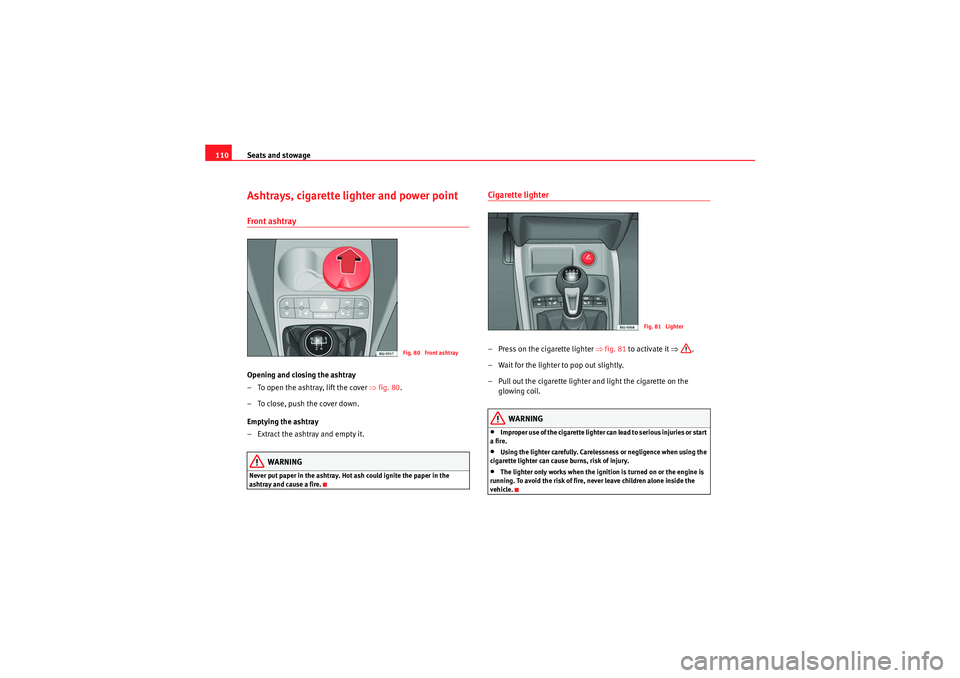
– To open the ashtray, lift the cover ⇒fig. 80 .
– To close, push the cover down.
Emptying the ashtray
– Extract the ashtray and empty it.
WARNING
Never put paper in the ashtray. Hot ash could ignite the paper in the
ashtray and cause a fire.
Cigarette lighter– Press on the cigarette lighter ⇒ fig. 81 to activate it ⇒.
– Wait for the lighter to pop out slightly.
– Pull out the cigarette lighter and light the cigarette on the glowing coil.
WARNING
•Improper use of the cigarette lighter can lead to serious injuries or start
a fire.•Using the lighter carefully. Carelessness or negligence when using the
cigarette lighter can cause burns, risk of injury.•The lighter only works when the ignition is turned on or the engine is
running. To avoid the risk of fire, never leave children alone inside the
vehicle.
Fig. 80 Front ashtray
Fig. 81 Lighter
IbizaSC_EN.book Seite 110 Mittwoch, 16. September 2009 12:11 12
Page 113 of 257

Seats and stowage111
Safety First
Controls and equipment
Practical tips
Technical Data
Electrical power points* The 12 Volt cigarette lighter power point can also be used for other electrical
components with a power rating of up to 120 Watt. When the engine is
switched off, however, the vehicle battery will discharge. Further information
⇒page 168.
WARNING
The current power points and the connected accessories will only operate
when the ignition is on or when the engine is running. Improper use of the
sockets or electrical accessories can lead to serious injuries or cause a fire.
To avoid the risk of injury, never leave children alone inside the vehicle.
Note
•The use of electrical appliances with the engine switched off will cause a
battery discharge.
•Before using any electrical accessories, see the instructions on
⇒ page 168.Auxiliary audio input connection (AUX)*– Lift the AUX. cover ⇒fig. 83 .
– Insert the plug as far as possible (see radio manual).
Fig. 82 Front power point
Fig. 83 AUX connection
on the central console
(depending on the equip-
ment)
IbizaSC_EN.book Seite 111 Mittwoch, 16. September 2009 12:11 12
Page 117 of 257
Heating, Ventilation and Air conditioning115
Safety First
Controls and equipment
Practical tips
Technical Data
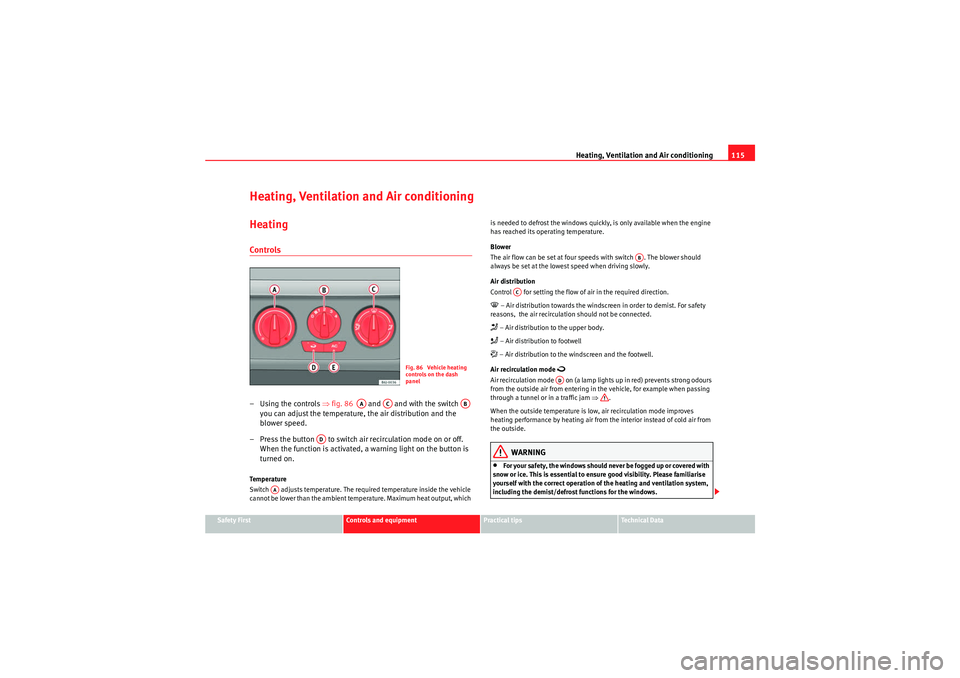
Heating, Ventilation and Air conditioningHeatingControls–Using the controls ⇒fig. 86 and and with the switch
you can adjust the temperature, the air distribution and the
blower speed.
– Press the button to switch ai r recirculation mode on or off.
When the function is activated, a warning light on the button is
turned on.Te m p e r a t u r e
Switch adjusts temperature. The required temperature inside the vehicle
cannot be lower than the ambient temperature. Maximum heat output, which is needed to defrost the windows quickly, is only available when the engine
has reached its operating temperature.
Blower
The air flow can be set at four speeds with switch . The blower should
always be set at the lowest speed when driving slowly.
Air distribution
Control for setting the flow of air in the required direction.
– Air distribution towards the windscreen in order to demist. For safety
reasons, the air recirculation should not be connected. – Air distribution to the upper body. – Air distribution to footwell – Air distribution to the windscreen and the footwell.
Air recirculation mode
Air recirculation mode on (a lamp lights up in red) prevents strong odours
from the outside air from entering in the vehicle, for example when passing
through a tunnel or in a traffic jam ⇒.
When the outside temperature is low, air recirculation mode improves
heating performance by heating air from the interior instead of cold air from
the outside.
WARNING
•For your safety, the windows should never be fogged up or covered with
snow or ice. This is essential to ensure good visibility. Please familiarise
yourself with the correct operation of the heating and ventilation system,
including the demist/defrost functions for the windows.
Fig. 86 Vehicle heating
controls on the dash
panel
AA
AC
AB
AD
AA
AB
AC
AD
IbizaSC_EN.book Seite 115 Mittwoch, 16. September 2009 12:11 12