Page 136 of 316

Seats and stowage
134Seats and stowageManual adjustment of the front seatsSeat adjuster controls
There are several seat adjustment functions for your conven-
ienceS o m e o f t h e e q u i p m e n t l is t e d is o n l y f i t t e d o n ce r ta i n m o d e l s o r is a n o p t i o na l
extra.
Control switches
Moving the seat backwards or forwards
Raising/lowering the seat
Adjusting the backrest angle
Adjusting lumbar support
Moving the seats forwards and backwards– Lift the lever ⇒fig. 106 and move the seat to the desired
position.
– Then release the lever and move the seat further until the catch engages.
WARNING
The driver's seat must only be moved forwards and backwards when the
vehicle is at a standstill. Failure to do so could result in an accident.Adjusting the seat height*Raising the seat
– Pull the lever ⇒ fig. 106 up repeatedly until the seat is in the
desired position.
Lowering the seat
– Press the lever down repeatedly until the seat is in the desired position.
WARNING
•The height of the driver's seat must not be adjusted while driving.
Failure to do so could result in an accident.
Fig. 106 Adjuster
controls on driver's seat
A1A2A3A4
A1
A1
A2A2
ExeoST_EN.book Seite 134 Donnerstag, 3. September 2009 12:24 12
Page 137 of 316
Seats and stowage135
Safety First
Controls and equipment
Practical tips
Technical Data
•Be careful when adjusting the seat height. Injuries can be caused if the
height is adjusted without due care and attention.
Adjusting the backrest angle– Lean forwards to take your weight off the backrest.
– Turn the adjuster wheel ⇒ page 134, fig. 106 to set the angle
of the backrest as required.
WARNING
The front backrests must not be reclined for driving. Otherwise, safety
belts and the airbag system might not protect as they should, with the
subsequent danger of injury.Adjusting lumbar support*– Do not exert any pressure on the backrest and turn adjuster wheel ⇒page 134, fig. 106 to adjust lumbar support.As you make the adjustments, the curvature of the cushioned area of the
lumbar region becomes more or less acute. In this way, it adapts to the
natural curvature of the spine.
WARNING (continued)
A3
A4
ExeoST_EN.book Seite 135 Donnerstag, 3. September 2009 12:24 12
Page 139 of 316

Seats and stowage137
Safety First
Controls and equipment
Practical tips
Technical Data
Control switches
Seat adjustment
Backrest adjustment
Lumbar support*
WARNING
•The electrical seat adjustment also works when the ignition is off or
when the key is not in the ignition. To avoid accidental injuries, never leave
children unattended in the vehicle.•For safety reasons, the seat must only be adjusted when the vehicle is
at a standstill. Failure to do so could result in an accident.•Be careful when adjusting the seat height. Injuries can be caused if the
seat height is adjusted without due care and attention.
Adjusting the backrest angle
– Press the button in the appr opriate direction of the arrow
⇒ fig. 109 to adjust the backrest ⇒.
WARNING
The front backrests must not be reclined for driving. Otherwise, safety
belts and the airbag system might not protect as they should, with the
subsequent danger of injury.Lumbar support*The lumbar support can be adjusted to fit the natural curve of
the spine.
AAABAC
Fig. 109 Front seat: Back-
rest adjuster switch
Fig. 110 Front seat:
Adjuster switch for lumbar
support
ExeoST_EN.book Seite 137 Donnerstag, 3. September 2009 12:24 12
Page 141 of 316

Seats and stowage139
Safety First
Controls and equipment
Practical tips
Technical Data
adjustment. Use of the button is recommended to disable the memory
system when the vehicle is being driven
temporarily by a different driver
whose settings do not need to be stored in the memory.
Note
You can also use the remote control to call up the stored settings
⇒ page 140.Storing settingsThe button must be in its down position (pressed in) before
you can store the desired settings.
– Adjust the driver's seat as required ⇒page 136.
– Adjust both exterior mirrors ⇒page 132.
– Press and hold the button. At the same time, press one of the memory buttons for at least a second.
– Release both buttons. The settin g is now stored on the selected
memory button.Any new setting selected automatically cancels the existing setting stored on
the memory button. It is best to begin with memory button No. 1 for the first
driver and then assign the other memory buttons to each subsequent driver.
The seat and mirror positions are stored when the car is locked with the
remote control and are assigned to the remote control key. The exterior
mirrors adjust automatically to the previous position when you unlock the
car; the driver's seat adjusts automatically when you open the driver's door. However, this does not delete the settings stored in memory buttons 1 to 4.
These settings can be enabled at any time.
Enabling settings
Stored settings can be recalled using either the memory
buttons or the remote control (remote control key).Using the memory buttons
– If the driver's door is open, press the desired memory button
briefly.
– If the driver's door is closed, press and hold down the appro- priate memory button until the seat and exterior mirrors reach
their programmed positions.
Using the remote control
– Unlock the vehicle using the remote control and open the driver's door within the next ten minutes.The seat adjustment will have to be call ed up using the memory buttons if the
driver's door is not opened within 10 minutes after unlocking the vehicle with
the remote control.
WARNING
•For safety reasons, the seat must only be adjusted when the vehicle is
at a standstill. Failure to do so could result in an accident.•In an emergency, the memory function can be stopped at any time by
pressing the STOP button or by briefly pressing any of the memory
buttons.
STOP
STOP
MEMO
ExeoST_EN.book Seite 139 Donnerstag, 3. September 2009 12:24 12
Page 145 of 316

Seats and stowage143
Safety First
Controls and equipment
Practical tips
Technical Data
Please note that the armrest can restrict the driver's movements when it is
lowered. The armrest should therefore be raised when driving in city traffic.
Luggage compartmentLoading the luggage compartment
Loads in the luggage compartment should be safely secured.To maintain safe handling on the road, please observe the following
points:
– Distribute the load evenly.
– Position heavy items as far forward as possible
⇒fig. 116 . – Secure the load with a luggage net* or with non-elastic straps
secured to the fastening rings ⇒page 144.
WARNING
•Unsecured objects in the luggage compartment can suddenly shift and
cause changes in the handling of the vehicle.•In an accident or a sudden manoeuvre, loose objects in the passenger
compartment can be flung forward and might injure vehicle occupants.•Always keep all objects in the luggage compartment and use appro-
priate grips to secure them, particularly in the case of heavy objects.•When you transport heavy objects, always bear in mind that a change
of the centre of gravity can also cause changes in vehicle handling.•Please refer to the notes on ⇒page 7.Caution
Make sure that no hard objects chafe against the wires of the heating element
in the rear window and damage them.
Note
The tyre pressure must be adjusted according to the load. If necessary,
consult the tyre pressure label on the door pillar ⇒page 242.
Fig. 116 Position heavy
items as far forward as
possible.
ExeoST_EN.book Seite 143 Donnerstag, 3. September 2009 12:24 12
Page 146 of 316
Seats and stowage
144Fastening rings
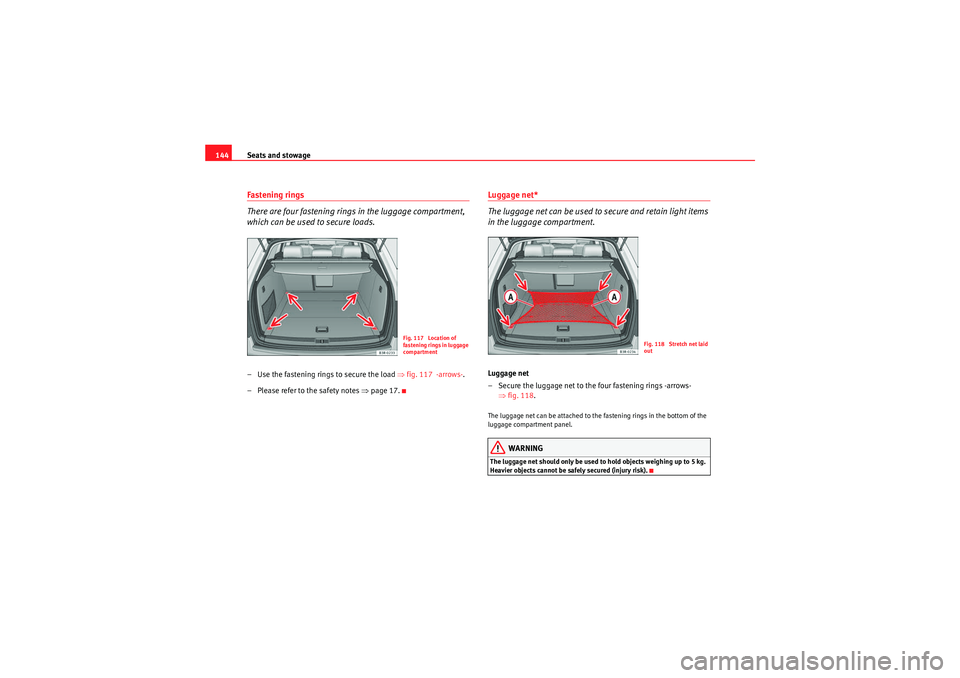
There are four fastening rings in the luggage compartment,
which can be used to secure loads.– Use the fastening ring s to secure the load ⇒fig. 117 -arrows- .
– Please refer to the safety notes ⇒page 17.
Luggage net*
The luggage net can be used to secure and retain light items
in the luggage compartment.Luggage net
– Secure the luggage net to the four fastening rings -arrows-
⇒fig. 118 .The luggage net can be attached to the fastening rings in the bottom of the
luggage compartment panel.
WARNING
The luggage net should only be used to hold objects weighing up to 5 kg.
Heavier objects cannot be safely secured (injury risk).
Fig. 117 Location of
fastening rings in luggage
compartment
Fig. 118 Stretch net laid
out
ExeoST_EN.book Seite 144 Donnerstag, 3. September 2009 12:24 12
Page 147 of 316
Seats and stowage145
Safety First
Controls and equipment
Practical tips
Technical Data
Retaining strap*
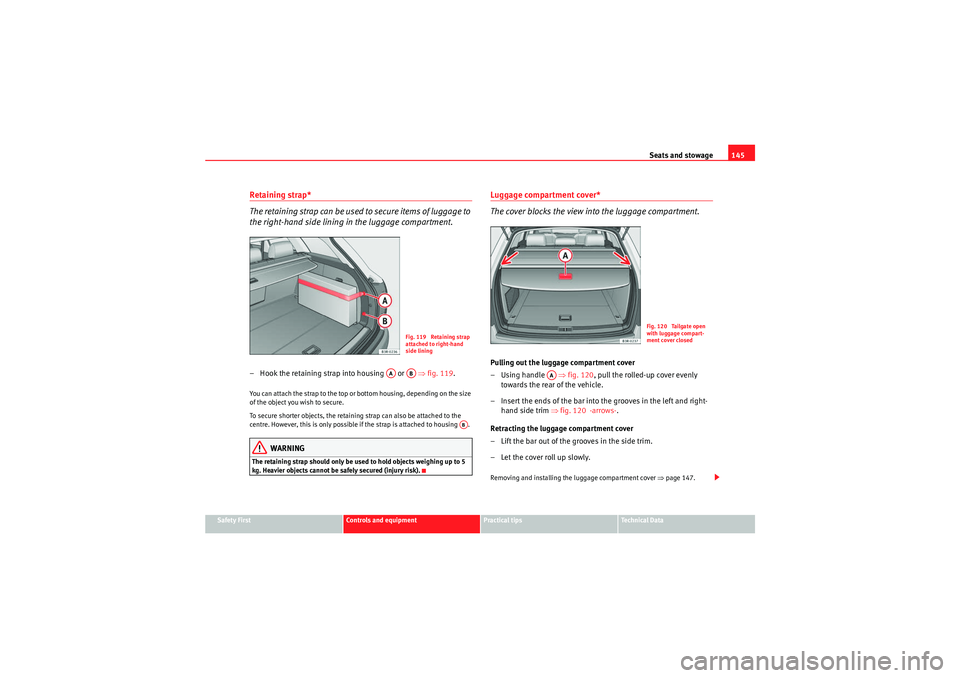
The retaining strap can be used to secure items of luggage to
the right-hand side lining in the luggage compartment.– Hook the retaining strap into housing or ⇒fig. 119 .You can attach the strap to the top or bottom housing, depending on the size
of the object you wish to secure.
To secure shorter objects, the retaining strap can also be attached to the
centre. However, this is only possible if the strap is attached to housing .
WARNING
The retaining strap should only be used to hold objects weighing up to 5
kg. Heavier objects cannot be safely secured (injury risk).
Luggage compartment cover*
The cover blocks the view into the luggage compartment.Pulling out the luggage compartment cover
–Using handle ⇒fig. 120 , pull the rolled-up cover evenly
towards the rear of the vehicle.
– Insert the ends of the bar into the grooves in the left and right- hand side trim ⇒fig. 120 -arrows-.
Retracting the luggage compartment cover
– Lift the bar out of the grooves in the side trim.
– Let the cover roll up slowly.Removing and installing the luggage compartment cover ⇒page 147.
Fig. 119 Retaining strap
attached to right-hand
side lining
AA
AB
AB
Fig. 120 Tailgate open
with luggage compart-
ment cover closed
AA
ExeoST_EN.book Seite 145 Donnerstag, 3. September 2009 12:24 12
Page 148 of 316

Seats and stowage
146
WARNING
The luggage compartment cover should not be used as a storage shelf.
Articles placed on this cover could cause injury to vehicle occupants in an
accident or if the brakes are applied suddenly.Partition grille*
The partition grille prevents loose objects in the luggage
compartment from being thrown forward into the passenger
compartment (e.g. under sudden braking).Pulling out and securing the partition grille
– Pull the grille up as far as it will go.
– Engage the ends of the bar in the retainers ⇒ fig. 121. Using the partition grille with the rear backrest folded down
– Fold down the rear backrests
⇒page 149.
– Pull the grille upwards.
– Engage the ends of the bar in the retainers ⇒fig. 121.
Retracting the partition grille
– Unhook the bar from the retainers.
– Let the grille retract slowly.
Removing and installing the partition grille ⇒page 147.
Fig. 121 Retainers for the
partition grilleAB
AA
ExeoST_EN.book Seite 146 Donnerstag, 3. September 2009 12:24 12