2009 SATURN OUTLOOK steering wheel
[x] Cancel search: steering wheelPage 110 of 432

OnStar Virtual Advisor
OnStar Virtual Advisor is a feature of
OnStar Hands-Free Calling that uses
minutes to access location-based
weather, local traffic reports, and
stock quotes. Press the phone button
and give a few simple voice
commands to browse through the
various topics. See the OnStar
Owner’s Guide for more information.
This feature is only available in the
continental U.S.
OnStar Steering Wheel
Controls
This vehicle may have a Talk/Mute
button that can be used to
interact with OnStar Hands-Free
Calling. SeeAudio Steering Wheel
Controls on page 3-125for more
information.
On some vehicles, the mute button
can be used to dial numbers into
voice mail systems, or to dial phone
extensions. See the OnStar Owner’s
Guide for more information.
How OnStar Service Works
The OnStar system can record and
transmit vehicle information. This
information is automatically sent to
an OnStar Call Center when the
OnStar button is pressed, the
emergency button is pressed, or if
the airbags or AACN system deploy.
This information usually includes the
vehicle’s GPS location and, in the
event of a crash, additional
information regarding the crash that
the vehicle was involved in (e.g. the
direction from which the vehicle was
hit). When the Virtual Advisor feature
of OnStar Hands-Free Calling is
used, the vehicle also sends OnStar
the vehicle’s GPS location so they
can provide services where it is
located.
OnStar service cannot work unless
the vehicle is in a place where
OnStar has an agreement with a
wireless service provider for service
in that area. OnStar service also
cannot work unless the vehicle is ina place where the wireless service
provider OnStar has hired for that
area has coverage, network capacity
and reception when the service is
needed, and technology that is
compatible with the OnStar service.
Not all services are available
everywhere, particularly in remote or
enclosed areas, or at all times.
Location information about
the vehicle is only available if the
GPS satellite signals are
unobstructed and available.
The vehicle must have a working
electrical system, including adequate
battery power, for the OnStar
equipment to operate. There are
other problems OnStar cannot
control that may prevent OnStar from
providing OnStar service at any
particular time or place. Some
examples are damage to important
parts of the vehicle in a crash, hills,
tall buildings, tunnels, weather or
wireless phone network congestion.
2-44 Features and Controls
ProCarManuals.com
Page 123 of 432

Instrument Panel
Instrument Panel OverviewInstrument Panel Overview.....3-4
Hazard Warning Flashers.......3-5
Horn....................................3-5
Tilt and Telescopic Steering
Wheel................................3-6
Turn Signal/Multifunction
Lever.................................3-6
Turn and Lane-Change
Signals...............................3-6
Headlamp High/Low-Beam
Changer.............................3-7
Flash-to-Pass........................3-7
Windshield Wipers.................3-7
Windshield Washer................3-8
Rear Window Wiper/Washer. . . .3-9
Cruise Control......................3-9
Exterior Lamps....................3-11
Delayed Headlamps.............3-12
Daytime Running
Lamps (DRL)/Automatic
Headlamp System..............3-12
Fog Lamps.........................3-13Instrument Panel
Brightness.........................3-13
Courtesy Lamps..................3-13
Dome Lamps......................3-14
Dome Lamp Override...........3-14
Entry Lighting......................3-14
Delayed Entry Lighting.........3-14
Delayed Exit Lighting...........3-15
Parade Dimming..................3-15
Reading Lamps...................3-15
Electric Power
Management.....................3-15
Battery Run-Down
Protection.........................3-16
Accessory Power Outlet(s). . . .3-17
Power Outlet 115 Volt
Alternating Current.............3-18
Climate ControlsClimate Control System........3-19
Dual Automatic Climate
Control System..................3-22
Outlet Adjustment................3-27
Rear Air Conditioning and
Heating System.................3-28
Rear Air Conditioning and
Heating System and
Electronic Climate
Controls............................3-29
Warning Lights, Gages,
and Indicators
Warning Lights, Gages,
and Indicators...................3-30
Instrument Panel Cluster.......3-31
Speedometer and
Odometer.........................3-32
Tachometer........................3-32
Safety Belt Reminders..........3-32
Airbag Readiness Light.........3-33
Passenger Airbag Status
Indicator...........................3-34
Charging System Light.........3-35
Voltmeter Gage...................3-35
Brake System Warning
Light................................3-36
Antilock Brake System
(ABS) Warning Light...........3-37
StabiliTrak
®Indicator Light.....3-37
Engine Coolant Temperature
Warning Light....................3-38
Engine Coolant
Temperature Gage.............3-38
Tire Pressure Light..............3-39
Malfunction
Indicator Lamp..................3-39
Oil Pressure Light................3-42
Security Light......................3-43
Fog Lamp Light...................3-43
Instrument Panel 3-1
ProCarManuals.com
Page 124 of 432

Cruise Control Light.............3-43
Highbeam On Light..............3-43
Tow/Haul Mode Light...........3-43
Fuel Gage..........................3-44
Driver Information
Center (DIC)
Driver Information
Center (DIC).....................3-44
DIC Operation and Displays
(With DIC Buttons).............3-45
DIC Operation and Displays
(Without DIC Buttons).........3-50
DIC Compass.....................3-54
DIC Warnings and
Messages.........................3-56
DIC Vehicle Customization
(With DIC Buttons).............3-65
Audio System(s)Audio System(s)..................3-74
Setting the Clock.................3-74
Radio(s).............................3-75
Using an MP3
(Radio with CD).................3-92
Using an MP3
(Radio with CD and
DVD Player)......................3-97
XM Radio Messages..........3-102
Navigation/Radio System.....3-103
Bluetooth
®........................3-103
Rear Seat Entertainment
(RSE) System..................3-114
Rear Seat Audio (RSA)......3-123
Theft-Deterrent Feature.......3-125
Audio Steering Wheel
Controls..........................3-125
Radio Reception................3-126
Multi-Band Antenna............3-127
3-2 Instrument Panel
ProCarManuals.com
Page 127 of 432

The main components of the
instrument panel are listed here:
A.Outlet Adjustment on page 3-27.
B.Turn Signal/Multifunction
Lever on page 3-6.
C.Instrument Panel Cluster on
page 3-31.
D.Driver Information Center (DIC)
on page 3-44.
E.Instrument Panel Storage on
page 2-50.
F.Audio System(s) on page 3-74.
Navigation/Radio System on
page 3-103(If Equipped).
G.Exterior Lamps on page 3-11.
H.Hood Release on page 5-11.
I.Dome Lamp Override on
page 3-14.Instrument Panel
Brightness on page 3-13.
J.Cruise Control on page 3-9.
K.Tilt and Telescopic Steering
Wheel on page 3-6.
L.Horn on page 3-5.M.Audio Steering Wheel Controls
on page 3-125.
N.Hazard Warning Flashers on
page 3-5.
O. Center Console Shift Lever.
See “Console Shift Lever” under
Shifting Into Park on page 2-28.
P.Rear Window Wiper/Washer
on page 3-9. Traction Control
System (TCS) Disable Button
(If Equipped). SeeStabiliTrak
®
System on page 4-5.Tow/Haul
Mode on page 2-26(If Equipped).
Power Liftgate on page 2-11
(If Equipped).
Q.Accessory Power Outlet(s) on
page 3-17.
R.Heated Seats on page 1-5.
S.Dual Automatic Climate Control
System on page 3-22.
T. Passenger Air Bag Status
Indicator. SeePassenger
Sensing System on page 1-55.
U.Glove Box on page 2-50.
Hazard Warning Flashers
|
Hazard Warning Flasher:Press
this button located on the instrument
panel below the audio system, to
make the front and rear turn signal
lamps ash on and off. This warns
others that you are having trouble.
Press again to turn the ashers off.
The turn signals do not work while
the hazard warning ashers are on.
Horn
Press near or on the horn symbols
on the steering wheel pad to
sound the horn.
Instrument Panel 3-5
ProCarManuals.com
Page 128 of 432

Tilt and Telescopic
Steering Wheel
The steering wheel can be adjusted.
The adjustment lever is located on
the left side of the steering column.
Pull the lever down to move the
steering wheel up or down and in
or out. Pull the lever up to lock
the steering wheel in place.
Do not adjust the steering wheel
while driving.
Turn Signal/Multifunction
Lever
The lever on the left side of the
steering column includes the
following:
G:Turn and Lane-Change
Signals
3:Headlamp High/Low-Beam
Changer
N:Windshield Wipers
L:Windshield Washer
Flash-to-Pass Feature.
Information for these features is on
the pages following.
For information on the headlamps,
seeExterior Lamps on page 3-11.
Turn and Lane-Change
Signals
An arrow on the instrument panel
cluster ashes in the direction of the
turn or lane change.
Move the lever all the way up or
down to signal a turn.
Raise or lower the lever until the
arrow starts to ash to signal a
lane change. Hold it there until the
lane change is completed. If the
lever is briey pressed and released,
the turn signal ashes three times.
The lever returns to its starting
position whenever it is released.
If after signaling a turn or lane
change the arrow ashes rapidly
or does not come on, a signal bulb
might be burned out.
Have the bulbs replaced. If the bulb
is not burned out, check the fuse.
SeeFuses and Circuit Breakers on
page 5-92.
3-6 Instrument Panel
ProCarManuals.com
Page 131 of 432
Rear Window
Wiper/Washer
The rear wiper and rear wash
button is located on the instrument
panel below the climate control
system.
Z(Rear Wiper):Press to turn the
rear wiper on and off. The wiper
speed cannot be changed.
Y(Wash):Press to spray washer
uid on the rear window. The window
wiper will also come on. Release the
button when enough uid has been
sprayed on the window. The rear
wiper will run a few more cycles
after it is released. If the rear wiper
function was already on, prior to
pressing the wash button, it stays
on until the wiper button is pressed
again.
The rear window washer uses the
same uid that is in the windshield
washer reservoir. SeeWindshield
Washer Fluid on page 5-26.
Cruise Control
With cruise control, a speed of about
25 mph (40 km/h) or more can be
maintained without keeping your
foot on the accelerator. Cruise
control does not work at speeds
below about 25 mph (40 km/h).
When the brakes are applied, the
cruise control is disengaged.
{CAUTION
Cruise control can be dangerous
where you cannot drive safely at
a steady speed. So, do not use
the cruise control on winding
roads or in heavy traffic.
Cruise control can be dangerous
on slippery roads. On such roads,
fast changes in tire traction can
cause excessive wheel slip, and
you could lose control. Do not use
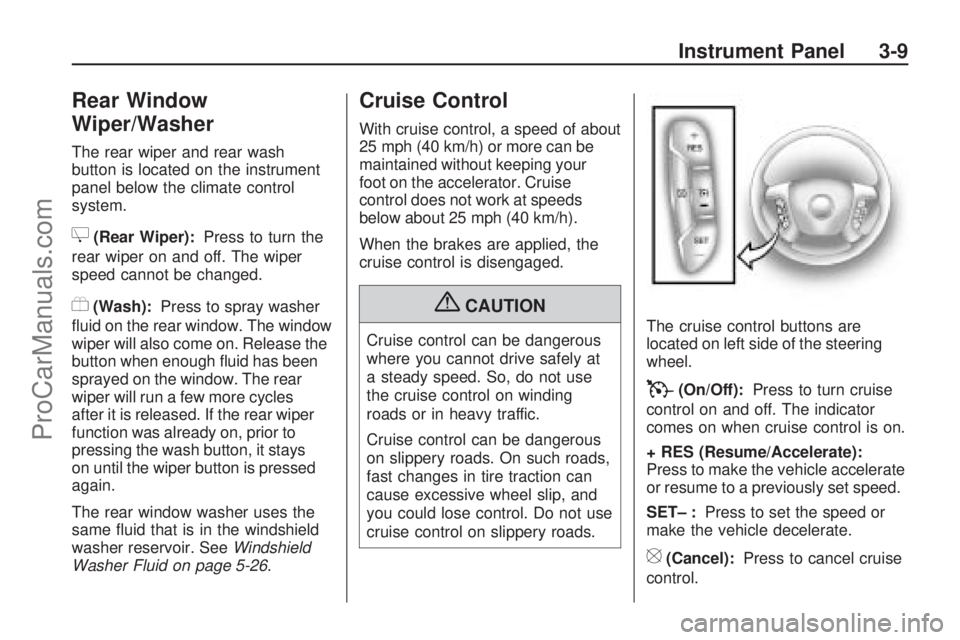
cruise control on slippery roads.The cruise control buttons are
located on left side of the steering
wheel.
T(On/Off):Press to turn cruise
control on and off. The indicator
comes on when cruise control is on.
+ RES (Resume/Accelerate):
Press to make the vehicle accelerate
or resume to a previously set speed.
SET– :Press to set the speed or
make the vehicle decelerate.
[(Cancel):Press to cancel cruise
control.
Instrument Panel 3-9
ProCarManuals.com
Page 132 of 432

Setting Cruise Control
Cruise control will not work if the
parking brake is set, or if the master
cylinder brake uid level is low.
The cruise control light on the
instrument panel cluster comes on
after the cruise control has been
set to the desired speed.
{CAUTION
If you leave your cruise control
on when you are not using cruise,
you might hit a button and go into
cruise when you do not want to.
You could be startled and even
lose control. Keep the cruise
control switch off until you want
to use cruise control.
1. Press the
Ibutton.
2. Get up to the speed desired.
3. Press and release the SET–
button located on the steering
wheel.
4. Take your foot off the
accelerator.Resuming a Set Speed
If the cruise control is set at a
desired speed and then the brakes
are applied, the cruise control is
disengaged. But it does not need
to be reset.
Once the vehicle speed is 25 mph
(40 km/h) or greater, press the
+RES button on the steering wheel.
The vehicle returns to the previously
set speed and stays there.
Increasing Speed While Using
Cruise Control
There are two ways to increase the
vehicle speed while using cruise
control:
Press and hold the +RES button
on the steering wheel until the
desired speed is reached,
then release it.
To increase vehicle speed in
small increments, press the
+RES button briey. Each time
this is done, the vehicle goes
about 1 mph (1.6 km/h) faster.Reducing Speed While Using
Cruise Control
There are two ways to reduce the
vehicle speed while using cruise
control:
Press and hold the SET– button
on the steering wheel until the
lower speed desired is reached,
then release it.
To slow down in very small
amounts, press the SET– button
briey. Each time this is done,
the vehicle goes about 1 mph
(1.6 km/h) slower.
Passing Another Vehicle While
Using Cruise Control
Use the accelerator pedal to
increase vehicle speed. When you
take your foot off the pedal, the
vehicle will slow down to the
previously set cruise speed.
3-10 Instrument Panel
ProCarManuals.com
Page 133 of 432

Using Cruise Control on Hills
How well the cruise control will work
on hills depends upon the vehicle
speed, load, and the steepness of
the hills. When going up steep hills,
you might have to step on the
accelerator pedal to maintain the
vehicle speed. When going downhill,
you might have to brake or shift to a
lower gear to keep the vehicle speed
down. When the brakes are applied
the cruise control is disengaged.
Ending Cruise Control
There are three ways to end cruise
control:
Step lightly on the brake pedal.
Press the[button.
Press theTbutton.
Erasing Speed Memory
The cruise control set speed
memory is erased when the cruise
control or the ignition is turned off.
Exterior Lamps
The exterior lamps control is located
on the instrument panel to the left
of the steering wheel.
It controls the following systems:
Headlamps
Taillamps
Parking Lamps
License Plate Lamps
Instrument Panel Lights
Fog Lamps (If Equipped)The exterior lamps control has four
positions:
O(Off):Turns the automatic light
control on or off.
AUTO (Automatic):Automatically
turns on the headlamps at normal
brightness, together with the
following:
Parking Lamps
Taillamps
License Plate Lamps
Instrument Panel Lights
;(Parking Lamps):Turns on the
parking lamps together with the
following:
Taillamps
License Plate Lamps
Instrument Panel Lights
Instrument Panel 3-11
ProCarManuals.com