2009 SATURN AURA manual radio set
[x] Cancel search: manual radio setPage 189 of 408

EQ (Equalization):Press this button to select preset
equalization settings.
To return to the manual mode, press EQ until Manual
displays or start to manually adjust the bass, midrange,
or treble by pressing
f.
Adjusting the Speakers (Balance/Fade)
To adjust balance or fade:
1. Press
funtil the speaker control labels display.
2. Press the softkey under the desired tab, or continue
pressing
fto highlight the desired tab.
3. Turn
fto adjust the highlighted setting. The
highlighted setting can also be adjusted by pressing
either SEEK arrow.
On some radios,
\FWD andsREV can also
be used to adjust the highlighted level.
The radio may be capable of adjusting balance or fade to
the middle position by pressing the softkey below the BAL
or FADE tab for more than two seconds. The radio beeps
once and the level adjusts to the middle position.
The radio may also be capable of adjusting all tone and
speaker controls to the middle position by pressing
ffor
more than two seconds until the radio beeps once.
Finding a Category (CAT) Station
(XM Satellite Radio Service Only)
CAT (Category):The radio may have the CAT button
feature.
To select and nd a desired category:
1. Press BAND until the XM frequency displays.
2. Press CAT to display the category labels on the
radio display. Continue pressing the CAT button
until the desired category name displays.
3. Press either of the two softkeys below the desired
category tab to immediately tune to the rst XM
station associated with that category.
4. To go to the previous or to the next XM station within
the selected category, do one of the following:
Turnf.
Press the softkeys below the right or left arrows
on the radio display.
Press©SEEK or¨SEEK.
5. To exit the category search mode, press the FAV
button or BAND button to display the favorites
again.
3-61
ProCarManuals.com
Page 190 of 408

Undesired XM categories can be removed through the
setup menu. To remove an undesired category:
1. Press MENU to display the radio setup menu.
2. Press the softkey below the XM CAT tab.
3. Turn
fto display the category to be removed.
4. Press the softkey below the Remove tab until the
category name along with the word Removed
displays.
5. Repeat the steps to remove additional categories.
Removed categories can be restored by pressing the
softkey under the Add tab when a removed category
displays or by pressing the softkey below the Restore
All tab.
Categories cannot be removed or added while the
vehicle is moving faster than 5 mph (8 km/h).
Radio Messages
Calibration Error:Displays if the radio is no longer
calibrated properly for the vehicle. The vehicle must be
returned to your dealer/retailer for service.
Loc or Locked:Displays when the THEFTLOCK
®
system has activated. Take the vehicle to your dealer/
retailer for service.
If any error occurs repeatedly or if an error cannot be
corrected, contact your dealer/retailer.
XM Satellite Radio Service
XM is a satellite radio service that is based in the
48 contiguous United States and 10 Canadian provinces.
XM Satellite Radio has a wide variety of programming
and commercial-free music, coast-to-coast, and in
digital-quality sound. During your trial or when you
subscribe, you will get unlimited access to XM Radio
Online for when you are not in the vehicle. A service
fee is required to receive the XM service. For more
information, contact XM at xmradio.com or call
1-800-929-2100 in the U.S. and xmradio.ca or call
1-877-438-9677 in Canada.
Radio Messages for XM Only
SeeXM Radio Messages on page 3-74later in this
section for further detail.
Loading a CD
Radio’s with a Single CD Player
Insert a CD partway into the slot, label side up.
The player pulls it in and the CD begins playing.
When the CD is inserted, the CD symbol displays. As
each new track starts to play, the track number displays.
The CD player can play the smaller 3 inch (8 cm)
single CDs with an adapter ring. Full-size CDs and the
smaller CDs are loaded in the same manner.
3-62
ProCarManuals.com
Page 194 of 408

Care of the CD Player
Do not add labels to a CD, it could get caught in the CD
player. Use a marking pen to write on the top of the
CD if a description is needed.
Do not use CD lens cleaners, they could damage the
CD player.
Notice:If a label is added to a CD, or more than
one CD is inserted into the slot at a time, or an
attempt is made to play scratched or damaged CDs,
the CD player could be damaged. While using the
CD player, use only CDs in good condition without
any label, load one CD at a time, and keep the CD
player and the loading slot free of foreign materials,
liquids, and debris.
If an error displays, see “CD Messages” earlier in this
section.
Using the Auxiliary Input Jack
The radio system may have an auxiliary input jack
located on the lower right side of the faceplate. This is
not an audio output; do not plug the headphone set
into the front auxiliary input jack. An external audio
device such as an iPod
®, laptop computer, MP3 player,
CD changer, etc. can be connected to the auxiliary
input jack for use as another audio source.Drivers are encouraged to set up any auxiliary device
while the vehicle is in P (Park). SeeDefensive Driving on
page 4-2for more information on driver distraction.
To use a portable audio player, connect a 3.5 mm
(1/8 inch) cable to the radio’s front auxiliary input jack.
When a device is connected, press the radio CD/AUX
button to begin playing audio from the device over
the vehicle speakers.
O(Power/Volume):Turn to adjust the volume.
Additional volume adjustments may have to be made
from the portable device if the volume is too quiet or
not loud.
BAND:Press to listen to the radio while a portable
audio device is playing. The portable audio device
continues playing until it is stopped or turned off.
CD/AUX (CD/Auxiliary):Press to play a CD while a
portable audio device is connected to the auxiliary input.
Press again and the system begins playing audio from
the connected portable audio player. If a portable audio
player is not connected, No Aux Input Device Found may
display.
3-66
ProCarManuals.com
Page 202 of 408
<(Shuffle Album):Press the softkey below>to
shuffle all songs in the current album on an iPod.
=(Shuffle Folder):Press the softkey below>to
shuffle all songs in the current folder on a USB storage
device.
XM Radio Messages
XL (Explicit Language Channels):These channels, or
any others, can be blocked at a customer’s request,
by calling 1-800-852-XMXM (9696).
XM Updating:The encryption code in the receiver is
being updated, and no action is required. This process
should take no longer than 30 seconds.
No XM Signal:The system is functioning correctly, but
the vehicle is in a location that is blocking the XM™
signal. When the vehicle is moved into an open area,
the signal should return.
Loading XM:The audio system is acquiring and
processing audio and text data. No action is needed.
This message should disappear shortly.
Channel Off Air:This channel is not currently in
service. Tune in to another channel.
Channel Unauth:This channel is blocked or cannot be
received with your XM Subscription package.Channel Unavail:This previously assigned channel is
no longer assigned. Tune to another station. If this
station was one of the presets, choose another station
for that preset button.
No Artist Info:No artist information is available at this
time on this channel. The system is working properly.
No Title Info:No song title information is available
at this time on this channel. The system is working
properly.
No CAT Info:No category information is available at
this time on this channel. The system is working properly.
No Information:No text or informational messages are
available at this time on this channel. The system is
working properly.
CAT Not Found:There are no channels available for
the selected category. The system is working properly.
XM Theftlocked:The XM receiver in the vehicle could
have previously been in another vehicle. For security
purposes, XM receivers cannot be swapped between
vehicles. If this message is received after having the
vehicle serviced, check with your dealer/retailer.
XM Radio ID:If tuned to channel 0, this message
alternates with the XM™ Radio 8 digit radio ID label.
This label is needed to activate the service.
3-74
ProCarManuals.com
Page 214 of 408

Other Information
The Bluetooth®word mark and logos are owned by the
Bluetooth®SIG, Inc. and any use of such marks by
General Motors is under license. Other trademarks and
trade names are those of their respective owners.
This device complies with Part 15 of the FCC Rules.
Operation is subject to the following two conditions:
1. This device may not cause harmful interference.
2. This device must accept any interference received,
including interference that may cause undesired
operation.
This device complies with RSS-210 of Industry Canada.
Operation is subject to the following two conditions:
1. This device may not cause interference.
2. This device must accept any interference received,
including interference that may cause undesired
operation of the device.
Changes or modications to this system by other than
an authorized service facility could void authorization to
use this equipment.
Rear Seat Audio (RSA)
Your vehicle may have rear seat audio (RSA). This
feature allows rear seat passengers to listen to and
control any of the music sources: radio, CDs, or other
auxiliary sources. However, the rear seat passengers can
only control the music sources the front seat passengers
are not listening to. For example, rear seat passengers
can control and listen to a CD through the headphones,
while the driver listens to the radio through the front
speakers. The rear seat passengers have control of the
volume for each set of headphones.
The RSA functions can be operated even when the
main radio is off. The front audio system will display the
headphone icon when the RSA is on, and will disappear
from the display when it is off.
The audio system mutes the rear speakers when the
RSA audio is active through the headphones.
Audio can be heard through wired headphones
(not included) plugged into the jacks on the RSA.
If your vehicle has this feature, audio can also be
heard on Channel 2 of the wireless headphones.
To listen to an iPod or portable audio device through the
RSA, attach the iPod or portable audio device to the front
auxiliary input (if available), located on the front audio
system. Turn the iPod on, then choose the front auxiliary
input with the RSA SRCE button.
The area above the top row of buttons on the RSA
faceplate is not a display. Infrared transmitters are
located in this area for the wireless headphones.
3-86
ProCarManuals.com
Page 215 of 408

The following functions are controlled by the RSA
system:
n(Volume):Turn this knob to increase or to
decrease the volume. The left knob controls the left
wired headphones and the right knob controls the right
wired headphones.
O(Power):Press this button to turn the system on or
off. The rear speakers are muted when the RSA power is
turned on.
SRCE (Source):Press this button to switch between the
CD, and if your vehicle has these features, DVD, front
auxiliary, and rear auxiliary.BAND:Press this button to switch between FM1, FM2,
AM, or XM1 or XM2 (if equipped).
1–6 (Preset):Press this button to go to the next preset
radio station. This function is inactive if the front seat
passengers are listening to the radio.
While a CD is playing in the six-disc CD changer, press
this button to select the next CD, if multiple CDs are
loaded. This function is inactive if the front seat
passengers are listening to a CD.
©¨(Seek):While listening to the radio, press the
seek arrows to go to the next or the previous station
and stay there. This function is inactive if the front seat
passengers are listening to the radio.
While a CD is playing, press the left seek arrow to go to
the start of the current track if more than eight seconds
have played. Press the right seek arrow to go to the next
track on the CD. This function is inactive if the front seat
passengers are listening to a CD.
3-87
ProCarManuals.com
Page 216 of 408

Rear Seat Audio Controls
The following function is controlled by the main radio:
Front seat passengers can turn the RSA off by
quickly pressing the front radio power knob twice.
Headphones
The RSA includes two wireless headphones that are
dedicated to this system. These headphones are used
to listen to media such as CDs or radio. The wireless
headphones have an On/Off button and a volume control.
Push the power button to turn on the headphones. An
indicator light located on the headphones comes on. If
the light does not come on, the batteries might need to be
replaced. See “Battery Replacement” later in this section
for more information. Switch the headphones to Off when
not in use.
Infrared transmitters are located on the rear seat audio
faceplate above the top row of buttons. This area is
not a display. The headphones shut off automatically
to save the battery power if the RSA shuts off or if the
headphones are out of range of the transmitters for more
than three minutes. If you move too far forward or step
out of the vehicle, the headphones lose the audio signal.The headphones automatically turn off after four hours
of continuous use.
To adjust the volume on the headphones, use the
volume control located on the right side.
For optimal audio performance, the headphones must
be worn correctly. Headphones should be worn with
the headband over the top of the head for best audio
reception. The symbol L (Left) appears on the upper left
side, above the ear pad and should be positioned on the
left ear. The symbol R (Right) appears on the upper right
side, above the ear pad and should be positioned on the
right ear.
Notice:Do not store the headphones in heat or
direct sunlight. This could damage the headphones
and repairs will not be covered by the warranty.
Storage in extreme cold can weaken the batteries.
Keep the headphones stored in a cool, dry place.
If the foam ear pads attached to the headphones
become worn or damaged, the pads can be replaced
separately from the headphone set. Contact your
dealer/retailer for more information.
3-88
ProCarManuals.com
Page 217 of 408
Battery Replacement
To change the batteries on the headphones, do the
following:
1. Turn the screw to loosen the battery door located on
the left side of the headphones. Slide the battery
door open.
2. Replace the two batteries in the compartment. Make
sure that they are installed correctly, using the
diagram on the inside of the battery compartment.
3. Replace the battery door and tighten the door
screw.
If the headphones are to be stored for a long period of
time, remove the batteries and keep them in a cool,
dry place.
Theft-Deterrent Feature
THEFTLOCK®is designed to discourage theft of the
vehicle’s radio by learning a portion of the Vehicle
Identication Number (VIN). The radio does not operate
if it is stolen or moved to a different vehicle.
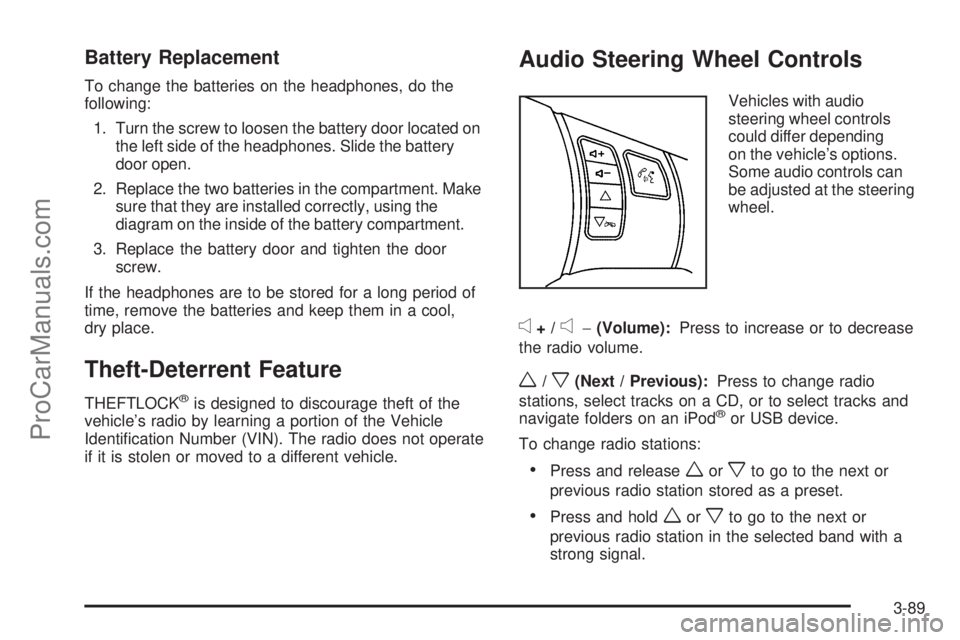
Audio Steering Wheel Controls
Vehicles with audio
steering wheel controls
could differ depending
on the vehicle’s options.
Some audio controls can
be adjusted at the steering
wheel.
e+/e−(Volume):Press to increase or to decrease
the radio volume.
w/x(Next / Previous):Press to change radio
stations, select tracks on a CD, or to select tracks and
navigate folders on an iPod
®or USB device.
To change radio stations:
Press and releaseworxto go to the next or
previous radio station stored as a preset.
Press and holdworxto go to the next or
previous radio station in the selected band with a
strong signal.
3-89
ProCarManuals.com