2009 SAAB 9-3 alarm
[x] Cancel search: alarmPage 59 of 304

59 Security
Quick guide, LED and Saab Information Display
(SID) messagesActivity LED signal
Arming (delay period) Illuminates for 11 seconds.
Alarm armed Flashes once every 3 seconds.
Disarming Extinguishes.
Alarm not armed Off.
A door, the hood or the tailgate is
open or opened during the delay
period.Flashes for 11 s then flashes
once every 3 seconds.
Car immobilized but not locked. Off.
Change of status of immobilizer
system, valid remote control
inserted or removed from ignition
switch.Double-flashes for 3 seconds.
SID message Reason/action
Key not accepted.
Contact service.Error when remote control
inserted into ignition switch.
Remote control battery
low. Replace battery.Battery needs replacing.
Seepage54.
Number of keys:
Active key number:Check of the number of remote
controls programmed for your
car. See page 53.
Alarm tripped during
last arming period.The alarm has been tripped
since the car was last locked.
93_US_MY09.book Page 59 Tuesday, April 15, 2008 10:30 AM
ProCarManuals.com
Page 90 of 304

90 Instruments and controlsWhen a message is displayed
The odometer and tripmeter is temporarily
turned off when a two row message is dis-
played. The icon is displayed in the left part
of the display.
The warnings and indications that can be
shown on the SID are listed on page 294.
If there is more than one message on the
SID, a plus sign will be displayed to the left
of the first message. Each message will be
displayed for 10 seconds.
Press the CLR button to acknowledge a SID
message. If you acknowledge a message
but do nothing about it, the message will be
displayed again the next time you start the
car.
When the engine is switched off the warn-
ing/indicator lights still active are displayed,
this is to remind the driver. At this point the
warning/indicator lights previously acknowl-
edged with the CLR button are also dis-
played.
You can adjust the settings of several of the
car’s systems, such as the alarm3, rain
sensor3 and climate control system. These
are known as Settings se page 94.
Odometer and trip meterThe odometer records the distance trav-
elled in miles on U.S. vehicles and on Cana-
dian vehicles the distance indicated is in
kilometres, and the trip meter in miles and
tenths (kilometres and tenths of kilometres
on Canadian vehicles).Reset buttonThe reset button is positioned immediately
to the left of the speedometer.
Press once to resets the trip meter, the igni-
tion shall be in position ON.
Trip computer function of the SID
WARNING
It is strongly recommended that the SID
settings be changed only when the car is
stationary. The driver’s attention can oth-
erwise easily be distracted from the road.
SID contains the following functions:
TempOutdoor temperature
D.T.E.Estimated range (distance to
empty fuel tank).
When the possible range is
less than 18 miles (30 km)
then the text Refill fuel now
is displayed.
Fuel ØAverage fuel consumption
since function last reset
DistDistance to destinations.
Function can also be used as
a trip meter
Speed ØAverage speed since function
last reset
Speed WSpeed warning (chime)
SettingsSettings of features such as
alarm clock, language and
rain sensor3
SID, control unit and display
93_US_MY09.book Page 90 Tuesday, April 15, 2008 10:30 AM
ProCarManuals.com
Page 92 of 304

92 Instruments and controlsResetting the trip computer
Press and hold the CLR button (approx.
3 seconds) until audible confirmation is
given.
The following functions will be rest:
FuelØ
Speed Ø
D.T.E. (the value is reset to the distance
possible on the remaining fuel if fuel
consumption is 10l/100 km, lower
consumption means a longer possible
distance)
Tr i p (Dist used as trip meter).Speed warning
This value is preset to 55 mph (90 km/h).
The value can be set to between 0 and
150 mph (0 and 250 km/h).
1Select Speed W using the steering
wheel controls, or .
2 Press and hold the SET button until
given audible confirmation.
3 Adjust the speed using the steering
wheel controls.
4 Confirm the setting by pressing the SET
button.
Go back/modify using the CLR-button.
The word ON on the right-hand side of the
display indicates when the speed warning
function is active.
An audible alarm will sound if the set speed
is exceeded.
Disengage the function with the CLR button.
Re-engage the function using the SET but-
ton.Calculating the arrival time
(When will I arrive if I know how far I have to
drive?)
This function should be used before starting
out a journey.
To calculate the arrival time, the distance
must first be given.
1Select Dist using the steering wheel
controls, or .
2 Press and hold the SET button until
given audible confirmation.
3 Set the distance to the destination using
the steering wheel controls.
4 Confirm the setting by pressing the SET
button.
The calculated arrival time will now appear
on the right-hand side of the display.
If you take a break, this time will be added to
the previously calculated arrival time.93_US_MY09.book Page 92 Tuesday, April 15, 2008 10:30 AM
ProCarManuals.com
Page 94 of 304
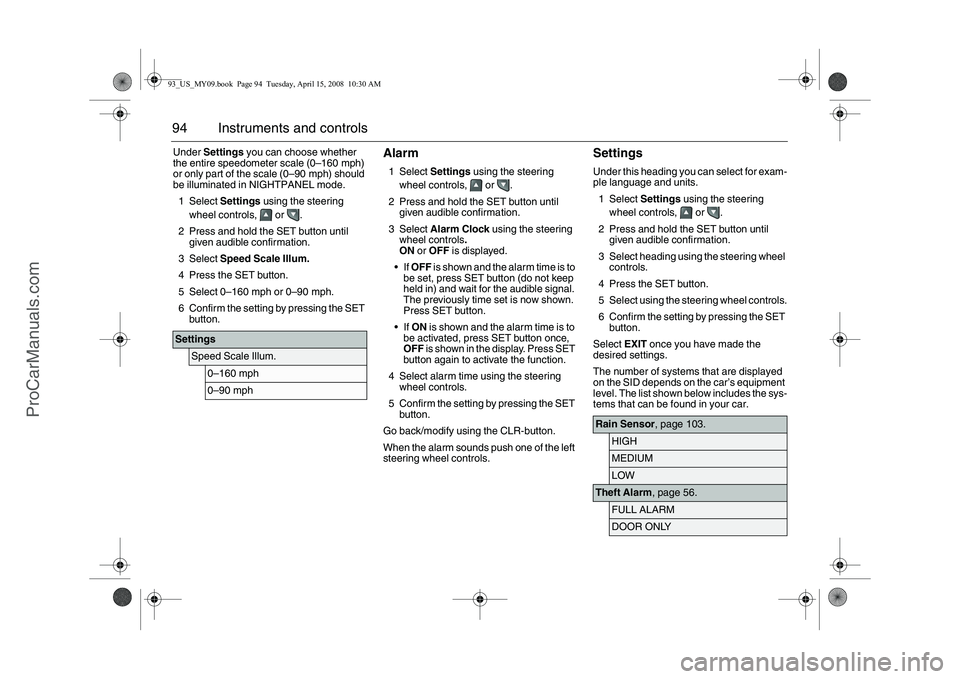
94 Instruments and controlsUnder Settings you can choose whether
the entire speedometer scale (0–160 mph)
or only part of the scale (0–90 mph) should
be illuminated in NIGHTPANEL mode.
1Select Settings using the steering
wheel controls, or .
2 Press and hold the SET button until
given audible confirmation.
3Select Speed Scale Illum.
4 Press the SET button.
5 Select 0–160 mph or 0–90 mph.
6 Confirm the setting by pressing the SET
button.
Alarm1Select Settings using the steering
wheel controls, or .
2 Press and hold the SET button until
given audible confirmation.
3Select Alarm Clock using the steering
wheel controls.
ON or OFF is displayed.
If OFF is shown and the alarm time is to
be set, press SET button (do not keep
held in) and wait for the audible signal.
The previously time set is now shown.
Press SET button.
If ON is shown and the alarm time is to
be activated, press SET button once,
OFF is shown in the display. Press SET
button again to activate the function.
4 Select alarm time using the steering
wheel controls.
5 Confirm the setting by pressing the SET
button.
Go back/modify using the CLR-button.
When the alarm sounds push one of the left
steering wheel controls.
SettingsUnder this heading you can select for exam-
ple language and units.
1Select Settings using the steering
wheel controls, or .
2 Press and hold the SET button until
given audible confirmation.
3 Select heading using the steering wheel
controls.
4 Press the SET button.
5 Select using the steering wheel controls.
6 Confirm the setting by pressing the SET
button.
Select EXIT once you have made the
desired settings.
The number of systems that are displayed
on the SID depends on the car’s equipment
level. The list shown below includes the sys-
tems that can be found in your car.
Settings
Speed Scale Illum.
0–160 mph0–90 mph
Rain Sensor, page 103.
HIGHMEDIUMLOW
Theft Alarm, page 56.
FULL ALARMDOOR ONLY
93_US_MY09.book Page 94 Tuesday, April 15, 2008 10:30 AM
ProCarManuals.com
Page 95 of 304

95 Instruments and controls
Explanation of the various selections under
Settings.
Park Assistance, page 180.
ONOFF
Alarm Clock, page 94.
ONOFF
Language.
ENGLISH UKENGLISH USFRANCAISDEUTSCHITALIANOESPANOLSVENSKA
Speed Scale Illum.
0–160 mph0–90 mph
Speed Scale Sel.
BOTH SCALESONLY MPH SCALE
Unit
METRICUSIMPERIAL
Climate System, page 115.Next Service: xx%.
INTERMEDIATEMAIN
Time for Service.
INTERMEDIATEMAINMAIN & INTERMEDReset Service Ind?
YES NO
TCS, page 173.
ONOFF
ESP, page 175.
ONOFF
Rain Sensor
The sensitivity has three levels.
Park Assistance
The Park Assistance can be shut off by
choosing OFF.
Alarm Clock
Setting of alarm clock is possible.
Language
Select the desired language. The num-
ber of languages can vary between
markets.
Speed Scale Illum.
Select the proportion of the speedo-
meter to be illuminated in NIGHT-
PANEL mode.
Speed Scale Sel.
Select if both scales or just mph-scale
shall be illuminated in NIGHTPANEL
mode.
93_US_MY09.book Page 95 Tuesday, April 15, 2008 10:30 AM
ProCarManuals.com
Page 151 of 304

151 Starting and driving
approx. 2 seconds. Following which, turn it
back to OFF.ON positionThe entire electrical system is operative.
Do not leave the remote control in the ON
position when the engine is not running.
Turn the ignition switch to the OFF position
to disconnect the electrical system.
When you turn the ignition switch to ON,
some indicator and warning lights will come
on in the main instrument panel. These
should go out after about 3 seconds.ST - starter positionThe starter motor operates (automatic
transmission: selector lever must be in P or
N) when the ignition switch is turned to this
position. When released, the ignition switch
will spring back to the ON position.
The car has an electronic restart lock. If the
engine fails to start, the ignition switch must
first be turned back to a position between
OFF and LOCK before the starter motor can
be operated again.
Steering wheel lockThe steering wheel lock is electronic. The
lock engages when the remote control is
removed from the ignition and unlocks when
the remote control is inserted. A click can be
heard when the steering wheel lock locks
and unlocks.
If the car is parked with one front wheel
touching the curb, for example, you may
need to turn the steering wheel slightly
when you insert the remote control to allow
the steering wheel lock to unlock. If you do
not succeed on first attempt you must
remove the remote control before trying
again. Turn the steering wheel and insert
the remote control into the ignition switch.
If the steering wheel lock does not disen-
gage it will not be possible to turn the remote
control in the ignition switch.
The following message is shown on the SID:If a fault arises affecting the steering wheel
lock, the following message will be
displayed on the SID:
If the steering wheel lock malfunctions while
the remote control is in the ignition switch,
this may prevent the removal of the remote
control or prevent the car from being
restarted once the engine has been
switched off.
If you have to leave the car, lock the car by
pressing down the lock buttons on the
doors. Lock the front left door from outside
with the traditional key (see page 50). The
car is now locked but the alarm is inactive.
Pull out key, turn
steering wheel. Restart.
Steering lock malfunc.
Make a safe stop.
93_US_MY09.book Page 151 Tuesday, April 15, 2008 10:30 AM
ProCarManuals.com
Page 253 of 304

253
Car care
Winter tiresWinter (snow) tires are recommended for
winter climates where the majority of your
driving will be done on snow and ice. Winter
tires should be fitted to all four wheels to
maintain a proper balance. Your Saab
dealer can advise you of to the correct size
tire for your car (if different from the original
size) and also supply Saab approved winter
tires pre-mounted on steel or alloy rims.
Winter tires normally use a different speed
rating compared to summer/all season tires.
Make sure not to exce ed the stated speed
rating on the tires you use.
Make sure that wheels with sensors for tire
pressure monitoring are fitted during
replacement if the car has automatic tire
pressure monitoring.Tire date codeTires should be regarded as perishable
goods. As the tires age, the rubber becomes
progressively harder, and the road holding
ability of the tires diminishes. This is partic-
ularly true on winter tires.
Tires have a code that specifies their date of
manufacture. The first two digits denote the
week number and the last two digits the year
followed by a filled triangle.
Automatic tire pressure
monitoring systemThe system consists of a sensor in each
wheel and a common receiver. The sensors
are located inside the tire in direct connec-
tion with the air pressure valves.
Make sure that wheels with sensors for tire
pressure monitoring are fitted during
replacement if the car has automatic tire
pressure monitoring.
The system will trigger a warning/alarm if
the spare wheel is fitted because it has no
sensor. Tire pressure informa
tion is transmitted
wireless to the receiver.
The system checks the tire pressures when
speed exceeds 19 mph (30 km/h).
The system is self-programming which
means that the wheels can be shifted
around without any need for adjustment.
The sensor batteries last for 10 years or
around 160 000 km. The battery cannot be
replaced. The whole sensor must be
replaced.
WARNING
The system is an aid to the driver. The
driver always has the responsibility that
the tires have the correct air pressure.
For optimum safety, economy and com-
fort tire pressures should be checked reg-
ularly even if the automatic tire pressure
monitoring has not alarmed.
NOTICETire replacement must take place with
great care to avoid damaging the sensors
that are built together with the valves.
Remove the rear side first, see page 255.
Start to remove the tire opposite the valve.
During removal the tire machine must not come closer than ±10° from the
valve.
During fitting, start 20° after the valve and finish 20° before the valve.
Do not inflate the tire with pressure higher than 102 psi (700 kPa).
93_US_7carcare_MY09.fm Page 253 Tuesday, April 15, 2008 11:26 AM
ProCarManuals.com
Page 254 of 304

254 Car careThe system does not warn if the tire pres-
sure is too high.
If the system has warned or triggered an
alarm due to inadequate pressure then
the pressure must be reset to the recom-
mended pressure so that the warning/alarm
is cleared.If the tire pressure decreasesIf the tire pressure decreases to 6 psi
(40 kPa) below the recommended pressure
then a warning is shown on the SID as to
which tires are affected.
Adjust the pressure as soon as possible. If the tire pressure continues to decrease
then an alarm is shown on the SID when the
pressure has decreased to 23 psi (160 kPa)
which is the lowest permitted pressure for
the tire.
An alarm is also received when leakage is
greater than 3 psi/min. (20 kPa/min.).
Reduce speed (avoid heavy braking and
significant steering wheel movement) and
stop the car as soon as possible at a suita-
ble location. Replace the defective wheel.
The fault message can remain for up to
10 minutes after restarting the car. Then it
disappears if the tire pressure is correct.Check/adjust the pressure in the other tires
when a fault message is shown.
Note that the tire pressure can decrease
without a puncture. The pressure could
decrease around 3 psi (20 kPa) during a
three month period.
The outside temperature could also affect
tire pressure.
The temperature in the
tire also affects the
tire pressure. The spec ified tyre pressures
are valid for cold tyres. The increased tyre
pressure resulting from extensive driving
must not be reduced. For further informa-
tion on tire air pressure , see page 240.
Allow 10 minutes for the system to recog-
nize the wheel/sensors positions after fitting
a new set of tires. During this period no low
pressure warning or alarm can be triggered.
Tire pressure low,
front right. Check tires.
Low tire pressure rear
left. Make a safe stop.
Valve with sensor
Valve without sensor
93_US_7carcare_MY09.fm Page 254 Tuesday, April 15, 2008 11:26 AM
ProCarManuals.com