Page 123 of 543

Far End Audio Performance
•
Audio quality is maximized under:
•low-to-medium blower setting,
•low-to-medium vehicle speed,
•low road noise,
•smooth road surface,
•fully closed windows,
•dry weather conditions, and
•operation from the driver’s seat.
•Performance, such as audio clarity, echo, and loudness
to a large degree rely on the phone and network, and
not the uconnect�phone.
•Echo at the far end can sometimes be reduced by
lowering the in-vehicle audio volume.
•In a convertible vehicle, system performance may be
compromised with the convertible top down.
Bluetooth�Communication Link
Cellular phones have been found to lose connection to
the uconnect� phone. When this happens, the connection
can generally be reestablished by switching the phone
off/on. Your cellular phone is recommended to remain in
Bluetooth� ON mode.
Power-Up
After switching the ignition key from OFF to either the
ON or ACC position, or after a language change, you
must wait at least five seconds prior to using the system.
3
UNDERSTANDING THE FEATURES OF YOUR VEHICLE 121
Page 128 of 543
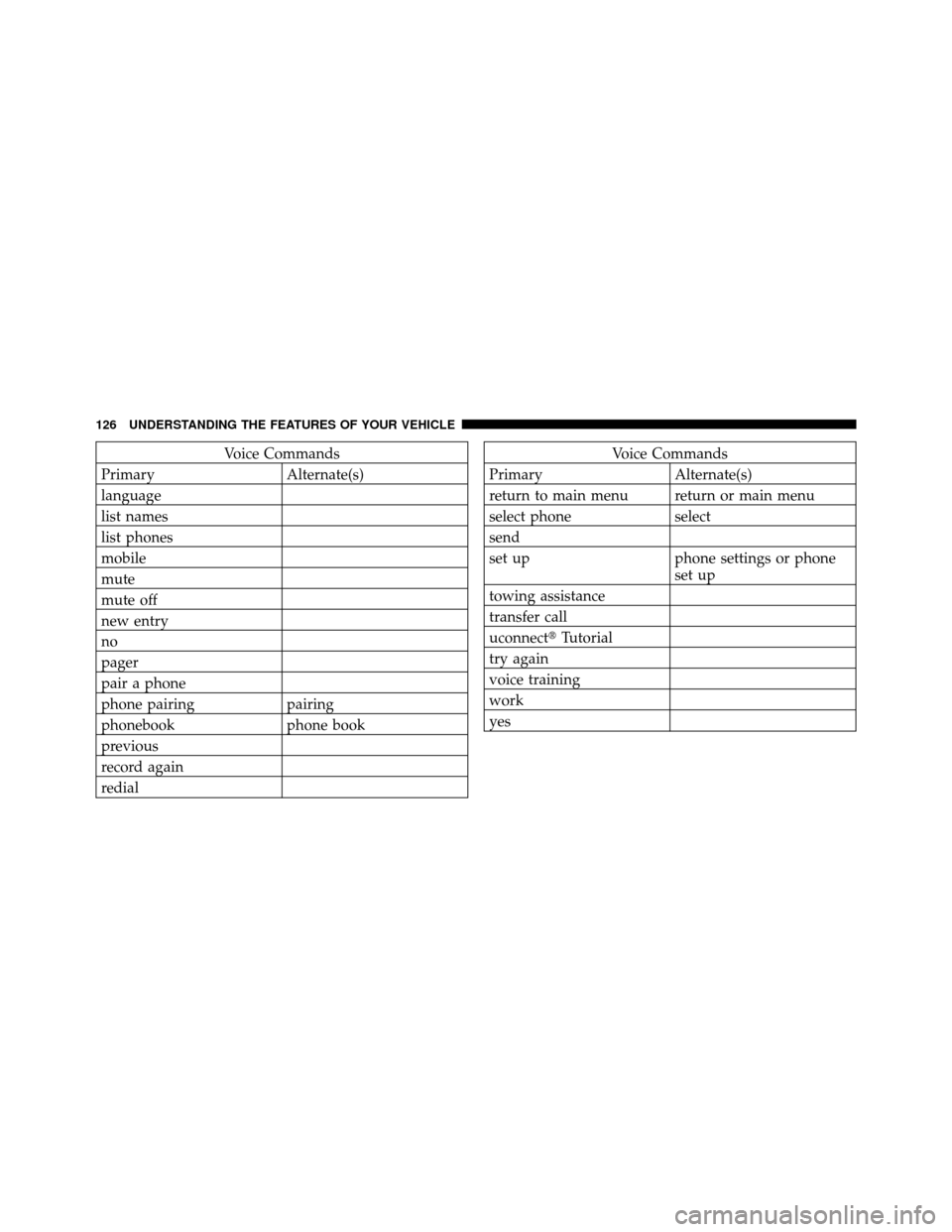
Voice Commands
Primary Alternate(s)
language
list names
list phones
mobile
mute
mute off
new entry
no
pager
pair a phone
phone pairing pairing
phonebook phone book
previous
record again
redialVoice Commands
Primary Alternate(s)
return to main menu return or main menu
select phone select
send
set up phone settings or phone set up
towing assistance
transfer call
uconnect� Tutorial
try again
voice training
work
yes
126 UNDERSTANDING THE FEATURES OF YOUR VEHICLE
Page 134 of 543

NOTE:Keep in mind that you have to press the VR
button first and wait for the beep before speaking the
“Barge In” commands.
Voice Training
For users experiencing difficulty with the system recog-
nizing their voice commands or numbers, uconnect�
phone Voice Training feature may be used.
1. Press the VR button, say “System Setup” and once you
are in that menu then say “Voice Training.” This will train
your own voice to the system and will improve recogni-
tion.
2. Repeat the words and phrases when prompted by
uconnect� phone. For best results, the Voice Training
session should be completed when the vehicle is parked,
engine running, all windows closed, and the blower fan
switched off. This procedure may be repeated with a new
user. The system will adapt to the last trained voice only.
SEATS
Seats are a primary part of the Occupant Restraint System
of the vehicle. They need to be used properly for safe
operation of the vehicle.
WARNING!
•It is extremely dangerous to ride in a cargo area,
inside or outside of a vehicle. In a collision, people
riding in these areas are more likely to be seri-
ously injured or killed.
•Do not allow people to ride in any area of your
vehicle that is not equipped with seats and seat
belts.
•Be sure everyone in your vehicle is in a seat and
using a seat belt properly.
132 UNDERSTANDING THE FEATURES OF YOUR VEHICLE
Page 188 of 543
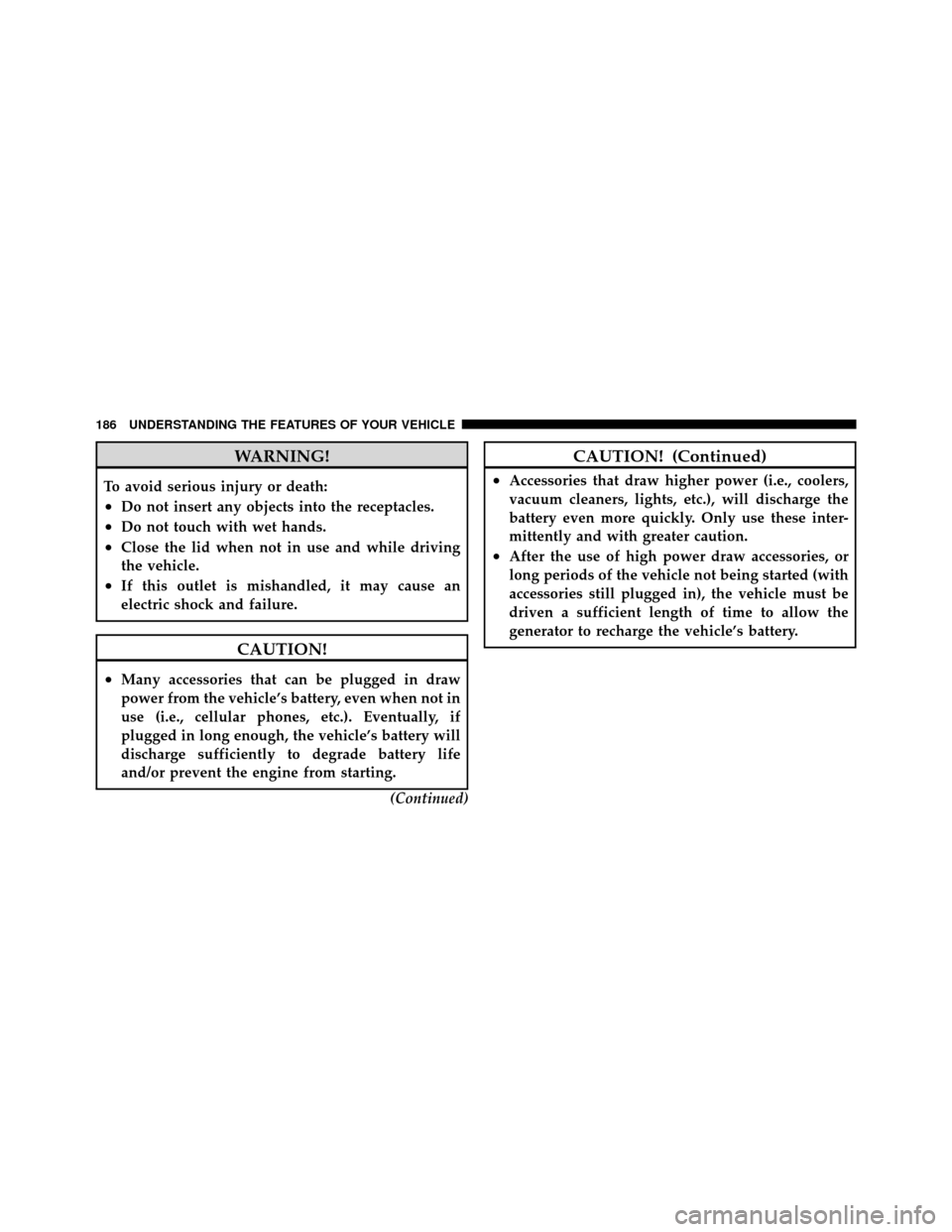
WARNING!
To avoid serious injury or death:
•Do not insert any objects into the receptacles.
•Do not touch with wet hands.
•Close the lid when not in use and while driving
the vehicle.
•If this outlet is mishandled, it may cause an
electric shock and failure.
CAUTION!
•Many accessories that can be plugged in draw
power from the vehicle’s battery, even when not in
use (i.e., cellular phones, etc.). Eventually, if
plugged in long enough, the vehicle’s battery will
discharge sufficiently to degrade battery life
and/or prevent the engine from starting.(Continued)
CAUTION! (Continued)
•Accessories that draw higher power (i.e., coolers,
vacuum cleaners, lights, etc.), will discharge the
battery even more quickly. Only use these inter-
mittently and with greater caution.
•After the use of high power draw accessories, or
long periods of the vehicle not being started (with
accessories still plugged in), the vehicle must be
driven a sufficient length of time to allow the
generator to recharge the vehicle’s battery.
186 UNDERSTANDING THE FEATURES OF YOUR VEHICLE
Page 190 of 543
POWER INVERTER — IF EQUIPPED
A 115-Volt (150 Watts Maximum) outlet is located on the
center stack of the instrument panel, to the right of the
radio. This outlet can power cellular phones, electronics
and other low power devices requiring power up to 150
Watts. Certain high-end video games, such as Playsta-
tion3 and XBox360 will exceed this power limit, as will
most power tools. Due to built-in overload protection, the
power outlet will shut down if the power rating is
exceeded. Each device to be powered should be checked
first to make sure it does not exceed the outlet’s 150 Watts
maximum rating.To turn on the power outlet, press the
switch once. Press the switch a second
time to turn the power outlet off.
Power Inverter Outlet
188 UNDERSTANDING THE FEATURES OF YOUR VEHICLE
Page 222 of 543

�Electronic Digital Clock ................. 261
▫ Clock Setting Procedure ............... 261
� Sales Code (RER/REN) — AM/FM/CD/DVD
Radio – If Equipped .................... 261
▫ Operating Instructions — Voice Recognition
System (VR) — If Equipped ............. 262
▫ Operating Instructions — uconnect� phone
— If Equipped ...................... 262
▫ Clock Setting Procedure ............... 262
� Sales Code RES — AM/FM Stereo Radio With
CD Player (MP3 AUX Jack)............... 264
▫ Operating Instructions — Radio Mode ..... 264
▫ Operation Instructions — CD Mode For CD
And MP3 Audio Play ................. 267
▫ Notes On Playing MP3 Files ............ 270▫
Operation Instructions - Auxiliary Mode .... 272
� Sales Code RES/RSC — AM/FM Stereo Radio
With CD Player (MP3 AUX Jack) And Sirius
Radio ............................... 273
▫ Operating Instructions — Radio Mode ..... 273
▫ Operation Instructions — CD Mode For CD
And MP3 Audio Play ................. 278
▫ Notes On Playing MP3 Files ............ 281
▫ List Button (CD Mode For MP3 Play) ...... 283
▫ Info Button (CD Mode For MP3 Play) ...... 284
� uconnect� studios (Satellite Radio) — If
Equipped (REN/RER/RES Radios Only) ...... 285
▫ System Activation .................... 285
▫ Electronic Serial Number/Sirius
Identification Number (ESN/SID) ......... 285
220 UNDERSTANDING YOUR INSTRUMENT PANEL
Page 223 of 543

▫Selecting uconnect� studios (Satellite)
Mode ............................. 286
▫ Satellite Antenna ..................... 286
▫ Reception Quality .................... 287
▫ Operating Instructions - uconnect� studios
(Satellite) Mode ..................... 287
▫ Operating Instructions - uconnect� phone
(If Equipped) ....................... 289
� Video Entertainment System (VES)™ —
If Equipped .......................... 290
� Remote Sound System Controls —
If Equipped .......................... 291
▫ Radio Operation ..................... 291
▫ CD Player ......................... 292 �
CD/DVD Maintenance ................. 292
� Radio Operation And Cellular Phones ....... 293
� Climate Controls ...................... 293
▫ Manual Heating And Air Conditioning
System ............................ 293
▫ Automatic Temperature Control (ATC) —
If Equipped ........................ 297
▫ Summer Operation ................... 302
▫ Winter Operation .................... 302
▫ Vacation/Storage .................... 303
▫ Window Fogging And Frosting .......... 303
▫ Outside Air Intake ................... 303
▫ Operating Tips ...................... 304
4
UNDERSTANDING YOUR INSTRUMENT PANEL 221
Page 256 of 543

Manual Compass Calibration
If the compass appears erratic and the CAL indicator
does not appear in the EVIC display, you must put the
compass into the Calibration Mode manually, as follows:
1. Turn ON the ignition switch.
2. Press the UP or DOWN button until the Setup
(Customer-Programmable Features) menu is reached,
then press the SELECT button.
3. Press the DOWN button until “Calibrate Compass” is
displayed in the EVIC.
4. Press and release the SELECT button to start the
calibration. The “CAL” indicator will be displayed in the
EVIC.
5. Complete one or more 360–degree turns (in an area
free from large metal or metallic objects) until the “CAL”
indicator turns off. The compass will now function
normally.
Compass Variance
Compass Variance is the difference between Magnetic
North and Geographic North. To compensate for the
differences the variance should be set for the zone where
the vehicle is driven, per the zone map. Once properly
set, the compass will automatically compensate for the
differences, and provide the most accurate compass
heading. For the most accurate compass performance, the
compass must be set using the following steps.
NOTE:Keep magnetic materials away from the top of
the instrument panel, such as iPod’s, Cell Phones, Lap-
tops and Radar Detectors. This is where the compass
module is located, and it can cause interference with the
compass sensor, and it may give false readings.
254 UNDERSTANDING YOUR INSTRUMENT PANEL