2009 PORSCHE CAYMAN steering
[x] Cancel search: steeringPage 105 of 284

Operation, Safety
103
Car Telephone and
Aftermarket Alarms Important legal and safety information
regarding the use of cellular telephones
Some states may prohibit the use of cellular tele-
phones while driving a vehicle. Check the laws and
regulations on the use of cellular telephones in the
areas where you drive.
Danger!
Risk of an accident.
Severe personal injury or death can result in
the event of an accident.
Looking away from the road or turning your
attention away from your driving can cause
an accident and seri ous or fatal injury.
When using your cellular telephone, you should al-
ways:
f Give full attention to your driving - pull off the
road and park before making or answering a
call if traffic conditions so require; and
f Keep both hands on the steering wheel - use
hands-free operation (if available) - pull off the
road and park before using a hand-held tele-phone. It is essential to observe the telephone
manufacturer's instructions before operating
the telephone.
Any portable telephone or radio transmitter which
is used in a Porsche must
be properly installed in
accordance with the technical requirements of
Porsche.
The transmission power must not exceed
10 W.
The devices must possess a type approval for
your vehicle and have an “e” symbol.
If you should require equipment with transmission
power values greater than 10 W, please consult
your authorized Porsche dealer for this purpose.
The dealer is familiar with the technical require-
ments for installing devices of this kind.
The antennas for all radios and telephones with a
transmitting antenna must be externally mounted.
The improper installation of radios or telephones
or use of a radio or tele phone with a transmitting
antenna inside the car may cause the warning
lights to come on.
Improper installation of such equipment can cre-
ate a discharged battery or excessive current
draw from added equipment. If aftermarket systems are
installed by non-dealer-
ship technicians or outside the selling dealer,
problems may result. Installation of aftermarket
equipment is not covered under the New Car War-
ranty.
f Consult your authorized Porsche dealer about
the installation of non Porsche approved equip-
ment.
Reception quality
The reception quality of your car telephone will
change constantly when you are driving. Interfer-
ence caused by buildings, landscape and weather
is unavoidable. It may become particularly difficult
to hear when using the hands-free function due to
external noise such as engine and wind noise.
Automatic car-wash
f Unscrew external antennas before using an au-
tomatic car-wash.
Page 107 of 284

Operation, Safety
105
Roof Transport SystemfPlease follow the separate instructions for fit-
ting the Roof Transport System.
f Only use Roof Transport Systems from the
Porsche Tequipment product range or Roof
Transport Systems which have been tested
and approved for your car by Porsche. Fitting
normal commercially available luggage racks
is not possible.
The Porsche Roof Transport System allows you
to carry various sports and hobby equipment.
Your Porsche partner will be pleased to tell you
about the various different uses of the Roof Trans-
port System.
Caution!
f Risk of damage to the paint on the rear lid.
Only open the rear lid if this cannot touch the
load.
f Completely remove the Roof Transport System
b e f o re u s i n g a n a u t o m a t i c c a r w a s h - r i s k o f d a -
mage to the vehicle!
f Do not exceed the maximum permitted pay-
load of 132 lbs. (60 kg), the maximum permit-
ted gross weight and the maximum permitted
axle loads.
f Please see the chapter “WEIGHTS” on
Page 272. f
Distribute load evenly, storing heavy items as
low as possible. Items of luggage must not
project beyond the side of the load area.
f Fix and secure every item to the basic carrier
with a rope or lashing strap (do not use elastic
rubber tensioners).
f Before every trip, and at regular intervals
during long trips, check that Roof Transport
System and load are secu re. Re-tighten if ne-
cessary and secure additionally by locking.
f When the Roof Transport System is loaded, the
maximum speed depends on the nature, size
and weight of the load being carried. But never
drive faster than 90 mph (140 km/h).
f With the basic carrier fitted and no load, do not
exceed a maximum speed of 110 mph
(180 km/h).
f Driving, braking and steering behavior change
due to the higher center of gravity and the gre-
ater wind-resistant area. You should adapt your
driving style appropriately.
f Since fuel consumption and noise are incre-
ased with the Roof Transport System fitted, it
should not remain on the vehicle if not in use.
Page 126 of 284
124
Instruments, On-Board Computer, Warnings
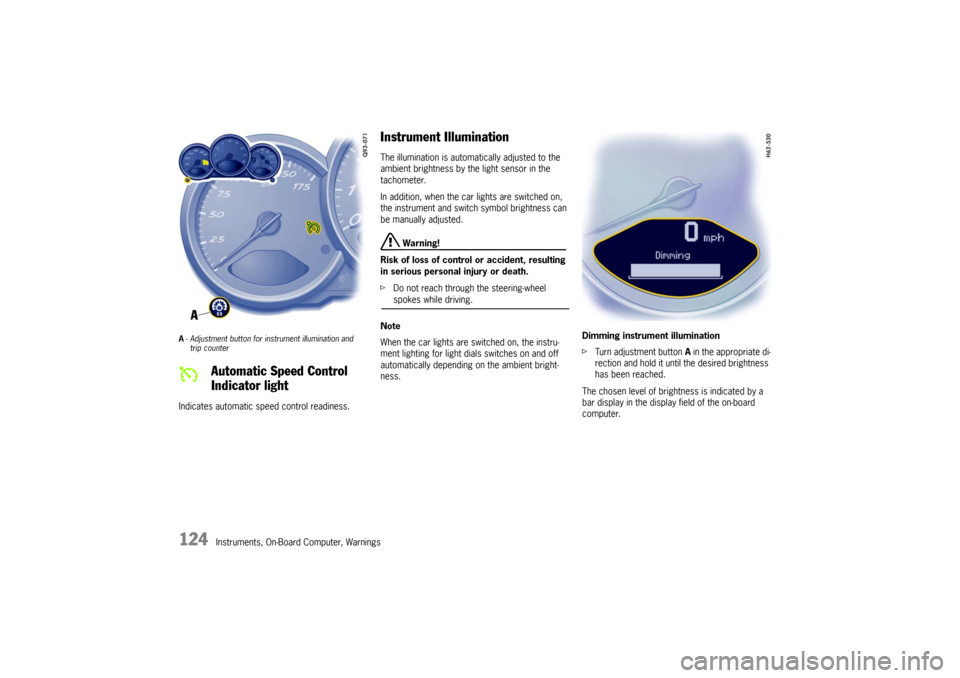
A- Adjustment button for in strument illumination and
trip counter Indicates automatic speed control readiness.
Instrument Illumination The illumination is automatically adjusted to the
ambient brightness by the light sensor in the
tachometer.
In addition, when the car lights are switched on,
the instrument and switch symbol brightness can
be manually adjusted.
Warning!
Risk of loss of control or accident, resulting
in serious personal injury or death.
f Do not reach through the steering-wheel spokes while driving.
Note
When the car lights are switched on, the instru-
ment lighting for light dials switches on and off
automatically depending on the ambient bright-
ness. Dimming instrument illumination
f
Turn adjustment button A in the appropriate di-
rection and hold it unti l the desired brightness
has been reached.
The chosen level of brightness is indicated by a
bar display in the display field of the on-board
computer.
Automatic Speed Control
Indicator light
Page 127 of 284
Instruments, On-Board Computer, Warnings
125
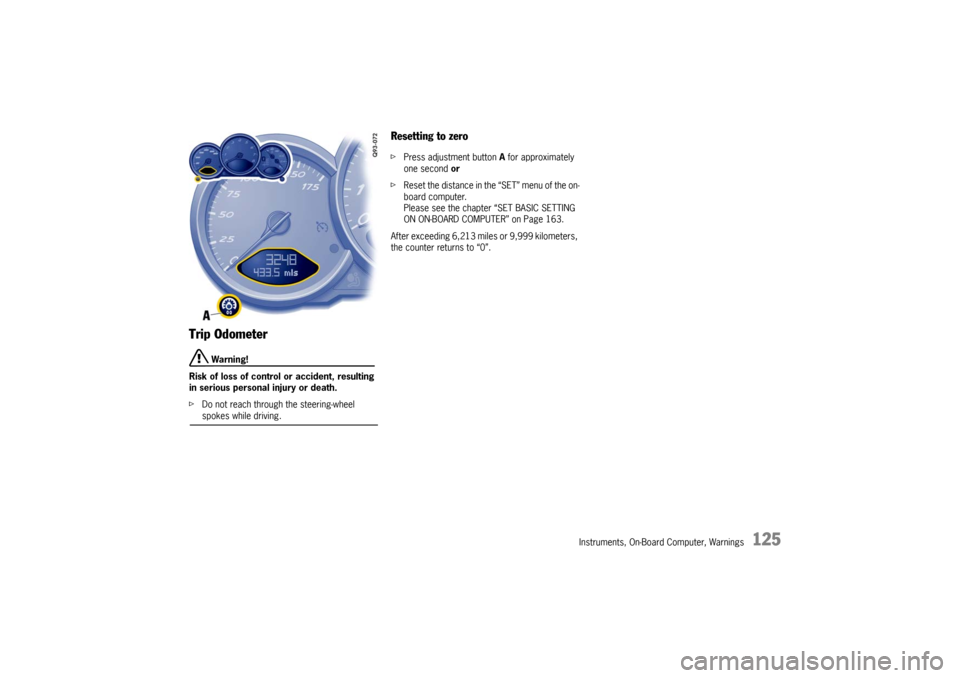
Trip Odometer
Warning!
Risk of loss of control or accident, resulting
in serious personal injury or death.
f Do not reach through the steering-wheel spokes while driving.
Resetting to zero fPress adjustment button A for approximately
one second or
f Reset the distance in the “SET” menu of the on-
board computer.
Please see the chapter “SET BASIC SETTING
ON ON-BOARD COMPUTER” on Page 163.
After exceeding 6,213 mile s or 9,999 kilometers,
the counter returns to “0”.
Page 133 of 284

Instruments, On-Board Computer, Warnings
131
A- Adjustment button for clock
B - Clock
C - Outside temperature displayClock The clock is blanked out approximately four min-
utes after the ignition is switched off or when the
car is locked.
Setting the time
Warning!
Risk of loss of control or accident, resulting
in serious personal injury or death.
f Do not reach through the steering-wheel spokes while driving.
f Switch ignition on.
Setting hours
f Press adjustment button A for about one sec-
ond.
Hour display flashes.
f Turn button in the appropriate direction:
to right – increase hours figure
to left – decrease hours figure.
Adjustment in hours – turn button briefly
Fast adjustment (display cycles) –
turn and hold button.
Setting minutes
f Press adjustment button again.
Minutes display flashes.
f Set by rotating as in hours mode. Leaving adjustment mode
Automatically after one minute
or:
f Press adjustment button again.
When adjustment mode is deliberately left by
pressing the button, the time begins precisely to
the second.
Note
The time mode can be changed between 12h and
24h in the on-board computer.
Outside Temperature The outside temperature display C does not indi-
cate, if ice is on the road.
Even if a temperature above 32 °F (0 °C) is dis-
played, ice may still form on the road, for instance
on bridges or when the road passes through a
heavily shaded area.
Page 134 of 284

132
Instruments, On-Board Computer, Warnings
If the battery voltage drops abruptly, a warning
m e s s a g e w i l l b e d i s p l a y e d b y t h e o n - b o a rd c o m p u -
ter.
If the warning is displayed by the on-board
computer while the engine is running or while
driving:
f
Stop the car in a safe place and stop the
engine.
Possible causes
– Defect in the battery charging system.
– Broken drive belt.
Warning!
Risk of engine damage with resultant loss of
control and accident, leading to serious per-
sonal injury or death.
A broken drive belt means there is no power
assistance to the steering (more effort is re-
quired to steer) and coolant pump function
will stop.
f Do not continue driving.
f Have the fault remedied at the nearest author-ized Porsche dealer. The central warning light on the instrument panel
lights up if there are warning messages in the
INFO menu.
The messages can be called in the on-board
computer INFO menu:
f
Please see the chapter “INFO WARNING MES-
SAGES” on Page 140. The warning light on the instrument panel lights
up:
– if the handbrake is on,
– if the brake fluid level is low,
– if the brake pads have
reached the wear limit,
– if the brake circuit division is defective.
Additionally, a warning is displayed by the on-
board computer.
f Please see the chapter “WARNINGS ON THE
INSTRUMENT PANEL AND THE ON-BOARD
COMPUTER” on Page 166.
Battery
Central Warning Light
Brake Warning Light USA
Brake Warning Light Canada
Page 136 of 284
134
Instruments, On-Board Computer, Warnings
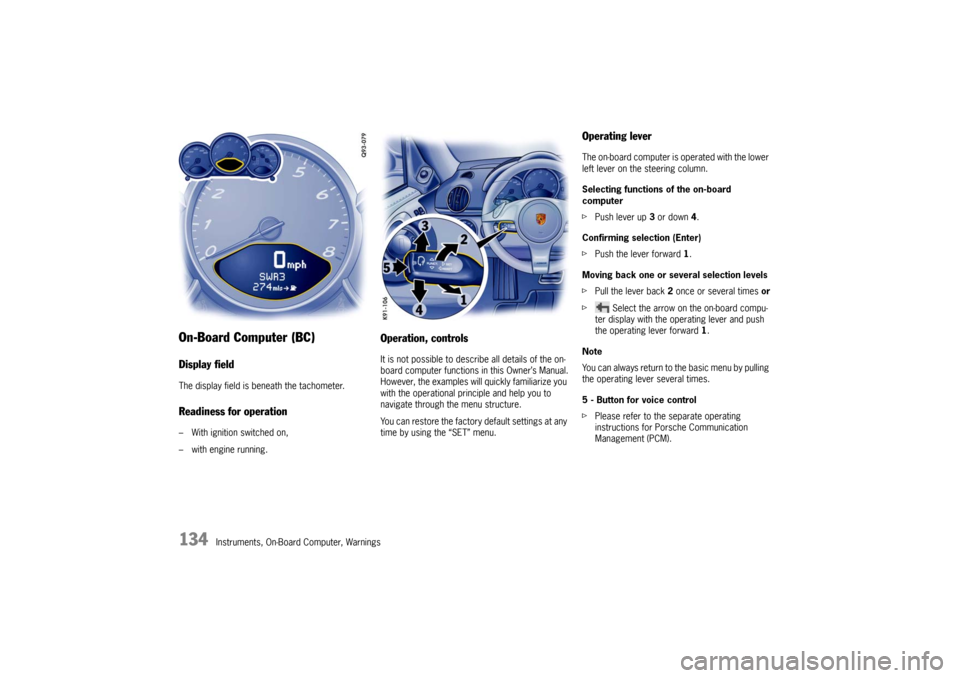
On-Board Computer (BC)Display fieldThe display field is beneath the tachometer.Readiness for operation– With ignition switched on,
– with engine running.
Operation, controlsIt is not possible to describe all details of the on-
board computer functions in this Owner’s Manual.
However, the examples will quickly familiarize you
with the operational principle and help you to
navigate through the menu structure.
You can restore the factory default settings at any
time by using the “SET” menu.
Operating leverThe on-board computer is operated with the lower
left lever on the steering column.
Selecting functions of the on-board
computer
f Push lever up 3 or down 4.
Confirming selection (Enter)
f Push the lever forward 1 .
Moving back one or several selection levels
f Pull the lever back 2 once or several times or
f Select the arrow on the on-board compu-
ter display with the operating lever and push
the operating lever forward 1.
Note
You can always return to the basic menu by pulling
the operating lever several times.
5 - Button for voice control
f Please refer to the separate operating
instructions for Porsche Communication
Management (PCM).
Page 168 of 284

166
Warnings
Warnings on the instrument panel and the on-board computerIf a warning message appears, always refer to the corresponding chapters in the Owner’s Manual.
Warning messages are issued only if all measurement preconditi ons are met. Therefore, check all fluid levels regularly –
in particular, always check the en gine oil level before refueling.
Instrument
panel On-board
computerText display on on-board
computer Meaning/measure
Seat belt
Driver and passengers must fasten their seat
belts.
Handbrake Handbrake is still on.
Ignition key
not removed
Replace battery
in ignition key Replace the remote-control battery.
Ignition lock faulty,
please go to workshop Have the fault remedied at an authorized
Porsche dealer.
Ignition lock faulty,
visit workshop now Have the fault remedied at an authorized
Porsche dealer.
Relieve steering Relieve the steering l o c k b y m o v i n g t h e s t e e r i n g
wheel to the left or right.
Steering locked The steering wheel lock remains engaged.
Have the fault remedied at an authorized
Porsche dealer.
Lights on Low beam/side marker lamps on
Parking light on Left/right parking light on