2009 PONTIAC VIBE service
[x] Cancel search: servicePage 102 of 318

Emissions Inspection and
Maintenance Programs
Some state/provincial and local
governments have or might begin
programs to inspect the emission
control equipment on the vehicle.
Failure to pass this inspection could
prevent getting a vehicle registration.
Here are some things to know to
help the vehicle pass an inspection:
The vehicle will not pass this
inspection if the check engine
light is on with the engine
running, or if the key is in the
ON/RUN and the light is not on.
The vehicle will not pass
this inspection if the OBD II
(on-board diagnostic) system
determines that critical emission
control systems have not been
completely diagnosed by the
system. The vehicle would
be considered not ready forinspection. This can happen if
the battery has recently been
replaced or if the battery has run
down. The diagnostic system
is designed to evaluate critical
emission control systems
during normal driving. This can
take several days of routine
driving. If this has been done
and the vehicle still does not
pass the inspection for lack
of OBD II system readiness,
your dealer/retailer can prepare
the vehicle for inspection.
Security Light
For information regarding this light
and the vehicle’s security system,
seeContent Theft-Deterrent
on page 2-10.
Oil Pressure Light
{CAUTION
Do not keep driving if the oil
pressure is low. The engine can
become so hot that it catches re.
Someone could be burned. Check
the oil as soon as possible and
have the vehicle serviced.
Notice:Lack of proper engine oil
maintenance can damage the
engine. The repairs would not be
covered by the vehicle warranty.
Always follow the maintenance
schedule in this manual for
changing engine oil.
The oil pressure light should come
on briey as the engine is started.
If it does not come on have the
vehicle serviced by your
dealer/retailer.
4-22 Instruments and Controls
2009 - Pontiac Vibe Owner Manual
Page 104 of 318

Service All-Wheel Drive
Light
This light will come on briey when
the ignition is turned on, and the
engine is not running, as a check to
show you it is working.
It should go out when the engine is
started. It should go out when the
engine is started. If it stays on, or
comes on while you are driving, you
may have a problem with the system.
Have it checked by your dealer/
retailer.
The four-wheel-drive indicator will
light up when the All-Wheel drive
is active.
Highbeam On Light
This light comes on when the
high-beam headlamps are in use.
SeeHeadlamp High/Low-Beam
Changer on page 4-7for more
information.
Door Ajar Light
This light comes on if any door,
the rear liftgate, or the rear liftglass
are not completely closed.
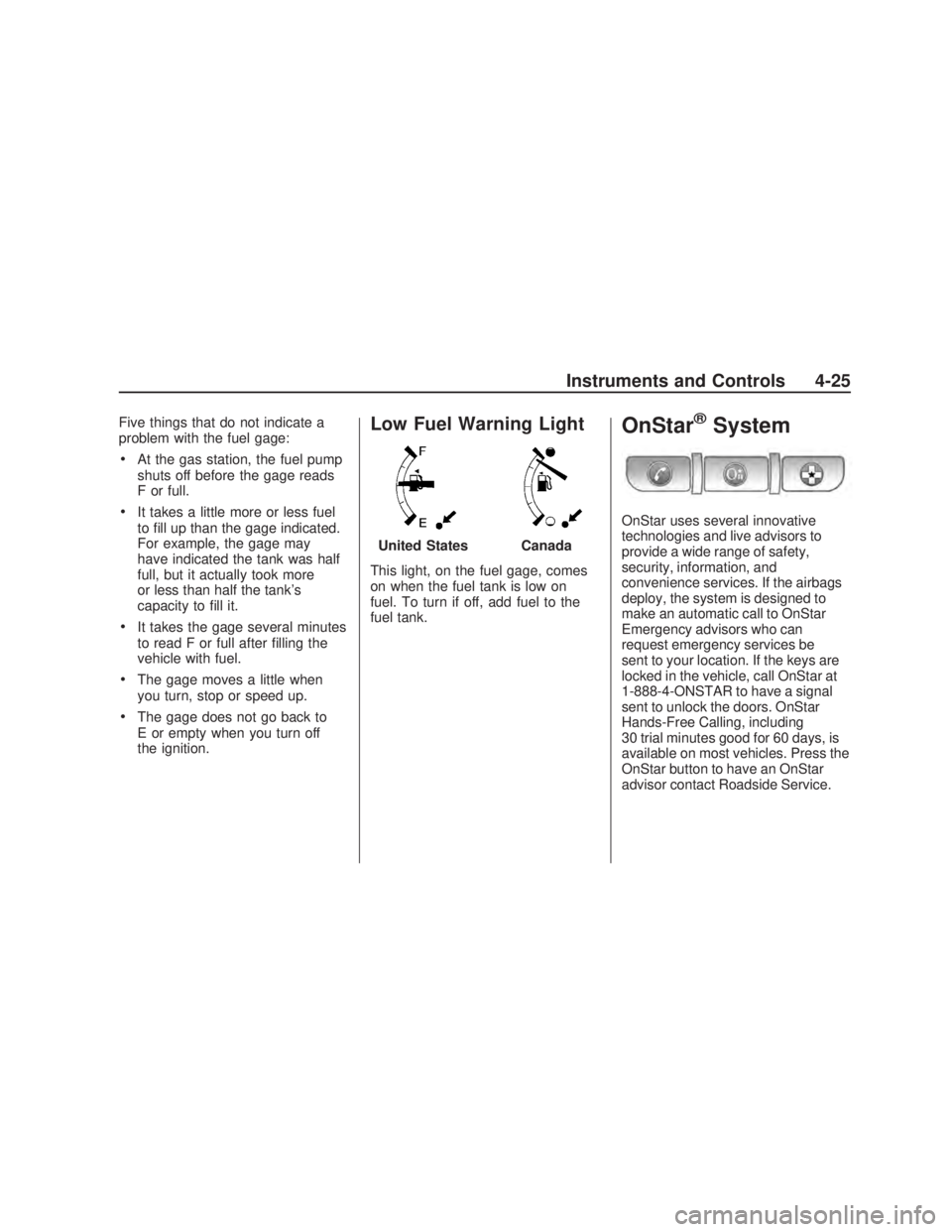
Fuel Gage
The fuel gage shows about how
much fuel is in the fuel tank.
An arrow on the fuel gage indicates
that the fuel ller door is on the driver
side of the vehicle. The fuel gage
works only when the ignition switch is
turned to ON/RUN. When the gage
rst indicates E or empty, there is still
about 2 gallons ( 7.6 L) of fuel left,
but more needs to be added right
away. When the vehicle is low on fuel
the low fuel warning light, located
below the empty mark, comes on.
United StatesCanada
4-24 Instruments and Controls
2009 - Pontiac Vibe Owner Manual
Page 105 of 318
Five things that do not indicate a
problem with the fuel gage:
At the gas station, the fuel pump
shuts off before the gage reads
F or full.
It takes a little more or less fuel
to ll up than the gage indicated.
For example, the gage may
have indicated the tank was half
full, but it actually took more
or less than half the tank’s
capacity to ll it.
It takes the gage several minutes
to read F or full after lling the
vehicle with fuel.
The gage moves a little when
you turn, stop or speed up.
The gage does not go back to
E or empty when you turn off
the ignition.
Low Fuel Warning Light
This light, on the fuel gage, comes
on when the fuel tank is low on
fuel. To turn if off, add fuel to the
fuel tank.
OnStar®System
OnStar uses several innovative
technologies and live advisors to
provide a wide range of safety,
security, information, and
convenience services. If the airbags
deploy, the system is designed to
make an automatic call to OnStar
Emergency advisors who can
request emergency services be
sent to your location. If the keys are
locked in the vehicle, call OnStar at
1-888-4-ONSTAR to have a signal
sent to unlock the doors. OnStar
Hands-Free Calling, including
30 trial minutes good for 60 days, is
available on most vehicles. Press the
OnStar button to have an OnStar
advisor contact Roadside Service. United States
Canada
Instruments and Controls 4-25
2009 - Pontiac Vibe Owner Manual
Page 106 of 318

OnStar service is provided subject
to the OnStar Terms and Conditions
included in the OnStar Subscriber
glove box literature.
Some services such as Remote Door
Unlock or Stolen Vehicle Location
Assistance may not be available until
the owner of the vehicle registers
with OnStar. After the rst prepaid
year, contact OnStar to select a
monthly or annual subscription
payment plan. If a payment plan is
not selected, the OnStar system
and all services, including airbag
notication and emergency services,
may be deactivated and no longer
available. For more information
visit www.onstar.com (U.S.) or
www.onstar.ca (Canada), or press
the OnStar button to speak with an
advisor.
Not all OnStar services are available
on all vehicles. To check if this
vehicle is able to provide the
services described below, or for a
full description of OnStar servicesand system limitations, see the
OnStar Owner’s Guide in the
glove box or visit www.onstar.com
(U.S.) or www.onstar.ca (Canada),
contact OnStar at 1-888-4-ONSTAR
(1-888-466-7827) or TTY
1-877-248-2080, or press the
OnStar button to speak with an
OnStar advisor 24 hours a day,
7 days a week.
OnStar Services Available
with the Safe & Sound Plan
Automatic Notication of
Airbag Deployment
Link to Emergency Services
Roadside Assistance
Stolen Vehicle Location
Assistance
Remote Door Unlock/Vehicle
Alert
OnStar Hands-Free Calling with
30 trial minutes
OnStar Virtual Advisor (U.S. Only)
OnStar Services Included with
Directions & Connections Plan
All Safe and Sound Plan Services
Driving Directions - Advisor
Delivered
RideAssist
Information and Convenience
Services
OnStar Hands-Free Calling
OnStar Hands-Free Calling allows
eligible OnStar subscribers to make
and receive calls using voice
commands. Hands-Free Calling is
fully integrated into the vehicle, and
can be used with OnStar Pre-Paid
Minute Packages. Most vehicles
include 30 trial minutes good for
60 days. Hands-Free Calling can
also be linked to a Verizon Wireless
service plan in the U.S. or a Bell
Mobility service plan in Canada,
depending on eligibility.
4-26 Instruments and Controls
2009 - Pontiac Vibe Owner Manual
Page 107 of 318

To nd out more, refer to the OnStar
Owner’s Guide in the vehicle’s glove
box, visit www.onstar.com or
www.onstar.ca, or speak with
an OnStar advisor by pressing
the OnStar button or calling
1-888-4-ONSTAR (1-888-466-7827).
OnStar Virtual Advisor
OnStar Virtual Advisor is a feature of
OnStar Hands-Free Calling that uses
minutes to access location-based
weather, local traffic reports, and
stock quotes. Press the phone
button and give a few simple voice
commands to browse through the
various topics. See the OnStar
Owner’s Guide for more information.
This feature is only available in the
continental U.S.
How OnStar Service Works
The OnStar system can record
and transmit vehicle information.
This information is automatically
sent to an OnStar Call Center when
the OnStar button is pressed, the
emergency button is pressed, or ifthe airbags deploy. This information
usually includes the vehicles GPS
location and, in the event of a crash,
additional information regarding the
crash that the vehicle was involved in
(e.g. the direction from which the
vehicle was hit). When the Virtual
Advisor feature of OnStar
Hands-Free Calling is used, the
vehicle also sends OnStar the
vehicles GPS location so they can
provide services where it is located.
OnStar service cannot work unless
the vehicle is in a place where
OnStar has an agreement with a
wireless service provider for service
in that area. OnStar service also
cannot work unless the vehicle is in
a place where the wireless service
provider OnStar has hired for that
area has coverage, network capacity
and reception when the service is
needed, and technology that is
compatible with the OnStar service.
Not all services are available
everywhere, particularly in remote
or enclosed areas, or at all times.Location information about the
vehicle is only available if the GPS
satellite signals are unobstructed
and available.
The vehicle must have a working
electrical system, including adequate
battery power, for the OnStar
equipment to operate. There are
other problems OnStar cannot
control that may prevent OnStar from
providing OnStar service at any
particular time or place. Some
examples are damage to important
parts of the vehicle in a crash, hills,
tall buildings, tunnels, weather or
wireless phone network congestion.
Your Responsibility
Increase the volume of the radio if
the OnStar advisor cannot be heard.
If the light next to the OnStar buttons
is red, the system may not be
functioning properly. If the light
appears clear (no light is appearing),
your OnStar subscription has
expired and all services have been
deactivated. Press the OnStar button
to conrm that the OnStar equipment
is active.
Instruments and Controls 4-27
2009 - Pontiac Vibe Owner Manual
Page 115 of 318

Radio(s)
Playing the Radio
PWR VOL (Power/Volume):Press
to turn the radio on and off. Turn
the PWR VOL knob to adjust
the volume. CLOCK:
Press to adjust the time.
See Setting the Clock on page 6-2
for more information.
Finding a Station
BAND: Press to select AM, FM,
or XM.
TUNE ADJ (Tune/Adjust): Turn to
select radio stations.
ySEEK TRACKz: Press to go to
the previous or next radio station.
The radio only stops at stations with
a strong signal.
SCAN: Press to enter scan mode.
The radio will display Scanning,
then goes to the next station, plays
for a few seconds, then continues
on to the next station. Press SCAN
again to stop scanning. The radio
only stops at stations with a
strong signal.
INFO (Information) (FM-RDS,
XM™ Satellite Radio Service, and
MP3 Features): Press to display
information for the current FM-RDS,
XM station, or MP3 song. Choose
from Channel, Song, Artist, and
CAT (category).
NO INFO displays when information
is not available from the station.
Radio with CD (MP3) shown, Radio with CD (Base) similar
Infotainment 6-3
2009 - Pontiac Vibe Owner Manual
Page 117 of 318

Finding a Category (CAT)
Station (XM Satellite Radio
Service Only)
If CAT times out and is no longer
on the display, return to Step 1.
To select and nd a desired
category:
1. Press the CAT button.
2. Turn the TUNE ADJ knob to
select a category.
3. Press
yorzto go to the
category’s rst station, when the
desired category is displayed.
4. Press
yorzto go to another
station within the selected
category.
5. Press CAT to exit the category
select mode or wait for CAT to
time out.
NOT FOUND displays if the desired
category cannot be found.
Scanning Categories (CAT)
(XM Satellite Radio
Service Only)
To scan a desired category:
1. Press the CAT button to enter
the category select mode.
2. Turn the TUNE ADJ knob to
select a category.
3. Press
yorzfor two seconds
to scan the stations in the
selected category.
4. Press
yorzagain to stop
scanning.
NOT FOUND displays if the desired
category cannot be found.
XM Satellite Radio Service
XM is a satellite radio service
that is based in the 48 contiguous
United States and 10 Canadian
provinces. XM Satellite Radio
has a wide variety of programming
and commercial-free music,
coast-to-coast, and in digital-quality
sound. During your trial or when you
subscribe, you will get unlimited
access to XM Radio Online for when
you are not in your vehicle. A service
fee is required to receive the XM
service. For more information,
contact XM at www.xmradio.com
or call 1-800-929-2100 in the U.S.
and www.xmradio.ca or call
1-877-438-9677 in Canada.
Infotainment 6-5
2009 - Pontiac Vibe Owner Manual
Page 124 of 318

RDM (Random):Press the button
below the RDM label to hear
the tracks in random order.
Sc(Previous Folder):Press
the button below to go to the
rst track in the previous folder.
cT(Next Folder):Press
the button below to go to the rst
track in the next folder.
h(Music Navigator):Press the
button below to play MP3 les in
order by artist or album.
SORT:Press the button below the
SORT label to change between
playback by artist or album while
using the Music Navigator.
BACK:Press the button below the
BACK label to return to the main
music navigator screen.
ST(Previous/Next):Press the
button below to go to the next
or previous artist or album in
alphabetical order while using
the Music Navigator.
XM Radio Messages
XL (Explicit Language Channels):
These channels, or any others, can
be blocked at a customer’s request,
by calling 1-800-852-XMXM (9696).
Updating:The encryption code
in the receiver is being updated,
and no action is required. This
process should take no longer
than 30 seconds.
No Signal:The system is
functioning correctly, but the vehicle
is in a location that is blocking
the XM™ signal. When the vehicle
is moved into an open area, the
signal should return.
Loading XM:The audio system is
acquiring and processing audio
and text data. No action is needed.
This message should disappear
shortly.CH Off Air:This channel is not
currently in service. Tune to another
channel.
CH Unavail:This previously
assigned channel is no longer
assigned. Tune to another station.
If this station was one of the presets,
choose another station for that
preset button.
No Info:No artist, song title,
category, or text information is
available at this time on this channel.
The system is working properly.
No Info:No text or informational
messages are available at this time
on this channel. The system is
working properly.
Not Found:There are no channels
available for the selected category.
The system is working properly.
6-12 Infotainment
2009 - Pontiac Vibe Owner Manual