Page 49 of 356
{CAUTION
Do not attach more than one child
restraint to a single anchor.
Attaching more than one child
restraint to a single anchor could
cause the anchor or attachment to
come loose or even break during a
crash. A child or others could be
injured. To reduce the risk of
serious or fatal injuries during a
crash, attach only one child
restraint per anchor.
{CAUTION
Children can be seriously injured
or strangled if a shoulder belt is
wrapped around their neck and
the safety belt continues to
tighten. Buckle any unused safety
belts behind the child restraint so
children cannot reach them. Pull
the shoulder belt all the way out
of the retractor to set the lock,
if your vehicle has one, after the
child restraint has been installed.
Notice:Do not let the LATCH
attachments rub against the
vehicle’s safety belts. This may
damage these parts. If necessary,
move buckled safety belts to avoid
rubbing the LATCH attachments.Do not fold the empty rear seat
with a safety belt buckled. This
could damage the safety belt or
the seat. Unbuckle and return the
safety belt to its stowed position.
1. Attach and tighten the lower
attachments to the lower
anchors. If the child restraint
does not have lower attachments
or the desired seating position
does not have lower anchors,
secure the child restraint with the
top tether and the safety belts.
Refer to your child restraint
manufacturer instructions and the
instructions in this manual.
1.1. Find the lower anchors for
the desired seating position.
1.2. Put the child restraint on
the seat.
1.3. Attach and tighten the
lower attachments on
the child restraint to the
lower anchors.
Seats and Restraints 1-45
Page 53 of 356
Position the release button on
the buckle so that the safety belt
could be quickly unbuckled if
necessary.
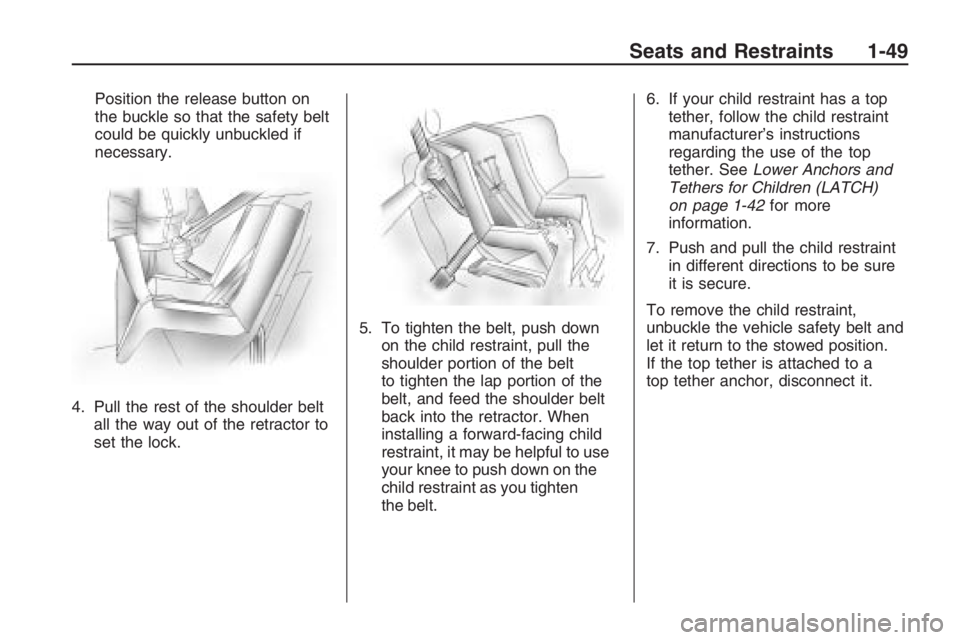
4. Pull the rest of the shoulder belt
all the way out of the retractor to
set the lock.5. To tighten the belt, push down
on the child restraint, pull the
shoulder portion of the belt
to tighten the lap portion of the
belt, and feed the shoulder belt
back into the retractor. When
installing a forward-facing child
restraint, it may be helpful to use
your knee to push down on the
child restraint as you tighten
the belt.6. If your child restraint has a top
tether, follow the child restraint
manufacturer’s instructions
regarding the use of the top
tether. SeeLower Anchors and
Tethers for Children (LATCH)
on page 1-42for more
information.
7. Push and pull the child restraint
in different directions to be sure
it is secure.
To remove the child restraint,
unbuckle the vehicle safety belt and
let it return to the stowed position.
If the top tether is attached to a
top tether anchor, disconnect it.
Seats and Restraints 1-49
Page 56 of 356
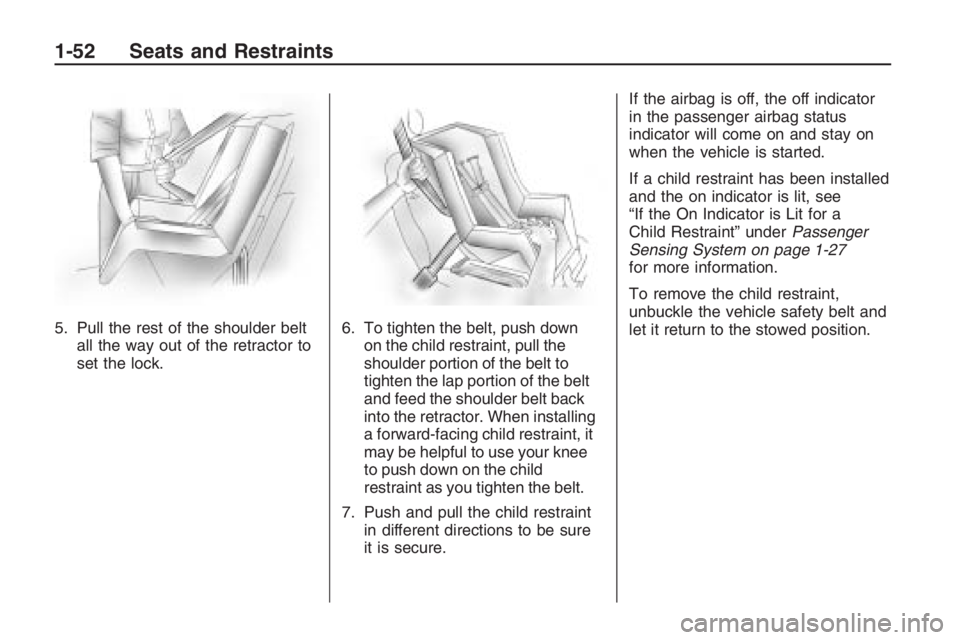
5. Pull the rest of the shoulder belt
all the way out of the retractor to
set the lock.6. To tighten the belt, push down
on the child restraint, pull the
shoulder portion of the belt to
tighten the lap portion of the belt
and feed the shoulder belt back
into the retractor. When installing
a forward-facing child restraint, it
may be helpful to use your knee
to push down on the child
restraint as you tighten the belt.
7. Push and pull the child restraint
in different directions to be sure
it is secure.If the airbag is off, the off indicator
in the passenger airbag status
indicator will come on and stay on
when the vehicle is started.
If a child restraint has been installed
and the on indicator is lit, see
“If the On Indicator is Lit for a
Child Restraint” underPassenger
Sensing System on page 1-27
for more information.
To remove the child restraint,
unbuckle the vehicle safety belt and
let it return to the stowed position.
1-52 Seats and Restraints
Page 57 of 356
Keys, Doors and
Windows
Keys
Keys...................................2-2
Remote Keyless Entry
(RKE) System...................2-3
Remote Keyless Entry
(RKE) System
Operation
..........................2-4
Remote Vehicle Start..........2-6
Doors and Locks
Door Locks.........................2-8
Power Door Locks..............2-9
Rear Door Security
Locks................................2-9
Trunk................................2-10
Theft-Deterrent Systems
Theft-Deterrent Systems. . . .2-11
Immobilizer.......................2-11
Immobilizer Operation.......2-12
Content Theft-Deterrent.....2-13
Windows
Windows...........................2-14
Power Windows................2-15
Sun Visors........................2-15
Mirrors
Manual Rearview Mirror. . . .2-16
Compass..........................2-16
Outside Power Mirror(s). . . .2-17
Outside Convex Mirror......2-18
Sunroof
Sunroof.............................2-18
Keys, Doors and Windows 2-1
Page 58 of 356

Keys
{CAUTION
Leaving children in a vehicle with
the ignition key is dangerous for
many reasons, children or others
could be badly injured or even
killed. They could operate the
power windows or other controls
or even make the vehicle move.
The windows will function with the
keys in the ignition and children
could be seriously injured or killed
if caught in the path of a closing
window. Do not leave the keys in
a vehicle with children.One key, located inside the Remote
Keyless Entry (RKE) transmitter,
can be used for the ignition and all
locks except the glovebox.
Press the button on the RKE
transmitter to extend the key.
Press the button and the key blade
to retract the key.
A xed blade key is also supplied
for the glovebox.
See your dealer/retailer if a new key
is needed.
Notice:If you ever lock your
keys in the vehicle, you may have
to damage the vehicle to get in.
Be sure you have spare keys.
Contact Roadside Assistance
or OnStar if you are locked out of
the vehicle. SeeRoadside
Assistance Program on page 12-6
orOnStar
®System on page 4-35.
2-2 Keys, Doors and Windows
Page 59 of 356

Remote Keyless Entry
(RKE) System
The Remote Keyless Entry (RKE)
system operates on a radio
frequency subject to Federal
Communications Commission (FCC)
Rules and with Industry Canada.
This device complies with Part 15 of
the FCC Rules. Operation is subject
to the following two conditions:
1. This device may not cause
interference.
2. This device must accept any
interference received, including
interference that may cause
undesired operation of the
device.This device complies with RSS-210
of Industry Canada. Operation
is subject to the following
two conditions:
1. This device may not cause
interference.
2. This device must accept any
interference received, including
interference that may cause
undesired operation of the
device.
Changes or modications to
this system by other than an
authorized service facility could
void authorization to use this
equipment.If there is a decrease in the RKE
operating range, try this:Check the distance. The
transmitter may be too far from
the vehicle. Stand closer
during rainy or snowy weather.
Check the location. Other
vehicles or objects may be
blocking the signal. Take a few
steps to the left or right, hold
the transmitter higher, and
try again.
Check the transmitter’s battery.
See “Battery Replacement”
later in this section.
If the transmitter is still not
working correctly, see your
dealer/retailer or a qualied
technician for service.
Keys, Doors and Windows 2-3
Page 60 of 356

Remote Keyless Entry
(RKE) System Operation
The Remote Keyless Entry (RKE)
transmitter functions will work
up to 195 feet (60 m) away from
the vehicle.
There are other conditions which
can affect the performance of
the transmitter. SeeRemote Keyless
Entry (RKE) System on page 2-3.The following functions may be
available if the vehicle has the
RKE system.Q(Lock):Press to lock all doors.
If enabled through the Driver
Information Center (DIC), the turn
signal indicators ash or the
horn sounds to indicate locking has
occurred. For more information
see “Flash Remote Lock” and “Beep
Remote Lock” underDIC Vehicle
Customization on page 4-31.
If any door is open when
Qis
pressed, the horn sounds ve times.
All doors lock except the open door.
If the driver door is open when
Qis
pressed, all doors lock except the
driver door.
Pressing
Qmay also arm the
content theft-deterrent system.
SeeContent Theft-Deterrent on
page 2-13.
K(Unlock):Press to unlock the
driver door or all doors depending
on the personalization setting.
To customize remote unlocking,
see “Two Stage Unlock” underDIC
Vehicle Customization on page 4-31.
If enabled through the DIC, the turn
signal indicators ash to indicate
unlocking has occurred. For more
information see “Flash Remote
Unlock” underDIC Vehicle
Customization on page 4-31.
Pressing
Kmay also disarm the
content theft-deterrent system.
SeeContent Theft-Deterrent on
page 2-13.
V(Remote Trunk Release):
Press and hold to unlock the trunk.
RKE with Remote Start Shown
2-4 Keys, Doors and Windows
Page 62 of 356

Remote Vehicle Start
Your vehicle may have this feature
which allows you to start the
engine from outside the vehicle.
/(Remote Vehicle Start):
This button will be on the RKE
transmitter if you have remote start.
To enable and disable remote
start, see “Remote Start” under
DIC Vehicle Customization on
page 4-31.
Vehicles with an automatic climate
control system will default to a
heating or cooling mode depending
on the outside temperature during
a remote start. When the key
is turned to ON/RUN, the climate
control system will turn on at
the setting the vehicle was set to
when the vehicle was last turned off.Laws in some local communities
may restrict the use of remote
starters. For example, some laws
may require a person using remote
start to have the vehicle in view
when doing so. Check local
regulations for any requirements on
remote starting of vehicles.
If your vehicle is low on fuel,
do not use the remote start feature.
The vehicle may run out of fuel.
If your vehicle has the remote start
feature, the RKE transmitter
functions will have an increased
range of operation. However,
the range may be less while the
vehicle is running.
There are other conditions which
can affect the performance of
the transmitter, seeRemote Keyless
Entry (RKE) System on page 2-3
for additional information.Starting the Engine Using
Remote Start
To start the engine using the remote
start feature:
1. PressQon the RKE transmitter.
2. Press and hold
/for about
two seconds. The turn signal
lamps will briey ash to conrm
the vehicle has been started.
The parking lamps will turn
on and remain on as long as the
engine is running. The vehicle’s
doors will be locked.
3. After entering the vehicle during
a remote start, insert and turn
the key to ON/RUN to drive
the vehicle.
After a remote start, the engine
will automatically shut off
after 10 minutes unless a time
extension has been done or
the vehicle’s key is inserted into
the ignition switch and turned
to ON/RUN.
2-6 Keys, Doors and Windows