2009 PEUGEOT 308 Information screen
[x] Cancel search: Information screenPage 53 of 290
73
Electronic engine immobiliser
The key contains an electronic chip
which has a special code. When the
ignition is switched on, this code must
be recognised in order for starting to be
possible.
This electronic engine immobiliser locks
the engine management system a few
minutes after the ignition is switched off
and prevents starting of the engine by
anyone who does not have the key.
Anti-theft protection
In the event of a malfunction,
you are informed by lighting of
this warning lamp, an audible
signal and a message on the
multifunction screen.
In this case, your vehicle does not start;
contact a PEUGEOT dealer as soon as
possible.
For further details, refer to the
"Practical information - § Energy
economy mode" section.
Starting the vehicle
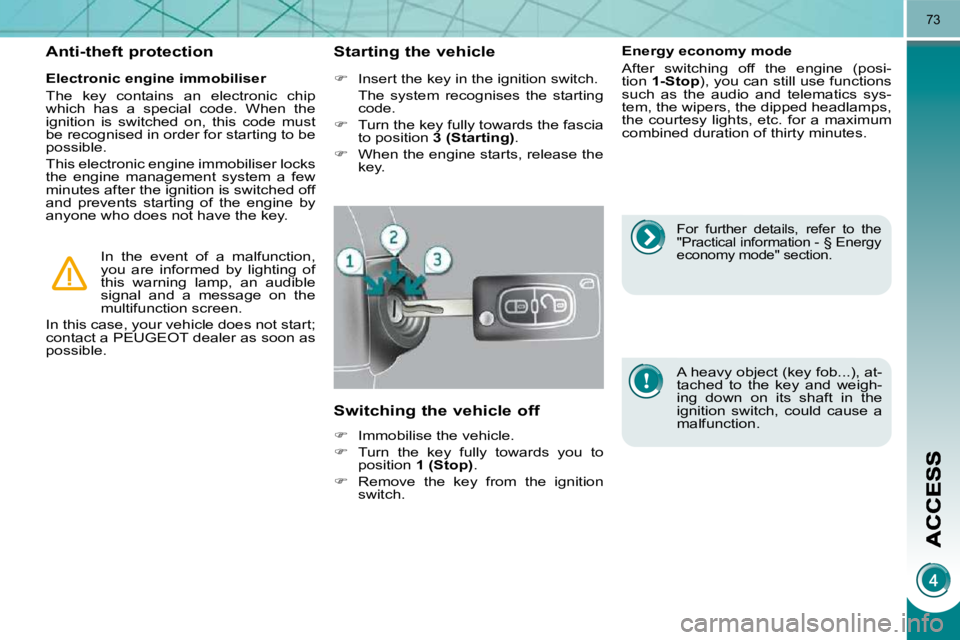
Insert the key in the ignition switch.
The system recognises the starting code.
Turn the key fully towards the fascia
to position 3 (Starting) .
When the engine starts, release the
key.
Switching the vehicle off
Immobilise the vehicle.
Turn the key fully towards you to
position 1 (Stop) .
Remove the key from the ignition
switch. Energy economy mode
After switching off the engine (posi-
tion
1-Stop ), you can still use functions
such as the audio and telematics sys-
tem, the wipers, the dipped headlamps,
the courtesy lights, etc. for a maximum
combined duration of thirty minutes.
A heavy object (key fob...), at-
tached to the key and weigh-
ing down on its shaft in the
ignition switch, could cause a
malfunction.
Page 56 of 290

73
Electronic engine immobiliser
The key contains an electronic chip
which has a special code. When the
ignition is switched on, this code must
be recognised in order for starting to be
possible.
This electronic engine immobiliser locks
the engine management system a few
minutes after the ignition is switched off
and prevents starting of the engine by
anyone who does not have the key.
Anti-theft protection
In the event of a malfunction,
you are informed by lighting of
this warning lamp, an audible
signal and a message on the
multifunction screen.
In this case, your vehicle does not start;
contact a PEUGEOT dealer as soon as
possible.
For further details, refer to the
"Practical information - § Energy
economy mode" section.
Starting the vehicle
Insert the key in the ignition switch.
The system recognises the starting code.
Turn the key fully towards the fascia
to position 3 (Starting) .
When the engine starts, release the
key.
Switching the vehicle off
Immobilise the vehicle.
Turn the key fully towards you to
position 1 (Stop) .
Remove the key from the ignition
switch. Energy economy mode
After switching off the engine (posi-
tion
1-Stop ), you can still use functions
such as the audio and telematics sys-
tem, the wipers, the dipped headlamps,
the courtesy lights, etc. for a maximum
combined duration of thirty minutes.
A heavy object (key fob...), at-
tached to the key and weigh-
ing down on its shaft in the
ignition switch, could cause a
malfunction.
Page 140 of 290
138
In certain extreme weather
conditions (rain and/or snow,
bright sunshine, ...) the head
up display may not be legible or may
suffer temporary interference.
Certain glasses (sunglasses, specta-
cles or polarised lenses) may ham-
per reading of the information.
To clean the transparent strip, use a
clean, soft cloth such as a spectacles
cloth. Do not use a dry or abrasive
cloth or detergent or solvent products. We recommend that adjust-
ments are only made using
these buttons when the vehi-
cle is stationary.
No objects should be placed on the
upper part of the fascia (between the
windscreen and the translucent strip)
or block the strip output.
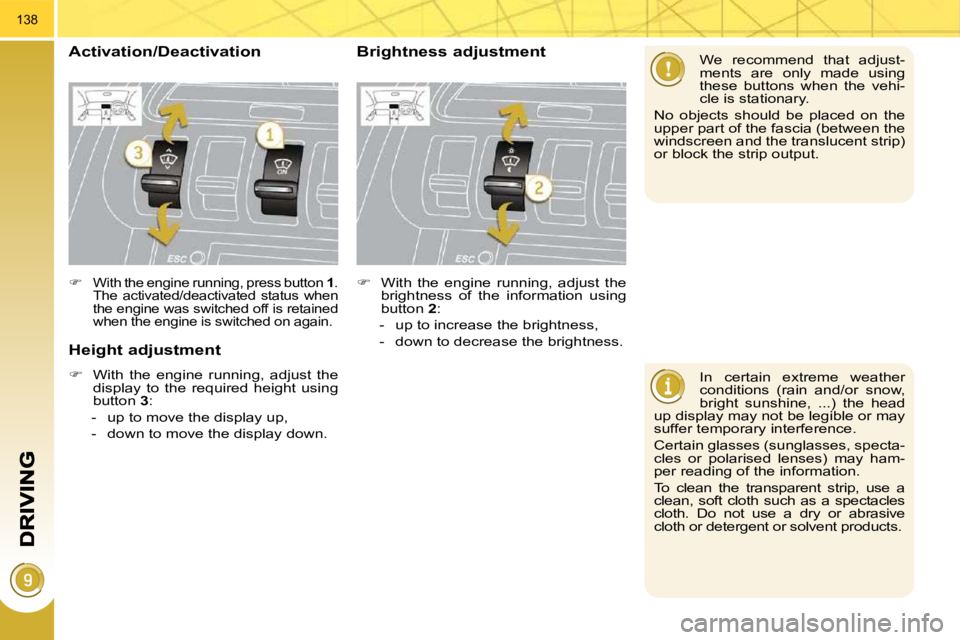
With the engine running, press button 1 .
The activated/deactivated status when
the engine was switched off is retained
when the engine is switched on again.
Height adjustment
With the engine running, adjust the
display to the required height using
button 3 :
- up to move the display up,
- down to move the display down.
Activation/Deactivation Brightness adjustment
With the engine running, adjust the
brightness of the information using
button 2 :
- up to increase the brightness,
- down to decrease the brightness.
Page 155 of 290

153
VISUAL AND AUDIBLE FRONT AND/OR REAR PARKING ASSISTANCE
System consisting of four proximity sen-
sors, installed in the front and/or rear
bumper.
It detects any obstacle (person, vehicle,
tree, barrier...) located behind the vehi-
cle, however, it will not be able to detect
obstacles located immediately below
the bumper. The parking assistance is
switched on :
- by engaging reverse gear,
- at a speed below 6 mph (10 km/h) in forward gear.
This is accompanied by an audible sig-
nal and/or displaying of the vehicle on
the multifunction screen.
An object, such as a stake, a
roadworks cone or any other
similar object may be detected
at the start of the manoeuvre but may
no longer be detected when the vehi-
cle moves nearer to it. The proximity information is indicated by:
- an audible signal which becomes
more rapid as the vehicle approach-
es the obstacle,
- a diagram on the multifunction screen, with blocks which move
closer to the vehicle.
The obstacle is located in relation to the
emission of the audible signal by the
speakers; front or rear and right or left.
When the distance between the vehicle
and the obstacle is less than approxi-
mately thirty centimetres, the audible
signal becomes continuous and/or the
"Danger" symbol appears, depending
on the multifunction screen version.
Page 162 of 290
CHECKS
161
Avoid prolonged contact of
used oil or fl uids with the skin.
Most of these fl uids are harm-
ful to health or indeed very
corrosive.
Do not discard used oil or fl uids
into sewers or onto the ground.
Take used oil to a PEUGEOT
dealer (France) or an authorised
waste disposal site.
Diesel additive level (Diesel
engine with particle emission
filter)
A low additive level is indicated by lighting
of the service warning lamp, accompanied
by an audible warning and a message on
the multifunction screen.
Used products
CHECKS
Unless otherwise indicated, check
these components in accordance with
the Maintenance and Warranty Guide
and according to your engine.
Otherwise, have them checked by a
PEUGEOT dealer.
Battery
The battery does not require any
maintenance.
However, check that the terminals
are clean and correctly tightened,
particularly in summer and winter.
When carrying out work on the battery, re-
fer to the "Practical information" section for
details of the precautions to be taken before
disconnecting the battery and following its
reconnection.
Air filter
Refer to the Maintenance and
Warranty Guide for details of
the replacement intervals for
these components.
Depending on the environment
(e.g. dusty atmosphere) and the use of
the vehicle (e.g. city driving), replace
them twice as often if necessary (refer
to the "Engines" paragraph). Particle emission filter (Diesel)
It is imperative that the maintenance of
the particle emission fi lter is carried out
by a PEUGEOT dealer.
Oil filter Replace the oil fi lter each time
the engine oil is changed.
Refer to the Maintenance and
Warranty Guide for details of
the replacement interval for
this component. Following prolonged opera-
tion of the vehicle at very low
speed or at idle, you may, in
exceptional circumstances, notice the
emission of water vapour at the ex-
haust on acceleration. This does not
affect the behaviour of the vehicle or
the environment.
Topping up
This additive must be topped up by a
PEUGEOT dealer without delay.
Dust filter/Anti-odour filter
(activated carbon)
Your vehicle is fi tted with a fi lter which
traps certain dust and limits odours in
the ventilation and air conditioning.
Refer to the servicing booklet for its re-
placement interval.
Do not hesitate to change it if you notice
unpleasant odours, contact a PEUGEOT
dealer.
A clogged passenger compartment fi lter
may reduce the performance of the air
conditioning system and produce unde-
sirable odours.
Page 163 of 290
CHECKS
161
Avoid prolonged contact of
used oil or fl uids with the skin.
Most of these fl uids are harm-
ful to health or indeed very
corrosive.
Do not discard used oil or fl uids
into sewers or onto the ground.
Take used oil to a PEUGEOT
dealer (France) or an authorised
waste disposal site.
Diesel additive level (Diesel
engine with particle emission
filter)
A low additive level is indicated by lighting
of the service warning lamp, accompanied
by an audible warning and a message on
the multifunction screen.
Used products
CHECKS
Unless otherwise indicated, check
these components in accordance with
the Maintenance and Warranty Guide
and according to your engine.
Otherwise, have them checked by a
PEUGEOT dealer.
Battery
The battery does not require any
maintenance.
However, check that the terminals
are clean and correctly tightened,
particularly in summer and winter.
When carrying out work on the battery, re-
fer to the "Practical information" section for
details of the precautions to be taken before
disconnecting the battery and following its
reconnection.
Air filter
Refer to the Maintenance and
Warranty Guide for details of
the replacement intervals for
these components.
Depending on the environment
(e.g. dusty atmosphere) and the use of
the vehicle (e.g. city driving), replace
them twice as often if necessary (refer
to the "Engines" paragraph). Particle emission filter (Diesel)
It is imperative that the maintenance of
the particle emission fi lter is carried out
by a PEUGEOT dealer.
Oil filter Replace the oil fi lter each time
the engine oil is changed.
Refer to the Maintenance and
Warranty Guide for details of
the replacement interval for
this component. Following prolonged opera-
tion of the vehicle at very low
speed or at idle, you may, in
exceptional circumstances, notice the
emission of water vapour at the ex-
haust on acceleration. This does not
affect the behaviour of the vehicle or
the environment.
Topping up
This additive must be topped up by a
PEUGEOT dealer without delay.
Dust filter/Anti-odour filter
(activated carbon)
Your vehicle is fi tted with a fi lter which
traps certain dust and limits odours in
the ventilation and air conditioning.
Refer to the servicing booklet for its re-
placement interval.
Do not hesitate to change it if you notice
unpleasant odours, contact a PEUGEOT
dealer.
A clogged passenger compartment fi lter
may reduce the performance of the air
conditioning system and produce unde-
sirable odours.
Page 191 of 290
PRACTICAL INFORMATION
186
Let the engine run for the
duration specifi ed to ensure
that the battery charge is suf-
fi cient.
Do not repeatedly and continuously
restart the engine in order to charge
the battery.
A fl at battery prevents the engine
from starting (refer to the "Battery"
paragraph). If the telephone is being used
at this time:
- it will be maintained for 5 minutes with the hands-free kit of your PC
Sound or PC Nav,
- it will still be possible to fi nish the call with the PC Com 3D.
Exiting economy mode
These functions are reactivated auto
matically next time the vehicle is driven.
In order to resume the use of these
functions immediately, start the en-
gine and let it run:
- for less than ten minutes, to use the equipment for approximately
fi ve minutes,
- for more than ten minutes, to use the equipment for up to approxi-
mately thirty minutes.
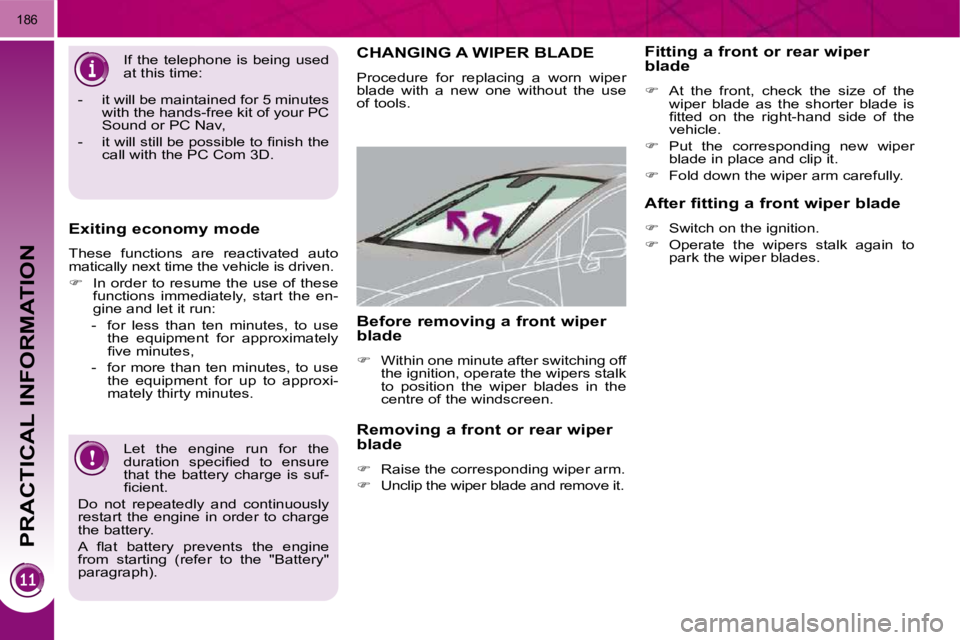
CHANGING A WIPER BLADE
Procedure for replacing a worn wiper
blade with a new one without the use
of tools.
Removing a front or rear wiper
blade
Raise the corresponding wiper arm.
Unclip the wiper blade and remove it. Fitting a front or rear wiper
blade
At the front, check the size of the
wiper blade as the shorter blade is
fi tted on the right-hand side of the
vehicle.
Put the corresponding new wiper
blade in place and clip it.
Fold down the wiper arm carefully.
Before removing a front wiper
blade
Within one minute after switching off
the ignition, operate the wipers stalk
to position the wiper blades in the
centre of the windscreen. After fitting a front wiper blade
Switch on the ignition.
Operate the wipers stalk again to
park the wiper blades.
Page 192 of 290
PRACTICAL INFORMATION
186
Let the engine run for the
duration specifi ed to ensure
that the battery charge is suf-
fi cient.
Do not repeatedly and continuously
restart the engine in order to charge
the battery.
A fl at battery prevents the engine
from starting (refer to the "Battery"
paragraph). If the telephone is being used
at this time:
- it will be maintained for 5 minutes with the hands-free kit of your PC
Sound or PC Nav,
- it will still be possible to fi nish the call with the PC Com 3D.
Exiting economy mode
These functions are reactivated auto
matically next time the vehicle is driven.
In order to resume the use of these
functions immediately, start the en-
gine and let it run:
- for less than ten minutes, to use the equipment for approximately
fi ve minutes,
- for more than ten minutes, to use the equipment for up to approxi-
mately thirty minutes.
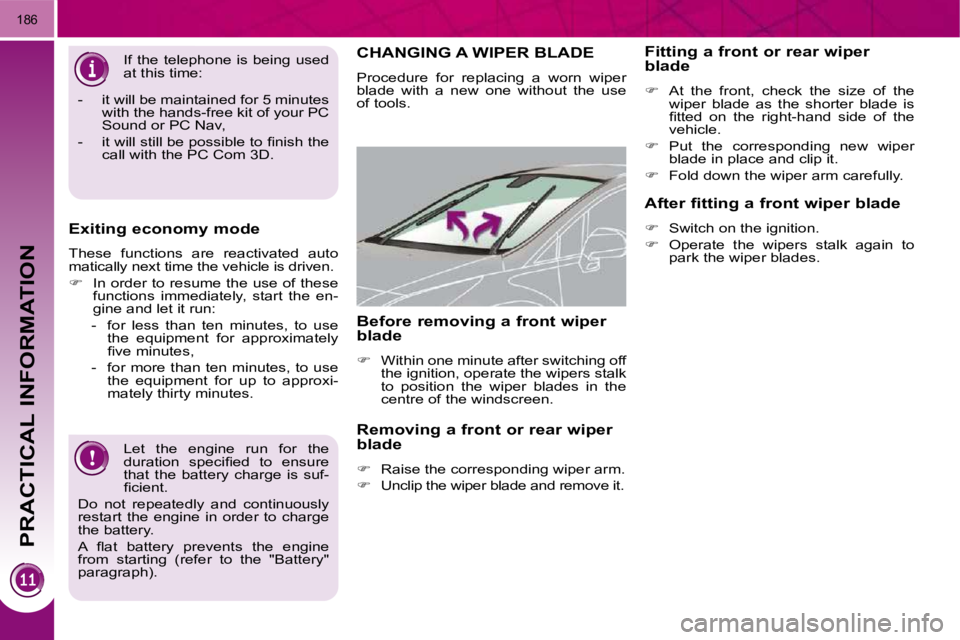
CHANGING A WIPER BLADE
Procedure for replacing a worn wiper
blade with a new one without the use
of tools.
Removing a front or rear wiper
blade
Raise the corresponding wiper arm.
Unclip the wiper blade and remove it. Fitting a front or rear wiper
blade
At the front, check the size of the
wiper blade as the shorter blade is
fi tted on the right-hand side of the
vehicle.
Put the corresponding new wiper
blade in place and clip it.
Fold down the wiper arm carefully.
Before removing a front wiper
blade
Within one minute after switching off
the ignition, operate the wipers stalk
to position the wiper blades in the
centre of the windscreen. After fitting a front wiper blade
Switch on the ignition.
Operate the wipers stalk again to
park the wiper blades.