2009 OPEL CORSA fuel
[x] Cancel search: fuelPage 41 of 284

35
Keys, doors, windows, sun roof
Picture no: 17047t.tif
Malfunction in remote control To unlock
Turn the key in the driver’s door lock to the
front until it stops. Turn the key back and
remove it. Open the driver’s door. To open
the other doors, switch on the ignition and
press the central locking button. To lock
Open passenger door, close driver’s door,
press central locking switch
m in centre
console. Central locking system locks all
doors. Close passenger door.
Malfunction in central
locking system To unlock
Turn the key in the driv er’s door lock to the
front until it stops. Turn the key back and
remove it. The other doors can be opened
by pulling the handle on the inside of the
doors (not possible if the anti-theft locking
system 3 has been activated). The luggage
compartment and fuel filler cap remain
locked. To deactivate the anti-theft alarm
system 3, switch on the ignition 3 16.
Picture no: 18410s.tif
To lock
Put the key in the opening above the lock
on the inside of the door and activate the
lock audibly by lifting with the key, close
the door. This procedure must be executed
for every door. The driver’s door can also
be locked from the outside using the lock.
The unlocked fuel filler cap and tailgate or
boot lid cannot be locked.
Back to overview
Page 92 of 284

86 Instruments, controls
Picture no: 18469s.tif
A
Engine electronics, transmission
electronics 3, immobiliser,
diesel fuel filter 3
Control indicator lights up and/or flashes
yellow.
It illuminates for a few seconds when the
ignition is switched on.
Illuminates when the engine is running
Fault in engine electronics or transmission
electronics. Electronics switches to
emergency running program, fuel
consumption may increase and driveability
of vehicle may be affected 3156. If the
fault is still there when the engine is started
again, contact a workshop for assistance.
Picture no:
Lamps
together with InSP4 on the service
display: Diesel fuel filter needs to be
drained of water 3244.
Flashes when the ignition is on
Fault in the electronic immobiliser system;
the engine cannot be started 327.
S
Engine oil level 3
Control indicator lights up yellow.
The engine oil level is checked
automatically.
Illuminates when the engine is running
Engine oil level too low. Check engine oil
level and top up engine oil if necessary
3 242.
I
Engine oil pressure
Control indicator lights up red.
It illuminates when the ignition is switched
on and goes out shortly after the engine
starts.
Illuminates when the engine is running
1. Depress clutch.
2. Shift manual transmission or manual
transmission automated 3 into neutral;
for automatic transmission 3, set
selector lever to N.
3. Move out of the flow of traffic as quickly as possible without impeding other
vehicles.
4. Switch off ignition.
Contact a workshop for assistance. Caution
Engine lubrication may be interrupted.
This may result in damage to the engine
and/or locking of the drive wheels.
9
Warning
When the engine is off, considerably
more force is needed to brake and steer.
Do not remove key until vehicle has
come to a standstill, otherwise the
steering column lock could engage
unexpectedly.
Back to overview
Page 93 of 284

87
Instruments, controls
p
Alternator
Control indicator lights up and/or flashes
red.
It illuminates when the ignition is switched
on and goes out shortly after the engine
starts.
Flashes during or after engine start
Battery voltage too lo w. Have electrical
system tested by a workshop.
Illuminates when the engine is runningStop and switch engine off. Battery will not
be charged. Engine cooling may be
interrupted. Effect of brake servo unit may
stop in vehicles with diesel engines.
Contact a workshop for assistance. p
Electro-hydraulic power assisted steering
Control indicator lights up yellow.
Fault in electro-hydr aulic power assisted
steering system. The power assisted
steering may have failed. The vehicle can
be steered but considerably more force is
required. Contact a workshop for
assistance.
O
Turn signal lamps
Control indicator flashes green.
The control indicator flashes if a turn signal
or the hazard warning flashers are
activated.
Rapid flashes: A turn signal lamp or the
related fuse has failed, failure of turn signal
lamp on the trailer 3.
Change bulbs 3212. Fuses 3 209.
Y
Fuel level
Control indicator lights up and/or flashes
yellow
Lamps
Level in fuel tank too low.
Flashes
Fuel level is used up, fuel immediately.
Never let the tank run dry!
Erratic fuel supply can cause catalytic
converter to overheat 3155.
Diesel engines: Bleed the fuel system after
running empty 3190.
C
Main beam
Control indicator lights up blue.
It is illuminated when main beam is on and
during headlamp flash 311, 3109.
W
Coolant temperature
Stop, switch off engine.
Check coolant level immediately 3244.
If there is sufficient coolant, consult a
workshop. Caution
Coolant temperature too high.
Back to overview
Page 96 of 284

90 Instruments, controls
Picture no: 18240s.tif
Instrument display On some versions, the pointer of the
tachometer, speedometer and fuel gauge
briefly moves to its end position when the
ignition is switched on.
Tachometer
Displays the engine rpm.
Drive in a low engine speed range for each
gear as much as possible.
Picture no:
Speedometer
Speed display.
Caution
If the pointer is in the warning zone, the
maximum permitted engine speed is
exceeded. Engine at risk.
Picture no: 18241s.tif
Fuel gauge
Fuel tank level display.
If the fuel level is too low, a warning lamp
lights up Y. When the light flashes, refuel as
soon as possible.
Never run the tank dry!
Because of the fuel remaining in the tank,
the amount of fuel requ ired to fill the tank
may be less than the specified tank
capacity.
Back to overview
Page 97 of 284
91
Instruments, controls
Picture no: 18405s.tif
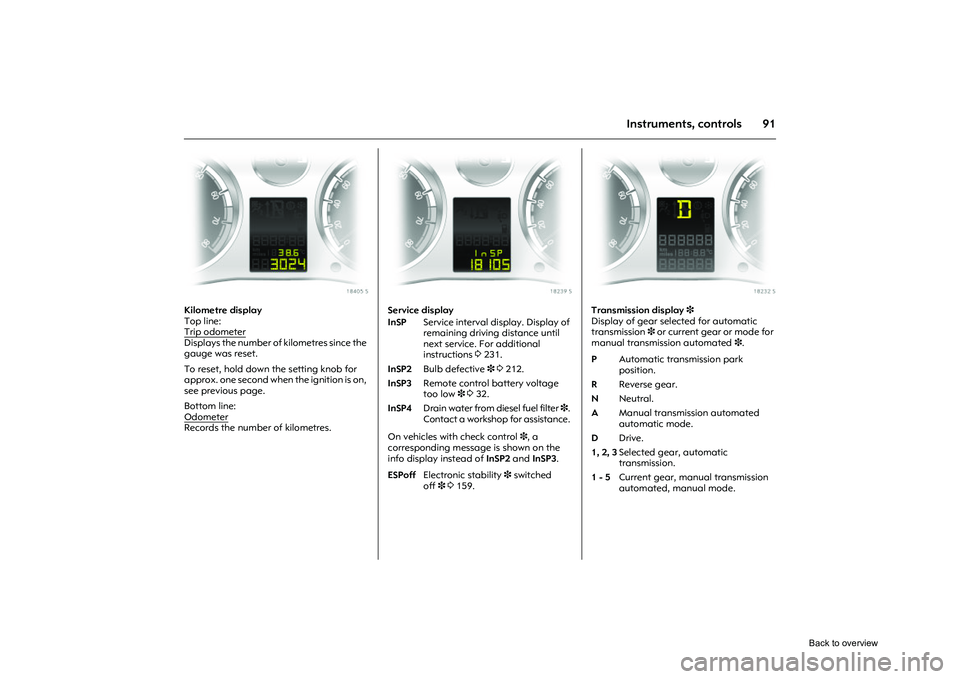
Kilometre display
Top line:
Trip odometerDisplays the number of kilometres since the
gauge was reset.
To reset, hold down the setting knob for
approx. one second when the ignition is on,
see previous page.
Bottom line:
OdometerRecords the number of kilometres.
Picture no: 18239s.tif
Service display
On vehicles with check control 3, a
corresponding message is shown on the
info display instead of InSP2 and InSP3 .
Picture no: 18232s.tif
Transmission display 3
Display of gear selected for automatic
transmission 3 or current gear or mode for
manual transmission automated 3.
InSP Service interval display. Display of
remaining driving distance until
next service. For additional
instructions 3231.
InSP2 Bulb defective 33212.
InSP3 Remote control battery voltage
too low 3332.
InSP4 Drain water from diesel fuel filter 3.
Contact a workshop for assistance.
ESPoff Electronic stability 3 switched
off 33159.
P Automatic transmission park
position.
R Reverse gear.
N Neutral.
A Manual transmission automated
automatic mode.
D Drive.
1, 2, 3 Selected gear, automatic
transmission.
1 - 5 Current gear, manual transmission
automated, manual mode.
Back to overview
Page 99 of 284

93
Instruments, controls
Picture no: 18436s.tif
Functions:
zRange
z Instantaneous consumption
z Distance travelled
z Average speed
z Effective consumption
z Average consumption
z Stop watch
To select, rotate the rotary switch on the
wiper stalk briefly up i or down h for
each function and then let go. The
functions will be called one after the other. Range
Range is calculated fr
om current fuel tank
content and instantaneous consumption.
The display shows average values.
After refuelling, the vehicle updates the
range automatically after a brief delay.
When there is insufficient fuel in the tank
for more than 30 km, the warning REFILL
appears on the display.
Confirm the warning message by pressing 0
on the wiper stalk.
Instantaneous consumption
Display of current consumption. At low
speeds, consumption per hour is displayed.
Distance travelled
Display of distance travelled. The
measurement can be reset at any time.
Average speed
Display of aver age speed. The
measurement can be reset at any time.
Stoppages in the journey with the ignition
off are not included in the calculations. Effective consumption
Display of fuel consumed. The
measurement can be reset at any time.
Average consumption
Display of average
consumption. The
measurement can be reset at any time.
Restart trip computer information
Select the desired trip computer function:
rotate the rotary switch on the wiper stalk
briefly up i or down h for each function
and then let go. To reset a value to zero,
hold down the button 0 on the wiper stalk
for more than three seconds: this restarts
measurement. To reset all functions at the
same time, hold down the button 0 for
more than 6 seconds.
All trip computer information, apart from
range and instantaneous consumption,
can be reset.
Stop watch
Select function using rotary
switch iorh ,
push button 0: start/stop
for longer than
three seconds: reset to zero
Back to overview
Page 107 of 284

101
Instruments, controls
Picture no: 17344t.tif
Graphical Information Display
3
or Colour Information Display 3,
trip computer
3
The main trip computer display provides
information about the range, average
consumption 3 and current consumption
of BC 1 .
To display other trip computer data,
press the BC button on the infotainment
system 3, select the trip computer menu
Board Computer on the display or press
the left hand adjustment wheel 3 on the
steering wheel.
Select BC 1 or BC 2 from the trip computer
menu.
Picture no: 17329t.tif
Range
Range is calculated fr om current fuel tank
content and instantaneous consumption.
The display shows average values.
After refuelling, the vehicle updates the
range automatically after a brief delay.
Picture no: 17345t.tif
If the fuel in the tank will allow less
than 50 km of travel, the message
Range appears in the display.
If the fuel in the tank will allow less
than 30 km of travel, the message
Please refuel! 3 appears in the display.
Ü
Board Computer 19,5° 19:36
BC 1 All values
BC 2
257.0
km
Timer
Ø40
km/h
31.0
Ltr.
Ø
7.0
L/100km
1
8
Range
257
km
Aver. Consump.
7.0
L/100km
Inst. consumpt.
7.6
L/100km
19,5° 23° 5 Eco
x
19:36
Range33km
OK
Back to overview
Page 108 of 284

102 Instruments, controlsInstantaneous consumption
Display of current consumption. At low
speeds, consumption per hour is displayed.
Distance travelled
Display of distance travelled. The
measurement can be reset at any time.
Average speed
Display of average speed. The
measurement can be reset at any time.
Stoppages in the journey with the ignition
off are not included in the calculations. Effective consumption
Display of fuel consumed. The
measurement can be reset at any time.
Average consumption
Display of average consumption. The
measurement can be reset at any time.
Picture no: 17344t.tif
Restart trip computer
The measurement or calculation of the
following trip computer information can be
restarted:
z
Distance.
z Average speed.
z Effective consumption.
z Average consumption.
Select BC 1 or BC 2 from the trip computer
menu.
Ü
Board Computer 19,5° 19:36
BC 1 All values
BC 2
257.0
km
Timer
Ø40
km/h
31.0
Ltr.
Ø
7.0
L/100km
1
8
Back to overview