2009 OPEL AGILA display
[x] Cancel search: displayPage 78 of 153

7-8 Infotainment system
(e.g. News). The PTY code enables
selection of the station according to
program type.
Searching for stations by
program type
Press the PTY button 8 to select
PTY mode.
Turn the bVOLUME rotary knob f
to select the desired PTY (e.g. News,
Sports).
Press the hbutton j or
gbuttoni to begin search within
the selected PTY.
If no station within the selected PTY
code is received, “NOTHING”
appears in the display followed by
“PTY”. Select another PTY as
described above.
TA (Traffic Announcement)
Traffic stations are RDS stations
which transmit traffic information.
With TA on, the Infotainment system
searches for stations emitting TP
(Traffic Programs) and tunes into
such stations in preference to others.When TA is active and a Traffic
Program is currently being received,
CD/MP3 CD 3 playback is
interrupted for the traffic
announcement and is resumed when
the announcement ends.
Switching TA on and off
Press the TA button 9 to switch on
traffic announcements.
With TA active, “TA” appears in the
display. When a Traffic Program is
currently being received, “TP” also
appears in the display.
Press the TA button 9 again to
switch off traffic announcements.
To search for a TP station (TP SEEK)
while TA is active, press the
hbuttonj or gbutton i.
If TP data is not received within
approx. 20 seconds after TA is
switched on, TP SEEK automatically
takes place only once.
If no TP station is received,
“NOTHING” appears in the display.
PS (Program Service Name)
Display of program name instead of
station frequency.
EON (Enhanced Other
Networks)
With EON, you will hear traffic
reports, even if the set station does
not transmit its own traffic
information. When a traffic
announcement is made, the unit
switches to a traffic information
station linked to EON.
When EON is active, “EON” appears
in the display.
Page 79 of 153

7-9Infotainment system
Audio players
Single CD player
The Infotainment system is equipped
with a CD player that can play audio
CDs and, if equipped, MP3 CDs 3.
The CD player will automatically
recognise the CD type.
Do not, under any circumstances,
insert DVDs, single CDs with a
diameter of 8 cm and CDs with
irregular shapes into the CD player.
These discs may becomes jammed in
the CD player or destroy the drive
mechanism, invalidating the unit’s
warranty.
The system may not be able to play
CD-Rs or play these items properly,
depending on their nature.
CD-RW discs cannot be played back
on the Infotainment system.
CD/MP3 3 playback
To enter CD mode when the
Infotainment system is switched-off
or while in any other mode, press the
CD button g if a CD is already
inserted in the audio/MP3 CD slot.If a CD is not already inserted, place
an audio CD into the CD slot with the
printed side facing upwards, just
sufficiently for it to be automatically
retracted. CD playback begins and
“CD IN” appears in the display.
Do not apply force when inserting
CDs into the slot.
Selecting next or previous track
Press the hbutton j to skip to the
next track.
Press the gbutton i once to skip
back to the start of the current track or
press it twice to skip back to the
previous track.
Fast forwards/backwards search
Press and hold the hbutton j to
fast forward through the current track.
Press and hold the gbutton i to
fast rewind through the current track.
During fast forward/rewind, the track
is played at a higher speed.
If ‘REPEAT’ has been switched on
previously and the end of the
repeated track is reached during fast forward/rewind, the repeat function is
disabled and normal playback will be
resumed.
While fast forwarding, if the end of the
disc is reached, the disc returns to the
first track.
Random play
Press the RDM button 0 to play the
tracks on the disc in random order.
“RDM” appears in the display.
Switch off random play by pressing
the RDM button 0 again.
Repeat play
Press the RPT button b to play the
current track repeatedly. “RPT”
appears in the display.
Switch off repeat play by pressing the
RPT button b again.
Scan CD
Press the SCN button e to play the
first few seconds of each track on the
disc. “SCN” appears in the display.
Switch off the scan CD function by
pressing the SCN button e again.
Page 80 of 153

7-10 Infotainment system
Selecting next or previous MP3
folder3
If the MP3 CD consists of several
folders, the required folder can be
selected as follows:
Press the DISC/FLD + button c to
skip to the next folder.
Press the - DISC/FLD button d to
skip back to the previous folder.
Displaying MP3 text
MP3 text types appear in the
following order when the TEXT
buttona is pressed repeatedly:
„Elapsed time,
„Folder name,
„File name.
Press and hold the TEXT buttona
for approx. 2 seconds to enable
scrolling text.
Removing CDs
Press the f button 1.
The CD is ejected.
Maintenance and care
„Never insert foreign objects in the
CD slot.
„If “ERROR 1” appears in the
display, the disc cannot be read. If
a normal, undamaged disc is
inserted and the message remains,
seek the assistance of a workshop.
„If “ERROR 3” appears in the
display, the player has developed
an unidentified error. The inserted
disc may not eject. Seek the
assistance of a workshop.
„Do not use commercially available
CD protection sheets or discs
equipped with stabilisers, as they
may get trapped in the internal
mechanism.
„Do not use any abrasive chemicals,
cleaning solutions or strong
cleaners. Use only a soft cloth
moistened with soapy water.
„The system must only be serviced
by trained specialists. Faulty
installation or servicing may
invalidate the unit’s warranty.Mobile telephones and
radio equipment (CB) 3
Installation and operation
The Opel installation instructions and
the operating guidelines provided by
the telephone manufacturer must be
observed when fitting and operating a
mobile telephone.
Failure to do so could invalidate the
vehicle’s operating permit
(EU Directive 95/54/EG).
Requirements to ensure trouble-free
operation:
„Professionally installed exterior
antenna, to obtain the maximum
range possible
„Maximum transmission power
10 Watts.
„Installation of the telephone in a
suitable spot (front centre console).
Obtain advice on predetermined
installation locations for the external
antenna and equipment holder and
ways of using devices with
transmission power of more than
10 Watts.
Page 90 of 153

9-3 Driving and operating
„If the vehicle is parked on a
downhill slope, select reverse gear
before switching the ignition off,
(vehicles with automatic
transmission 3: shift into P). Also
turn front wheels towards kerb.
„Switch off exterior lamps, otherwise
the headlamp warning device will
sound when the driver’s door is
opened.
„Cooling fans may run on after the
engine has been switched off 3
10-1.
Parking over things that
burn
Do not park vehicle on easily ignitable
surfaces as the hot exhaust system
temperatures could cause the
surface to ignite.
Transmission
Automatic transmission 3
The engine can only be started when
the selector lever is in position P or N.
When starting in P or N, depress foot
brake before selecting a gear, then
release the parking brake.
Do not accelerate whilst gearshifting.
If a gear has been selected and the
foot brake is released without
accelerating, the vehicle will "creep".
Never operate the foot brake and
accelerator simultaneously.
Selecting D puts the transmission in
automatic mode.
Only select 3, 2 or L to prevent
automatic upshifting above the
selected gear or as an aid to engine
braking.
The selected gear is shown in the
transmission display.
Transmission display
Displays the selected mode or
current gear.
Page 91 of 153
9-4Driving and operating
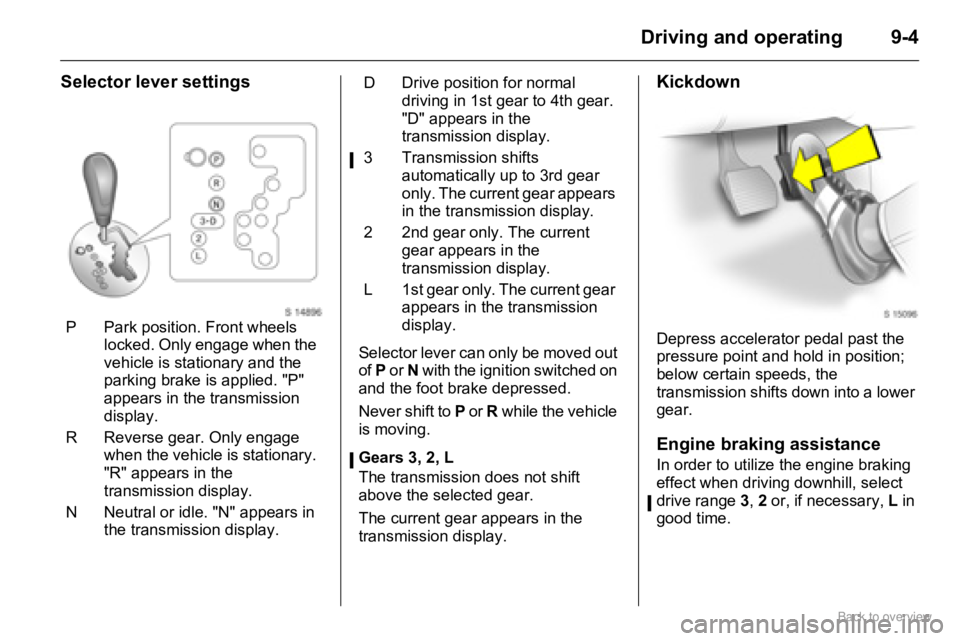
Selector lever settings
Selector lever can only be moved out
of P or N with the ignition switched on
and the foot brake depressed.
Never shift to P or R while the vehicle
is moving.
Gears 3, 2, L
The transmission does not shift
above the selected gear.
The current gear appears in the
transmission display.
Kickdown
Depress accelerator pedal past the
pressure point and hold in position;
below certain speeds, the
transmission shifts down into a lower
gear.
Engine braking assistance
In order to utilize the engine braking
effect when driving downhill, select
drive range 3, 2 or, if necessary, L in
good time. P Park position. Front wheels
locked. Only engage when the
vehicle is stationary and the
parking brake is applied. "P"
appears in the transmission
display.
R Reverse gear. Only engage
when the vehicle is stationary.
"R" appears in the
transmission display.
N Neutral or idle. "N" appears in
the transmission display.
D Drive position for normal
driving in 1st gear to 4th gear.
"D" appears in the
transmission display.
3 Transmission shifts
automatically up to 3rd gear
only. The current gear appears
in the transmission display.
2 2nd gear only. The current
gear appears in the
transmission display.
L 1st gear only. The current gear
appears in the transmission
display.
Page 117 of 153

10-17Vehicle care
Tyre condition
Drive over edges slowly and at a right
angle if possible. When parking,
ensure that the tyres are not pressed
against the edge of the kerb.
Check tyres regularly for damage
(foreign bodies, punctures, cuts,
cracks, bulges in sidewalls). Check
wheels for damage. In the event of
damage or abnormal wear, seek the
assistance of a workshop.
Different tyre and wheel
types
If tyres of a different size to those
fitted at the factory are used (this
includes winter tyres), the electronic speedometer may possibly need to
be reprogrammed, to ensure that the
speed displayed is correct.
Wheel covers 3
Wheel covers and tyres that are
approved for the vehicle and comply
with all of the relevant wheel and tyre
combination requirements must be
used.
If the wheel covers and tyres used
are not approved, make sure that the
tyres do not have a beaded edge.
Remove wheel covers before fitting
tyre chains, to avoid damaging the
wheel covers.
Tyre chains 3
Tyre chains are only permitted on the
drive wheels (front axle). They must
be fitted to the tyres symmetrically in
order to achieve a concentric fit.
Use fine mesh chains that add no
more than 10 mm to the tyre tread
and the inboard sides (including
chain lock).
Tyre chains may only be used at
speeds of up to 50 km/h (30 mph) or
up to the tyre chain manufacturer’s
recommended maximum speed,
whichever is lower.
9 Warning
If the pressure is too low, this can
result in considerable tyre warm-
up and internal damage, leading
to tread separation and even to
tyre blow-out at high speeds.
Caution
Use of unsuitable tyres or wheels
may lead to accidents and render
the vehicle unroadworthy.
Page 133 of 153

11-1Service and maintenance
Service and
maintenanceScheduled
maintenance
Service intervals
Interim Service
Due every 15,000 km (10,000 miles)
or 1 year, whichever occurs first.
Main Service
Due every 30,000 km (20,000 miles)
or 2 years, whichever occurs first.
The service intervals are based on
average operating conditions. For
severe operating conditions 311-5.
Service interval display 35-14.
Engine oil life monitor 35-14.Confirmations
Confirmation of Service is recorded in
the spaces provided in the Service
and Warranty Booklet. The date and
kilometre/mileage reading is
completed with the stamp and
signature of the Servicing Workshop.
Make sure that the Service and
Warranty Booklet is completed
correctly as continuous proof of
service is essential if any warranty or
goodwill claims are to be met, and is
also a benefit when you come to sell
the vehicle. Scheduled maintenance ....... 11-1
Service schedule .................. 11-2
Additional servicing ............... 11-5
Recommended fluids and
lubricants ............................ 11-5
Page 136 of 153

11-4 Service and maintenance
⊕Additional operations.o Under extreme operating conditions and if required by country-specific conditions, the intervals are reduced.
Service operations by year 1)
km ( x 1000)1)
miles ( x 1000)1)
1
15
102
30
203
45
304
60
405
75
506
90
60
o⊕Automatic transmission fluid level: check correct x x x
Fluid hose: inspectx
Fluid: change every 165,000 km/110,000 miles
Engine, transmission, A/C compressor: check for leaks x x x x x x
oBrake drum: remove, clean, visual check x
Steering system boots, track rods, final drive: visual check x x
Track rod end and supporting ball joint: check x x x
⊕Brake and clutch fluid: change every 2 years
Wheel fastening: loosen and tighten to torque
Tyre condition and pressures: check, correctxxxxxx
First aid kit: visual check every 2 years
Headlamp aiming: check, adjust x x x
Door hinges, door stop, lock cylinder, lock striker, bonnet catch, tailgate
hinges and check links: lubricate xxx
Test drive, final check
Service interval display and oil life monitor: reset - if applicablexxxxxx
1)Whichever occurs first.