2009 NISSAN CUBE warning
[x] Cancel search: warningPage 105 of 321

Black plate (103,1)
Model "Z12-D" EDITED: 2009/ 1/ 28
SIC4138
GLOVE BOX
WARNING
Keep glove box lid closed while driving
to help prevent injury in an accident or a
sudden stop.
To open the glove box, pull the handle.
To close, push the lid in until the lock latches.
SIC4165
WARNING
Do not store objects on the horizontal
surface just above the glove box or on
top of the instrument panel. Objects
can become projectiles and/or interfere
with passenger air bag deployment
causing serious personal injury.
SIC4147
REAR PILLAR POCKET
CAUTION
Do not keep heavy or long objects in
the pocket.
Instruments and controls
2-33
ProCarManuals.com
Page 106 of 321
Black plate (104,1)
Model "Z12-D" EDITED: 2009/ 1/ 28
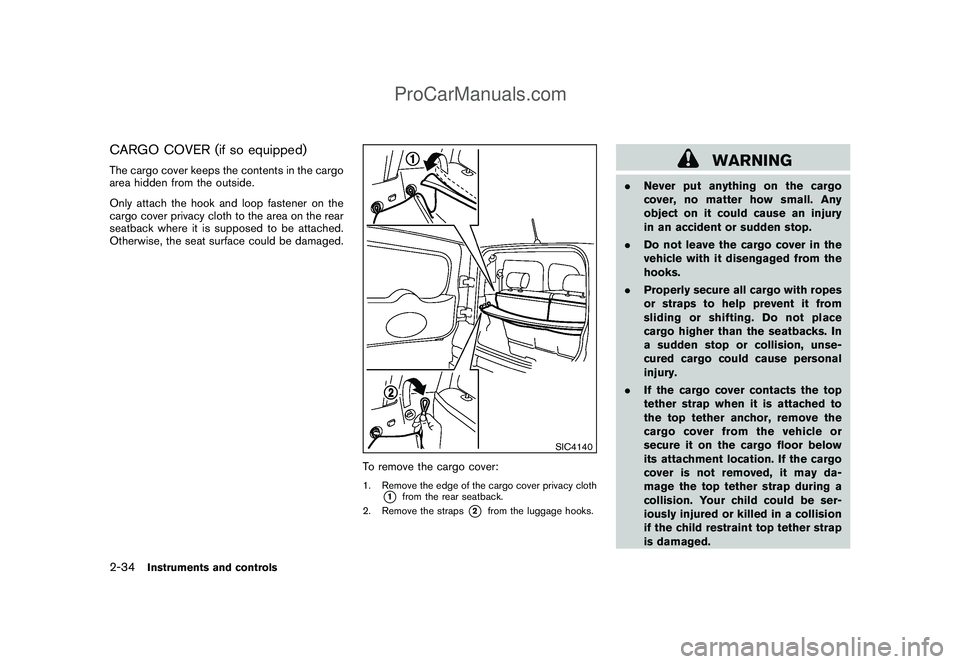
CARGO COVER (if so equipped)The cargo cover keeps the contents in the cargo
area hidden from the outside.
Only attach the hook and loop fastener on the
cargo cover privacy cloth to the area on the rear
seatback where it is supposed to be attached.
Otherwise, the seat surface could be damaged.
SIC4140
To remove the cargo cover:1. Remove the edge of the cargo cover privacy cloth
*1
from the rear seatback.
2. Remove the straps
*2
from the luggage hooks.
WARNING
.Never put anything on the cargo
cover, no matter how small. Any
object on it could cause an injury
in an accident or sudden stop.
.Do not leave the cargo cover in the
vehicle with it disengaged from the
hooks.
.Properly secure all cargo with ropes
or straps to help prevent it from
sliding or shifting. Do not place
cargo higher than the seatbacks. In
a sudden stop or collision, unse-
cured cargo could cause personal
injury.
.If the cargo cover contacts the top
tether strap when it is attached to
the top tether anchor, remove the
cargo cover from the vehicle or
secure it on the cargo floor below
its attachment location. If the cargo
cover is not removed, it may da-
mage the top tether strap during a
collision. Your child could be ser-
iously injured or killed in a collision
if the child restraint top tether strap
is damaged.
2-34
Instruments and controls
ProCarManuals.com
Page 107 of 321
Black plate (105,1)
Model "Z12-D" EDITED: 2009/ 1/ 28
.Do not allow cargo to contact the
top tether strap when it is attached
to the top tether anchor. Properly
secure the cargo so it does not
contact the top tether strap. Cargo
that is not properly secured or that
contacts the top tether strap may
damage the top tether strap during
a collision. Your child could be
seriously injured or killed in a colli-
sion if the child restraint top tether
strap is damaged.
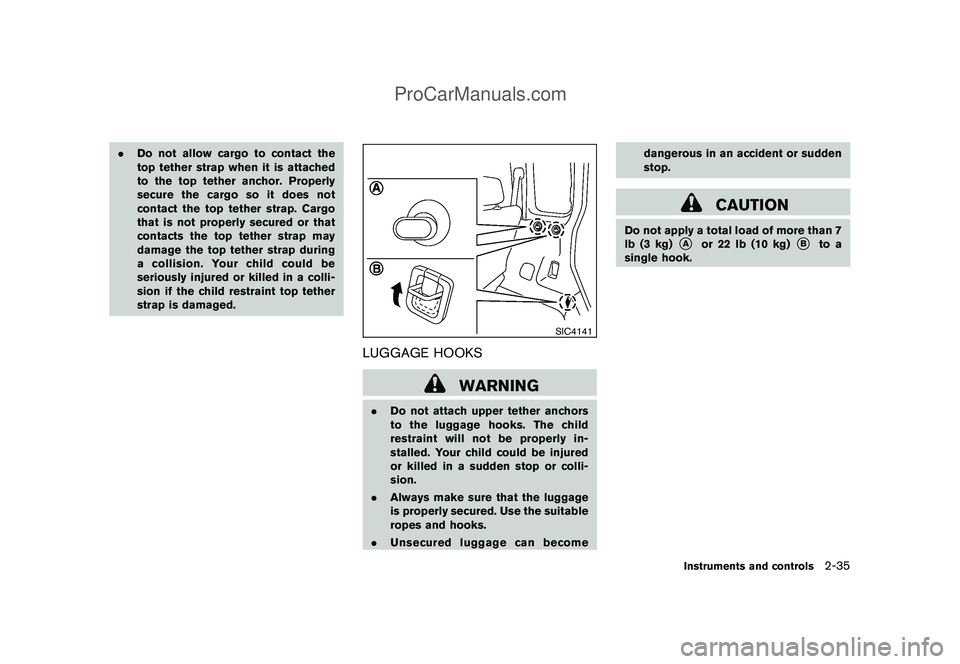
SIC4141
LUGGAGE HOOKS
WARNING
.Do not attach upper tether anchors
to the luggage hooks. The child
restraint will not be properly in-
stalled. Your child could be injured
or killed in a sudden stop or colli-
sion.
.Always make sure that the luggage
is properly secured. Use the suitable
ropes and hooks.
.Unsecured luggage can becomedangerous in an accident or sudden
stop.
CAUTION
Do not apply a total load of more than 7
lb (3 kg)
*A
or 22 lb (10 kg)
*B
to a
single hook.
Instruments and controls
2-35
ProCarManuals.com
Page 108 of 321
Black plate (106,1)
Model "Z12-D" EDITED: 2009/ 1/ 28
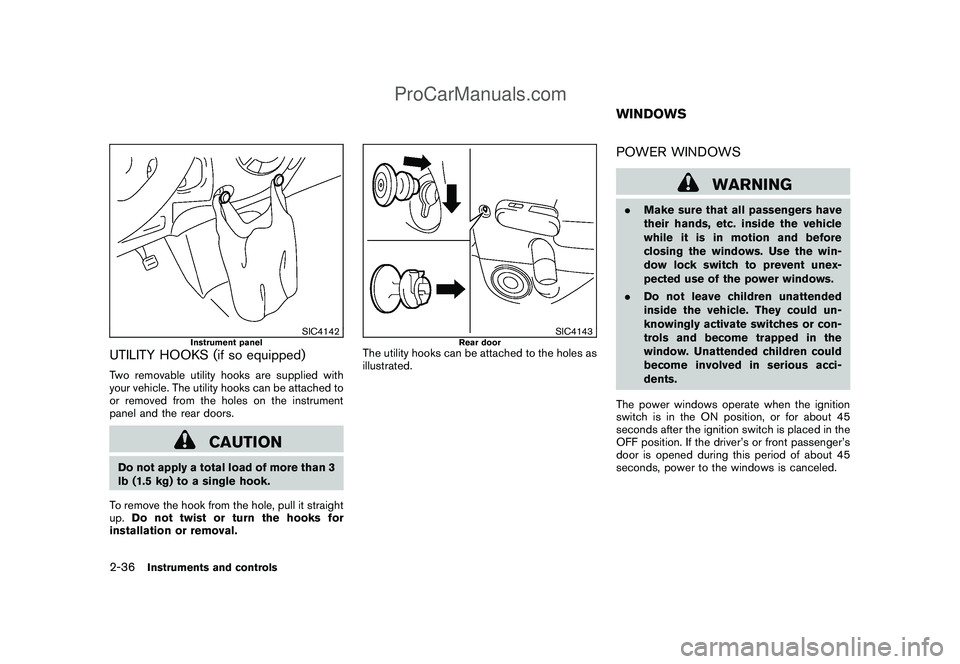
SIC4142
Instrument panel
UTILITY HOOKS (if so equipped)Two removable utility hooks are supplied with
your vehicle. The utility hooks can be attached to
or removed from the holes on the instrument
panel and the rear doors.
CAUTION
Do not apply a total load of more than 3
lb (1.5 kg) to a single hook.
To remove the hook from the hole, pull it straight
up.Do not twist or turn the hooks for
installation or removal.
SIC4143
Rear door
The utility hooks can be attached to the holes as
illustrated.
POWER WINDOWS
WARNING
.Make sure that all passengers have
their hands, etc. inside the vehicle
while it is in motion and before
closing the windows. Use the win-
dow lock switch to prevent unex-
pected use of the power windows.
.Do not leave children unattended
inside the vehicle. They could un-
knowingly activate switches or con-
trols and become trapped in the
window. Unattended children could
become involved in serious acci-
dents.
The power windows operate when the ignition
switch is in the ON position, or for about 45
seconds after the ignition switch is placed in the
OFF position. If the driver’s or front passenger’s
door is opened during this period of about 45
seconds, power to the windows is canceled.WINDOWS
2-36
Instruments and controls
ProCarManuals.com
Page 110 of 321

Black plate (108,1)
Model "Z12-D" EDITED: 2009/ 1/ 28
SIC3509
Automatic operationThe automatic operation is available for the
switch that has an
mark on its surface.
To fully open or close the window, completely
push down or pull up the switch and release it;
the switch need not be held. The window will
automatically open or close all the way. To stop
the window, just push or lift the switch in the
opposite direction.
A light push or pull on the switch will cause the
window to open or close until the switch is
released.
Auto-reverse function
WARNING
There are some small distances imme-
diately before the closed position which
cannot be detected. Make sure that all
passengers have their hands, etc., in-
side the vehicle before closing the
window.
If the control unit detects something caught in
the window as it is closing, the window will be
immediately lowered.
The auto reverse function can be activated when
the window is closed by automatic operation
when the ignition switch is in the ON position or
for 45 seconds after the ignition switch is placed
in the OFF position.
Depending on the environment or driving
conditions, the auto reverse function may
be activated if an impact or load similar to
something being caught in the window
occurs.If the windows do not close automaticallyIf the power window automatic function (closing
only) does not operate properly, perform the
following procedure to initialize the power
window system.1. Place the ignition switch in the ON position.
2. Close the door.
3. Open the window completely by operating
the power window switch.
4. Pull the power window switch and hold it to
close the window, and then hold the switch
more than 3 seconds after the window is
closed completely.
5. Release the power window switch. Operate
the window by the automatic function to
confirm the initialization is complete.
If the power window automatic function does
not operate properly after performing the pro-
cedure above, have your vehicle checked by a
NISSAN dealer.
2-38
Instruments and controls
ProCarManuals.com
Page 115 of 321

Black plate (10,1)
3 Pre-driving checks and adjustments
Model "Z12-D" EDITED: 2009/ 1/ 28
Keys ............................................................... 3-2
NISSAN Vehicle Immobilizer System keys............ 3-2
Intelligent Keys (if so equipped)......................... 3-3
Doors.............................................................. 3-4
Locking with key............................................ 3-4
Locking with inside lock knob........................... 3-5
Locking with power door lock switch.................. 3-5
Automatic door locks...................................... 3-5
Child safety rear door lock............................... 3-6
Remote keyless entry system (if so equipped)........... 3-7
How to use remote keyless entry system............. 3-8
Intelligent Key system (if so equipped).................. 3-10
Intelligent Key operating range........................ 3-12
Door locks/unlocks precaution........................ 3-12
Intelligent Key operation................................. 3-13
Battery saver system..................................... 3-14Warning lights and audible reminders............... 3-14
Troubleshooting guide................................... 3-15
How to use remote keyless entry function.......... 3-17
Hood............................................................ 3-21
Back door...................................................... 3-22
Bumpers and side sill extensions (Kro¯
m models) ..... 3-23
Fuel-filler door................................................. 3-24
Opening the fuel-filler door............................. 3-24
Fuel-filler cap.............................................. 3-24
Tilt steering column.......................................... 3-25
Tilt operation............................................... 3-26
Sun visors...................................................... 3-26
Mirrors........................................................... 3-26
Inside mirror................................................ 3-26
Outside mirrors............................................ 3-27
ProCarManuals.com
Page 118 of 321

Black plate (116,1)
Model "Z12-D" EDITED: 2009/ 1/ 28
SPA2033
Mechanical keyTo remove the mechanical key, release the lock
knob at the back of the Intelligent Key.
To install the mechanical key, firmly insert it into
the Intelligent Key until the lock knob returns to
the lock position.
Use the mechanical key to lock or unlock the
doors. (See “DOORS” later in this section.)
CAUTION
Always carry the mechanical key in-
stalled in the Intelligent Key.
WARNING
.Always have the doors locked while
driving. Along with the use of seat
belts, this provides greater safety in
the event of an accident by helping
to prevent persons from being
thrown from the vehicle. This also
helps keep children and others from
unintentionally opening the doors,
and will help keep out intruders.
.Before opening any door, always
look for and avoid oncoming traffic.
.Do not leave children unattended
inside the vehicle. They could un-
knowingly activate switches or con-
trols. Unattended children could
become involved in serious acci-
dents.
SPA2602
LOCKING WITH KEYThe power door lock system allows you to lock
or unlock all doors simultaneously.
.Turning the driver’s door key cylinder to the
front of the vehicle
*1
will lock all doors and
the back door.
.Turning the driver’s door key cylinder once
to the rear of the vehicle*2
will unlock the
driver’s door. After returning the key to the
neutral position, turning it to the rear again
within 5 seconds will unlock all doors and
the back door.
DOORS
3-4
Pre-driving checks and adjustments
ProCarManuals.com
Page 121 of 321

Black plate (119,1)
Model "Z12-D" EDITED: 2009/ 1/ 28
It is possible to lock/unlock all doors (including
the back door) , and activate the panic alarm by
using the keyfob from outside the vehicle.
Before locking the doors, make sure the
key is not left in the vehicle.
The keyfob can operate at a distance of
approximately 33 ft (10 m) from the vehicle.
(The effective distance depends upon the
conditions around the vehicle.)
As many as 5 keyfobs can be used with one
vehicle. For information concerning the pur-
chase and use of additional keyfobs, contact a
NISSAN dealer.
The keyfob will not function:
.When the keyfob is not within the opera-
tional range.
.When the doors are open or not closed
securely.
.When the key is in the ignition switch.
.When the battery is discharged.
WARNING
The remote keyless entry keyfob trans-
mits radio waves when the buttons are
pushed. The FAA advises that the radio
waves may affect aircraft navigation
and communication systems. Do not
operate the keyfob while on an air-plane. Make sure the buttons are not
operated unintentionally when the unit
is stored during a flight.
CAUTION
The following conditions or occur-
rences will damage the keyfob.
.Do not allow the keyfob to become
wet.
.Do not drop the keyfob.
.Do not strike the keyfob sharply
against another object.
.Do not place the keyfob for an
extended period in an area where
temperatures exceed 1408F (608C) .
If a keyfob is lost or stolen, NISSAN
recommends erasing the ID code of that
keyfob. This will prevent the keyfob
from unauthorized use to unlock the
vehicle. For information regarding the
erasing procedure, please contact a
NISSAN dealer.
If the indicator light on the keyfob does not
illuminate when pushing the buttons, the keyfob
battery may be discharged.
For information regarding the replacement of abattery, see “KEY BATTERY REPLACEMENT”
in the “8. Maintenance and do-it-yourself”
section.
REMOTE KEYLESS ENTRY SYSTEM
(if so equipped)
Pre-driving checks and adjustments
3-7
ProCarManuals.com