2009 NISSAN CUBE steering wheel
[x] Cancel search: steering wheelPage 85 of 321

Black plate (83,1)
Model "Z12-D" EDITED: 2009/ 1/ 28
Low tire pressure warning light
Your vehicle is equipped with a Tire Pressure
Monitoring System (TPMS) that monitors the tire
pressure of all tires except the spare.
The low tire pressure warning light warns of low
tire pressure or indicates that the TPMS is not
functioning properly.
After the ignition switch is placed in the ON
position, this light illuminates for about 1 second
and turns off.
Low tire pressure warning:
If the vehicle is being driven with low tire
pressure, the warning light will illuminate.
When the low tire pressure warning light
illuminates, you should stop and adjust the tire
pressure to the recommended COLD tire
pressure shown on the Tire and Loading
Information label. The low tire pressure warning
light does not automatically turn off when the tire
pressure is adjusted. After the tire is inflated to
the recommended pressure, the vehicle must be
driven at speeds above 16 MPH (25 km/h) to
activate the TPMS and turn off the low tire
pressure warning light. Use a tire pressure
gauge to check the tire pressure.
For additional information, see “TIRE PRES-
SURE MONITORING SYSTEM (TPMS)” in the“5. Starting and driving” section and “TIRE
PRESSURE MONITORING SYSTEM (TPMS)”
in the “6. In case of emergency” section.
TPMS malfunction:
If the TPMS is not functioning properly, the low
tire pressure warning light will flash for approxi-
mately 1 minute when the ignition switch is
placed in the ON position. The light will remain
on after 1 minute. Have the system checked by a
NISSAN dealer.
For additional information, see “TIRE PRES-
SURE MONITORING SYSTEM (TPMS)” in the
“5. Starting and driving” section.
WARNING
.If the light does not illuminate with
the ignition switch placed in the ON
position, have the vehicle checked
by a NISSAN dealer as soon as
possible.
.If the light illuminates while driving,
avoid sudden steering maneuvers or
abrupt braking, reduce vehicle
speed, pull off the road to a safe
location and stop the vehicle as
soon as possible. Driving with un-
der-inflated tires may permanently
damage the tires and increase thelikelihood of tire failure. Serious
vehicle damage could occur and
may lead to an accident and could
result in serious personal injury.
Check the tire pressure for all four
tires. Adjust the tire pressure to the
recommended COLD tire pressure
shownontheTireandLoading
Information label to turn the low
tire pressure warning light OFF. If
the light still illuminates while driv-
ing after adjusting the tire pressure,
a tire may be flat. If you have a flat
tire, replace it with a spare tire as
soon as possible.
.When a spare tire is mounted or a
wheel is replaced, the TPMS will not
function and the low tire pressure
warning light will flash for approxi-
mately 1 minute. The light will
remain on after 1 minute. Contact
your NISSAN dealer as soon as
possible for tire replacement and/
or system resetting.
.Replacing tires with those not ori-
ginally specified by NISSAN could
affect the proper operation of the
TPMS.
Instruments and controls
2-13
ProCarManuals.com
Page 100 of 321

Black plate (98,1)
Model "Z12-D" EDITED: 2009/ 1/ 28
SIC4130
To sound the horn, push the center pad area of
the steering wheel.
WARNING
Do not disassemble the horn. Doing so
could affect proper operation of the
supplemental front air bag system.
Tampering with the supplemental front
air bag system may result in serious
personal injury.
SIC1881
The vehicle should be driven with the Vehicle
Dynamic Control (VDC) system on for most
driving conditions.
If the vehicle is stuck in mud or snow, the VDC
system reduces the engine output to reduce
wheel spin. The engine speed will be reduced
even if the accelerator is depressed to the floor.
If maximum engine power is needed to free a
stuck vehicle, turn the VDC system off.
To turn off the VDC system, push the VDC OFF
switch. The
indicator will illuminate.
Push the VDC OFF switch again or restart the
engine to turn on the system. (See “VEHICLE
DYNAMIC CONTROL (VDC) SYSTEM” in the
“5. Starting and driving” section.)The digital clock (in the audio unit) displays time
when the ignition switch is in the ACC or ON
position.
The clock ON or OFF mode can be selected.
If the power supply is disconnected, the
clock will not indicate the correct time.
Readjust the time.
HORNVEHICLE DYNAMIC CONTROL (VDC)
OFF SWITCHCLOCK (if so equipped)2-28
Instruments and controls
ProCarManuals.com
Page 125 of 321

Black plate (123,1)
Model "Z12-D" EDITED: 2009/ 1/ 28
computer.
.When the vehicle is parked near a parking
meter.
In such cases, correct the operating conditions
before using the Intelligent Key function or use
the mechanical key.
Although the life of the battery varies depending
on the operating conditions, the battery’s life is
approximately 2 years. If the battery is dis-
charged, replace it with a new one.
Since the Intelligent Key is continuously receiv-
ing radio waves, if the key is left near equipment
which transmits strong radio waves, such as
signals from a TV and personal computer, the
battery life may become shorter.
For information regarding replacement of a
battery, see “KEY BATTERY REPLACEMENT”
in the “8. Maintenance and do-it-yourself”
section.
Because the steering wheel is locked electri-
cally, unlocking the steering wheel with the
ignition switch in the LOCK position is impos-
sible when the vehicle battery is completely
discharged. Always be careful that the vehicle
battery is not completely discharged.
As many as 4 Intelligent Keys can be registered
and used with one vehicle. For information about
the purchase and use of additional IntelligentKeys, contact a NISSAN dealer.
CAUTION
.Do not allow the Intelligent Key,
which contains electrical compo-
nents, to come into contact with
water or salt water. This could affect
the system function.
.Do not drop the Intelligent Key.
.Do not strike the Intelligent Key
sharply against another object.
.Do not change or modify the Intel-
ligent Key.
.Wetting may damage the Intelligent
Key. If the Intelligent Key gets wet,
immediately wipe until it is comple-
tely dry.
.Do not place the Intelligent Key for
an extended period in an area where
temperatures exceed 1408F (608C) .
.Do not attach the Intelligent Key
with a key holder that contains a
magnet.
.Do not place the Intelligent Key near
equipment that produces a mag-
netic field, such as a TV, audio
equipment, personal computers orcellular phone.
If an Intelligent Key is lost or stolen, NISSAN
recommends erasing the ID code of that
Intelligent Key from the vehicle. This may prevent
the unauthorized use of the Intelligent Key to
operate the vehicle. For information regarding
the erasing procedure, contact a NISSAN deal-
er.
The Intelligent Key function can be disabled. For
information about disabling the Intelligent Key
function, contact a NISSAN dealer.
Pre-driving checks and adjustments
3-11
ProCarManuals.com
Page 139 of 321

Black plate (137,1)
Model "Z12-D" EDITED: 2009/ 1/ 28
filling portable fuel containers:
— Always place the container on
the ground when filling.
— Do not use electronic devices
when filling.
— Keep the pump nozzle in contact
with the container while you are
filling it.
— Use only approved portable fuel
containers for flammable liquid.
CAUTION
.If fuel is spilled on the vehicle body,
flush it away with water to avoid
paint damage.
.Insert the cap straight into the fuel-
filler tube, then tighten until the
fuel-filler cap clicks. Failure to tight-
en the fuel-filler cap properly may
cause the
malfunction indicator
light (MIL) to illuminate. If the
light illuminates because the fuel-
filler cap is loose or missing, tighten
or install the cap and continue to
drive the vehicle. The
light
should turn off after a few driving
trips. If the
light does not turnoff after a few driving trips, have the
vehicle inspected by a NISSAN deal-
er.
For additional information, see
“Malfunction Indicator Light (MIL)”
in the “2. Instruments and controls”
section.
WARNING
Do not adjust the steering wheel while
driving. You could lose control of your
vehicle and cause an accident.TILT STEERING COLUMNPre-driving checks and adjustments
3-25
ProCarManuals.com
Page 140 of 321
Black plate (138,1)
Model "Z12-D" EDITED: 2009/ 1/ 28
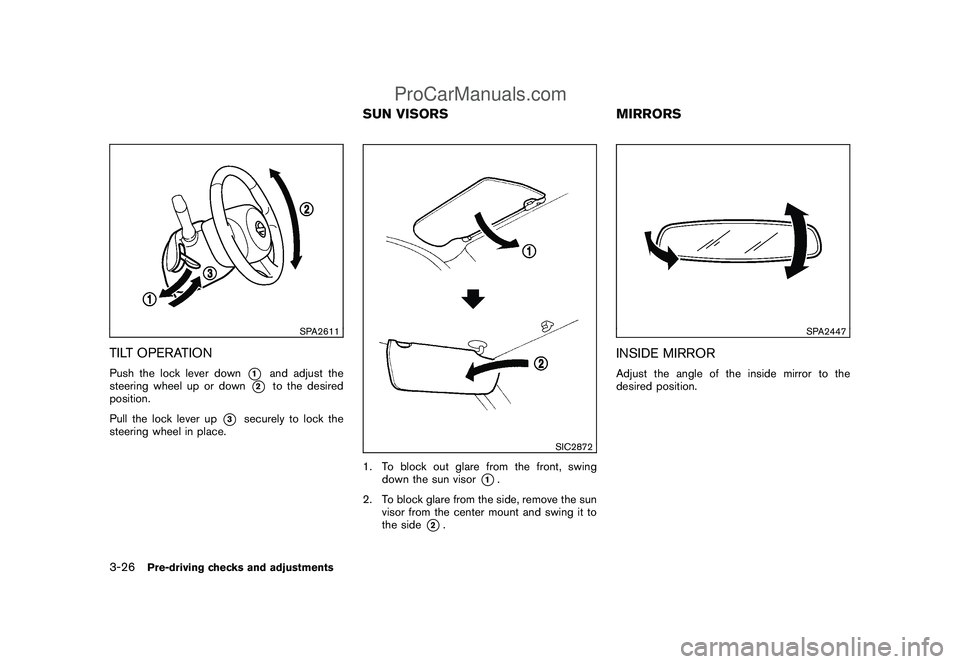
SPA2611
TILT OPERATIONPush the lock lever down
*1
and adjust the
steering wheel up or down
*2
to the desired
position.
Pull the lock lever up
*3
securely to lock the
steering wheel in place.
SIC2872
1. To block out glare from the front, swing
down the sun visor
*1.
2. To block glare from the side, remove the sun
visor from the center mount and swing it to
the side
*2.
SPA2447
INSIDE MIRRORAdjust the angle of the inside mirror to the
desired position.
SUN VISORS MIRRORS
3-26
Pre-driving checks and adjustments
ProCarManuals.com
Page 145 of 321

Black plate (13,1)
4 Heater, air conditioner, audio and phone
systems
Model "Z12-D" EDITED: 2009/ 1/ 28
Ventilators........................................................ 4-2
Center ventilators........................................... 4-2
Side ventilators.............................................. 4-2
Heater and air conditioner.................................... 4-2
Manual air conditioner..................................... 4-3
Automatic air conditioner................................. 4-6
Operating tips............................................... 4-8
In-cabin microfilter.......................................... 4-8
Servicing air conditioner.................................. 4-9
Audio system.................................................... 4-9
Audio operation precautions............................. 4-9
FM-AM radio with Compact Disc (CD) player..... 4-17FM-AM-SAT radio with Compact Disc (CD)
player........................................................ 4-21
CD care and cleaning................................... 4-27
Steering wheel switch for audio control
(if so equipped)........................................... 4-28
Antenna..................................................... 4-29
Car phone or CB radio...................................... 4-31
Bluetooth
®Hands-Free Phone System with
NISSAN voice recognition (if so equipped)............ 4-31
Using system.............................................. 4-33
Speaker Adaptation (SA) mode....................... 4-42
Troubleshooting guide................................... 4-45
ProCarManuals.com
Page 172 of 321

Black plate (170,1)
Model "Z12-D" EDITED: 2009/ 1/ 28
rubbing the inner and outer edges with the
side of a pen or pencil as illustrated.
SAA2348
Without Hands-Free Phone System
SAA2349
With Hands-Free Phone System
1. SOURCE select switch
2. VOLUME control switch
3. Tuning switchSTEERING WHEEL SWITCH FOR
AUDIO CONTROL (if so equipped)The audio system can be operated using the
controls on the steering wheel.SOURCE select switchWith the ignition switch placed in the ACC or
ON position, push the SOURCE select switch
to turn the audio system on.
Push the SOURCE select switch to change the
mode.
AM, FM, CD, AUX, iPod
®(if so equipped) and
SAT (if so equipped)
If no CD is loaded or AUX and/or iPod
®are not
connected, the CD, AUX and/or iPod®modes
will be skipped.
VOLUME control switchPush up or down the VOLUME control switch to
increase or decrease the volume.
Tuning switch
Memory change (radio):
Push the tuning switch for less than 1.5 seconds
to change the next or previous radio preset.
4-28
Heater, air conditioner, audio and phone systems
ProCarManuals.com
Page 177 of 321

Black plate (175,1)
Model "Z12-D" EDITED: 2009/ 1/ 28
surrounded by metal or far away from the in-
vehicle phone module to prevent tone quality
degradation and wireless connection dis-
ruption.
.While a cellular phone is connected through
the Bluetooth
®wireless connection, the
battery power of the cellular phone may
discharge quicker than usual.
.If the Bluetooth®Hands-Free Phone System
seems to be malfunctioning, please refer to
“Troubleshooting guide” later in this section.
You can also visit www.nissanusa.com/blue-
tooth for troubleshooting help.
.Some cellular phones or other devices may
cause interference or a buzzing noise to
come from the audio system speakers.
Storing the device in a different location
may reduce or eliminate the noise.
.Refer to the cellular phone Owner’s Manual
regarding the telephone charges, cellular
phone antenna and body, etc.
This device complies with Part 15 of the
FCC Rules. Operation is subject to the
following two conditions: (1) this device
may not cause harmful interference, and
(2) this device must accept any interfer-
ence received, including interference that
may cause undesired operation.FCC Radiation Exposure Statement:
This equipment complies with FCC radiation
exposure limits set forth for an uncontrolled
environment. This equipment should be installed
and operated with minimum distance 8 in (20
cm) between the radiator and your body. This
Transmitter must not be co-located or operating
in conjunction with any other antenna or
transmitter.
USING SYSTEMThe NISSAN Voice Recognition system allows
hands-free operation of the Bluetooth
®Hands-
Free Phone System.
If the vehicle is in motion, some commands may
not be available so full attention may be given to
vehicle operation.
InitializationWhen the ignition switch is placed in the ON
position, NISSAN Voice Recognition is initia-
lized, which takes a few seconds. If thebutton is pushed before the initialization com-
pletes, the system will announce “Hands-free
phone system not ready” and will not react to
voice commands.Operating tipsTo get the best performance out of the NISSAN
Voice Recognition system, observe the follow-
ing:.Wait until the tone sounds before speaking a
command. Otherwise, the command will not
be received properly.
.Start speaking a command within 5 seconds
after the tone sounds.
.Speak in a natural voice without pausing
between words.
Giving voice commandsTo operate NISSAN Voice Recognition, push
and release the
button located on the
steering wheel. After the tone sounds, speak a
command.
Thecommandgivenispickedupbythe
microphone, and voice feedback is given when
the command is accepted.
.If you need to hear the available commands
for the current menu again, say “Help” and
the system will repeat them.
.If a command is not recognized, the system
announces, “Command not recognized.
Please try again.” Repeat the command in
a clear voice.
.If you want to go back to the previous
command, you can say “Go back” or
“Correction” anytime the system is waiting
for a response.
.You can cancel a command when the
Heater, air conditioner, audio and phone systems
4-33
ProCarManuals.com