2009 NISSAN ALTIMA HYBRID fog light
[x] Cancel search: fog lightPage 20 of 353

1. Power windows (P. 2-41)
2. Windshield (P. 8-17)
3. Windshield wiper and washer switch
(P. 2-28)
4. Engine hood (P. 3-18)
5. Tie down/towing hooks (if so equipped)
(P. 6-14)
6. Fog light switch (if so equipped)
(P. 2-33)
7. Headlight and turn signal switch
(P. 2-29)
8. Replacing bulbs (P. 8-24)
9. Tire pressure (P. 8-29)
10. Flat tire (P. 6-2)
11. Tire chains (P. 8-37)
12. Mirrors (P. 3-24)
13. Door locks, NISSAN Intelligent Key ™ ,
keys (P. 3-4, 3-2, 3-2)
See the page number indicated in paren-
theses for operating details.
LII0094
EXTERIOR FRONT
Illustrated table of contents0-3
ZREVIEW COPYÐ2009 Altima Hybrid Electric
(ahv)
Owners ManualÐCanadian_French(fr_can)
06/14/08Ðdebbie
X
Page 23 of 353

1. Vents (P. 4-10)
2. Headlight/fog light (if so equipped)/turn
signal switch (P. 2-29)
3. Steering wheel switch for audio control
(if so equipped)/BluetoothTHands-free
Phone System (if so equipped)
(P. 4-37, 4-39)4. Meters and gauges (P. 2-3)
5. Driver supplemental air bag/horn
(P. 1-34, 2-34)
6. Cruise control main/set switch
(P. 5-15)
7. Windshield wiper/washer switch
(P. 2-28)8. Ignition switch (P. 5-7)
9. Hazard warning flasher switch (P. 2-33)
10. Front passenger air bag status light
(P. 2-15)
11. Front passenger supplemental air bag
(P. 1-34)
12. Glove box (P. 2-38)
13. Navigation system* (if so equipped)
(P. 4-2)
14. Heater and air conditioner (P. 4-11)
15. Shift selector (P. 5-11)
16. Audio system controls (P. 4-14)
17. Tilt/telescopic steering wheel controls
(P. 3-23)
18. Vehicle information display controls
(P. 2-18)
19. Hood release (P. 3-18)
20. Intelligent Key port (P. 3-2)
Trunk opener (P. 3-18)
*: Refer to the separate Navigation System
Owner’s Manual.
See the page number indicated in paren-
theses for operating details.
WIC1258
INSTRUMENT PANEL
0-6Illustrated table of contents
ZREVIEW COPYÐ2009 Altima Hybrid Electric
(ahv)
Owners ManualÐCanadian_French(fr_can)
06/14/08Ðdebbie
X
Page 79 of 353

2 Instruments and controls
Instrument panel...................................2-2
Meters and gauges................................2-3
Speedometer and odometer.....................2-4
Power meter...................................2-4
High voltage battery status meter.................2-5
Fuel gauge....................................2-5
Compass display (if so equipped)...................2-6
Compass display...............................2-6
Warning/indicator lights and audible reminders.......2-9
Checking bulbs................................2-9
Warning lights................................2-10
Indicator lights................................2-15
Audible reminders.............................2-17
Vehicle information display.........................2-18
How to use the vehicle information display.......2-18
Security systems.................................2-26
Vehicle security system.........................2-26
NISSAN vehicle immobilizer system.............2-27
Windshield wiper and washer switch...............2-28
Switch operation..............................2-28
Rear window and outside mirror (if so equipped)
defroster switch..................................2-29
Headlight and turn signal switch....................2-29Headlight control switch........................2-29
Daytime running light system (Canada only)......2-32
Instrument brightness control...................2-32
Turn signal switch.............................2-33
Fog light switch (if so equipped)................2-33
Hazard warning flasher switch.....................2-33
Horn............................................2-34
Heated seats (if so equipped)......................2-34
Power outlet.....................................2-35
Storage.........................................2-36
Map pockets..................................2-36
Seatback pockets.............................2-36
Sunglasses holder.............................2-37
Cup holders..................................2-37
Glove box....................................2-38
Console box..................................2-39
Covered storage box...........................2-40
Grocery hooks................................2-40
Cargo net (if so equipped)......................2-41
Windows........................................2-41
Power windows...............................2-41
Moonroof (if so equipped).........................2-44
Automatic moonroof...........................2-44
ZREVIEW COPYÐ2009 Altima Hybrid Electric
(ahv)
Owners ManualÐCanadian_French(fr_can)
06/14/08Ðdebbie
X
Page 81 of 353

1. Vents (P. 4-10)
2. Headlight/fog light (if so equipped)/turn
signal switch (P. 2-29)
3. Steering wheel switch for audio control
(if so equipped)/BluetoothTHands-free
Phone System (if so equipped)
(P. 4-37, 4-39)4. Meters and gauges (P. 2-3)
5. Driver supplemental air bag/horn
(P. 1-34, 2-34)
6. Cruise control main/set switch
(P. 5-15)7. Windshield wiper/washer switch
(P. 2-28)
8. Ignition switch (P. 5-7)
9. Hazard warning flasher switch (P. 2-33)
10. Front passenger air bag status light
(P. 2-15)
11. Front passenger supplemental air bag
(P. 1-34)
12. Glove box (P. 2-38)
13. Navigation system* (if so equipped)
(P. 4-2)
14. Heater and air conditioner (P. 4-11)
15. Shift selector (P. 5-11)
16. Audio system controls (P. 4-14)
17. Tilt/telescopic steering wheel controls
(P. 3-23)
18. Vehicle information display controls
(P. 2-18)
19. Hood release (P. 3-18)
20. Intelligent Key port (P. 3-2)
Trunk opener (P. 3-18)
*: Refer to the separate Navigation System
Owner’s Manual.
See the page number indicated in paren-
theses for operating details.
WIC1258
INSTRUMENT PANEL
2-2Instruments and controls
ZREVIEW COPYÐ2009 Altima Hybrid Electric
(ahv)
Owners ManualÐCanadian_French(fr_can)
06/14/08Ðdebbie
X
Page 112 of 353
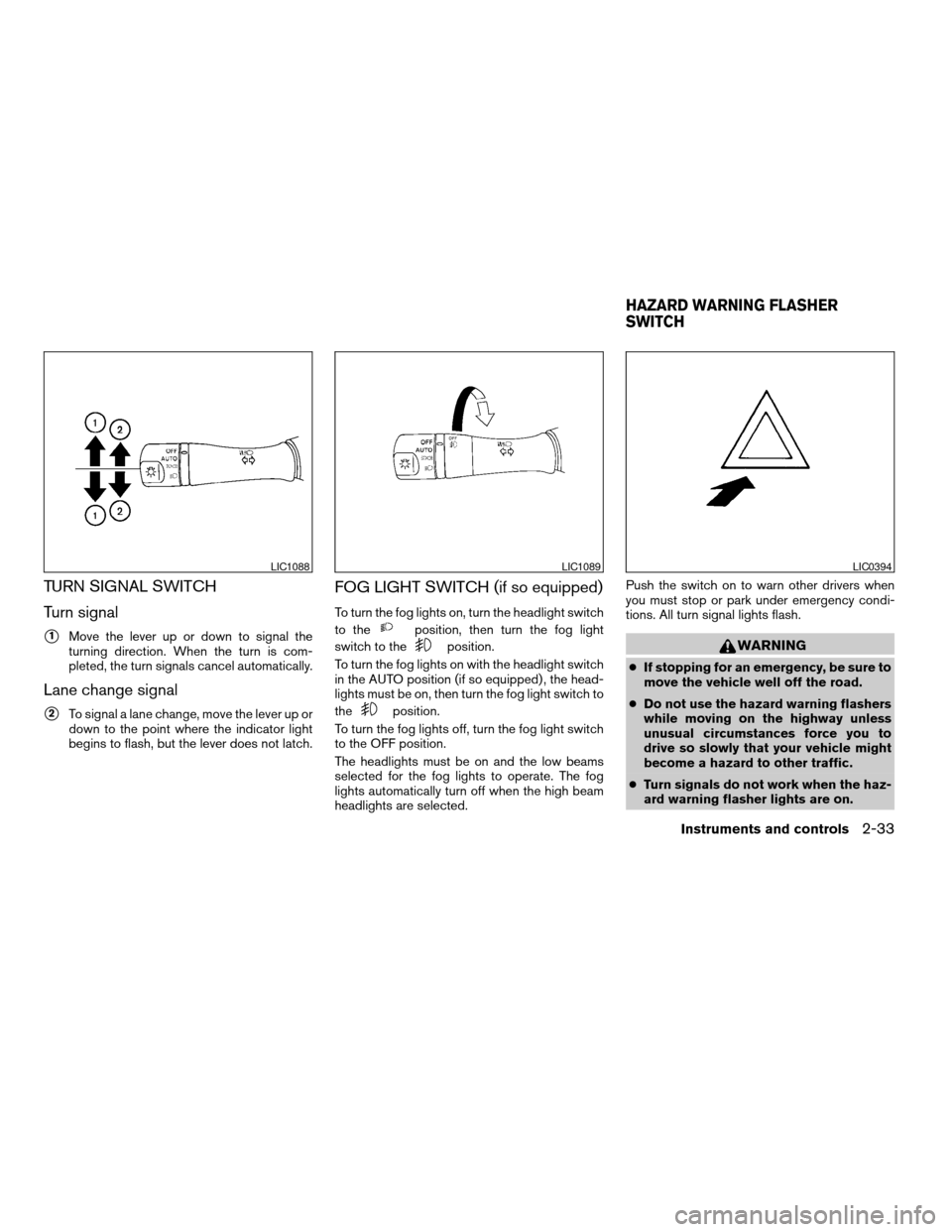
TURN SIGNAL SWITCH
Turn signal
s1Move the lever up or down to signal the
turning direction. When the turn is com-
pleted, the turn signals cancel automatically.
Lane change signal
s2To signal a lane change, move the lever up or
down to the point where the indicator light
begins to flash, but the lever does not latch.
FOG LIGHT SWITCH (if so equipped)
To turn the fog lights on, turn the headlight switch
to the
position, then turn the fog light
switch to the
position.
To turn the fog lights on with the headlight switch
in the AUTO position (if so equipped) , the head-
lights must be on, then turn the fog light switch to
the
position.
To turn the fog lights off, turn the fog light switch
to the OFF position.
The headlights must be on and the low beams
selected for the fog lights to operate. The fog
lights automatically turn off when the high beam
headlights are selected.Push the switch on to warn other drivers when
you must stop or park under emergency condi-
tions. All turn signal lights flash.
WARNING
cIf stopping for an emergency, be sure to
move the vehicle well off the road.
cDo not use the hazard warning flashers
while moving on the highway unless
unusual circumstances force you to
drive so slowly that your vehicle might
become a hazard to other traffic.
cTurn signals do not work when the haz-
ard warning flasher lights are on.
LIC1088LIC1089LIC0394
HAZARD WARNING FLASHER
SWITCH
Instruments and controls2-33
ZREVIEW COPYÐ2009 Altima Hybrid Electric
(ahv)
Owners ManualÐCanadian_French(fr_can)
06/16/08Ðdebbie
X
Page 156 of 353
To turn on the automatic anti-glare feature, press
the
button again. The indicator light will
turn on.
For information on HomeLinkTUniversal Trans-
ceiver operation, see “HomeLinkTUniversal
Transceiver” in the “Instrument and controls” sec-
tion of this manual.
For information on the compass and outside tem-
perature display, see “Compass and outside
temperature display” in the “Instrument and con-
trols” section of this manual.
NOTE:
Do not hang any objects over the sensors
s2or apply glass cleaner to the sensors.
Doing so will reduce the sensitivity of the
sensors, resulting in improper operation.
OUTSIDE MIRRORS
WARNING
cObjects viewed in the outside mirror on
the passenger side are closer than they
appear. Be careful when moving to the
right. Using only this mirror could cause
an accident. Use the inside mirror or
glance over your shoulder to properly
judge distances to other objects.
Electric control type
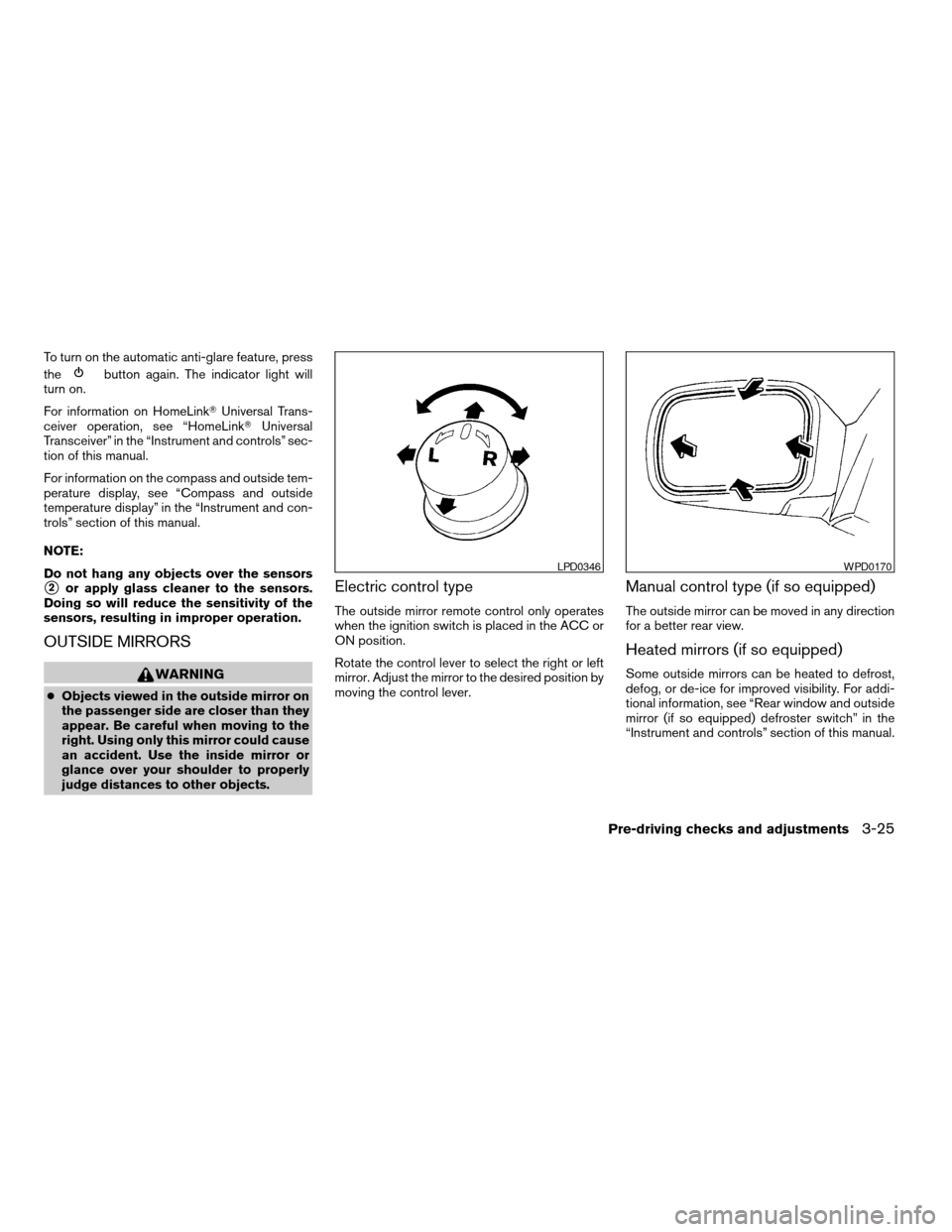
The outside mirror remote control only operates
when the ignition switch is placed in the ACC or
ON position.
Rotate the control lever to select the right or left
mirror. Adjust the mirror to the desired position by
moving the control lever.
Manual control type (if so equipped)
The outside mirror can be moved in any direction
for a better rear view.
Heated mirrors (if so equipped)
Some outside mirrors can be heated to defrost,
defog, or de-ice for improved visibility. For addi-
tional information, see “Rear window and outside
mirror (if so equipped) defroster switch” in the
“Instrument and controls” section of this manual.
LPD0346WPD0170
Pre-driving checks and adjustments3-25
ZREVIEW COPYÐ2009 Altima Hybrid Electric
(ahv)
Owners ManualÐCanadian_French(fr_can)
06/16/08Ðdebbie
X
Page 170 of 353
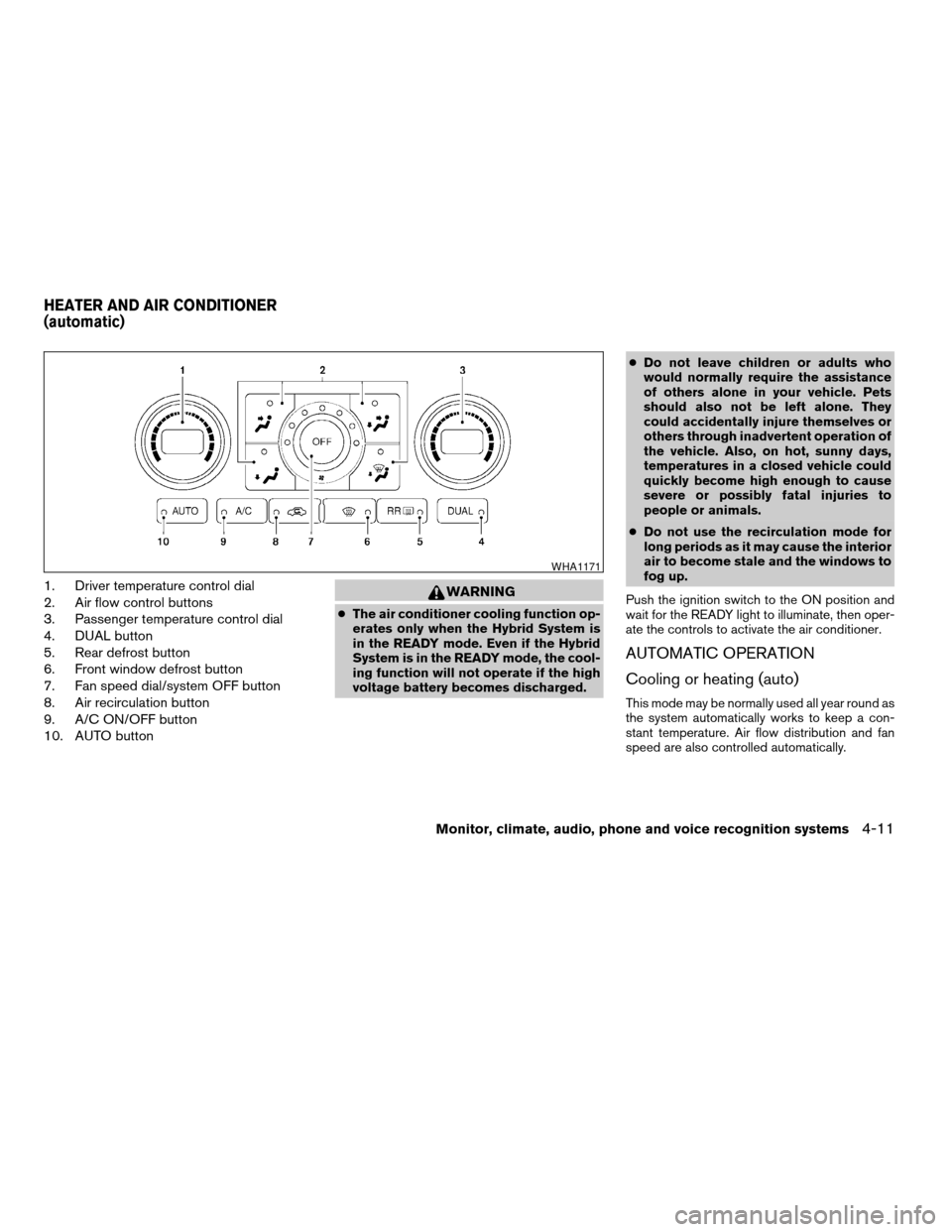
1. Driver temperature control dial
2. Air flow control buttons
3. Passenger temperature control dial
4. DUAL button
5. Rear defrost button
6. Front window defrost button
7. Fan speed dial/system OFF button
8. Air recirculation button
9. A/C ON/OFF button
10. AUTO buttonWARNING
cThe air conditioner cooling function op-
erates only when the Hybrid System is
in the READY mode. Even if the Hybrid
System is in the READY mode, the cool-
ing function will not operate if the high
voltage battery becomes discharged.cDo not leave children or adults who
would normally require the assistance
of others alone in your vehicle. Pets
should also not be left alone. They
could accidentally injure themselves or
others through inadvertent operation of
the vehicle. Also, on hot, sunny days,
temperatures in a closed vehicle could
quickly become high enough to cause
severe or possibly fatal injuries to
people or animals.
cDo not use the recirculation mode for
long periods as it may cause the interior
air to become stale and the windows to
fog up.
Push the ignition switch to the ON position and
wait for the READY light to illuminate, then oper-
ate the controls to activate the air conditioner.
AUTOMATIC OPERATION
Cooling or heating (auto)
This mode may be normally used all year round as
the system automatically works to keep a con-
stant temperature. Air flow distribution and fan
speed are also controlled automatically.
WHA1171
HEATER AND AIR CONDITIONER
(automatic)
Monitor, climate, audio, phone and voice recognition systems4-11
ZREVIEW COPYÐ2009 Altima Hybrid Electric
(ahv)
Owners ManualÐCanadian_French(fr_can)
06/16/08Ðdebbie
X
Page 171 of 353

1. Push the AUTO button on.
2. Turn the driver’s side temperature control
dial to the left or right to set the desired
temperature. Driver and passenger tem-
peratures can be set independently. Press
DUAL or turn the passenger temperature
control dial to the left or right to activate dual
climate control functions. Turn the passen-
ger’s side temperature control dial to the left
or right to set the desired passenger’s tem-
perature.
cAdjust the temperature dial to about 75°F
(24°C) for normal operation.
cThe temperature of the passenger compart-
ment will be maintained automatically. Air
flow distribution, fan speed and A/C on/off
are also controlled automatically.
cA visible mist may be seen coming from the
ventilators in hot, humid conditions as the air
is cooled rapidly. This does not indicate a
malfunction.
Dehumidified defrosting or defogging
1. Push the defroster control buttonto
turn the system on. The indicator light in the
button will illuminate.
2. Turn the temperature dial to the left or right
to set the desired temperature.cTo quickly remove ice from the outside of the
windows, turn the manual fan control to HI.
cAs soon as possible after the windshield is
clean, push the AUTO button to return to the
auto mode.
cWhen the
control is activated, the air
conditioner will automatically be turned on at
outside temperatures above 36°F (2°C) .
Rear window defroster switch
For more information about the rear window de-
froster switch, see “Rear window and outside
mirror (if so equipped) defroster switch” in the
“Instruments and controls” section of this manual.
MANUAL OPERATION
Fan speed control
Turn the fan control dialleft or right to
manually control the fan speed.
Press the
/OFF button to turn the system
off.
Push the AUTO button to return to automatic
control of the fan speed.
Air recirculation
Push the air recirculation buttonto recir-
culate interior air inside the vehicle. The indicator
light on the switch will come on.
The air recirculation button will not be activated
when the air conditioner is in DEF or
mode.
The air recirculation mode may be turned off
automatically depending on the vehicle condi-
tion.
Air flow control
Push the air flow control buttons to manually
control air flow and select the air outlet:
— Air flows from center and side
ventilators.
— Air flows from center and side
ventilators and foot outlets.
— Air flows mainly from foot outlets.
— Air flows from defroster and foot
outlets.
— Air flows from defroster outlets.
To turn system off
Press the/OFF button.
4-12Monitor, climate, audio, phone and voice recognition systems
ZREVIEW COPYÐ2009 Altima Hybrid Electric
(ahv)
Owners ManualÐCanadian_French(fr_can)
06/16/08Ðdebbie
X