2009 NISSAN ALTIMA COUPE auxiliary
[x] Cancel search: auxiliaryPage 194 of 373
Each time the button is pressed, the CD ad-
vances 1 additional track. The track number ap-
pears in the display window. (When the last track
on the compact disc is skipped, the first track is
played.)
When
is pressed, the track being played
returns to the beginning. Press
several
times to skip back several tracks. Each time the
button is pressed the CD moves back 1 track.
RDM/RPT button:
When the RDM/RPT button is pressed while the
compact disc is being played, the play pattern
can be changed as follows:
Random DiscÃ!Repeat TrackÃ!Normal
Random Disc: The order of the tracks on the disc
will be mixed during play.
Repeat Track: The track that is currently playing
will be repeated.
SCAN (CDs) button:
Press the SCAN button less than 1.5 seconds to
scan all tracks of the current disc for 10 seconds
per track. The SCAN icon is flashed during scan
mode.
The scan mode is canceled once it scans through
all tracks on the disc, or if the SCAN button is
pressed during scan mode.
CD EJECT:
When the
button is pressed with a com-
pact disc loaded, the compact disc will be
ejected.
When the
button is pressed while the
compact disc is playing, the compact disc will
eject and the system will turn off.
CD IN indicator:
A CD icon indicator appears on the display when
a CD is loaded with the system on.
AUX (Auxiliary) button:
The AUX IN jack is located on the CD player. The
AUX IN audio input jack accepts any standard
analog audio input such as from a portable cas-
sette tape/CD player, MP3 player or laptop com-
puters.
Press the AUX button to play a compatible device
when it is plugged into the AUX IN jack.
4-30Monitor, climate, audio, phone and voice recognition systems
ZREVIEW COPYÐ2009 Altima(alt)
Owners Manual(owners)ÐUSA_English(nna)
02/03/09Ðdebbie
X
Page 200 of 373
SCAN button:
1 Disc, All Tracks
While listening to a CD, press the SCAN button
to preview the first 10 seconds of each track on
the CD playing. Pressing the SCAN button again
during this 10 second period stops the scan and
the CD remains on that track.
All Discs, 1 Track
While listening to a CD with other CDs loaded
into the CD changer, press and hold the SCAN
button for approximately 2 seconds, to preview
the first 10 seconds of the first track on the CDs
loaded. Pressing the SCAN button again during
this 10 second period stops the scan and the
current loaded CD will remain playing.
MP3 SCAN mode:
1 Disc All Folders
While listening to an MP3 CD, press the SCAN
button to preview the first 10 seconds of each
track in each folder on the MP3 CD playing.
Pressing the SCAN button again during this 10
second period stops the scan and the CD re-
mains on that track and folder.All Discs, 1 Track, 1 Folder
While listening to an MP3 CD with other CDs
loaded into the CD changer, press and hold the
SCAN button for approximately 2 seconds, to
preview the first 10 seconds of the first track in
the first folder on the MP3 CDs loaded. Pressing
the SCAN button again during this 10 second
period stops the scan and the current loaded CD
will remain playing.
CD Eject:
Current/Selected disc:
cPress the
button, then press the slot
number (1 – 6) for the desired disc. The
compact disc will be ejected. If no slot num-
ber (1 – 6) is pressed the current loaded
disc will be ejected. Also, if the ejected disc
is not removed within 15 seconds, the disc
will reload.All discs:
cPress and hold the
button for more
than 1.5 seconds. The compact discs will be
ejected one by one. If a disc is not removed
within 15 seconds, or the button is pressed
again during the eject sequence, the entire
disc eject sequence will be canceled. When
this button is pressed while the compact
disc is being played, the compact disc will
eject and the last source will be played.
CD IN indicator:
A CD icon indicator appears on the display when
a CD is loaded with the system on.
AUX (Auxiliary) button:
The AUX IN jack is located on the CD player. The
AUX IN audio input jack accepts any standard
analog audio input such as from a portable cas-
sette tape/CD player, MP3 player or laptop com-
puters.
Press the AUX button to play a compatible device
when it is plugged into the AUX IN jack.
4-36Monitor, climate, audio, phone and voice recognition systems
ZREVIEW COPYÐ2009 Altima(alt)
Owners Manual(owners)ÐUSA_English(nna)
02/03/09Ðdebbie
X
Page 206 of 373
MP3 CD:
1 DISC RPT!1 FOLDER RPT!1 TRACK
RPT
1 DISC RPT: The disc that is currently playing will
be repeated.
1 TRACK RPT: The track that is currently playing
will be repeated
1 FOLDER RPT: The folder that is currently play-
ing will be repeated.
“Random” key:
When the “Random” key is touched while a com-
pact disc is played, the play pattern can be
changed as follows:
CD:
ALL DISC RDM!1 DISC RDM
MP3 CD:
ALL DISC RDM!1 DISC RDM!1 FOLDER
RDM
ALL DISC RDM: Tracks from all discs will be
played randomly.
1 DISC RDM: Tracks from the disc that is cur-
rently playing will be played randomly.
1 FOLDER RDM: Folders from that disc that is
currently playing will be played randomly.CD EJECT:
Current/Selected disc:
cPress the
button. The loaded com-
pact disc will be ejected. Also, if the ejected
disc is not removed within 15 seconds, the
disc will reload.
All discs:
cPress and hold the
button for more
than 1.5 seconds. The compact discs will be
ejected one by one. If a disc is not removed
within 15 seconds, or the
button is
pressed again during the eject sequence,
the entire disc eject sequence will be can-
celed.
When this button is pressed while the compact
disc is being played, the compact disc will eject
and the next compact disc will be loaded. If no
disc is loaded, the system will stay on the com-
pact disc screen.
CD IN indicator:
The slot numbers (1 – 6) will illuminate if CDs
have been loaded into the changer in CD mode
only.CD/AUX (Auxiliary) button:
The AUX jack is located above the CD changer.
The AUX audio input jack accepts any standard
analog audio input such as from a portable cas-
sette tape/CD player, MP3 player or a laptop
computer.
Press the CD/AUX button to play a compatible
device when it is plugged into the AUX jack.
4-42Monitor, climate, audio, phone and voice recognition systems
ZREVIEW COPYÐ2009 Altima(alt)
Owners Manual(owners)ÐUSA_English(nna)
02/03/09Ðdebbie
X
Page 208 of 373
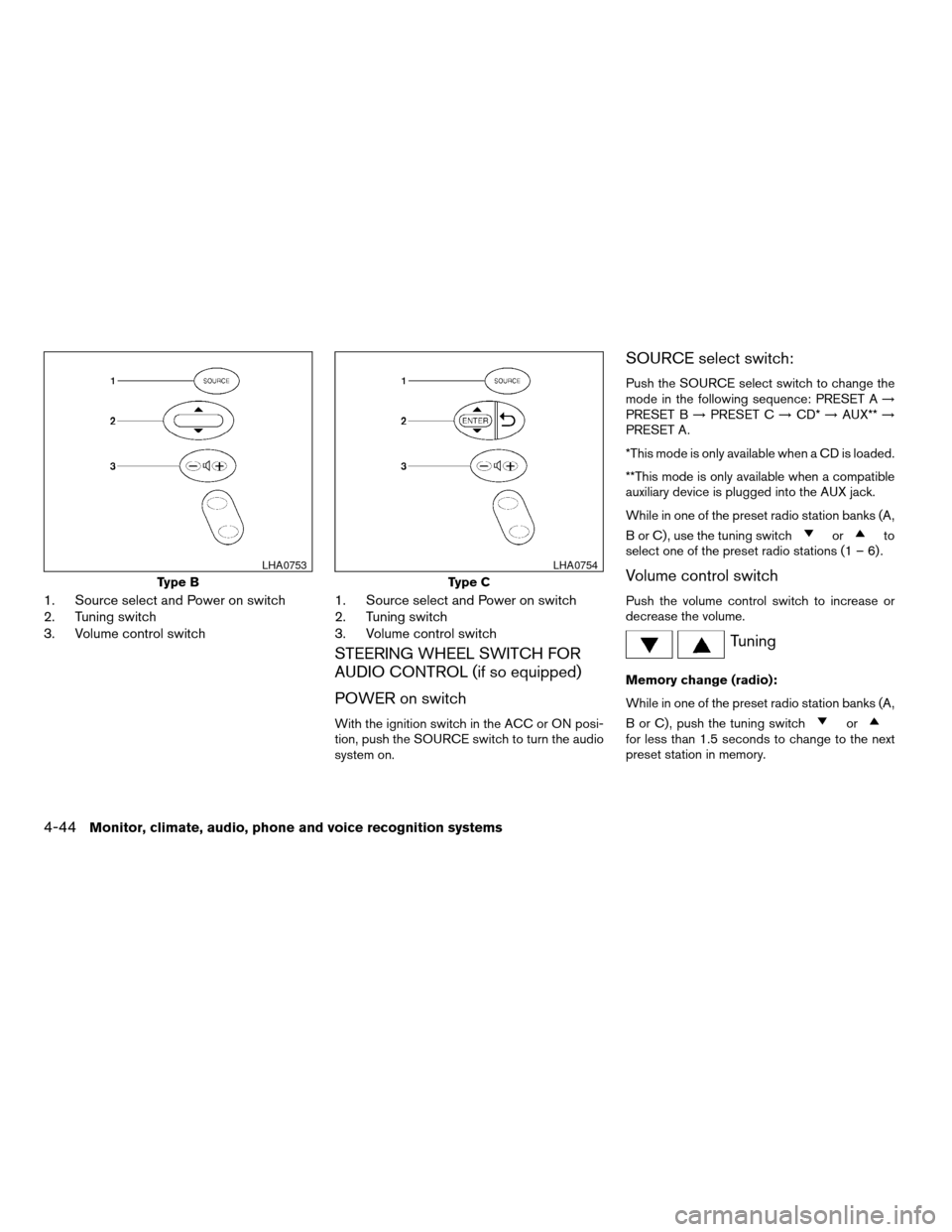
1. Source select and Power on switch
2. Tuning switch
3. Volume control switch1. Source select and Power on switch
2. Tuning switch
3. Volume control switch
STEERING WHEEL SWITCH FOR
AUDIO CONTROL (if so equipped)
POWER on switch
With the ignition switch in the ACC or ON posi-
tion, push the SOURCE switch to turn the audio
system on.
SOURCE select switch:
Push the SOURCE select switch to change the
mode in the following sequence: PRESET A!
PRESET B!PRESET C!CD*!AUX**!
PRESET A.
*This mode is only available when a CD is loaded.
**This mode is only available when a compatible
auxiliary device is plugged into the AUX jack.
While in one of the preset radio station banks (A,
B or C) , use the tuning switch
orto
select one of the preset radio stations (1 – 6) .
Volume control switch
Push the volume control switch to increase or
decrease the volume.
Tuning
Memory change (radio):
While in one of the preset radio station banks (A,
B or C) , push the tuning switch
orfor less than 1.5 seconds to change to the next
preset station in memory.
Type B
LHA0753
Type C
LHA0754
4-44Monitor, climate, audio, phone and voice recognition systems
ZREVIEW COPYÐ2009 Altima(alt)
Owners Manual(owners)ÐUSA_English(nna)
02/03/09Ðdebbie
X