2009 MITSUBISHI COLT are
[x] Cancel search: arePage 70 of 273

Downloaded from www.Manualslib.com manuals search engine The side airbags and curtain airbags MAY NOT
DEPLOY when…
With certain types of side collisions, the vehicle’s
body structure is designed to absorb the shock to
help protect the occupants from harm. (The vehicle
body’s side area may deform significantly as it ab-
sorbs the impact.) Under such circumstances, the
side airbags and curtain airbags may not deploy ir-
respective of the deformation and damage to the ve-
hicle body.
Examples of some typical conditions are shown in
the illustration.
Because the side airbags and curtain airbags do not
protect the occupant in all types of collisions, be
sure to always properly wear your seat belts.Side impacts in an area away from the passenger
compartmentMotorcycle or other similar small vehicle collides with the
side of vehicleCollision with a utility pole, tree or other narrow objectOblique side impactsVehicle rolls onto its side or roof
Seat and seat belts
2-31
2
Page 71 of 273

Downloaded from www.Manualslib.com manuals search engine The side airbags and curtain airbags ARE NOT
DESIGNED TO DEPLOY when…
The side airbags and curtain airbags are not de-
signed to deploy in conditions where they cannot
usually provide protection to the occupant. Typical
conditions are shown in the illustration.Head-on collisionsRear end collisions
Because the side airbags and curtain airbags do not
protect the occupant in all types of collisions, be
sure to always properly wear your seat belts.
WARNINGl The side airbags and curtain airbags are
designed to supplement the driver and pas-
senger seat belts in certain side impacts.
Seat belts should always be worn proper-
ly, and the driver and passenger should
sit well back and upright without leaning
against the window or door.WARNINGl The side airbags and curtain airbags in-
flate with great force. The driver and pas-
senger should not put their arms out the
window, and should not lean against the
door, in order to reduce risk of serious or
possible fatal injury from the deploying
side airbags and curtain airbags.WARNINGl Do not allow a child to kneel on the pas-
senger seat facing the passenger’s side
door, since the side airbags and curtain
airbags inflate with great force.
Otherwise, the child may be killed or seri-
ously injured.WARNINGl Do not allow any rear seat occupant to
hold onto the seatback of either front
seat, in order to reduce risk of injury
from the deploying side airbags. Special
care should be taken with children.
l Do not place any objects near or in front
of the seatback of either front seat. They
could interfere with proper side airbag in-
flation, and also could cause injury if
thrown free by side airbag deployment.
l Do not place stickers, labels or additional
trim on the seatback of either front seat.
They could interfere with proper side air-
bag inflation.
l Do not install seat covers on seats with
side airbags. Do not re-cover seats that
have side airbags. They could interfere
with proper side airbag inflation.
Seat and seat belts
2-32
2
Page 72 of 273

Downloaded from www.Manualslib.com manuals search engine WARNINGlDo not attach a microphone (A) or any
other device or object around the part
where the curtain airbags activate such
as on the windscreen, side door glass,
front and rear pillars and roof side or as-
sist grips. When the curtain airbags in-
flate, the microphone or other device or
object will be hurled with great force or
the curtain airbags may not activate cor-
rectly, resulting in death or serious injury.WARNINGl Do not put a hanger or any heavy or poin-
ted object on the coat hook. If the curtain
airbag was activated, any such item could
be propelled away with great force and
could prevent the curtain airbag from in-
flating correctly. Hang clothes directly on
the coat hook (without using a hanger).
Make sure there are no heavy or sharp ob-
jects in the pockets of clothes that you
hang on the coat hook.
l Do not allow the child to lean against or
close to the front door even if the child is
seated in a child restraint system.
The child’s head should also not be
leaned against or be close to the area
where the side airbags and curtain air-
bags are located. It is dangerous if the
side airbags and curtain airbags inflate.
Failure to follow all of these instructions
could lead to serious or fatal injury to the
child.
l We recommend work around and on the
side airbags and curtain airbags system
to be done by a MITSUBISHI MOTORS
Authorized Service Point. Improper
work could result inadvertent deploy-
ment of a side airbags and curtain air-
bags, or could render a side airbags and
curtain airbags inoperative; either situa-
tion could result in serious injury.SRS warning lamp E00407801214
There is a Supplemental Restraint System (“SRS”)
warning lamp on the instrument panel. The system
checks itself and the lamp tells you if there is a prob-
lem. When the ignition key is turned to the “ON”
or “START” position, the warning lamp should il-
luminate for several seconds and then should go
out. This means the system is ready. If an SRS air-
bags or pretensioner seat belt is not operating prop-
erly, the warning lamp comes on and stays on and
a buzzer sounds.
The SRS warning lamp is shared by the following:
l Driver’s airbag
l Front passenger’s airbag
l Side airbags*
l Curtain airbags*
l Seat belt pretensioners
l Front passenger’s airbag ON-OFF switch
Seat and seat belts
2-33
2
Page 73 of 273

Downloaded from www.Manualslib.com manuals search engine WARNINGlIf any of the following conditions occurs,
the SRS and/or seat belt pretensioners
are not working properly, and we recom-
mend you to have it inspected by a
MITSUBISHI MOTORS Authorized
Service Point immediately. •The SRS warning lamp does not illu-
minate when you start the vehicle.
• The SRS warning lamp does not go
out after several seconds.
• The SRS warning lamp illuminates
while driving.SRS servicing E00407900784WARNINGlWe recommend any maintenance per-
formed on or near the components of the
SRS to be performed by a MITSUBISHI
MOTORS Authorized Service Point.
Improper work on the SRS components
or wiring could result in inadvertent de-
ployment of the airbags, or could render
the SRS inoperative; either situation
could result in serious injury.
l Do not modify your steering wheel, seat
belt retractor or any other SRS compo-
nents. For example, replacement of the
steering wheel, or modifications to the
front bumper or body structure can ad-
versely affect SRS performance and lead
to possible injury.WARNINGl If your vehicle has received any damage,
we recommend you to have the SRS in-
spected to ensure it is in proper working
order.
l On vehicles with the side airbags, do not
modify your front seats, centre pillar and
centre console.
It can adversely affect SRS performance
and lead to possible injury.
Also, if you have found any tear or open
seam in the seat fabric at the portion near
the side airbag, we recommend you to
have the seat inspected.
l On vehicles with the curtain airbags, if
you have found any scratch, crack or dam-
age to the portion of the front and rear pil-
lars and roof side rail, we recommend
you to have the SRS inspected by a
MITSUBISHI MOTORS Authorized
Service Point.
NOTE
l When you transfer ownership of the vehicle
to some other person, we urge you to alert
the new owner that it is equipped with the
SRS and refer that owner to the applicable
section in this owner’s manual.
l If you junk or scrap the vehicle, we urge you
to first take the vehicle to a MITSUBISHI
MOTORS Authorized Service Point so that
the SRS can be rendered safe.
Seat and seat belts
2-34
2
Page 78 of 273
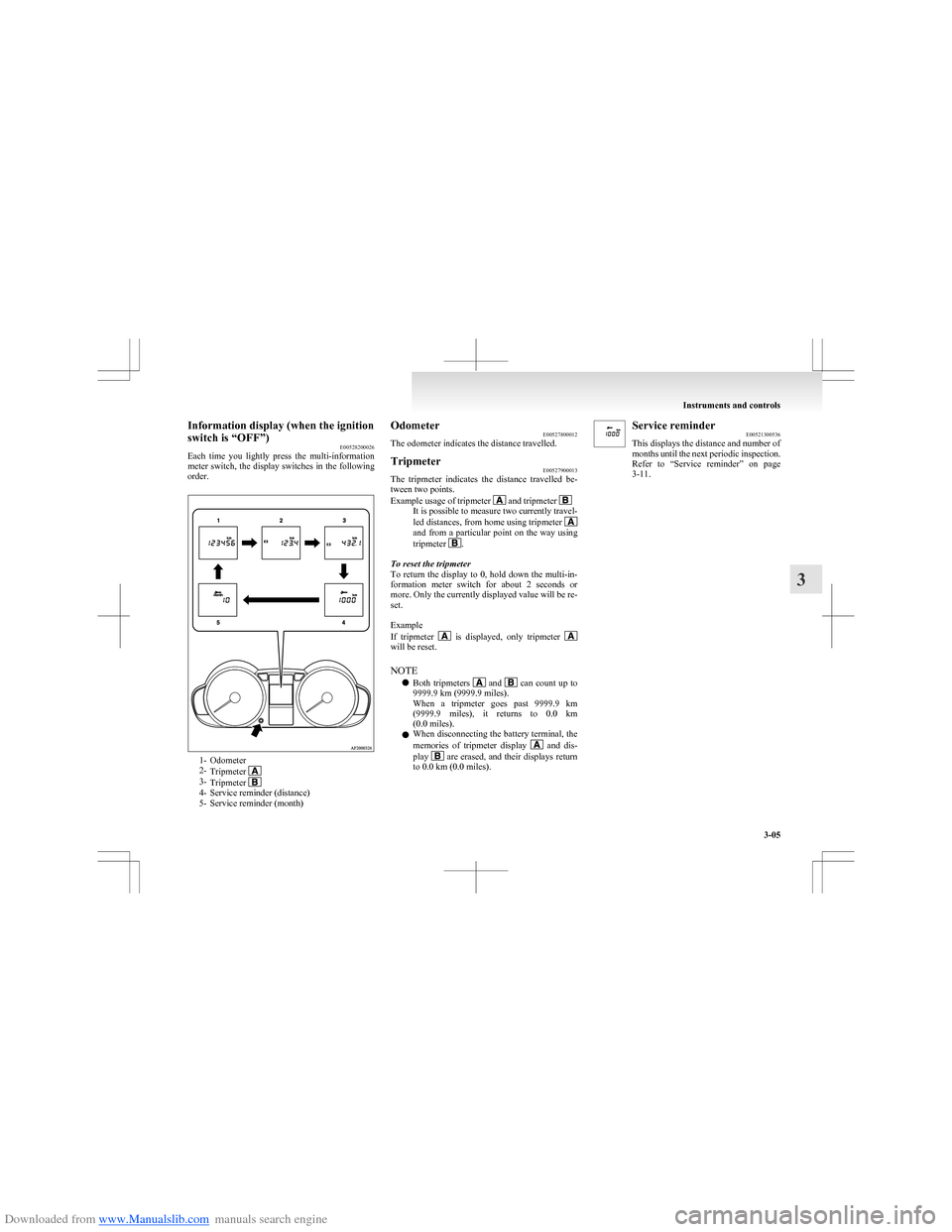
Downloaded from www.Manualslib.com manuals search engine Information display (when the ignition
switch is “OFF”) E00528200026
Each time you lightly press the multi-information
meter switch, the display switches in the following
order.
1- Odometer
2- Tripmeter
3-Tripmeter 4- Service reminder (distance)
5- Service reminder (month)
Odometer E00527800012
The odometer indicates the distance travelled.Tripmeter E00527900013
The tripmeter indicates the distance travelled be-
tween two points.
Example usage of tripmeter
and tripmeter It is possible to measure two currently travel-
led distances, from home using tripmeter
and from a particular point on the way using
tripmeter .
To reset the tripmeter
To return the display to 0, hold down the multi-in-
formation meter switch for about 2 seconds or
more. Only the currently displayed value will be re-
set.
Example
If tripmeter
is displayed, only tripmeter will be reset.
NOTE l Both tripmeters
and can count up to
9999.9 km (9999.9 miles).
When a tripmeter goes past 9999.9 km
( 9999.9 miles), it returns to 0.0 km
(0.0 miles).
l When disconnecting the battery terminal, the
memories of tripmeter display
and dis-
play are erased, and their displays return
to 0.0 km (0.0 miles).
Service reminder E00521300536
This displays the distance and number of
months until the next periodic inspection.
Refer to “Service reminder” on page
3-11.
Instruments and controls
3-05
3
Page 80 of 273

Downloaded from www.Manualslib.com manuals search engine 1- Odometer
2- Tripmeter
3-Tripmeter 4- Service reminder (distance)
5- Service reminder (month)
6- Driving range display*
7- Momentary fuel consumption display*
8- Average fuel consumption display*
9- Average speed display*
NOTE
l Always stop the vehicle in a safe place before operating.
Refer to “Changing the function settings (when the ignition switch is “ON”)” on page 3-12.
l For vehicles that are not equipped with an audio system, the driving range display, momentary fuel consumption display, average fuel consumption display,
and average speed display cannot be displayed.
Instruments and controls
3-07
3
Page 81 of 273

Downloaded from www.Manualslib.com manuals search engine OdometerE00527700011
The operation method is the same as
when the ignition switch is “OFF”.
Refer to “Odometer” on page 3-05.Tripmeter E00528000011
The operation method is the same as
when the ignition switch is “OFF”.
Refer to “Tripmeter” on page 3-05.Service reminder E00521300552
This displays the distance and number of
months until the next periodic inspection.
Refer to “Service reminder” on page
3-11.Driving range display* E00521500219
This displays the approximate driving
range (how many more kilometres or
miles you can drive). When the driving
range falls below approximately 50 km
(30 miles), “---” is displayed.
Refuel as soon as possible.NOTE
l The remaining distance is based
on the previous fuel consumption
data. The actual distance will de-
pend on the driving conditions
(road conditions, how you drive,
etc.). When the battery terminal is
disconnected, the previous fuel
consumption data is erased. A val-
ue different from before may be
displayed. Treat the distance dis-
played as just a rough guideline.
l When you refuel, the driving
range display is updated.
However, if you only add a small
amount of fuel, the correct value
will not be displayed. Fill with a
full tank whenever possible.
l On rare occasions, the value dis-
played for the driving range may
change if you are parked on an ex-
tremely steep incline. This is due
to the movement of fuel in the
tank and does not indicate any mal-
function.Momentary fuel consumption
display* E00521800544
While driving, this displays the momen-
tary fuel consumption (in L/100 km ,
km/L or mpg). Calculation and indica-
tion of the value begin when the vehicle
speed rises above 6 km/h (4 mph).NOTE
l “
---” is displayed when the momen-
tary fuel consumption cannot be
measured.
l The display setting can be
changed to the preferred units
(L/100 km, km/L).
Refer to “Changing the function
settings (when the ignition switch
is “ON”)” on page 3-12.
l For vehicles equipped with multi-
information displays that show fig-
ures in miles, the fuel consump-
tion can only be displayed in
miles per gallon (“mpg”).Average fuel consumption dis-
play* E00521700729
This displays the average fuel consump-
tion (in L/100 km, km/L, or mpg) from
the last reset to the present time.
There are the following 2 mode settings.
For information on how to change the
average fuel consumption display set-
ting, refer to “Changing the function set-
tings (when the ignition switch is
“ON”)” on page 3-12.
Manual reset mode
l When the average fuel consump-
tion is being displayed, if you hold
down the MODE/SET switch, the
average fuel consumption and aver-
age speed displayed at that time
are reset.
Instruments and controls
3-08
3
Page 82 of 273

Downloaded from www.Manualslib.com manuals search engine lWhen the ignition switch is switch-
ed from “ACC” or “LOCK” to
“ON”, the mode setting is automat-
ically switched from manual to au-
to.
Switching to auto occurs automati-
cally. If switching to manual
mode is done, however, the data
from the last reset is displayed.
Auto reset mode l When the average fuel consump-
tion is being displayed, if you hold
down the MODE/SET switch, the
average fuel consumption and aver-
age speed displayed at that time
are reset.
l If the ignition switch is at “ACC”
or “LOCK” for about 4 hours or
longer, the average fuel consump-
tion display is automatically reset.
NOTE l “
---” is displayed when the aver-
age fuel consumption cannot be
measured.
l The initial (default) setting is “Au-
to reset mode”.
l The average fuel consumption de-
pends on the driving condition
(road condition, driving behavior,
etc.). The displayed fuel consump-
tion may vary from the actual fuel
consumption. Treat the fuel con-
sumption displayed as just a rough
guideline.l The memory of the auto reset
mode or manual reset mode for
the average fuel consumption dis-
play is erased if the battery is dis-
connected.
l The display setting can be
changed to the preferred units
(L/100 km, km/L).
Refer to “Changing the function
settings (when the ignition switch
is “ON”)” on page 3-12.
l For vehicles equipped with multi-
information displays that show fig-
ures in miles, the fuel consump-
tion can only be displayed in
miles per gallon (“mpg”).Average speed display* E00521600744
This displays the average speed (km/h or
mph ) from the last reset to the present
time.
There are the following 2 mode settings.
For the method for changing the average
speed display setting, refer to “Changing
the function settings (when the ignition
switch is “ON”)” on page 3-12.
Manual reset mode
l When the average speed is being
displayed, if you hold down the
MODE/SET switch, the average
speed and average fuel consump-
tion displayed at that time are reset.l When the ignition switch is switch-
ed from “ACC” or “LOCK” to
“ON”, the mode setting is automat-
ically switched from manual to au-
to.
Switching to auto occurs automati-
cally. If switching to manual
mode is done, however, the data
from the last reset is displayed.
Auto reset mode l When the average speed is being
displayed, if you hold down the
MODE/SET switch, the average
speed and average fuel consump-
tion displayed at that time are reset.
l If the ignition switch is at “ACC”
or “LOCK” for about 4 hours or
longer, the average speed display
is automatically reset.
NOTE l “
---” is displayed when the aver-
age speed cannot be measured.
l The initial (default) setting is “Au-
to reset mode”.
l The memory of the auto reset
mode or manual reset mode for
the average speed display is
erased if the battery is disconnec-
ted.Allshift lever position display* E00528100012
Shows the position of the allshift lever.
Refer to “Allshift lever position and mul-
ti-information display” on page 4-20.
Instruments and controls
3-09
3