2009 MINI Clubman brake
[x] Cancel search: brakePage 175 of 218

MOBILITYAT A GLANCE CONTROLS DRIVING TIPS ENTERTAINMENT
173
NAVIGATION REFERENCE
maximum temperature of 1407/606.
If the distance is too close, the pressure too high,
or the temperature too high, parts of the vehicle
can be damaged, or water can penetrate.
Observe the operating instructions for high-
pressure washers.<
Do not spray sensors such as Park Dis-
tance Control with high-pressure washers
for a long time or at a distance of less than
1 ft/30 cm.<
Manual washing
Use a great deal of water and, if necessary, car
shampoo when washing your car by hand. Clean
the vehicle with a sponge or a washing brush
applying a slight amount of pressure.
Before cleaning the windshield, deacti-
vate the rain sensor or turn off the ignition
to prevent unintentional wiping.<
Observe local regulations regarding wash-
ing vehicles by hand.<
Headlamps
Do not wipe dry and do not use abrasive or cor-
rosive cleaning agents. Remove dirt and con-
tamination, such as insects, by soaking with
shampoo and then washing with plenty of
water.
Do not remove accumulated ice and snow with
an ice scraper; use window de-icers instead.
Windows
Clean the outside and inside of the windows and
mirrors with a window cleaner.
Do not clean the mirrors with cleaners
containing quartz.<
Wiper blades
Clean with soapy water and change regularly to
prevent the formation of streaks
Wax, preservatives and dirt on the win-
dows cause streaks when the windshield
wipers are on, and can cause premature wear o
f the wiper blades and interfere with the rain
sensor.<
Paintwork, care
Regular care helps your vehicle retain its value
and protects the paint from the long-term
effects of aggressive substances.
In some regions, environmental factors can
affect the vehicle paintwork and damage it. It is
therefore important to adjust the frequency and
extent of vehicle care correspondingly.
Immediately remove aggressive materials such
as spilled fuel, oil, grease, brake fluid, tree sap
or bird droppings to prevent damage to the
paintwork.
Removing paintwork damage
Depending on the severity of the damage,
immediately repair stone damage or
scratches to prevent rusting.<
The manufacturer of the MINI recommends
repairing paint damage professionally according
to factory specifications with original MINI
paints.
Preservation
Preservation is necessary when water no longer
beads on the clean paint surface. To preserve
the paint, only use preservatives that contain
carnauba or synthetic waxes.
Rubber seals
Only treat with water or rubber care products.
Do not use silicon sprays or other silicon-
containing care products on rubber seals,
otherwise noise and damage could occur.<
Chrome parts*
Carefully clean vehicle parts such as the radiator
grill and door handles with copious quantities of
water and, if necessary, a shampoo additive,
especially when contaminated with road salt.
For additional treatment, use chrome polish.
Light-alloy wheels*
The system produces brake dust that collects on
the light alloy wheels. Clean them regularly with
acid-free wheel cleaner.
Page 181 of 218
MOBILITYAT A GLANCE CONTROLS DRIVING TIPS ENTERTAINMENT
179
NAVIGATION REFERENCE
Replacing a fog lamp bulb
H8 bulb, 35 watts
1.Turn in the wheel.
2.Remove cover 2.
To do so, turn the cover counterclockwise.
3.Screw out the lower bulb counterclockwise.
4.To insert the new bulb and replace the
cover, proceed in reverse order.
Side turn signal indicators
5 watt bulb, W 5 W
1.Push the lamp with the ventilation grate for-
ward and remove.
2.Screw out the bulb holder counterclockwise.
3.Pull out and replace the bulb.
4.To insert the new bulb and replace the
cover, proceed in reverse order.
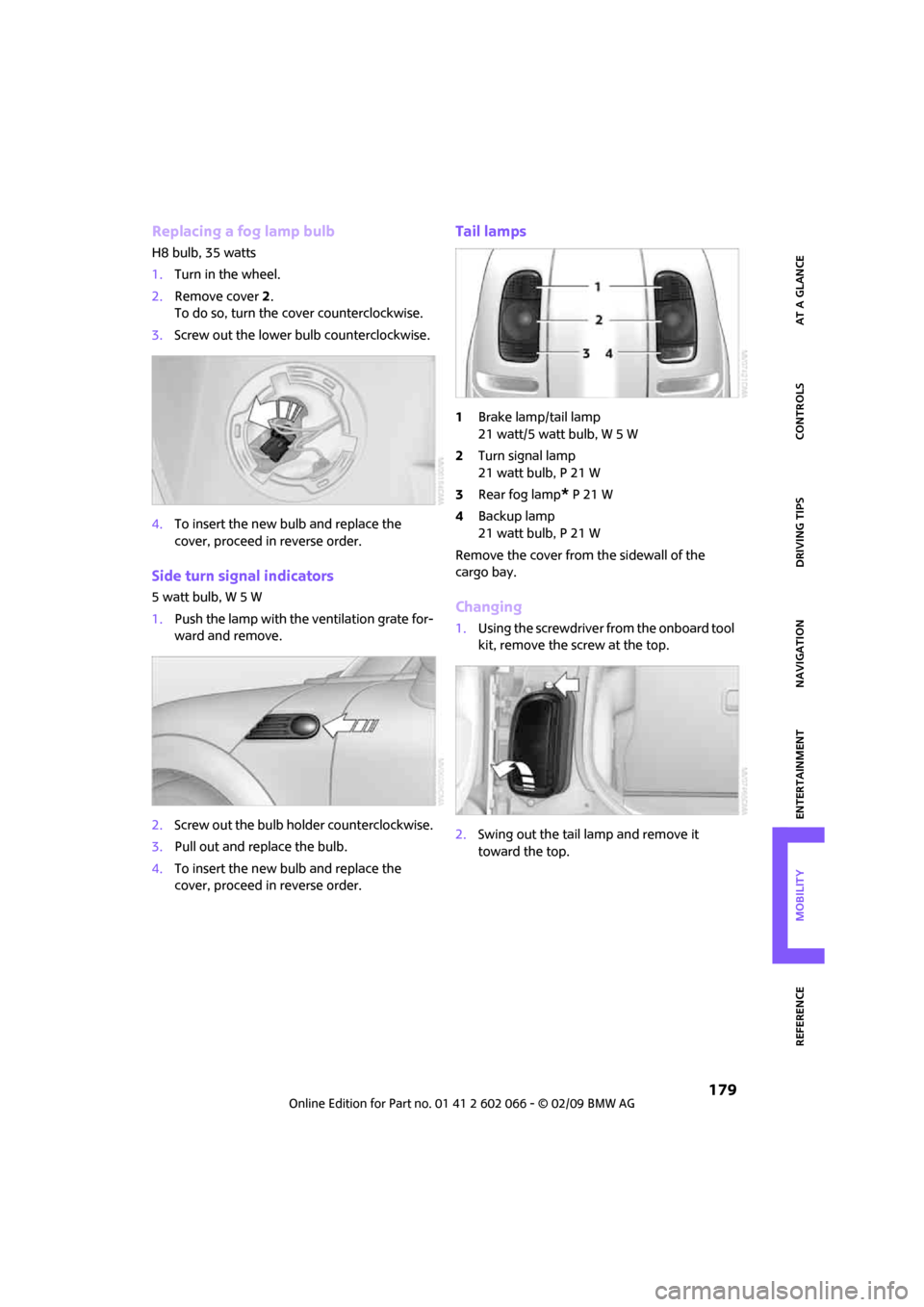
Tail lamps
1Brake lamp/tail lamp
21 watt/5 watt bulb, W 5 W
2Turn signal lamp
21 watt bulb, P 21 W
3Rear fog lamp
* P 21 W
4Backup lamp
21 watt bulb, P 21 W
Remove the cover from the sidewall of the
cargo bay.
Changing
1.Using the screwdriver from the onboard tool
kit, remove the screw at the top.
2.Swing out the tail lamp and remove it
toward the top.
Page 182 of 218

Replacing components
180
3.Pull off the cable connector 1, unlock the
bulb holder, arrow2, and remove it,
arrow3.
4.Screw out the respective bulb counter-
clockwise.
5.To insert the new bulb and reinstall the tail
lamp, proceed in reverse order.
Rear fog lamp*
21 watt bulb, P 21 W
The rear fog lamp is located in the left tail
lamp, see Tail lamps page179.<
License plate lamps
5 watt bulb, C 5 W
1.Using a screwdriver, push the lamp to the
left in the tab of the lamp housing, arrow1.
2.Remove the lamp, arrow 2.
3.Replace the bulb.
4.Insert the lamp.
Center brake lamp
This lamp uses LED technology for operation. In
the event of a malfunction, contact your MINI
Dealer or a workshop that has specially trained personnel working in accordance with the spec-
ifications of your MINI manufacturer.
Repairing a flat tire
Safety measures in the event of a break-
down:
Park the vehicle as far as possible from
moving traffic and switch on the hazard warning
flashers.
Turn the steering wheel until the front wheels
are in the straight-ahead position and engage
the steering wheel lock. Engage the parking
brake and shift into 1st or reverse gear or place
the selector lever in position P.
All passengers should be outside the vehicle and
in a safe place, e.g. behind a guardrail.
Erect a warning triangle or warning flasher at the
appropriate distance if necessary. Comply with
all safety guidelines and regulations.<
In the event of a flat tire, different procedures
should be followed depending on the equip-
ment included in your vehicle:
>MINI Mobility System, refer to the following
section
>Run-Flat Tires, page164
>Tire change with space-saver spare tire,
page182
MINI Mobility System with onboard tool
kit and tire change set*
Follow the instructions on using the Mobil-
ity System found on the compressor and
the sealant bottle.<
Do not remove foreign bodies which have pen-
etrated the tire if possible.
Pull the sticker for the speed restriction off and
apply it to the steering wheel.
The Mobility System with tire change set and
onboard tool kit is located under the floor mat or
the level load floor in the cargo bay.
Page 202 of 218

From A to Z
200
From A to Z
INDEX
„...“ Identifies Control Display
texts used to select
individual functions and
refers you to the page where
these texts can be found.
A
Accessories, refer to Your
individual vehicle4
Activated-charcoal filter for
automatic climate control88
"Add to destination list"111
Additives
– coolant169
– engine oil168
Address for navigation
– deleting117
– entering108,111,116
– selecting117
– storing116
– storing current position116
Adjusting temperature inside
the car, refer to Automatic
climate control87
Adjusting the sound during
audio playback, refer to Tone
control133
Air conditioning mode
– automatic climate control87
– ventilation88
Air distribution
– automatic87
Air flow rate87
– automatic climate control87
Air pressure, checking, refer to
Tire inflation pressure158
Air recirculation, refer to
Recirculated-air mode87
Air supply
– automatic climate control87
– ventilation88
Air vents86Airbags80
– sitting safely37
– warning lamp81
Airing, refer to Ventilation88
AKI, refer to Fuel
specifications157
Alarm system31
"All channels"141
"All stations" on the radio135
All-season tires, refer to Winter
tires165
"AM", waveband132
Ambient air, refer to
Recirculated-air mode87
Ambient lighting85
Antenna, care172
Antifreeze
– coolant169
– washer fluid52
Antilock Brake System ABS71
Anti-theft alarm system, refer
to Alarm system31
Anti-theft system
27
Approved axle loads, refer to
Weights194
Approved engine oils168
Approved gross vehicle
weight, refer to Weights194
Armrest, refer to Center
armrest91
Arrival time
– computer57
– destination guidance120
"Arrow display" in
navigation121
Ashtray92
Assistant systems, refer to
– Dynamic Stability Control
DSC71Audio132
– controls132
– switching on/off132
– tone control133
– volume133
Audio device, external91
AUTO program for automatic
climate control87
Automatic
– air distribution87
– air flow rate87
– cruise control53
– headlamp control82
– storing of stations136
Automatic climate control86
– automatic air distribution87
Automatic station search136
Automatic transmission with
Steptronic48
– interlock48
– overriding selector lever
lock50
– shiftlock48
– sport program49
"Autostore"
– on the radio137
"AUX"149,151
– AUX-In port149
– USB-audio interface150
AUX-In port149
AUX-In, refer to External audio
device91
Average fuel consumption56
– setting the units60
Average speed57
"Avoid ferries" in
navigation119
"Avoid highways" in
navigation118
Avoid highways in
navigation118
"Avoid tollroads" in
navigation118
Page 203 of 218

201
MOBILITYAT A GLANCE CONTROLS DRIVING TIPS ENTERTAINMENT NAVIGATION REFERENCE
Axle loads, refer to
Weights194
B
Background lighting, refer to
Ambient lighting85
Backrests, refer to Seats37
Backup lamps
– replacing bulb179
Balance, tone control133
Band-aids, refer to First aid
pouch186
Bar, refer to Tow-starting,
towing away188
Bass sounds, refer to Tone
control133
Bass sounds, refer to Treble
and bass133
Bass, tone control133
Battery184
– charging184
– disposal34,184
– jump starting186
– temporary power failure184
Battery renewal
– remote control34
Being towed188
Belt tensioner, refer to Safety
belts40
Belts, refer to Safety belts40
Beverage holders, refer to Cup
holders92
Blower, refer to Air flow rate87
Bonnet166
Bottle holders, refer to Cup
holders92
Brake Assist71
Brake fluid, refer to Service
requirements60
Brake lamps
– replacing bulbs179
Brake pads, breaking in96
Brake rotors97
– brakes96
– breaking in96Brake system96
– breaking in96
– disc brakes97
– MINI Maintenance
System170
Brakes
– ABS71
– breaking in96
– MINI Maintenance
System170
– parking brake47
– service requirements60
Brakes, refer to Braking
safely97
Breakdown service, refer to
Roadside Assistance
186
Break-in period96
Breaking in the clutch96
"Brightness"on the Control
Display69
Bulb changing, refer to Lamps
and bulbs176
Button for starting the
engine46
Buttons on the steering
wheel11
C
California Proposition 65
warning5
Can holders, refer to Cup
holders92
Capacities194
Car battery, refer to Vehicle
battery184
Car care172
"Car Data"57
Car key, refer to Keys/remote
controls26
Car phone
– installation location, refer to
Center armrest91
– refer to separate Owner's
Manual
Car radio, refer to Radio135
Car wash, care172
Car washes172Care172
– car washes172
– car-care products172
– CD/DVD drives175
– external172
– high-pressure washers172
– internal174
– leather174
– manual washing173
– upholstery and fabrics174
– windows173
– wiper blades173
Cargo area
– capacity194
Cargo bay97
– convenient access33
– doors, refer to Splitdoor31
– lamp84
– opening from outside31
– trunk lid, refer to Splitdoor31
Cargo bay doors, refer to
Splitdoor31
Cargo bay, expanding98
Cargo bay lamp84
Cargo bay partition net, refer
to Partition net99
Cargo loading99
– securing cargo100
– stowing cargo100
– vehicle97
Cargo, securing100
Carpets, care174
Catalytic converter, refer to
Hot exhaust system96
"Categories"141
"CD"132,143
CD changer143
– controls132
– fast forward/reverse146
– playing a track144
– random order146
– repeating a track145
– selecting a CD143
– selecting a track144
– switching on/off132
– tone control133
– volume133
Page 204 of 218

From A to Z
202
CD player143
– controls132
– fast forward/reverse146
– playing a track144
– random order146
– repeating a track145
– selecting a track144
– switching on/off132
– tone control133
– volume133
Center armrest91
Center brake lamp180
Center console, refer to
Around the center
console14
"Central locking"28
Central locking system27
– convenient access32
– from inside30
– from outside27
Changing bulbs176
Changing the language on the
Control Display68
Changing the measurement
units on the Control
Display60
Changing wheels182
Chassis number, refer to
Engine compartment167
Check Control65
"Check Control messages"67
Child's seats43
Child-restraint fixing system
LATCH44
Child-restraint systems43
Chrome parts, care173
Chrome parts, refer to
Care172
Cigarette lighter93
Cleaning headlamps52
– washer fluid52
Clock55
– 12h/24h mode64
– hour signal64
– setting time63
Closing
– from inside30
– from outside27
Clothes hooks92Clubdoor31
Cockpit10
Cold start, refer to Starting the
engine46
Comfort access
– what to observe before
entering a car wash34
Comfort access, refer to
Convenient access32
Comfort area, refer to Around
the center console14
Compact disc, refer to
– CD changer143
– CD player143
Compartment for remote
control, refer to Ignition
lock46
Computer56
– displays on Control
Display57
– hour signal64
Condensation, refer to When
the vehicle is parked97
Condition Based Service
CBS170
Configuring settings, refer to
Personal Profile26
Confirmation signals for
vehicle locking/unlocking28
Connecting vacuum cleaner,
refer to Connecting electrical
appliances93
Consumption indicator
– average fuel consumption56
Consumption, refer to Average
fuel consumption56
Control Display
– settings59
– switching off/on20
Control Display, refer to
Onboard monitor16
Control stick, refer to Onboard
monitor16
Control unit, refer to Onboard
monitor16
Controls and displays10
Convenience start, refer to
Starting the engine46Convenient access32
– replacing the battery34
Convenient operation
– windows28
Coolant169
– checking level169
– filling169
Coolant temperature55
Cooling fluid, refer to
Coolant169
Cooling, maximum87
Copyright2
Country of destination for
navigation109
Cross-hairs in navigation113
Cruise control
– indicator lamp13
Cruising range56
Cup holders92
Curb weight, refer to
Weights194
Current fuel consumption57
"Current position"128
Current position
– displaying128
– entering116
– storing116
D
Dashboard instruments, refer
to Displays12
Dashboard lighting, refer to
Instrument lighting84
Dashboard, refer to Cockpit10
Data192
– capacities194
– dimensions193
– engine192
– weights194
"Date"65
Date
– setting64
– setting format65
"Date format"65
"Daytime running lamps"83
Daytime running lamps83
DBC Dynamic Brake Control,
refer to Brake assist71
Page 205 of 218

203
MOBILITYAT A GLANCE CONTROLS DRIVING TIPS ENTERTAINMENT NAVIGATION REFERENCE
Deactivating front passenger
airbags80
Deadlocking, refer to
Locking28
Defect
– door lock29
– fuel filler door156
Defogging windows88
Defrost position, refer to
Defrosting windows88
Defrosting windows88
Defrosting windows and
removing condensation
– automatic climate control88
Destination address
– deleting117
– entering108,111
Destination for navigation
– destination list115
– entry108
– home address117
– manual entry108,111
– selecting from address
book117
– selecting using
information114
– selecting via map113
– storing116
Destination guidance120
– changing specified route118
– displaying route121
– distance and arrival120
– interrupting120
– starting120
– taking detours124
– terminating/continuing120
– voice instructions123
– volume for voice
instructions123
Destination list for navigation
system115
Destinations recently driven
to115
Detour, refer to Driving around
a traffic congestion128
Differential, breaking in96
Digital clock55
Digital radio, refer to HD
Radio138Dimensions193
Dipstick, engine oil167
Direction instructions, refer to
Voice instructions123
Directional indicators, refer to
Turn signals50
Directory for navigation, refer
to Address book116
Displacement, refer to Engine
data192
Display lighting, refer to
Instrument lighting84
"Display off"20
Display, refer to Onboard
monitor controls16
Displays12
– instrument combination12
– on the Control Display16
Displays and controls10
Displays, care174
Disposal
– of coolant169
– remote control battery34
– vehicle battery184
"Dist. to dest."58
Distance remaining to service,
refer to Service
requirements60
Distance warning, refer to Park
Distance Control PDC70
Diving stability control
systems71
Door
– rear, refer to Clubdoor31
Door key, refer to Integrated
key/remote control26
Door lock29
Door lock, confirmation
signals28
"Door locks"28,30
Doors, manual operation29
DOT Quality Grades162
Double doors, refer to
Splitdoor31
Drinks holders, refer to Cup
holders92
Drive-off assistant, refer to Hill
Start Assist73Driving around a traffic
congestion128
Driving dynamics control, refer
to Sport button73
Driving lamps, refer to Parking
lamps/low beams82
Driving notes96
Driving off on inclines, refer to
Hill Start Assist73
Driving route, refer to
Displaying route121
Driving through water97
Driving tips, refer to Driving
notes96
Dry air, refer to Cooling
function88
DTC Dynamic Traction Control
DTC72
DVD for navigation106
Dynamic Brake Control DBC,
refer to Brake assist71
Dynamic Stability Control
DSC71
Dynamic Traction Control72
E
Eject button, refer to Buttons
on the CD player132
Electrical malfunction
– door lock29
– fuel filler door156
Electronic brake-force
distribution71
Electronic Stability Program
ESP, refer to Dynamic
Stability Control DSC71
Emergency operation, refer to
Manual operation
– door lock29
– fuel filler door156
– transmission lock, automatic
transmission50
Emergency services, refer to
Roadside Assistance186
Page 206 of 218

From A to Z
204
Engine
– breaking in96
– data192
– overheated, refer to Coolant
temperature55
– speed192
– starting46
– starting, convenient
access32
– switching off47
Engine compartment167
Engine coolant, refer to
Coolant169
Engine malfunction
– indicator lamp13
Engine oil
– adding168
– additives, refer to Approved
engine oils168
– approved engine oils168
– capacity168
– checking level167
– dipstick167
– intervals between changes,
refer to Service
requirements60
– MINI Maintenance
System170
Engine oil level, checking167
Engine output, refer to Engine
data192
Engine starting, refer to
Starting the engine46
Entering address111
Entering destination109
Entering intersection110
Error messages, refer to Check
Control65
"ESN"139,140,141
ESP Electronic Stability
Program, refer to Dynamic
Stability Control DSC71
Event data recorders171
Exhaust system, refer to Hot
exhaust system96
Exterior mirrors40
– adjusting40
– automatic heating41
– folding in and out41External audio device91
External audio device, refer to
AUX-In port149
Eyes
– for tow-starting and towing
away187
– for tying down loads100
F
Fader, tone control133
Failure messages, refer to
Check Control65
Failure of an electrical
consumer185
Fast forward
– CD changer146
– CD player146
"Fast route" in navigation118
Fasten safety belts reminder,
refer to Seat belt
reminder40
Fastening safety belts, refer to
Safety belts40
Fastest route for
navigation118
Filter
– microfilter/activated-
charcoal filter for automatic
climate control88
Fine wood, care174
First aid pouch186
Fixture for remote control,
refer to Ignition lock46
Flash when locking/
unlocking28
Flat tire
– Run-Flat Tires164
– Tire Pressure Monitor TPM76
Flat Tire Monitor FTM73
– indicating a flat tire75
– initializing the system74
– snow chains74
– system limits74
Flat tires, refer to Tire
condition163
Floor mats, care174
Floor plate, see Level load
floor99"FM", waveband132,135
FM, waveband135
Fog lamps
– replacing bulb178,180
Folding rear seat backrest98
Footbrake, refer to Braking
safely97
Footwell lamps84
For your own safety5
Frequency, selecting
manually136
Front airbags80
Front fog lamps84
– replacing bulb178
Front seat adjustment37
Frost on windows, refer to
Defrosting windows88
"FTM"77
FTM, refer to Flat Tire
Monitor73
Fuel157
– gauge56
– high-quality brands157
– quality157
– specifications157
– tank capacity194
Fuel clock, refer to Fuel
gauge56
Fuel display, refer to Fuel
gauge56
Fuel filler door156
– releasing in the event of
electrical malfunction156
Fuses185
G
Garage door opener, refer to
Integrated universal remote
control89
Gasoline
– refer to Average
consumption56
Gasoline display, refer to Fuel
gauge56
Gasoline, refer to Required
fuel157