Page 3 of 375
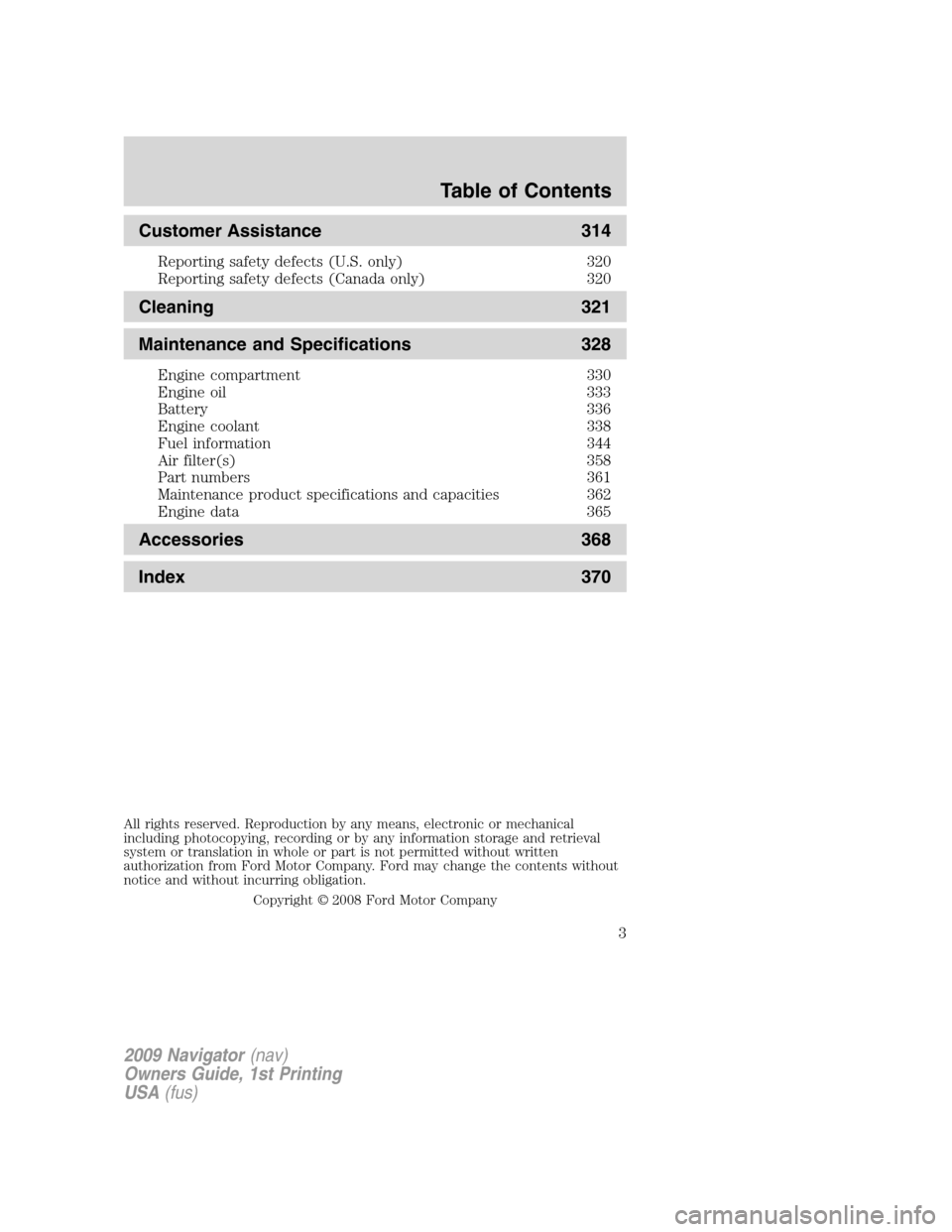
Customer Assistance 314
Reporting safety defects (U.S. only) 320
Reporting safety defects (Canada only) 320
Cleaning 321
Maintenance and Specifications 328
Engine compartment 330
Engine oil 333
Battery 336
Engine coolant 338
Fuel information 344
Air filter(s) 358
Part numbers 361
Maintenance product specifications and capacities 362
Engine data 365
Accessories 368
Index 370
All rights reserved. Reproduction by any means, electronic or mechanical
including photocopying, recording or by any information storage and retrieval
system or translation in whole or part is not permitted without written
authorization from Ford Motor Company. Ford may change the contents without
notice and without incurring obligation.
Copyright © 2008 Ford Motor Company
Table of Contents
3
2009 Navigator(nav)
Owners Guide, 1st Printing
USA(fus)
Page 6 of 375
BREAKING-IN YOUR VEHICLE
Your vehicle does not need an extensive break-in. Try not to drive
continuously at the same speed for the first 1,000 miles (1,600 km) of
new vehicle operation. Vary your speed frequently in order to give the
moving parts a chance to break in.
Drive your new vehicle at least 1,000 miles (1,600 km) before towing a
trailer. For more detailed information about towing a trailer, refer to
Trailer towingin theTires, Wheels and Loadingchapter.
Do not add friction modifier compounds or special break-in oils since
these additives may prevent piston ring seating. SeeEngine oilin the
Maintenance and Specificationschapter for more information on oil
usage.
SPECIAL NOTICES
New Vehicle Limited Warranty
For a detailed description of what is covered and what is not covered by
your vehicle’s New Vehicle Limited Warranty, refer to theWarranty
Guide/Customer Information Guidethat is provided to you along with
yourOwner’s Guide.
Special instructions
For your added safety, your vehicle is fitted with sophisticated electronic
controls.
WARNING:Please read the sectionAirbag Supplemental
Restraint System (SRS)in theSeating and Safety Restraints
chapter. Failure to follow the specific warnings and instructions could
result in personal injury.
WARNING:Front seat mounted rear-facing child or infant seats
shouldNEVERbe placed in front of an active passenger airbag.
2009 Navigator(nav)
Owners Guide, 1st Printing
USA(fus)
Introduction
6
Page 11 of 375
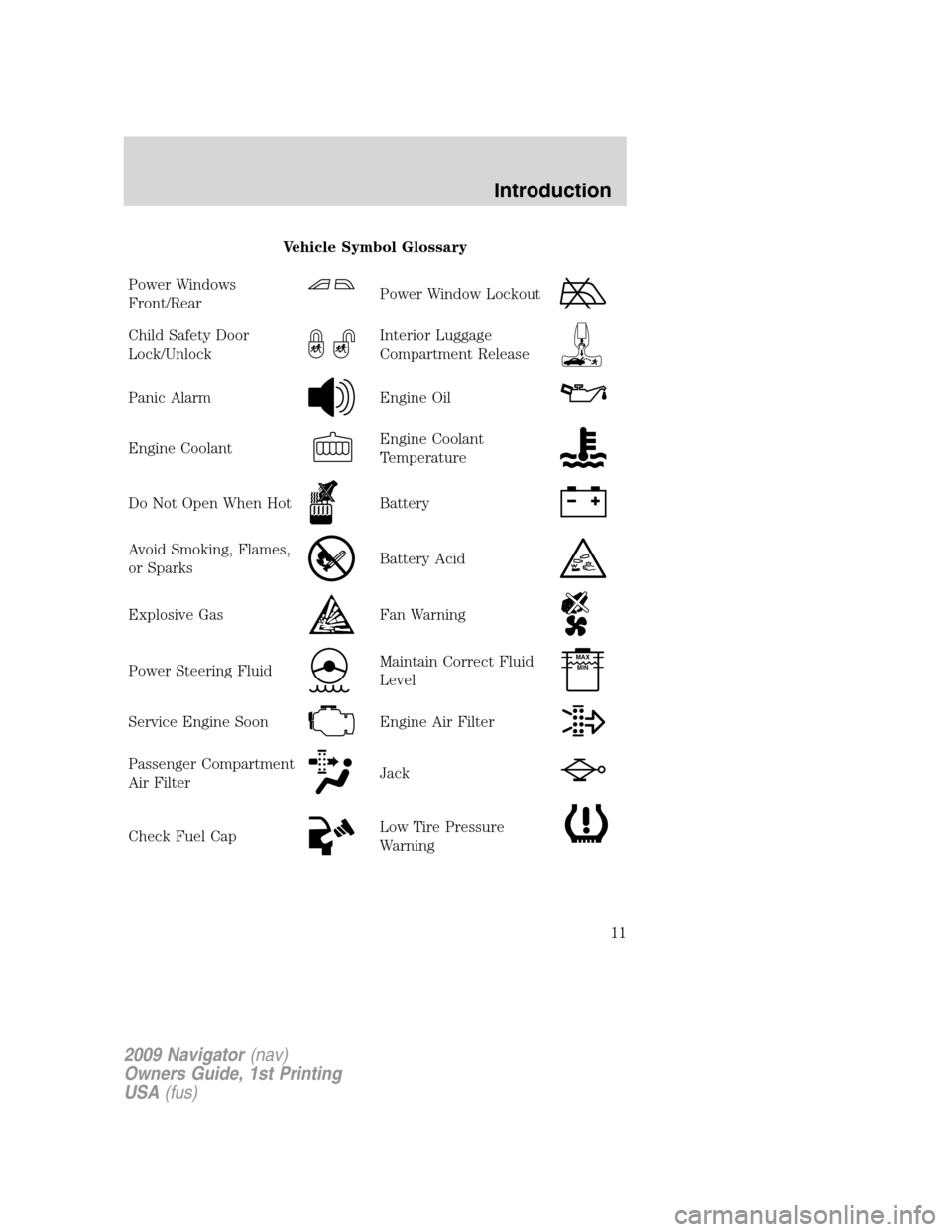
Vehicle Symbol Glossary
Power Windows
Front/Rear
Power Window Lockout
Child Safety Door
Lock/UnlockInterior Luggage
Compartment Release
Panic AlarmEngine Oil
Engine CoolantEngine Coolant
Temperature
Do Not Open When HotBattery
Avoid Smoking, Flames,
or SparksBattery Acid
Explosive GasFan Warning
Power Steering FluidMaintain Correct Fluid
LevelMAX
MIN
Service Engine SoonEngine Air Filter
Passenger Compartment
Air FilterJack
Check Fuel CapLow Tire Pressure
Warning
2009 Navigator(nav)
Owners Guide, 1st Printing
USA(fus)
Introduction
11
Page 14 of 375

Airbag readiness:If this light fails
to illuminate when the ignition is
turned to on, continues to flash or
remains on, have the system
serviced immediately by your authorized dealer. A chime will also sound
when a malfunction in the supplemental restraint system has been
detected.
Safety belt:Reminds you to fasten
your safety belt. A Belt-Minder�
chime will also sound to remind you
to fasten your safety belt. Refer to
theSeating and Safety Restraints
chapter to activate/deactivate the Belt-Minder�chime feature.
Charging system (RTT):Displays
when the battery is not charging
properly.
Anti-theft system:Flashes when
the SecuriLock™ Passive Anti-theft
System has been activated.
Engine oil pressure (RTT):
Displays when the oil pressure falls
below the normal range. Refer to
Engine oilin theMaintenance
and Specificationschapter.
Engine coolant temperature
(RTT):Displays when the engine
coolant temperature is high. Stop
the vehicle as soon as safely
possible, switch off the engine and
let it cool. Refer toEngine coolant
in theMaintenance and Specificationschapter.
WARNING:Never remove the coolant reservoir cap while the
engine is running or hot.
2009 Navigator(nav)
Owners Guide, 1st Printing
USA(fus)
Instrument Cluster
14
Page 19 of 375
Battery voltage gauge:Indicates
the battery voltage when the
ignition is in the on position. If the
pointer moves and stays outside the
normal operating range, have the
vehicle’s electrical system checked
by your authorized dealer as soon as possible.
Engine oil pressure gauge:
Indicates engine oil pressure. The
needle should stay in the normal
operating range (between “L” and
“H”). If the needle falls below the
normal range, stop the vehicle, turn
off the engine and check the engine oil level. Add oil if needed. If the oil
level is correct, have your vehicle checked by your authorized dealer.
2009 Navigator(nav)
Owners Guide, 1st Printing
USA(fus)
Instrument Cluster
19
Page 113 of 375
•Autounlock
•Air Suspension (if equipped)
•Running Boards (if equipped)
•Power Liftgate
•Rear park aid (if equipped)
•Front park aid (if equipped)
•Language
•Units (English/Metric)
•Reset for zone setting (if equipped)
•Reset for Calibration (if equipped)
•System Check
Reset to English (if in another language)
When entering the SETUP MENU
and a non-English language has
been selected, “PRESS RESET FOR
ENGLISH” will be displayed to
change back to English.
Press and hold the RESET control to set the language choice.
Oil life
An oil change is required whenever indicated by the message center and
according to the recommended maintenance schedule. USE ONLY
RECOMMENDED ENGINE OILS.
To reset the oil monitoring system to 100% after each oil change
(approximately 7,500 miles [12,000 km] or six months) perform the
following:
1. Press and release the SETUP
control to display “OIL LIFE XXX%
HOLD RESET = NEW”.
2009 Navigator(nav)
Owners Guide, 1st Printing
USA(fus)
Driver Controls
113
Page 123 of 375

OIL LIFE CHANGE SOON— Displayed when the engine oil life
remaining is 10% or less. When oil life left is between 10% and 0%, the
XX% OIL LIFE CHANGE SOON message will be displayed.
OIL CHANGE REQUIRED— Displayed when the oil life left reaches
0%, the OIL CHANGE REQUIRED message will be displayed.
An oil change is required whenever indicated by the message center and
according to the recommended maintenance schedule. USE ONLY
RECOMMENDED ENGINE OILS.
To reset the oil monitoring system to 100% after each oil change
(approximately 7,500 miles [12,000 km] or six months) perform the
following:
POSITIVE RETENTION FLOOR MAT
WARNING:Do not install additional floor mats on top of the
factory installed floor mats as they may interfere with the
accelerator or the brake pedals.
Position the driver floor mat so that
the eyelet is over the pointed end of
the retention post and rotate
forward to lock in. Make sure that
the mat does not interfere with the
operation of the accelerator or the
brake pedal. To remove the floor
mat, reverse the installation
procedure.
POWER LIFTGATE
The liftgate can be operated by the following:
•instrument panel control button
•key fob button
•outside control button
•control button in the rear cargo area
Note:The liftgate can be reversed with a second press on a control
button or key fob and can be manually closed at any time.
2009 Navigator(nav)
Owners Guide, 1st Printing
USA(fus)
Driver Controls
123
Page 330 of 375
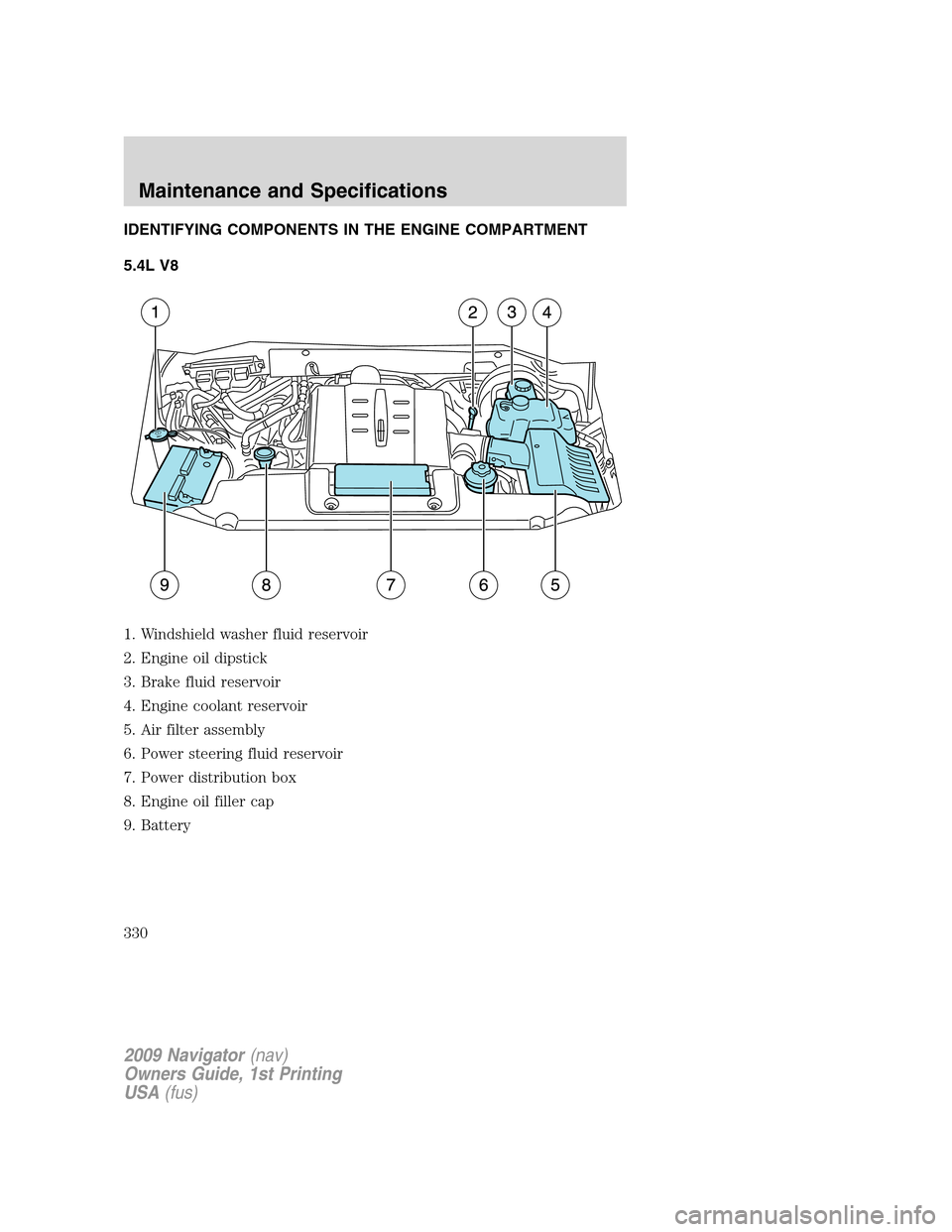
IDENTIFYING COMPONENTS IN THE ENGINE COMPARTMENT
5.4L V8
1. Windshield washer fluid reservoir
2. Engine oil dipstick
3. Brake fluid reservoir
4. Engine coolant reservoir
5. Air filter assembly
6. Power steering fluid reservoir
7. Power distribution box
8. Engine oil filler cap
9. Battery
2009 Navigator(nav)
Owners Guide, 1st Printing
USA(fus)
Maintenance and Specifications
330