2009 LINCOLN NAVIGATOR lights
[x] Cancel search: lightsPage 233 of 375

Low Tire Pressure
Warning LightPossible cause Customer Action Required
Flashing Warning
LightSpare tire in use Your temporary spare tire is in
use. Repair the damaged road
wheel and re-mount it on the
vehicle to restore system
functionality. For a description
of how the system functions
under these conditions, refer to
When your temporary spare
tire is installedin this section.
TPMS
malfunctionIf your tires are properly
inflated and your spare tire is
not in use and the TPMS
warning light still flashes, have
the system inspected by your
authorized dealer.
When inflating your tires
When putting air into your tires (such as at a gas station or in your
garage), the Tire Pressure Monitoring System may not respond
immediately to the air added to your tires.
It may take up to two minutes of driving over 20 mph (32 km/h) for the
light to turn OFF after you have filled your tires to the recommended
inflation pressure.
How temperature affects your tire pressure
The Tire Pressure Monitoring System (TPMS) monitors tire pressure in
each pneumatic tire. While driving in a normal manner, a typical
passenger tire inflation pressure may increase approximately 2 to 4 psi
(14 to 28 kPa) from a cold start situation. If the vehicle is stationary
over night with the outside temperature significantly lower than the
daytime temperature, the tire pressure may decrease approximately 3 psi
(20.7 kPa) for a drop of 30° F (16.6°C) in ambient temperature. This
lower pressure value may be detected by the TPMS as being significantly
lower than the recommended inflation pressure and activate the TPMS
warning for low tire pressure. If the low tire pressure warning light is
ON, visually check each tire to verify that no tire is flat. (If one or more
tires are flat, repair as necessary.) Check air pressure in the road tires. If
any tire is under-inflated, carefully drive the vehicle to the nearest
location where air can be added to the tires. Inflate all the tires to the
recommended inflation pressure.
2009 Navigator(nav)
Owners Guide, 1st Printing
USA(fus)
Tires, Wheels and Loading
233
Page 247 of 375
5. Turn the air suspension (if equipped) control to on.
WARNING:Do not adjust a weight distributing hitch to any
position where the rear bumper of the vehicle is higher than it
was before attaching the trailer. Doing so will defeat the function of
the weight distributing hitch, which may cause unpredictable handling,
and could result in serious personal injury.
Safety chains
Always connect the trailer’s safety chains to the frame or hook retainers
of the vehicle hitch. To connect the trailer’s safety chains, cross the
chains under the trailer tongue and allow slack for turning corners.
If you use a rental trailer, follow the instructions that the rental agency
gives to you.
Do not attach safety chains to the bumper.
Trailer brakes
Electric brakes and manual, automatic or surge-type trailer brakes are safe
if installed properly and adjusted to the manufacturer’s specifications. The
trailer brakes must meet local and Federal regulations.
WARNING:Do not connect a trailer’s hydraulic brake system
directly to your vehicle’s brake system. Your vehicle may not
have enough braking power and your chances of having a collision
greatly increase.
The braking system of the tow vehicle is rated for operation at the
GVWR not GCWR.
Trailer lamps
Trailer lamps are required on most towed vehicles. Make sure all running
lights, brake lights, turn signals and hazard lights are working. See your
authorized dealer or trailer rental agency for proper instructions and
equipment for hooking up trailer lamps.
Driving while you tow
When towing a trailer:
•Keep your speed no faster than 70 mph (113 km/h) during the first
500 miles (800 km) of towing a trailer, and don’t make full throttle
starts.
2009 Navigator(nav)
Owners Guide, 1st Printing
USA(fus)
Tires, Wheels and Loading
247
Page 250 of 375
STARTING
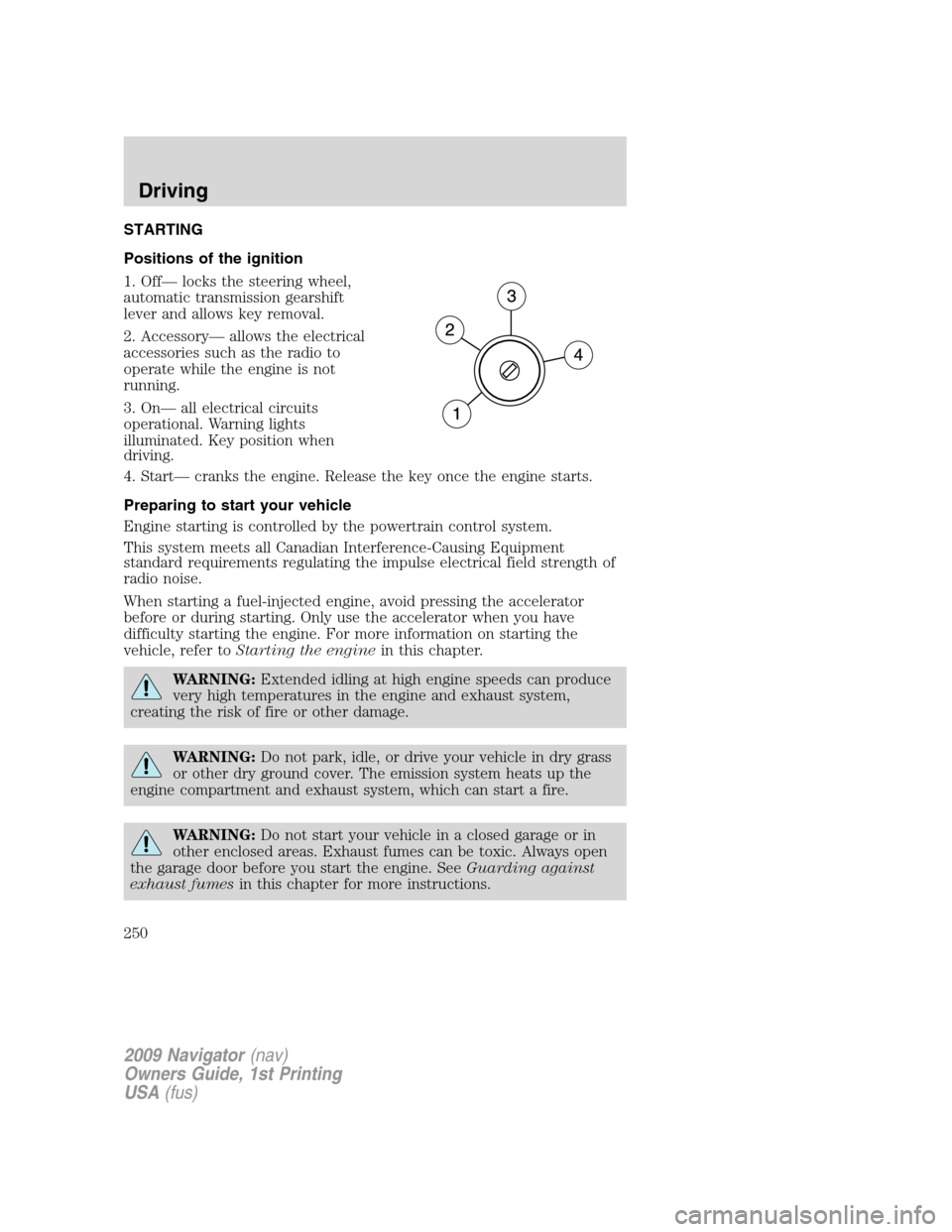
Positions of the ignition
1. Off— locks the steering wheel,
automatic transmission gearshift
lever and allows key removal.
2. Accessory— allows the electrical
accessories such as the radio to
operate while the engine is not
running.
3. On— all electrical circuits
operational. Warning lights
illuminated. Key position when
driving.
4. Start— cranks the engine. Release the key once the engine starts.
Preparing to start your vehicle
Engine starting is controlled by the powertrain control system.
This system meets all Canadian Interference-Causing Equipment
standard requirements regulating the impulse electrical field strength of
radio noise.
When starting a fuel-injected engine, avoid pressing the accelerator
before or during starting. Only use the accelerator when you have
difficulty starting the engine. For more information on starting the
vehicle, refer toStarting the enginein this chapter.
WARNING:Extended idling at high engine speeds can produce
very high temperatures in the engine and exhaust system,
creating the risk of fire or other damage.
WARNING:Do not park, idle, or drive your vehicle in dry grass
or other dry ground cover. The emission system heats up the
engine compartment and exhaust system, which can start a fire.
WARNING:Do not start your vehicle in a closed garage or in
other enclosed areas. Exhaust fumes can be toxic. Always open
the garage door before you start the engine. SeeGuarding against
exhaust fumesin this chapter for more instructions.
2009 Navigator(nav)
Owners Guide, 1st Printing
USA(fus)
Driving
250
Page 252 of 375

4. Make sure the parking brake is
set.
5. Turn the key to 3 (on) without
turning the key to 4 (start).
Some warning lights will briefly illuminate. SeeWarning lights and
chimesin theInstrument Clusterchapter for more information
regarding the warning lights.
Starting the engine
1. Turn the key to 3 (on) without
turning the key to 4 (start).
2. Turn the key to 4 (start), then
release the key as soon as the
engine begins cranking. Your vehicle
has a computer assisted cranking
system that assists in starting the
engine. After releasing the key from
the 4 (start) position, the engine may continue cranking for up to
10 seconds or until the vehicle starts.
Note:Cranking may be stopped at any time by turning the key to the off
position.
3. After idling for a few seconds, apply the brake, shift into gear and
drive.
2009 Navigator(nav)
Owners Guide, 1st Printing
USA(fus)
Driving
252
Page 276 of 375

CONTROL TRAC FOUR-WHEEL DRIVE (4X4) OPERATION
(IF EQUIPPED)
WARNING:For important information regarding safe operation
of this type of vehicle, seePreparing to drive your vehiclein
this chapter.
Do not use 4X4 mode on dry, hard surfaced roads. Doing so will produce
excessive noise, increase tire wear and may damage drive components.
4X4 mode is only intended for consistently slippery or loose surfaces.
Use of 4X4 mode on these surfaces may produce some noise (such as
occasional clunks) but will not damage drive components.
Your 4x4 features the heavy-duty Control Trac system which includes a
computer-operated transfer case. This unique system is interactive with
the road, continually monitoring and adjusting torque delivery to the
front and rear wheels to optimize vehicle control.
System indicator messages
The Control Trac system indicator messages display in the reconfigurable
telltale (RTT) location in the message center only under the following
conditions. If these messages display when driving in 4X2, contact your
authorized dealer as soon as possible. Refer toWarning lights and
chimesin theInstrument Clusterchapter.
•4X4 AUTO– displays when 4X4 AUTO is selected.
•4X4– displays when 4X4 is selected.
Positions of the Control Trac system
The Control Trac system functions
in three modes:
•4X2 (2WD)delivers power to
the rear wheels only. This is
appropriate for normal on-road
driving on dry pavement.
•4X4 AUTOprovides electronic
control four-wheel drive with
power delivered to all four wheels, as required, for increased traction.
The RTT location in the message center will display “4X4 AUTO”
when this position is selected. This is appropriate for all on-road
driving conditions, such as dry road surfaces, wet pavement, snow or
gravel.
4X24X4
AUTO4X4
2009 Navigator(nav)
Owners Guide, 1st Printing
USA(fus)
Driving
276
Page 290 of 375

The fuses are coded as follows.
Fuse/Relay
LocationFuse Amp
RatingProtective Circuits
1 30A Smart window #1
2 15A Driver side power seat memory
3 15A FES, Audio rear seat controls,
SDARS, SYNC
4 30A Smart window #2
5 10A Keypad illumination, 3rd row seat
enable, Brake Shift Interlock
(BSI), SPDJB
6 20A Turn signals
7 10A Low beam headlamps (left)
8 10A Low beam headlamps (right)
9 15A Interior lights
10 15A Switch backlighting, Puddle lamps
11 10A Not used (Spare)
12 7.5A Power mirror switch, Driver seat
switch
13 5A Not used (Spare)
14 10A Clock, Power liftgate module –
keep-alive power, Power running
board module – keep-alive power
15 10A Climate control
16 15A Not used (Spare)
17 20A All lock motor feeds, Liftgate
release, Liftglass release
18 20A Second row heated seats
19 25A Rear wiper
20 15A Adjustable pedals, Datalink
21 15A Fog lamps, Cornering lamps
22 15A Park lamps relay
23 15A High beam headlamps
24 20A Horn relay
2009 Navigator(nav)
Owners Guide, 1st Printing
USA(fus)
Roadside Emergencies
290
Page 350 of 375

If you have run out of fuel:
•You may need to cycle the ignition from off to on several times after
refueling to allow the fuel system to pump the fuel from the tank to
the engine. On restarting, cranking time will take a few seconds longer
than normal.
•Normally, adding 1 gallon (3.8L) of fuel is enough to restart the
engine. If the vehicle is out of fuel and on a steep grade, more than
1 gallon (3.8L) may be required.
•TheService engine soon
indicator may come on. For more
information on the “service engine soon” indicator, refer toWarning
lights and chimesin theInstrument Clusterchapter.
Refilling with a portable fuel container
With the Easy Fuel™ “no cap” fuel system, use the following directions
when filling from a portable fuel container:
WARNING:Do not insert the nozzle of portable fuel containers
or aftermarket funnels into the Easy Fuel™ system. This could
damage the fuel system and its seal, and may cause fuel to run onto
the ground instead of filling the tank, which could result in serious
personal injury.
WARNING:Do not try to pry open or push open the Easy
Fuel™ system with foreign objects. This could damage the fuel
system and its seal and cause injury to you or others.
When filling the vehicle’s fuel tank from a portable fuel container, use the
included funnel.
1. Locate the white plastic funnel. It
is attached to the underside of the
spare tire cover or is included with
the tire changing tools.
2. Slowly insert the funnel into the Easy Fuel™ system.
2009 Navigator(nav)
Owners Guide, 1st Printing
USA(fus)
Maintenance and Specifications
350
Page 372 of 375

specifications ..........................362
Event data recording ....................7
Exhaust fumes ..........................253
F
Fail safe cooling ........................342
Family entertainment system ....37
Flexible Fuel Vehicle (FFV) ....344
Floor mats .................................123
Fluid capacities .........................362
Fog lamps ....................................77
Four-Wheel Drive vehicles .......276
control trac .............................276
description ..............................276
driving off road .......................277
indicator light .........................276
preparing to drive your
vehicle .....................................265
Fuel ............................................344
calculating fuel
economy ..........................111, 351
cap ...........................................347
capacity ...................................362
choosing the right fuel ...........348
comparisons with EPA fuel
economy estimates .................354
detergent in fuel .....................349
filler funnel .............................349
filling your vehicle with
fuel ...........................344, 347, 351
filter, specifications ........344, 361
fuel pump shut-off switch .....287
improving fuel economy ........351
octane rating ...................348, 365
quality ......................................349
running out of fuel .........305, 349
safety information relating to
automotive fuels .....................344Fuel - flex fuel vehicle
(FFV) .................................344, 348
Fuses ..................................288–289
G
Gas cap (see Fuel cap) ............347
Gas mileage
(see Fuel economy) .................351
Gauges .........................................17
H
Hazard flashers .........................286
Headlamps ...................................76
aiming ........................................78
autolamp system .......................76
bulb specifications ....................82
daytime running lights .............77
flash to pass ..............................77
high beam .................................77
turning on and off ....................76
Homelink wireless control
system ........................................106
Hood ..........................................329
I
Ignition ...............................250, 365
Illuminated visor mirror .............89
Infant seats
(see Safety seats) .....................198
Inspection/maintenance (I/M)
testing ........................................356
Instrument panel
cleaning ...................................325
cluster ........................................12
J
Jack ............................................295
Index
372