2009 LINCOLN MKS power
[x] Cancel search: powerPage 53 of 323

Windshield wiper rainlamp feature
When the windshield wipers are turned on during daylight, and the
headlamp control is in the autolamp position, the exterior lamps will turn
on after a brief delay and will remain on until the wipers are turned off.
POWER TILT/TELESCOPE STEERING COLUMN
The steering column can be
adjusted manually by moving the
four-way rocker adjustment control
located below the turn signal/wiper
control stalk. Hold the control to
adjust.
The telescope function is adjusted
by moving the control toward the
driver to telescope out, and toward
the instrument panel to telescope
in.
The tilt function is adjusted by moving the control up or down.
During easy exit, when you remove the key, the column will move to the
full in and up position. When the key is inserted into the ignition, the
column will return to the previous setting.
WARNING:Never adjust the steering wheel when the vehicle is
moving.
ILLUMINATED VISOR MIRROR
Lift the mirror cover to turn on the
visor mirror lamp.
2009 MKS(mks)
Owners Guide (post-2002-fmt)
USA(fus)
Driver Controls
53
Page 55 of 323

CENTER CONSOLE
Your vehicle may be equipped with a variety of console features. These
include:
1. Cupholders
2. Driver and passenger arm rests
that slide forward or rearward and
also opens the utility compartment
that has an audio input jack, USB
port and power point inside.
Note:Move the arm rests to the
rearward position to open the utility
compartment.
3. Rear power point, heated seat
switches and air vents to the rear seating positions.
4. Power point door and a power rear sunshade control (if equipped).
WARNING:Use only soft cups in the cupholder. Hard objects
can injure you in a collision.
AUXILIARY POWER POINT (12VDC)
Power outlets are designed for accessory plugs only. Do not insert
any other object in the power outlet as this will damage the
outlet and blow the fuse. Do not hang any type of accessory or
accessory bracket from the plug. Improper use of the power
outlet can cause damage not covered by your warranty.
The auxiliary power points are located on the center console and inside
the utility compartment.
A third rear auxiliary power point is
located on the rear of the center
console. The power point is
accessible from the rear seat.
Do not use the power point for
operating the cigarette lighter
element (if equipped).
To prevent the fuse from being
blown, do not use the power
point(s) over the vehicle capacity of
12 VDC/180W. If the power point or cigar lighter socket is not working, a
2009 MKS(mks)
Owners Guide (post-2002-fmt)
USA(fus)
Driver Controls
55
Page 56 of 323

fuse may have blown. Refer toFuses and relaysin theRoadside
Emergencieschapter for information on checking and replacing fuses.
To have full capacity usage of your power point, the engine is required to
be running to avoid unintentional discharge of the battery. To prevent
the battery from being discharged:
•do not use the power point longer than necessary when the engine is
not running,
•do not leave battery chargers, video game adapters, computers and
other devices plugged in overnight or when the vehicle is parked for
extended periods.
Always keep the power point caps closed when not being used.
Cigar/Cigarette lighter (if equipped)
Do not plug optional electrical accessories into the cigarette lighter
socket.
Do not hold the lighter in with your hand while it is heating, this will
damage the lighter element and socket. The lighter will be released from
its heating position when it is ready to be used.
Improper use of the lighter can cause damage not covered by your
warranty.
POWER WINDOWS
WARNING:Do not leave children unattended in the vehicle and
do not let children play with the power windows. They may
seriously injure themselves.
WARNING:When closing the power windows, you should verify
they are free of obstructions and ensure that children and/or
pets are not in the proximity of the window openings.
Press and pull the switches to open
and close windows.
•Push down (to the first detent)
and hold the switch to open.
•Pull up (to the first detent) and
hold the switch to close.
Note:You can open and close the vehicle’s windows and moon roof (if
equipped) by using the door key in the driver door key cylinder or the
2009 MKS(mks)
Owners Guide (post-2002-fmt)
USA(fus)
Driver Controls
56
Page 58 of 323

Window lock
The window lock feature allows only
the driver to operate the power
windows.
To lock out all the window controls
(except for the driver’s) press the
right side of the control. Press the
left side to restore the window
controls.
Accessory delay
With accessory delay, the radio, Family Entertainment DVD System (if
equipped), power windows, and moon roof (if equipped) operate for up
to 10 minutes after the ignition switch is turned from on to off or until
one of the front doors are opened.
POWER REAR SUNSHADE (IF EQUIPPED)
Your vehicle may be equipped with a
power rear sunshade that covers the
rear window of your vehicle. The
control is located in the center
console access bin next to the
power point.
Press the control to move the shade
up or down.
The power sunshade is equipped
with an automatic, one-touch, auto
down feature. To stop motion at any time during the auto down
operation, press the control a second time. To activate the automatic,
one-touch, auto down feature, press the control and release quickly.
INTERIOR MIRROR
The interior rear view mirror has two pivot points on the support arm
which lets you adjust the mirror UP or DOWN and from SIDE to SIDE.
WARNING:Do not adjust the mirror while the vehicle is in
motion.
Automatic dimming interior rear view mirror
Your vehicle is equipped with an interior rear view mirror and a driver’s
side exterior mirror that have auto-dimming function. The electronic
2009 MKS(mks)
Owners Guide (post-2002-fmt)
USA(fus)
Driver Controls
58
Page 59 of 323

day/night mirrors will change from the normal (high reflective) state to
the non-glare (darkened) state when bright lights (glare) reach the
interior mirror. When the interior mirror detects bright light from behind
the vehicle, the interior rear view mirror and the driver’s side exterior
mirror will automatically adjust (darken) to minimize glare.
With microphone
The mirrors will automatically return to the normal state whenever the
vehicle is placed in R (Reverse) to ensure a bright clear view when
backing up.
Do not block the sensors on the front and back of the interior
rear view mirror since this may impair proper mirror
performance.
Do not clean the housing or glass of any mirror with harsh
abrasives, fuel or other petroleum-based cleaning products.
EXTERIOR MIRRORS
Power side view mirrors
WARNING:Do not adjust the mirror while the vehicle is in
motion.
To adjust your mirrors:
1. Rotate the control clockwise to
adjust the right mirror and rotate
the control counterclockwise to
adjust the left mirror.
2. Move the control in the direction
you wish to tilt the mirror.
3. Return to the center position to lock mirrors in place.
Automatic dimming feature
The driver’s side view mirror has an auto-dimming function. For more
information, refer toAutomatic dimming interior rear view mirrorin
this chapter.
2009 MKS(mks)
Owners Guide (post-2002-fmt)
USA(fus)
Driver Controls
59
Page 73 of 323

SYNC system hands free control
feature
Press
briefly to use the voice
command feature. You will hear a
tone and LISTENING will appear in
the radio display. Press and
hold
to exit voice command.
Press
to activate phone mode or
answer a phone call. Press and
hold
to end call or exit phone
mode.
Press
to scroll through various menus and selections. Press
OK to confirm your selection.
For further information on the SYNC system, refer to theSYNC
supplement.
Navigation system/SYNC hands
free control features (if
equipped)
Press
control briefly until the
voice
icon appears on the
Navigation display to use the voice
command feature.
Press
to activate phone mode or
answer a phone call. Press and
hold
to exit phone mode or end
call.
For further information on the Navigation system/SYNC system, refer to
theNavigation SystemandSYNCsupplements.
DUAL PANEL MOON ROOF AND POWER SUNSCREEN
(IF EQUIPPED)
The dual panel moon roof and power sunscreen controls are located on
the overhead console.
WARNING:Do not let children play with the moon roof or leave
children unattended in the vehicle. They may seriously hurt
themselves.
2009 MKS(mks)
Owners Guide (post-2002-fmt)
USA(fus)
Driver Controls
73
Page 74 of 323
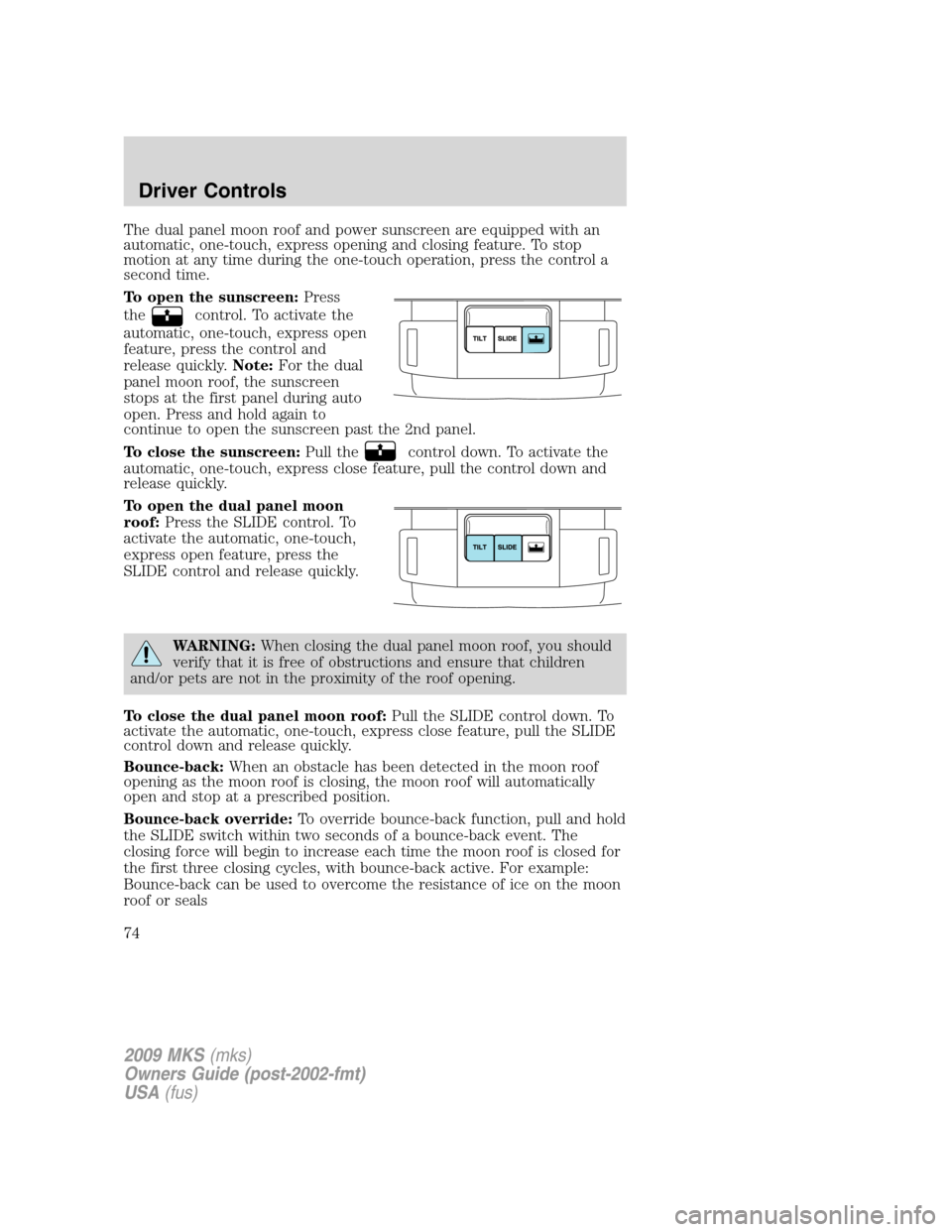
The dual panel moon roof and power sunscreen are equipped with an
automatic, one-touch, express opening and closing feature. To stop
motion at any time during the one-touch operation, press the control a
second time.
To open the sunscreen:Press
the
control. To activate the
automatic, one-touch, express open
feature, press the control and
release quickly.Note:For the dual
panel moon roof, the sunscreen
stops at the first panel during auto
open. Press and hold again to
continue to open the sunscreen past the 2nd panel.
To close the sunscreen:Pull the
control down. To activate the
automatic, one-touch, express close feature, pull the control down and
release quickly.
To open the dual panel moon
roof:Press the SLIDE control. To
activate the automatic, one-touch,
express open feature, press the
SLIDE control and release quickly.
WARNING:When closing the dual panel moon roof, you should
verify that it is free of obstructions and ensure that children
and/or pets are not in the proximity of the roof opening.
To close the dual panel moon roof:Pull the SLIDE control down. To
activate the automatic, one-touch, express close feature, pull the SLIDE
control down and release quickly.
Bounce-back:When an obstacle has been detected in the moon roof
opening as the moon roof is closing, the moon roof will automatically
open and stop at a prescribed position.
Bounce-back override:To override bounce-back function, pull and hold
the SLIDE switch within two seconds of a bounce-back event. The
closing force will begin to increase each time the moon roof is closed for
the first three closing cycles, with bounce-back active. For example:
Bounce-back can be used to overcome the resistance of ice on the moon
roof or seals
2009 MKS(mks)
Owners Guide (post-2002-fmt)
USA(fus)
Driver Controls
74
Page 86 of 323

Warnings Status
Integrated key programming
status (if equipped)Maximum number of Integrated Keys
exceeded
Cruise On (if equipped) Adaptive Cruise Control warnings
Cruise Off (if equipped)
Set speed and Gap (if
equipped)
Cruise override (if equipped)
Driver intervene (if equipped)
Cruise not available (if
equipped)
Cruise malfunction (if
equipped)
Cruise radar blocked (if
equipped)
Press brake to start (if
equipped)Intelligent Access with Push Button
Start warnings
No fob detected (if equipped)
Shift to park (if equipped)
Restart now or fob is needed
(if equipped)
Accessory power active (if
equipped)
Starting system fault (if
equipped)
Fob programmed, 3 fobs total
(if equipped)
Fob programmed, 4 fobs total
(if equipped)
Max # of fobs learned (if
equipped)
DRIVER DOOR AJAR— Displayed when the driver’s door is not
completely closed.
PASSENGER DOOR AJAR— Displayed when the passenger side door
is not completely closed.
2009 MKS(mks)
Owners Guide (post-2002-fmt)
USA(fus)
Driver Controls
86