Page 381 of 622
380
3-7. Other interior features
GS_HV_U (OM30B44U)
April 27, 2009 10:09 am
Vanity mirrors
Slide the cover.
The light turns on when the
cover is opened.
GS450h_HV_U.book Page 380 Monday, April 27, 2009 10:10 AM
Page 382 of 622
381
3-7. Other interior features
3
Interior features
GS_HV_U (OM30B44U)
April 27, 2009 10:09 am
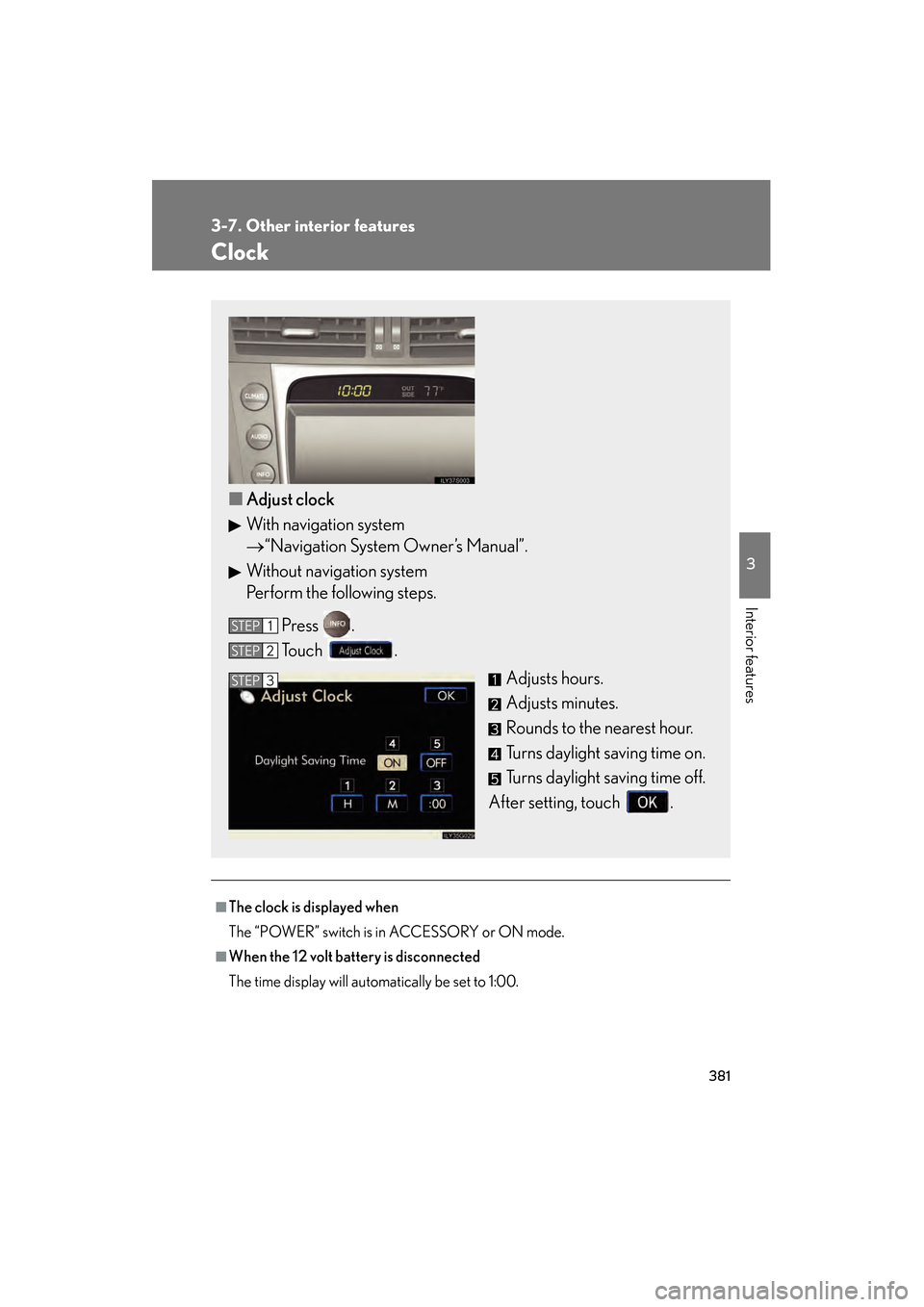
Clock
■The clock is displayed when
The “POWER” switch is in ACCESSORY or ON mode.
■When the 12 volt battery is disconnected
The time display will automatically be set to 1:00.
■Adjust clock
With navigation system
→ “Navigation System Owner’s Manual”.
Without navigation system
Perform the following steps.
Press .
Touch . Adjusts hours.
Adjusts minutes.
Rounds to the nearest hour.
Turns daylight saving time on.
Turns daylight saving time off.
After setting, touch .
STEP1
STEP2
STEP3
GS450h_HV_U.book Page 381 Monday, April 27, 2009 10:10 AM
Page 385 of 622
384
3-7. Other interior features
GS_HV_U (OM30B44U)
April 27, 2009 10:09 am
Cigarette lighter
■The cigarette lighter can be used when
The “POWER” switch is in ACCESSORY or ON mode.
CAUTION
■To avoid burns or fires
●Do not touch the metal parts of the cigarette lighter.
●Do not hold the cigarette lighter down. It could overheat and cause a fire.
●Do not insert anything other than the cigarette lighter into the outlet.
■When not in use
Keep the ashtray lid closed.
Injuries may result in the event of sudden braking, sudden swerving or an accident.
Slide the lid to open, and push
the cigarette lighter down.
The cigarette lighter will pop up
when ready for use.
GS450h_HV_U.book Page 384 Monday, April 27, 2009 10:10 AM
Page 387 of 622
386
3-7. Other interior features
GS_HV_U (OM30B44U)
April 27, 2009 10:09 am
Seat heaters/ventilators∗
■The seat heaters/ventilators can be used when
The “POWER” switch is in ON mode.
■When not in use
Set the dial to “0”. The indicator light turns off.
∗: If equipped
The temperature of the seats can be adjusted individually.
■ Seat heaters
Heats the seats
The indicator light comes on.
The higher the number, the
warmer the seats become.
■Seat heaters/ventilators
Heats the seats
The indicator light (red) comes
on.
The higher the number, the
warmer the seats become.
Blows air from the seats
The indicator light (green)
comes on.
The higher the number, the
stronger the airflow becomes.
GS450h_HV_U.book Page 386 Monday, April 27, 2009 10:10 AM
Page 395 of 622
394
3-7. Other interior features
GS_HV_U (OM30B44U)
April 27, 2009 10:09 am
Garage door opener
The garage door opener (HomeLink Universal Transceiver) is manufactured
under license from HomeLink.
Programming the HomeLink (for U.S.A. owners)
The HomeLink
compatible transceiver in your vehicle has 3 buttons
which can be programmed to operate 3 different devices. Refer to the
programming method below appropriate for the device.
Indicator
Buttons
■ Programming the HomeLink
Point the remote control transmit-
ter for the device 1 to 3 in. (25 to
75 mm) from the HomeLink
control buttons.
Keep the HomeLink indicator
light in view while programming.
The garage door opener can be pr ogrammed to operate garage doors,
gates, entry doors, door locks, home lighting systems, security systems, and
other devices.
STEP1
GS450h_HV_U.book Page 394 Monday, April 27, 2009 10:10 AM
Page 396 of 622

395
3-7. Other interior features
3
Interior features
GS_HV_U (OM30B44U)
April 27, 2009 10:09 am
Press and hold one of the
HomeLink buttons and the trans-
mitter button. When the
HomeLink
indicator light
changes from a slow to a rapid
flash, you can release both buttons.
If the HomeLink indicator light
comes on but does not flash,
flashes rapidly for 2 seconds
and remains lit, the HomeLink
button is already programmed.
Use the other buttons or follow
the “Reprogramming a
HomeLink
button” instruc-
tions. (→ P. 3 9 7 )
Test the HomeLink operation by
pressing the newly programmed
button.
If a HomeLink button has been
programmed for a garage door,
check to see if the garage door
opens and closes. If the garage
door does not operate, see if your
remote control transmitter is of the
rolling code type. Press and hold
the programmed HomeLink
but-
ton. The remote control transmitter
is of the rolling code type if the
HomeLink
indicator light flashes
rapidly for 2 seconds and then
remains lit. If your transmitter is of
the rolling code type, proceed to
the heading “Programming a roll-
ing code system”.
Repeat the steps above to program another device for each of
the remaining HomeLink buttons.
STEP2
STEP3
STEP4
GS450h_HV_U.book Page 395 Monday, April 27, 2009 10:10 AM
Page 397 of 622

396
3-7. Other interior features
GS_HV_U (OM30B44U)
April 27, 2009 10:09 am
■Programming a Rolling Code system
If your device is Rolling Code equipped, follow the steps under the
heading “Programming the HomeLink
” before proceeding with the
steps listed below.
Locate the learn button on the ceiling mounted garage door
opener motor. The exact location and color of the button may
vary by brand of garage door opener motor.
Refer to the operation manual supplied with the garage door opener
motor for the location of the learn button.
Press the learn button.
Press and hold the vehicle’s programmed HomeLink
button for
2 seconds and release it. Repeat this step once again. The garage
door may open.
If the garage door opens, the programming process is complete. If the
door does not open, press and release the button a third time. This third
press and release will complete the programming process by opening
the garage door.
The ceiling mounted garage door op ener motor should now recognize
the HomeLink
transceiver and operate the garage door.
Repeat the steps above to program another rolling code system
for any of the remaining HomeLink buttons.
■ Programming an entry gate (for U.S.A. owners)/Programming all
devices in the Canadian market
Place your transmitter 1 to 3 in. (25 to 75 mm) away from the sur-
face of the HomeLink
.
Keep the indicator light on the HomeLink in view while programming.
Press and hold the selected HomeLink button.
Repeatedly press and release (cycle) the device’s remote control
button for two seconds each until step 4 is completed.
When the indicator light on the HomeLink
compatible trans-
ceiver starts to flash rapidly, release the buttons.
STEP1
STEP2
STEP3
STEP4
STEP1
STEP2
STEP3
STEP4
GS450h_HV_U.book Page 396 Monday, April 27, 2009 10:10 AM
Page 398 of 622

397
3-7. Other interior features
3
Interior features
GS_HV_U (OM30B44U)
April 27, 2009 10:09 am
Test the operation of the HomeLink by pressing the newly pro-
grammed button. Check to see if the gate/device operates cor-
rectly.
Repeat the steps above to program another device for each of
the remaining HomeLink
buttons.
■ Programming other devices
To program other devices such as home security systems, home door
locks or lighting, contact your authorized Lexus dealer for assistance.
■ Reprogramming a button
The individual HomeLink
buttons cannot be erased but can be
reprogrammed. To reprogram a button, follow the “Reprogramming a
HomeLink
button” instructions.
Operating the HomeLink
Press the appropriate HomeLink button. The HomeLink indicator
light on the HomeLink transceiver should turn on.
The HomeLink continues to send a signal for up to 20 seconds as long as
the button is pressed.
Reprogramming a HomeLink® button
Press and hold the desired HomeLink
button. After 20 seconds, the
HomeLink indicator light will start flashing slowly. Next, while still press-
ing and holding the HomeLink button, press and hold the button on the
transmitter until the HomeLink indicator light changes from a slow to a
rapid flash.
STEP5
STEP6
GS450h_HV_U.book Page 397 Monday, April 27, 2009 10:10 AM