Page 387 of 622

386
3-7. Other interior features
GS_G_U (OM30B43U)
April 27, 2009 10:48 am
Erasing the entire HomeLink memory (all three programs)Press and hold the 2 outside but-
tons for 10 seconds until the indi-
cator light flashes.
If you sell your vehicle, be sure to
erase the programs stored in the
HomeLink
memory.
■Before programming
●Install a new battery in the remote control transmitter.
●The battery side of the remote control transmitter must be pointed away from
the HomeLink button.
■Certification for the garage door opener
This device complies with Part 15 of the FCC Rules and with RSS-210 of the IC
Rules.
Operation is subject to the following two conditions: (1) this device may not cause
harmful interference, and (2) this device must accept any interference received,
including interference that may cause undesired operation.
WARNING: This transmitter has been tested and complies with FCC and IC rules.
Changes or modifications not expressly approved by the party responsible for
compliance could void the user’s authority to operate the device.
GS_U_G.book Page 386 Monday, April 27, 2009 10:50 AM
Page 388 of 622
387
3-7. Other interior features
3
Interior features
GS_G_U (OM30B43U)
April 27, 2009 10:48 am
CAUTION
■When programming a garage door or other remote control devices
The garage door on other devices may operate, so ensure people and objects are
out of danger to prevent potential harm.
■Conforming to federal safety standards
Do not use the HomeLink
Compatible Transceiver with any garage door opener
or device that lacks safety stop and reverse features as required by federal safety
standards.
This includes any garage door that canno t detect an obstruction object. A door or
device without these featur es increases the risk of death or serious injury.
GS_U_G.book Page 387 Monday, April 27, 2009 10:50 AM
Page 393 of 622

392
3-7. Other interior features
GS_G_U (OM30B43U)
April 27, 2009 10:48 am
Lexus Link System∗
∗: If equipped
The Lexus Link System is a communication service that uses Global Posi-
tioning System (GPS) data and cellular service to provide you with safety,
security and convenience. This system is only operational in GPS and cellu-
lar coverage areas. Button operation and voice commands are used to
operate the system. To operate the system, follow the voice guidance
instructions. For details about service and subscription, call the Lexus Link
Call Center at 1-800-25-LEXUS (1-800-255-3987) (toll-free).
■ Buttons
Voice keypad button
Volume control
Phone button
“SERVICES” button
Emergency button
■ Services
The Lexus Link System offers the following services.
● Airbag deployment notification ( →P. 394)
● Emergency assistance ( →P. 394)
● Stolen vehicle location assistance ( →P. 395)
● Remote horn/lights and remote door lock/unlock (→ P. 395)
● Advisor record ( →P. 396)
● Personal calling ( →P. 396)
● Other services ( →P. 395)
Operating the Lexus Link Sy stem during a Bluetooth phone call will ter-
minate the Bluetooth phone call.
GS_U_G.book Page 392 Monday, April 27, 2009 10:50 AM
Page 396 of 622
395
3-7. Other interior features
3
Interior features
GS_G_U (OM30B43U)
April 27, 2009 10:48 am
Stolen vehicle location assistance
If your vehicle is stolen, call the Lexus Link Call Center at 1-800-25-
LEXUS (1-800-255-3987) (toll-free) and select the option for Lexus Link.
To protect subscribers’ privacy, the location of a vehicle will not be provided to
anyone other than a law enforcement authority.
Remote horn/lights and remote door lock/unlock
The remote operations are performed by contacting the Lexus Link Call
Center from the outside of the vehicle. When necessary, call the Lexus Link
Call Center at 1-800-25-LEXUS (1-800-255-3987) (toll-free) and
select the option for Lexus Link.
● In the case that you forget to lock the vehicle or you are locked out, the
Lexus Link Call Center can send a sig nal to lock or unlock the vehicle
remotely.
● In the case that you forget where yo u parked the vehicle, such as in a
large parking lot, the Lexus Link Call Center can send a signal to flash the
headlights and sound the horn to help you locate the vehicle.
When contacting the Lexus Link Call Center from the outside of the vehicle,
you need the Lexus Link PIN (Personal Identification Number). Write the PIN
down and carry it with you.
Other services
Press the button in the vehicle or call the Lexus Link Call Center at 1-
800-25-LEXUS (1-800-255-3987) (toll- free), and then select the option
for Lexus Link. The services provided will depend on the service plan level.
GS_U_G.book Page 395 Monday, April 27, 2009 10:50 AM
Page 460 of 622

459
4-3. Do-it-yourself maintenance
4
Maintenance and care
GS_G_U (OM30B43U)
April 27, 2009 10:48 am
■If the electronic key battery is discharged
The following symptoms may occur.
●The smart access system with push-button start and wireless remote control will
not function properly.
●The operational range is reduced.
■Use a CR1632 lithium battery
●Batteries can be purchased at your Lexus dealer, jewelers, or camera stores.
●Replace only with the same or equivalent type recommended by your Lexus
dealer.
●Dispose of used batteries according to the local laws.
■When the card key battery needs to be replaced
The battery for the card key is available only at Lexus dealers. Your Lexus dealer
can replace the battery for you.
CAUTION
■Removed battery and other parts
Keep away from children.
These parts are small and if swallowed by a child they can cause choking.
NOTICE
■For normal operation after replacing the battery
Observe the following precautions to prevent accidents.
●Always work with dry hands.
Moisture may cause the battery to rust.
●Do not touch or move any other components inside the electronic key.
●Do not bend the battery terminals.
GS_U_G.book Page 459 Monday, April 27, 2009 10:50 AM
Page 546 of 622
5
When trouble arises
545
5-2. Steps to take in an emergency
GS_G_U (OM30B43U)
April 27, 2009 10:48 am
If the electronic key does not operate properly
Locking and unlocking the doors, unlocking the trunk and key linked
functions
Doors Using the mechanical key (
→P. 2 5 )
in order to perform the following
operations:
Locks all doors
Closes the windows/moon roof
(turn and hold)
Unlocks the door
Turning the key rearward unlocks
the driver’s door.
Turning the key once again unlocks
the other doors.
Opens the windows/moon roof
(turn and hold)
If communication between the electron ic key and vehicle is interrupted
(
→P. 33) or the electronic key cannot be used because the battery is
depleted, the smart access system with push-button start and wireless
remote control cannot be used. In su ch cases, the doors and trunk can be
opened or the engine can be started by following the procedure below.
GS_U_G.book Page 545 Monday, April 27, 2009 10:50 AM
Page 591 of 622
590
6-2. Customization
GS_G_U (OM30B43U)
April 27, 2009 10:48 am
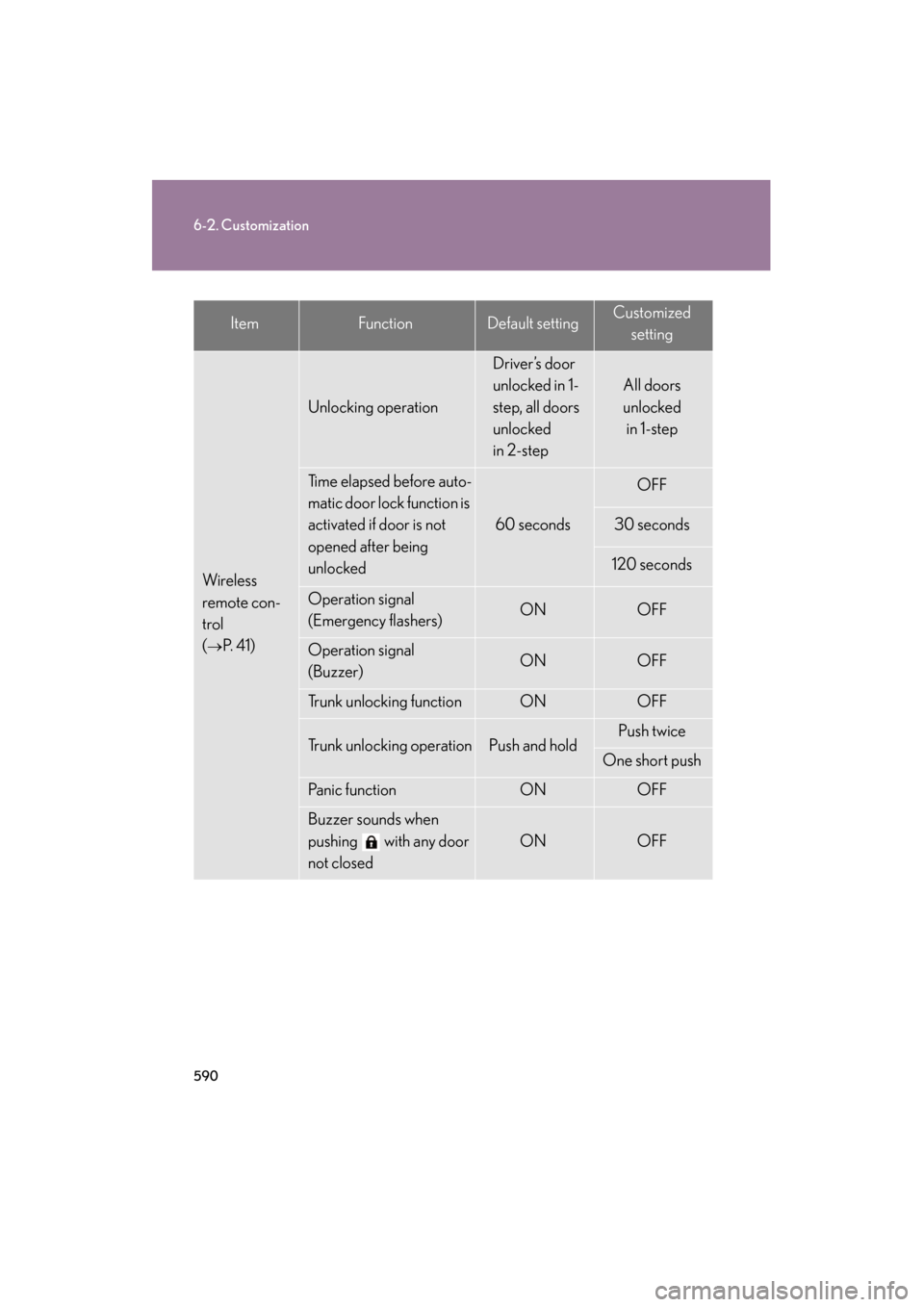
ItemFunctionDefault settingCustomizedsetting
Wireless
remote con-
trol
(
→P. 4 1 )
Unlocking operation
Driver’s door
unlocked in 1-
step, all doors
unlocked
in 2-step
All doors
unlocked in 1-step
Time elapsed before auto-
matic door lock function is
activated if door is not
opened after being
unlocked
60 seconds
OFF
30 seconds
120 seconds
Operation signal
(Emergency flashers)ONOFF
Operation signal
(Buzzer) ONOFF
Trunk unlocking functionONOFF
Trunk unlocking operationPush and holdPush twice
One short push
Panic functionONOFF
Buzzer sounds when
pushing with any door
not closed
ONOFF
GS_U_G.book Page 590 Monday, April 27, 2009 10:50 AM
Page 592 of 622
591
6-2. Customization
6
Vehicle specifications
GS_G_U (OM30B43U)
April 27, 2009 10:48 am
ItemFunctionDefault settingCustomizedsetting
Door lock
(
→P. 4 4 )
Unlocking using a key
Driver’s door
unlocked in 1-
step, all doors
unlocked
in 2-step
All doors
unlocked in 1-step
Speed-detecting auto-
matic door lock functionOFFON
Opening driver’s door
unlocks all doors OFFON
Shifting the shift lever to
“P” unlocks all doorsONOFF
Shifting the shift lever to
position other than “P”
locks all doors
ONOFF
Pow e r w i n -
dows
(
→P. 7 5 )
Linked door key opera-
tionOpen and closeOpen only
Close only
Wireless remote control
linked operationONOFF
GS_U_G.book Page 591 Monday, April 27, 2009 10:50 AM