Page 243 of 622

242
3-2. Using the air conditioning system and defogger
GS_G_U (OM30B43U)
April 20, 2009 4:34 pm
■Automatic mode for air intake control
In automatic mode, the system detects exhaust gas and other pollutants and auto-
matically switches between outside air and recirculated air modes.
When the air conditioning is off, and the fan is operating, turning the auto mode on
will activate the air conditioning system.
■Micro dust and pollen filter
●In order to prevent the windows from fogging up when the outside air is cold,
the following may occur.
• Outside air mode does not switch to .
• The air conditioning syst em operates automatically.
• The operation cancels after 1 minute.
●In rainy weather, the windows may fog up. Press .
■When the indicator light on flashes
Touch and turn off the air conditioning system before turning it on once
more. There may be a problem in the air conditioning system if the indicator light
continues to flash. Turn the air conditioning system off and have it inspected by your
Lexus dealer.
CAUTION
■To prevent the windshield from fogging up
Do not use during cool air operation in extremely humid weather. The differ-
ence between the temperature of the outside air and that of the windshield can
cause the outer surface of the windshield to fog up, blocking your vision.
NOTICE
■To prevent 12 volt battery discharge
Do not leave the automatic air conditioning system on longer than necessary when
the engine is off.
GS_U_G.book Page 242 Monday, April 27, 2009 10:50 AM
Page 244 of 622
243
3-2. Using the air conditioning system and defogger
3
Interior features
GS_G_U (OM30B43U)
April 20, 2009 4:34 pm
Rear window and outside rear view mirror defoggers
■Operating conditions
The “ENGINE START STOP” switch must be in the IGNITION ON mode.
CAUTION
■When the outside rear view mirror defoggers are on
Do not touch the rear view mirror surface s, as they can become very hot and burn
you.
NOTICE
■To prevent 12 volt battery discharge
Turn the defoggers off when the engine is off.
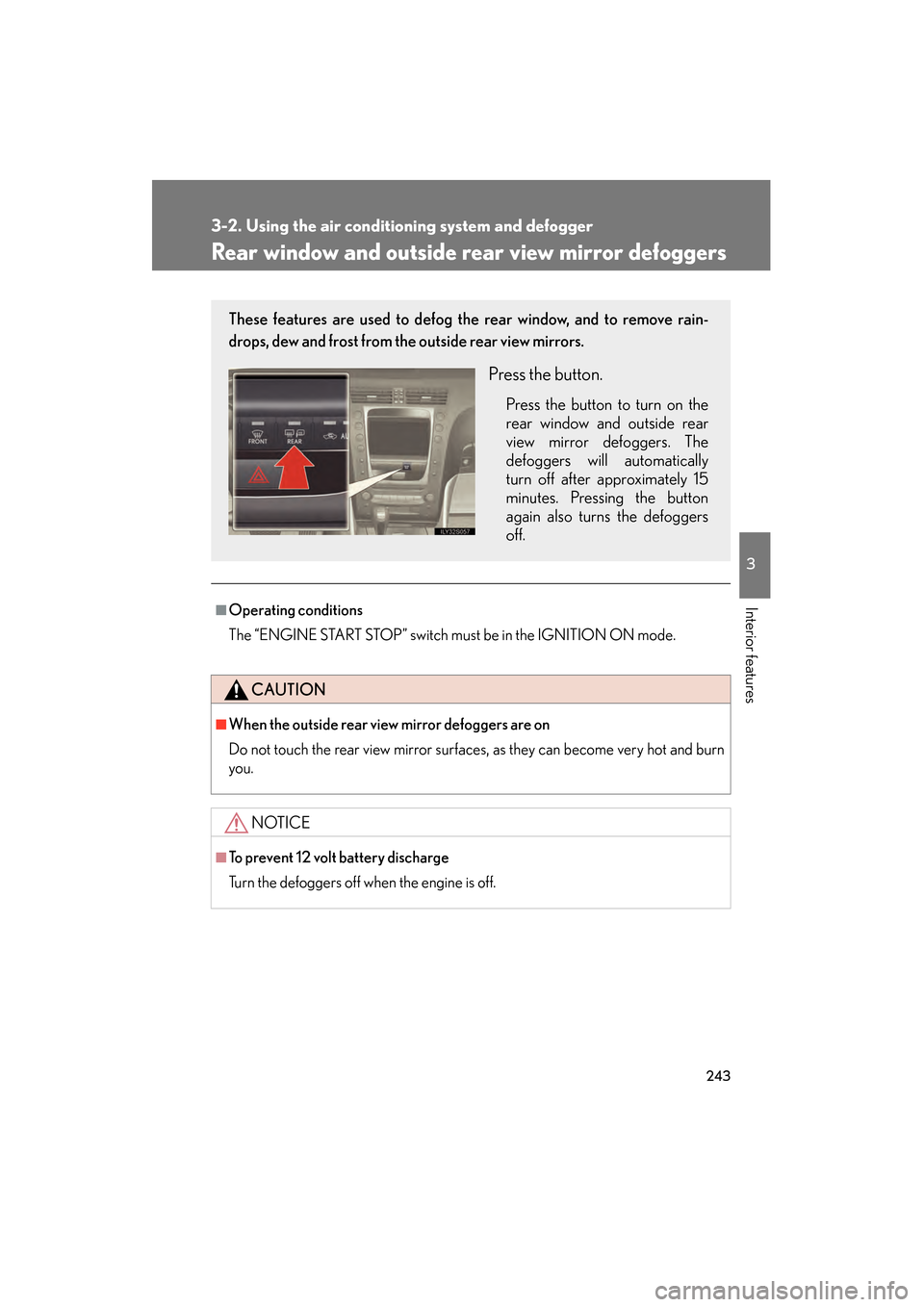
These features are used to defog the rear window, and to remove rain-
drops, dew and frost from the outside rear view mirrors.
Press the button.
Press the button to turn on the
rear window and outside rear
view mirror defoggers. The
defoggers will automatically
turn off after approximately 15
minutes. Pressing the button
again also turns the defoggers
off.
GS_U_G.book Page 243 Monday, April 27, 2009 10:50 AM
Page 248 of 622

247
3-3. Using the audio system
3
Interior features
GS_G_U (OM30B43U)
April 27, 2009 10:48 am
CAUTION
■For vehicles sold in the U.S.A. and Canada
●Pa r t 1 5 o f t h e F CC Ru l e s
FCC Warning:
Any unauthorized changes or modifications to this equipment will void the user’s
authority to operate this device.
●Laser products
• Do not take this unit apart or attempt to make any changes yourself. This is an intricate unit that uses a lase r pickup to retrieve information from the
surface of compact discs. The laser is carefully shielded so that its rays remain
inside the cabinet. Therefore, never try to disassemble the player or alter any
of its parts since you may be exposed to laser rays and dangerous voltages.
• This product utilizes a laser. Use of controls or adjustments or performance of procedures other than
those specified herein may result in hazardous radiation exposure.
NOTICE
■To prevent 12 volt battery discharge
Do not leave the audio system on longer than necessary with the engine off.
■To avoid damaging the audio/video system
Take care not to spill drinks or other fluids over the audio system.
GS_U_G.book Page 247 Monday, April 27, 2009 10:50 AM
Page 255 of 622

254
3-3. Using the audio system
GS_G_U (OM30B43U)
May 7, 2009 6:22 pm
■When the 12 volt battery is disconnected
All preset stations are erased.
■Reception sensitivity
●Maintaining perfect radio reception at all times is difficult due to the continually
changing position of the antenna, differences in signal strength and surrounding
objects, such as trains, transmitters, etc.
●The radio antenna is mounted inside the rear window. To maintain clear radio
reception, do not attach metallic window tinting or other metallic objects to the
antenna wire mounted inside the rear window.
■Receiving XM® Satellite Radio
The optional Lexus genuine satellite radio tuner and antenna allows you to receive
and play XM
® Satellite Radio broadcasts. (Subscription is required. Not available
in Hawaii and Alaska.)
*
●XM® subscriptions
For detailed information about XM® Satellite Radio or to subscribe, visit XM®
on the web at www.xmradio.com or call 1-877-515-3987.
●Radio ID
You will need the radio ID when activating XM
® service or reporting a prob-
lem. Select “CH000” using the dial, and the receiver’s 8-character ID
number will appear.
●Satellite tuner
The tuner supports only Audio Services (Music and Talk) and the accompany-
ing Text Information of XM
® Satellite Radio.
*: Terms and services provided by XM® Satellite Radio are subject to change with-
out notice.
sec_03_03.fm Page 254 Thursday, May 7, 2009 6:22 PM
Page 312 of 622
311
3-4. Using the hands-free system (for cellular phone)
3
Interior features
GS_G_U (OM30B43U)
April 27, 2009 10:48 am
Status displayYou can check such indicators as sig nal strength and battery charge on
the “Telephone” screen.
Connection status
Battery charge
Call area
Signal strength
IndicatorsConditions
Connection status
Blue: Good
Yellow: Bad
: Not connected
Battery charge: Full
: Low
Call area“Rm”: Roaming area
“Hm”: Home area
Signal strengthExcellentTo o b a d
GS_U_G.book Page 311 Monday, April 27, 2009 10:50 AM
Page 313 of 622

312
3-4. Using the hands-free system (for cellular phone)
GS_G_U (OM30B43U)
April 27, 2009 10:48 am
■When using the hands-free system
●The audio system and voice guidance are muted when making a call.
●If both parties speak at the same time, it may be difficult to hear.
●If the received call volume is overly loud, an echo may be heard.
●Try to face toward the microphone as much as possible when speaking.
●In the following circumstances it may be difficult to hear the other party.
• When driving on unsealed roads
• When driving at high speeds
• If a window is open
• If the air conditioning is blowing directly on the microphone
• If the air conditioning is set to high
■Conditions under which the system will not operate
●If using a mobile phone that does not support Bluetooth®.
●If the mobile phone is switched off.
●If you are outside service range.
●If the mobile phone is not connected.
●If the mobile phone’s battery is low.
■Bluetooth® antenna
The antenna is built into the display. If the mobile phone is behind the seat or in the
console box, or touching or covered by metal objects, connection status may dete-
riorate.
GS_U_G.book Page 312 Monday, April 27, 2009 10:50 AM
Page 314 of 622

313
3-4. Using the hands-free system (for cellular phone)
3
Interior features
GS_G_U (OM30B43U)
April 27, 2009 10:48 am
■Battery charge/Signal status
This display may not correspond exactly with the mobile phone itself.
■About Bluetooth®
■Compatible models
Compatible with HFP (Hands Free Profile) Ver. 1.0 and OPP (Object Push Profile)
Ve r. 1 .1 .
If your cellular phone does not supp ort HFP, you cannot enter the Bluetooth
®
phone, and take OPP service individually.
■Certification for the hands-free system
This device complies with Part 15 of the FCC Rules and RSS-210. Operation is sub-
ject to the following two conditions: (1) This device may not cause harmful interfer-
ence, and (2) This device must accept any interference received, including
interference that may cause undesired operation.
FCC WARNING:
Changes or modifications not expressly approved by the party responsible for
compliance could void the user’s authority to operate the equipment.
Radio Frequency Exposure. This device is approved for Mobile Application only
and, to comply with applicable FCC radio frequency exposure regulations, must be
used with a distance of at least 7.9 in. (20 cm) between the antenna and the body of
any person at all time during use. Bluetooth is a registered trademark of
Bluetooth SIG. Inc.
FCC ID: HYQBT0501A
IC ID: 1551A-BT0501A
GS_U_G.book Page 313 Monday, April 27, 2009 10:50 AM
Page 358 of 622
357
3-5. Using the interior lights
3
Interior features
GS_G_U (OM30B43U)
April 27, 2009 10:48 am
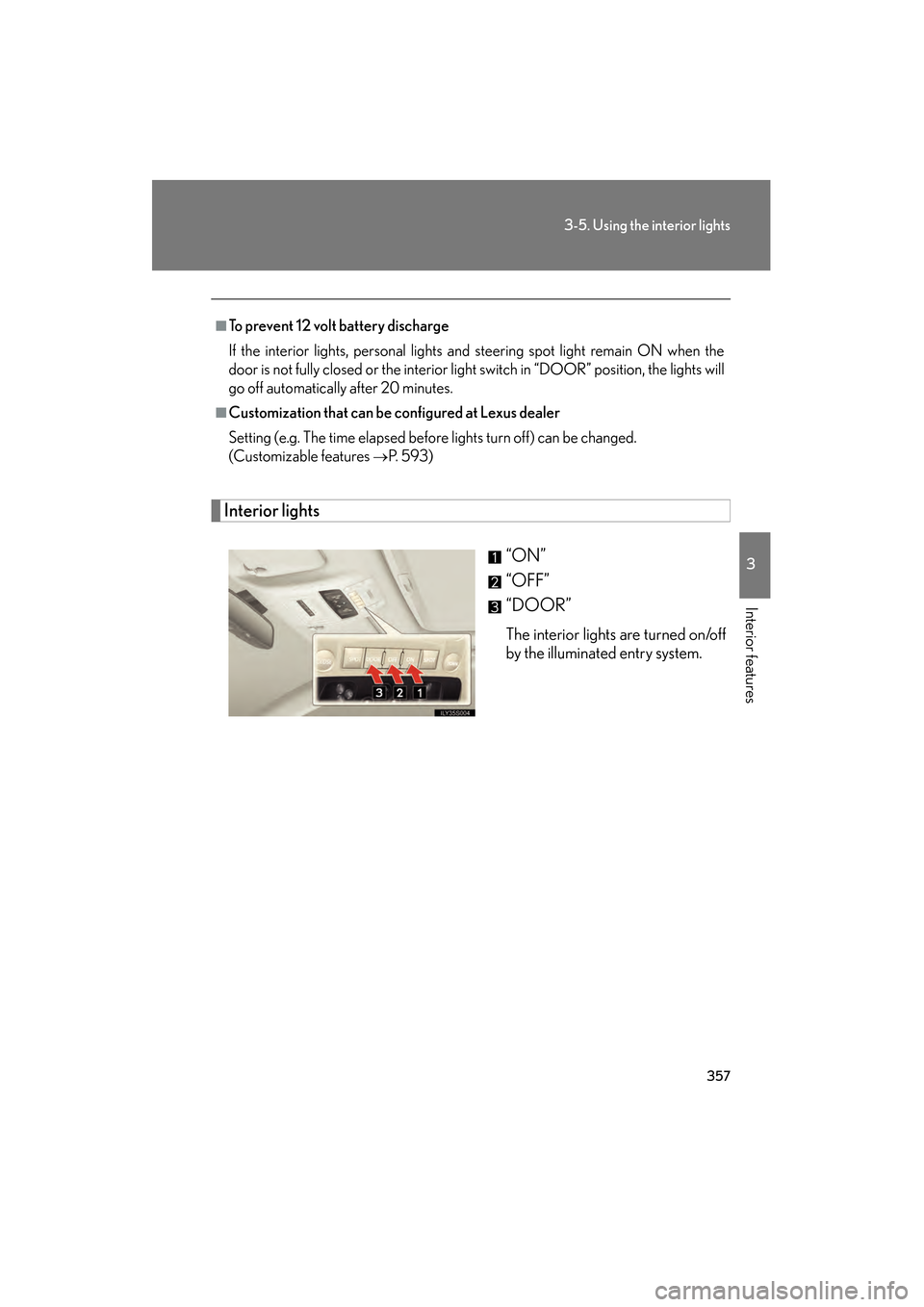
Interior lights“ON”
“OFF”
“DOOR”
The interior lights are turned on/off
by the illuminated entry system.
■To prevent 12 volt battery discharge
If the interior lights, personal lights and steering spot light remain ON when the
door is not fully closed or the interior light switch in “DOOR” position, the lights will
go off automatically after 20 minutes.
■Customization that can be configured at Lexus dealer
Setting (e.g. The time elapsed before lights turn off) can be changed.
(Customizable features
→P. 5 9 3 )
GS_U_G.book Page 357 Monday, April 27, 2009 10:50 AM