Page 124 of 622

When driving2
123
GS_G_U (OM30B43U)
April 27, 2009 10:37 am
2-1. Driving proceduresDriving the vehicle.................. 124
Engine (ignition) switch ......... 133
Automatic transmission ........ 137
Turn signal lever ....................... 142
Parking brake ........................... 143
Horn ............................................ 144
2-2. Instrument cluster Gauges and meters ................ 145
Indicators and warning lights ........................ 149
Multi-information display ...................................... 152
2-3. Operating the lights and windshield wipers
Headlight switch...................... 155
Fog light switch ........................ 158
Windshield wipers and washer ..................................... 159
Headlight cleaner switch...... 164 2-4. Using other driving
systems
Cruise control.......................... 165
Dynamic radar cruise control ...................................... 169
Intuitive parking assist ............ 181
Rear view monitor system .... 196
AVS (Adaptive Variable Suspension System) ............ 199
Driving assist systems ........... 200
PCS (Pre-Collision System) ...... 207
2-5. Driving information Cargo and luggage ................ 212
Vehicle load limits ................... 216
Winter driving tips .................. 217
Trailer towing .......................... 222
Dinghy towing......................... 223
GS_U_G.book Page 123 Monday, April 27, 2009 10:50 AM
Page 141 of 622

140
2-1. Driving procedures
GS_G_U (OM30B43U)
April 27, 2009 10:48 am
■Shift ranges and their functions
●You can choose from 8 levels (GS460) or 6 levels (GS350) of
engine braking force.
● A lower shift range will provide gr eater engine braking force than a
higher shift range, and the engine revolutions will also increase.
● If you accelerate while in ranges “1” to “7” (GS460) or “1” to “5”
(GS350), the shift range may auto matically range up in accordance
with the vehicle’s speed.
■“S” mode
When the shift range is “6” (GS460) or “4” (GS350) or lower, holding the shift
lever toward “+” sets the shift range to “8” (GS460) or “6” (GS350).
■Downshifting restrictions warning buzzer (in the “S” mode)
To help ensure safety and driving perfor mance, downshifting operation may some-
times be restricted. In some circumstance s, downshifting may not be possible even
when the shift lever is operated. (The warning buzzer will sound twice.)
■When driving with the cruise control syst em (or dynamic radar cruise control sys-
tem)
The engine brake will not operate in the “S” mode, even when downshifting to “7”,
“6”, “5” or “4” (GS460) or “5” or “4” (GS350). ( →P. 165, 169)
■Snow mode automatic deactivation
Snow mode is automatically deactivated if the “ENGINE START STOP” switch is
turned to ACCESSORY or IGNITION ON mode after driving in snow mode.
■If the shift lever cannot be shifted from “P”
→P. 5 4 3
GS_U_G.book Page 140 Monday, April 27, 2009 10:50 AM
Page 156 of 622
155
2
When driving
GS_G_U (OM30B43U)
April 27, 2009 10:40 am
2-3. Operating the lights and windshield wipers
Headlight switch
Turning on the high beam headlightsWith the headlights on, push the
lever forward to turn on the high
beams.
Pull the lever back to the center
position to turn the high beams off.
Pull the lever toward you to turn
on the high beams.
Release to turn them off. You can
flash the high beams with the head-
lights on or off.
The headlights can be operated manually or automatically.
The side marker, parking,
tail, license plate and
instrument panel lights
turn on.
The headlights and all lights listed above turn
on.
The headlights and all the lights listed above turn
on and off automatically.
(When the “ENGINE
START STOP” switch is
in IGNITION ON
mode.)
U.S.A. Canada
GS_U_G.book Page 155 Monday, April 27, 2009 10:50 AM
Page 164 of 622

163
2-3. Operating the lights and windshield wipers
2
When driving
GS_G_U (OM30B43U)
April 27, 2009 10:40 am
■If no windshield washer fluid sprays
Check that the washer nozzles are not blocked if there is washer fluid in the wind-
shield washer fluid reservoir.
■If the components get extremely hot or cold
The system will turn off if the components get extremely hot (more than 194 °F
[90 °C]) or cold (less than -22 °F [-30 °C]).
■Customization that can be configured at Lexus dealer
Settings (e.g. drip prevention function) can be changed.
(Customizable features → P. 5 9 3 )
CAUTION
■Caution regarding the use of windshield wipers in “AUTO” mode
The windshield wipers may operate unexpectedly if the sensor is touched or the
windshield is subject to vibration in “AUT O” mode. Take care that your fingers or
anything else do not become caught in the windshield wipers.
NOTICE
■When the windshield is dry
Do not use the wipers, as they may damage the windshield.
■When there is no washer fluid spray from the nozzle
Damage to the washer fluid pump may be caused if the lever is pulled toward you
and held continually.
GS_U_G.book Page 163 Monday, April 27, 2009 10:50 AM
Page 167 of 622
166
2-4. Using other driving systems
GS_G_U (OM30B43U)
April 27, 2009 10:48 am
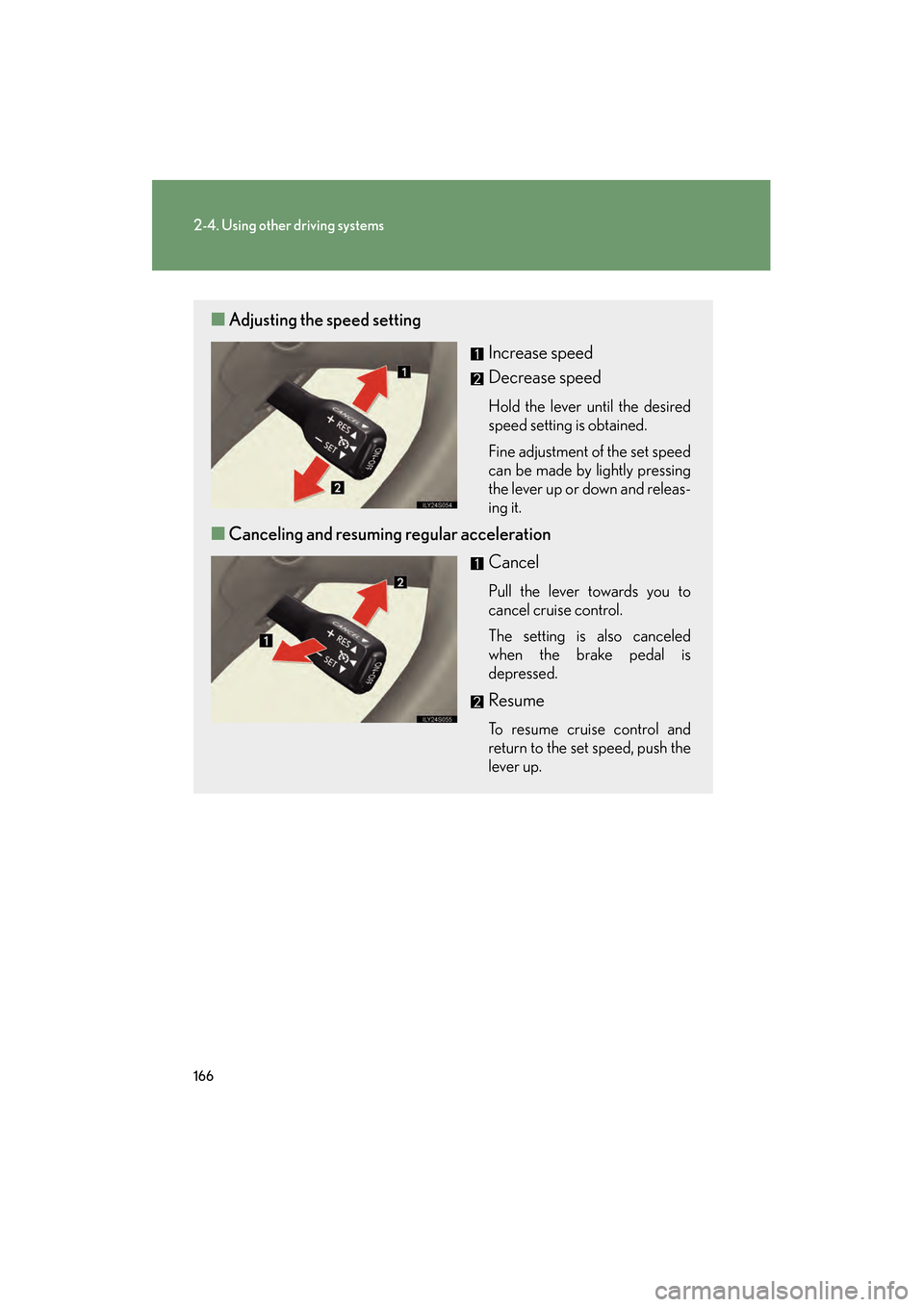
■Adjusting the speed setting
Increase speed
Decrease speed
Hold the lever until the desired
speed setting is obtained.
Fine adjustment of the set speed
can be made by lightly pressing
the lever up or down and releas-
ing it.
■Canceling and resuming regular acceleration
Cancel
Pull the lever towards you to
cancel cruise control.
The setting is also canceled
when the brake pedal is
depressed.
Resume
To resume cruise control and
return to the set speed, push the
lever up.
GS_U_G.book Page 166 Monday, April 27, 2009 10:50 AM
Page 173 of 622
172
2-4. Using other driving systems
GS_G_U (OM30B43U)
April 27, 2009 10:48 am
■Canceling and resuming the speed setting
Cancel
Pull the lever towards you to
cancel cruise control.
The setting is also canceled
when the brake pedal is
depressed.
Resume
To resume cruise control and
return to the set speed, push the
lever up.
■Changing the vehicle-to-vehicle distance
Each pull of the switch changes
the vehicle-to-vehicle distance
Long
Medium
Short
The vehicle-to-vehicle distance
is automatically set to the long
mode when the “ENGINE
START STOP” switch is set to
the IGNITION ON mode.
A mark will be displayed to indi-
cate the presence of the vehicle
if a vehicle is running ahead of
you.
Preceding
vehicle mark
GS_U_G.book Page 172 Monday, April 27, 2009 10:50 AM
Page 194 of 622

193
2-4. Using other driving systems
2
When driving
GS_G_U (OM30B43U)
April 27, 2009 10:48 am
●In the following situations, the intuitive parking assist may not function correctly,
possibly leading to an accident.
• There is ice, snow or mud on the sensors. (Wiping the sensors will resolve this
problem.)
• The sensor area is frozen. (Thawing the area will resolve this problem.) In especially cold weather, if a sensor is frozen the screen may show an abnor-
mal display, or obstacles may not be detected.
• The vehicle angle is especially wide.
• In harsh sunlight or intense cold weather.
• When driving on bumpy, sloped or gravel roads, or over grass.
• If there is something producing ultrasonic waves nearby, such as another vehicle’s horn, motorcycle engine nois e, air braking sound from heavy-duty
vehicles, or another vehicle using the intuitive parking assist.
• In heavy rain, or if water is splashed on the sensors.
• If a commercial fender pole or radio antenna is installed.
• If towing eyelet is installed on your vehicle.
• If moving towards a high curb or a curb corner.
• Objects such as signs may cause the detection distance to shorten.
• The area directly under the bumpers is not detected. Objects lower than the sens ors or thin stakes etc. may be detected initially,
but as they draw closer, they may cease to be detected.
• If obstacles draw too close to the sensor.
■Obstacles that may not be detected correctly
The following obstacles may not be detected.
●Thin objects such as wire, fencing or rope.
●Objects that absorb sound wave s, such as cotton or snow.
●Objects with sharp corners.
●Objects where the upper section projects out over the lower section.
●Low objects.
■If the display flashes and a message is displayed
→P. 5 2 6
GS_U_G.book Page 193 Monday, April 27, 2009 10:50 AM
Page 213 of 622

212
GS_G_U (OM30B43U)
April 27, 2009 10:48 am
2-5. Driving information
Cargo and luggage
Capacity and distributionCargo capacity depends on the to tal weight of the occupants.
(Cargo capacity) = (Total load capa city) — (Total weight of occupants)
Steps for Determining Correct Load Limit—
(1) Locate the statement “The combined weight of occupants and cargo should never exceed XXX kg or XXX lbs.” on your vehicle’s
placard.
(2) Determine the combined weight of the driver and passengers that
will be riding in your vehicle.
(3) Subtract the combined weight of the driver and passengers from
XXX kg or XXX lbs.
Take notice of the following information about storage precautions, cargo
capacity and load.
● Stow cargo and luggage in the trunk whenever possible. Be sure all
items are secured in place.
● Be careful to keep the vehicle leve l. Placing the weight as far for-
ward as possible helps maintain vehicle balance.
● For better fuel economy, do not carry unnecessary weight.
GS_U_G.book Page 212 Monday, April 27, 2009 10:50 AM