Page 243 of 622

242
3-2. Using the air conditioning system and defogger
GS_G_U (OM30B43U)
April 20, 2009 4:34 pm
■Automatic mode for air intake control
In automatic mode, the system detects exhaust gas and other pollutants and auto-
matically switches between outside air and recirculated air modes.
When the air conditioning is off, and the fan is operating, turning the auto mode on
will activate the air conditioning system.
■Micro dust and pollen filter
●In order to prevent the windows from fogging up when the outside air is cold,
the following may occur.
• Outside air mode does not switch to .
• The air conditioning syst em operates automatically.
• The operation cancels after 1 minute.
●In rainy weather, the windows may fog up. Press .
■When the indicator light on flashes
Touch and turn off the air conditioning system before turning it on once
more. There may be a problem in the air conditioning system if the indicator light
continues to flash. Turn the air conditioning system off and have it inspected by your
Lexus dealer.
CAUTION
■To prevent the windshield from fogging up
Do not use during cool air operation in extremely humid weather. The differ-
ence between the temperature of the outside air and that of the windshield can
cause the outer surface of the windshield to fog up, blocking your vision.
NOTICE
■To prevent 12 volt battery discharge
Do not leave the automatic air conditioning system on longer than necessary when
the engine is off.
GS_U_G.book Page 242 Monday, April 27, 2009 10:50 AM
Page 282 of 622

281
3-3. Using the audio system
3
Interior features
GS_G_U (OM30B43U)
April 27, 2009 10:48 am
■Setting subtitle language
To u c h .
Select the desired language.
If you cannot find the desired language, touch and input the
desired language code. ( →P. 2 8 2 )
: Returns to previous screen.
■ Setting menu language
To u c h .
Select the desired language.
If you cannot find the desired language, touch and input the
desired language code. ( →P. 2 8 2 )
: Returns to previous screen.
■ Setting angle mark ON or OFF
If the DVD has angle options, you can turn the angle mark on or off.
Touch . Each time you touch the button, the multi angle
mark on the screen turns on or off alternately.
■ Parental lock
To u c h .
Input the 4-digit password and
then touch .
If you enter wrong numbers, touch to delete the numbers.
Touch 10 times to initialize
the personal code.
Select a parental level (1 - 8).
: Returns to previous screen.
STEP1
STEP2
STEP1
STEP2
STEP1
STEP2
STEP3
GS_U_G.book Page 281 Monday, April 27, 2009 10:50 AM
Page 350 of 622
349
3-4. Using the hands-free system (for cellular phone)
3
Interior features
GS_G_U (OM30B43U)
April 27, 2009 10:48 am
Input the current security code,
and touch .
Input the new security code, and touch .
A confirmation message will appe ar. If everything is correct,
touch .
■ Enabling security
Press .
Touch on the “Information” screen.
Touch on the “Telephone” screen.
Touch on the “S ettings” screen.
Touch in the “Phone Book Lo ck” section of the “Phone
Book Lock” screen.
Input the security code, and touch .STEP6
STEP7
STEP8
STEP1
STEP2
STEP3
STEP4
STEP5
STEP6
GS_U_G.book Page 349 Monday, April 27, 2009 10:50 AM
Page 351 of 622
350
3-4. Using the hands-free system (for cellular phone)
GS_G_U (OM30B43U)
April 27, 2009 10:48 am
■Setting the security code to default
Press .
Touch on the “Information” screen.
Touch on the “Telephone” screen.
Touch on the “Settings” screen.
Touch on the “Phone Book Lock” screen.
Input the security code on the “Security Code” screen, then
touch .
A confirmation message will appe ar. If everything is correct,
touch .
STEP1
STEP2
STEP3
STEP4
STEP5
STEP6
STEP7
GS_U_G.book Page 350 Monday, April 27, 2009 10:50 AM
Page 352 of 622

351
3-4. Using the hands-free system (for cellular phone)
3
Interior features
GS_G_U (OM30B43U)
April 27, 2009 10:48 am
■If the “Phone Book Lock” is set
If the security code is input and the “Phone Book Lock” set, the following functions
are locked.
●Display of the phone book screen and transferring, registering, editing, deleting
the phone book data.
●Display of speed dial screen , registering, deleting the speed dial and speed dial-
ing.
●Display of the other party’s name for calls being received or made.
●Displayed of dialed numbers screen and received calls screen, deleting dialed
numbers and received numbers.
●Display of phone information screen.
●Changing the security code.
The speed dial screen is not displayed while driving.
■When changing the security code
●Be sure to choose a number difficult for strangers to guess.
●Do not forget the security code. Even your Lexus dealer will be unable to dis-
able the security. If you do forget the code, initialize all personal data. ( →P. 2 3 3 )
GS_U_G.book Page 351 Monday, April 27, 2009 10:50 AM
Page 357 of 622
356
GS_G_U (OM30B43U)
April 27, 2009 10:48 am
3-5. Using the interior lights
Interior lights list
Illuminated entry system: The various lights automatically turn on/off
according to the presence of the electronic key, whether the doors are
locked/unlocked, whether the doors are open/closed, and the “ENGINE
START STOP” switch mode.
When the instrument panel light control switch is turned to minimum, the foot
lights, inside door handle lights and shift lever light will turn off. (→ P. 1 4 6 )
Outer foot light
Steering spot light
Front personal lights
(→P. 3 5 8 )
Shift lever light
Front interior lights (→ P. 3 5 7 )
Inside door handle lightsRear personal lights (→P. 3 5 8 )
Rear interior lights
Door courtesy lights
Foot light
Front scuff light
GS_U_G.book Page 356 Monday, April 27, 2009 10:50 AM
Page 361 of 622
360
3-6. Using the storage features
GS_G_U (OM30B43U)
April 27, 2009 10:48 am
Glove boxOpen (push button)
Unlock with the mechanical key
Lock with the mechanical key
■Glove box light
The glove box light turns on when the headlight switch is on.
■Trunk opener main switch
The trunk opener main switch is located in the glove box. ( →P. 4 9 )
CAUTION
■While driving
Keep the glove box closed.
Injuries may result in the event of sudden braking, sudden swerving or an accident.
GS_U_G.book Page 360 Monday, April 27, 2009 10:50 AM
Page 362 of 622
361
3-6. Using the storage features
3
Interior features
GS_G_U (OM30B43U)
April 27, 2009 10:48 am
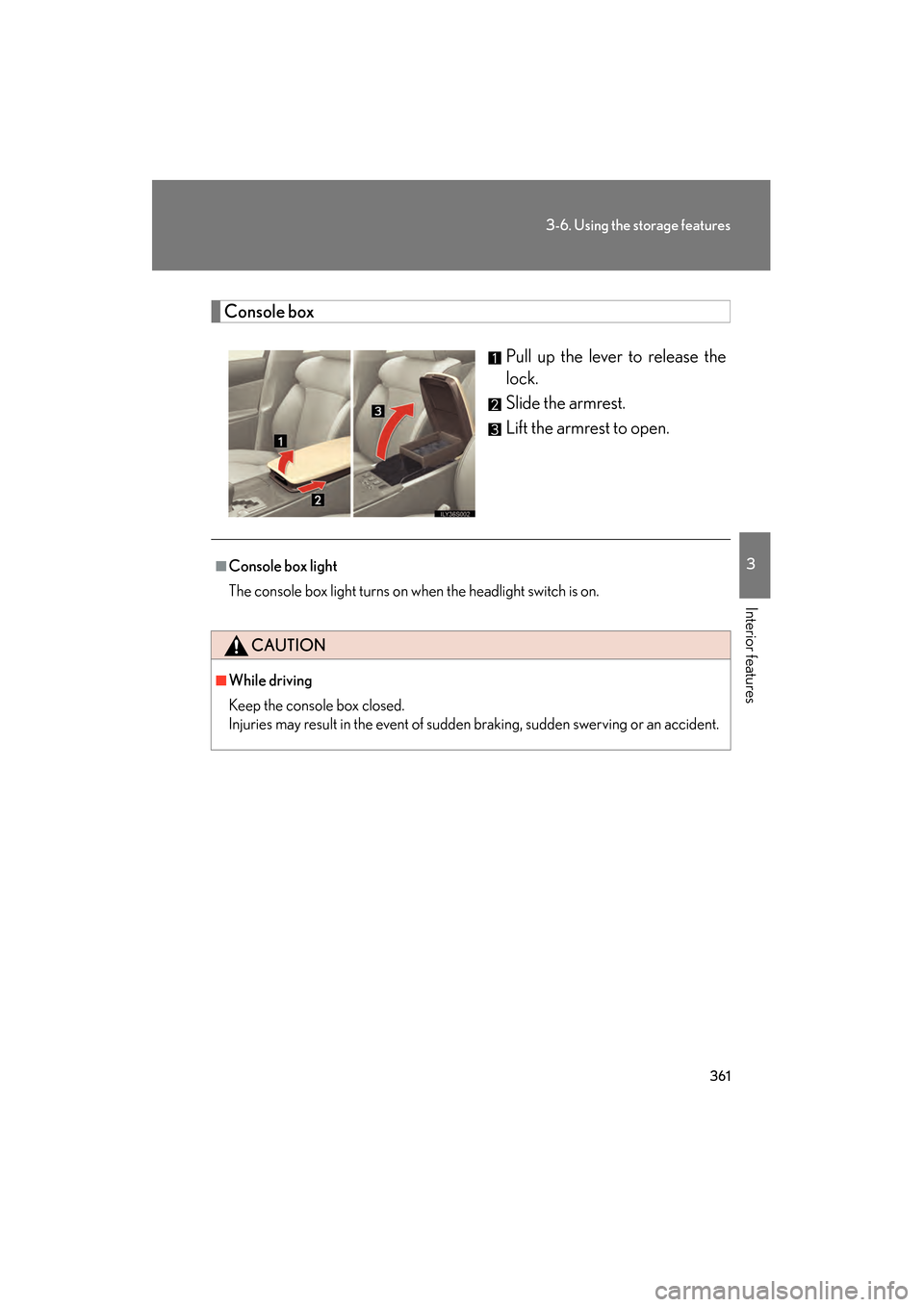
Console boxPull up the lever to release the
lock.
Slide the armrest.
Lift the armrest to open.
■Console box light
The console box light turns on when the headlight switch is on.
CAUTION
■While driving
Keep the console box closed.
Injuries may result in the event of sudden braking, sudden swerving or an accident.
GS_U_G.book Page 361 Monday, April 27, 2009 10:50 AM