Page 80 of 291
Knowing your vehicle70
3
1
2
3
4
5
6
7
8
9
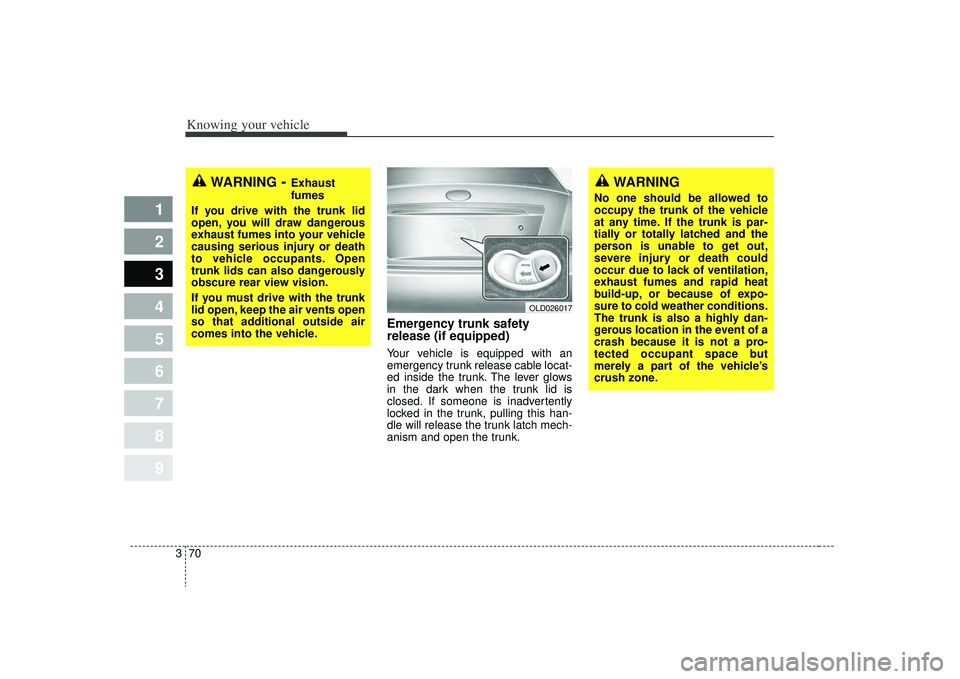
Emergency trunk safety
release (if equipped)Your vehicle is equipped with an
emergency trunk release cable locat-
ed inside the trunk. The lever glows
in the dark when the trunk lid is
closed. If someone is inadvertently
locked in the trunk, pulling this han-
dle will release the trunk latch mech-
anism and open the trunk.
WARNING
- Exhaust
fumes
If you drive with the trunk lid
open, you will draw dangerous
exhaust fumes into your vehicle
causing serious injury or death
to vehicle occupants. Open
trunk lids can also dangerously
obscure rear view vision.
If you must drive with the trunk
lid open, keep the air vents open
so that additional outside air
comes into the vehicle.
OLD026017
WARNING
No one should be allowed to
occupy the trunk of the vehicle
at any time. If the trunk is par-
tially or totally latched and the
person is unable to get out,
severe injury or death could
occur due to lack of ventilation,
exhaust fumes and rapid heat
build-up, or because of expo-
sure to cold weather conditions.
The trunk is also a highly dan-
gerous location in the event of a
crash because it is not a pro-
tected occupant space but
merely a part of the vehicle’s
crush zone.
Page 96 of 291

Knowing your vehicle86
3
1
2
3
4
5
6
7
8
9
Digital clock (if equipped)Whenever the battery terminals,
ROOM fuse, or Power Connect are
disconnected, you must reset the
time.
When the ignition switch is in the
ACC or ON position, the clock but-
tons operate as follows:
HOUR:
Pressing the “H” button with your
finger, a pencil or similar object will
advance the time displayed by one
hour.
MINUTE: Pressing the “M” button with your
finger, a pencil or similar object will
advance the time displayed by one
minute.
Display conversionTo change the 12 hour format to the
24 hour format, press the “H” and “M”
buttons at the same time for more
than 4 seconds.
For example, if the “H” and “M” but-
tons are pressed at the same time for
more than 4 seconds while the time
is 10:15 p.m., the display will be
changed to 22:15.
CAUTION
Use when the engine is run- ning, and remove a plug fromthe power outlet after usingthe electric appliance. Usingelectrical accessories whenthe engine is not running mayresult in battery discharge.
Only use 12V accessories which are rated for less than10A maximum current draw.
Adjust the air-conditioner or heater to the lowest operationlevel when you have to use thepower socket while using air-conditioner or heater.
Close the cover when not in use.
Some electronic devices can cause electronic interferencewhen plugged into a vehicle'spower outlet. These devicesmay cause excessive audiostatic and malfunctions inother electronic systems ordevices used in your vehicle.
OLD038151N
Page 112 of 291

Knowing your vehicle102
3
1
2
3
4
5
6
7
8
9
✽ ✽
NOTICE• To assure proper operation of the
unit, keep the vehicle interior tem-
perature within a normal range by
using the vehicle's air conditioning
or heating system.
• When replacing the fuse, replace it with a fuse having the correct
capacity.
• All stored bookmarks are all erased when the car battery is dis-
connected or power to the vehicle
is lost. If this occurs, the book-
marks will have to be reset.
• This equipment is designed to be used only in a 12 volt DC battery
system with negative ground.
• This unit is made of precision parts. Do not attempt to disassem-
ble or adjust any parts.
• Do not expose this equipment (including the speakers and CD)
to water or excessive moisture.
CAUTION
Do not insert warped or poor
quality discs into the CD play-er as damage to the unit mayoccur.
Do not insert anything like coins into the player slot asdamage to the unit may occur.
Do not place beverages close to the audio system. The play-back mechanism may be dam-aged if you spill them.
Do not strike or allow anything to impact the audio system,damage to the system mecha-nisms could occur.
Off-road or rough surface driving may cause the com-pact disc to skip. Do not usethe compact disc when driv-ing in such conditions asdamage to the compact discface could occur.
(Continued)
(Continued) Do not attempt to grab or pull the compact disc out while thedisc is being pulled into theaudio unit by the self-loadingmechanism. Damage to theaudio unit and compact disccould occur.
Avoid using recorded com- pact discs in your audio unit.Original compact discs arerecommended for bestresults.
WARNING
When driving your vehicle, be
sure to keep the volume of the
unit set low enough to allow you
to hear sounds coming from the
outside.
Page 120 of 291

Knowing your vehicle110
3
1
2
3
4
5
6
7
8
9
✽ ✽
NOTICE• To assure proper operation of the
unit, keep the vehicle interior tem-
perature within a normal range by
using the vehicle's air conditioning
or heating system.
• When replacing the fuse, replace it with a fuse having the correct
capacity.
• All stored bookmarks are all erased when the car battery is dis-
connected or power to the vehicle
is lost. If this occurs, the book-
marks will have to be reset.
• This equipment is designed to be used only in a 12 volt DC battery
system with negative ground.
• This unit is made of precision parts. Do not attempt to disassem-
ble or adjust any parts.
• Do not expose this equipment (including the speakers and tape)
to water or excessive moisture.
CAUTION
Do not insert warped or poor
quality discs into the CD play-er as damage to the unit mayoccur.
Do not insert anything like coins into the player slot asdamage to the unit may occur.
Do not place beverages close to the audio system. The play-back mechanism may be dam-aged if you spill them.
Do not strike or allow anything to impact the audio system,damage to the system mecha-nisms could occur.
Off-road or rough surface driving may cause the com-pact disc to skip. Do not usethe compact disc when driv-ing in such conditions asdamage to the compact discface could occur.
(Continued)
(Continued) Do not attempt to grab or pull the compact disc out while thedisc is being pulled into theaudio unit by the self-loadingmechanism. Damage to theaudio unit and compact disccould occur.
Avoid using recorded com- pact discs in your audio unit.Original compact discs arerecommended for bestresults.
WARNING
When driving your vehicle, be
sure to keep the volume of the
unit set low enough to allow you
to hear sounds coming from the
outside.
Page 138 of 291

Driving your vehicle12
4
1
2
3
4
5
6
7
8
9
Disc brakes wear indicator Your vehicle has disc brakes.
When your brake pads are worn and
it's time for new pads, you will hear a
high-pitched warning sound from
your front brakes or rear brakes (if
equipped). You may hear this sound
come and go or it may occur when-
ever you depress the brake pedal.
Please remember that some driving
conditions or climates may cause a
brake squeal when you first apply (or
lightly apply) the brakes. This is nor-
mal and does not indicate a problem
with your brakes.
WARNING
- Brake wear
This brake wear warning sound
means your vehicle needs serv-
ice. If you ignore this audible
warning, you will eventually lose
braking performance, which
could lead to a serious accident.
CAUTION
Always replace brake pads as complete front or rear axle sets.
(Continued)
Wet brakes may result in the vehicle not slowing down at
the usual rate and pulling to
one side when the brakes are
applied. Applying the brakes
lightly will indicate whether
they have been affected in this
way. Always test your brakes
in this fashion after driving
through deep water. To dry the
brakes, apply them lightly
while maintaining a safe for-
ward speed until brake per-
formance returns to normal.
CAUTION
To avoid costly brake repairs, donot continue to drive with wornbrake pads.
Page 173 of 291
447
1
2
3
4
5
6
7
8
9
Driving your vehicle
MANUAL CLIMATE CONTROL SYSTEM (IF EQUIPPED)
OLD029120
1. Fan speed control knob
2. Mode selection knob
3. Temperature control knob4. Rear window defroster button
5. Air intake control button
6. Air conditioning button (if equipped)
1
2
3
5
4
6
Page 178 of 291
Driving your vehicle52
4
1
2
3
4
5
6
7
8
9
✽ ✽
NOTICEProlonged use of the air condition-
ing with the “recirculated air posi-
tion” selected, will result in exces-
sively dry air in the passenger com-
partment.
Air conditioning button
(if equipped) Push the A/C button to turn the air
conditioning system on (indicator
light will illuminate). Push the button
again to turn the air conditioning sys-
tem off.
WARNING
- Reciruclated
air
Continued climate control system operation in the recir-
culated air position may allow
humidity to increase inside
vehicle which may fog the
glass and obscure visibility.
Continued climate control system operation in the
reciruclated air position can
slightly reduce oxygen levels
which can lead to cause
drowsiness or sleepiness, and
loss of vehicle control. Set the
air intake control to the out-
side (fresh) air position as
much as possible while driv-
ing.
OLD026127
Page 179 of 291

453
1
2
3
4
5
6
7
8
9
Driving your vehicle
System OperationVentilation1. Set the mode to the position.
2. Set the air intake control to theoutside (fresh) air position.
3. Set the temperature control to the desired position.
4. Set the fan speed control to the desired speed.
Heating1. Set the mode to the position.
2. Set the air intake control to theoutside (fresh) air position.
3. Set the temperature control to the desired position.
4. Set the fan speed control to the desired speed.
5. If dehumidified heating is desired, turn the air conditioning system (if
equipped) on.
If cool air is desired at face level for bi-level operation, set the mode to
the position.
If the windshield fogs up, set the mode to the ,position.
Air conditioning (if equipped) All Kia Air Conditioning Systems are
filled with environmentally friendly
R-134a refrigerant which is not dam-
aging to the ozone layer.
1. Start the engine. Push the air con-
ditioning button.
2. Set the mode to the position.
3. Set the air intake control to the outside air or recirculated air posi-
tion.
4. Set the temperature control knob to the desired position.
5. Set the fan speed control to the desired speed.
6. Adjust the fan speed control and temperature control to maintain
maximum comfort.
If warmer air is desired at floor level for bi-level operation, set the
mode to the position and
adjust the temperature control to
maintain maximum comfort.

