2009 KIA Borrego lock
[x] Cancel search: lockPage 198 of 425

4 121
Features of your vehicle
D290100AHMRoof rack (if equipped)If the vehicle has a roof rack, you can
load cargo on top of your vehicle.
The two crossbars on the roof rack can
be repositioned forward or rearward for
conveniently loading cargo or a roof car-
rier. To move the crossbar, pull the lever
and move the crossbar to the desired
position. Release the lever and lock the
crossbar by moving the crossbar slightly
forward or rearward.
For your convenience and to prevent
damage, with an assistant on the oppo-
site side of the vehicle, pull and hold the
lever on each side, then move the cross
bar to the desired position.
✽ ✽NOTICE• The crossbars (if equipped) should be
placed in the proper load carrying
positions prior to placing items onto
the roof rack.
• If the vehicle is equipped with a sun- roof, be sure not to position cargo onto
the roof rack in such a way that itcould interfere with sunroof operation.• When the roof rack is not being usedto carry cargo, the crossbars may
need to be repositioned if wind noise is
detected.
EXTERIOR FEATURES
CAUTION
When carrying cargo on the roof
rack, take the necessary precau-tions to make sure the cargo doesnot damage the roof of the vehicle.
When carrying large objects on the roof rack, make sure they donot exceed the overall roof length or width.
WARNING
The following specification is the maximum weight that can be
loaded onto the roof rack.
Distribute the load as evenly as
possible across the crossbars (if
equipped) and roof rack and
secure the load firmly.
Loading cargo or luggage in
excess of the specified weight
limit on the roof rack may dam-
age your vehicle.
The vehicle center of gravity will be higher when items are loaded
onto the roof rack. Avoid sudden
starts, braking, sharp turns,
abrupt maneuvers or high speeds
that may result in loss of vehicle
control or rollover resulting in an
accident.
(Continued)
OUN026355 ROOF
100 kg (220 lbs.)
RACK EVENLY DISTRIBUTED
Page 200 of 425
4123
Features of your vehicle
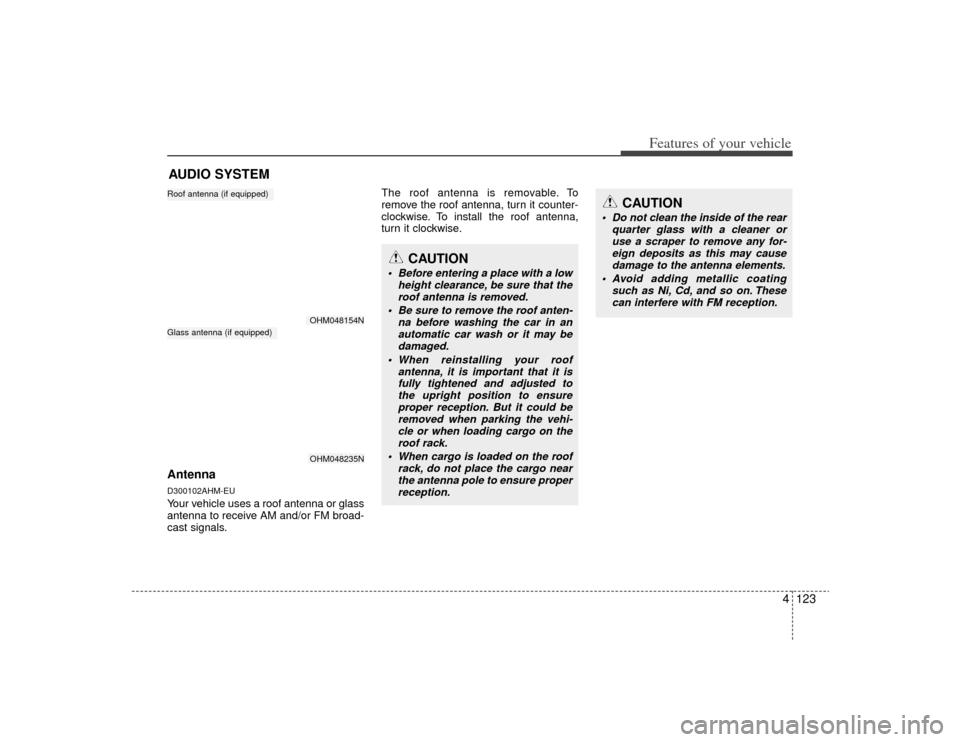
AntennaD300102AHM-EUYour vehicle uses a roof antenna or glass
antenna to receive AM and/or FM broad-
cast signals.The roof antenna is removable. To
remove the roof antenna, turn it counter-
clockwise. To install the roof antenna,
turn it clockwise.AUDIO SYSTEM
OHM048154NOHM048235N
Roof antenna (if equipped)Glass antenna (if equipped)
CAUTION
• Before entering a place with a low
height clearance, be sure that theroof antenna is removed.
Be sure to remove the roof anten- na before washing the car in anautomatic car wash or it may be damaged.
When reinstalling your roof antenna, it is important that it isfully tightened and adjusted tothe upright position to ensure proper reception. But it could beremoved when parking the vehi-cle or when loading cargo on the roof rack.
When cargo is loaded on the roof rack, do not place the cargo nearthe antenna pole to ensure proper reception.
CAUTION
Do not clean the inside of the rear quarter glass with a cleaner oruse a scraper to remove any for-eign deposits as this may cause damage to the antenna elements.
Avoid adding metallic coating such as Ni, Cd, and so on. Thesecan interfere with FM reception.
Page 203 of 425
Features of your vehicle126
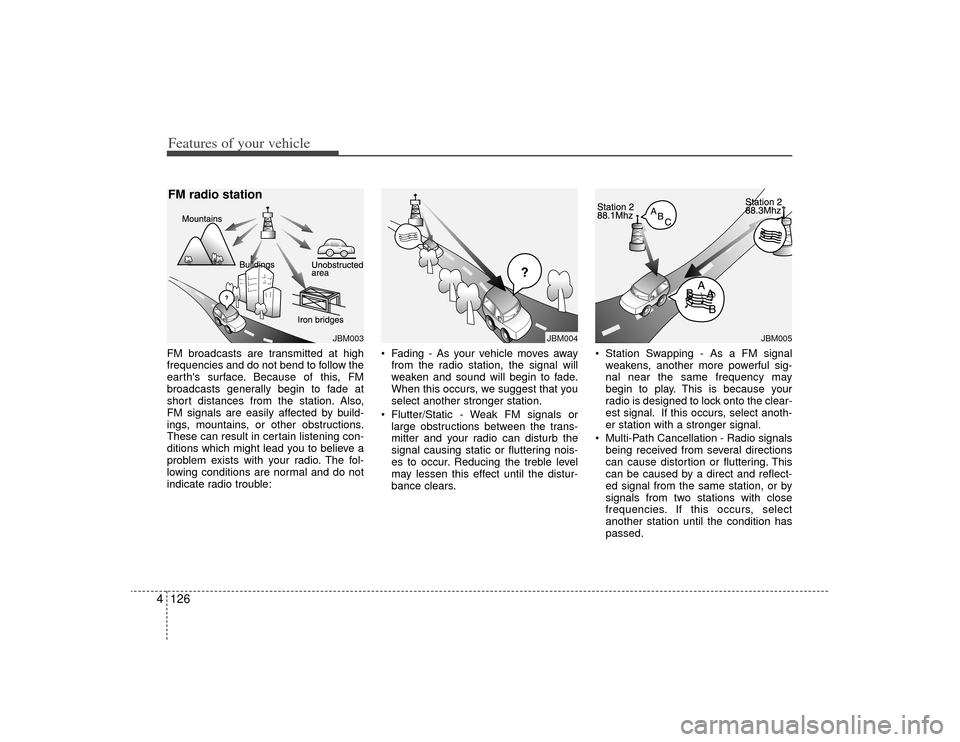
4FM broadcasts are transmitted at high
frequencies and do not bend to follow the
earth's surface. Because of this, FM
broadcasts generally begin to fade at
short distances from the station. Also,
FM signals are easily affected by build-
ings, mountains, or other obstructions.
These can result in certain listening con-
ditions which might lead you to believe a
problem exists with your radio. The fol-
lowing conditions are normal and do not
indicate radio trouble: Fading - As your vehicle moves away
from the radio station, the signal will
weaken and sound will begin to fade.
When this occurs, we suggest that you
select another stronger station.
Flutter/Static - Weak FM signals or large obstructions between the trans-
mitter and your radio can disturb the
signal causing static or fluttering nois-
es to occur. Reducing the treble level
may lessen this effect until the distur-
bance clears. Station Swapping - As a FM signal
weakens, another more powerful sig-
nal near the same frequency may
begin to play. This is because your
radio is designed to lock onto the clear-
est signal. If this occurs, select anoth-
er station with a stronger signal.
Multi-Path Cancellation - Radio signals being received from several directions
can cause distortion or fluttering. This
can be caused by a direct and reflect-
ed signal from the same station, or by
signals from two stations with close
frequencies. If this occurs, select
another station until the condition has
passed.
JBM005
¢¢¢
JBM004
JBM003
FM radio station
Page 208 of 425

4131
Features of your vehicle
How to Activate RADIO,
SET UP, VOLUME Control1. FM/AM Selection Button The FM/AM button toggles between FM
and AM. Listed below are the paths as
the system switches from FM to AM and
back to FM.
FM/AM : FM1
➟FM2
➟AM
➟FM1...
FM : FM1
➟FM2
➟FM1...
2. Power ON/OFF Button & Volume Control Knob Turns the audio system on/off when
the ignition switch is on ACC or ON.
If the knob is turned clockwise/counter- clockwise, the volume will increase
/decrease.3. Automatic Channel Selection Button When the [TRACK ] is pressed, it
will automatically tune to the next lower
station.
When the [SEEK ] is pressed, it will automatically tune to the next higher
station.
4. SCAN Selection Button When the button is pressed, it auto-matically scans the radio stations
upwards.
The SCAN feature steps through each station, starting from the initial station,
for ten seconds.
Press the [SCAN] button again to stop the scan feature and to listen to the
currently selected channel.5. Preset Selection Button Press [1]~[6] buttons less than 0.8 sec-ond to play the station saved in each
button.
Press [1]~[6] b utton more than 0.8 sec-
ond or longer to save the current station
to the respective button with a beep.6. TUNE/AUDIO KnobIf the knob is turned clockwise/counter-
clockwise, the frequency will increase/
decrease.
(AM 10kHz, FM 200kHz)
■Audio Setup MODE Press and Rotate [AUDIO] repeatedly to
choose the desired mode.
Each press changes the mode as below :
(Hierarchy 4 (AUTO VOLUME CON-
TROL) mode is only selected in the CDP.)
Hierarchy 1
Hierarchy 2
Page 214 of 425

4137
Features of your vehicle
10. Track (File) Search Knob andENTER Button Turn this knob clockwise to display the
Track NO (File name) after the current
song.
Turn this button counterclockwise to display the Track NO (File Name)
before the current song.
To select the displayed song, press the button.11. FOLDER Search Button Folder name/File name (the first songin the folder) is moved up or down from
the currently playing folder.
To select the displayed folder, press ENTER (NO.10) button.12. INFORMATION ButtonDisplays the information of the current CD
TRACK (FILE) as below when the button
is pressed each time.
CDDA : DISC TITLE
➟DISC ARTIST
➟
TRACK TITLE
➟TRACK ARTIST
➟TOTAL
TRACK...
MP3/WMA : FILE NAME
➟TITLE
➟
ARTIST
➟ALBUM
➟FOLDER NAME
➟
TOTAL FILE...
13. DISC UP/DOWN Button (CDC ONLY)Disc is moved up or down from the cur-
rently playing disc.14. CD Loading Button (CDC ONLY)How to load a CD
Press [LOAD] for less than 0.8 second.
An empty slot is selected and the CD
number indicator(a) blinks on the LCD.
After "WAIT" is displayed for a moment, "INSERT DISC(1~6)" is diplayed and
the CD slot indicator(b) blinks.
Insert a CD while the slot indicator blinks.
How to load CDs (ALL Load)
Press [LOAD] for more than 0.8 sec- ond.
An empty slot is selected and the CD number indicator (a) blinks on the LCD.
After "WAIT" is displayed for a moment, "INSERT DISC(1~6)" is
diplayed and the CD slot indicator (b)
blinks.
Insert a CD while the slot indicator blinks. After the CD is inserted, the rest of the
empty CD slots' number blink.
Repeat step 2 and 3 until all of the slots are loaded.
CAUTION
Insert a CD only while "Insert Disc (1~6)" is displayed and theslot indicator blinks.
Don't insert two CDs for one oper- ation.
Page 220 of 425

4143
Features of your vehicle
How to activate USB MEMORY1. RANDOM Play ButtonPress this button for less than 0.8 second
to activate 'RDM' mode and more than
0.8 second to activate 'ALL RDM' mode.
RDM : Only files in a folder are playedback in random sequence.
ALL RDM : All files in a USB memory are played back in random sequence.2. Automatic Track Selection Button Press [TRACK ] to return to thebeginning of the current file.
Press again within 1 seconds to return
the previous file.
Press and hold [TRACK ] to initiate rewind search.
Press [SEEK ] for less than 0.8 sec- ond to advance the next file.
Press and hold [SEEK ] to initiate fast forward search.
3. REPEAT Play ButtonPress this button for less than 0.8 second
to activate 'RPT' mode and more than
0.8 second to activate 'FLD RPT' mode.
RPT : Only a file is played repeatedly.
FLD RPT : Only files in a folder areplayed repeatedly.4. SCROLL Play ButtonFile names are scrolled for 5 seconds on
the display.5. USB/AUX Selection Button If auxiliary device/USB/ is connected, itturns to USB/AUX mode and toggles
as below when the button is pressed
each time.
AUX/USB : AUX
➟USB
➟AUX.......
If no auxiliary device and USB is con- nected, it displays "No Media" for 5
seconds and returns to the previous
mode.
6. INFORMATION ButtonDisplays the information of the current
CD TRACK(FILE) as below when the
button is pressed each time.
FILE NAME
➟TITLE
➟ARTIST
➟ALBUM
➟FOLDER NAME
➟TOTAL FILE...
7. File Search Knob and ENTER Button Turn this knob clockwise to display File
name after the current song.
Turn this knob counterclockwise to dis- play File Name before the current
song.
To select the displayed song, press the button.8. FOLDER Search Button Folder name/File name(the first songin the folder) is moved up or down from
currently playing folder.
To select the displayed folder, press ENTER (NO.6) button.9. SCAN Play Button Plays back the first 10 seconds of each
song in the USB memory.
Page 223 of 425

Features of your vehicle146
4
1. DVDP TRACK UP/DOWN Button
2. DVDP TITLE UP/DOWN Button
3. RSE ON/OFF, RSE LOCK/UNLOCK
Button
4. AUX2/DVD Selection Button
A-350HMU
RSE(DVD/AUX2)
Page 224 of 425
![KIA Borrego 2009 1.G Owners Manual 4147
Features of your vehicle
Using the Rear Seat
Entertainment (RSE)1. DVD Chapter Selection Button Press [TRACK ] button to play fromthe beginning of current track.
Press [TRACK ] button again with](/manual-img/2/2906/w960_2906-223.png "KIA Borrego 2009 1.G Owners Manual 4147
Features of your vehicle
Using the Rear Seat
Entertainment (RSE)1. DVD Chapter Selection Button Press [TRACK ] button to play fromthe beginning of current track.
Press [TRACK ] button again with")
4147
Features of your vehicle
Using the Rear Seat
Entertainment (RSE)1. DVD Chapter Selection Button Press [TRACK ] button to play fromthe beginning of current track.
Press [TRACK ] button again within 3 seconds to play the previous track.
Press [SEEK ] button for less than 0.8 second to play the next track.2.DVD Title Selection Button Press [FOLDER ] b utton to play the
previous track.
Press [CAT ] button to play the next
track.3. RSE ON/OFF, LOCK/UNLOCK ButtonWhen the RSE ON/OFF, LOCK/UNLOCK
button is pushed for less than 0.8 sec-
ond, the red color LED of the button will
light and RSE unit will be locked. If you
push button for more than 0.8 second,
the green color LED of the button will
light and RSE unit will turn on and [RSE]
will appear on the LCD.
4. DVD/AUX2 Selection ButtonIn the event there is a DVD inserted and
an auxiliary device is connected to the
RSE system, pressing the DVD/AUX2
button will switch between DVD and
AUX2 modes.