Page 101 of 321
389
Knowing your vehicle
✽
✽NOTICE• To avoid possible theft, do not leave
valuables in the storage compartment.
• Since stored items may move while driving, be sure to position them in
the storage compartment so that they
do not make noise or cause a potential
safety hazard when the vehicle is mov-
ing.
• Always keep the storage compartment covers closed while driving. Do not
attempt to place many items in the
storage compartment that the storage
compartment cover cannot close
securely.
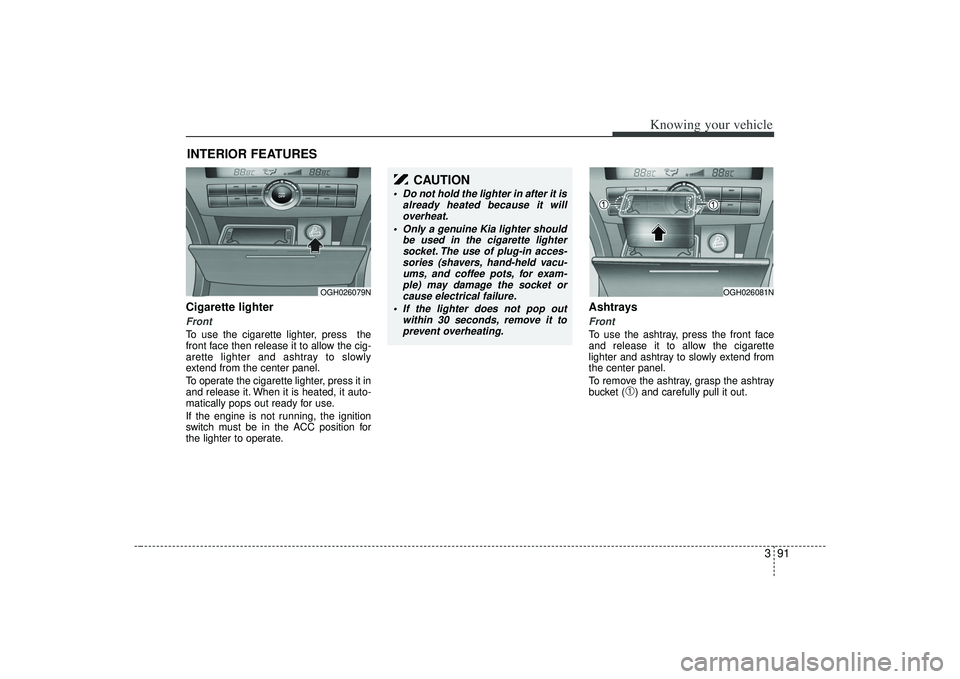
Center console storageTo open either of the console storage
compartments, press button
➀
or
➁.
These compartments can be used to
store small items required by the driver
or front passenger.
Multi boxRear (if equipped)To open the storage compartment, pull
the armrest down and pull up on the lock-
ing tab (
➀). It can be used for storing
small items.
STORAGE COMPARTMENTS
WARNING
Do not store cigarette lighters,
propane cylinders, or other flamma-
ble/explosive materials in the vehi-
cle. These items may catch fire
and/or explode if the vehicle is
exposed to hot temperatures for
extended periods.
OGH039376N
1GHA2234A
➀➁
Page 103 of 321
391
Knowing your vehicle
Cigarette lighterFrontTo use the cigarette lighter, press the
front face then release it to allow the cig-
arette lighter and ashtray to slowly
extend from the center panel.
To operate the cigarette lighter, press it in
and release it. When it is heated, it auto-
matically pops out ready for use.
If the engine is not running, the ignition
switch must be in the ACC position for
the lighter to operate.
Ashtrays Front To use the ashtray, press the front face
and release it to allow the cigarette
lighter and ashtray to slowly extend from
the center panel.
To remove the ashtray, grasp the ashtray
bucket (
➀) and carefully pull it out.
INTERIOR FEATURES
OGH026079N
OGH026081N
CAUTION
Do not hold the lighter in after it isalready heated because it willoverheat.
Only a genuine Kia lighter should be used in the cigarette lightersocket. The use of plug-in acces-sories (shavers, hand-held vacu- ums, and coffee pots, for exam-ple) may damage the socket orcause electrical failure.
If the lighter does not pop out within 30 seconds, remove it toprevent overheating.
Page 105 of 321
393
Knowing your vehicle
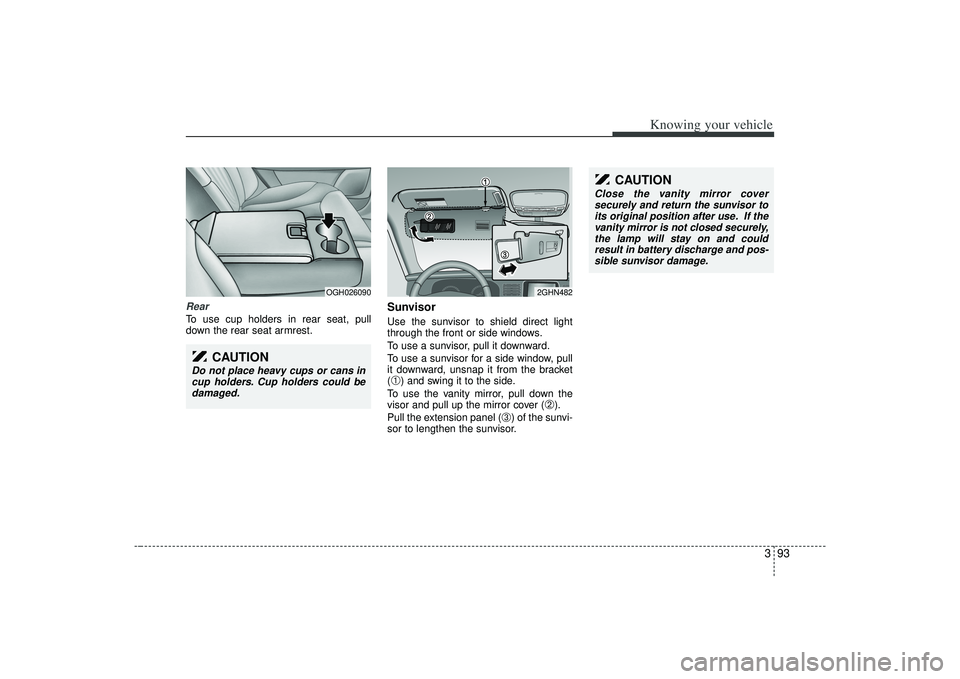
RearTo use cup holders in rear seat, pull
down the rear seat armrest.
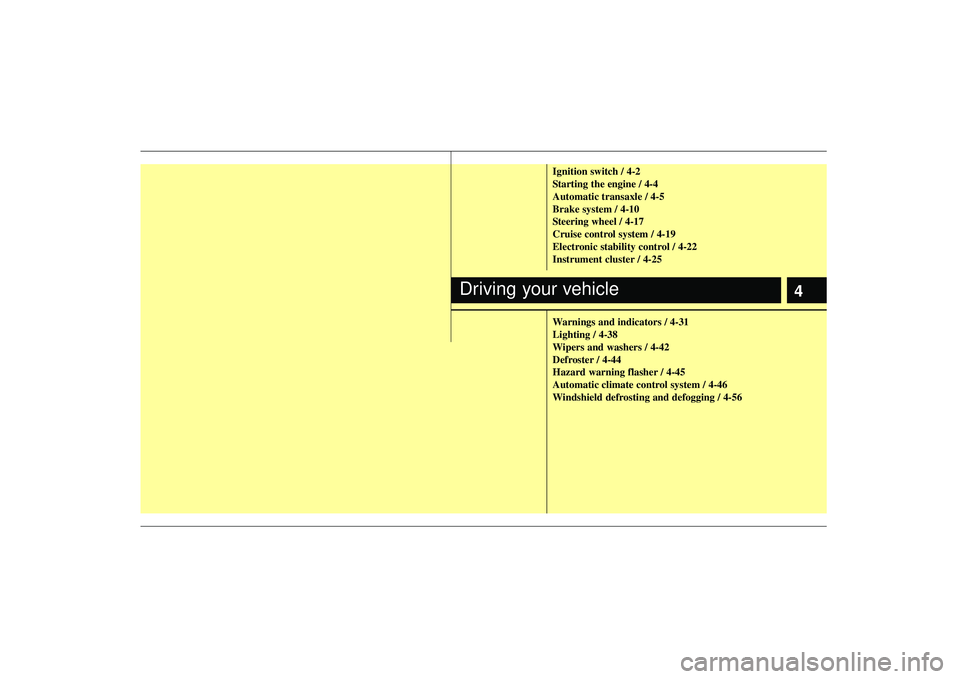
SunvisorUse the sunvisor to shield direct light
through the front or side windows.
To use a sunvisor, pull it downward.
To use a sunvisor for a side window, pull
it downward, unsnap it from the bracket
(➀) and swing it to the side.
To use the vanity mirror, pull down the
visor and pull up the mirror cover (
➁).
Pull the extension panel (
➂) of the sunvi-
sor to lengthen the sunvisor.
OGH026090
2GHN482
CAUTION
Do not place heavy cups or cans in cup holders. Cup holders could bedamaged.
CAUTION
Close the vanity mirror coversecurely and return the sunvisor to its original position after use. If thevanity mirror is not closed securely, the lamp will stay on and couldresult in battery discharge and pos-sible sunvisor damage.
Page 121 of 321
3109
Knowing your vehicle
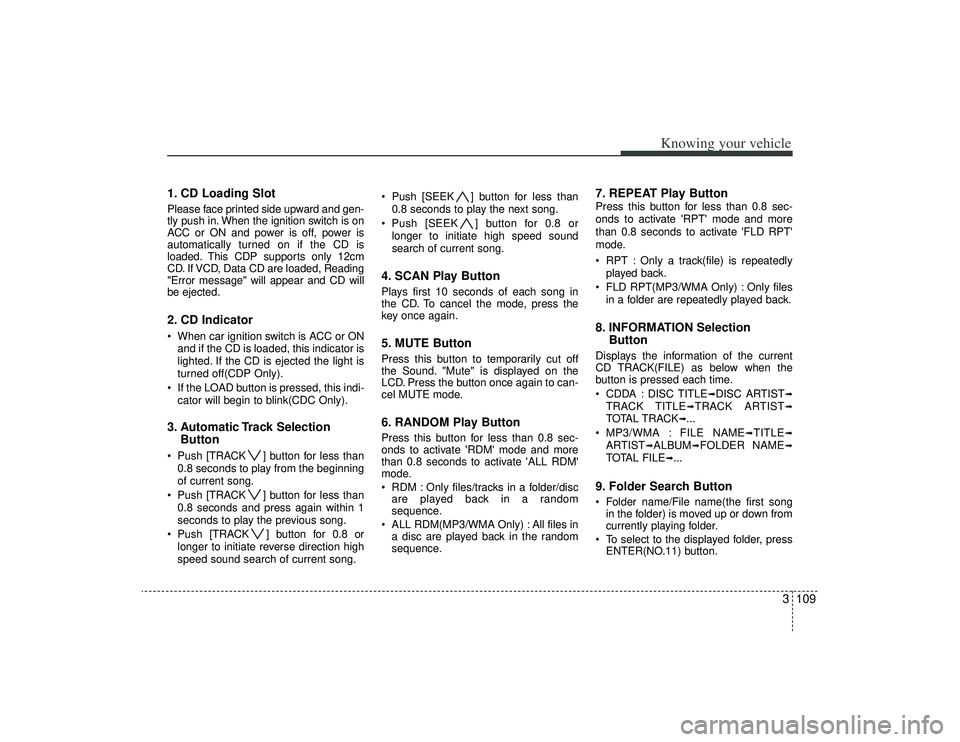
1. CD Loading SlotPlease face printed side upward and gen-
tly push in. When the ignition switch is on
ACC or ON and power is off, power is
automatically turned on if the CD is
loaded. This CDP supports only 12cm
CD. If VCD, Data CD are loaded, Reading
"Error message" will appear and CD will
be ejected.2. CD Indicator When car ignition switch is ACC or ONand if the CD is loaded, this indicator is
lighted. If the CD is ejected the light is
turned off(CDP Only).
If the LOAD button is pressed, this indi- cator will begin to blink(CDC Only).3. Automatic Track Selection Button Push [TRACK ] button for less than
0.8 seconds to play from the beginning
of current song.
Push [TRACK ] button for less than 0.8 seconds and press again within 1
seconds to play the previous song.
Push [TRACK ] button for 0.8 or longer to initiate reverse direction high
speed sound search of current song. Push [SEEK ] button for less than
0.8 seconds to play the next song.
Push [SEEK ] button for 0.8 or longer to initiate high speed sound
search of current song.
4. SCAN Play ButtonPlays first 10 seconds of each song in
the CD. To cancel the mode, press the
key once again.5. MUTE ButtonPress this button to temporarily cut off
the Sound. "Mute" is displayed on the
LCD. Press the button once again to can-
cel MUTE mode.6. RANDOM Play ButtonPress this button for less than 0.8 sec-
onds to activate 'RDM' mode and more
than 0.8 seconds to activate 'ALL RDM'
mode.
RDM : Only files/tracks in a folder/discare played back in a random
sequence.
ALL RDM(MP3/WMA Only) : All files in a disc are played back in the random
sequence.
7. REPEAT Play ButtonPress this button for less than 0.8 sec-
onds to activate 'RPT' mode and more
than 0.8 seconds to activate 'FLD RPT'
mode.
RPT : Only a track(file) is repeatedly
played back.
FLD RPT(MP3/WMA Only) : Only files in a folder are repeatedly played back.8. INFORMATION Selection ButtonDisplays the information of the current
CD TRACK(FILE) as below when the
button is pressed each time.
CDDA : DISC TITLE
➟DISC ARTIST
➟
TRACK TITLE
➟TRACK ARTIST
➟
TOTAL TRACK
➟...
MP3/WMA : FILE NAME
➟TITLE
➟
ARTIST
➟ALBUM
➟FOLDER NAME
➟
TOTAL FILE
➟...
9. Folder Search Button Folder name/File name(the first song in the folder) is moved up or down from
currently playing folder.
To select to the displayed folder, press ENTER(NO.11) button.
Page 134 of 321
![KIA AMANTI 2009 Owners Manual Knowing your vehicle122
37. CAT/FOLDER Button Press [CAT ] or [FLDR ] button to
enter the Category list Mode, it dis-
plays cateogry items and highlights the
category that currently tuned channel
belo](/manual-img/2/57931/w960_57931-133.png "KIA AMANTI 2009 Owners Manual Knowing your vehicle122
37. CAT/FOLDER Button Press [CAT ] or [FLDR ] button to
enter the Category list Mode, it dis-
plays cateogry items and highlights the
category that currently tuned channel
belo")
Knowing your vehicle122
37. CAT/FOLDER Button Press [CAT ] or [FLDR ] button to
enter the Category list Mode, it dis-
plays cateogry items and highlights the
category that currently tuned channel
belongs to.
On Category List Mode, press these buttons to navigate category list.
Press [ENTER] Button to select the lowest channel in highlighted category.
If channel is selected by selecting cat- egory CATEGORY Icon is displayed at
the top of the screen.8. Tune Knob and Enter Button Rotate clockwise to increase the chan-nel number or to down the category in
the category list.
Rotate counterclockwise to decrease the channel number or to up the cate-
gory in the category list.
Press this button to make selection of channels or items.
❈ ❈ Troubleshooting1. Antenna Error
If this message is displayed, the antenna
or antenna cable is broken or unplugged.
Please consult with your Kia dealership.
2. Acquiring Signal
If this message is displayed, it means that
the antenna is covered and that the SIR-
IUS Satellite Radio signal is not available.
Ensure the antenna is uncovered and has
a clear view of the sky.
Page 136 of 321
![KIA AMANTI 2009 Owners Manual Knowing your vehicle124
31. DISPLAY ON/OFF This is the display window ON/OFF
function.
Each time the [DISP] button is pressed, the display window will be turned
ON/OFF.2. CLOCK Function This is the](/manual-img/2/57931/w960_57931-135.png "KIA AMANTI 2009 Owners Manual Knowing your vehicle124
31. DISPLAY ON/OFF This is the display window ON/OFF
function.
Each time the [DISP] button is pressed, the display window will be turned
ON/OFF.2. CLOCK Function This is the")
Knowing your vehicle124
31. DISPLAY ON/OFF This is the display window ON/OFF
function.
Each time the [DISP] button is pressed, the display window will be turned
ON/OFF.2. CLOCK Function This is the clock adjustment function.
Each time [CLOCK] is pressed, thesecond
➟minute will blink once every
0.5 seconds and switch modes.
Pressing the [CLOCK] again while the "minute" mode is blinking or waiting 10
seconds will turn off time adjustment
mode and save the set time.
The clock can be set in 12 hour or 24 hour modes. The 12 hour system is the
default and can be changed to 24 hour
system within the SET-UP menu.
3. Time/Date Increase/Decrease Function While in Time/Date mode, pressing the
[ ], [ ] buttons will increase/
decrease the time/date.
This function will operate only after pressing the time/date button and the
hour/minute/month/day is blinking.
4. RESET Function The RESET function can be usedwhen adjusting the time.
If the [RESET] is pressed while adjust- ing the "hour", the hour will display
"AM12" when using 12 hour clock
mode and "00" when using 24 hour
clock mode.
If the RESET is pressed while adjust- ing the "min", the minute display will be
changed to "00".
The RESET function can be used while adjusting the date.
If the [RESET] is pressed while adjust- ing the "month/day", the corresponding
display will be changed to "01month/
01day".
5. DATE Function This is used to adjust the date.
Each time [DATE] is pressed, the mon-th
➟day will blink once every 0.5 sec-
onds and switch modes.
Pressing the [DATE] again while the "day" is blinking or waiting 10 seconds
will turn off date adjustment mode and
save the set date.
❈Slight differences with actual time may
occur. Please readjust the time upon
the occurrence of such differences.
Page 137 of 321
4
Ignition switch / 4-2
Starting the engine / 4-4
Automatic transaxle / 4-5
Brake system / 4-10
Steering wheel / 4-17
Cruise control system / 4-19
Electronic stability control / 4-22
Instrument cluster / 4-25
Warnings and indicators / 4-31
Lighting / 4-38
Wipers and washers / 4-42
Defroster / 4-44
Hazard warning flasher / 4-45
Automatic climate control system / 4-46
Windshield defrosting and defogging / 4-56
Driving your vehicle
Page 138 of 321
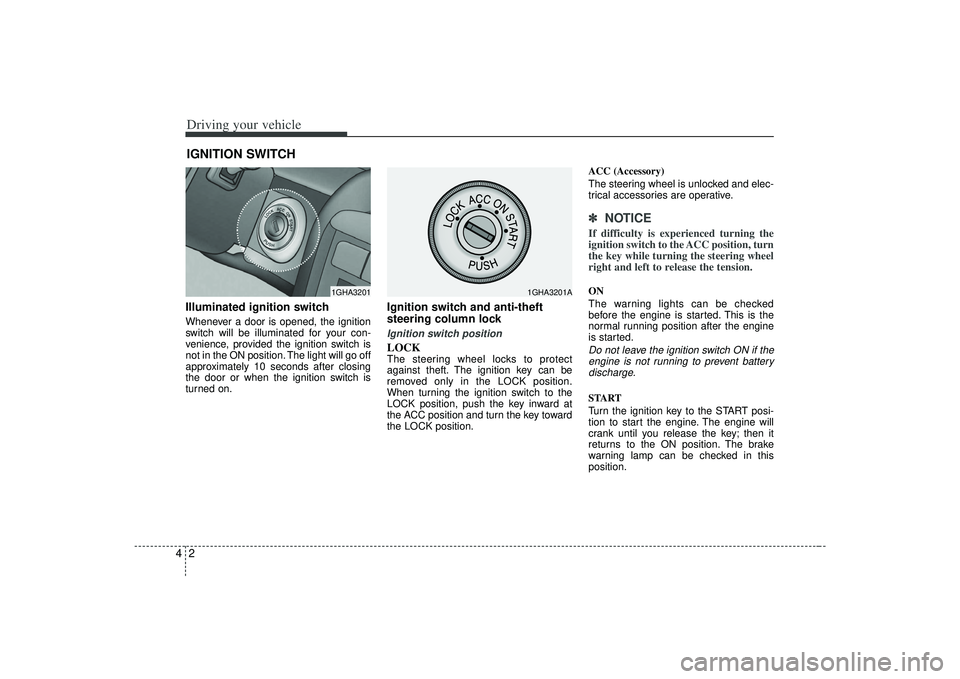
Driving your vehicle24Illuminated ignition switchWhenever a door is opened, the ignition
switch will be illuminated for your con-
venience, provided the ignition switch is
not in the ON position. The light will go off
approximately 10 seconds after closing
the door or when the ignition switch is
turned on.
Ignition switch and anti-theft
steering column lock Ignition switch positionLOCKThe steering wheel locks to protect
against theft. The ignition key can be
removed only in the LOCK position.
When turning the ignition switch to the
LOCK position, push the key inward at
the ACC position and turn the key toward
the LOCK position.ACC (Accessory)
The steering wheel is unlocked and elec-
trical accessories are operative.
✽ ✽
NOTICEIf difficulty is experienced turning the
ignition switch to the ACC position, turn
the key while turning the steering wheel
right and left to release the tension.ON
The warning lights can be checked
before the engine is started. This is the
normal running position after the engine
is started.Do not leave the ignition switch ON if the
engine is not running to prevent batterydischarge.START
Turn the ignition key to the START posi-
tion to start the engine. The engine will
crank until you release the key; then it
returns to the ON position. The brake
warning lamp can be checked in this
position.
IGNITION SWITCH
1GHA3201
1GHA3201A