2009 KIA AMANTI audio
[x] Cancel search: audioPage 114 of 321
Knowing your vehicle102
3Care of disc (if equipped) If the temperature inside the car is too
high, open the car windows for ventilation
before using your car audio.
Do not apply volatile agents such as benzene and thinner, normal cleaners
and magnetic sprays made for ana-
logue disc onto CDs.
To prevent the disc surface from get- ting damaged. Hold and carry CDs by
the edges or the edges of the center
hole only.
Clean the disc surface with a piece of soft cloth before playback (wipe it from the
center to the outside edge.)
Do not damage the disc surface or attach pieces of sticky tape or paper
onto it.
Make sure on undesirable matter other than CDs are inserted into the CD
player (Do not insert more than one
CD at a time).
Keep CDs in their cases after use to protect them from scratches or dirt. Depending on the type of CD-R/CD-
RW CDs, certain CDs may not operate
normally according to manufacturing
companies or making and recording
methods. In such circumstances, if you
still continue to use those CDs, they
may cause the malfunction of your car
audio system.
✽ ✽ NOTICE
- Playing an
Incompatible Copy-Protected
Audio CD
Some copy-protected CDs, which do not
comply with the international audio CD
standards (Red Book), may not play on
your car audio. Please note that if you
try to play copy protected CDs and the
CD player of your car audio is not per-
forming to your expectation, this may be
caused by those CDs and not a defect in
the device itself. Please replace those
CDs.
Page 123 of 321
3111
Knowing your vehicle
CAUTION -
Using USB
device
To use the external USB device,make sure the device is notmounted when starting up thevehicle and mount the deviceafter starting up.
If you start the vehicle when the USB device is mounted, it maydamage the USB device. (USB isnot ESA)
If the vehicle is started up or turned off while the external USBdevice is connected, the external USB device may not work.
It may not play inauthentic MP3 or WMA files.
1) It can only play MP3 files with the compression rate between8Kbps~320Kbps.
2) It can only play WMA music files with the compression ratebetween 8Kbps~320Kbps.
Take cautions for static electricity when mounting or dismountingthe external USB device.
Encoded MP3 PLAYER is not rec- ognizable.
(Continued)
(Continued) Depending on the condition of the external USB device, the con-nected external USB device can be unrecognizable.
When the formatted byte/sector setting of External USB devices isnot either 512BYTE or 2048BYTE,then the device will not be recog- nized.
Only the USB device formatted to FAT 12/16/32.
USB device without USB IF authen- tication may not be recognizable.
Make sure the USB connection terminal does not come in contactwith human body or any object.
If you repeat mounting or dis- mounting USB device in a shortperiod of time, it may break thedevice.
You might hear strange noise when mounting or dismounting aUSB device.
(Continued)
(Continued) If you dismount the external USB device during playback in USBmode, the external USB device can be damaged or malfunction.Therefore, mount the external USBdevice when the engine is turnedoff or in another mode.
Depending on the type and capac- ity of the external USB device orthe type of the files stored in thedevice, there is a difference in thetime taken for recognition of the device, but this is not a troublePlease wait for a moment.
Do not use the USB device for other purposes than playing music files.
Use of USB accessories such as the recharger or heater using USBI/F may lower the performance or cause trouble.
If you use devices such as the USB hub you purchased separate-ly, the vehicle’s audio system maynot recognize the USB device.Connect the USB device directly to the multimedia terminal of thevehicle.
Page 130 of 321
Knowing your vehicle118
3✽
✽
NOTICE -
Using iPod device
• Some iPod models might not support
the communication protocol and the
files will not be played. (iPod models
supported: Mini, 4G, Photo, Nano,
5G)
• The order of search or playback of songs in the iPod can be different
from the order searched in the audio
system.
• If the iPod crashes due to its own trou- ble, reset iPod. (Reset: Refer to iPod
manual)
• iPod may not operate normally on low battery.
(Continued)
When the iPod cable is connected, the system can be switched to theAUX mode even without the iPoddevice and can cause noise. Disconnect iPod cable when youare not using the iPod device.
CAUTION
- Using iPod device
You need the power cable exclu-
sive for iPod in order to operateiPod with the buttons on the audio system. The PC cable provided byApple may cause malfunction and do not use it for vehicle use.
When connecting the device with iPod cable, push in the jack fullynot to interfere with communica-tion.
When adjusting the sound effects of iPod and the audio system, thesound effects of both devices willoverlap each and might causereduce or distort the quality of thesound.
Deactivate (turn off) the equalizer function of iPod when adjustingthe audio system’s volume, andturn off the equalizer of the audio system when using the equalizerof iPod.
(Continued)
Page 234 of 321
611
In case of an emergency
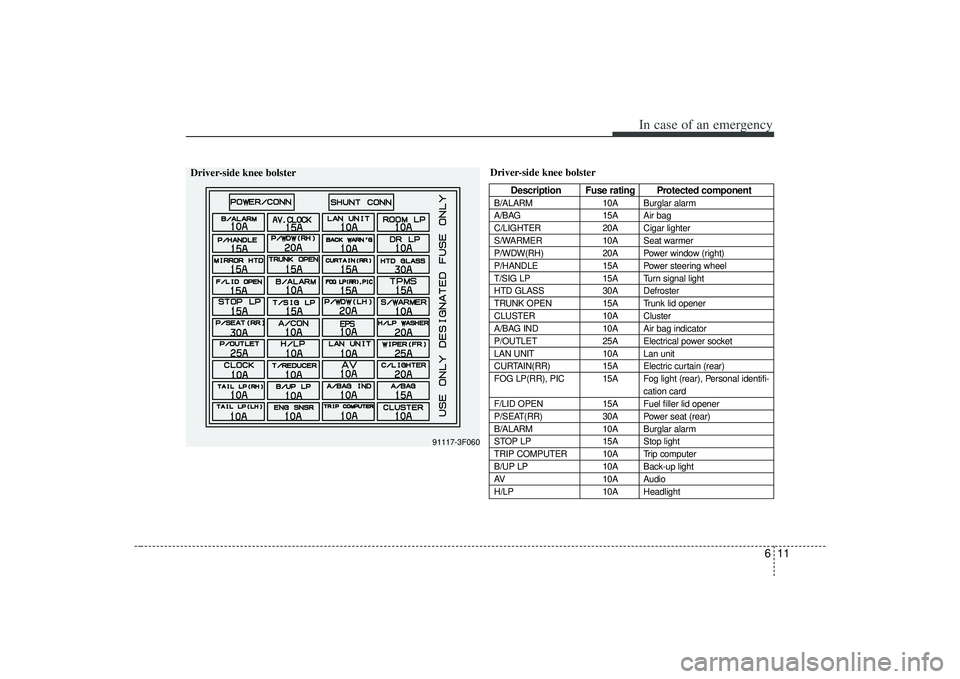
Driver-side knee bolster
Description Fuse rating Protected component
B/ALARM10A Burglar alarm
A/BAG 15A Air bag
C/LIGHTER 20A Cigar lighter
S/WARMER 10A Seat warmer
P/WDW(RH) 20A Power window (right)
P/HANDLE 15A Power steering wheel
T/SIG LP 15A Turn signal light
HTD GLASS 30A Defroster
TRUNK OPEN 15A Trunk lid opener
CLUSTER 10A Cluster
A/BAG IND 10A Air bag indicator
P/OUTLET 25A Electrical power socket
LAN UNIT 10A Lan unit
CURTAIN(RR) 15A Electric curtain (rear)
FOG LP(RR), PIC 15A Fog light (rear), Personal identifi- cation card
F/LID OPEN 15A Fuel filler lid opener
P/SEAT(RR) 30A Power seat (rear)
B/ALARM 10A Burglar alarm
STOP LP 15A Stop light
TRIP COMPUTER 10A Trip computer
B/UP LP 10A Back-up light
AV 10A Audio
H/LP 10A Headlight
91117-3F060
Driver-side knee bolster
Page 235 of 321

In case of an emergency12
6
Power connectorYour vehicle is equipped with a power connector to prevent bat-
tery discharge if your vehicle is parked without being operated
for prolonged periods. Use the following procedures before
parking the vehicle for prolonged period.
1. Turn off the engine.
2. Turn off the headlights and tail lights.
3. Open the driver-side knee bolster cover and pull up the
“POWER/CONN”.✽ ✽NOTICE• If the power connector is pulled up from the fuse panel, the
warning chime, AV system, clock and intetrior lamps, etc.,
will not operate. Some items must be reset after replace-
ment.
• Even though the power connector is pulled up, the battery can still be discharged by operation of the headlights or
other electrical devices.
Description Fuse rating Protected component
A/CON 10A Air-conditioning system
P/WDW(LH) 20A Power window (left)
TAIL LP(RH) 10A Taillight (right)
BACK WARN’G 10A Back warning
DR LP 10A Door courtesy lamp
MIRROR HTD 15A Outside review mirror defroster
ENG SNSR 10A
Power train control system sensors
T/REDUCER10A Seat belt tension reducer
CLOCK 10A Clock
WIPER(FR) 25A Wiper (front)
EPS 10A Electronic power steering
TAIL LP(LH) 10A Tail light (left)
ROOM LP 10A Room lamp
AV, CLOCK 15A Audio, Clock
LAN UNIT 10A Lan unit
TPMS 15A Tire pressure monitoring system
H/LP WASHER 20A Headlight washer
SHUNT CONN - Switch illumination
POWER/CONN - Power connector
1GHA403
Power
connector
Page 277 of 321

727
Maintenance
For best battery service : Keep the battery securely mounted.
Keep the battery top clean and dry.
Keep the terminals and connectionsclean, tight, and coated with petroleum
jelly or terminal grease.
Rinse any spilled electrolyte from the battery immediately with a solution of
water and baking soda.
If the vehicle is not going to be used for an extended time, disconnect the bat-
tery cables.
Battery recharging Your vehicle has a maintenance-free,
calcium-based battery.
If the battery becomes discharged in ashort time (because, for example, the
headlights or interior lights were left on
while the vehicle was not in use),
recharge it by slow charging (trickle)
for 10 hours.
If the battery gradually discharges because of high electric load while the
vehicle is being used, recharge it at 20-
30A for two hours.
Items to be reset after the battery hasbeen discharged or the battery has been disconnected. Driver seat position memory system (See Chapter 3)
Power window (See Chapter 3)
Clock (See Chapter 3)
Climate control system (See Chapter 4)
Audio (See Chapter 3)
Sunroof (See Chapter 3)
CBGQ0705
Page 309 of 321
Consumer assistance, Reporting safety defects49ELECTRICAL EQUIPMENT (U.S. ONLY)The electrical system of your vehicle is designed to perform
under all reasonably expected operating conditions. However,
before any additional electrical equipment is installed in your
vehicle, consult an Authorized Kia Dealer, in order to ensure
that you do not void your warranty.
Certain electrical equipment, or the way in which it is installed,
may adversely affect the operation of your vehicle, including
such systems as the engine control system, the audio system
and the electrical charging system and thus potentially void all
or part of your warranty.
We assume no responsibility for any expense you may incur or
for any malfunction of your vehicle or any of its components or
systems that may result from the installation of additional elec-
trical equipment that is not supplied, or recommended for instal-
lation by, Kia.
Installation of a Mobile Two-Way Radio SystemIf a mobile two-way radio system is installed improperly, or if an
excessively powerful type of system is used, other electronic
systems may be adversely affected. To avoid damage to your
vehicle, consult an Authorized Kia Dealer concerning the prop-
er equipment and installation.
Page 313 of 321

Index2
10
Air Bags - Advanced Supplemental Restraint System ··3-52
Air Bag Curtain ··················\
··················\
··················\
··················\
·3-65
Driver's ··················\
··················\
··················\
··················\
3-57
Front Passenger's ··················\
··················\
··················\
···3-58
Side ··················\
··················\
··················\
··················\
······3-64
Warning Light ··················\
··················\
················3-73, 4-\
35
Air Cleaner··················\
··················\
··················\
···············7-21
Air Conditioning Button ··················\
··················\
··················\
··················\
··4-53
System Operation Tips ··················\
··················\
············4-54
Air Intake Control Button··················\
··················\
··········4-49
Alignment, Tire Balance and Wheel ··················\
···········7-32
Aluminum Wheel Maintenance ··················\
··················\
·7-50
Antenna ················\
··················\
··················\
··················\
···3-98
Anti-Lock Brake System ··················\
··················\
···········4-15 Warning Light ··················\
··················\
··················\
········4-31
Anti-Theft Steering Column Lock, Ignition Switch and ··················\
··················\
··················\
·4-2
Ashtray ··················\
··················\
··················\
··················\
···3-91
Audio Remote Control ··················\
··················\
··················\
·····3-99
Systems ··················\
··················\
··················\
················3-100
Automatic Climate Control System ··················\
··················\
··········4-46
Transaxle ··················\
··················\
··················\
········4-5, 7-18
Transaxle Fluid Level, Checking the ··················\
········7-18 Balance, Wheel Alignment and Tire··················\
············7-32
Battery··················\
··················\
··················\
··················\
····7-26
Recharging ··················\
··················\
··················\
·············7-27
Service, For Best ··················\
··················\
··················\
···7-27
Before Driving ··················\
··················\
··················\
···········5-5
Belts, Safety ··················\
··················\
··················\
··················\
···3-30
Pre-tensioner, seat··················\
··················\
··················\
··3-30
Blade Replacement, Windshield Wiper ··················\
·······7-24
Blades, Wiper··················\
··················\
··················\
···········7-24
Body Lubrication ··················\
··················\
··················\
·····7-20
Brake Fluid Level, Checking ··················\
··················\
·············7-16
Parking··················\
··················\
··················\
··················\
·4-13
System ··················\
··················\
··················\
··················\
·4-10
System, Anti-Lock ··················\
··················\
··················\
·4-15
Wear Indicators, Disc ··················\
··················\
··············4-11
Brakes ··················\
··················\
··················\
··················\
····7-16 Power ··················\
··················\
··················\
··················\
···4-10
Trailer ··················\
··················\
··················\
··················\
··5-21
Break-In Process, Vehicle ··················\
··················\
············1-3
Bulb Replacement··················\
··················\
··················\
····7-41
Bulbs, Light ··················\
··················\
··················\
···············8-2A
B