2009 JAGUAR XF warning light
[x] Cancel search: warning lightPage 144 of 391

Brakes
144
PRINCIPLE OF OPERATION
Brake pads
Brake pads require a period of bedding in when
new. Drive with extra caution for the first
500 km (300 miles) to avoid the need for heavy
braking.
Brake pad wear warning
When the brake pads are wearing low, the
warning message BRAKE PADS LOW is
displayed in the message centre. Arrange for
your vehicle to be se en by your Dealer/
Authorised Repairer at the earliest opportunity.
Wet conditions
Driving through heavy ra in or water can have
an adverse effect on braking efficiency. Under
such circumstances, it is recommended that
you lightly a pply the brakes intermittently to
dry the brakes.
ABS warning indicator
If this amber warning indicator
illuminates while driving and/or
ABS FAULT is displayed in the
message centre, drive with extra caution, avoid
heavy braking where possible, and seek
qualified assistance as soon as possible.
If this red warning indicator
illuminates while driving and/or the
message LOW BRAKE FLUID is
displayed in the message centre, check the
brake fluid level at the earliest opportunity and
top-up as required. See BRAKE FLUID CHECK
(page 206).
HINTS ON DRIVING WITH ABS
ABS (Anti-Lock Braking System) allows
maximum brake pressure, and thus maximum
braking efficiency, to be applied, and prevents
the road wheels locking. This allows the driver
to retain steering control during heavy braking
under most road conditions.
ABS optimises tyre to road adhesion under
maximum braking conditions, though it cannot
provide increased cornering ability.
WARNINGS
Do not rest your foot on the brake
pedal whilst the vehicle is in motion.
This may cause a light application of
the brakes, which can result in overheating,
reduced brake performance, and excessive
brake wear.
Never allow the vehicle to coast
(freewheel) with the engine turned
off. The engine must be running to
provide full braking assistance. The brakes will
still function with the e ngine off, but far more
pressure will be required to operate them.
If the red brake warning indicator
illuminates, safely bring the vehicle to
a stop, as quickly as possible. Seek
qualified assistance before proceeding.
Never place non-approved floor
matting or any ot her obstructions
under the brake pedal. This restricts
pedal travel and braking efficiency.
WARNINGS
ABS cannot overcome the physical
limitations of braking distance. Nor
can it overcome the lack of grip on a
road surface (e.g. aquaplaning on water).
Braking distance is increased on a
slippery surface. This applies to all
vehicles, even those fitted with ABS.
The driver should not be tempted to
take risks when driving, in the hope
that ABS will correct errors of
judgement. In all cases it remains the driver's
responsibility to driv e with due care and
attention, payi ng particular attention to the
effects of speed, weather, road conditions etc.
Page 145 of 391
145
Brakes
During emergency braking conditions ABS
constantly monitors the speed of each wheel.
ABS varies the brake pressure to individual
wheels, according to the grip available. The
constant alteration of brake pressure can be
felt as a pulsing sensation through the brake
pedal. This is not a caus e for concern, as it is
designed to demonstrate to the driver that ABS
is operating.
ABS braking techniques
For optimum ABS performance, these
instructions on braking techniques during ABS
operation should be followed:
• Do not release the brake pressure when
the pulsating effect is felt. Maintain a
constant pressure until the manoeuvre is
completed.
• To familiarise y ourself with the feel of the
brake pedal during ABS braking, practise
an emergency stop pr ocedure, always
making sure it is safe to do so. With the
seat belts fitted to all occupants, drive the
vehicle at 32 km/h (20 mph) and brake
sharply.
• ABS enables the driver to steer around
obstacles during em ergency braking.
However, the consequences of turning
sharply at high speed cannot be overcome
by the ABS.
• Do not attempt to pump the brakes to
avoid skidding, as this can interfere with
ABS operation. The ABS will not allow the
wheels to skid under normal road
conditions.
• The ABS will tend to keep the vehicle
straight during braki ng. Because braking
distances may increase under certain road
conditions, it is nece ssary to plan and
make turning manoeuvres as early as
possible.
Electronic Brakeforce Distribution (EBD)
EBD balances the distribution of braking forces
between the wheels on the front and rear axles,
to maintain maximum braking under all vehicle
loading conditions.
For example; Under light loads, EBD applies
less braking effort to the rear wheels, to
maintain stability. Conv ersely, it allows full
braking effort to the rear wheels when the
vehicle is towing or is heavily laden.
A fault with the EBD system is
indicated by illumination of the red
brake warning indicator and the
message EBD FAULT is displayed in the
message centre. Gently stop the vehicle, as
soon as safety permit s, and seek qualified
assistance.
Page 146 of 391

Brakes
146
Emergency Brake Assist (EBA)
The EBA system measures the rate at which the
brake pressure increases. If the system detects
an emergency braking situation, EBA
automatically init iates full braking effect. This
can reduce stopping dist ances in critical
situations.
EBA stops operating as soon as the brake pedal
is released.
EBA is part of the Dynamic Stability
Control (DSC) system and a fault
with the EBA system is indicated by
the amber DSC warning indicator illuminating
and DSC NOT AVAILABLE (with amber
backlight) displaying in the message centre.
Seek qualified assistan ce as soon as possible.
Brake vacuum assist
(V6 petrol models only)
When the engine is cold and/or engine vacuum
is low, Brake vacuum assist provides additional
brake pedal assistance. When the function is
operating, a pulsation ma y be felt through the
brake pedal - this is not a cause for concern.
A fault is indicate d by the message BRAKE
ASSIST FAULT (with amber backlight)
appearing in the message centre. Increased
brake pedal effort may be required to slow the
vehicle when the engine is cold and/or engine
vacuum is low. Seek qualified assistance.
ELECTRIC PARKING BRAKE (EPB)
The switch which operate s the parking brake is
mounted on the centre c onsole to the rear of
the gear selector.
To engage the parking brake (1): Pull the
parking brake switch up wards and release. The
switch will return to the neutral position. The
Parking brake warning and Brake fluid low
warning indicator on the instrument panel will
illuminate.
The Drive Away Release feature allows the
parking brake to release automatically as the
vehicle is driven away.
To disengage the parking brake (2): With the
ignition system on or with the engine running,
apply the foot brake and press the parking
brake switch down.
If the parking brake is a pplied while the vehicle
is stationary and D or R is selected, applying
the throttle will auto matically release the
parking brake.
The parking brake is also automatically
released when the gear selector is moved from
the P position.
WARNING
The EBA system is an additional
safety system; it is not intended to
relieve the driver of his or her
responsibility for exercising due care and
attention when driving.12
E95148
Page 156 of 391
Cruise control
156
PRINCIPLE OF OPERATION
Cruise control enables the driver to maintain a
constant road speed without using the
accelerator pedal. This is particularly useful for
motorway cruising, or for any journey where a
constant speed can be maintained for a lengthy
period.
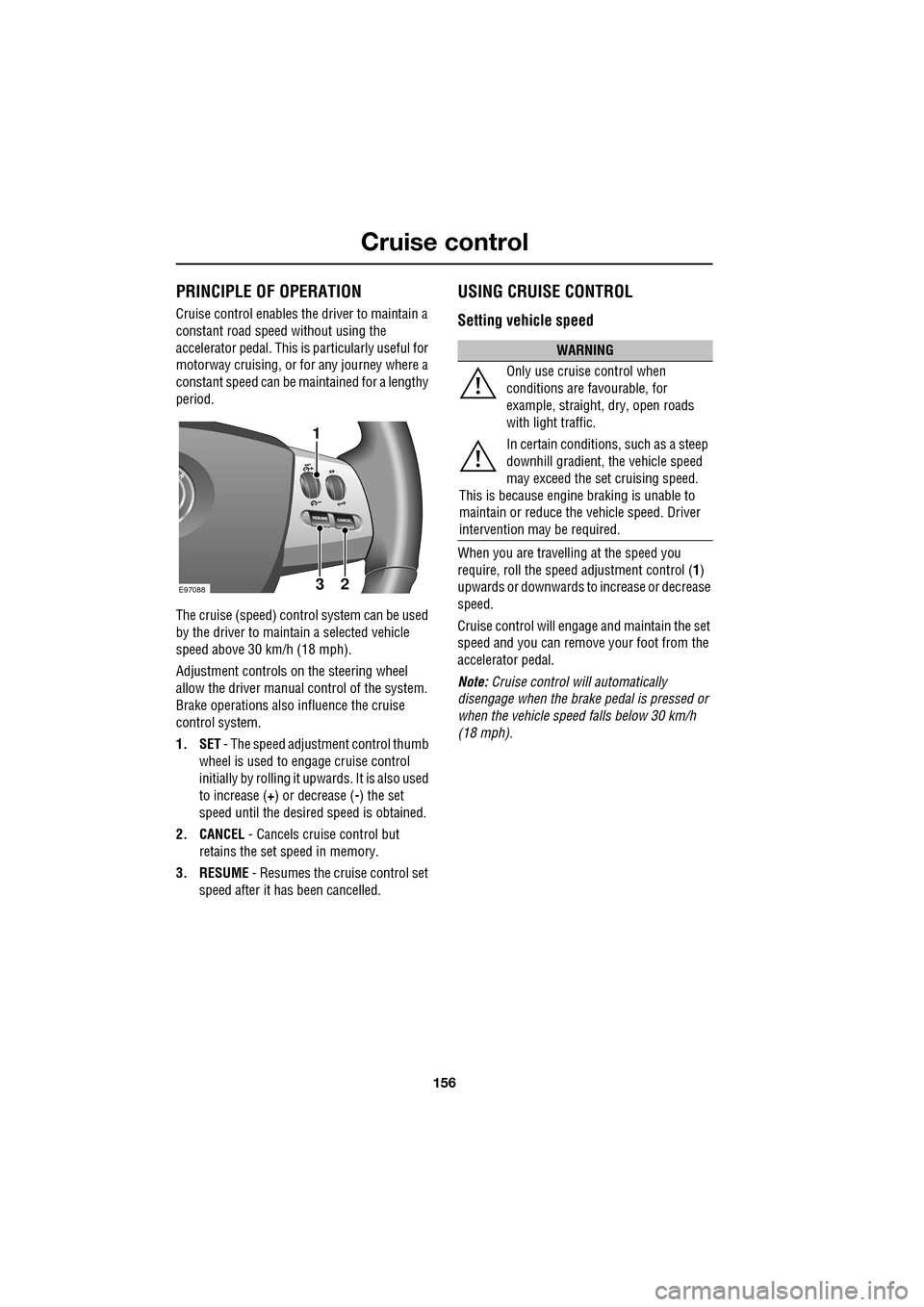
The cruise (speed) contro l system can be used
by the driver to maintain a selected vehicle
speed above 30 km/h (18 mph).
Adjustment controls on the steering wheel
allow the driver manual control of the system.
Brake operations also influence the cruise
control system.
1. SET - The speed adjustment control thumb
wheel is used to engage cruise control
initially by rolling it upw ards. It is also used
to increase ( +) or decrease ( -) the set
speed until the desired speed is obtained.
2. CANCEL - Cancels cruise control but
retains the set speed in memory.
3. RESUME - Resumes the cruise control set
speed after it ha s been cancelled.
USING CRUISE CONTROL
Setting vehicle speed
When you are travelling at the speed you
require, roll the speed adjustment control ( 1)
upwards or downwards to increase or decrease
speed.
Cruise control will engage and maintain the set
speed and you can remove your foot from the
accelerator pedal.
Note: Cruise control w ill automatically
disengage when the brake pedal is pressed or
when the vehicle speed falls below 30 km/h
(18 mph).
E9708823
1
WARNING
Only use cruise control when
conditions are favourable, for
example, straight, dry, open roads
with light traffic.
In certain conditions, such as a steep
downhill gradient, the vehicle speed
may exceed the set cruising speed.
This is because engine braking is unable to
maintain or reduce the vehicle speed. Driver
intervention may be required.
Page 165 of 391

165
Adaptive cruise control (ACC)
ADVANCED EMERGENCY BRAKE
ASSIST
On vehicles fitted with Advanced Emergency
Brake Assist, brake response is improved
during emergency braking when a moving
vehicle is detected close ahead.
Advanced Emergency Brake Assist activates If
the risk of collision increases after the
FORWARD ALERT warning is displayed.
See FORWARD ALERT FUNCTION (page 164).
The brakes are automatica lly applied gently in
preparation for rapid braking (which may be
noticeable). If the brake pedal is then pressed
quickly, then braking is implemented fully,
even if the pressure on the pedal is light.
See HINTS ON DRIVING WITH ABS
(page 144).
Advanced Emergency Brake Assist is available
at speeds above approximately 7 km/h (5 mph)
and will function even if Forward Alert and
Adaptive Cruise Control are switched off. A
fault with the system will be indicated by the
warning FORWARD ALER T UNAVAILABLE
appearing in the mess age centre. Advanced
Emergency Brake Assist will not be available
until the fault is rectified.
WARNING
Advanced Emergency Brake Assist, is
an additional safety system and is not
intended to relieve the driver of the
responsibility for exer cising due care and
attention when driving.
CAUTION
The system may not react to slow
moving vehicles and will not react to
stationary vehicles or vehicles not
travelling in the same direction as your vehicle.
Advanced Emergency Brake Assist can
only improve braking performance if the
driver applies the brakes.
Warnings may not appear if the distance
to the vehicle ahead is very small or if
steering wheel and pedal movements
are large (e.g. to avoid a collision).
Advanced Emergency Brake Assist
utilises the same radar sensor as
Adaptive Cruise Control and Forward
Alert - the same limita tions of performance
apply.
See PRINCIPLE OF OPERATION (page 159).
See USING ACC (page 159).
See FORWARD ALERT FUNCTION
(page 164).
Page 167 of 391
167
Automatic speed limiter (ASL)
PRINCIPLE OF OPERATION
ASL can be used in a situation where varying
vehicle speed is likely but a maximum speed
must not be exceeded. For example, where a
local speed limit is 80 km/h (50 mph), the set
speed could be at that limit or just under.
If ASL is not selected, cr uise control is always
available by simply rotating the thumb wheel
on the right-hand side of the steering wheel to
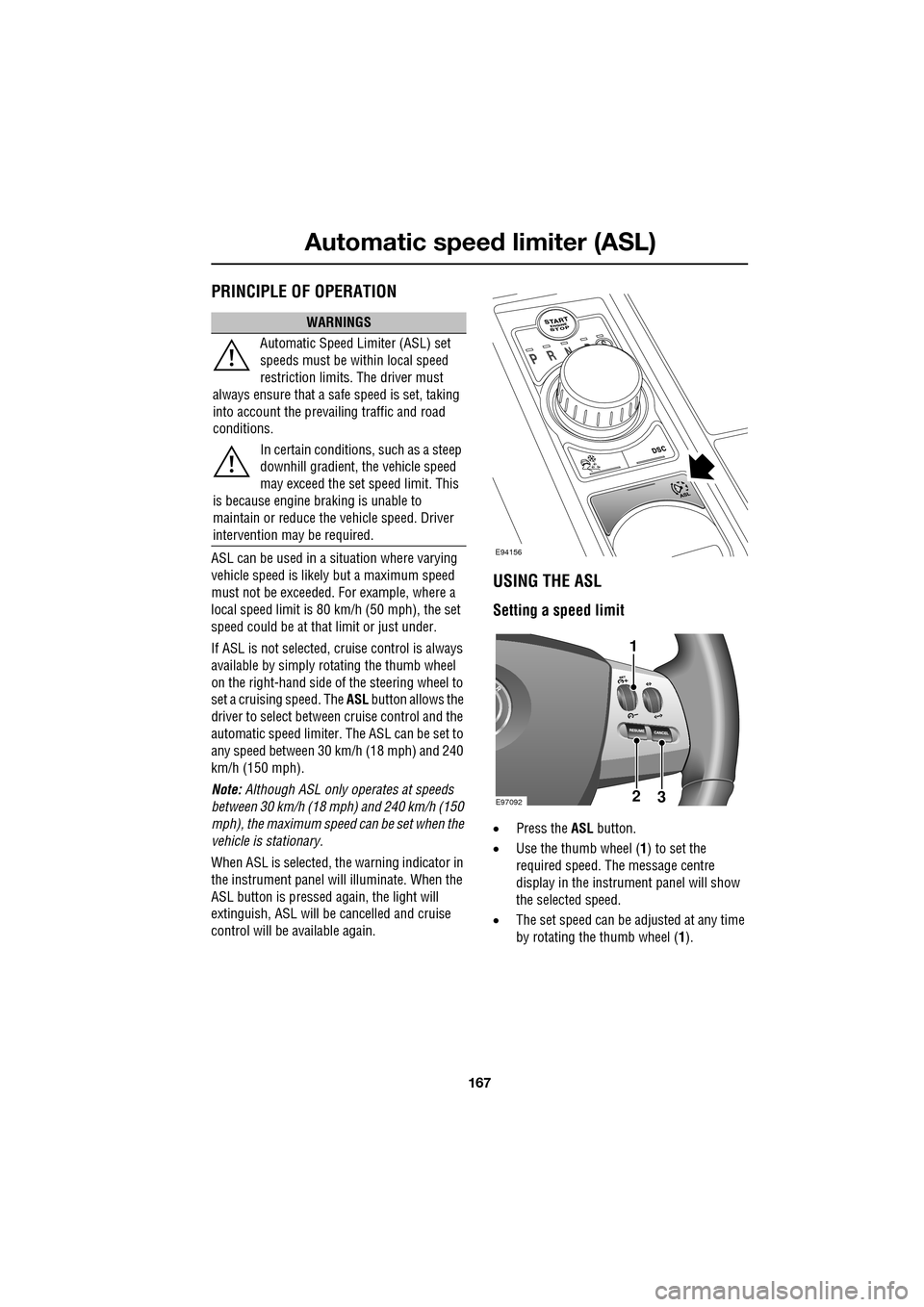
set a cruising speed. The ASL button allows the
driver to select betwee n cruise control and the
automatic speed limiter. The ASL can be set to
any speed between 30 km/h (18 mph) and 240
km/h (150 mph).
Note: Although ASL only operates at speeds
between 30 km/h (18 mph) and 240 km/h (150
mph), the maximum speed can be set when the
vehicle is stationary.
When ASL is selected, the warning indicator in
the instrument panel will illuminate. When the
ASL button is pressed ag ain, the light will
extinguish, ASL will be cancelled and cruise
control will be available again.
USING THE ASL
Setting a speed limit
• Press the ASL button.
• Use the thumb wheel ( 1) to set the
required speed. The message centre
display in the instru ment panel will show
the selected speed.
• The set speed can be adjusted at any time
by rotating the thumb wheel (1).
WARNINGS
Automatic Speed Limiter (ASL) set
speeds must be within local speed
restriction limits. The driver must
always ensure that a safe speed is set, taking
into account the prevailing traffic and road
conditions.
In certain conditions, such as a steep
downhill gradient, the vehicle speed
may exceed the set speed limit. This
is because engine br aking is unable to
maintain or reduce the vehicle speed. Driver
intervention may be required.
E94156
E9709223
1
Page 172 of 391
Driving dynamics
172
Note: In rare circumstances, when TracDSC is
selected or DSC is o ff, high acceleration on
rough roads may cause DSC to switch back on.
This prevents high loads on the vehicle
driveline. DSC will su bsequently remain on,
unless TracDSC is selected or DSC is switched
off manually.
Stability control indicator
If there is a fault, the warning
indicator will ill uminate in the
instrument panel and the message
centre will display DSC NOT AVAILABLE with
an amber backlight.
It is safe to drive the vehicle, but the DSC
system will not activa te under wheel spin or
slide conditions. You should seek qualified
assistance as soon as possible.
Adaptive dynamics
(Supercharged vehicles only)
Jaguar Adaptive dy namics continuously
monitors the road a nd driver inputs and
optimises the vehicle suspension settings for
ride comfort and control.
The adaptive dynamics system is linked to
Dynamic mode, modifying the suspension
settings for a more sporting character.
If the message centre displays the message
ADAPTIVE DYNAMICS FAULT , a fault has been
detected in the adaptive dynamics system.
Seek qualified assistan ce as soon as possible.
Active Differential Control (E-diff)
(Supercharged vehicles only)
The E-diff improves trac tion when one driven
wheel has more grip than the other. This
improves progress out of corners and on
patchy or uneven surfaces. The E-diff can also
increase stability in oversteer situations,
depending on road c onditions and driver
inputs. Settings for the E-diff are made automatically,
without the need for driver selection.
If there is a fault with the E-diff system, the
message centre will display
EDIFF SYSTEM
FAULT . If DSC is off, then TracDSC will be
selected automatically. The driver can still
switch between DSC mode s, as normal and the
vehicle is safe to dr ive, but seek qualified
assistance as soon as possible.
Note: If the E-diff is active continuously for an
extended period (e.g. on a patchy surface with
DSC off) then the E-diff may be temporarily
deactivated to prevent ov erheating. If DSC is
off, then TracDSC will be selected
automatically. The mess age centre will display
EDIFF NOT AVAILABLE . The driver can still
switch between DSC modes as normal and the
E-diff will become availa ble again automatically
when it has cool ed sufficiently.
Page 179 of 391

179
Fuel and refuelling
REFUELLING
Fuel filler
Filling station pumps used for diesel
commercial vehicles deliver fuel at a higher
rate than normal. The hi gher fill rate can cause
premature cut-off and ma y cause fuel spillage.
Therefore, it is recommended that only
standard light vehicle pumps are used. If the fuel cuts off as soon as the trigger on the
pump is operated, check that the correct fuel
has been selected. Immediate cut-off may have
been caused by the fuel guard system.
See
DIESEL MISFUELLING PROTECTION
DEVICE (page 180).
Fuel tank capacity
Avoid the risk of running out of fuel and never
intentionally drive the vehicle when the fuel
gauge indicates that the tank is empty. When
refuelling your vehicle after the fuel gauge
reads empty, you may not be able to add the
fuel quantity shown below, as there will be a
small reserve remaining in the tank.
All engines
WARNINGS
When refuelling ensure that all
windows, doors, and sunroof are fully
closed, particularly if young children
or animals are in the vehicle. Fuel vapour
contains harmful chemical compounds, some
of which may cause cancer.
Do not attempt to fill the tank to its
maximum capacity. If the vehicle is to
be parked on a slope, in direct
sunlight or high ambient temperature,
expansion of the fuel could cause spillage.
Filling station pumps are equipped with
automatic cut-off sensing, to avoid fuel
spillage. Fill the tank unt il the filler nozzle
automatically cuts off supply. Do not attempt
to fill the tank beyond this point.
CAUTIONS
Check the fuel pump information
carefully, to ensure that you are putting
the correct fuel into the vehicle. Filling a
vehicle with the incorrect fuel can cause
serious engine and fu el system damage.
It is the driver’s responsibility to fill the
vehicle with the correct fuel. If the
vehicle is filled with the wrong type of fuel, do
not start the engine. Call for Roadside
Assistance.
Fuel specification:
Petrol 95-98 RON
Diesel EN 590
Total tank capacity:
Petrol 69.5 litres
(15.3 gallons)
Diesel 68.1 litres
(15 gallons)
Fill capacity (when fuel gauge
indicates empty) 64 litres
(14.1 gallons)
Reserve capacity (when fuel
gauge indicates empty) 5.5 litres
(1.2 gallons)
E95151