2009 JAGUAR XF steering wheel
[x] Cancel search: steering wheelPage 141 of 391

141
Transmission
Driver type recognition
In Sport mode, the transmission monitors
driving style and in combination with sensors
in the vehicle, varies the shift schedule,
fast-off, corner recognition and shift adapt
under braking functions, according to the
driving style.
Manual mode - Jaguar Sequential Shift
Shifts in the Jaguar Sequential Shift manual
mode are made using the steering wheel
mounted shift paddles and are optimised to
provide a rapid response to gear shift requests. Up-shift requests (
+) are optimised for
performance via the s hort shift function,
resulting in firmer feeling shifts than in
automatic mode. Down-shift requests ( -)
utilise a throttle blip duri ng the shift, resulting
in improved shift feel.
The Jaguar Sequential Shift manual mode can
be accessed either temporarily, or
permanently.
Temporary manual gear selection: When the
gear selector is in the D position, manual mode
may be directly accessed by the single action of
operating the steering wheel mounted shift
paddles.
This convenience feature allows immediate but
temporary use of the sh ift paddles when the
gear selector is in D.
If continued use of manua l mode is required,
the gear selector may be subsequently moved
to the S position to enter permanent manual
mode in the currently selected gear.
If the gear selector remains in the D position,
temporary manual mode will be held whilst the
driver is accelerating, decelerating, cornering
or continuing to request shifts via the paddles.
The transmission will revert to automatic
operation after a short pe riod of driving at
steady speed; alternatively the shift-up ( +)
paddle may be held for a short period
(approximately one second) to return directly
to automatic operation in D .
Permanent manual gear selection: Select the
S position, permanent manual mode is then
accessed by the operation of the steering wheel
mounted shift paddles.
The message centre will highlight the currently
selected gear.
E94122
Page 142 of 391
Transmission
142
Note: When the transmission is set to
permanent manual mode (i.e. using the
paddles to change gear while in Sport mode)
and Dynamic mode is selected, transmission
up-shifts are fully controlled by the driver. This
means that the transmissi on will not change up
a gear automatically, even when the vehicle's
rev limit is reached. When the rev limit is
reached, the gear position indicator in the
message centre will glow amber, to indicate
that the next gear should be selected.
To exit from the Jaguar Sequential Shift
permanent manual mode, either pull and hold
the shift-up paddle for approximately one
second (to return directly to automatic
operation in S ), or rotate the gear selector to
the D position. The transmission will revert to
the D automatic shift mode.
Manual operation
To shift-up, briefly pull the shift-up ( +) paddle
on the right-hand side of the steering wheel
towards you.
To shift-down, briefly pull the shift-down
paddle ( -) on the left-hand side of the steering
wheel towards you.
The message centre display will change to
highlight the requested gear.
Note: The transmission will inhibit up-shifts
and down-shifts if the requested shift would
result in an engine speed outside the normal
operating range of the engine. If this occurs,
the message centre will briefly display the
requested gear selection, but will return to
displaying the current gear.
The Jaguar Sequential Shift mode also has the
following features: Kick-down:
Operation of kick-down in Jaguar
Sequential Shift mode will override the
currently selected gear. The lowest available
gear will be selected for maximum acceleration
and will be highlighted in the message centre
display. Subsequent manu al shifts may then be
selected as usual.
Positive torque: Provides throttle blips on
down-shifts, improving shift feel and response.
Shift assist: The transmission will
automatically up-shift at the engine speed
redline in Jaguar Sequential Shift mode, as if
commanded manually.
The transmission will automatically
down-shift, when the engine speed drops too
low for the currently selected gear.
When the vehicle approaches, or comes to
rest, second gear is au tomatically selected.
Subsequent pull-aways will occur in second
gear, unless the accelerator pedal demand is
high or a down-shift is manually selected, in
which case, first gear will be selected.
In all cases the message centre will display the
current gear.
Note: During sustained braking, if a down-shift
is selected at a speed which would result in the
engine speed exceeding its normal operating
range, the gear change wi ll be indicated in the
message centre, but the down-shift will be
delayed until the vehi cle speed has reduced
sufficiently for the gear selection to be made,
without causing the engine speed to exceed its
normal operating range.
Page 144 of 391

Brakes
144
PRINCIPLE OF OPERATION
Brake pads
Brake pads require a period of bedding in when
new. Drive with extra caution for the first
500 km (300 miles) to avoid the need for heavy
braking.
Brake pad wear warning
When the brake pads are wearing low, the
warning message BRAKE PADS LOW is
displayed in the message centre. Arrange for
your vehicle to be se en by your Dealer/
Authorised Repairer at the earliest opportunity.
Wet conditions
Driving through heavy ra in or water can have
an adverse effect on braking efficiency. Under
such circumstances, it is recommended that
you lightly a pply the brakes intermittently to
dry the brakes.
ABS warning indicator
If this amber warning indicator
illuminates while driving and/or
ABS FAULT is displayed in the
message centre, drive with extra caution, avoid
heavy braking where possible, and seek
qualified assistance as soon as possible.
If this red warning indicator
illuminates while driving and/or the
message LOW BRAKE FLUID is
displayed in the message centre, check the
brake fluid level at the earliest opportunity and
top-up as required. See BRAKE FLUID CHECK
(page 206).
HINTS ON DRIVING WITH ABS
ABS (Anti-Lock Braking System) allows
maximum brake pressure, and thus maximum
braking efficiency, to be applied, and prevents
the road wheels locking. This allows the driver
to retain steering control during heavy braking
under most road conditions.
ABS optimises tyre to road adhesion under
maximum braking conditions, though it cannot
provide increased cornering ability.
WARNINGS
Do not rest your foot on the brake
pedal whilst the vehicle is in motion.
This may cause a light application of
the brakes, which can result in overheating,
reduced brake performance, and excessive
brake wear.
Never allow the vehicle to coast
(freewheel) with the engine turned
off. The engine must be running to
provide full braking assistance. The brakes will
still function with the e ngine off, but far more
pressure will be required to operate them.
If the red brake warning indicator
illuminates, safely bring the vehicle to
a stop, as quickly as possible. Seek
qualified assistance before proceeding.
Never place non-approved floor
matting or any ot her obstructions
under the brake pedal. This restricts
pedal travel and braking efficiency.
WARNINGS
ABS cannot overcome the physical
limitations of braking distance. Nor
can it overcome the lack of grip on a
road surface (e.g. aquaplaning on water).
Braking distance is increased on a
slippery surface. This applies to all
vehicles, even those fitted with ABS.
The driver should not be tempted to
take risks when driving, in the hope
that ABS will correct errors of
judgement. In all cases it remains the driver's
responsibility to driv e with due care and
attention, payi ng particular attention to the
effects of speed, weather, road conditions etc.
Page 153 of 391

153
Rear view camera
Camera overlays
A.Solid line: This is the projected wheel
trajectory.
B. Dotted line: This is the safe working width
of the vehicle (includi ng standard exterior
mirrors).
C. Boot access guideline: Do not reverse the
vehicle beyond this point if access to the
boot is required.
D. Rear bumper.
E. Parking sensor activa tion: A red area will
appear on the camera image, to indicate
which rear parking sensor(s) has been
activated.
C
BA
D
JAG1651
C
B
A
D
E
JAG1652
CAUTIONS
If, after the ignition has been switched
off, the steering wheel is turned, the
projected wheel trajecto ry graphics (A) will
display as being straight (as in the second
illustration), until the vehicle is driven for
approximately 10 seconds.
Page 156 of 391
Cruise control
156
PRINCIPLE OF OPERATION
Cruise control enables the driver to maintain a
constant road speed without using the
accelerator pedal. This is particularly useful for
motorway cruising, or for any journey where a
constant speed can be maintained for a lengthy
period.
The cruise (speed) contro l system can be used
by the driver to maintain a selected vehicle
speed above 30 km/h (18 mph).
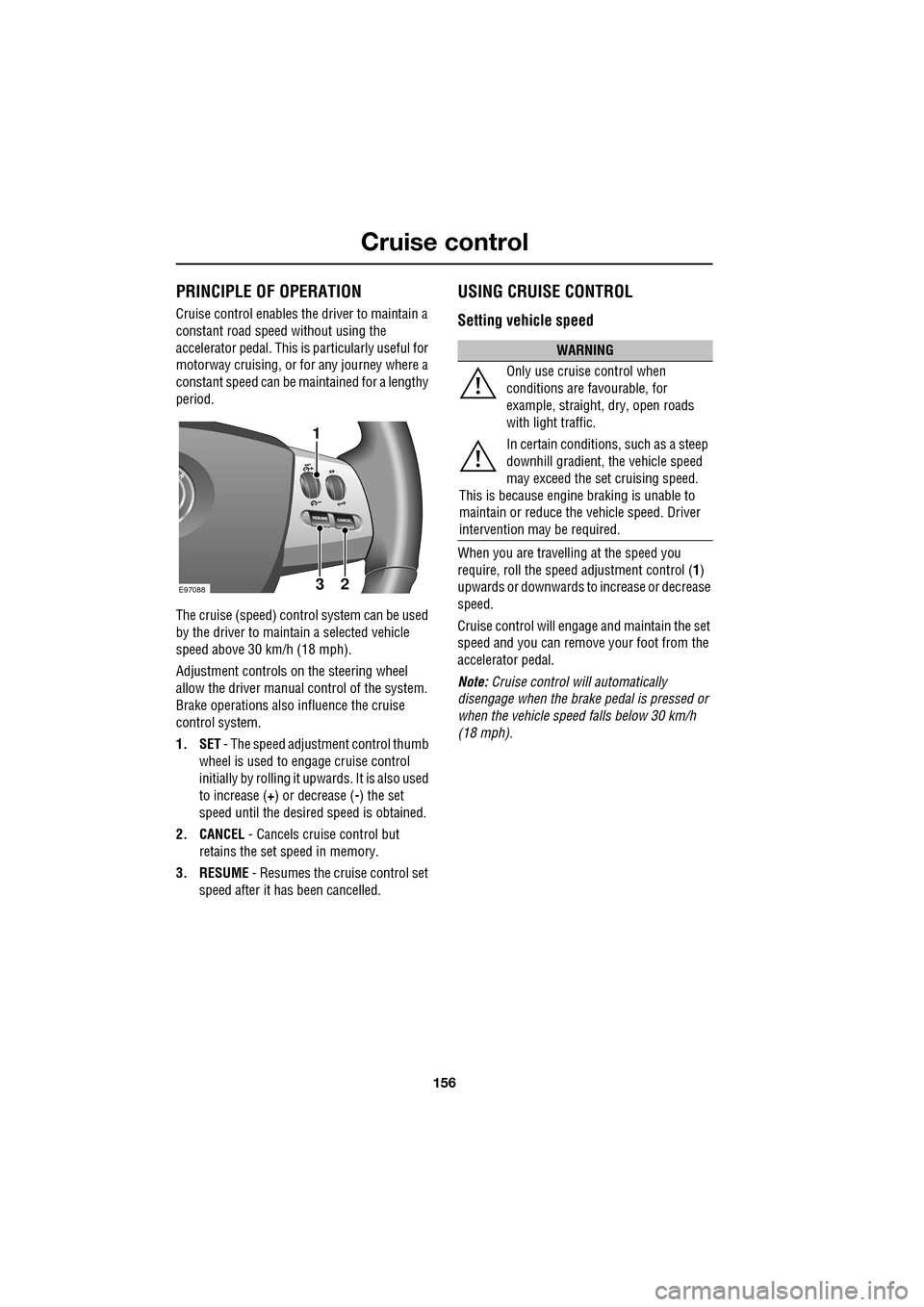
Adjustment controls on the steering wheel
allow the driver manual control of the system.
Brake operations also influence the cruise
control system.
1. SET - The speed adjustment control thumb
wheel is used to engage cruise control
initially by rolling it upw ards. It is also used
to increase ( +) or decrease ( -) the set
speed until the desired speed is obtained.
2. CANCEL - Cancels cruise control but
retains the set speed in memory.
3. RESUME - Resumes the cruise control set
speed after it ha s been cancelled.
USING CRUISE CONTROL
Setting vehicle speed
When you are travelling at the speed you
require, roll the speed adjustment control ( 1)
upwards or downwards to increase or decrease
speed.
Cruise control will engage and maintain the set
speed and you can remove your foot from the
accelerator pedal.
Note: Cruise control w ill automatically
disengage when the brake pedal is pressed or
when the vehicle speed falls below 30 km/h
(18 mph).
E9708823
1
WARNING
Only use cruise control when
conditions are favourable, for
example, straight, dry, open roads
with light traffic.
In certain conditions, such as a steep
downhill gradient, the vehicle speed
may exceed the set cruising speed.
This is because engine braking is unable to
maintain or reduce the vehicle speed. Driver
intervention may be required.
Page 159 of 391

159
Adaptive cruise control (ACC)
PRINCIPLE OF OPERATION
The Adaptive Cruise Control (ACC) system is
designed to aid the driver to maintain a gap
from the vehicle ahead or a set road speed if
there is no slower vehicle ahead. The system is
intended to provide enhanced operation of the
vehicle when following other vehicles which
are in the same lane and travelling in the same
direction.
The ACC system uses a radar sensor, which
projects a beam directly forward of the vehicle
to detect objects ahead.
The radar sensor is m ounted centrally behind
the bumper cover above the cooling aperture,
to provide a clear view forward for the radar
beam.
USING ACC
The system is operated by adjustment controls
mounted on the steering wh eel. The driver can
also intervene at any time by use of the brake
or accelerator pedals. The steering wheel
adjustment controls operate as follows:
1. SET - Rotate the thumbwheel upwards ( +)
or downwards ( -), to increase or decrease
speed, until the desire d speed is achieved.
2. Gap increase or decr ease. Four settings
available by adjusting the thumb wheel.
3. CANCEL - Cancels but retains the set
speed in memory.
4. RESUME - Resumes the set speed after it
has been cancelled.
WARNING
ACC is not a collision warning or
avoidance system. Additionally, ACC
will not react to:
• Stationary or slow moving vehicles below
10 km/h (6 mph).
• Pedestrians or objects in the roadway.
• Oncoming vehicles in the same lane.
CAUTION
Only use ACC when conditions are
favourable (i.e. main roads with free
flowing traffic).
Do not use in poor visibility, specifically
fog, heavy rain, spray or snow.
E94163
Do not use on icy or slippery roads.
It is the drivers re sponsibility to stay
alert, drive safely and be in control of the
vehicle at all times.
Keep the front of the vehicle free from
dirt, metal badges or objects, including
vehicle front protectors, which may
prevent the sensor from operating.
Do not use ACC when entering or
leaving a motorway.
CAUTION
E97090
12
34
Page 165 of 391

165
Adaptive cruise control (ACC)
ADVANCED EMERGENCY BRAKE
ASSIST
On vehicles fitted with Advanced Emergency
Brake Assist, brake response is improved
during emergency braking when a moving
vehicle is detected close ahead.
Advanced Emergency Brake Assist activates If
the risk of collision increases after the
FORWARD ALERT warning is displayed.
See FORWARD ALERT FUNCTION (page 164).
The brakes are automatica lly applied gently in
preparation for rapid braking (which may be
noticeable). If the brake pedal is then pressed
quickly, then braking is implemented fully,
even if the pressure on the pedal is light.
See HINTS ON DRIVING WITH ABS
(page 144).
Advanced Emergency Brake Assist is available
at speeds above approximately 7 km/h (5 mph)
and will function even if Forward Alert and
Adaptive Cruise Control are switched off. A
fault with the system will be indicated by the
warning FORWARD ALER T UNAVAILABLE
appearing in the mess age centre. Advanced
Emergency Brake Assist will not be available
until the fault is rectified.
WARNING
Advanced Emergency Brake Assist, is
an additional safety system and is not
intended to relieve the driver of the
responsibility for exer cising due care and
attention when driving.
CAUTION
The system may not react to slow
moving vehicles and will not react to
stationary vehicles or vehicles not
travelling in the same direction as your vehicle.
Advanced Emergency Brake Assist can
only improve braking performance if the
driver applies the brakes.
Warnings may not appear if the distance
to the vehicle ahead is very small or if
steering wheel and pedal movements
are large (e.g. to avoid a collision).
Advanced Emergency Brake Assist
utilises the same radar sensor as
Adaptive Cruise Control and Forward
Alert - the same limita tions of performance
apply.
See PRINCIPLE OF OPERATION (page 159).
See USING ACC (page 159).
See FORWARD ALERT FUNCTION
(page 164).
Page 167 of 391
167
Automatic speed limiter (ASL)
PRINCIPLE OF OPERATION
ASL can be used in a situation where varying
vehicle speed is likely but a maximum speed
must not be exceeded. For example, where a
local speed limit is 80 km/h (50 mph), the set
speed could be at that limit or just under.
If ASL is not selected, cr uise control is always
available by simply rotating the thumb wheel
on the right-hand side of the steering wheel to
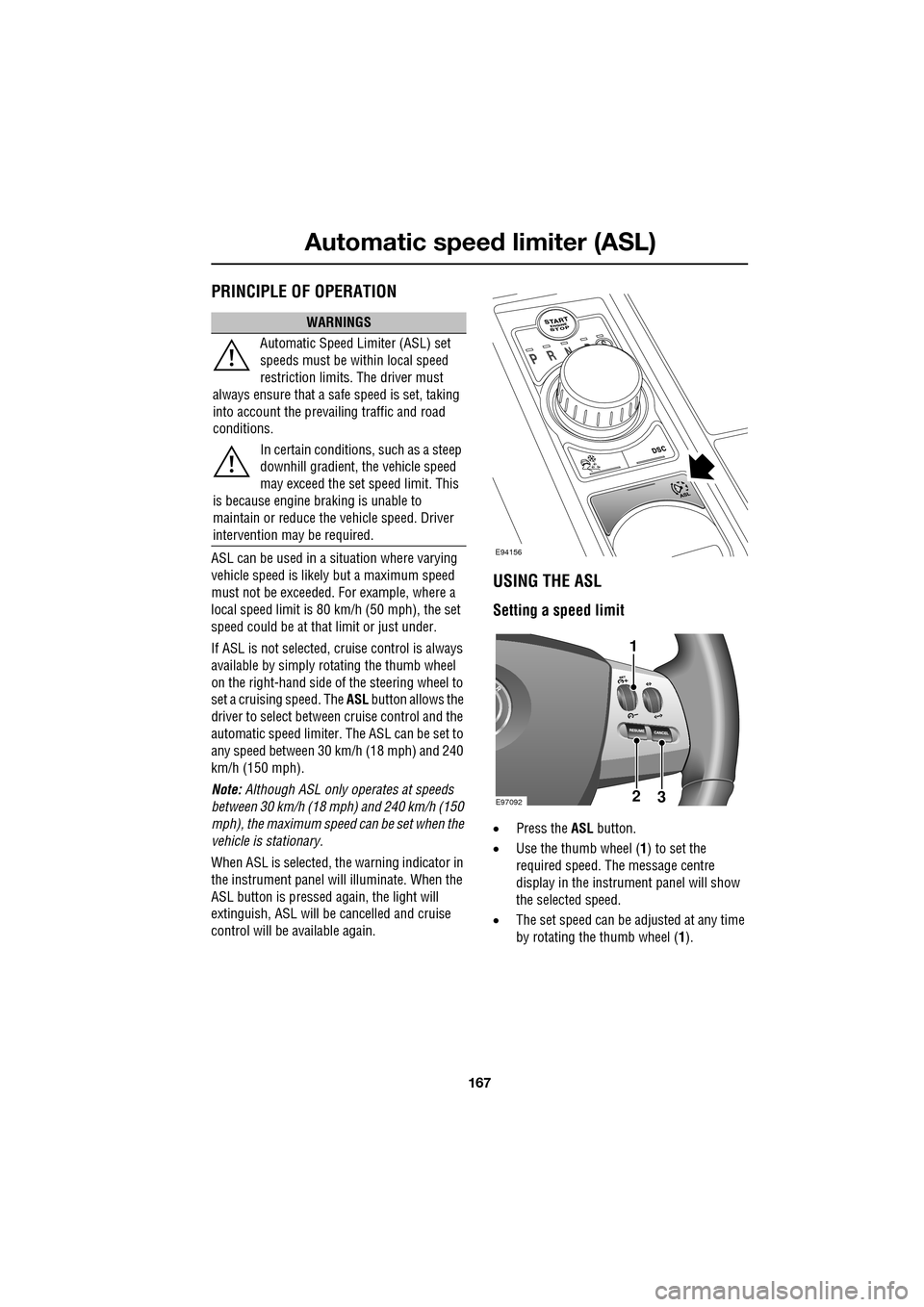
set a cruising speed. The ASL button allows the
driver to select betwee n cruise control and the
automatic speed limiter. The ASL can be set to
any speed between 30 km/h (18 mph) and 240
km/h (150 mph).
Note: Although ASL only operates at speeds
between 30 km/h (18 mph) and 240 km/h (150
mph), the maximum speed can be set when the
vehicle is stationary.
When ASL is selected, the warning indicator in
the instrument panel will illuminate. When the
ASL button is pressed ag ain, the light will
extinguish, ASL will be cancelled and cruise
control will be available again.
USING THE ASL
Setting a speed limit
• Press the ASL button.
• Use the thumb wheel ( 1) to set the
required speed. The message centre
display in the instru ment panel will show
the selected speed.
• The set speed can be adjusted at any time
by rotating the thumb wheel (1).
WARNINGS
Automatic Speed Limiter (ASL) set
speeds must be within local speed
restriction limits. The driver must
always ensure that a safe speed is set, taking
into account the prevailing traffic and road
conditions.
In certain conditions, such as a steep
downhill gradient, the vehicle speed
may exceed the set speed limit. This
is because engine br aking is unable to
maintain or reduce the vehicle speed. Driver
intervention may be required.
E94156
E9709223
1