2009 JAGUAR XF service
[x] Cancel search: servicePage 221 of 391

221
Wheels and tyres
Wear indicators
When the tread has worn down to
approximately 2 mm, wear indicators start to
appear at the surface of the tread pattern. This
produces a continuous band of rubber across
the tread as a visual indicator.
To maintain performance and grip the tyre
must be replaced as soon as the wear indicator
becomes visible. Sooner, if legislation requires
replacement at a greater tread depth.
Note: Tread depth should be checked
regularly, in some case more frequently than
the service intervals. For advice on checking
tyres contact your Dealer/Authorised repairer
or a tyre dealer.
Age degradation
Tyres degrade over time due to the effects of
ultraviolet light, extreme temperatures, high
loads, and environmen tal conditions. It is
recommended that tyres are replaced at least
every six years, but they may require
replacement more frequently.
Jaguar recommends that even if unused, the
spare tyre be replaced at the same time as the
four road tyres.
Punctured tyres
Tyre checks
Not all punctures result in the tyre deflating
immediately. Therefore, it is important to check
the tyres for damage and foreign objects,
regularly.
When driving, if a sudden vibration, or change
to the vehicle's hand ling is noticed, reduce
speed immediately. Do not brake hard, or make
any sudden manoeuvres or direction changes.
Drive slowly to an area off the main highway
and stop the vehicle.
Note: Driving the vehicle to a safe area may
cause damage to th e punctured tyre, but
occupant safety is far more important.
Inspect the tyres for signs of punctures,
damage or under inflati on. If any damage or
deformity is detected, the tyre should be
replaced. If a spare tyre is not available, then
the vehicle should be reco vered to a tyre repair
centre, or Dealer/Approved repairer.
WARNING
Wear indicators show the minimum
tread depth recommended by the
manufacturers. Tyres which have
worn to this point will have reduced grip and
poor water displacement characteristics.
CAUTION
If tread wear is uneve n across a tyre, or
the tyre wears excessively, the vehicle
should be checked by your Dealer/Authorised
Repairer as soon as possible.
E91698
WARNING
Do not drive the vehicle with a
punctured tyre. Even if the punctured
tyre has not deflated, it is unsafe to
use, as the tyre may deflate suddenly at any
time. See TYRE REPAIR KIT (page 229).
Page 236 of 391

Wheels and tyres
236
Tyre pressure warning with speed
If the vehicle is to be driven at speeds in excess
of 160 km/h (100 mph), the tyre pressures
should be increased as stated in this handbook
or on the placard label. Failure to increase the
tyre pressures and driving in excess of
160 km/h (100 mph), will illuminate the yellow
warning telltale and display a text message
TYRE PRESSURES LOW FOR SPEED . In the
event of this warning be ing displayed, vehicle
speed should be reduced
Temporary use spare wheel and tyre
change
If the temporary use spare wheel is fitted the
system will automatically recognise the change
in wheel positions. The n after approximately
ten minutes of driv ing above 25 km/h
(18 mph), a message TYRE NOT MONITORED
will be displayed accompanied by illumination
of the warning telltale and the corresponding
block in the vehicle graphic.
The warning telltale will initially flash and will
subsequently revert to continuous illumination.
Extended use of the temporary use spare wheel
will produce an additional text message TYRE
PRESSURE SYSTEM FAULT .
This TPM system display sequence will be
activated at every ignition cycle until the
temporary use spare wheel is replaced by a
fully operational full size wheel and tyre
assembly.
Always replace the temporary use wheel before
having TPM system faults investigated. The
fault may well be rectified with the fitment of a
fully operational full size running tyre in lieu of
the temporary use spare wheel assembly.
Tyre changing
Always have your tyres serviced or changed by
a qualified engineer.
Care must be taken to avoid contact between
the bead of the tyre and the sensor during
removal and refitting of the tyre, otherwise the
sensor may become damaged and or
inoperable.
Sensors can be removed from the wheel by the
unscrewing of the va lve retention nut.
Replacement sensor
Should the sensor require replacing, it should
be carried out by a Dealer/Authorised Repairer.
A replacement sensor must be fitted to a
running wheel in order to be recognised by the
system. The vehicle needs to be stationary for
15 minutes during the se nsor fitment before
the system is ready to detect the new sensor.
The vehicle must be driven for a minimum of
fifteen minutes after the sensor change, and
then remain stationary for fifteen minutes to
activate full TPM system operation.
If the TPM system warning for any wheel does
not clear, even after ensuring correct inflation
and driving for more than ten minutes above
25 km/h (18 mph), you should seek qualified
assistance as soon as possible.
CAUTION
Valve stem seal, washer, nut, valve core
and cap should be replaced at every tyre
change. Valve stem seal, washer and nut must
be replaced if valve re tention nut is loosened.
Sensor units and nuts must be refitted using
correct torque figures and associated profile.
Damage to the vehicle may result if these
precautions are not taken.
Page 257 of 391
257
Vehicle identification
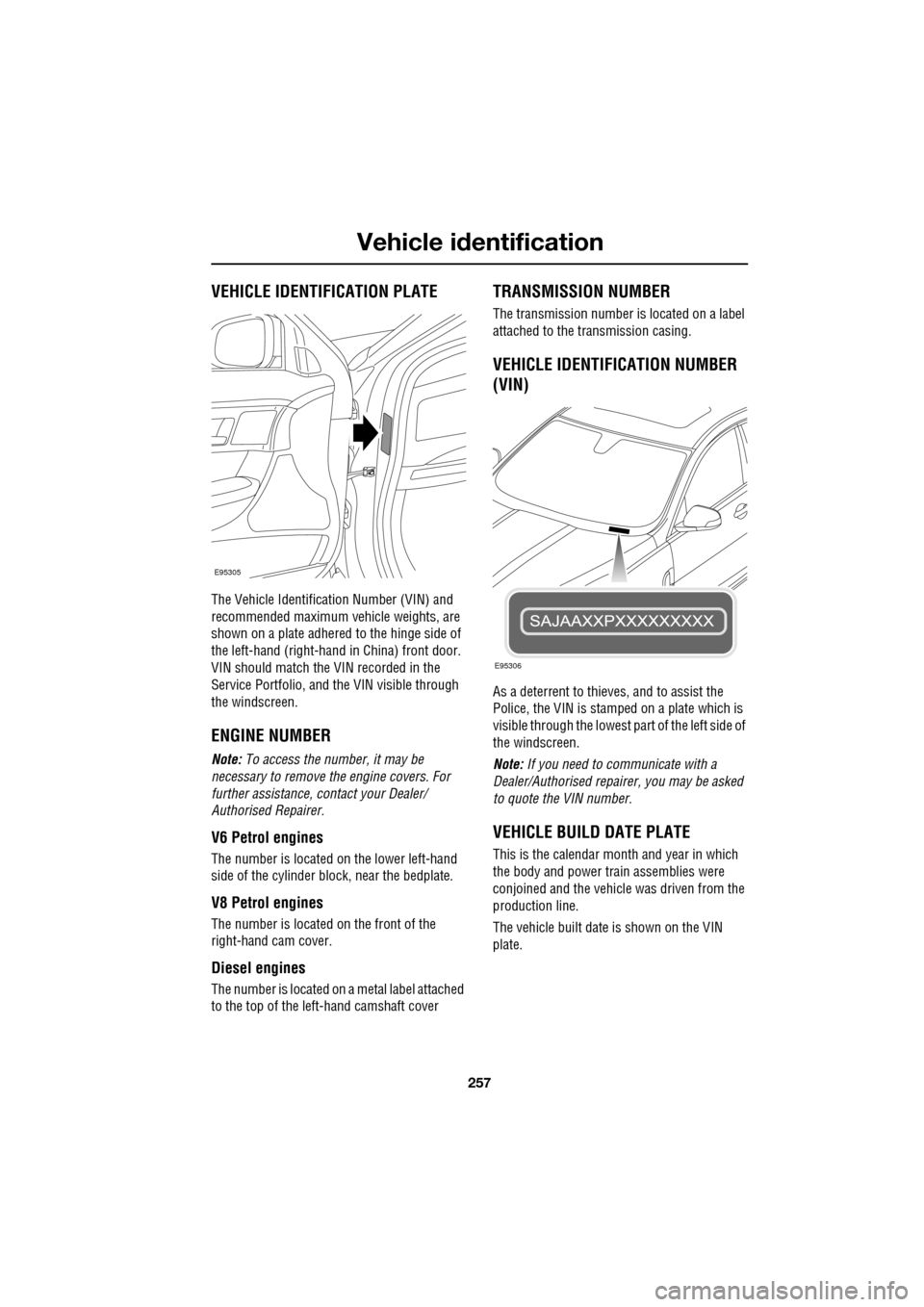
VEHICLE IDENTIFICATION PLATE
The Vehicle Identification Number (VIN) and
recommended maximum vehicle weights, are
shown on a plate adhered to the hinge side of
the left-hand (right-hand in China) front door.
VIN should match the VIN recorded in the
Service Portfolio, and the VIN visible through
the windscreen.
ENGINE NUMBER
Note: To access the number, it may be
necessary to remove the engine covers. For
further assistance, contact your Dealer/
Authorised Repairer.
V6 Petrol engines
The number is located on the lower left-hand
side of the cylinder bloc k, near the bedplate.
V8 Petrol engines
The number is located on the front of the
right-hand cam cover.
Diesel engines
The number is located on a metal label attached
to the top of the left-hand camshaft cover
TRANSMISSION NUMBER
The transmission number is located on a label
attached to the transmission casing.
VEHICLE IDENTIFICATION NUMBER
(VIN)
As a deterrent to thieves, and to assist the
Police, the VIN is stamped on a plate which is
visible through the lowest part of the left side of
the windscreen.
Note: If you need to communicate with a
Dealer/Authorised repairer, you may be asked
to quote the VIN number.
VEHICLE BUILD DATE PLATE
This is the calendar mont h and year in which
the body and power train assemblies were
conjoined and the vehicle was driven from the
production line.
The vehicle built date is shown on the VIN
plate.
E95305
E95306
Page 277 of 391
277
Audio unit menus
RADIO DATA SYSTEM (RDS)
Options menu overview
Your radio is equipped with Radio Data System
(RDS), which enables the audio unit to receive
additional inform ation with normal FM radio
signals.
When tuned to certai n stations on the FM
waveband, the radi o decodes signals
transmitted to provide the functions listed
below (dependent upon th e service available
from the broadcasters).
Note: Not all FM radio stat ions broadcast RDS
information. If you are currently tuned to a
non-RDS station, then RDS features will be
unavailable.
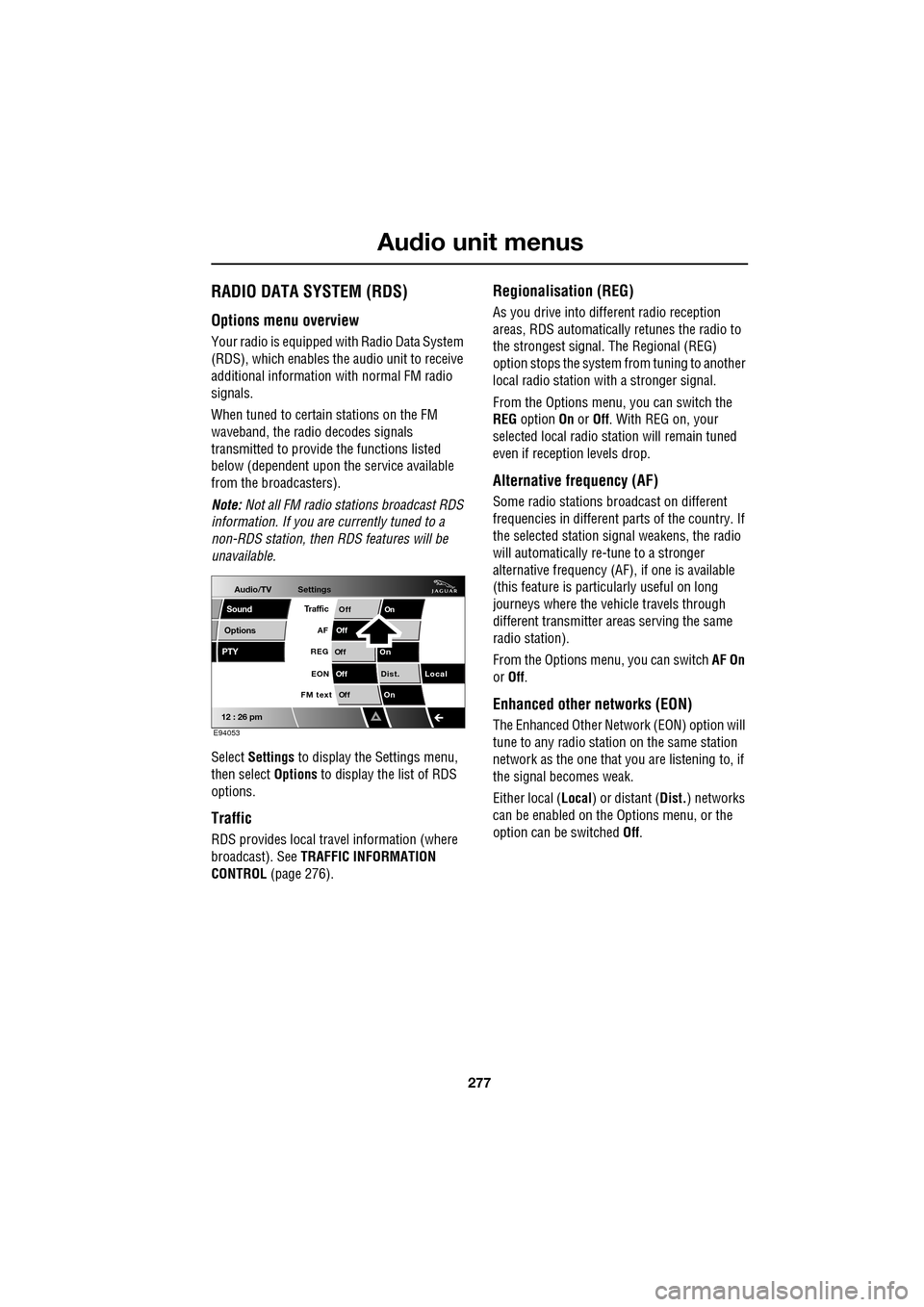
Select Settings to display the Settings menu,
then select Options to display the list of RDS
options.
Traffic
RDS provides local trav el information (where
broadcast). See TRAFFIC INFORMATION
CONTROL (page 276).
Regionalisation (REG)
As you drive into different radio reception
areas, RDS automatically retunes the radio to
the strongest signal. The Regional (REG)
option stops the system from tuning to another
local radio station wi th a stronger signal.
From the Options menu, you can switch the
REG option On or Off . With REG on, your
selected local radio st ation will remain tuned
even if reception levels drop.
Alternative frequency (AF)
Some radio stations broadcast on different
frequencies in different parts of the country. If
the selected station signal weakens, the radio
will automatically re -tune to a stronger
alternative frequency (AF) , if one is available
(this feature is partic ularly useful on long
journeys where the vehicle travels through
different transmitter areas serving the same
radio station).
From the Options menu, you can switch AF On
or Off .
Enhanced other networks (EON)
The Enhanced Other Network (EON) option will
tune to any radio station on the same station
network as the one that you are listening to, if
the signal becomes weak.
Either local ( Local) or distant ( Dist.) networks
can be enabled on the Options menu, or the
option can be switched Off.
Audio/TV
Options
PTY
Sound
12 : 26 pm
Settings
TrafficOnOff
Of f
On
Of
f
Dist. Local
Of f
On
Of f
FM text EON
REG
AF
E94053
Page 288 of 391

Digital audio broadcasting
288
SETTINGS
In DAB mode, select Settings.
Select Options .
Note: If Settings is selected once, but no
action is taken for a further ten seconds, the
system will exit the menu automatically.
Announcements
You can select up to four types of
announcement from a list of eleven, for
example, News, Area/Weather , Traffic and
Alarm .
When a DAB announcement is broadcast, it will
interrupt normal play for the duration of the
announcement.
Note: The Alarm announcement type,
broadcasts information concerning crises of
national or international importance. To display the full list
of announcement types,
touch Select .
Select an announcement type to enable it,
select it again to disabl e it. If you want to clear
all enabled types, select Clear all. To scroll
through the list, select the arrow buttons.
Note: If you have already selected four
announcement types, y ou will be unable to
select further types.
Audio/TV
DAB radio
CD
AM/FM
12 : 26 pm
BBC R2 Viking
Trent Century BBC LeicRadio 1
Settings search
TA FM DAB i Link DPLIIDAB1 BBC Radio2
Portable audio
TV
DAB radio text
BBC National DAB
E94190
Audio/TV
Bal/Fade
Options
Sound
12 : 26 pm
Settings
Announcements
On
Of f
On
Of f
EnsemblePTY
Of f
DAB text
Link DAB
FM trafficPTY
Select
Clear all
E94191
Audio/TV
Bal/Fade
Options
Sound
12 : 26 pm
Settings
Announcements
On
Of f
On
Of f
EnsemblePTY
Of f
DAB text
Link DAB
FM trafficPTY
Select
Clear all
E94192
Audio/TV
12 : 26 pm
Settings
News
Alarm
Traffic
T ransport flash
W
arning services
Clear allSelect up to
four options
E94193
Page 290 of 391
Digital audio broadcasting
290
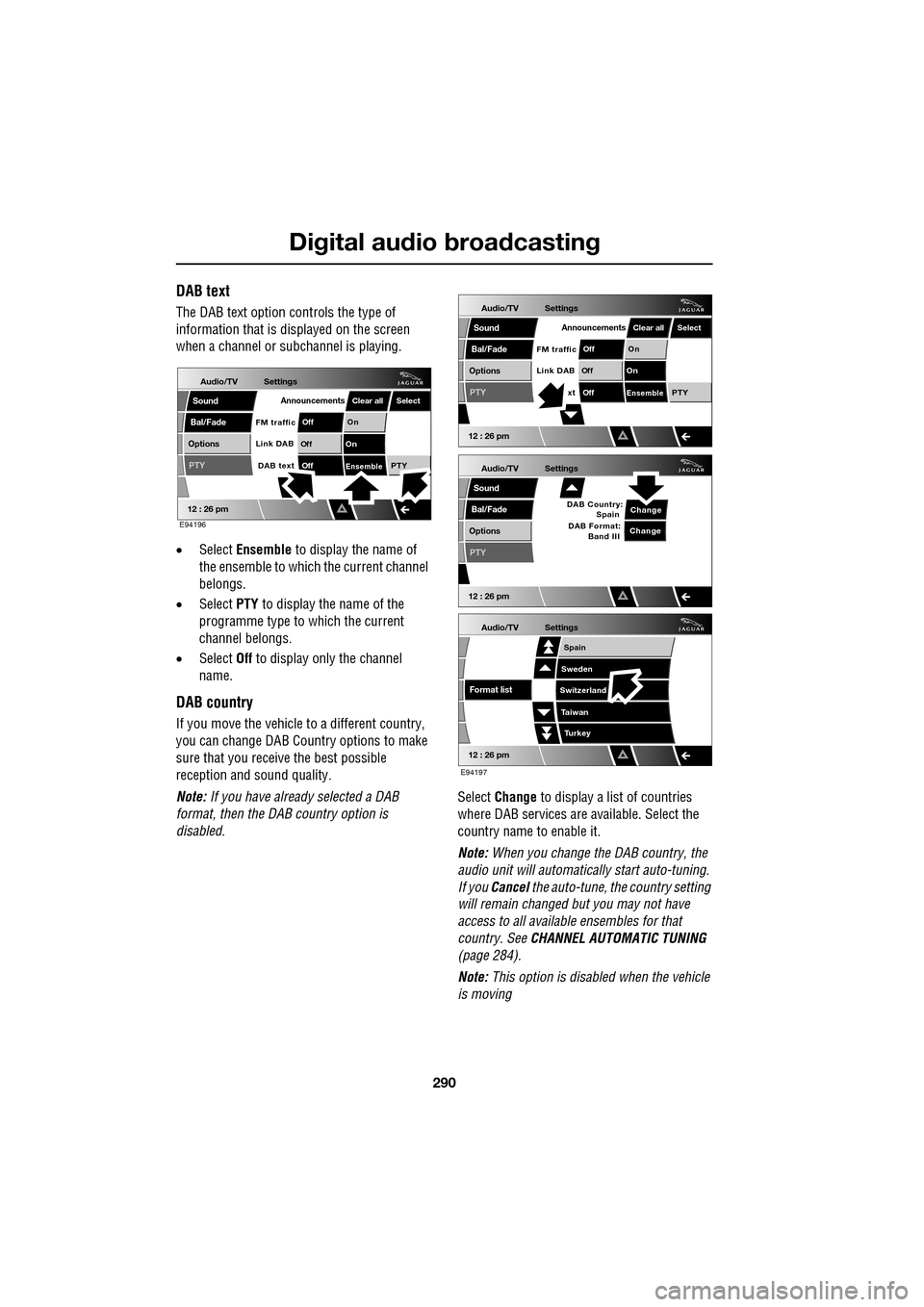
DAB text
The DAB text option controls the type of
information that is displayed on the screen
when a channel or s ubchannel is playing.
• Select Ensemble to display the name of
the ensemble to which the current channel
belongs.
• Select PTY to display the name of the
programme type to which the current
channel belongs.
• Select Off to display only the channel
name.
DAB country
If you move the vehicle to a different country,
you can change DAB Count ry options to make
sure that you receive the best possible
reception and sound quality.
Note: If you have already selected a DAB
format, then the DAB country option is
disabled. Select
Change to display a list of countries
where DAB services are available. Select the
country name to enable it.
Note: When you change the DAB country, the
audio unit will automati cally start auto-tuning.
If you Cancel the auto-tune, the country setting
will remain changed but you may not have
access to all available ensembles for that
country. See CHANNEL AUTOMATIC TUNING
(page 284).
Note: This option is disabled when the vehicle
is moving
Audio/TV
Bal/Fade
Options
Sound
12 : 26 pm
Settings
Announcements
On
Of f
On
Of f
EnsemblePTY
Of f
DAB text
Link DAB
FM trafficPTY
Select
Clear all
E94196
Audio/TV
Bal/Fade
Options
Sound
12 : 26 pm
Settings
Announcements
On
Of f
On
Of f
EnsemblePTY
Of f
xt
Link DAB
FM trafficPTY
Select
Clear all
Audio/TV
Bal/Fade
Options
Sound
12 : 26 pm
Settings
Change
PTY
Change
DAB Country:
Spain
DAB Format: Band III
Audio/TV
12 : 26 pm
Settings
Turkey
Spain
Sweden
Switzerland
T aiwan
Format list
E94197
Page 313 of 391

313
Telephone
3.Select Change phone .
4. Select Delete . This permanently removes
the phone from the vehicle's Bluetooth
system list. To use the phone again, you
have to pair and dock the phone to the
vehicle.
5. The phone does not need to be present to
be deleted from the list.
Register
From the Settings ma in menu, selecting
Register gives the options to Undock, Change
phone or Search new . For further information,
refer to the following procedures - Pairing
other phones, Changing the docked phone .
VOICE MAIL
You can set up your voice mail to be accessed
via the touch-screen. The voice mail (network
service) option is an answering service, where
callers who are unable to reach you can leave
messages.
Select Voice mail , enter the number provided
by your service provider and select OK. This
number is stored in the system and used to
retrieve any voice mail messages.
Retrieving voice mail
To listen to your voice mail
messages, select and hold 1.
The voice mail features ca n be used as if dialled
from the mobile phone.
JAG1314
Comms
Delete
Delete
Delete
Paired
PairedDock
Dock
Docked
Nokia N73
Nokia 6300
Apple iPhone
C
7
1
*8
2
5
0 9
3
6
OK
Enter voice mail number
nametag
Register
Voice mail
Answer options
Phone options
E96913
Comms
Add phone
Operator Name
*
Digit Dial
Names
Last 10
Settings
7
1
4
*8
2
5
0 9
3
6
Options
E96922
Comms
C
Page 326 of 391
Telephone
326
Storing nametags using the
touch-screen
Nametags can also be added to the system by
using the Add Phone nametag feature on the
touch-screen, as described below.
1. From the Home menu, select the Comms
button.
2. From the Comms menu, select the Add
Phone Nametag button.
3. A numerical touch-screen is displayed.
Enter the phone number.
4. When the number is entered, select the
Add button in the top right-hand corner
and, once the tone ha s sounded, speak the
name that you wish the number to be
stored under.
Note: The storage of the nametag itself is
subject to the nameta g not being too short
(less than 0.4 seconds), too long (longer than
4 seconds), not sounding too much like
another stored nametag and relies on the
repetition of the nametag sounding the same
as the first utterance of it. If any of these criteria
are not met, the system will prompt you to give
a new nametag.
Note: The Add button will be greyed out if the
phone number is not valid.
Dialling a nametag
To dial a number stored under a nametag in the
directory, press and release the voice button
and say Phone dial name . The system will
repeat the command and will prompt you for a
stored nametag by saying Name please. After
the tone, speak the name tag of the required
number. The system will replay the stored
nametag and ask for confirmation that it is
correct. Answer with Yes or No, as appropriate.
Dialling voicemail
The number for your voicemail service needs
to be stored in the system, before using this
facility. To store the voicemail number:
• From the Home menu, select Comms.
• From the Comms menu, select Settings.
• The phone Settings me nu has a Voice mail
button, to allow your voicemail number to
be entered.
To dial the voicemail number, press and
release the Voice button on the steering wheel,
wait for the tone to sound, then say Phone dial
voicemail .
Play all stored nametags
To play all the nametags stored in the directory,
press and release the Voice button on the
steering wheel and after the tone, say Phone
play directory . The list can be interrupted at
any time, by pressing and releasing the button
again. Once interrupted, you can then use the
commands, REPLAY , DIAL , DELETE, EDIT or
CANCEL .
Dialling a nametag stored on the
handset
To dial a number associated with a nametag
stored on the phone hand set, press and release
the Voice button on the steering wheel and,
after the tone, say Phone dial handset name .